🔎 Reverse Image Search
Image search techniques made simple: upload a photo or paste a URL and search 6 engines at once. 100% free, nothing stored.
🔒 Your image is never stored on our servers longer than 24 hours and is never shared.
A customer posts a lovely photo of your product, tags your business, and you want to share it. It feels like a gift. It can also turn into a takedown request, an angry public post, or a demand letter, and the difference is usually one thing: whether you had permission that actually covers what you did with the photo. This guide is written for a small business in the UK or the US. It covers UGC photo rights for businesses in plain terms, with a permission workflow you can run on every photo, and a worked check on a real photo so you can see what the checks look like in practice. It is one of the feeder guides for our Brand and Business Image Protection hub, which gathers the whole set of business-side photo guides in one place.
Direct answer: A customer owns the copyright in a photo they took, even if it shows your product and even if they tagged you. You need their permission before you reuse it, and the permission must cover where you will use it, for how long, and whether it will run as an ad. A tag, a hashtag, or a public profile is not permission on its own. Ask in writing, keep the reply, and check the photo itself first.
UGC means user generated content. For a small business that is usually a photo or short video a customer made about your product, your cafe, your shop, or your service. The photo is the asset. The rights question is separate from the photo itself, and it has three parts: who owns the copyright, whether the people in the photo agreed to be shown, and whether advertising rules apply to how you use it. This article works through all three, in that order. It is general information, not legal advice, and the rules are stated as they stood in November 2026.
Who owns a customer photo?
The person who took the photo owns it. That is the first sentence of the whole subject, and most of the trouble in this area comes from businesses acting as if the opposite were true.
Copyright is automatic. In the UK, GOV.UK states that you get copyright protection automatically when you create original artistic work, including photography, with no application and no fee, and there is no register of copyright works in the UK. The same principle applies in the US: the US Copyright Office explains that protection applies automatically on creation. So the moment a customer presses the shutter on a photo of your product, that customer holds the copyright in the photo. Your product being in the frame does not change that. Neither does the fact that they posted it publicly, tagged your account, or used your hashtag. Tagging is a courtesy. It is not a transfer of rights.
That matters because copyright is a property right that can be enforced. The creator can ask you to take the photo down, and in some cases can pursue a claim. The demand letter route is what that looks like from the other side, and our guide to what to do when a copyright demand letter arrives for a photo walks through it. The point here is simpler: assume someone else owns every customer photo you receive, and get permission before you use it commercially.
There is a second ownership question people confuse with the first. The platform is not the owner either. When a customer posts a photo on Instagram, Instagram’s Terms of Use say plainly: “We do not claim ownership of your content, but you grant us a license to use it.” That licence is a non-exclusive, royalty-free, transferable, sub-licensable, worldwide licence to host, use, distribute, modify, run, copy, publicly perform or display, translate, and create derivative works of the content, and it ends when the content is deleted from Instagram’s systems. Read that carefully. The licence is granted to Instagram, so Instagram can run its service. It is not granted to your business. Nothing in Instagram’s terms lets you download a customer’s photo and put it on your website, in your emails, or in your ads. The same pattern holds on other platforms: the licence runs to the platform, not to other users.
Answer capsule: the customer who took the photo owns the copyright from the moment they took it, and the platform’s licence does not pass any of that ownership to your business.
Does a tag, a hashtag, or a public account count as permission?
No. This is the single most common mistake small businesses make with customer photos, and it is worth a table, because each of these signals looks like a yes and none of them is one.
| What the customer did | What it actually means | What it does not give you |
|---|---|---|
| Tagged your business in the post | They want you to see it, and they are happy to be associated with you | Any right to copy, repost, or advertise with the photo |
| Used your branded hashtag | They joined a conversation you started, or they wanted to be found | Permission, unless your hashtag terms say so clearly and they replied to accept them |
| Left their account public | Anyone can view the post | A licence to reuse the photo elsewhere |
| Replied “yes” to your comment asking to share it | A yes to what you asked, in the words you used | More than the use you named: a yes to an organic repost is not a yes to an ad |
| Sent the photo to you by DM or email | They shared it with you directly | Commercial use, unless the message says so |
The hashtag row needs a closer look, because it is where businesses most often overreach. Some brands run a consent hashtag, for example asking customers to reply with #YesBrandName, and link that hashtag to short terms explaining what the reply agrees to. That can work, but only if three things are true: the terms are short and readable, the link to them is right where the customer replies, and the terms name the uses, the duration, and the fact that the photo may appear in marketing. A branded hashtag on its own, with no terms attached, is just a label. It proves the customer used your hashtag. It does not prove they agreed to anything.
The same logic applies to a public account. “It was public” is not a defence to a copyright complaint. Public means viewable. It does not mean free to use. If your team has ever said “but they posted it publicly” as the reason a repost was fine, that is the habit to break first.
Answer capsule: a tag, a hashtag, or a public profile shows enthusiasm, not permission, and only a clear reply to a clear request, or a hashtag tied to readable terms, counts as a yes.
What counts as a yes? The permission workflow
This is the Ranking Asset for this article: the permission workflow a small business can actually run. It has six steps, and it fits on one page if you print it. Run it the same way every time, and keep the record with the photo.
| Step | What to do | What good looks like |
|---|---|---|
| 1. Check the photo first | Reverse search the image before you ask anyone anything | You know whether the photo is really theirs or lifted from somewhere else (see the worked example below) |
| 2. Ask for the specific use | Message the customer and name the places the photo will appear | “May we share this on our Instagram feed and our website?” names two uses, not “may we use this?” |
| 3. Name the duration | Say how long you will keep using it | “For the next 12 months” beats “forever”, and creators are more likely to agree to it |
| 4. Say whether it will be an ad | State plainly if the photo may appear in paid advertising | Ads need a separate, explicit yes, with the platforms and the time period named |
| 5. Agree credit and edits | Confirm whether you will tag or name them, and whether you may crop or add text | A short line: “We will tag you every time, and we will not crop out your watermark or caption” |
| 6. File the permission with the photo | Save a screenshot of the reply next to the image file, with the date | Anyone on your team can find, in under a minute, what was agreed and when |
A yes that covers only some of those points is a partial yes. Treat it as one. If a customer says “sure, repost it” and you later want the same photo in a paid ad, go back and ask again for the ad use. Going back is awkward for about thirty seconds. Running an ad on a permission that never covered ads is awkward for much longer, and it is the exact situation that produces public complaints.
For bigger uses, a short written agreement is safer than a DM thread. It does not need to be long. It needs to name the specific post or photo, list the permitted uses, state the duration and territory, say whether you are paying a fee or offering a product, confirm credit, and say what happens if the creator later asks you to stop. If the photo shows recognisable people other than the photographer, you also need to think about them. A photo of a person who can be recognised is personal data under UK GDPR, according to the ICO, and the photographer is not the only person whose consent may matter. If the photo shows a child, or someone who clearly did not know they were being photographed, do not use it without a separate check. The safest photos to reuse are the ones where the customer is the only person in the frame, or where everyone in it plainly posed for the camera.
One more distinction that saves arguments: the difference between a customer and a creator. A customer posted because they liked your product. A creator makes content for a living and expects to be paid for commercial use, especially for website and ad use. If someone who makes UGC professionally sends you a photo, agree payment terms in writing before you use it. “We will tag you” is not payment, and a professional creator will quite reasonably say so.
Answer capsule: a real yes names the photo, the uses, the duration, the ad question, the credit, and the edits, and it is saved where your team can find it.
How do you check the photo itself before you ask?
Permission from the wrong person is worth nothing. Before you ask a customer whether you may use their photo, check that the photo is actually theirs. This is the photo check that belongs in every UGC workflow, and it takes about five minutes. Here is a real one, performed on 15 November 2026.
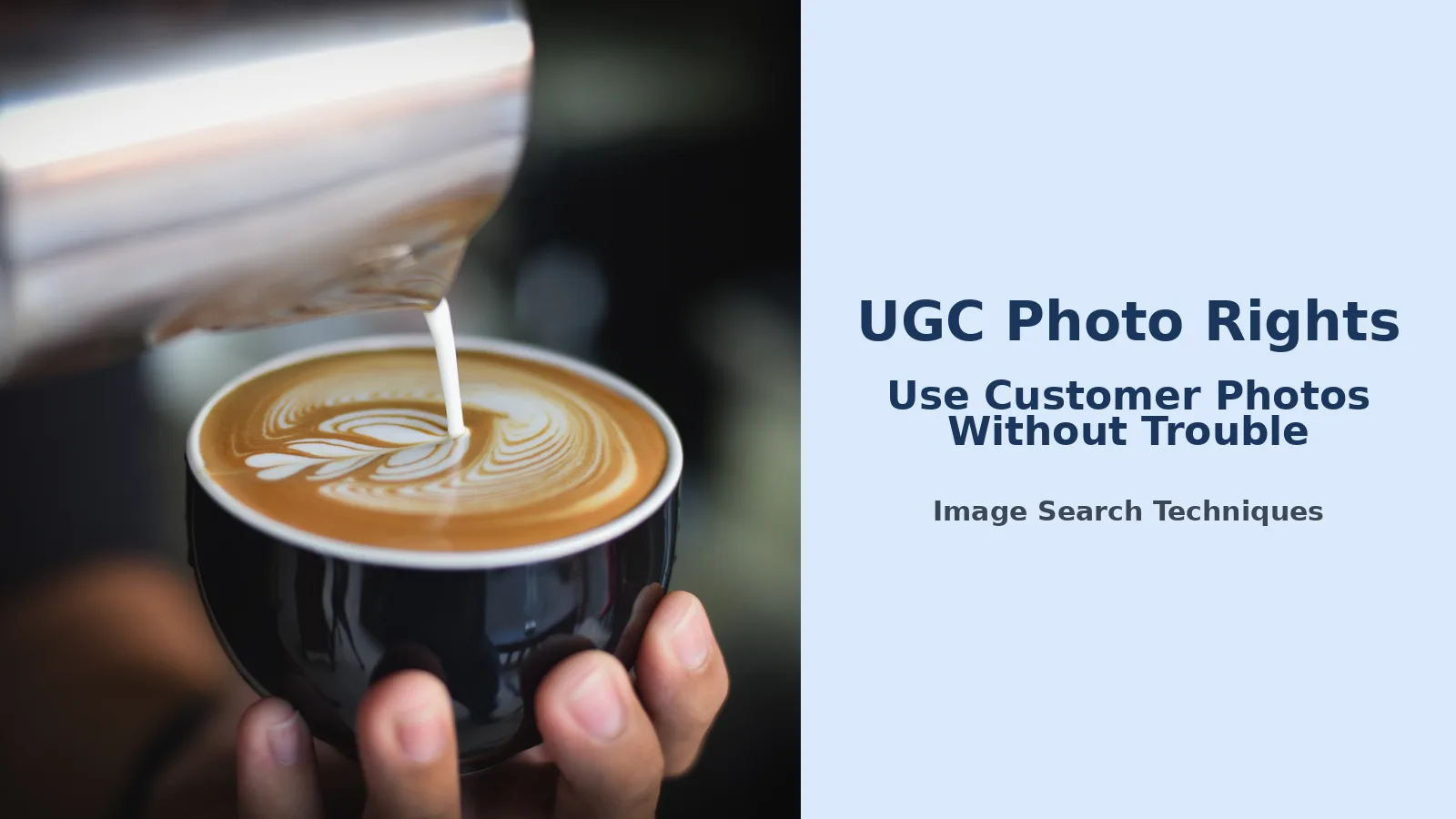
The photo is a close-up of a woman holding a coffee cup at a cafe, with latte art visible in the cup. It is the kind of warm, natural shot a small coffee shop would love to repost. It comes from Wikimedia Commons, where it is listed as a CC0 photo by Chevanon Photography, originally published on Pexels as photo 312420 and taken on 2 February 2017. The file on Commons is 5,840 by 3,899 pixels and 1,135,765 bytes, and it carries no EXIF data at all: the camera, date, and location fields that a phone photo normally carries have been stripped. That is normal for a photo that has travelled through a stock site. It is also the first warning sign. A genuine customer photo sent straight from a phone usually still carries its original file details. A stripped file has been through other hands.
I reverse searched the photo live, using the public Commons file address. TinEye reported 920 results across its index of 86.7 billion images, first indexed on 10 February 2017, across 92 pages. The oldest results point straight back to the original: Pexels photo 312420, dated 10 February 2017. The same image also appears for sale on Shutterstock, Alamy, and Adobe Stock, and on StockSnap and a string of blogs and cafe pages from 2017 onwards. Google Lens does not show a total number of matches, so I am not guessing one, but its exact-matches list ran through many pages: a Perfect Daily Grind article from 7 March 2017, Instagram posts from cafes, and the Commons file page itself, dated 29 January 2021. That is the honest result, and it is also the useful one. The search does not say “this photo is safe to use”. It says “this photo has a public history, and the history does not start with your customer”. If a customer sent you this exact image and said “I took this”, the search tells you the claim does not hold up: the photo was published on Pexels in 2017, years before your customer could have taken it, and it is freely licensed under CC0, which means anyone may use it without asking, but no one may claim to own it.
Run the same three checks on any photo a customer sends you. First, reverse search it on TinEye and Google Lens and read where it appears. A photo that already appears on a stock site, on another brand’s page, or under a different name did not start with your customer. Second, look at the file itself: a photo with no metadata, an odd size, or a file name like a stock download has usually been through other hands. Third, ask the customer one plain question: “Did you take this photo yourself?” Their answer, plus the search, is your record. If the search and the answer disagree, believe the search and do not use the photo. A “customer photo” that turns out to be someone else’s stock image is a real risk: our guide to photos sold on stock sites without permission explains how that happens and what it costs.
Answer capsule: reverse search the photo, read the file, and ask the customer if they took it themselves, and if the search and the answer disagree, do not use the photo.
Organic repost or paid ad: why the rules change
Not all reuse is equal. The risk rises with each step away from the original post, and ads sit at the top of that ladder. A native reshare, using the platform’s own share tools to reshare a Story that tags you, keeps the content on the platform with the credit attached, and it is generally the lowest-risk option. Downloading the photo and uploading it to your own feed is a new use, and it needs permission even if you add credit. Putting it on a product page, in an email, or on packaging moves further still, and usually needs clear written permission that names those specific uses. Running it as a paid ad is the highest-risk use of all, because you are now paying to put someone else’s photo and likeness in front of strangers, and the advertising rules join the copyright rules.
On TikTok, the permission for ads runs through the creator, not through you. A creator authorises one post for advertising by generating a video code for it, choosing a duration of 7, 30, 60, or 365 days, and the brand uses that code in TikTok Ads Manager to run the post as a Spark Ad. The creator turns on ad authorisation in the app, agrees to the advertising content terms, and must switch on the commercial content disclosure for the post. The caption cannot be edited after authorisation, and a creator cannot delete an authorised post until the authorisation is removed. On Meta, the equivalent is partnership ads: the creator grants partnership ad permissions, either for one piece of content with an ad code or for the whole account through Creator Marketing Hub. In both cases the permission has an expiry, and when it expires the ad stops. That is a feature, not a bug. Build your campaign around the expiry date, and agree in writing what happens when it passes.
The advertising rules are separate from the permission rules, and they apply even when permission is perfect. In the US, the FTC’s Endorsement Guides require a clear and conspicuous disclosure whenever there is a material connection between a brand and the person endorsing it that a significant minority of consumers would not expect. If you paid the customer, gave them a free product, or offered them anything of value in exchange for the post, that connection must be visible. The FTC’s own guidance is blunt about where the duty sits: responsibility for disclosure rests with the influencer and the brand, not the platform. The Guides were revised in 2023 and now include a new definition of “clearly and conspicuously”. Our second external source for this article is the FTC’s own questions and answers on the Endorsement Guides, which is the clearest official statement of these rules. There is also a separate FTC rule on reviews: the Trade Regulation Rule on the Use of Consumer Reviews and Testimonials, 16 CFR Part 465, in effect since 21 October 2024, bans fake reviews and testimonials, paying for reviews of a particular sentiment, and suppressing honest reviews, with civil penalties for knowing violations. Do not edit a customer’s words to change what they said, and never pay for a review that expresses a set sentiment.
In the UK, the ASA treats UGC used in your own marketing as your advertising, so it must follow the CAP Code and the claims in it must be accurate. The CMA enforces consumer law against misleading reviews, and fake reviews have been a banned practice under the Digital Markets, Competition and Consumers Act 2024 since 6 April 2025. The practical rule is the same on both sides of the Atlantic: if you paid for it, say so, and if the customer said it, do not change what they said.
Answer capsule: a native reshare is the lowest-risk use, a downloaded repost needs permission, and a paid ad needs a separate explicit yes plus the platform’s own authorisation and a visible disclosure.
What do you do when permission is withdrawn?
Permission is not always forever, and a good workflow plans for the day it ends. A customer may change their mind. They may have fallen out with your business. They may simply not want their face in your ads any more. Whatever the reason, the response is the same: take the photo down, quickly and without argument.
Start with the live uses. Remove the photo from your feed, your website, your emails, and any scheduled posts. Then deal with the ads. On TikTok, a creator can turn off authorisation for videos that are not currently running as paid ads, but a live Spark Ad has to be stopped by the advertiser or run out its window first, so stop it yourself as soon as you hear from them. On Meta, remove the partnership ad permission and pause the campaign. Do not wait for the authorisation to expire and call that a solution. Expiry is a deadline, not a takedown.
Then deal with the copies you cannot see. A photo you used on a product page may have been copied by a marketplace, a search engine cache, or a customer who screenshotted it. You cannot delete other people’s copies, but you can remove every copy you control and stop distributing the image. If the photo is a customer photo on your Google Business Profile, the removal route is different again, and our guide to removing customer photos from a Google Business Profile covers it step by step.
Under UK GDPR, the position is straightforward in practice. A photo in which someone can be recognised is their personal data, and the ICO says it must be as easy to withdraw consent as it is to give it. The right to erasure exists, though it is not absolute: a business can sometimes keep a photo where it has another lawful basis, but “we already published it” is not a lawful basis. For a small business, the argument is not worth having. Take it down, confirm in writing that you have done so, and keep the confirmation with the original permission. That record is what protects you if the same photo resurfaces later in an old email or a cached page.
Answer capsule: when permission is withdrawn, remove every copy you control, stop the ads yourself, confirm it in writing, and file the confirmation with the original permission.
The permission message you can copy
Most small businesses do not need a lawyer to ask for permission. They need a message that names the uses, the duration, and the ad question, so the reply is a real yes. Here is one you can copy and adapt. Send it by comment or DM, and keep the reply.
“Hi, thank you for sharing this photo of [product or visit]. We love it. May we share it on our Instagram and Facebook feeds, and on our website, with credit to you, for the next 12 months? We may also like to use it in a paid ad on Instagram. Please reply yes if you are happy with all of that, or tell us which parts you are happy with. You can ask us to stop using it at any time, and we will take it down. Thank you.”
Three things make this message work. It names the places, so a yes is a yes to those places and nothing else. It names the ad use separately, so the customer can say yes to the feed and no to the ad. And it says they can withdraw permission at any time, which is both honest and, under UK GDPR, what the law expects of consent. If the customer replies with a shorter yes, like “sure, go ahead”, reply once more and confirm the details: “Thank you. Just to confirm, that is our Instagram and Facebook feeds and our website, for 12 months, with credit to you, and not in ads unless we ask again. Is that right?” Their confirmation to that message is the permission you file.
For website or ad use at any scale, use a short form instead of a DM. A simple upload form with tick boxes works: the creator’s name, the photo, the permitted uses, the duration, the payment if any, and a box that says they took the photo themselves and that everyone in it agreed to be shown. That last box is worth more than it looks. It is the question that catches the borrowed stock photo before it becomes your problem.
Answer capsule: ask in writing, name the places, the duration, and the ad use separately, confirm a short yes back in full, and file the reply with the photo.
Common mistakes that get small businesses in trouble
Most UGC disputes are not caused by bad intent. They are caused by a shortcut that felt harmless at the time. These are the ones to watch for.
- Reposting because they tagged you. A tag is a compliment, not a licence. Ask first, every time, even for a Story reshare if you are downloading the photo rather than using the platform’s own share button.
- Using a hashtag reply as permission for ads. A hashtag reply can cover an organic repost if the terms are clear. It rarely covers paid advertising, and it never covers a use the terms did not name.
- Running the photo in an ad on a verbal yes. “Sure, use it” in a comment is not a yes to paid advertising. Get the ad use in writing, with the platforms and the period named, and use the platform’s own authorisation flow.
- Skipping the photo check. The photo may not be the customer’s at all. Reverse search it before you ask. A five-minute check beats a takedown letter.
- Forgetting the people in the photo. The photographer is not the only person with rights in the image. If someone else is recognisable in it, their consent matters too, and under UK GDPR their photo is their personal data.
- Editing the customer’s words. Cropping is one thing. Changing what a customer said, or cutting a review so it reads as praise it was not, breaks both the FTC’s rules in the US and the ASA’s rules in the UK.
- Paying for praise and hiding it. If you paid, gifted, or offered anything of value, disclose it clearly. The FTC’s Endorsement Guides put that duty on you and on the endorser, not on the platform.
- Keeping the photo after permission ends. When someone asks you to stop, stop. Remove every copy you control, stop the ads yourself, and confirm it in writing.
The mirror image of this article is the subject’s side: what to do when a company uses your photo in an ad without permission. If you are reading this because someone used your photo, rather than because you run a business, start with our guide to a company using your photo in ads without permission, which covers the removal and complaint routes from the owner’s side. This article stays on the business side: how to get permission properly, so you never need that guide.
One last point, and it is the one that matters most for a small business. Customer photos are worth having because they are real. A permission workflow does not make them less real. It makes them safe to use, and it makes the customer more likely to say yes next time. The businesses that get the most UGC are not the ones that take the most photos. They are the ones that ask properly, credit properly, and take a photo down the moment they are asked to. That is the whole system. It fits on one page, it takes five minutes a photo, and it is the difference between a photo library you own the rights to use and a feed full of photos you are borrowing on a hope.
This article was checked against the official sources named in it in November 2026. Copyright, data protection, and advertising rules differ between the UK and the US and change over time. This is general information, not legal advice. If a photo is worth a lot to your business, or a dispute has already started, speak to a solicitor or attorney where you are before you act.
FAQs
Can I repost a customer photo if they tagged my business?
No. A tag means the customer wants you to see the photo, not that you may reuse it. The customer still owns the copyright, and the platform’s licence runs to the platform, not to your business. Ask in a message, name where the photo will appear, and keep the reply with the photo before you post it.
Does a hashtag reply count as permission to use a customer photo?
It can, but only when the hashtag is tied to short, readable terms that name the uses, the duration, and whether the photo may appear in ads, and the customer replies to accept them. A branded hashtag on its own proves nothing except that the customer used your hashtag. Without terms attached, ask for permission in a message instead.
Can I use a customer photo in a paid ad?
Only with a separate yes that covers paid advertising, the platforms, and the time period. A yes to an organic repost is not a yes to an ad. On TikTok the creator must generate a video code for the post, and Meta needs partnership ad permissions. If you paid the customer or gifted the product, disclose that connection.
What should a UGC permission message say?
Name the photo, the places it will appear, how long you will use it, and whether it may run as an ad. Confirm credit and whether you may crop or add text. Say the customer can ask you to stop at any time. If they reply with a short yes, confirm the details back and file it with the photo.
What do I do if a customer asks me to stop using their photo?
Take it down everywhere you control: your feed, website, emails, and scheduled posts. Stop any ads yourself rather than waiting for the authorisation to expire. Remove it from your Google Business Profile too if it appears there. Confirm in writing that you have done so, and file that confirmation with the original permission.
Do I need permission to use a customer photo on my website?
Yes. A website, email, or packaging use needs clear written permission that names those uses, because it moves the photo further from the original post than a native reshare does. Ask in writing, name the duration, and agree credit. Keep the permission with the photo so anyone on your team can find what was agreed and when.