


🔎 Reverse Image Search
Image search techniques made simple: upload a photo or paste a URL and search 6 engines at once. 100% free, nothing stored.
💡 Right-click any image online → "Copy image address" → paste here.
—
🔒 Your image is never stored on our servers longer than 24 hours and is never shared.
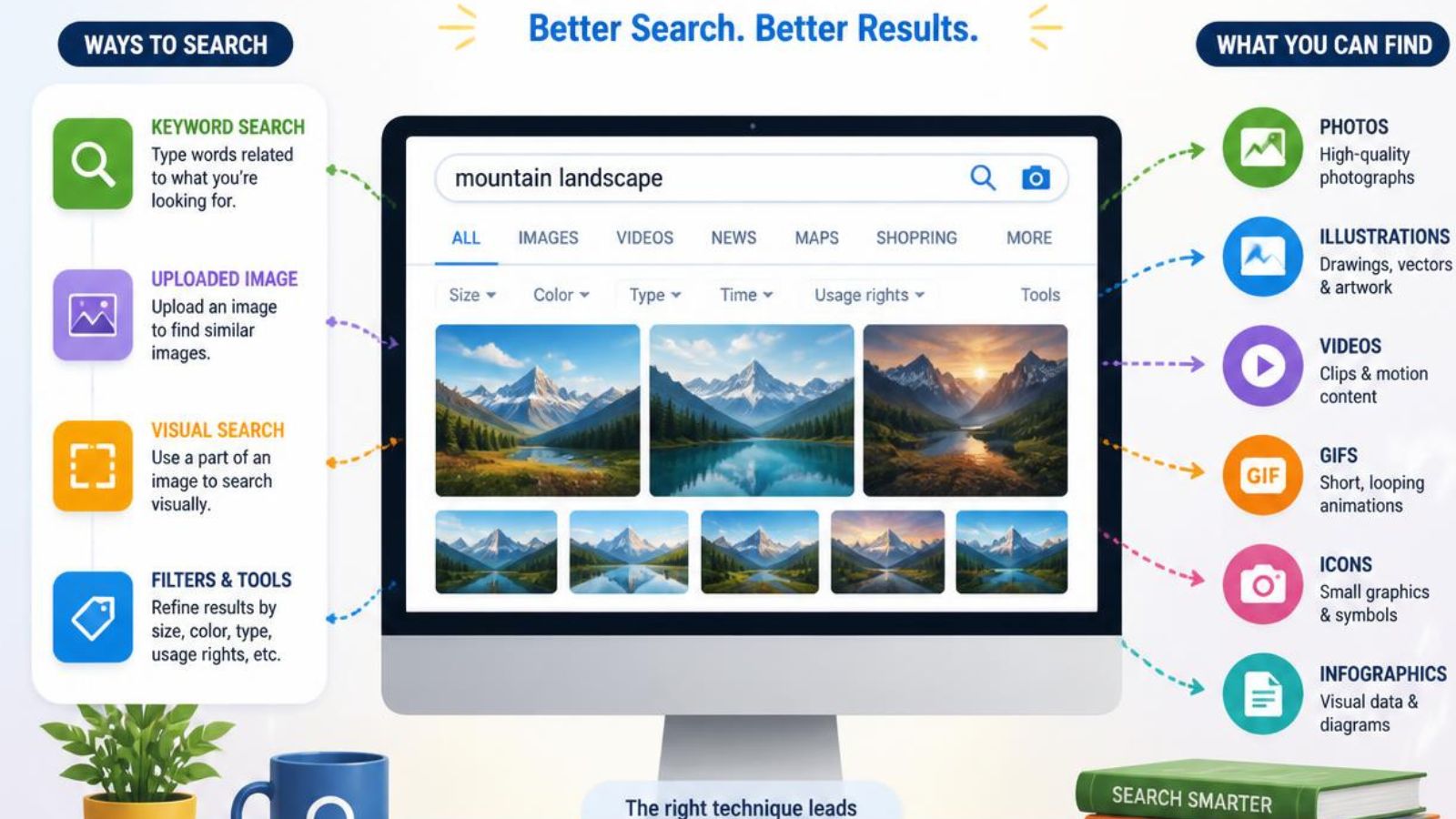
Quick answer: Image search techniques are the methods you use to find, identify, trace or verify a picture. The five main ones are keyword search, reverse image search, visual similarity search, color and pattern search, and object, text or landmark search. Choose the technique by what you know: if you have words, use keywords; if you have a picture, start with reverse image search and check two or three engines.
Try the free reverse image search tool to search Google, Google Lens, Bing, Yandex, TinEye and Pinterest with one upload.
What Are Image Search Techniques?
Image search techniques are different ways of finding images or information about images. Some start with words (“red vintage bicycle”), others start with a photo you already have (“where did this come from?”). The right method depends on your question: finding a source, spotting a copy, identifying an object, shopping, or checking whether a photo is real.
What Is a Reverse Image Search?
A reverse image search starts with an image instead of words. You upload a picture or paste its URL, and the engine returns pages where it appears, copies, and similar images. It is the most useful technique when you do not know what something is called or where a photo came from.
Reverse Image Search vs. Regular Image Search
| Regular image search | Reverse image search | |
|---|---|---|
| You start with | Words | An image |
| You get | Pictures that match your words | Sources, copies, similar images and context |
| Best for | Finding ideas and visuals | Tracing, identifying and verifying |
The 5 Main Image Search Techniques
1. Keyword-based image search
You type descriptive words. Add details such as color, material, place or era to narrow results. It works well when you can describe what you want.
2. Reverse image search
You search with the image itself. It is the core technique for finding sources and reuse. Our tool searches several engines at once, and you can read the how it works page for details. If you only have a screenshot, follow how to reverse image search a screenshot.
3. Visual similarity search
You look for pictures that resemble yours, such as similar products, styles or scenes. See how to find similar images. Pinterest is especially useful for style ideas: how to reverse image search on Pinterest.
4. Color and pattern search
You narrow results by palette or visual style. Designers use it to find references and alternatives.
5. Object, text, landmark and face recognition
You select one part of an image, such as a logo, sign, building or product, and search only that. You can also search with your phone camera: live camera image search. Be careful with face matching: a visual match is not proof of identity.
Which Reverse Image Search Engine Should You Use?
| Engine | Best for | Read more |
|---|---|---|
| Google Lens | Broad discovery: objects, products, text | Use as your first pass |
| TinEye | Exact and edited copies, cropped or resized versions | Source investigation |
| Bing Visual Search | Visual and shopping results | Second opinion |
| Yandex | Matches other engines miss | Yandex reverse image search guide |
| Inspiration and style ideas | Pinterest guide |
No single engine finds everything, because each has its own index and ranking system. If you want to avoid Google, see reverse image search without Google.
How to Do a Reverse Image Search: Step-by-Step Workflow
Step 1: Start with the best image you have
Use the original, least-edited file. Screenshots and heavily compressed copies lose detail and give weaker results.
Step 2: Start broad with Google Lens
A broad first pass tells you what the image contains and gives you words to search with.
Step 3: Find exact or edited copies with TinEye
TinEye is built for copies, including resized and modified versions.
Step 4: Cross-check with a different index
Run the same image through Bing or Yandex. A different index often shows pages the first engine missed.
Step 5: Verify the context
Open the pages you find. Compare dates, captions and credits. Image metadata can add clues, though it can be removed or edited: what is image metadata.
Step 6: Record what you found
Keep the URLs, dates and anything you are unsure about, especially for work or research.
Practical Use Cases for Image Search Techniques
Finding the original source of an image
Search on several engines, open the oldest results first, and compare dates and credits. The most visible page is not always the original. Full steps: how to find the original source of a photo.
Finding stolen or reused images
Photographers and brands can search their images to see where else they appear. A match is not automatically infringement, since some uses are licensed. To clean up copies on your own device, see how to find and delete duplicate photos.
Verifying a viral photo or social media image
Separate the image from the claim attached to it, then look for earlier appearances. More in reverse image search on social media photos. To check whether a profile photo is real, read how to spot a fake dating profile.
Finding a product from a photo
Crop tightly around the product, search with Google Lens and Bing, and compare a few sellers. Confirm model numbers before you buy.
Designers, journalists and researchers
Designers use similarity and color search to find references and licensed alternatives. Journalists and fact-checkers compare results across engines and keep a record of every step. Always check licensing before you reuse an image.
Image Search on Your Phone
Most techniques work in a mobile browser. For device-specific steps, see reverse image search on iPhone and Android image search techniques.
Common Image Search Mistakes to Avoid
| Mistake | Fix |
|---|---|
| Using only one engine | Compare two or three. |
| Searching a blurry or heavily edited image | Use the original, or crop to the key detail. |
| Treating similarity as proof | Verify dates, sources and context. |
| Assuming “no results” means the image is new | Private or unindexed images cannot be found. |
| Reusing a found image without a license | Check the license or ask permission. |
Privacy and Copyright Considerations
Privacy. Think about what an image shows before you upload it. Avoid ID documents, private photos and pictures of other people, and crop to the least sensitive part. Read how we handle uploads in our privacy policy.
Copyright. Finding an image does not give you permission to use it. Check the license first.
Frequently Asked Questions About Image Search Techniques
What is the difference between image search and reverse image search?
Image search starts with words and returns pictures. Reverse image search starts with a picture and returns sources, copies and similar images.
Which image search engine is most accurate?
None is best for every job. Google Lens is strong for broad discovery, TinEye for copies, and Yandex or Bing as a second opinion.
Can reverse image search find the original source of an image?
It can find candidate sources. Compare dates and context across several pages to decide which came first.
Does reverse image search work on mobile?
Yes, in any mobile browser. See the iPhone and Android guides linked above.
Can TinEye find cropped or edited images?
TinEye is designed to find resized and edited versions, including many cropped ones, though not every one.
Why do different engines return different results?
Each engine has its own index, crawling history and ranking system.
Can I search using an image URL instead of uploading a file?
Yes. Paste a direct image link into the tool instead of uploading.
How many engines should I use?
Two or three is a good balance: one broad engine, one copy specialist, and one cross-check.
More answers are in our full FAQ.
Use the Right Technique, Verify the Result
Match the technique to your question, use more than one engine, and always verify the context before you trust a result. Ready to try it? Use the free reverse image search tool, or keep learning in our Blog & Guides.
