🔎 Reverse Image Search
Image search techniques made simple: upload a photo or paste a URL and search 6 engines at once. 100% free, nothing stored.
🔒 Your image is never stored on our servers longer than 24 hours and is never shared.
Someone in your neighbourhood has posted a photo of you, your house or your car on Nextdoor, and you want it taken down. If you have searched for how to remove a photo of me from Nextdoor, this guide walks through the route that actually works. You do not need a lawyer to start. Nextdoor runs on neighbour reports and local moderators, and a photo post can be removed that way. The catch is that the people who vote on your report are your neighbours, not Nextdoor staff, so the reason you pick and the evidence you keep matter as much as the report itself.
Short answer: Open the post, tap the three dots, choose Report, and pick the reason that matches what the photo shows. Save a screenshot with the post’s web address and the date first, because removal deletes your proof. Local moderators then vote to remove or keep it. If they keep it, you can appeal to a different set of moderators.
This guide is about a photo of you. If you want to check whether a Nextdoor profile itself is a scam, that is a different job, and our Nextdoor scam photo check covers it. The steps below do not repeat it. For the wider picture on finding and removing photos of yourself online, see our face search and photo privacy guide.
Which kind of photo post is this?
Nextdoor does not have one button that says “remove a photo of me”. You report the post and pick the reason that fits what is in it. Picking the right reason is half the job, because the moderators who vote see the reason you chose, and a wrong one makes your report easy to dismiss. Work out which of these five cases you are in before you touch the report button.
| What was posted | What to report it as | What to say in the report |
|---|---|---|
| A photo of you, named as a “suspicious person” | “Racial profiling”, which maps to the guideline “No racism, discrimination or hate speech”. If the post is a civil safety post with a full description, Nextdoor allows it, so the reason only fits when the post assumes suspicion from race or is too vague to mean anything. Posting photos of suspects with no active public safety threat maps to “Public shaming” instead. | You are the person in the photo. State that plainly, and say the post names you as suspicious without evidence. |
| A photo of your car, named as a “suspicious vehicle” | “Public shaming”, or “Racial profiling” if the suspicion is framed around who was driving. Nextdoor’s own crime guidance encourages vehicle detail such as make, model, plate and direction of travel, so a well-described safety post is allowed and the reason only fits a shaming or profiling framing. | Give the make, model and plate if the post shows them, and say the car is yours and the post presents it as suspicious. |
| A photo of your house, with your address or a map pin | “Violation of someone’s privacy”, which maps to the guideline “No violations of privacy”. If the post geo-tags your home without your knowledge or permission to humiliate, shame or complain about you, that is “Public shaming”. A photo of a house taken from a public street is not automatically a violation, so the privacy reason is the one to pick and the reviewers decide. | Say the photo shows your home and the post identifies where you live. Do not repeat your full address in the report text. |
| A photo of you or your property with a defamatory caption | “Public shaming”. Nextdoor’s guideline forbids negative reviews and comments with personal attacks, public shaming, libel or name-calling, while a civil, factual safety post is allowed. | Quote the caption exactly and say which claim in it is false. Stick to facts you can show. |
| A photo of your child | “Public shaming”, and say you are the parent or guardian. Nextdoor’s own guideline says it may remove a post when contacted by an involved party, and that includes parents and guardians of minors. Its privacy guidance adds that if a parent or guardian asks for a photo of a minor to be removed, Nextdoor may remove it. | Say you are the parent or guardian. Nextdoor’s own guideline says it may remove a post when contacted by an involved party, and that includes parents and guardians of minors. |
Two things are worth knowing before you report. First, a photo being unflattering, or taken in a public place, is not on its own a violation. The report has to point at a guideline the post actually breaks, such as public shaming, harassment, or a safety post that breaks the Crime and Safety rules. Second, the report flow asks you to fill in information about the post. Short and specific beats long and angry. “This is a photo of me, taken outside my house on 12 November, and the caption says I was trying car doors. I was not. I was unlocking my own car.” That is a report a moderator can act on.
If the photo is in a comment rather than a post, the same route applies. Open the comment’s own menu, not the post’s menu, and report the comment. The moderators vote on the comment itself, and removing the original post also removes its replies, so check whether the photo appears in both places.
Save your evidence before you report
Do this first, before you tap Report. When a post is removed, it disappears from Nextdoor, and with it goes the photo, the caption, the comments and the date it was posted. If you later need to show a landlord, an employer, the police or Nextdoor Support what was said about you, a screenshot taken now is the only copy you will have.
- Screenshot the whole post. Capture the photo, the caption, the author’s name and the date and time shown on the post. On a phone, take a scrolling screenshot if the caption runs long. On a computer, use a full-page screenshot.
- Save the post’s web address. Copy the link from the post’s menu or from your browser’s address bar and paste it into a note with the date. A screenshot without the link is weaker evidence, because it does not prove where the photo was published.
- Screenshot the comments too. If neighbours have added their own claims, or if the author has replied, capture those as well. Comments often contain the worst of it, and they vanish with the post.
- Note what the photo shows, in your own words. Write one paragraph: where and when the photo was taken, if you know; what it shows; who can identify you from it; and what harm the post is doing, such as neighbours avoiding you or asking about it. Keep it factual.
- Keep the originals. Save the screenshots in a folder with the date in the file name, and back them up somewhere the post cannot touch, such as your email or cloud storage. Do not edit or crop out the parts that look bad for the other side. A clean, complete record is more useful than a tidy one.
If the photo was taken from your own social media or your own listing, a reverse image search can show where else it has been used. Our how to reverse image search guide walks through it. That tells you whether the Nextdoor post is the only copy or one of several, which changes how wide your removal work needs to be. There is a worked example of this later in the article.
How to report the post, step by step
The route is the same on the website, the iPhone app and the Android app. You need a Nextdoor account to report, because the report is tied to your verified address. If you do not have one, skip to the section on non-members below. The steps below follow Nextdoor’s own report guide.
- Log in at nextdoor.com, or open the Nextdoor app, and find the post in your Newsfeed. If you cannot find it, search for the author’s name or a distinctive word from the caption.
- Tap or click the three dots in the top corner of the post.
- Choose Report.
- Fill in the information the form asks for. Pick the reason from the table above, and write the one or two sentences that say why the post breaks the guidelines. Keep it to what the photo shows and what the caption claims.
- Tap or click Submit report.
Nextdoor also offers three options that look like removal but are not. Hide a post removes the discussion from your view only; everyone else still sees it. Mute a neighbour stops you hearing from that person; it does nothing to the post. Turn off notifications only stops the alerts. None of these is a substitute for a report, and none of them helps if the photo is harming your reputation with other neighbours. Use them to protect your own feed while the report is being decided, not instead of reporting.
You can also report the neighbour behind the post, rather than the post itself, if the problem is a pattern of behaviour rather than one photo. That is a separate route, for account issues, and it goes to Nextdoor Support rather than the local moderators. For a single photo, report the post.
What happens after you report it?
After you submit, you will get a notification that the post is under review by a group of local moderators. Those moderators are Neighbourhood Leads and Review Team members, people from your area who have volunteered for the role. They vote on whether the post breaks Nextdoor’s Community Guidelines and should be removed. Reporting is anonymous: the author is never told who reported the post or which moderators voted to remove it. Some reports go straight to the Nextdoor Support team instead, and agency posts are reviewed by the Nextdoor team rather than local moderators. Sensitive reports, such as discrimination, go directly to Nextdoor Support. Content that gets reports or votes to remove may get decreased visibility while the vote runs.
The vote has three options. Remove means the post breaks the guidelines and should come down at once. Keep means it does not break them and should stay. Maybe remove is for a moderator who is not sure, and it can mean the content is removed in some neighbourhoods while staying in others. Leads are told to vote Remove only on content that actually violates the guidelines or the Member Agreement, and voting to remove content that does not break the rules is itself a violation.
When a decision is reached, you get a notification with the result. If the post was not judged a violation, you will have the chance to appeal, and the appeal is reviewed by a different set of moderators. That matters, because the first vote can reflect one street’s view of a neighbour dispute rather than the guidelines. A second set of eyes is a real second chance, not a formality. Reporters can appeal a decision not to remove content too.
There is no published timetable for any of this. Nextdoor does not promise a decision within a set number of hours or days, and its moderator guidance says plainly that there is no fixed number of votes either: how many it takes depends on the number and type of reports, how Leads vote, and automated detection. Do not treat any figure from a third-party site as Nextdoor’s own promise. The only time-bound statement Nextdoor publishes is on its contact form, which says it will follow up within 24 hours, and that is a reply to the person who contacted Support, not a removal deadline. In practice, the wait is the hardest part, because the photo stays visible while the vote runs. That is another reason to save your evidence first: if the photo spreads or the caption is repeated elsewhere, you already have the record.
If the post was yours and it was removed, the process runs in the other direction. You get a notification with an orange or yellow flag, and you can tap “See why” to learn the reason and your options, as Nextdoor’s removed-content guide explains. You can appeal, or edit the post to remove the problem and have the edited version submitted for appeal automatically. Content stays hidden while an appeal is decided, and the author sees it marked “under review”. If you do not appeal within two weeks, the content is removed and you can no longer appeal. For Sale and Free posts are the exception: they get no notification and no appeal option, so check the post category before promising yourself an appeal.
If the vote keeps the photo up
A Keep vote is not the end of the road, but the next steps need to be in the right order. Start with the appeal, because it costs nothing and goes to a different set of moderators. When you appeal, say what the first vote missed. If the post names you as a suspicious person, say so directly and point at the guideline it breaks. If the photo shows your child, say you are the parent or guardian and ask for the involved-party route under the public shaming guideline. A short, specific appeal beats a long complaint about the moderators.
If the appeal also fails, there are two more routes. First, Nextdoor’s public shaming guideline says the company may remove a post when contacted by an involved party, and that explicitly includes parents and guardians of minors. That is a different route from the moderator vote: it is a direct contact with Nextdoor about a post that identifies you. Use it when you are the person in the photo and the moderator route has run out. Second, if you believe specific Leads or Review Team members voted unfairly or are biased, you can report those moderators, and that report goes directly to Nextdoor Support.
What not to do matters as much as what to do. Do not send the poster a legal threat. There is no legal-threats template that helps here, and a threat usually hardens the poster’s position and gives them a new post to write about you. Do not ask friends to mass-report the post either. Excessive or retaliatory reporting is itself a violation of Nextdoor’s guidelines, and a flood of reports from people with no connection to the photo can hurt your case. Do not repost the photo yourself to complain about it, because that spreads the very image you want removed. And do not assume a Keep vote means the photo is lawful or fair. It means local moderators did not judge it a guideline violation. If the photo is being used to harass you, or if it puts you in danger, that is a matter for the police, not for a moderator vote.
One more thing to check while you wait: whether the same photo appears anywhere else. A neighbour who posts your house on Nextdoor may have taken the photo from Google Street View, a property listing or your own social media. If it came from Street View, our guide to blurring your house on Google Street View covers that route. If it came from a listing, the listing itself may need a report too. And if the photo is yours and someone is using it without permission, our guide to removing your photos from Google covers the search side of the problem.
Can I remove a photo of me from Nextdoor if I am not a member?
You do not need an account to ask. Nextdoor’s help centre has a contact form that works without signing in, and it is the route that matches the public shaming guideline’s line that Nextdoor may remove a post when contacted by an involved party. Here is how to reach it.
- Open the Nextdoor help centre and follow the “Contact us” link. That page first asks you to log in, but it also offers “Can’t log in? Contact us here.” Follow that link to the unauthenticated form.
- For “I need help as a”, choose Neighbour. There is no explicit non-member option, so Neighbour is the closest fit.
- For “What can we help with?”, choose Reporting and moderation, then the radio option Request removal of an image or video.
- Fill in your email address, say what the post is and where it appears, and describe the problem in detail. Attach the screenshot you saved, with the post’s web address and the date if you have it.
- Complete the check that you are human and submit. The page says Nextdoor will follow up within 24 hours.
Say plainly that you are the person in the photo, or the parent or guardian if the photo shows your child, and that you are asking as an involved party. Give the post’s web address if you have it, and the date you saw it. A neighbour who is a member can also show you the post and save the screenshots for you, or report it on your behalf with the facts you give them. Keep your own evidence folder regardless of who files the report, and do not create a Nextdoor account just to report the post unless you are willing to verify your address, because an account tied to a false address can be closed and the report with it.
Worked example: what reverse image search finds
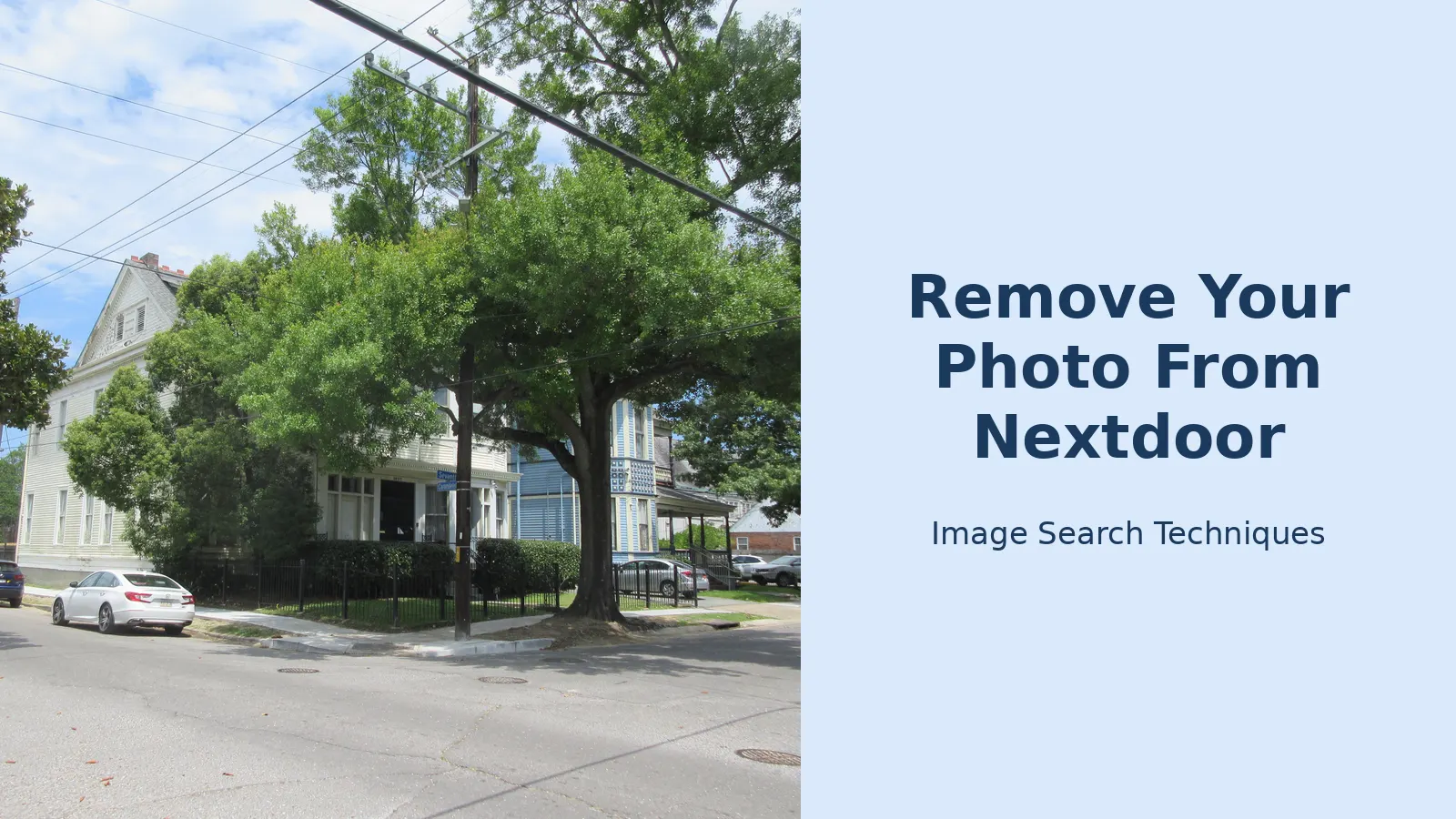
The test photo is a real public photo: “Carondelet Street New Orleans, downtown river corner of 7th Street, June 2023”, by Infrogmation, on Wikimedia Commons under a CC BY-SA 4.0 licence, 5,184 by 3,888 pixels. It shows a white two-storey house at a street corner, with big oak trees, a black iron fence and parked cars. The site’s own tool refused the 12 MB file, saying the maximum is 8 MB, so the search ran from the photo’s public web address instead. The test ran on 14 November 2026.
| Engine | Ran? | Exact matches | Found the Commons source page? | Notes |
|---|---|---|---|---|
| Google Lens | No, failed | Not obtainable | No | Ran twice. Both times the results stayed stuck on “Thinking” and then reported “Something went wrong. No image at the URL.” |
| TinEye | Yes | 0 of 86.7 billion images | No | A human check appeared first and needed a fresh browser tab before the results page loaded. |
| Bing | No, failed | Not obtainable | No | The visual search showed “Image uploaded successfully” and then returned to the plain Images homepage with no results, on every attempt. No error message and no sign-in prompt. |
| Yandex | Yes | 0 | No | Recognised the scene as New Orleans and the Garden District, showed 18 similar images and 20 sites, and the word Carondelet appeared in none of them. Top result was a different Commons street photo. |
| Pinterest Lens | Yes | 0 | No | 30 visually similar pins, none of them the same photo. The site’s own Pinterest button is not a visual search at all: it opens a keyword search, so the real Pinterest Lens upload was used instead. |
Three of the five engines ran and all three returned zero exact matches. Two could not run at all. None of them found the Wikimedia Commons page, even though the photo is a public Commons file that has been online since June 2023. That is the honest finding, and it is useful: reverse image search does not reliably surface the source for an ordinary, little-shared photo.
The point of the test is not the photo. It is the limit. Reverse image search is good at finding a photo that has already been published on the open web, and poor at finding one that lives only inside a private neighbourhood feed. A match tells you where the photo came from. A blank result tells you nothing at all about whether the post is real, fair or removable. Use the search to find the source, and use the report route to get the post down.
What does not work
A few honest limits, so you do not waste time on routes that go nowhere.
- Hiding the post only hides it from you. Hide, mute and notification settings change your feed, not anyone else’s. The photo stays up for every other neighbour.
- Being unflattering is not a violation. A bad photo of you, or a photo of your house that you simply dislike, will not be removed on those grounds alone. The report needs a guideline the post breaks.
- A photo taken in public is not automatically removable. Nextdoor’s Crime and Safety rules allow safety posts about people the poster does not know, provided the post is civil and respectful. What the rules do forbid is racial profiling, identifying someone by race and sex alone, and geo-tagging a home to shame or complain about the person who lives there.
- Safety posts have their own rules. For a genuine safety concern, Nextdoor tells neighbours to call the police first, on 999 in the UK or 911 in the US, and to describe people with several distinctive characteristics and clothing from head to toe. For vehicles, the make, model, plate and direction of travel help. A post that ignores those rules is easier to challenge than one that follows them.
- Deleting your own account does not delete the post. If you are a member and the photo is of you, leaving Nextdoor removes your profile, not someone else’s post about you. Report first, then decide about your account.
- A removal does not recall copies. Once a photo has been screenshotted or shared out of Nextdoor, removing the original post does not remove the copies. That is why the evidence folder matters, and why it is worth searching for the photo elsewhere once the post is down.
The short version
If you only remember five things, remember these. Save a screenshot of the post with its web address and the date before you do anything else. Report the post from its three-dot menu and pick the reason that matches what the photo shows. Say, in one or two sentences, that you are the person in the photo and which guideline the post breaks. Appeal to a different set of moderators if the first vote keeps it up, and use the involved-party route if you are pictured and the vote has run out. And do not repost the photo yourself while you wait.
A photo of you on Nextdoor feels personal because it is personal: it is your face, your house or your car, shown to the people who live nearest to you. The removal route is slow and it is run by neighbours, not by Nextdoor staff, which is frustrating. But it is a real route, it has an appeal, and it works best when the report is specific, the evidence is saved first, and the reason chosen matches the photo in front of the moderators. Start with the screenshot, then report.
Can I get a photo of me removed from Nextdoor if I am not a member?
Yes, you can ask, even without an account. Use Nextdoor’s help-centre contact form, choose Neighbour, then Reporting and moderation, then Request removal of an image or video. Give your email, describe the post and attach your screenshot. Nextdoor says it will follow up within 24 hours.
How long does Nextdoor take to remove a reported photo?
Nextdoor publishes no fixed timetable for a decision, so there is no number of hours or days to count on. After you report, local moderators vote to remove or keep the post, and you get a notification when they decide. If the vote keeps it up, appeal, because a different set of moderators reviews the appeal.
What happens if the moderators vote to keep the photo?
If the first vote keeps the photo up, appeal it. The appeal goes to a different set of moderators, so say what the first vote missed, such as the fact that you are the person in the photo. If the appeal fails, use the involved-party contact route, and report any moderator you believe voted unfairly to Nextdoor Support.
Can I report a photo of my house on Nextdoor?
Yes. Report the post and say the photo shows your home and the post identifies where you live. Do not repeat your full address in the report. If the photo came from Google Street View, ask Google to blur your house as well, because removing the Nextdoor post does not remove the source photo.
Will hiding the post remove it from Nextdoor?
No. Hiding a post only removes it from your own view. Every other neighbour can still see the photo, the caption and the comments. To get the post taken down, report it from the three-dot menu and let the moderators vote. Use Hide while you wait, not instead of reporting.
Can I get a photo of my child removed from Nextdoor?
Yes. Say you are the parent or guardian when you report or contact Nextdoor, and Nextdoor’s public shaming guideline says it may remove a post when contacted by an involved party, which includes parents and guardians of minors. Save screenshots first, and do not repost the photo yourself while you wait.