


🔎 Reverse Image Search
Image search techniques made simple: upload a photo or paste a URL and search 6 engines at once. 100% free, nothing stored.
🔒 Your image is never stored on our servers longer than 24 hours and is never shared.
You can check a Nextdoor neighbour in minutes by reverse searching three photos: their profile picture, any work photo they posted, and the listing photo. If the same photo appears under another name, on a stock site, or on a real business page far from your area, walk away. A clean result proves nothing on its own.
A nextdoor scam works because the platform feels safer than other social apps, and that feeling is the whole problem. The people on it live near you. They use real names. They post about the same streets, the same school gates, the same potholes. When one of them offers to fix your roof, claims to have found your lost cat, or lists a sofa for a price that seems kind, your guard drops in a way it never would on a random website.
Scammers know this. They set up as neighbours, post as neighbours, and get recommended by other accounts that look like neighbours. The photos are what give them away, because a stolen photo leaves a trail and a real photo has a history. This guide shows you how to follow both, using only the three photos that matter most.
What does Nextdoor actually verify about a neighbour?
A Nextdoor scam is a fraud carried out through a Nextdoor account, usually by someone posing as a local resident, a tradesperson, or a helpful neighbour. The platform checks addresses, not honesty. That distinction is the key to everything in this guide.
When you join Nextdoor you must confirm your email address and your physical address. Nextdoor’s own help pages on avoiding fraud, phishing and spam list the ways this happens: a code texted to a phone number whose billing address matches, a postcard with a code sent to the address, a location check while you are at home, or a photo of a document such as a driving licence or utility bill. The check proves that the person who opened the account could reach that address. It does not prove that the person is honest, qualified, or who their profile photo shows.
That gap is exactly what scammers work in. A real address can belong to a rented room, a short let, or a house whose owner has no idea their address was used. Verification can also be passed once and the account then used for something else entirely. Nextdoor’s own fraud advice says its support team never contacts members by direct message or chat, and warns that anyone asking you to pay with a gift card is almost certainly running a scam. If an account called Assistant, Support or Help messages you, it is not Nextdoor.
So treat the word “verified” on Nextdoor as a statement about an address, not a character reference. The photo checks below are how you test the rest of the story.
What is the neighbour-verification workflow?
The workflow is three reverse image searches, one for each photo a Nextdoor scammer has to show you. Run them in this order, because each one answers a different question.
Search 1: the profile photo. This answers the question “Is this person who the photo shows?” A stolen profile photo is the oldest trick on the platform. The picture usually belongs to a real person with no connection to the account. If it turns up on another social profile, a company team page, or a modelling portfolio under a different name, the account is not what it claims to be.
Search 2: the work photo. This answers the question “Did this person actually do this work?” A contractor who posts a photo of a finished kitchen, a repaired roof, or a painted house should be showing their own job. Stolen work photos are everywhere. They come from stock libraries, other builders’ websites, and image searches. If the same “before and after” appears on a firm in another city, the work is not theirs.
Search 3: the listing photo. This answers the question “Is this item, pet, or property real and local?” A marketplace listing, a lost-pet post, or a rental ad all depend on one photo. If that photo was copied from a real-estate site, a breeder’s page, or a listing in another state, the thing being sold or “found” does not exist where the poster says it does.
Run all three even if the first one looks clean. Scammers mix sources. A profile photo can be a genuine photo of the scammer while the work photos are stolen, or the work photos can be real while the profile photo is borrowed. One clean search clears one photo, never the whole account.
How do you run the three searches?
You need the photo files first. On a phone, long-press the photo in the Nextdoor app and save it, or take a screenshot and crop it to the photo. A screenshot works fine for a reverse search even though it loses the file’s hidden data, because the search compares pixels, not file details. On a computer, right-click the photo and save it, or open it and use the browser’s image search from the right-click menu.
Then run each photo through more than one engine. No single engine sees the whole web, and the engines disagree with each other constantly. Our own reverse image search tool runs the main engines from one page, or you can visit each one directly. Work through them in this order:
- Google Lens. Upload the photo or paste its web address. Lens is strongest on widely indexed images and on naming what is in the picture. Check the “Exact matches” tab first, then the visual matches. A photo that appears on many pages is a photo with a history, and the history is what you are reading.
- TinEye. Upload the photo at tineye.com. TinEye is built to find where an image has appeared before, and it sorts results by the date it first saw each one. That date matters. A work photo first indexed in 2013 cannot be a job finished last month.
- Bing Visual Search. Upload the photo or paste its address. Bing’s index does not fully overlap with Google’s, so it sometimes finds matches the others miss. Its “Pages with this image” tab is the one to read. If Bing turns your photo into a keyword query instead, that is a result too: it means Bing could not match the image to a page.
- Yandex Images. Upload the photo or paste its address. Yandex is often the strongest on faces and on tracing a photo to its original page, including pages Google never indexed. Check the “Sites” tab for the list of pages using the image, and the “In other sizes” section for the exact original size.
- Pinterest. Treat Pinterest with care. Its search button on most tools runs a keyword search, not a visual search, so a blank result there proves nothing. Use it only as a spare check, never as your verdict.
Save anything you find. Screenshot the results page with the matching page visible, and note the date. If you report the account later, that screenshot is your evidence. Nextdoor’s moderators and support team act faster on a report that shows the same photo under another name than on a report that only says “this feels wrong”.
This guide checks someone else’s profile. If the photo on Nextdoor is of you, the job is different: our guide to getting a photo of you removed from Nextdoor walks through the report, the moderator vote, and the route for people who are not members.
How do you read the results?
A match is not a verdict by itself. What matters is what the match says about the photo’s story. Read each result against the claim the poster made.
| What the search finds | What it usually means | What to do |
|---|---|---|
| Same photo under a different name | The photo was taken from a real person or a real business | Stop. Do not pay, reply, or meet. Report the account. |
| Same photo on a stock library | The “work” or “pet” was bought or downloaded, not photographed by the poster | Stop. The job, pet, or item is not theirs to sell or show. |
| Same photo on a real business site far away | The work belongs to another firm, often in another city or country | Ask for proof tied to your area, such as a dated photo at your address. Expect silence. |
| Same photo on many unrelated pages | An old, widely shared image, often a scam photo reused for years | Treat the post as untrusted. The photo has no link to this poster. |
| No matches anywhere | The photo may be new, private, AI-generated, or simply unindexed | Keep checking. A clean result is not a pass. See the honesty box below. |
One rule applies to every match: the person in a stolen photo is almost always an innocent third party. Never contact them, accuse them, or post their name in your neighbourhood feed. The photo was taken from them, not by them. Report the account that used it, and leave the person in the picture alone.
The honesty box: what a clean result does and does not prove. Nextdoor is a name-verified platform, so a clean search feels like a pass. It is not. A clean result proves only that no engine in your search had indexed that exact image under those conditions. It does not prove the photo is genuine. An AI-generated face has never been posted anywhere, so it matches nothing. A photo taken from a private account may never have been indexed. A cropped or flipped copy can dodge exact-match searches while still being the same picture. And a real neighbour with a real address can still run a scam, because Nextdoor verified where they live, not what they do. Use a clean result as permission to keep checking, never as a reason to pay.
If the photo does match somewhere, compare the details. Does the name on the other page match the name on the Nextdoor profile? Does the location fit? Does the date make sense? A work photo dated 2013 cannot show a job done in 2026. A “local” roofer whose only work photos sit on a firm in another country is not local. Small mismatches are often the clearest signal, because scammers copy photos but rarely copy the context around them.
Worked example: a contractor’s work photo, run through all five engines
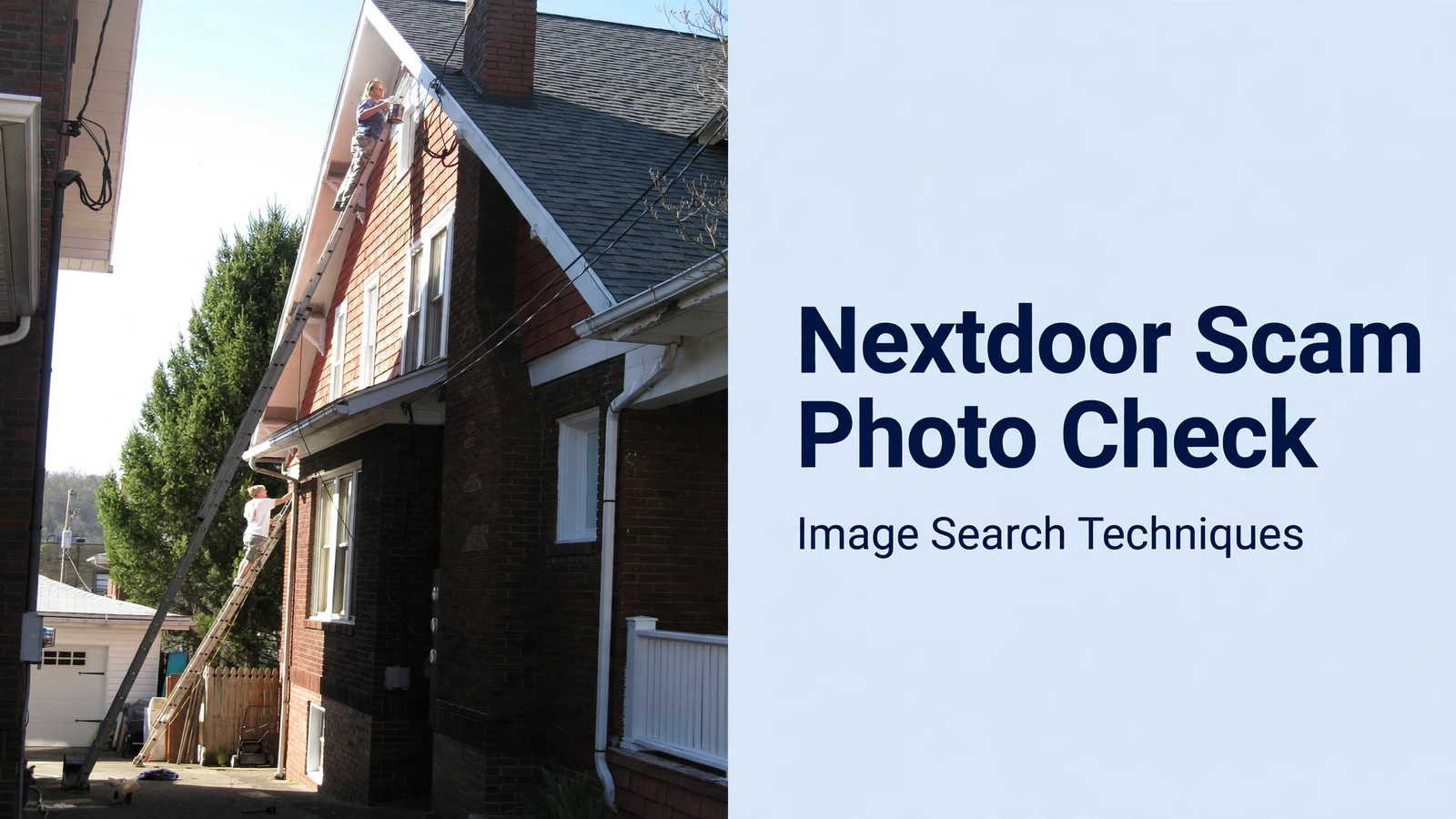
To show what this looks like in practice, we ran a real contractor-style photo through the site’s own tool on 13 November 2026. The photo is “Painters on Ladders”, a public-domain picture from the US National Institute for Occupational Safety and Health, taken in Morgantown, West Virginia, on 16 April 2008. It shows house painters working on tall ladders instead of scaffolding, three and four storeys up. It is exactly the kind of work photo a Nextdoor contractor might post, and it has been on the web since 2008, so the engines had plenty of time to index it.
Here is what each engine returned for the same image, pasted as a web address into the tool:
| Engine | Result | Source found? |
|---|---|---|
| Google Lens | Failed. “Something went wrong. No image at the URL” on both the exact and visual matches tabs, and the visual search showed as expired. No CAPTCHA appeared. | No. 0 exact matches. |
| TinEye | Worked. 8 results across 86.7 billion images searched. Earliest indexed 20 February 2013. Other matches included OpenStreetMap Wiki pages, a photo site, and three full-size copies on small domains. | Yes. The Wikimedia Commons file page, first crawled 20 February 2013. |
| Bing | Worked as a page, but found nothing. It turned the photo into the keyword query “Roof Repair Ladder Safety Tips” and its “Pages with this image” tab said it could not find pages with this image. | No. 0 exact matches. |
| Yandex | Worked. Listed the exact 768 by 1024 copy under “In other sizes”, plus resized copies, and named five pages using the image. | Yes. The Wikimedia Commons file page headed the Sites list. |
| Failed as a visual search. The tool’s Pinterest link opens a keyword search for the image host’s domain, which returned unrelated pins. No match in the first 28 pins. | No. |
Two lessons sit in that table. First, the engines disagreed completely on the same photo. Google Lens, the engine most people try first, failed outright. Bing found nothing. TinEye and Yandex both traced the photo to its Commons source, with TinEye adding the useful detail that the image was first indexed in February 2013, five years after it was taken. If we had stopped after Lens, we would have called this photo untraceable. It was not.
Second, the tool’s “Search All” button opened only the Google Lens tab, not one tab per engine. TinEye, Bing, Yandex and Pinterest each had to be opened from their own buttons. That is worth knowing before you start, so you do not mistake one engine’s answer for all five.
Now imagine the same photo on a Nextdoor post from a “local painter” in your town. TinEye’s 2013 date alone would end the conversation. The photo is eighteen years old and was taken in West Virginia. No painter in your neighbourhood took it last week. That is the whole workflow in one search: a real photo, a real date, and a claim that falls apart against both.
What are the red flags a photo check cannot catch?
Some warning signs never appear in a photo. Watch for them alongside the searches, because a scammer with original photos is still a scammer.
A brand-new account with no post history and no recommendations from people you recognise is the most common one. Nextdoor shows how long someone has been around and what they have posted before. An account created last week that is already offering roofing, selling a puppy, and collecting for a fundraiser is not a busy neighbour. It is a new account doing three jobs at once.
Pressure is the second. A contractor who needs a deposit today, a seller who says someone else is coming at six, or a “finder” who will only return your pet if you pay right now is using urgency to stop you checking. Real neighbours wait. Scammers do not, because every hour you spend verifying is an hour their photos might be found.
Payment method is the third. Nextdoor’s own fraud advice is blunt: do not pay anyone you have not met in person, and never pay with a gift card. A request for gift cards, wire transfers, or payment through an app before any work or meeting is a stop sign on its own, whatever the photos show.
Finally, watch for the move off the platform. A poster who wants to switch to text or email straight away is leaving the one place where moderators and other neighbours can see the conversation. Keep the discussion on Nextdoor until you have met the person and seen the work, the pet, or the item in real life.
For the rest of the story, the photo checks above are only half the job. If a lost-pet message arrives, the photo test belongs with the rest of the lost-pet checks in our find a lost pet with a photo guide. If a builder’s photos look wrong, the hiring checks live in our builder and tradesperson photo check, and the before-and-after test has its own guide at fake before and after photos. This article stays with the photos. Those guides carry the process.
How do you report a Nextdoor scam?
Report first, warn second. Open the post or the profile, tap the three dots menu, and choose Report. Pick the closest reason, and add the evidence in your own words: the photo appears under another name, or on a stock site, or on a business far away, with the link to the page where you found it. Nextdoor’s volunteer moderators review reported content, and the platform’s own reporting says nearly 300,000 of them kept the median removal time under six hours in 2024. A report with a link moves faster than a report with a feeling.
Then report the scam itself to the Federal Trade Commission at ReportFraud.ftc.gov. The FTC’s figures show the scale of what you are reporting: the FBI’s Internet Crime Complaint Center recorded $16.6 billion in cybercrime losses in 2024, up 33 percent on the year before, and the FTC’s own data puts imposter scam losses for people aged 60 and over at $700 million in 2024, up from $121 million in 2020. A report from you adds one more data point to a picture that only works when victims speak up.
If you lost money, contact your bank or card provider immediately and keep every message, receipt, and screenshot. Nextdoor itself says it cannot investigate things that happened off the platform, so your bank and the police are the routes for money already sent. In the UK, the same role is played by Action Fraud’s successor service, Report Fraud, and your bank’s fraud team.
Only after reporting should you warn your neighbours, and keep the warning to facts you can show. “This account’s work photo is from a firm in Ohio, here is the link” helps everyone. “This person is a criminal” does not, and it can land you in trouble if you are wrong about who is behind the account. The person in a stolen photo is usually a stranger to the scam, and the account holder may be using a real neighbour’s address. Stick to the photos.
A real case shows why this matters. On 25 October 2026, a Nextdoor user in London posted that her cat was missing, and strangers contacted her claiming they had the animal. They sent photos as proof. The photos were AI images. The senders demanded Apple and Xbox gift cards and asked her to meet in a park to hand them over. She spotted it in time. The photo check would have caught it sooner: an AI image matches nothing, and a genuine finder can send a fresh photo of your pet next to something you name on the spot, in the moment, not a picture that already existed.
Nextdoor is still a useful place. Most of the people on it are your actual neighbours, and most of the recommendations are real. The photo check does not change that. It just stops one kind of stranger from borrowing the trust the real neighbours built. Run the three searches, read what they say, and let the photos speak before the money moves.
For the wider picture, our photo scams complete guide covers the patterns these checks sit inside, and our how to spot a catfish guide covers the same stolen-photo test on dating and social profiles, where the trick works the same way.
Can I check a Nextdoor profile photo without saving it first?
Yes. On a computer, right-click the photo and choose the image search option in your browser, which sends the picture straight to the search engine. On a phone, save the photo or take a screenshot and crop it to the picture, then upload it to a reverse image search. A screenshot works because the search compares pixels, not file data.
What should I do if the profile photo matches a real person under another name?
Stop contact, do not pay anything, and report the account on Nextdoor using the three dots menu. Do not message or accuse the person in the photo, because they are almost always an innocent third party whose picture was stolen. Save a screenshot of the matching page, then report the scam to the FTC at ReportFraud.ftc.gov.
Does a clean reverse image search mean a Nextdoor neighbour is genuine?
No. A clean result only means no search engine had indexed that exact image. AI-generated faces match nothing, photos from private accounts may never have been indexed, and a cropped copy can dodge exact matching. A real neighbour with a verified address can still run a scam. Treat a clean result as permission to keep checking, not as proof.
How do I check a contractor’s work photos on Nextdoor?
Save the work photo and reverse search it on Google Lens, TinEye, Bing, and Yandex, then compare the results with the claim. Look for the same photo on a stock site or another firm’s website, or first indexed years before the job was supposedly done. If it appears elsewhere, ask for a fresh dated photo at your address.






