🔎 Reverse Image Search
Image search techniques made simple: upload a photo or paste a URL and search 6 engines at once. 100% free, nothing stored.
🔒 Your image is never stored on our servers longer than 24 hours and is never shared.
You have a photo of a train and no idea what it is. It might be a snap from a station platform, a picture from a family album, or a screenshot someone sent you with the question “what train is this?” The good news is that one photo usually holds enough to name the train. You can do it in a few minutes with a reverse image search, then a close read of what is painted on the locomotive itself.
Short answer: To identify a train from a photo, run a reverse image search first, then read the livery, the road number and the headcode from the photo itself, and check the class in a railway database. Google Lens named our test locomotive exactly. A zero from one engine proves nothing, so check the photo by hand before you give up.
A train photo gives you more clues than most people expect. The shape of the locomotive tells you the era and the type: steam with rods and a tender, a diesel-electric, or an electric multiple unit. The type is usually obvious at a glance: a high-speed set, a commuter or metro train, or a freight locomotive. The colours tell you the operator, because liveries are deliberately distinct. The number tells you the exact unit. And the background often tells you the place: a station sign, a bridge, a hillside, or the style of the overhead wires. Put those together and you can usually name the train without ever asking anyone.
How do you reverse image search a train photo?
Start with the search, because it is the fastest route to an answer and it costs nothing. Crop the photo to the locomotive first if the train is small in the frame. A tight crop on the loco and its number gives every engine a cleaner picture to match. Then run the same photo through more than one engine, because they index different corners of the web and they disagree more often than you would think.
- Google Lens. Open Google Lens, upload the photo, and read the visual matches and the short summary it writes about the image. In our test it was the only engine that named the locomotive exactly.
- TinEye. Upload the photo at tineye.com. TinEye only finds copies of the same image that it has indexed, so a zero there is common and means very little on its own.
- Bing Visual Search. Upload the photo at bing.com/images and use the visual search. Bing sometimes turns the picture into a text search instead of showing matching images, which still tells you the model family.
- Yandex Images. Upload the photo at yandex.com/images. Yandex is strong on matching the same photo across the web, even when the other engines miss it.
- Our own tool. If you want all of them at once, the reverse image search tool on our homepage runs the same photo across six engines in one go, which saves you uploading it five times.
Keep a note of what each engine returns before you move on. The differences between them are part of the answer, as the worked example below shows. If you want the general method in more detail, our guide to reverse image search walks through each step, and our Google reverse image search guide covers the Lens route in full.
What did the reverse search find on a real photo?
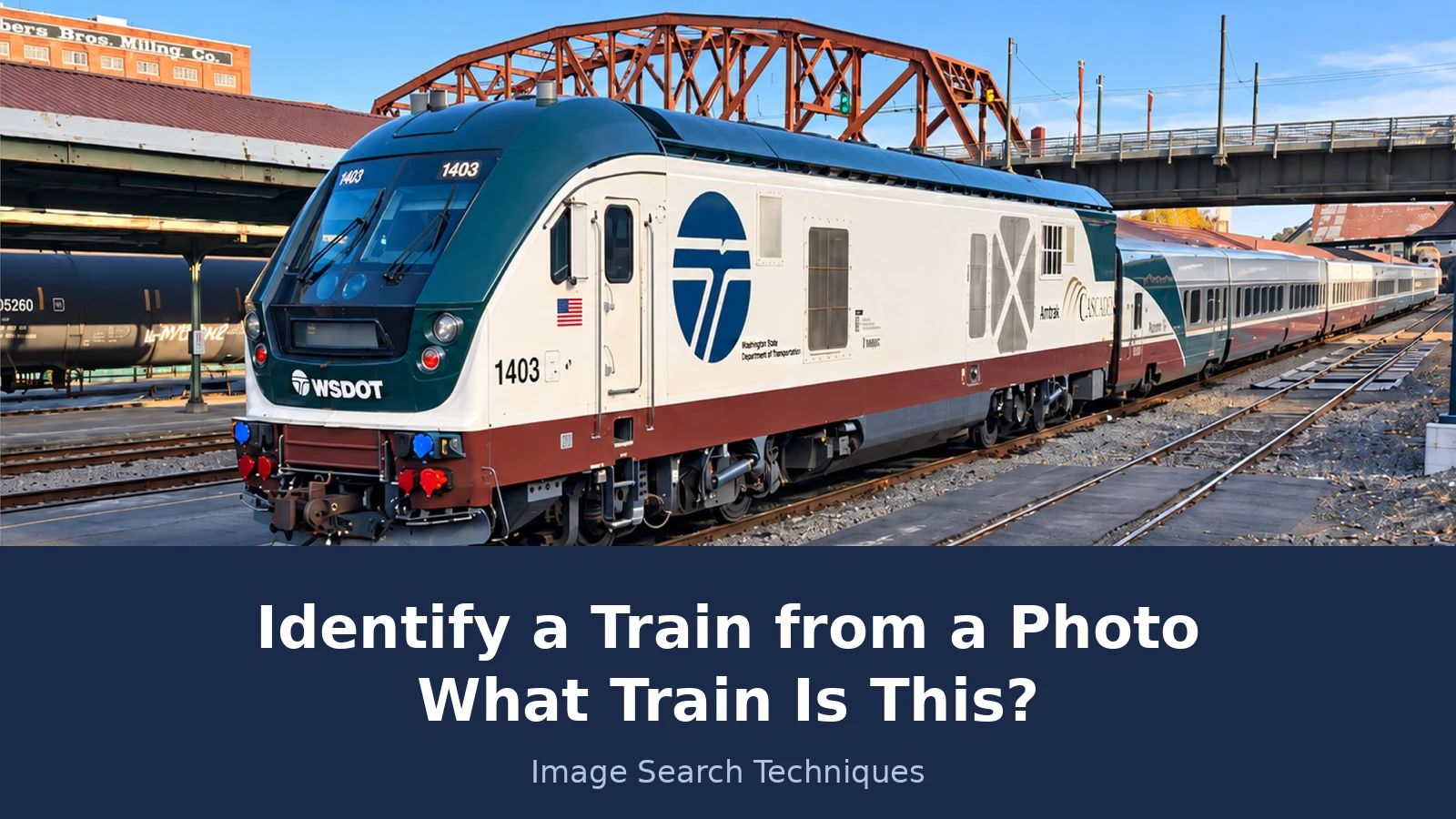
We tested the method on a real photo so you can see honest results, not a best case. The photo shows an Amtrak Cascades train at Portland Union Station in Oregon, taken in October 2026. The locomotive in the foreground is WSDOT No. 1403, wearing the Cascades colours of dark green, white and deep maroon, with Talgo coaches behind it. The photo is on Wikimedia Commons under a CC BY-SA 4.0 licence, and its file page lists the locomotive, the number and the location. We uploaded that photo to four engines on 17 November 2026 and recorded exactly what each one returned.
| Engine | Same photo found? | What it said |
|---|---|---|
| Google Lens | Yes, the identical photo on Flickr | Named it exactly: a Siemens SC-44 Charger diesel-electric locomotive, numbered 1403, in Amtrak Cascades and WSDOT livery. About 55 visual matches, with 17 in the Exact matches tab. |
| TinEye | No, 0 matches | Searched over 86.8 billion images and found no matches at all. |
| Bing Visual Search | No | Turned the picture into a text search for “Siemens Charger Sc-44 Amtrak” with 93,800 web results. It named the model only, not the number, the operator or the service. |
| Yandex Images | Yes, on two pages | Found the same photo on two pages and 18 similar images. It recognised Amtrak and Amtrak Cascades, but not the model or the number 1403. |
| Not tested | Visual search needs a Pinterest login, so this engine stays untested rather than guessed at. |
Three things stand out. First, Google Lens was the only engine to identify the locomotive exactly, and its top match was the same photo on Flickr, captioned with the model and the number. Second, TinEye found nothing at all, which shows why one engine is never enough: a zero is a property of the index, not of the photo. Third, none of the five engines linked the Wikimedia Commons page for this photo, even though that page holds the full description. The search gets you most of the way, but you still have to read the photo and check the source yourself. That is the next step.
How do you read the livery, number and headcode?
Once the search has given you a lead, confirm it from the photo itself. Every clue below is visible in an ordinary platform snap, and each one narrows the answer. Work through them in order: livery first, then the number, then the headcode, then a database check. This is the ranking asset for this article, the read table we used on the 1403 photo.
| Clue | Where to look | What it tells you |
|---|---|---|
| Livery | Colours and stripes on the loco and coaches | The operator and often the service. Dark green, white and deep maroon is Amtrak Cascades. |
| Road number | Nose, cab side, number boards | The exact unit. 1403 pins this loco once you search the number with the operator. |
| Logo and lettering | Nose, cab side, flanks | The operator. The WSDOT mark and the Amtrak Cascades name are both on this loco. |
| Builders plate | Small plate near the cab or on the frame | The builder and build details. Here the builder is Siemens. |
| Headcode | Departure board or timetable, four characters | The service and route in the UK. It is rarely painted on the train today. |
| Coaches and formation | The cars behind the loco | The service type. Talgo coaches behind the loco point to a Cascades set. |
The road number is the most powerful clue in the table. Railroads give every locomotive a number that is unique on that road, so searching the number together with the operator usually lands you on the exact unit. Try “WSDOT 1403” or “SC-44 1403” in a normal web search and compare the photos that come back with yours. If the livery and the number both match, you have your answer. The livery on its own is weaker, because operators repaint locos and lend them to each other, but it still rules out most wrong answers fast.
The headcode needs a short explanation, because it works differently from the rest. In Britain it is the four-character train reporting number, such as 1A23, that appears on departure boards and in timetables. Older trains carried it on the front, but modern trains rarely show it on the bodywork. So if your photo shows a departure board, read the headcode from there. If it does not, skip this row and use the number instead. Do not guess a headcode from a photo that does not show one.
One more caution from a well known example. A rail writer once identified an Amtrak P30CH from a black-and-white photo using only the road number 702, the Phase II paint and the Jefferson Memorial in the background, and dated the shot to 1976 to 1980. That is good deduction, and it shows what careful reading can do. But it is still deduction. A reverse search plus the read table gets you the same answer with evidence attached, and it takes minutes rather than an afternoon.
How do you identify a train from a photo when the number is missing?
Sometimes the number is hidden, cropped out, or too small to read. You can still get a long way with shape and setting. Start with the cab: the window shape, the headlight layout and the ditch lights differ between builders and regions. A Siemens Charger has a smooth, sloping nose and a single cab window shape that looks nothing like an older EMD loco with its boxy cab. Then look at the coaches, the roof line and the pantograph if there is one. Then use the setting: station signs, bridge styles, the colour of the ballast, the language on any sign, and whether the wires above are the high catenary of a main line or nothing at all.
Now compare. Search for the class you suspect and put its photos next to yours, side by side. Check the nose, the windows, the lights and the livery in that order. If three of those match and the fourth is hidden, you have a likely answer, but say so plainly. A likely answer is not a confirmed one. If two candidate classes both fit, note both and say what extra detail would settle it, such as a clearer shot of the number or the builders plate. The same habit works across the whole identification family: our guide to identifying a flag from a photo uses the same compare-and-confirm method, and our find an item by image guide covers the general workflow for any object, trains included.
How do you check the class in a railway database?
Once you have a candidate class, check it against a railway database instead of trusting the first search result. For British trains, gbtrains.uk keeps a class page for each type, with the build dates, the operator and the current status. Its Class 93 page, for example, was updated on 13 November 2026, which is the kind of freshness you want from a reference. Find the class page for your candidate, read the description and the photos, and check that the livery, the number range and the formation match your photo. If the page says the class was withdrawn before your photo was taken, your candidate is wrong.
For trains outside Britain, use the operator or the builder as the source. Amtrak lists its services and its fleet, and Siemens publishes the Charger family. And always check the source page of the photo itself when it came from the web. In our test, the Wikimedia Commons file page for the 1403 photo listed the model, the number and the station, and that is what confirmed the Lens result. A database check takes two minutes and it is what turns a good guess into a verified identification.
What if every engine comes back empty?
An empty result is common and it is not a verdict. TinEye found nothing on our test photo even though the photo is public and widely shared, simply because that copy had not been indexed. If every engine comes back empty, work through the photo by hand instead of giving up.
- Crop tighter. Upload a crop of the locomotive only, then a separate crop of the number or the logo. A close crop often matches where the full photo does not.
- Try another engine. Yandex found our photo when TinEye and Bing did not. Engines index different parts of the web, so a second try is worth it.
- Read the file. If the photo came from the web, check its file name, its page and any caption. The answer is often sitting next to the image.
- Use the read table. Livery, number, logo and formation are all visible without any search engine. Work through them and then search the number as text.
What an empty result never means is that the train does not exist, or that the photo is fake. It only means no engine matched this copy. Say that plainly in any note you keep, and keep the photo. A search that fails today can succeed in a month, once the image has been indexed.
When should you ask a rail community instead?
Ask people when the photo itself cannot settle it: the number is unreadable, the livery is unfamiliar, or two classes both fit. Rail enthusiasts are good at this, and they enjoy it. Post to the r/trains community on Reddit or to a Facebook group such as the Railway Identification Group, and include the photo, where and when it was taken if you know, and what you have already checked. Veteran spotters can often name the exact class, the road number and the builder from a small visual detail, which is exactly why the AI Overview for this question points readers to those communities.
Give them something to work with. A bare photo with no context gets slower and weaker answers. Say whether the photo is yours, say what the search engines returned, and say which details you can already read. Then treat the replies the way you treat a search result: as a lead to verify, not as a fact. Check the suggested class against a database page and against photos of that class before you repeat the answer anywhere. And post only photos you have the right to share. Your own photo is fine. Someone else’s photo needs their say-so first.
Can Google Lens identify a train from a photo?
Yes. In our test on a real photo, Google Lens named the locomotive exactly: a Siemens SC-44 Charger, numbered 1403, in Amtrak Cascades and WSDOT livery. It found the identical photo on Flickr and listed about 55 visual matches. Lens is the strongest first try, but check its answer against the number on the photo.
What is the number on the side of a locomotive?
It is the road number, and it is unique on its railroad. Railroads assign a road number to every unit, so searching the number with the operator name usually finds the exact locomotive. On our test photo the number 1403 appears on the nose and the cab side, and it pins the loco to the Siemens SC-44 Charger class.
Can you identify a train if the number is not visible?
Often, yes. Use the livery to find the operator, then the cab shape, headlights and coach formation to narrow the class. Compare your photo side by side with photos of the candidate class and check the nose, windows and lights in that order. If two classes both fit, say so and note what extra detail would settle it.
Why does TinEye sometimes find no matches?
TinEye only finds copies of the same image that it has already indexed, so a photo that is new, cropped or rarely shared can return zero matches. In our test TinEye searched over 86.8 billion images and found nothing, while Google Lens and Yandex both found the same photo. A zero from TinEye proves nothing about the train.
What is a headcode?
In Britain a headcode is the four-character train reporting number, such as 1A23, that appears on departure boards and in timetables. Older trains carried it on the front, but modern trains rarely show it on the bodywork. If your photo shows a departure board, read it there. Never guess a headcode from a photo that does not show one.
Where do I check a locomotive class once I have the number?
Search the number together with the operator name, then check the class in a railway database. For British trains, gbtrains.uk keeps a class page for each type with build dates, operator and current status. For other countries, use the operator or builder pages. Always compare the database photos with yours before you call it confirmed.