🔎 Reverse Image Search
Image search techniques made simple: upload a photo or paste a URL and search 6 engines at once. 100% free, nothing stored.
🔒 Your image is never stored on our servers longer than 24 hours and is never shared.
You took a photo of a bright point in the night sky and now you want to know which planet it is. The honest answer is that the photo alone rarely names the planet. A single bright dot in a dark frame carries almost no detail, so the identification comes from the facts around the photo: when and where it was taken, which way you were facing, and whether the dot moved on the next night.
Direct answer: To identify a planet from a photo, read the date, time and location from the photo, enter them into a sky app such as Stellarium, and match the dot against the planets in that part of the sky. Check the dot again on a second night. A planet stays steady and shifts position, while a star twinkles and stays put.
What does a photo of a planet actually show?
Answer in short: In an ordinary phone photo, a planet is just a bright dot, and that dot alone cannot prove which planet it is.
A planet is a disc, but it is so small in the sky that a phone camera records it as a point of light. Jupiter, the largest planet, spans only about 30 to 50 arcseconds across, and Venus spans about 10 to 66 arcseconds, according to the NowSky guide. An arcsecond is a tiny slice of the sky. A phone lens cannot resolve that into a shape, so Venus, Jupiter, Mars and a bright star can all look the same in a photo: one white or slightly coloured dot on black.
This matters because it sets the limit of the whole task. If someone tells you they named a planet from the dot alone, they are guessing. The dot becomes an identification only when you add context. That context is the date, the time, the place, the direction of the shot, and what else is in the frame. A nearby constellation, the Moon, a rooftop or a tree line all help, because they pin the dot to one patch of sky. A bare dot on a black background, with no date and no direction, is the hardest case of all, and sometimes it cannot be solved at all.
Planet: a body that orbits the Sun and shines by reflected sunlight. It moves against the background stars from night to night. Star: a distant sun that makes its own light. It stays fixed in its constellation and only appears to twinkle because its light passes through moving air. A photo of a planet and a photo of a star can look identical. The difference is in the behaviour, not the dot.
Why does reverse image search struggle with planet photos?
Answer in short: Reverse image search matches pictures, not sky positions, so a photo of a bright dot returns generic night sky pictures instead of a planet name.
Reverse image search works by comparing the shapes, colours and textures in your picture with pictures already on the web. A night sky photo has almost none of those: a black field, one or two dots, and not much else. There is nothing distinctive for the engine to grip. That is why the same tool that names a rabbit breed or a seashell from a photo falls flat here, and the worked example below shows it happening in practice.
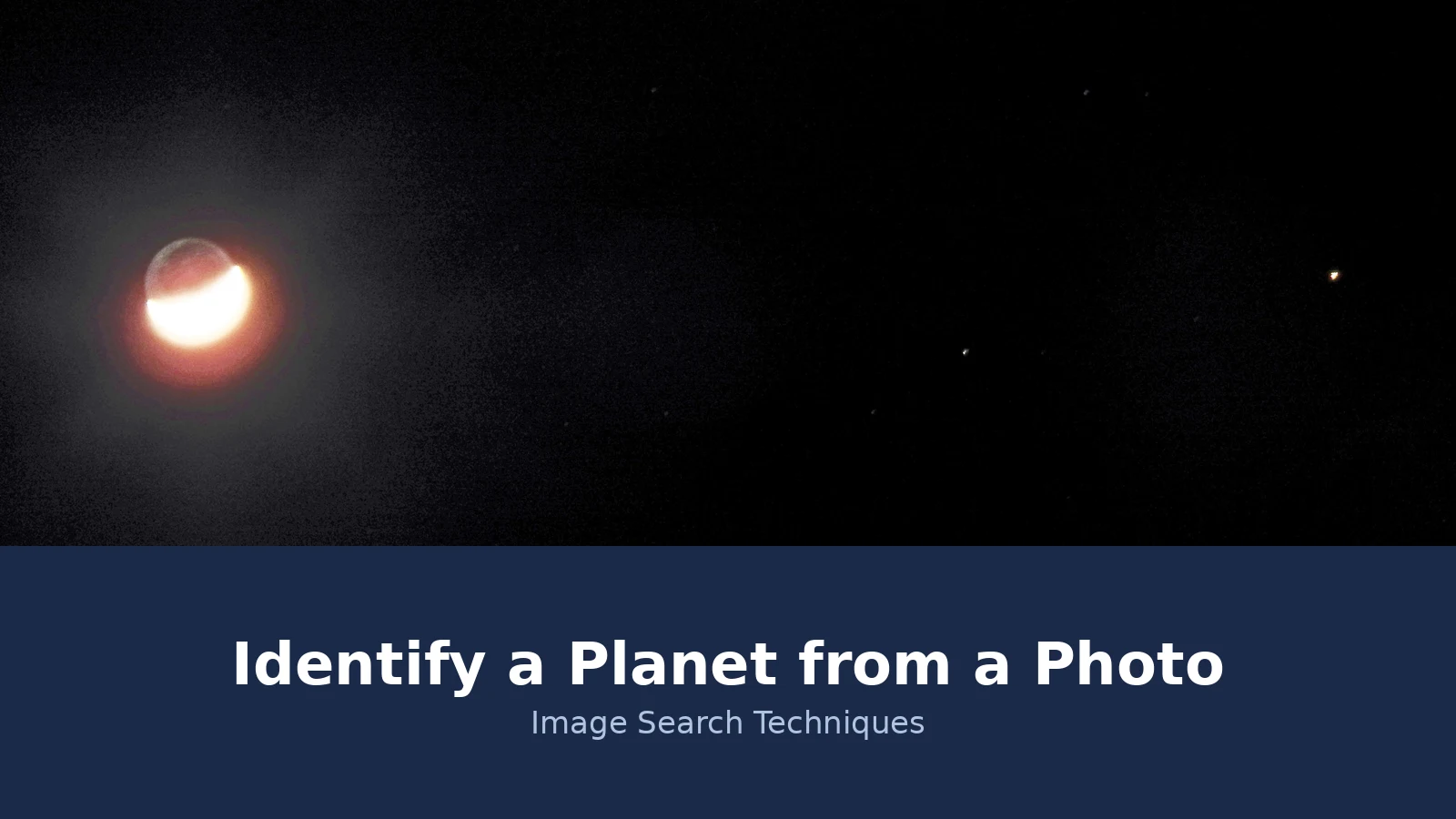
I tested this on a real photo. On 10 February 2019, Victor Rogus of Sedona, Arizona, photographed a conjunction of the crescent Moon and Mars. The faint planet Uranus was also in the frame, a fact confirmed afterwards by astronomers at the Adler Planetarium in Chicago. Space.com told the story on 15 March 2019, in an article by Hanneke Weitering titled “Dim Planet Uranus Makes a Surprise Appearance in This Night Sky Photo”. Rogus used a Nikon Coolpix P900 on autofocus, zoomed to 1,000 mm, with no telescope and no special zoom lens. At the time Uranus was magnitude 5.8, just bright enough to see with the unaided eye under a dark sky, and nearly 1.9 billion miles (3.1 billion km) away. The annotated version of the photo labels a medium-bright binary star, Omicron Piscium, sitting between Mars and the Moon. Rogus himself said Uranus is a difficult target that he had only seen a couple of times in 35 years of astrophotography.
I ran the unannotated photo through Google Lens and TinEye on 20 November 2026, and the results show the limit clearly. Lens did not name any planet itself. Its top result in both the visual matches and the exact matches was the Space.com article about the photo, which is how a reader would learn the answer, by reading the page Lens found, not from Lens. Lens showed 4 exact matches and more than 60 visual matches before a “See more” button, and Google showed no total count. The other exact matches were the same image reused on two unrelated sites. TinEye returned 0 matches and said the image was too simple to find matches, with the message that it requires a basic level of visual detail to identify matches. I also tried TinEye on the annotated copy, but its Cloudflare check failed repeatedly and no result was obtained, so that figure is unknown, not zero.
The lesson is simple. A reverse search can find where a night sky photo has already been published, and that can identify the photo, but it cannot identify the planet in a photo nobody has published before. For your own photo, taken last night in your own garden, there is no web page for the engine to find. The sky app method in the next section is the one that actually works. If you want to try the reverse search first anyway, our guide to how to reverse image search a blurry photo covers the settings that give a low-detail image its best chance.
How do you identify a planet from a photo, step by step?
Answer in short: Read the photo’s date, time and place, rebuild that sky in a planetarium app, and match the dot to a planet in the same direction.
Follow these steps in order. Each one narrows the answer, and together they usually settle it.
- Find the date, time and place. Open the photo’s details or EXIF data on your phone or computer. You need the exact date and time the photo was taken, and the location if the phone saved GPS data. If the photo was sent through a chat app, the metadata may have been stripped, so check the original file on the phone that took it. Without a date, a sky app cannot rebuild the sky, because planets move.
- Note the direction and the height. Think back to where you were standing and which way you faced. Was the dot in the west after sunset, or high in the south at midnight? Was it just above the rooftops or high overhead? A rough compass direction and a rough height above the horizon are enough. Landmarks in the photo, a roofline, a hill, a tree, help a lot.
- Rebuild the sky in a planetarium app. Enter the date, time and location into Stellarium, a free planetarium app, or a similar sky app such as SkySafari or Star Walk. Point the virtual sky in the same direction you faced. The app shows the planets in that part of the sky at that moment, labelled by name.
- Match the dot against the app. Compare the dot’s position with the app’s labelled planets. Use nearby stars, constellations or the Moon as reference points. If the dot sits where the app puts Venus, and nothing else bright is near it, you have your answer. If two planets are close together, note both and move to step five.
- Check again on a second night. Photograph the same patch of sky the next night, or a few nights later, from the same spot. A planet shifts its position against the stars, while a star stays put. This is the check that turns a likely answer into a confident one.
- Use the reverse search only as a cross-check. If the photo shows a recognisable scene, a famous conjunction or a named event, a reverse search may find the page that already identified it, as it did with the Rogus photo. Treat that as supporting evidence, not as the identification itself. Our main how to reverse image search guide explains how to run the same image through more than one engine.
What should you check on the date, time and location?
Answer in short: The date, time, location and direction are the identification. Get one of them wrong and the app points at the wrong sky.
This is the ranking asset of this article: the check table. Work through it before you trust any answer a sky app gives you.
| Check | What to look for | Why it matters |
|---|---|---|
| Date | Exact day the photo was taken, from the file, not from memory | Planets move night to night, so a date a week out can put a different planet in that spot |
| Time | Exact time, including whether it was morning or evening | The sky turns through the night, so the same planet sits in a different direction an hour later |
| Location | Town or GPS position where you stood | The visible sky depends on latitude, and the time a planet rises or sets depends on where you are |
| Direction | Compass direction you faced, such as west or south-west | A bright dot in the west after sunset is a different set of planets from one high in the south at midnight |
| Height | How high above the horizon the dot sat | Venus and Mercury stay low near the Sun, while Jupiter can sit high overhead |
| Steadiness | Whether the dot shone steadily or twinkled | Planets shine steadily and stars twinkle, which is the quickest first test |
| Ecliptic position | Whether the dot sits near the Sun’s path across the sky | Planets stay close to the ecliptic, so a dot far from it is almost certainly a star |
| Second night | Whether the dot moved against the stars a night or two later | Movement is the proof. A star stays fixed, a planet drifts |
Two of these checks deserve a warning. First, the date matters more than most people expect. A planet’s position changes every night, so a sky chart for the wrong date is a chart of the wrong sky. Second, the time zone matters too. If your photo’s time is recorded in UTC but you enter it as local time, or the other way round, the app rebuilds the sky for the wrong hour. Check the time zone on the file before you type anything into the app.
How can you tell a planet from a star in a photo?
Answer in short: A planet shines steadily, sits near the ecliptic, and moves over successive nights. A star twinkles, can sit anywhere, and stays fixed.
Three tests separate planets from stars, and you can run all three on a photo, or on the memory of the night you took it.
The steadiness test. Stars are so far away that they reach your eye as a thin beam of light, and moving air tosses that beam around, which is why stars twinkle. Planets are much closer, so they show as tiny discs rather than points, and the disturbances average out across the disc. The result is a steady shine. Jupiter spans about 30 to 50 arcseconds and Venus about 10 to 66 arcseconds, which is why their light holds still. The test has one weakness: near the horizon, thick air can make even a planet shimmer, so do not trust it alone for a low dot.
The ecliptic test. The planets orbit the Sun in roughly the same flat plane, so from Earth they always appear in a band of sky called the ecliptic, the Sun’s path across the sky. That band is about 20 degrees wide and runs through the thirteen zodiac constellations, from Pisces through Aries, Taurus, Gemini, Cancer, Leo, Virgo, Libra, Scorpius, Ophiuchus, Sagittarius, Capricornus and Aquarius. If your bright dot sits near the Moon or near one of those constellations, it could be a planet. If it sits near Polaris or the Big Dipper, far from the ecliptic, it is very unlikely to be a planet at all. This is the test the NowSky guide leans on most, and it is the fastest way to rule a planet out.
The movement test. Photograph the same patch of sky on two nights and compare the dot’s position against the stars around it. A star stays in the same place relative to its neighbours. A planet drifts. Mars takes about 687 days to orbit the Sun, Jupiter about 11.86 years and Saturn about 29.4 years, so the nightly shift is small, but over a few nights it is visible in a photo, and over weeks it is obvious. A dot that moves within minutes, by contrast, is a satellite or an aircraft, not a planet.
Brightness helps too, but only as a hint. Venus ranges from magnitude minus 4.92 to minus 2.98, Jupiter from minus 2.94 to minus 1.66, Mars from minus 2.94 to plus 1.86, and Saturn from minus 0.55 to plus 1.17, against Sirius, the brightest star, at minus 1.46. A dot far brighter than every star around it is probably Venus or Jupiter. A dot no brighter than the stars around it could be Saturn, or a star. If the dot is one of several bright points and you are unsure which are stars, our guide to identify stars and constellations from a photo covers the star side of the same problem, and the two articles are meant to be read together rather than repeating each other.
Which planet is the bright dot most likely to be?
Answer in short: Most mystery bright dots are Venus or Jupiter. Mars is the red one, Saturn is the dimmer steady one, and Mercury is the rare low one.
| Planet | How it looks | Where to look |
|---|---|---|
| Venus | Brilliant white, the brightest point in the sky after the Sun and the Moon | Low in the west after sunset or low in the east before sunrise, never far from the Sun |
| Jupiter | Brilliant white, steady, often brighter than every star nearby | Can sit high in the sky, visible most of the night around opposition |
| Mars | Red or orange tint, steady shine | Near the ecliptic, brightest around opposition, which comes roughly every 780 days |
| Saturn | Pale yellow, steady but dimmer than Venus or Jupiter | Near the ecliptic, best seen around opposition, roughly every 378 days |
| Mercury | Yellowish, bright but always low and brief | Close to the Sun, only just after sunset or just before sunrise, and easy to miss |
Venus is the usual answer, and the reason is simple: it is the brightest planet and the one most people notice first. Venus never strays far from the Sun, reaching at most about 45 to 47 degrees away from it, so it only appears in the twilight sky, low in the west after sunset or low in the east before sunrise. If your photo was taken in full darkness, high overhead, Venus is unlikely, because by then it has set or not yet risen. Mercury is even more restricted, reaching only 18 to 28 degrees from the Sun, which is why it is the planet people photograph least.
Jupiter is the other common answer. It can be far brighter than the stars around it, and it can sit high in the sky at midnight, which Venus cannot. Around opposition, when Earth passes between Jupiter and the Sun, roughly every 399 days, Jupiter is up all night and at its brightest. Mars is the one people most often ask about by name, usually because of its colour. A reddish dot near the ecliptic is a good Mars candidate, but colour alone is not proof, because a star can look red too, and a phone camera shifts colours in low light. Saturn is the hardest of the five to pick out, because it is dimmer and its colour is a pale yellow that a photo may not keep.
What if the photo is a telescope close-up?
Answer in short: A close-up can show real features, rings, bands or moons, but it still needs the date and a plate-solving check to be certain.
Everything above assumes an ordinary phone photo. A photo taken through a telescope, or through a long zoom such as the 1,000 mm zoom on the Rogus camera, is a different case, because it can show features. Saturn’s rings are the clearest of these. Jupiter’s cloud bands and its four large Galilean moons are next. Mars can show a reddish disc rather than a point. These features are strong evidence, because no star shows rings or moons. Even so, a feature does not name the planet on its own. A ringed dot is Saturn, but a banded dot still needs the date check to rule out a misread image, and a reddish disc still needs the position check.
For a wide or deep-sky photo, one that shows a whole star field with no obvious landmarks, the right tool is plate solving. A plate solver matches the star pattern in your photo against a catalogue and works out the exact patch of sky the photo covers. The free service at nova.astrometry.net does this: upload the photo, and it returns the sky coordinates. From those coordinates, plus the capture date, you can label the planets in the frame. The date is the catch. Star catalogues show where the stars are, but planets move, so a solver alone cannot place a planet without the exact date the photo was taken. That is the same date rule as before, in a more technical form.
One more caution applies to close-ups. A telescope photo taken by someone else, found on the web, is easy to misread, because it may be cropped, flipped or colour-adjusted. If you are checking a photo someone sent you, run the reverse search first to find the original, as the Rogus example shows. If the original is a published astrophoto with a caption, the caption may already give you the answer, and the plate-solving step becomes a check rather than the main work. For identifying other things in a photo, the same find-it method applies, and our find item by image guide is the hub for the whole identification family.
What are the limits of a one-photo planet ID?
Answer in short: One photo can suggest a planet, but it cannot prove one, and some planets cannot be identified from a phone photo at all.
The first limit is Uranus and Neptune. Both are far too dim for a casual photo identification. Uranus at magnitude 5.8 sits at the very edge of what the unaided eye can see under a truly dark sky, and Neptune is dimmer still. The Rogus photo is the exception that proves the rule: Uranus was in the frame, but nobody knew it until Adler Planetarium astronomers confirmed it, and Rogus had spent 35 years doing astrophotography. Do not claim Uranus or Neptune from a single phone photo. If a sky app puts Uranus where your dot is, treat it as a possibility to check with better equipment, not as an identification.
The second limit is confusion with other things in the sky. A satellite crossing the frame looks like a bright dot that moves, and an aircraft looks like a moving light with a regular blink. A bright star low on the horizon can look steady if the air is calm, and a planet low on the horizon can twinkle if the air is not. The International Space Station is brighter than Venus at its best and crosses the sky in minutes, which is why a dot that moves during a single exposure is not a planet. If your photo shows a streak rather than a dot, it is a moving object, not a planet.
The third limit is the photo itself. A heavily compressed photo from a chat app loses the faint stars that would have served as reference points, and it loses the metadata that holds the date and place. A screenshot of a photo loses both. If the only copy you have is a screenshot, go back to the original file on the phone that took it. If that file is gone, the identification may be impossible, and it is better to say so than to guess. A photo can only suggest a planet, never prove it, and an honest “most likely Venus, check it tomorrow night” is a better answer than a confident name built on one dot. For a similar problem on the ground rather than in the sky, our guide to identify a mountain from a photo uses the same method: landmarks, direction and a second check.
FAQs
Can Google Lens identify a planet from a photo?
No, not on its own. I tested this on a real night sky photo, the Victor Rogus Moon and Mars conjunction from 10 February 2019. Lens returned 4 exact matches, and the top result was the Space.com article about the photo, so the answer came from reading that page, not from Lens. Lens named no planet itself.
Can I identify a planet from a photo without the date and time?
It is very hard. A sky app needs the exact date, time and location to rebuild the sky, because planets move from night to night. Without them, brightness, colour and steadiness can only narrow the answer to a guess, usually Venus or Jupiter. If the photo file still exists, check its details for the date and time first.
What is the brightest planet in a photo?
Venus, by a clear margin. It ranges from magnitude minus 4.92 to minus 2.98, making it the brightest point in the sky after the Sun and the Moon. It appears low in the west after sunset or low in the east before sunrise, and never strays far from the Sun.
How do I know if the bright dot is a planet or a star?
Use three tests. Planets shine steadily while stars twinkle, because planets show as tiny discs and stars as points. Planets sit near the ecliptic, the Sun’s path across the sky, while stars can sit anywhere. And planets move against the stars over successive nights, while stars stay fixed in their constellations.
Can a phone photo show Saturn’s rings or Jupiter’s moons?
No, not an ordinary phone photo. A planet is a tiny disc in a phone shot, and its rings or moons need a telescope of at least around 30x magnification, or a long camera zoom such as the 1,000 mm zoom used for the Rogus photo. A close-up through a telescope can show Saturn’s rings and Jupiter’s bands.
Can I identify Uranus or Neptune from a phone photo?
Practically no. Uranus at magnitude 5.8 sits at the edge of naked-eye visibility under a truly dark sky, and Neptune is dimmer still. In the one famous case, the Rogus photo from 2019, Uranus was only confirmed afterwards by astronomers at the Adler Planetarium. Do not claim either planet from a single phone photo.