


🔎 Reverse Image Search
Image search techniques made simple: upload a photo or paste a URL and search 6 engines at once. 100% free, nothing stored.
🔒 Your image is never stored on our servers longer than 24 hours and is never shared.
You found a typewriter with no box, no manual and no seller who knows what it is. Maybe it came from a charity shop, a house clearance or a relative who kept it in a cupboard for forty years. To identify a typewriter model from a photo, start with the badge on the front, then find the serial number, then check both against a reverse image search and the Typewriter Database. The badge gives you the brand and often the model name. The serial number confirms the model and dates the machine. The mechanism settles the rest, because plenty of machines were sold under more than one name.
Short answer: Yes. Photograph the front badge, the keyboard and the serial number, then reverse search the photo on Yandex and TinEye and check the serial against the Typewriter Database. The badge names the brand, the serial number confirms the model and year, and the mechanism settles rebadged machines. A photo alone only suggests a model, it never proves one.
This guide works through the whole check on a real machine, an Olivetti Lettera 32 photographed as found, with the actual results from Google Lens, TinEye and Yandex. It also shows where the method breaks down, because the honest limits matter as much as the steps. A photo can tell you a lot about a typewriter. It cannot tell you everything, and it should never be used to put a price on one.
What counts as the model? The model is the maker’s name for one design, such as the Olivetti Lettera 32. The badge is the nameplate on the machine, which may show the brand, the model, or a shop name instead. The serial number is the factory number stamped on the machine, and it is the one mark that ties a single machine to a production year. Keep the three separate in your notes, because they answer different questions.
What can a photo of a typewriter actually tell you?
A good photo answers four questions, and it answers them in order. First, the brand and the model name, if the badge is legible. Second, the format, portable or standard, manual or electric, from the shape of the body and the keyboard. Third, the likely age, from the styling, the key shape and the case. Fourth, whether the machine matches other photos of the same model online, which is what a reverse image search checks.
What a photo cannot do is confirm the model on its own. Typewriters were rebadged constantly. A shop could order a run of machines with its own name on the front, and the same mechanism could appear under three different badges in three countries. Olivetti sold the Lettera 32 in several markets with small changes, and the badge on a Brazilian machine is not identical to the badge on an Italian one. That is why the brief for this check is badge plus serial number, not badge alone. The serial number is the part of the machine the shop could not rebrand, and it is the part that ties the machine to the maker’s own records.
The same logic applies to other objects you might be identifying from a photo. A camera, a watch or a piano all carry a badge and a serial number, and the serial number does the confirming in each case. Our guide to find an item by image sets out the general method, and the same steps work here: photograph the marks, search the photo, then confirm against the specialist database.
Answer capsule: A photo can suggest the brand, the model, the format and the rough age of a typewriter, but only the serial number confirms the model, so treat any photo-only identification as a suggestion, not a verdict.
How should I photograph a typewriter for identification?
Take the photos before you search anything. A reverse image search can only work with what the photo shows, and a blurry badge wastes the whole exercise. You need six shots, and they take about five minutes.
- The whole machine from the front, at eye level. Put the typewriter on a table with a plain background, stand back far enough to fit the whole body in the frame, and keep the camera level with the machine. This is the photo you will reverse search.
- A close-up of the badge. Fill the frame with the nameplate. If the badge is worn, take two shots, one straight on and one at a slight angle so the light catches the raised letters.
- The keyboard, straight down. Key shape, key colour and the layout tell an expert a lot. Note any key that looks replaced or mismatched.
- The serial number. Find it first (the next section tells you where to look), then photograph it close up, with the numbers sharp and the surrounding metal in the frame so the location is clear.
- The back and the underside. Makers often stamped a second number, a patent mark or a country of origin here. Photograph the case too, with any label or stencil on it.
- Anything odd. A different coloured key, a dealer sticker, a repair label, a missing part. Odd details are often the ones that separate one model from another.
Use daylight if you can, and turn the flash off. Flash flattens the badge lettering and blows out the keys. If the badge is hard to read in the photo, do not guess at it. Write down exactly what you can read, letter by letter, and mark the rest as unreadable. A wrong guess written into your notes becomes a wrong search, and a wrong search becomes a wrong identification.
One warning before you go further. Do not force anything on the machine to get a photo. Never force a stuck carriage, never force a key that will not move, and never force a ribbon cover that will not lift. A stuck part is a job for a repairer, and forcing it can break a spring or bend a type bar. If the ribbon cover will not open, photograph the machine as it is and note that the serial number is hidden.
Answer capsule: Six photos cover the identification: the whole machine from the front, the badge close up, the keyboard, the serial number, the back and underside, and anything odd, all in daylight with the flash off.
What does the badge on the front really prove?
The badge proves what the front of the machine says, and that is all it proves. On most machines the badge carries the maker and the model, such as “olivetti LETTERA 32”, and that is usually enough to start the search. But a badge can mislead in three ways, and each one is common enough to check for.
First, the badge may name a shop, not a maker. Department stores and office suppliers ordered machines with their own name on the front. The machine underneath was still an Olivetti, a Smith-Corona or a Remington, but the badge says otherwise. Second, the badge may be a later replacement. A badge from a different model can be fitted to a machine during a repair, and it will look perfectly original to anyone who does not check the serial number. Third, the same model was often sold under different names in different countries. A badge that reads differently is not always a different machine.
So read the badge as a clue, then test it. Search the exact badge wording in quotes, and see whether the results show the same machine. Then read the serial number, and see whether the serial range matches the model the badge names. If the badge and the serial number disagree, trust the serial number. The serial number was stamped at the factory. The badge was screwed on at the end of the line, and it could be changed later.
It helps to compare with how other objects carry their marks. A vintage camera and a watch both have a badge and a serial number, and in both cases the serial number is the check that settles a dispute. Our guides to identify a vintage camera from a photo and identify a watch from a photo use the same badge-plus-serial method, because the same rebadging problem turns up in every collecting field.
Answer capsule: The badge names the brand and usually the model, but shops rebadged machines and badges can be replaced, so a badge alone is never enough and the serial number must agree with it.
Where is the serial number on a typewriter?
There is no single place. The serial number sits somewhere different on almost every maker, and on some models it sits in two places at once. The usual spots are under the ribbon cover, on the frame beside a ribbon spool, on the back of the machine, under the carriage, or stamped into the base. The only reliable way to find it is to look for a short run of digits, usually six or seven of them, stamped into the metal rather than printed on a label.
On the Olivetti Lettera 32, the serial number is under the ribbon cover, stamped on the frame by the right ribbon spool. That is worth stating plainly, because the usual advice on this point is vague. Google’s own AI Overview for this question says the serial number is “often stamped on the frame or underside”, which is true for many machines and unhelpful for this one. The Typewriter Database gallery confirms the Lettera 32 position twice: a 1967 machine, serial number 2941517, has its number “under the ribbon cover, stamped by the right ribbon spool”, and a 1977 machine, serial number 9172939, has it “on the right frame, next to the right spool”. Same machine, same place, two independent records.
To reach it, lift the ribbon cover gently. On a Lettera 32 the cover lifts off by hand. If it does not move, stop. Do not prise it with a tool and do not force it. Some covers are held by a small catch, and forcing a stuck cover can crack the plastic or bend the metal. If you cannot reach the serial number, say so in your notes and move on to the reverse search. A missing serial number is a gap, not a dead end, and it is better to record the gap than to damage the machine closing it.
Once you have the number, write it down exactly, digit by digit, and photograph it. Do not round it, do not guess a worn digit, and do not publish the full number online if you plan to sell the machine. A serial number is not a secret, but there is no reason to hand a buyer a number they can use to describe a different machine. Keep the full number in your own notes and quote only the range when you ask for help, such as “in the 2,900,000s”.
Answer capsule: The serial number is stamped into the metal, usually under the ribbon cover or on the frame, and on a Lettera 32 it sits under the ribbon cover by the right ribbon spool, so lift the cover gently and never force it.
How do I identify a typewriter model from a photo with reverse image search?
Reverse image search is the step the usual typewriter guides skip. The best-known guide to identifying a vintage typewriter, on VintageTypewriters.co, teaches a careful five-step physical workflow: photograph the machine, classify the format, record the badge and serial number, date the serial range, and run a light functional test. It is a good workflow, and it gives confidence levels for the result. But it never mentions a reverse image search at all. Google Lens, TinEye and Yandex do not appear on the page, and no named machine is identified step by step. That is the gap this guide fills, because a reverse search can name a machine in a minute when the badge is worn or missing.
Start with the front view, the first photo you took. Upload it to each engine in turn, and write down what each one returns before you move on. The three engines do different things, and the difference matters.
Yandex Images is usually the strongest for this job. It reads the photo and suggests tags for what it contains, and it often names the model outright. Upload the photo, look at the tags under “Image appears to contain”, then open the “Sites” tab to see which pages carry the same image. The top result is often the Wikipedia or Commons page for the model, and that page names the machine. Yandex also lists the other sizes the image exists in, which tells you how widely it has been copied.
TinEye is the exact-match engine. It searches its index, which it reports as 86.8 billion images, and returns every page carrying the identical image, with the date it first indexed each one. TinEye will not name the model for you. The identification comes from the titles and addresses of the pages it finds, so read the top match carefully. If the top match is a Wikipedia article called “Olivetti Lettera 32”, the photo is of an Olivetti Lettera 32, and the first-indexed date tells you how long that photo has been circulating.
Google Lens is the one most people try first, and it is the one that fails most often on this kind of photo. Lens sometimes refuses to fetch an image from a pasted link, even when the link is a plain public page. If that happens, save the photo to your device and upload the file itself instead of pasting the link. If Lens still fails, say so in your notes and move on. A failed lookup is not a result, and it must never be written down as a zero.
Our step-by-step guide to how to reverse image search covers the upload steps for each engine in detail, including the phone routes, so use it alongside this guide if you are searching from a mobile.
Answer capsule: Yandex usually names the model from the photo, TinEye finds every exact copy and dates them, and Lens can fail to fetch a pasted link, so upload the file itself and record a failure as a failure, never as a zero.
Worked example: identifying an Olivetti Lettera 32 from one photo
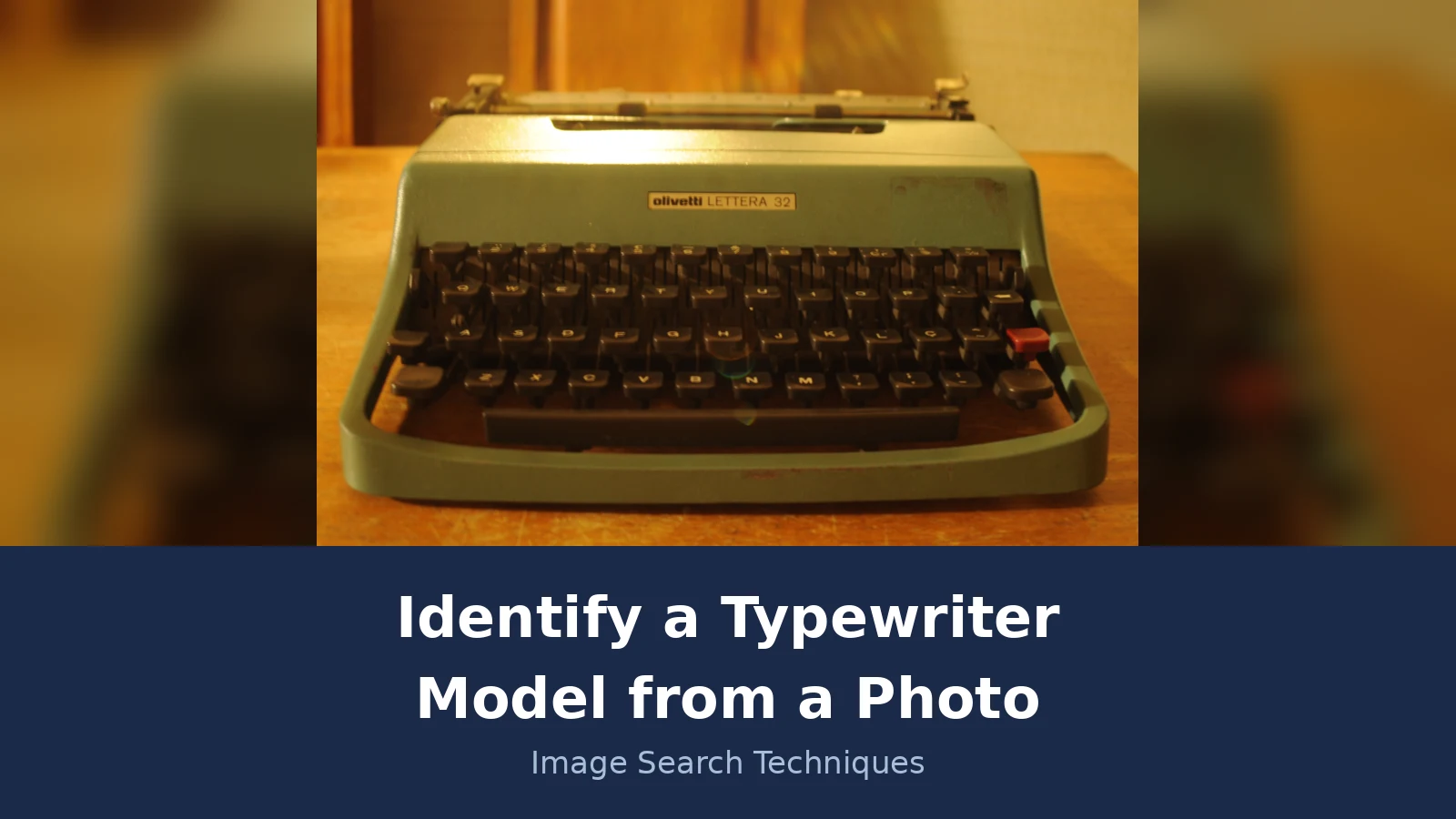
Here is the whole method run on a real photo, with the real results, including the failure. The photo is a Wikimedia Commons file, “Olivetti Lettera 32.JPG”, taken by a photographer called Feen on 5 January 2010 and uploaded on 5 January 2011. It is licensed CC BY-SA 3.0, which means it can be reused with credit, and it is the same photo used on the English and Portuguese Wikipedia pages for the Olivetti Lettera 32. It shows a green-grey portable machine from the front, on a wooden table, with the badge reading “olivetti LETTERA 32” in the centre of the body. The file description calls it a Brazilian Portuguese model, which fits the keyboard layout visible in the photo. The original file is 4,288 by 2,848 pixels and 2.96 MB. The photo is the source for the banner of this article, and you can see the original file on the Commons page for Olivetti Lettera 32.JPG.
Step one was the badge. It reads “olivetti LETTERA 32”, clear and legible in the centre of the machine, so the brand and the model name are both on the front. Step two was the serial number, and here the photo itself hits its limit. The serial number on a Lettera 32 sits under the ribbon cover, by the right ribbon spool, and the cover is closed in this photo. No serial number is visible, so no production year can be read from this one image. That is an honest limit, and it is exactly why the method asks for a second photo with the cover lifted. A single front view names the model. It cannot date the machine.
Step three was the reverse search, run live on 21 November 2026. The results were mixed, and the mix is instructive.
- Google Lens failed. Four attempts, using the full-size image link twice, the paste-image-link route and an 800-pixel thumbnail, all ended with “Something went wrong. No image at the URL. Try again with a different URL or image.” The Lens AI Overview stayed on “Thinking” and then showed “Expired visual search”. No exact matches, no similar images, no identification, because Lens could not fetch the file at all. That is a failed lookup, not a zero, and it is written down as one.
- TinEye found 12 exact matches out of the 86.8 billion images it reports searching, first indexed on 2 November 2012. The top match was the English Wikipedia article for the Olivetti Lettera 32, followed by the Commons file page itself, then a 220-pixel Wikipedia thumbnail first indexed on 7 March 2014, and then answers.com, wikivisually.com, wikiwand.com, alchetron.com, two academic mirror sites, a Pinterest pin and a second Wikipedia entry. TinEye named no model itself. The identification came from the top match, whose title and address both say Olivetti Lettera 32.
- Yandex named the model. Its tags under “Image appears to contain” read “olivetti lettera 32 typewriter”, “olivetti lettera 32” and “1970s olivetti lettera 32 typewriter”. Its Sites tab listed 12 sites carrying the image, topped by the Wikipedia file page, and it showed 40 similar images on the first load, including the exact image itself. It also listed 12 sizes the image exists in, from 4,288 by 2,848 down to 250 by 166. For this photo, Yandex was the only engine that named the model outright.
Step four was the marks table, the check that turns a search result into an identification. Run through it mark by mark, and only accept the model when the marks agree with each other.
| Mark to check | What to look for | What it proves |
|---|---|---|
| Brand badge | The maker name on the front, such as “olivetti” | The brand, and the first clue to the model family |
| Model name on the front | The model name beside the badge, such as “LETTERA 32” | The model name as sold, which the serial number must then confirm |
| Serial number location | The stamped number, on a Lettera 32 under the ribbon cover by the right spool | The production year, once checked against the serial table |
| Key layout | Key shape, colour and layout, including any language-specific keys | The market the machine was made for, such as Brazilian Portuguese |
| Case style | Carrying case shape, latches, labels and any stencil on the lid | Whether the case matches the model, and whether it is original |
| Mechanism | Portable or standard, manual or electric, ribbon and carriage style | Whether a rebadged machine is really the model the badge claims |
On the Lettera 32 photo, the badge, the model name, the key layout and the portable mechanism all agree, and the reverse search agrees with them. The serial number is the one mark missing, because the cover is closed. The verdict is therefore “Olivetti Lettera 32, model confirmed by badge and search, year unknown until the serial number is read”. That is a proper identification with a stated gap, which is far more useful than a confident guess. The same table works for any machine, and the same discipline applies: accept the model only when the marks agree.
The same photo-first approach works for other machines with a badge and a serial number. A piano, for example, is identified the same way, from the maker name on the fallboard and the serial number inside the case, and our guide to identify a piano model from a photo runs the same check on a different instrument.
Answer capsule: On the Lettera 32 photo, Yandex named the model, TinEye found 12 exact matches topped by the Wikipedia article, and Lens failed to fetch the file, while the badge and the mechanism agreed and the hidden serial number left the year unknown.
How do I confirm the model on the Typewriter Database?
The Typewriter Database, at typewriterdatabase.com, is the reference most collectors use, and it is the place to confirm a serial number. At the time of writing it lists 1,073 brands, 3,486 models and 26,142 galleries of machines. It does not work the way most people expect, so it is worth knowing the route before you open it.
There is no box to type a serial number into. On the home page the field reads “Select Typewriter Brand or Type Name”. Choose the brand, which opens that brand’s serial-number page, then find your serial number by hand in the brand’s table. The table columns show the model and serial range, the year, the month and the day where known, plus remarks and a reference. It is a manual lookup, and it is slower than a search box, but it is also more honest, because it shows you the ranges and the gaps instead of giving you a single answer.
For Olivetti, the serial page is the Olivetti typewriter serial numbers page on the Typewriter Database, and its table was last edited on 20 January 2025. The Lettera 32 ranges for machines made at Ivrea are shown below, checked on 21 November 2026. Read them as ranges, not as exact dates: a serial number inside a range belongs to that year, and a serial number on a boundary needs a second check, such as the gallery entry for a machine with a nearby number.
| Serial number range (Ivrea) | Year | Note |
|---|---|---|
| 2,000,000 to 2,300,000 | 1964 | First year of Lettera 32 production at Ivrea |
| 2,300,001 to 2,600,000 | 1965 | |
| 2,600,001 to 2,800,000 | 1966 | |
| 2,800,001 to 3,000,000 | 1967 | Includes serial 2941517, the gallery machine quoted above |
| 3,000,001 to 4,000,000 | 1968 | |
| 4,000,001 to 5,000,000 | 1969 | |
| 5,000,001 to 5,600,000 | 1970 | |
| 5,600,001 to 6,100,000 | 1971 | |
| 6,100,001 to 6,600,000 | 1972 | |
| 6,981,040 | 1973 | Single documented number, not a range |
| 7,500,000 | 1974 | Extrapolated guess on the database page, not a factory record |
| 8,100,000 | 1975 | Documented example, serial 8140630 |
| 8,600,000 | 1976 | Extrapolated guess on the database page, not a factory record |
| 9,100,000 and up | 1977 | Includes serial 9172939, the gallery machine quoted above |
Two warnings sit on the same page and both matter. First, the database has separate sections for machines made at Barcelona in Spain and at Glasgow in Scotland, including one Glasgow machine from 1980, serial number 12505966, so check which factory your machine came from before you use the Ivrea ranges. Second, after 1978 Olivetti changed its serial system so the numbers were no longer necessarily in chronological order, and no serial numbers are given for 1979 or later. If your Lettera 32 has a serial number above the 1977 range and no factory mark you can read, the database cannot date it, and you should say so rather than guessing a year from the styling.
Answer capsule: Pick the brand on the Typewriter Database, find your serial number by hand in that brand’s table, and read the year from the range, remembering that the 1974 and 1976 Lettera 32 figures are extrapolated guesses and that no numbers are given after 1978.
What can a photo not tell you about a typewriter?
Three things, and each one is a trap for a new buyer. First, a photo cannot tell you the value. A photo match is not an appraisal, and this article gives no value estimate, because value depends on condition, completeness, the case, the ribbon, the market on the day and whether the machine has been serviced. Two machines of the same model can sell for very different amounts, and a photo hides the difference. If you need a value, ask a dealer or an auction house that has seen the machine in person, and expect them to want the serial number and the condition, not just a photo.
Second, a photo cannot tell you the condition of the mechanism. A machine can look clean in a photo and still have a frozen carriage, a dead spring or a type bar that sticks. The functional test in the VintageTypewriters.co guide, carriage, keys, ribbon, bell and platen, is the right check, and it has to be done by hand. Never buy a machine on a photo alone if you can inspect it first, and never force a stuck part during an inspection.
Third, a photo cannot prove the machine is genuine in every detail. Badges can be swapped, cases can be mixed up between models, and a machine can be assembled from two broken machines. A photo can only suggest a model, and the serial number confirms it. If the badge, the serial number and the mechanism disagree, the machine has a history that a photo will not explain, and that is a reason to ask more questions, not to pay more.
Answer capsule: A photo cannot value a typewriter, cannot test its mechanism and cannot prove every part is original, so use the photo to identify the model and inspect the machine in person before you judge its condition or its price.
What should I do once I know the model?
Write the identification down in one place, with the evidence beside it. A good note has five lines: the model name as the badge reads it, the serial number exactly as stamped, the factory if you know it, the year from the serial table, and the reverse search results with the dates you ran them. Add the photo file names, so anyone reading the note can find the pictures. That note is what a repairer, a dealer or a fellow collector will ask for, and it is far more useful than a single sentence saying “it is a Lettera 32”.
Then decide what you actually need. If you want a ribbon, search for ribbons by the model name, not by the brand alone, because ribbon sizes differ between models. If you want a manual, search for the model name plus the word “manual”, and check the serial range, because manuals changed between production years. If you want parts, quote the serial number to the supplier, because a part that fits a 1964 machine may not fit a 1977 one. If you want to sell, photograph the machine the same way you photographed it for identification, and quote the model and the serial range in the listing, not a value you read off a photo match.
Finally, keep the photos. The front view, the badge close-up and the serial number photo are the record of the machine as you found it. If you ever need to ask a forum or a collector for help, those three photos, with the serial number quoted as a range, are the whole question. And if the next machine you find has no badge at all, the same method still works: photograph what is there, search the photo, and let the serial number and the mechanism do the talking.
Answer capsule: Record the model, the exact serial number, the factory, the year and the search results in one note, then use the model name for ribbons, manuals and parts, and quote the serial range rather than a guessed value if you sell.
FAQs
Can I identify a typewriter model from a photo alone?
Yes, often, but only as a suggestion. A clear front photo plus a badge close-up usually names the brand and model, and a reverse search can confirm it. The serial number is still needed for a confirmed identification and a production year, so treat a photo-only answer as a likely match, not a proven one.
Where is the serial number on an Olivetti Lettera 32?
Under the ribbon cover, stamped on the frame by the right ribbon spool. Lift the cover and look beside the right spool for six or seven digits stamped into the metal. If the cover will not lift, do not force it. Photograph the number close up and write it down exactly before you check the serial table.
What is the best reverse image search for a typewriter photo?
Yandex Images, in our live test. It named the model from the photo, listed 12 sites carrying the image and showed 40 similar images. TinEye found the same 12 exact matches and dated them, which helps when you want to know where a photo first appeared. Google Lens failed to fetch the image link, so upload the saved file instead.
Can a badge alone identify a typewriter model?
No, not safely. Shops sold rebadged machines under their own names, badges can be swapped during a repair, and the same model was often sold under different names in different countries. The badge is a strong clue, and it usually names the brand and model, but the serial number must agree with it before the identification is confirmed.
How do I date a typewriter from its serial number?
Find the serial number, then look it up in the brand table on the Typewriter Database. Pick the brand, open its serial page and find your number in the ranges by hand, since there is no type-in search box. A number inside a range belongs to that year, and Olivetti numbers after 1978 no longer run in order.
Can I find the value of a typewriter from a photo?
No. A photo match is not an appraisal, and no value can be read from a picture alone. Value depends on condition, completeness, the case, the ribbon and whether the machine has been serviced, and a photo hides all of that. Ask a dealer or auction house that has seen the machine in person.






