🔎 Reverse Image Search
Image search techniques made simple: upload a photo or paste a URL and search 6 engines at once. 100% free, nothing stored.
🔒 Your image is never stored on our servers longer than 24 hours and is never shared.
You have a pair of headphones with no box, no receipt and no clear name on them. Maybe you bought them second hand, found them in a drawer, or a seller sent you one photo and you need the exact model before you order ear pads, a charger or a replacement cable. The good news is that you can identify a headphone model from a photo in most cases, as long as the photo shows the right details and you check what it tells you against the label code.
Short answer: photograph the ear cups, headband, yoke and any printed text, then run the photo through a reverse image search and read the label code inside the ear cup or on the box. The photo points to a model family. The label code confirms the exact model. One clear photo is rarely enough, so take several angles before you trust any single result.
What can a photo actually tell you about a pair of headphones?
A photo can tell you a lot, but it cannot tell you everything. The shape of the ear cups, the curve of the headband, the position of the buttons and the colour of the finish all narrow the field. A brand logo tells you the maker. Printed text tells you far more than shape alone. What a photo cannot do on its own is prove the exact model, because several models in one family often share the same shell and differ only in the parts you cannot see, such as the driver, the Bluetooth chip or the battery.
That is the first rule of this whole method. Type is not model. Over-ear, on-ear and in-ear are types. Wireless, wired and noise cancelling are features. Sony WH-1000XM3 is a model. A tool that tells you a pair is over-ear and noise cancelling has answered a different question from the one you asked.
Use the table below as your checklist. Work through it mark by mark, and note what you can see and what is missing before you search.
| Mark to check | Where to look | What it tells you |
|---|---|---|
| Ear cup shape | Front and side view of each cup | Model family and cup size |
| Headband shape | Top view, padding and stitching | Family and generation |
| Yoke and slider | Where the cup meets the band | Brand and build generation |
| Buttons and ports | Edge of the right and left cups | Features and model range |
| Cable and connector | Plug, jack and cable entry | Wired or wireless, jack type |
| Printed text | Cup, yoke, inside the cushion | Brand, model code, serial |
| Label code | Inside ear cup, box, case | Exact model, confirms the match |
The last row is the one that matters most. Everything above it suggests a model. The label code confirms it. If you cannot see a label code in the photo, ask the seller for a photo of it, or look for it yourself on the inside of the ear cup, under the cushion, or on the original box.
How do you photograph headphones so the model can be identified?
Answer capsule: take five clear photos, one of each cup from the front, one of each cup from the side, one of the headband, one of the yoke and slider, and one close up of every bit of printed text you can find.
A blurry photo is the most common reason an identification fails. If the photo is soft or dark, the text on the cups turns into a smudge and the search engines match on shape alone, which is how you end up with the wrong model from the same family. Use daylight or a bright lamp, hold the camera still, and fill the frame with the headphones rather than the room around them.
Photograph the ear cups first, from the front and from the side. The cup shape is the strongest visual mark, and a side view shows the depth of the cup and the position of the buttons. Then photograph the headband from above, including the padding and any stitching. Next, photograph the yoke, which is the forked arm that joins each cup to the band, and the slider above it. Brand names often sit here, and on some models so does a model code.
Then photograph every bit of printed text. Look on the outside of the cups, on the inside of the yoke, under the ear cushion, and on any label inside the case. Also photograph the cable and its connectors, including the plug at the end and the jack where the cable enters the cup. A USB-C port, a 3.5 mm jack or a fixed cable each point to a different set of models. If the headphones are wireless, photograph the charging port as well.
Finally, photograph the box and the case if you still have them. The box carries the full model name, and the case sometimes carries a label with the model code. A photo of the box alone is often enough to confirm a model that the headphones themselves leave uncertain.
How do you reverse image search a headphone photo?
Answer capsule: upload your best photo to Google Lens and Yandex Images, and try TinEye as well, then compare what each engine says instead of trusting the first answer you see.
Start with Google Lens. Open Lens, upload the clearest photo you have, and look at the visual matches and the exact matches separately. Visual matches show similar looking products, which is useful when the photo is a common product shot. Exact matches show pages that use the very same image, which is often how you find the original listing or the file page that names the model.
Then try Yandex Images, which is often stronger than Lens on product photos, and TinEye, which searches for exact copies of the image across the web. The three engines do not index the same pages, so one engine can name the model while another finds nothing at all. That difference is normal. It is not a sign that the model does not exist.
Read the results with care. Look for the model name in the page titles of the top results, and check whether several independent pages agree. If the top result names one model and the next five name another, do not take the top result at face value. Open the pages, compare the photos, and check the model code on the maker’s own support page before you decide. If you want the full method, start with our guide to how to reverse image search and then work through the steps below on your own photo.
Worked example: a Sony WH-1000XM3 photo through three engines
Answer capsule: one real photo, three engines, three different answers, and only the label check on the maker’s own page settled it.
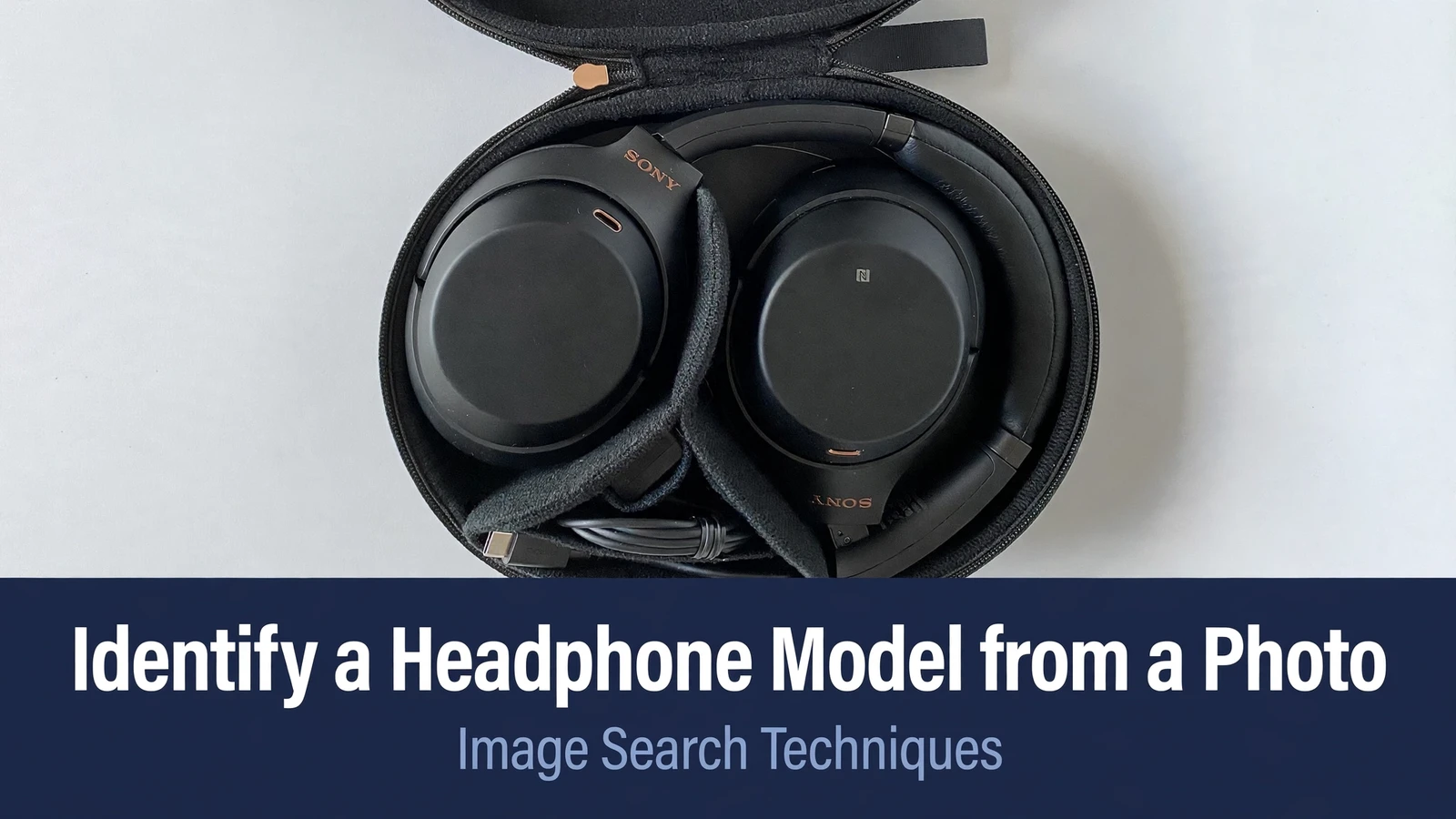
For this test I used a real photo from Wikimedia Commons, file name Sony-WH-1000XM3-kabellose-Bluetooth-Noise-Cancelling-Kopfhoerer.jpg, a CC BY 4.0 photo by www.digitalpush.net dated 29 July 2020. It shows a pair of black Sony WH-1000XM3 headphones sitting in their open case, photographed from above at 3024 by 4032 pixels. I uploaded the same file to Google Lens, TinEye and Yandex Images on 22 November 2026 and recorded exactly what each engine returned.
Google Lens gave a partial and confusing answer. Its headline said the headphones appeared to be black Sony wireless noise cancelling over-ear headphones resembling the Sony WH-1000XM4 or Sony WH-1000XM3, naming the wrong successor model first and the correct model second. In the visual matches, the first two cards were both WH-1000XM4 listings, the correct WH-1000XM3 first appeared third, and most of the remaining cards were WH-1000XM3 listings. The exact source file appeared sixth in the visual matches and third in the exact matches tab, where the top two entries were WH-1000XM5 review pages reusing the same image. Lens found the right image and the right model, but its headline led with the wrong model.
TinEye found nothing at all. It reported 0 matches after searching over 86.9 billion images, and said it had probably not yet crawled any page where the image appears. There were no results naming any model, only unrelated sponsored images below the result. A zero from TinEye is a zero, and it proves nothing about the headphones. It only means TinEye has not indexed a copy of this photo.
Yandex Images was the clearest of the three. Its tags named the correct model directly, listing “sony wh 1000 xm 3” among the tags, and the exact Wikimedia Commons file was the first similar image and the top site listed with information about the image. It also listed seven sizes of the same image, from 3024 by 4032 down to 180 by 240, which is a strong sign that the file is widely reused and correctly labelled.
| Engine | Result | Correct model named? |
|---|---|---|
| Google Lens | Headline names XM4 first, XM3 second | Yes, but second |
| TinEye | 0 matches | No, no results |
| Yandex Images | Tags name WH-1000XM3, exact file first | Yes, clearly |
There is one more honest correction in this test. The model name WH-1000XM3 is not printed on the outside of the ear cup or the yoke in this photo. What you can see on the slider above the cup is only the brand name SONY in gold, plus the L and R marks. Sony’s own Help Guide lists the parts of the WH-1000XM3, including the slider, headband, touch sensor control panel and USB Type-C port, and none of those parts carries the model name on the outside. The identification in this test came from the reverse image matches to the named Wikimedia file and from Sony’s own support page, which is titled WH-1000XM3. That is why the label code matters so much. The outside of the headphones gives you the brand and the family. The code inside the cup, on the box or on the support page gives you the model.
Where is the label code, and how do you read it?
Answer capsule: look inside the ear cup under the cushion, on the inner side of the yoke, on the box, and on any label inside the case, and never publish a serial number you find there.
On most over-ear headphones the model code sits in one of four places. The first is a small printed label inside the ear cup, often under the removable cushion. Lift the cushion gently and look for a code printed on the driver cover or on a sticker. The second is the inner face of the yoke or slider, where some makers print the model beside the brand. The third is the original box, which carries the full model name and a barcode label with the model code. The fourth is the carry case, which sometimes has a small label stitched or stuck inside.
Read the code exactly as printed, including every letter and number, and type it into the maker’s support page. A single wrong letter can take you to a different model, and two models in one family can differ by one character. If the code is worn or partly rubbed away, photograph it from several angles and try each reading you can make out.
Two warnings belong here. First, never publish a serial number. If you share a photo of the label in a forum or a listing, blur the serial number first. A serial number is unique to one pair, and it can be misused. The model code is enough for identification. Second, remember that fakes copy markings. A counterfeit pair can carry a printed model code that looks right, so a matching photo and a matching code are not proof of authenticity on their own. If the price is far below the usual price, the seller cannot show the box, and the build quality looks wrong, treat the pair with suspicion even when the markings match.
How do you confirm the model on the manufacturer’s support page?
Answer capsule: search the model code on the maker’s own support site, then check that the photos, buttons, ports and specifications on that page match the pair in your photo.
Take the model code you found and search it on the manufacturer’s own support website. For the worked example above, Sony’s official support page for the WH-1000XM3 is titled with the model name and lists the specifications, the Help Guide, the firmware updates and the manuals for that exact model. That page is the anchor for the whole identification, because it comes from the maker and not from a shop listing or a forum post. You can open Sony’s support page for the WH-1000XM3 and check the model against the Help Guide linked there, which names the headset in full.
Once you are on the right support page, compare the details. Check the shape of the cups and the position of the buttons against the product photos. Check the ports, because a USB-C port and a micro-USB port belong to different generations. Check the colour options, because a colour that the maker never sold is a warning sign. Check the specifications for weight, battery life and Bluetooth version if you can test the pair. If every visible detail matches and the model code matches, you have a confirmed identification. If the support page shows a different button layout or a different port, you have the wrong model, however similar the photo looked.
If the maker’s site has no support page for the code you found, that is useful information too. It may mean the code is incomplete, the model is very old, or the pair is not genuine. Try the code with and without spaces, and try searching the code together with the brand name on a general web search before you give up.
What if the photo only gives you the brand and the shape?
Answer capsule: name the model family, list the two or three models it could be, and ask for a photo of the label code before you buy parts or list the pair for sale.
Sometimes the photo gives you the brand and the shape and nothing else. The cups are right, the headband is right, and there is no readable text anywhere. In that case, say so plainly and narrow the field instead of guessing. List the models that share that shape, and note what would separate them, such as a button, a port or a colour. A careful shortlist is far more useful than a confident wrong answer, and it tells you exactly which extra photo to ask for.
If you are buying second hand, ask the seller for a photo of the label inside the ear cup and a photo of the box. A genuine seller with the real pair can usually provide both in a minute. If the seller refuses or says the label has worn off, lower the price you are willing to pay, because you are buying an unidentified pair and the ear pads, cables and parts you order may not fit.
If you are selling, the same rule works in your favour. A listing with a clear photo of the label code and the box sells faster and for more money than a listing with one dark photo and a guessed model name. Buyers who can verify the model before they pay are far more likely to pay. The same care applies to other gadgets too. Our guide to identify a phone model from a photo uses the same label-first method, and the watch identification guide shows how a case back code does the same job for a watch.
Why do headphone type tools not answer this question?
Answer capsule: type classifiers label the shape of a headphone, not the model, so they cannot tell a WH-1000XM3 from its successor.
The top competitor for this question is Nyckel, whose page offers a pretrained classifier that identifies headphone types using AI. It is an honest tool for the job it does, but that job is not model identification. It classifies an uploaded image into type labels such as over-ear, on-ear, noise cancelling and gaming, and it does not search the web for the same image or name a brand or a model. Its own page says the classifier can identify 10 different types, while the label list shown on the same page contains 16 labels, and it claims 97 percent accuracy on its sample set. Its worked example is a sample JSON response, not a real photo of a named model worked through.
That gap is exactly why a reverse image search guide is needed. A type classifier can tell you a pair is over-ear and noise cancelling, which narrows the field to hundreds of models. A reverse image search, followed by a label code check, can name the one model in your photo. Use type tools for sorting a catalogue, and use the method in this article when you need the exact model. The same split shows up across other gadgets. Our laptop model guide explains why a screen size is a type and not a model, and our main find an item by image guide covers the same label-first approach for anything you can photograph.
Common mistakes that waste your time
Answer capsule: one blurry photo, one engine, and one top result are the three mistakes that cause most wrong identifications.
The first mistake is trusting a single blurry photo. If you cannot read the text and cannot see the buttons clearly, take better photos before you search. A search run on a poor photo returns matches on shape alone, and shape alone points to a whole family.
The second mistake is trusting one engine. As the worked example showed, Google Lens led with the wrong successor model, TinEye found nothing, and Yandex named the model correctly. Any one of those answers on its own would have misled you. Run at least two engines and compare them.
The third mistake is reading the type as the model. Over-ear, noise cancelling and wireless describe what the headphones are, not which model they are. If a tool or a listing gives you only those words, you do not have an identification yet.
The fourth mistake is ignoring the label code. The photo gets you close, and the code finishes the job. If you skip the code, you are guessing, however good the photo match looks. And the fifth mistake is forgetting that fakes copy markings. A copied logo and a copied model code do not make a pair genuine, so weigh the price, the seller and the build quality alongside the markings.
Work through the marks table, photograph every angle, search with two or three engines, and confirm the code on the maker’s own support page. That is the whole method, and it works for headphones, phones, watches and laptops alike. Start with the photo you have, and let the label code have the last word.
Can Google Lens identify a headphone model from a photo?
Yes, often, but not always correctly. In our live test on a Sony WH-1000XM3 photo, Lens named the right model second, after naming the wrong successor model first. Use Lens as a starting point, compare its answer with Yandex Images, and confirm the exact model with the label code on the maker’s support page.
Where is the model number on headphones?
Look inside the ear cup under the removable cushion, on the inner face of the yoke or slider, on the original box, and on any label inside the carry case. The code is usually printed on a small sticker or moulded into the plastic. Read it exactly, including every letter and number, and search it on the maker’s support site.
Can you identify headphones from a photo with no label visible?
You can usually narrow it to a model family from the cup shape, headband, buttons and ports, but you cannot confirm the exact model without the label code. List the two or three models that share the shape, note what would separate them, and ask the seller for a photo of the label inside the ear cup.
Does TinEye work for headphone photos?
Sometimes, but it often finds nothing. In our live test, TinEye reported zero matches for a widely used Sony headphone photo, even though the same image appears on many pages. A zero from TinEye means the engine has not indexed a copy of your image, not that the headphones do not exist. Try Yandex Images as well.
How do you tell a fake pair from a real one in a photo?
Check the markings, then weigh the price, the seller and the build quality. Fakes copy logos and model codes, so matching text alone is not proof. Look for sloppy stitching, wrong fonts, missing buttons and colours the maker never sold. Ask for photos of the box and the label code, and compare every detail with the maker’s official product page.
What photo should I ask a seller to send?
Ask for five photos: each ear cup from the front, each cup from the side, the headband, the yoke and slider, and a close up of the label code inside the ear cup. Ask for the box and the cable connectors too. A seller who can provide these quickly is more likely to be selling the genuine pair.