🔎 Reverse Image Search
Image search techniques made simple: upload a photo or paste a URL and search 6 engines at once. 100% free, nothing stored.
🔒 Your image is never stored on our servers longer than 24 hours and is never shared.
A message lands in your inbox. It says your Netflix payment failed, your account is on hold, and you must update your billing details before a deadline. It looks right. It has the red logo, the right colours, and a button that says Update Billing Info. Most people would click it. This article shows you how to check that message properly first, using one real example worked through line by line, and a reverse image search of the screenshot itself.
Short answer: a fake Netflix payment failed message is a phishing email or text that invents a billing problem and pushes you to a lookalike page through a button or link. Netflix says it will never ask for your card number, bank details or password by email or text, and never asks for payment through a third party site. Do not click. Open the Netflix app or type netflix.com yourself and check your account there.
Phishing means a message that pretends to be from a company you trust so you hand over your login or card details. The message itself does the damage. The page it leads to only collects what you type. That is why the check in this article starts with the message, not the link.
What does a fake Netflix payment failed message look like?
The pattern barely changes. A subject line says your payment failed, your membership is on hold, or your billing details need updating. The body says Netflix is having trouble with your current billing information and your account may be suspended. A deadline follows, usually 24 hours, 48 hours, or a named date a few days away. A big red button offers the fix. The whole message is built to make you act before you think.
That is also why it works. A failed payment is ordinary. Cards expire. Banks replace accounts. A recurring charge gets blocked for no clear reason. The scam borrows a believable problem, then supplies a quick solution: one button, one short form. The pressure does the rest. MalwareTips, the strongest guide on this exact scam, puts it well. Its page walks through the same six-step flow, from the failed-payment email to the fake sign-in form, the card form, the bank code request, and the success page that sends you back to the real Netflix site so nothing looks wrong.
But MalwareTips uses reconstructed screenshots, not a real one. It never reverse searches the image, and it never tears a real message down line by line. That is the gap this article fills. Everything below is worked from a real screenshot of a real phishing email, documented by PCRisk, and every check is one you can repeat on any message in your own inbox.
The answer capsule for this section is simple. A payment failed message is fake when it asks you to fix billing through its own button or link instead of through your account. Netflix never does that.
Is this screenshot a real Netflix email?
No. The screenshot below is a phishing email, documented by PCRisk on 4 April 2025 as sample 3 of its “Netflix – Update Your Payment Details” campaign. It is shown here as a warning example, with the recipient address blurred in the original. The email arrived in Mozilla Thunderbird on 28 March 2025 at 1:50 PM. Read it line by line and the tells stack up fast.
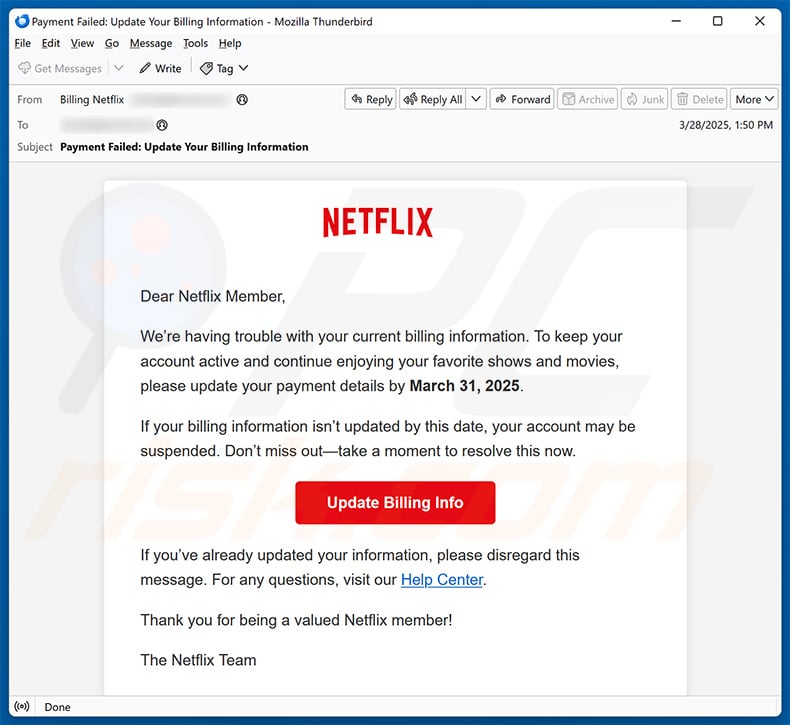
Start at the top. The From line shows the display name “Billing Netflix” and no visible email address. A display name is free text. Anyone can set it to anything, and mail apps show it in large type while the real address sits behind it. A real Netflix billing message comes from a netflix.com address. Here the sender hides behind a name, and that alone is enough to stop and check.
The greeting is “Dear Netflix Member,”. Netflix knows your name. It puts it in the messages it sends you. A greeting with no name tells you the sender does not know who you are, which is exactly what a bulk campaign looks like. It is not proof on its own, because some genuine bulk mail is generic too, but it belongs on the suspicious side of the ledger.
The body says Netflix is having trouble with your current billing information and asks you to update your payment details by March 31, 2025. The email arrived on 28 March. That gives you three days. Three days is not a long deadline, but it is not the same as “within 24 hours or your account is gone”. The pressure here is softer than in most versions, which makes it more dangerous. It reads like a polite reminder, and polite reminders get clicked.
Then comes the threat, kept quiet. “If your billing information isn’t updated by this date, your account may be suspended.” Note the word “may”. The scammer wants you worried but not suspicious, so the threat stays conditional. A real billing notice from Netflix would tell you what actually happened to your payment, which card was charged, and what your plan costs. This message gives you none of that. No plan name, no card ending, no billing date, no amount. There is nothing in it that only Netflix would know.
The red “Update Billing Info” button is the trap. Hovering over it on a computer would show the real destination, and in every documented version of this campaign it points somewhere that is not netflix.com. The button text says nothing about where it goes. That is the whole point of a button: it hides the address. Never judge a button by its label. Judge it by its destination, and never click to find out.
The last lines try to sound official. “If you’ve already updated your information, please disregard this message. For any questions, visit our Help Center.” The Help Center link is text, not a visible address, so you cannot tell where it leads without clicking. A genuine Netflix message links to help.netflix.com. This one borrows the words and hides the address.
Here is the read table for this message. Use it on any payment failed message you receive.
| What to read | What this message shows | Verdict |
|---|---|---|
| From line | Display name “Billing Netflix”, no visible address | Fail. A name is not an address. |
| Greeting | “Dear Netflix Member”, no name | Fail. Netflix knows your name. |
| Account details | No plan, no card ending, no billing date, no amount | Fail. Nothing only Netflix would know. |
| Deadline wording | Update by March 31, 2025, or the account “may be suspended” | Fail. A deadline plus a threat is the pressure tactic. |
| Button destination | “Update Billing Info” hides where it goes | Fail. A button label proves nothing. |
| Help Center link | Link text with no visible address | Fail. The real Help Center is help.netflix.com. |
Five of the six rows fail, and the sixth is not a pass, it is a missing detail. One failed row would be enough to check the message properly. Five is a verdict. The message is fake, and the safe move is to delete it after forwarding it to Netflix, which the reporting section below covers.
One more detail matters. PCRisk documented newer variants of the same campaign in November 2025, with the same wording pattern and a different subject line. The campaign keeps running because the template keeps working. The date on the message does not make it old or harmless. It makes it proven.
The answer capsule for this section is simple. A real Netflix billing message names your plan, your card and your billing date. This one names none of them.
What did a reverse image search find?
A screenshot can be checked the same way as any other photo. If the image has been seen before, a reverse image search will find where. If it has not, that tells you something too. I uploaded the PCRisk screenshot to Google Lens, TinEye and Yandex Images on 21 November 2026 and recorded exactly what each engine returned. The file was the same 790 by 725 pixel JPEG for all three.
Google Lens found one exact match. The match was the PCRisk article itself, “Netflix – Update Your Payment Details Email Scam”, which Lens dated 4 November 2025. That date is the page’s later update, not the sample date. The sample in the screenshot is dated 4 April 2025 on the PCRisk page, and the email inside it arrived on 28 March 2025. Lens also listed 60 visual matches on its first page, including Reddit threads about the same scam, a Facebook scam alert, and a YouTube report. Lens even recognised what the picture was. It described the email as resembling a phishing attempt or a security awareness training example rather than a verified message from Netflix, and it listed the same warning signs this article covers: the urgent billing threat, the generic greeting, the sender showing only “Billing Netflix”, and the red button that could lead to a fake login page.
TinEye found nothing. It searched over 86.8 billion images and returned zero matches, with no first indexed date because there was nothing to date. That is a genuine zero, not a failed search. The upload worked on the first attempt. TinEye simply has not crawled a page carrying this exact file. Its related images section showed sponsored stock thumbnails only, which are adverts, not matches. A zero on TinEye proves nothing by itself. It only means TinEye has not seen this file. Lens and Yandex both found it, so the image is plainly documented.
Yandex Images read the picture best. Its tags named the subject straight away: “from netflix”, “payment detail”, “your account”, “for netflix”, “fix netflix”. Its text recognition transcribed the Thunderbird email, including the sender, the date, the subject line, the greeting and the March 31, 2025 deadline. It found only one size, 790 by 725, which means no other copy at a different resolution turned up. It listed 20 similar images on the first page, led by the PCRisk article, and two sites with information about the image: the PCRisk article and a second write-up about a Netflix membership expiry phishing email.
| Engine | Exact matches | What it found |
|---|---|---|
| Google Lens | 1 | The PCRisk article, dated 4 Nov 2025 in Lens; 60 visual matches on page 1; Lens itself called it a likely phishing attempt. |
| TinEye | 0 | Genuine zero out of 86.8 billion images searched. No first indexed date. Sponsored thumbnails only. |
| Yandex Images | 1 size only | Only the 790 by 725 copy; 20 similar images; OCR read the full email text; 2 sites with information. |
What does this prove? Two things. First, the screenshot is a documented phishing example, not a real Netflix email. Two independent engines trace it to the same PCRisk article, and the third engine’s zero is explained by its own index, not by the image being genuine. Second, reverse image search works on screenshots of emails, not just on photos. If a message in your inbox looks familiar, save a screenshot and search it. If it matches a documented scam, you have your answer in a minute. Our guide to reverse image search a screenshot walks through the same three engines step by step.
The answer capsule for this section is simple. Two engines trace this screenshot to a documented phishing campaign. A zero on the third engine is an index gap, not a clean bill of health.
How do I check my Netflix billing without clicking the link?
The rule is short. Never check a billing problem through a link that arrived in a message about the billing problem. Check it through a route you opened yourself. Netflix says the same thing in its own help page: do not click a link if you are not sure about it, go directly to the company website instead. Here is the check, in order.
- Close the message. Do not click the button, do not click the Help Center link inside it, and do not open any attachment. Closing it costs nothing. The real state of your account is not inside that email.
- Open Netflix yourself. Use the Netflix app on your phone or TV, a bookmark you saved yourself, or type netflix.com into your browser address bar. Sign in there. If there is a real billing problem, it will be visible inside your account. A failed payment shows up as a failed payment. A message that only exists in your inbox does not.
- Look at the payment method on file. Inside your account, check which card is on file and whether the last payment went through. Compare the card ending and the billing date with what you know. The fake message gave you no card ending and no billing date to compare against, which is itself a tell.
- Check your card statement separately. Open your bank app or statement and look for the Netflix charge. A real failed payment may not appear at all, because nothing was charged. An alleged charge or refund that does appear should be checked with the bank, not through a screenshot in an email. If the statement shows the usual monthly charge going through normally, the message is lying.
- Hover before you ever click. On a computer, hold the mouse over a button without clicking and read the address in the status bar. On a phone, use the mail app link preview. If the address is not netflix.com, or it is shortened, misspelled, or on an unrelated domain, stop. A padlock in the address bar means the connection is encrypted. It does not mean the site belongs to Netflix. Fake sites use HTTPS too.
That is the whole check. It takes about two minutes, and it answers the question with certainty instead of guesswork. If your account shows no billing problem and your statement shows the usual charge, the message was fake and you can delete it. If your account does show a problem, fix it inside the account, on a page you reached yourself. Either way, the button in the email stays unclicked.
One more habit helps. Save the habit, not the link. If a message claims a billing problem, your first move is always the app or the typed address, never the button. Scammers know this is the safe route, which is why every version of this message works so hard to stop you taking it. The deadline, the threat, the big red button, they all exist to keep you inside the message instead of inside your account.
The answer capsule for this section is simple. A real billing problem is visible in your account. If it is only visible in an email, it is not real.
How is the email version different from the text version?
It is the same scam in a shorter envelope. The text version arrives by SMS and says something like “Netflix: your payment was declined and your membership is on hold. Update your payment details within 24 hours to avoid cancellation”, followed by a link. The wording is shorter because a text has to be, but the structure is identical: a billing problem, a deadline, and a link that is not netflix.com.
Three differences matter. First, the text is harder to inspect. On a computer you can hover over a button and read the address. On a phone the link is a short string, and the full address only appears if you preview it carefully. Scammers count on that. Second, the sender is a number or a short name, not an email address, so the From line check does not work the same way. A message from an unknown number claiming to be Netflix is already suspicious. Netflix does not text you from a random mobile number about billing. Third, the text version often uses a link shortener or a lookalike domain, which hides the destination even further.
The check does not change. Do not tap the link. Open the Netflix app or type netflix.com yourself and look at your account. Forward the text to phishing@netflix.com, following the forwarding steps on Netflix’s help page, then delete it. On a phone you can also forward the text to 7726, the spam reporting number, so your carrier can act on the sender. The email and the text are one artefact in two channels. If you learn to spot one, you can spot both.
The answer capsule for this section is simple. Shorter message, same trick. The link is the test, and it fails the same way.
What should I do if I already clicked or entered my details?
Do not panic, and do not blame yourself. These pages are built by professionals and they catch careful people too. What matters now is speed, in this order.
- Leave the page and stop responding. Do not submit more information to finish the update. Close the tab. End any call that followed the message. Do not let a follow-up caller guide you back to the fake page.
- Change your Netflix password from the official site. Open netflix.com yourself, sign in, and set a new password that is strong and unique to Netflix. Then sign out of all devices from the account settings, so any session the scammer opened is closed. Check that the email address, phone number, plan and payment method on the account are still yours.
- Secure every account that reused the password. Start with your email account, because it can reset your other accounts. Change the password there too, and turn on two-factor authentication. Review active sessions and any forwarding rules you did not set.
- Call your card issuer. If you entered card information, use the number printed on the card or in your bank’s own app. Ask whether the card should be locked or replaced. Review pending and completed charges and dispute anything you did not authorise. If you entered a bank security code, tell the bank exactly what the code message said and which page asked for it. A code can authorise a transaction, add a card to a digital wallet, or approve a new device, so the bank needs the full story.
- Keep the evidence, then report it. Before you delete the message, save a screenshot and keep the sender address and any headers you can see. Our guide to saving evidence before you report explains what to keep and why. Then report it using the steps in the next section. Watch your statements for weeks, not days. Stolen details are often used later, not straight away, and a small test purchase can come before a larger charge.
Two warnings from the pattern are worth repeating. A fake success page that sends you back to the real Netflix site means nothing. The fake page cannot update your real account, so if your service keeps working, that only means there was never a real billing problem. And a follow-up call that knows your name, your card ending or your address is not proof of a real company. The caller knows those details because you just typed them into the fake page.
The same screenshot check works on other brands too. Our fake Apple ID locked screenshot check and our fake Microsoft account locked screenshot check use the same read table on a different logo, and the tells are the same: a display name instead of an address, a generic greeting, a deadline, and a button that hides where it goes. Once you have read one of these messages properly, the next one is easy to spot.
The answer capsule for this section is simple. Change the password, call the bank, keep the evidence, then report. Speed matters more than shame.
How do I report a fake Netflix message?
Reporting takes a minute and it helps other people. Netflix asks you to forward the email to phishing@netflix.com, then delete it. The steps are: do not click any links or open any attachments, forward the message to phishing@netflix.com, and delete the email. If your forward is rejected, that means Netflix has already received a copy of the phishing message, and you only need to delete it. For a text, forward it to phishing@netflix.com using your phone’s forwarding steps, then delete it. Netflix’s own help page, Phishing or suspicious emails or texts claiming to be from Netflix, gives the exact steps for Android and iPhone.
Then report it to the authorities. In the United States, report it to the Federal Trade Commission at ReportFraud.ftc.gov, which also gives you a step-by-step recovery plan. In the United Kingdom, report it to Report Fraud at reportfraud.police.uk. If the message arrived by text, forward it to 7726 as well so your carrier can act on the sender. If you lost money, tell your bank first and report to the police as well, because the bank and the report are separate jobs.
Keep a copy of what you sent. A screenshot of the message, the sender address, and the date you reported it are enough. If a charge appears later, that record is what your bank will ask for. For the full picture of how these messages fit together, our photo scams complete guide covers the whole family, from fake letters to fake screenshots, with the same read-first method used here.
The answer capsule for this section is simple. Forward it to phishing@netflix.com, delete it, then report it. A minute of reporting can save the next person a stolen card.
FAQs
Does Netflix send payment failed emails?
Netflix can send genuine billing notices, but it will never ask for your card number, bank details or password inside an email or text. A real billing problem is visible inside your account when you sign in through the app or netflix.com. If the message only exists in your inbox, treat it as fake and check your account directly.
How do I know if a Netflix payment email is real?
Read the From line, the greeting and the details. A real message comes from a netflix.com address, uses your name, and names your plan, your card ending and your billing date. A fake one hides behind a display name, says Dear Netflix Member, gives no account details, and pushes you to fix billing through its own button before a deadline.
What happens if I click a fake Netflix payment link?
The link opens a page that looks like Netflix and asks for your email, password and card details. Anything you type goes to the scammer. Some versions also ask for a bank security code, which can authorise a transaction or add a card to a digital wallet. A success page may send you back to the real Netflix site.
What should I do if I entered my details on a fake Netflix page?
Change your Netflix password from the official site straight away and sign out of all devices. Change the same password anywhere else you used it, starting with your email account. Call your card issuer from the number on your card and ask whether the card should be locked or replaced. Then report the message to Netflix and to the authorities.
How do I report a fake Netflix payment failed message?
Forward the email to phishing@netflix.com, then delete it. If the forward is rejected, Netflix already has a copy. For a text, forward it to phishing@netflix.com and to 7726 so your carrier can act on the sender. In the United States report it to the FTC, and in the United Kingdom report it to Report Fraud.
Will Netflix suspend my account if I ignore the email?
No. Ignoring a fake email cannot suspend your account, because the email was never from Netflix. A real billing problem shows inside your account, and Netflix keeps retrying the payment while it is unresolved. If your account shows no billing problem and your statement shows the usual charge, the message was fake and deleting it is the right move.