


🔎 Reverse Image Search
Image search techniques made simple: upload a photo or paste a URL and search 6 engines at once. 100% free, nothing stored.
🔒 Your image is never stored on our servers longer than 24 hours and is never shared.
Short answer: To check a Grindr profile photo, capture it, crop it to the face, and reverse-search it on Google Lens, TinEye and Bing. A photo that appears under another name, on a stock site or a model’s page is a red flag. Score the photo result with the profile and the chat, and do not meet until the score is clean.
Grindr is different from most dating apps when you want to check a photo, and the difference is practical, not technical. There is no profile link to paste into a checker, because Grindr profiles do not have shareable web addresses. The only way to test a photo is to capture it from the app yourself, and since January 2026 Grindr blocks screenshots of photos sent in chat on mobile. This guide works inside those limits: how to get the photo, how to run it through three reverse-search engines, how to read the results, and how to score the whole profile before you meet.
One boundary matters before you start. A reverse search tells you where a photo appears online. It does not tell you who the person in front of you is, and a match is not proof of identity in either direction. Use the check for your own safety before a meeting, keep the photo to yourself, and do not republish anyone’s pictures. If the photo turns out to belong to a real person, the right move is a report, not a message to that person.
What is a Grindr fake profile?
A Grindr fake profile, often called a Grindr catfish, is an account that uses photos of someone else to look real. The person behind it may be running a romance scam, stealing intimate photos, or impersonating a real person to send strangers to that person’s home or workplace. The photos are usually the giveaway, because a scammer needs a believable face and the easiest way to get one is to take it from somewhere else: a model’s portfolio, a stock photo site, another person’s social media, or a previous victim.
Grindr has one check of its own, and it is weaker than it looks. The app offers optional selfie verification, which puts a badge on the profile, but the badge only shows that the account holder took a selfie when asked. It is not government-ID identity proof, and Grindr does not run universal ID verification. A badge means the face in the selfie matched the profile photos at that moment. It does not mean the name is real, the age is real, or the person is who they claim to be, so a badge is never a reason to skip the photo check. Our guide to face search and photo privacy explains the same limit across dating apps, and our generic guide to spotting a fake dating profile covers the wider method this article does not repeat.
The scale of the problem is real. The FTC’s Consumer Sentinel Network recorded 55,604 romance scam complaints in the first nine months of 2025, up 22% on the same period of 2024, with reported losses above $1.16 billion and a median loss of $2,218 in the third quarter. Most victims are not careless; they are patient, trusting people who were shown a convincing face. Checking the photo before you meet is the cheapest defence there is.
How do you get a Grindr profile photo to check?
Because Grindr gives you no profile link, the photo has to leave the app as an image file. That is the step most guides skip, and it is the step that has changed most recently.
- Open the profile in the Grindr app and look at the photos first. A single photo, a photo that looks professionally shot, or photos that do not match each other in style or lighting are all reasons to check.
- Try a screenshot of the profile photo. On many phones this still works for the public profile page, which shows the display name, bio and stats.
- If the screenshot comes out black, or the phone refuses to take it, do not keep retrying the same button. Since 5 January 2026 Grindr blocks screenshots of photos sent in chat on mobile: on iOS the capture comes out blacked out, and on Android the screenshot is disabled outright. Grindr’s safety guidance says the same blocking applies to Albums, profiles and expiring photos, so a blocked capture is expected behaviour, not a fault in your phone.
- Use the fallback. The simplest reliable method is a second device: photograph the phone’s screen with another phone or a camera, then crop to the face. The other route is Grindr Web on a desktop browser, which is available to Grindr XTRA and Grindr Unlimited subscribers, where a screenshot usually works.
- Crop the capture tightly to the face before you search. A tight crop removes the app’s interface and gives the search engines only the photo to match, which is what makes the results readable.
Two things Grindr does not do are worth knowing. Grindr does not document a screenshot notification, so nobody is told when you capture a profile. And Grindr does not let you save a profile photo from inside the app, which is why the capture step exists at all. Keep the capture for your own check and delete it afterwards; passing someone’s photos around is a privacy violation even when you suspect the profile is fake.
How do you reverse-search a Grindr photo?
Run the cropped photo through three engines, not one. Each engine indexes different parts of the web, so a photo that is invisible on one can be obvious on another. All three are free and need no sign-in, and the whole test takes a few minutes. Our reverse image search guide explains the engines in full; the steps below are the Grindr version.
- Start with Google Lens at lens.google.com. Upload the cropped photo and read the identical matches first. Lens is the broadest index and the fastest way to find a photo on a stock site, a model’s page or another social profile.
- Run the same crop through TinEye at tineye.com. TinEye is the strictest of the three: it reports how many matches it found and when each copy first appeared, which is useful when you want to know which copy is the oldest.
- Finish with Bing Visual Search at bing.com/images, using the camera icon. Bing’s index overlaps with Lens but catches pages the others miss, especially image-heavy pages and regional sites.
- Compare the three result sets side by side before you decide anything. One engine finding nothing means little; all three finding nothing means the photo is either genuinely private or too new to be indexed, which is a neutral result, not a clean one.
Use the original capture, not a screenshot of a screenshot. Every re-save softens the image and weakens the match, and a photo of a screen is already one generation away from the original. If the engines return nothing useful, try a second crop that includes more of the background, because distinctive furniture, a skyline or a tattoo can match even when the face does not.
What does the reverse-search result actually tell you?
The result is a clue about the photo’s history, not a verdict about the person. Read it in four bands.
| What the engines found | What it usually means | What to do next |
|---|---|---|
| Identical photo under a different name, age or city | Stolen photo, likely a fake profile | Do not meet; report the profile |
| Photo on a stock site, a model’s portfolio or a photographer’s page | Stolen photo, likely a fake profile | Do not meet; report the profile |
| Photo only on the person’s own linked social accounts | Consistent with a real person | Check the linked accounts match, then continue with the other checks |
| No match on any engine | Private photo, new photo, or not indexed | Neutral: rely on the profile and chat checks, and insist on a live video call |
A match on a stock site is the strongest single signal, because nobody’s real dating photo is a stock photo. A match under a different name is nearly as strong. A match on the person’s own Instagram is the opposite: it supports the profile, provided the account itself looks real and the photos, dates and followers line up. And a photo that appears nowhere is the result people misread most. It does not prove the profile is real. It only proves the photo is not indexed yet, which is true of most private photos, so treat it as neutral and lean on the rest of the scorecard.
How do you cross-check the rest of the profile?
The photo check answers one question. The profile and the chat answer the rest, and a fake usually fails at least one of them.
- Check the linked socials. Grindr profiles can link Instagram, Facebook and Spotify. Open the linked account from the profile itself and compare: same face, same name, same city, photos that span months rather than a single week. If the linked account is empty, brand new, or shows a different person, that is a red flag. Only check what the profile itself links; do not go hunting for the person’s accounts by name, because that crosses from a safety check into stalking.
- Read the bio against the photos. A claimed age, job or city should fit the pictures. A 22-year-old with a ten-year-old’s photo set, a local claiming a skyline from another continent, or a bio that reads like it was copied from a template are all worth noting.
- Watch the chat for the classic moves. The FTC’s romance scam guidance lists them plainly: the person cannot meet in person, lives or works far away, moves the chat off the app quickly, and then asks for money, gift cards, a wire transfer or cryptocurrency. Any request for money from someone you have not met in person is a scam, however real the relationship feels.
- Ask for a live video call before you meet. A real person can do a short call; a fake profile cannot, or will only send a recorded clip. Note that AI can now fake a live face too, so a call is a strong check but not proof on its own. Our Hinge check, how to check a Hinge fake profile photo, uses the same call test and explains its limits.
Do not let a good chat override a bad photo result. Scammers are often warm, attentive and quick to reply, because that is the job. The photo result is evidence; the chat is performance. Score them separately, and let the photo score decide whether you meet.
The red-flag scorecard: is this Grindr profile safe to meet?
Score the three columns separately, then read the row. A single red in the photo column is enough to stop, whatever the other two say.
| Photo-source result | Profile evidence | Chat behaviour | Risk rating |
|---|---|---|---|
| Photo appears under another name, or on a stock or model site | Any | Any | Do not meet: report the profile |
| No match anywhere | Linked socials empty, new or mismatched | Pushes to move off the app, or asks for money | Do not meet: report the profile |
| No match anywhere | Linked socials match and look established | Normal chat, no money request | Proceed with care: public place, tell a friend, live call first |
| Photo only on the person’s own linked accounts | Bio, age and city fit the photos | Normal chat, agrees to a live call | Low risk: still meet in public first |
The scorecard is deliberately strict about the photo column, because the photo is the one piece of evidence a scammer cannot improvise. A real person’s photo history is messy and consistent at the same time: the same face across years, in different places, with different people. A stolen photo’s history is clean and wrong: one perfect image, one name that is not the profile’s name, and nothing else. When the history does not fit, believe the history.
Worked test: one profile photo, three engines
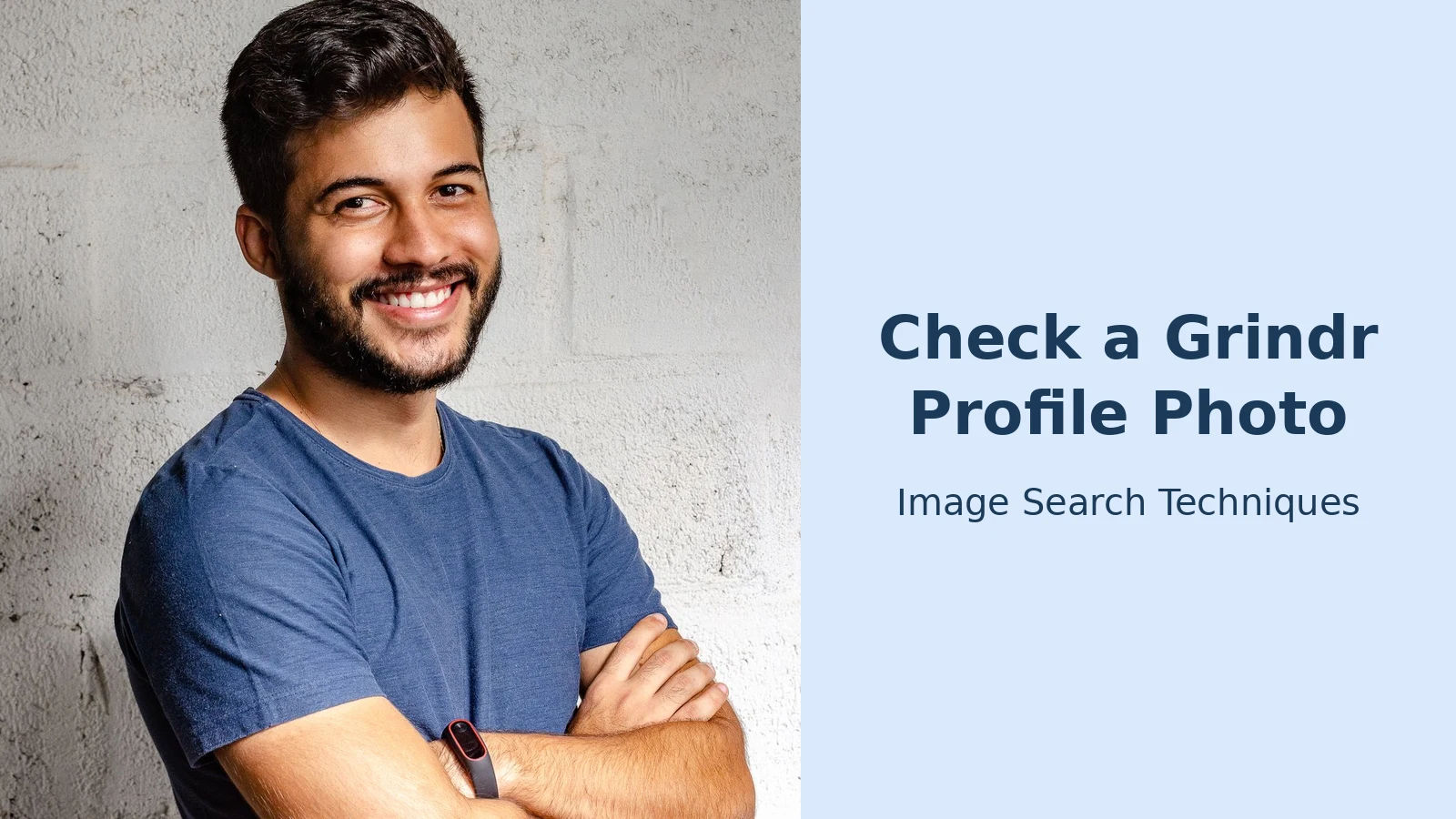
We ran the test on 10 November 2026 with a stock portrait standing in for a profile photo: a Pexels photograph of a smiling man with a short beard, wearing a blue T-shirt with his arms crossed (1,200 by 1,812 JPEG, photographer Italo Melo). It is a stand-in, not a real Grindr user’s photo, and the point of the test is to show what the engines return for a photo of this kind. All three uploads were made signed out, and none of the three asked for a sign-in.
Google Lens. Lens described the photo in its AI Overview as a smiling man with a short beard and dark hair, wearing a blue T-shirt with his arms crossed and a fitness tracker on his wrist. Its exact-matches view returned a long list of identical copies, with no total count shown. The top sources were unrelated sites using the same portrait: Pill Pals, PSCON, Otmar Sibilo, Revitalize Men’s Health and Maintain Your Smile Dentistry. The original appeared in the list as the Pexels photo from 31 May 2019, alongside a Pinterest repost from 2 August 2024.
TinEye. TinEye reported 523 results after searching 86.6 billion images, and said the image was first indexed on 19 June 2019. Sorted oldest first, the earliest match was the original Pexels file, pexels-photo-2379004.jpeg, from 19 June 2019, with a second Pexels copy from 21 June 2019 and eight matches on pexels.com in total. The next copies appeared on bunnyears.com (11 August 2019), dudewithsjogrens.com (3 September 2019), habitbox.com and hawalove.com (8 September 2019) and speak.global (9 October 2019). Thirty-one of the matches were stock listings.
Bing Visual Search. The first upload failed with Bing’s error “Unable to process this search. Please try a different image or keywords.” The retry worked. Bing returned 7,560 results and 50 pages with this image, led by fpocf.com, hindustanacademy.edu.in, etsy.com and tfod.in, with Pexels itself also in the list. Bing’s own description read: “This photograph shows a man in a blue T-shirt standing with his arms crossed against a textured white brick wall. He is wearing a smartwatch on his left wrist, suggesting a casual yet tech-savvy style.”
What the three results together show is that a stock portrait is trivially detectable. All three engines independently traced the same photo to the same Pexels original from May and June 2019 and to hundreds of unrelated sites that reused it. On the scorecard this photo lands on the top row: a photo that appears on a stock site and under other names is a do-not-meet result, whatever the profile and the chat say. A real person’s private photo would not behave like this; a scammer’s stolen photo would behave exactly like this.
What should you do if the photo fails the check?
Act on the photo result, and do it in the right order. Evidence first, report second, block third.
- Save the evidence before you report. Screenshot the profile, the photos and the chat, including any phone number, payment handle or link the person sent. Blocking a profile removes every chat with that profile from your inbox, so capture first or the evidence is gone.
- Report inside the app. Open the profile, tap the block icon and choose Report. Grindr shows seven categories: Illegal Activity, Spam, Harassment or Bullying, Hate Speech/Discrimination, Nudity or Pornography, Underage, and Impersonation. Choose Impersonation when the photos belong to a real person you can name, and Spam when the profile is a script pushing links or payment requests. There is no category called catfish or fake profile, which is why people miss the right button. Grindr’s help centre has the full reporting steps.
- Block after you report. Grindr states that reporting a profile does not block it, so submit the report, read the confirmation screen, and then block. Grindr only lets you block a profile that has messaged you; otherwise the option is Hide.
- If money is involved, report that separately. A platform report cannot reverse a payment. Contact your bank or payment provider first, then report the scam to the FTC at ReportFraud.ftc.gov. The FTC’s romance scam guidance sets out the same order: stop communicating, talk to someone you trust, reverse-search the photo, and report.
- If the photo is yours, report it as impersonation and name yourself. Grindr says that for profiles suspected of using fake photos or impersonating others, it requires photo verification to continue using Grindr, and the reported account stays suspended until the holder proves it. Our guide on reporting a fake profile using your photos covers the victim side in full.
If the score was low risk and you do meet, meet in a public place, tell a friend where you are going and when you expect to be back, and keep your own location sharing off until you trust the person. The FBI’s Internet Crime Complaint Center logged 1,008,597 complaints in 2025, with reported losses of about $20.9 billion, according to the FBI’s IC3 2025 Annual Report released on 6 April 2026. Most of those cases started with a convincing profile and a first meeting that nobody else knew about.
FAQs
Can you reverse image search a Grindr profile?
Yes. Grindr has no shareable profile link, so capture the photo by screenshot or a second device, crop it to the face, and upload it to Google Lens, TinEye and Bing Visual Search. All three are free and need no sign-in. A photo that appears under another name or on a stock site strongly suggests a fake profile.
Does Grindr tell someone if you screenshot their profile?
No. Grindr does not document a screenshot notification, so the profile owner is not told. Since January 2026, though, Grindr blocks screenshots of photos sent in chat on mobile, showing a blacked-out image on iOS and disabling the screenshot on Android, so use a second device or Grindr Web instead.
Does a verified badge on Grindr mean the profile is real?
No. The badge shows the account holder passed an optional selfie check, not a government-ID check, and Grindr runs no universal identity verification. A badge means the selfie matched the photos at that moment. It says nothing about the name, age or story, so always run the photo check anyway.
What should I do if a Grindr profile is using my photos?
Save the evidence first, then report the profile in the app under Impersonation and name yourself as the person being copied. Blocking deletes the chats, so capture the profile and messages before you block. Grindr suspends reported accounts until the holder passes a selfie check, which a photo thief cannot do.






