


🔎 Reverse Image Search
Image search techniques made simple: upload a photo or paste a URL and search 6 engines at once. 100% free, nothing stored.
🔒 Your image is never stored on our servers longer than 24 hours and is never shared.
Your bus pass photo was probably rejected because your council’s photo rules differ from the passport rules most photo tools quote. There is no single national standard: each English council runs its own scheme and sets its own photo rules, so a photo that passes in one county can fail in the next. Check your council first.
This guide sets out the bus pass photo requirements UK councils actually publish, council by council, and it names the councils. It also shows the one photo that satisfies the strictest council in our table, and it tests two real photos against the rules so you can see where the line falls.
The English National Concessionary Travel Scheme, known as ENCTS, is the scheme that pays for free off-peak travel on local buses in England for people who have reached State Pension age and for eligible disabled people. Your council runs your pass, not a national office, and that is why the photo rules change at the county boundary. London is different again: the Freedom Pass and the 60+ Oyster photocard are separate London schemes, so this guide does not cover them.
Why was my bus pass photo rejected?
Most bus pass photos are rejected for simple, fixable reasons: the photo is old, blurred, badly lit, or taken against a busy background.
Councils reject photos for one practical reason. The photo is printed on the pass, and a driver has to match it to the person holding the card. Anything that makes that match harder is a reason to send the application back. A photo that is too dark, too light, out of focus, or full of background clutter does not do the job, even if it is a lovely photo of you.
The mistakes that cause most rejections are easy to list, and most of them are easy to avoid:
- An old photo. Norfolk, Herefordshire and Oxfordshire all ask for a photo taken within the last six months. BCP Council and Lincolnshire allow twelve months. A photo from three years ago fails both limits.
- A black and white photo. Norfolk and Herefordshire both refuse black and white photos, and both say the application will be put on hold or returned.
- A busy background. Patterned wallpaper, a garden, a car park, or other people behind you all break the plain background rule.
- A photo that is not really you any more. If your appearance has changed a lot, the photo no longer works as a likeness, and Nottingham City warns that a pass can be revoked if the photo does not resemble the holder.
- A photo that has been edited. Filters, beauty modes and background swap apps all count as alteration, and several councils refuse altered photos outright.
- A file the form cannot use. A photo saved in the wrong format, or a file far bigger than the upload limit, gets rejected before anyone looks at it.
Some councils tell you exactly what was wrong. Others return the form or put the application on hold with a short note. If the note does not name the fault, do not guess and resend the same photo. Retake it against a plain wall and send the new one.
Is there one set of bus pass photo rules for the whole country?
No. There is no single national photo rule for bus passes in England, and any page that claims there is has not read the council guidance.
ENCTS sets who qualifies and when the pass can be used. In England you qualify for an older person’s pass when you reach State Pension age, and the pass gives free off-peak travel on local buses anywhere in England, normally from 9.30am to 11pm on weekdays and all day at weekends and on bank holidays. A disabled person’s pass works under the same scheme, with eligibility assessed by your council. None of that fixes the photo. The photo is a local decision, and each council publishes its own version.
GOV.UK’s older person’s bus pass page does not set photo rules at all. It asks for your postcode and sends you to your council, which is the right first step and the only national step there is.
The page that ranks near the top for this search gets it wrong. Passport-size-photo.com presents one fixed set of rules for the whole UK and says the requirements are consistent across England, Wales, Scotland, and Northern Ireland. It then lists passport measurements as bus pass law: a head of 29 to 34mm, taking up 70 to 80 percent of the frame, a light grey or cream background, no smiling, mouth closed, and a photo taken within the last month. Those are HM Passport Office rules, not bus pass rules, and the page’s own source proves it. The page cites Norfolk County Council, yet Norfolk asks for a photo less than six months old and says nothing about smiling. Herefordshire goes further and states plainly that a photograph of you smiling is fine for your pass. The tool page also says nothing about file types or upload size limits, which is what actually breaks most online applications. Treat it as a sales page for a photo tool, not as a source of council rules.
Photo checks are not all the same, either. A bus pass photo is a likeness for a printed card, which is a much lower bar than a government identity check, so do not judge your bus pass photo by the rules in our guide to a failed GOV.UK One Login photo check.
Bus pass photo requirements UK councils publish, side by side
Eight English councils publish eight different versions of the same request, and the differences are big enough to change whether your photo passes.
Norfolk publishes the most detailed bus pass photo guidance of any council I checked, with example photos for size, background and clarity, so it is the best single page to compare your photo against. The table below records what each council actually says on its own page, in its own words, as checked in November 2026. Where a council says nothing on a point, the table says so. That silence is part of the story: it means the council decides case by case, and you cannot assume the passport rule fills the gap.
| Council | Print size | How recent | Background | Smile, hats and glasses | File and upload rules | Source |
|---|---|---|---|---|---|---|
| Norfolk | 45 x 35mm passport style | Less than 6 months | Plain and pale, no patterns | Face must be visible; glasses must not cover the eyes; smile not mentioned | No file cap published on the guidance page | Norfolk County Council photo guidance page |
| Herefordshire | 45 x 35mm passport style | Less than 6 months | Plain and pale, no patterns or other people | Smiling is fine; face must be visible | No file cap published; in-person photo service available | Herefordshire Council photo guidance page |
| Oxfordshire | Head and shoulders close-up | Less than 6 months | Page defers to GOV.UK; no one else visible | Not stated on the page | Portal limits reported as 132 x 170 to 264 x 340 px, 200 KB max; check the form itself | Oxfordshire County Council bus pass photo guidance |
| Hampshire | Passport sized, head and shoulders only | Recent, no number given | Not stated on the page | No headgear except on religious or medical grounds; front facing and alone | Name and date of birth on the back for postal applications | Hampshire County Council older person’s bus pass page |
| Merseytravel (Merseyside) | Not stated | Recent, no number given | Not stated on the form | Face the camera; full face visible; no sunglasses; no headwear except religious or medical | JPG only; max 10 MB | Merseytravel concession form |
| BCP Council | 45 x 35mm | Within the last 12 months | Pale or neutral | Nothing covering face or head except for religious reasons | Unaltered by software; good quality, not under or overexposed | BCP Council concessionary travel application form |
| Lincolnshire | Passport size | Within the last 12 months | Not stated on the form | Full face without a hat or sunglasses | Name and date of birth on the back | Lincolnshire concessionary fare scheme form |
| Nottingham City | Passport style preferred, not required | Not stated on the page | Not stated on the page | Photo must resemble you; pass can be revoked if it does not | Upload or take on device; renewals can reuse the photo | Nottingham City Council bus passes page |
Three differences in that table matter more than the rest. First, recency splits in half: six months in Norfolk, Herefordshire and Oxfordshire, twelve months in BCP and Lincolnshire, and no number at all in Hampshire, Merseytravel and Nottingham City. Second, the smile rule that photo tools treat as law does not exist in any row. Only Herefordshire mentions smiling, and it allows it. Third, the file rules are the real trap for online applications. Merseytravel takes JPG only and caps files at 10 MB, while the Oxfordshire and Gloucestershire online form is reported to cap files at 200 KB and pixels at 264 x 340. A normal phone photo is several megabytes, so it can fail a small portal before a person ever sees it.
Some councils publish almost nothing. Kent’s main pass page lists travel times and eligibility but no photo rules in the text I read, so applicants there must follow the application form itself. Nottinghamshire’s page, now run through the East Midlands Combined County Authority, only says a photograph is required and can be uploaded or taken on a webcam, and that renewals need no new photo if you are happy with the old one. The same pattern shows up elsewhere: railcard photo rules also vary by issuer, which is why a photo that worked for one card can fail on the next.
What is the safest photo to send any council?
Send a recent colour photo of your head and shoulders against a plain pale wall, and it will satisfy the strictest council in the table as well as the most lenient.
The safest photo is not a passport photo. It is a photo built to pass the strictest row in the table, because a photo that passes Norfolk will pass Nottingham City too, while the reverse is not true. Use this as your checklist:
- Colour, sharp, and in focus, with even light on your face and no shadows behind your head.
- Taken within the last six months. Six months satisfies the six-month councils and the twelve-month councils at the same time.
- Head and shoulders, facing the camera, eyes open, full face visible from chin to forehead.
- Plain pale background. A light wall with nothing on it is enough. No patterns, no garden, no other people.
- No hat and no sunglasses. Wear glasses if you need them, but check there is no glare and your eyes are clearly visible. A religious head covering is fine as long as your full face shows.
- Neutral expression, or a small natural smile. Herefordshire allows a smile, and no council in the table bans one, but a neutral face is never questioned, so it is the safer choice.
- Unaltered. No filters, no beauty mode, no background swap app, no cropping a face out of a group photo.
- Saved as a JPG, and small enough for your council’s form. If your council caps files at 10 MB, a normal phone photo will usually fit. If the form is a small portal, shrink the file below 200 KB before you upload.
- For postal applications, print it at 45 x 35mm and write your name and date of birth on the back, as Hampshire, BCP and Lincolnshire ask.
If you also need a Blue Badge, do not reuse this photo without checking first: the Blue Badge photo rules are a separate council checklist with their own wording. The same care applies to every council photo check, so read the page for the pass you are actually applying for.
Would two real photos pass the test?
I tested two real, freely licensed portrait photos against the strictest and the most lenient council in the table, and the same photo can fail in one county and pass in the next.
Both photos come from Wikimedia Commons, and both are real photographs of real people, not studio samples. I looked at each one and checked it rule by rule against Norfolk, which publishes the strictest guidance in the table, and Nottingham City, which publishes the most lenient. I did not run a reverse image search on either photo, so this audit says nothing about where else these photos appear online.
Photo A: an elderly man sitting on a roadside kerb
The file is “An Indian Muslim old man.jpg” on Wikimedia Commons, by Ganesh Dhamodkar, 895 x 1,115 pixels, taken on 4 March 2012. The file page asks for attribution to Ganesh Dhamodkar and Wikimedia Commons. The exact Creative Commons version did not show in the page text I retrieved, so check the file page before reusing it. What the photo shows is a full-body outdoor shot: an elderly man with a white beard and a white skullcap, dressed in white robes, sitting barefoot on a roadside kerb and holding a walking stick. He is in full profile, looking away to the right. Behind him are a paved road, a yellow and black kerb, a car wheel, and litter.
Against Norfolk, the strictest council, it fails on four counts. It is not front facing, so it fails the first rule on the Norfolk page. It is a full-body shot, not head and shoulders, with the head taking up about a tenth of the frame. The background is a busy street scene, not plain and pale. And it was taken in 2012, which is far outside the six-month limit. The colour is fine, and the skullcap is religious dress, which councils with a religious exception allow, but a covering cannot save a photo taken in profile.
Against Nottingham City, the most lenient council, it still fails as a pass photo. Nottingham City says passport style is preferred rather than required, and its published test is mostly about resemblance. Even so, a side view of a whole person sitting on a kerb does not work as a pass photo, because a driver could not match it to the holder at a glance. The failure here is pose, framing and background, not the skullcap.
Photo B: a smiling elderly woman wrapped in a printed cloth
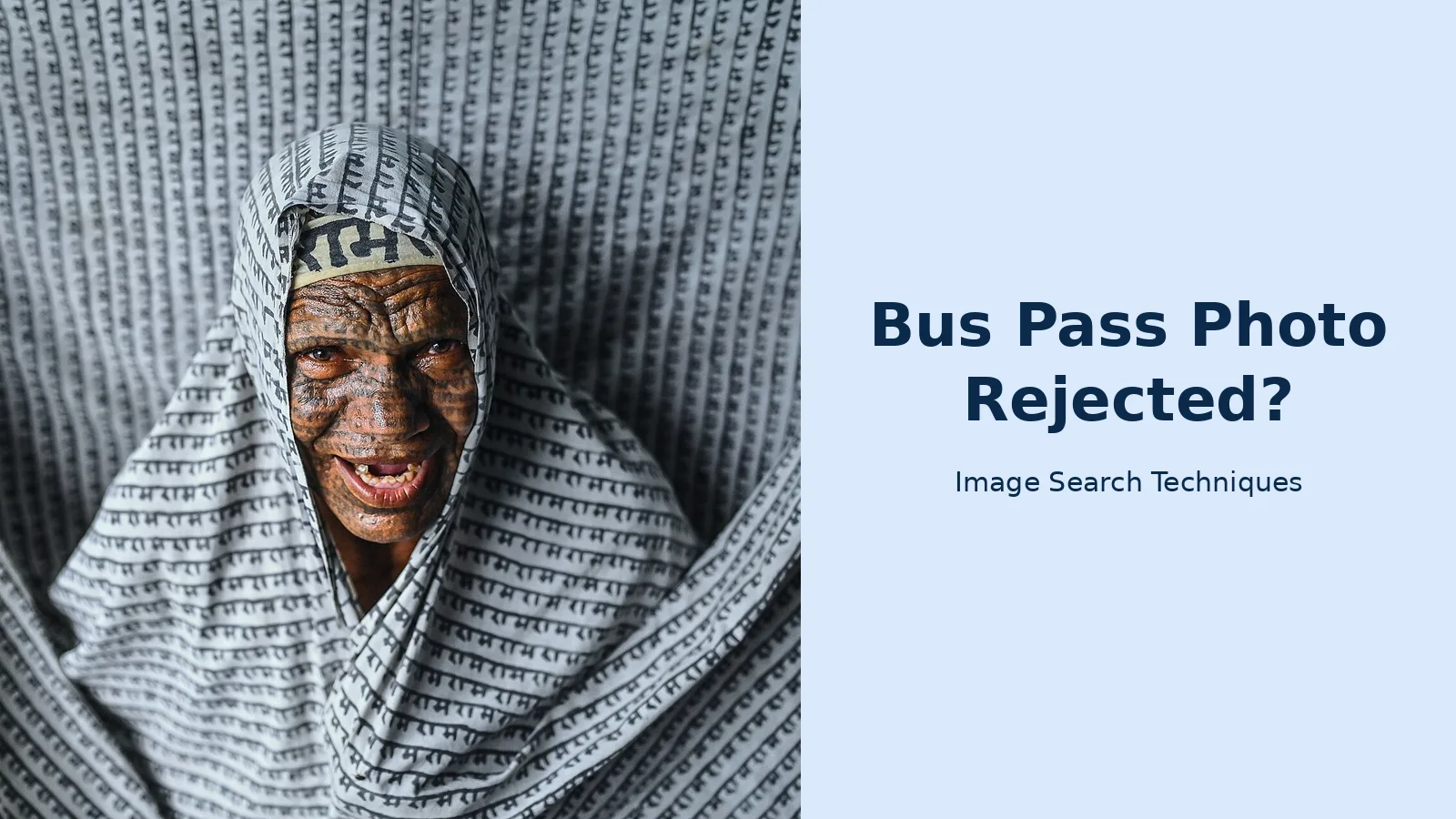
The file is “A smiling member of the Ramnami Samaj (edited).jpg” on Wikimedia Commons, by Arpan.basuchowdhury, 6,048 x 4,024 pixels and 14.79 MB, taken on 13 July 2022 and published under CC BY-SA 4.0. It is a retouched derivative: the file page states openly that the picture was brightened, small spots of dirt were removed, and the work was done in Photoshop. What the photo shows is an elderly woman facing the camera, smiling broadly with teeth showing, head and shoulders, wrapped in a cloth printed all over with dense black script that fills the whole frame as clothing, head covering and background.
Against Norfolk, it fails too, but for different reasons. Facing the camera is a pass, and the head and shoulders framing would pass after a crop to portrait, since the file is landscape and the head takes up about a third of the frame height. The background fails: dense printed text is the opposite of plain and pale. Recency fails as well, since the photo dates from 2022. The smile itself is not the problem. Herefordshire allows smiling, and Norfolk says nothing against it, so the smile passes even though a passport checker would reject it. The cloth is religious dress and her full face is visible, so the covering itself passes where a religious exception exists. Two file-level problems remain. The picture was retouched in Photoshop, and councils that refuse photos altered by computer software would reject the file. And at 14.79 MB it is over Merseytravel’s 10 MB cap and far over a small portal’s 200 KB limit.
Against Nottingham City, this is the one photo in the test that would likely pass on the published wording. It is front facing, clear, and a true likeness, and Nottingham City says passport style is preferred rather than required and publishes no background or recency rule. That is the whole point of this guide in one comparison: the same photo fails in Norfolk and would likely pass in Nottingham. I would still not send it. The patterned background and the 2022 date are risks anywhere, and a fresh photo against a plain wall takes five minutes. If you want to check whether a photo of you is already online before you send it anywhere, our guide to reverse image search shows how to run that check.
How do I take and upload a photo that passes?
You do not need a studio or a paid app: a phone, a plain wall and daylight will produce a photo most councils accept first time.
Follow these steps in order, and check the result on your phone screen before you send it.
- Pick a plain pale wall indoors, and stand about a metre in front of it so your shadow does not fall on the wall behind you.
- Face a window in daylight. Stand so the light falls evenly on your face, with no bright sun in your eyes and no lamp behind you.
- Put the phone on a stack of books at eye level, or ask someone to hold it. Use the rear camera and the timer if you can, because a selfie taken at arm’s length distorts the shape of your face.
- Frame head and shoulders, with a little space above your head. Look straight at the lens, keep your eyes open, and keep a neutral expression or a small natural smile.
- Take three or four shots and pick the sharpest one. Zoom in on your eyes on the phone screen. If they are soft or lost in shadow, move closer to the window and take it again.
- Check the file before you upload. On most phones, open the photo, tap the details or info icon, and you will see the file type and size. The file should be a JPG and under your council’s cap. If it is too big, use your phone’s resize or save a smaller copy, and check the size again.
- Upload it through your council’s own form, and wait for the confirmation screen. If the form rejects the file, read the error message: a size error means shrink the file, while a format error means convert it to JPG first. iPhones often save photos as HEIC files, and a form that asks for JPG only will refuse them.
- If you are applying by post, print the photo at 45 x 35mm, write your name and date of birth on the back, and send it with the form. Do not staple through the face, and do not send the original of a photo you cannot replace.
Two warnings save most people a second attempt. First, do not use a photo editing app to fix a bad photo. Removing the background, smoothing skin or brightening the face all count as alteration, and a council that bans altered photos will reject the edited file even if it looks better. Retake it instead. Second, do not crop your face out of a group photo or a holiday snap. Herefordshire says plainly that a doctored holiday snap is not acceptable, and the crop will usually be too soft and too small once it is printed on a card.
Your bus pass photo is a clear photo of your face, so think about where else it ends up. Our face search and photo privacy guide explains how to check whether your face appears online and how to ask for it to be removed.
What should I do if my photo was rejected?
Read the reason, retake the photo instead of editing the old one, and send the new photo through the same route you used first.
Start with the letter or email the council sent. It usually names the fault in a few words: too dark, too old, background not plain, file too large. Match that fault to the table in this guide, then fix that one thing. A rejection is not a refusal of the pass. It is a photo problem, and a fresh photo against a plain wall fixes most of them.
- Do not resend the same photo. If it failed once for being old or blurred, it will fail again.
- Do not try to rescue it with an app. A background swap or a filter is alteration, and several councils refuse altered photos outright.
- Retake it using the steps above, and check the file size and type before you upload.
- Send the new photo through the same route: the council’s online form, or by post with your name and date of birth on the back.
- If no reason was given, phone your council’s concessionary travel team and ask what was wrong with the photo. That one call can save a second rejection.
- If you cannot take a suitable photo at home, ask the council what help it offers. Oxfordshire’s validating libraries will take your photo for you, and Herefordshire runs an appointment-only photo service at Blueschool House in Hereford on Wednesday mornings.
- When you renew, check whether you need a new photo at all. Nottingham City and Nottinghamshire both let you keep the photo on your current pass if it is still a true likeness, so a renewal is often just a form.
If your pass arrives with the wrong photo on it, tell the council straight away and ask for a replacement with the right photo. Oxfordshire replaces a pass sent out with the wrong photograph free of charge, and other councils have their own process for the same mistake. Do not just carry on using a pass that shows someone else’s face.
Can I smile in my bus pass photo?
Yes, in most of England. Herefordshire states plainly that a photograph of you smiling is fine for your pass, and no council in our table bans a smile. The no-smiling rule belongs to passport photos, not bus passes. A small natural smile is safe, but a neutral expression is never questioned, so use that if you want the lowest risk.
What size should my bus pass photo be?
For a printed photo, 45 x 35mm in the passport style is the size most councils ask for. For an online application, follow your council’s form instead, because the file rules vary. Merseytravel takes JPG files up to 10 MB, while small council portals cap files at 200 KB, so check the size before you upload.
How recent does my bus pass photo need to be?
It depends on your council. Norfolk, Herefordshire and Oxfordshire ask for a photo taken within the last six months, while BCP Council and Lincolnshire allow twelve months. Some councils only say recent, with no number. Check your council’s page, and use a photo taken in the last few weeks to be safe.
Can I use a passport photo for my bus pass?
Usually yes. A recent passport-style photo meets most councils’ bus pass rules, because most councils only ask for a passport-style likeness. Check your council’s file rules first, though. Passport digital photos must be less than a month old, which is stricter than most bus pass rules, so an older passport photo may still fail on recency.
What do I do if my bus pass photo was rejected?
Read the reason the council gave, then retake the photo instead of editing the old one. Use a plain pale wall, even daylight, and a JPG file under your council’s size cap. Send the new photo through the same route you used first. If no reason was given, phone your council’s concessionary travel team and ask.
Does a bus pass photo have to be taken professionally?
No. A phone photo is fine if it is sharp, well lit, and taken against a plain pale background with your head and shoulders in frame. No council in our table asks for a professional studio photo. If you cannot take one at home, Oxfordshire’s libraries and Herefordshire’s customer services will take your photo for you.






