


🔎 Reverse Image Search
Image search techniques made simple: upload a photo or paste a URL and search 6 engines at once. 100% free, nothing stored.
🔒 Your image is never stored on our servers longer than 24 hours and is never shared.
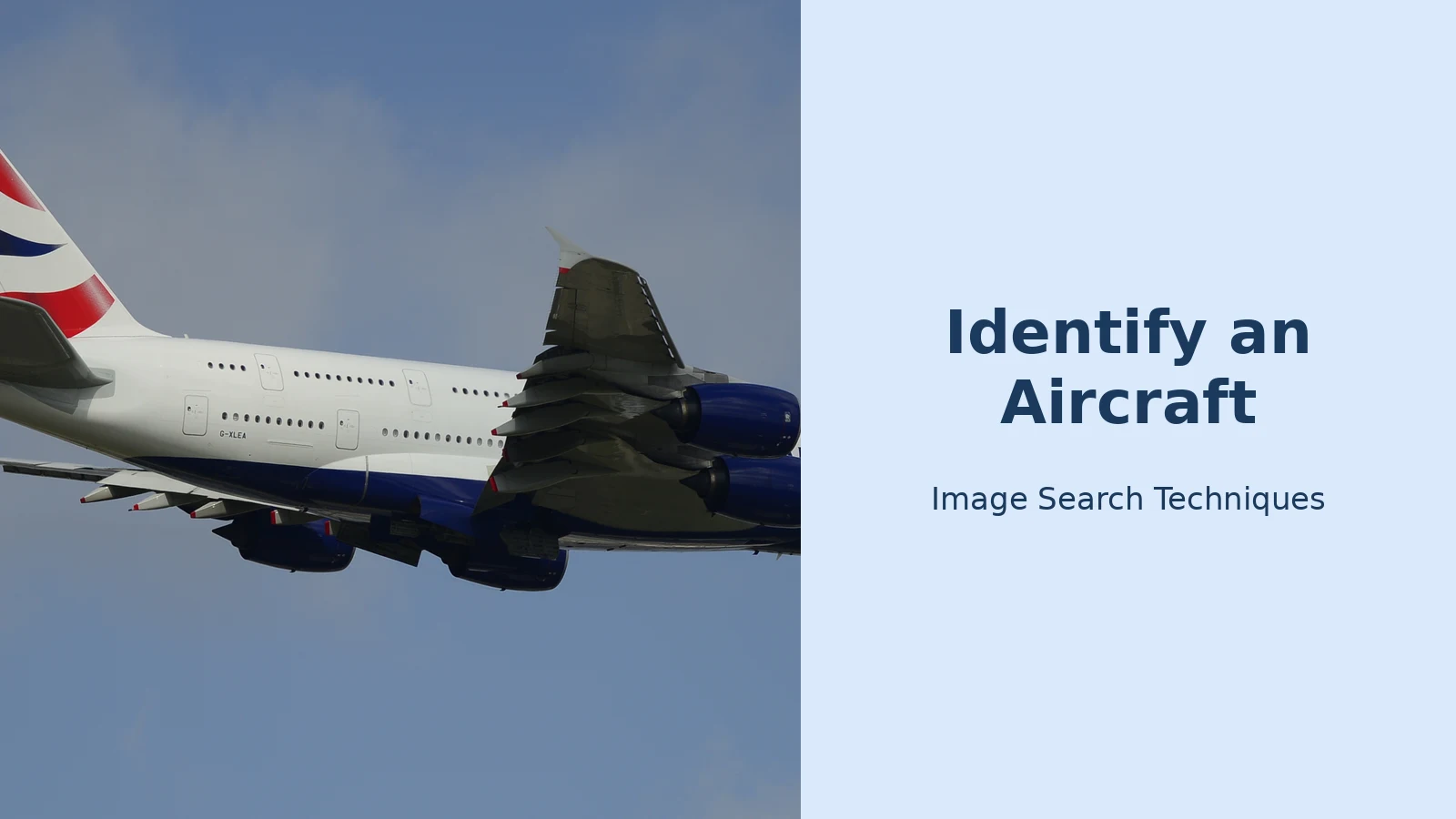
To identify aircraft from photo evidence, start with Google Lens, then confirm the result yourself using the shape of the nose, engines and tail, the airline livery and the registration near the tail. This guide walks through the whole method step by step, including the Boeing 737 versus Airbus A320 clues spotters rely on, how to read a registration, and a real worked example using a British Airways Airbus A380.
Direct answer: To identify an aircraft from a photo, run the image through Google Lens, then check the visual clues yourself: count the engines, note the nose and tail shape, read the airline livery, and read the registration near the tail. Look the registration up in the FAA Registry or the CAA’s G-INFO database to confirm the exact model, airline and age.
What Does It Mean to Identify an Aircraft from a Photo?
Identifying an aircraft from a photo means working out three things from a single image: the aircraft model, the airline that operates it, and the individual airframe. The model is the type, such as an Airbus A320 or a Boeing 737. The airline is usually clear from the livery, which is the paint scheme and branding on the fuselage and tail. The individual airframe is identified by its registration, a unique code painted on the rear fuselage that works like a number plate for a car.
A registration is the most powerful clue in the photograph. Once you can read it, you can look the aircraft up in an official register and confirm the exact model and variant, the serial number, the registered owner and often the delivery date. According to the UK Civil Aviation Authority, its G-INFO database lets anyone search for an aircraft’s details by registration. In the United States, the Federal Aviation Administration runs the same kind of public search through its N-Number Inquiry service. Both are free, and both are the authoritative source for the aircraft they cover.
Photo identification is useful in more situations than spotting at an airport fence. You might want to know which aircraft flew your holiday flight, check a photo a seller is using in a listing, date an old family photograph, or settle an argument about the plane in a film still. The method below works for all of them, and it needs nothing more than a phone and a free image search.
How Do I Identify Aircraft from a Photo with Google Lens?
Google Lens is the fastest free first pass, and it is the tool to try before any specialist app. It compares your photo with images across the web and usually returns the aircraft model, and often the airline too, within seconds. According to Google, Lens can identify objects, places and text in a photo and show visually similar images and related results.
Follow these steps:
- Open Google Lens. On Android, open the Google app and tap the camera icon in the search bar. On iPhone, open the Google app and tap the same camera icon, or use the Google Photos app and tap the Lens icon on the photo.
- Upload the photo. Tap the gallery icon and choose the aircraft photo, or point the camera at the aircraft and take the picture.
- Read the first results. Lens usually names the aircraft type at the top of the results, with similar images underneath. Tap a result to see the source page and check whether it shows the same aircraft.
- Crop to the aircraft if the result is wrong. If Lens matches the airport or the sky instead of the plane, drag the crop handles so only the aircraft is inside the frame, then search again.
- Crop to the registration for a second search. If the registration is readable, crop tightly around it and run Lens again. This often surfaces photos of the same individual aircraft.
- Confirm with the visual clues below. Never accept a Lens answer on its own. Check the nose, engines, tail and livery against the result before you trust it.
If you want a fuller walkthrough of the tool itself, our guide to how to reverse image search covers Lens, TinEye and Bing Visual Search in detail. For the Lens-specific steps, see our Google reverse image search guide. Both explain how to search from a screenshot as well as from a camera photo, which matters when the aircraft photo is one you saved from social media rather than one you took yourself.
Lens has real limits. It is strongest on common airliners photographed from the side, and weakest on rare types, military aircraft, distant or blurry shots, and photos taken from directly underneath. It can also confuse similar types, such as the Airbus A320 and the Boeing 737, which is why the visual checks in the next section matter. If Lens gives you a model name, treat it as a hypothesis, then prove it with the clues below.
How Can I Tell a Boeing 737 from an Airbus A320?
The Airbus A320 and the Boeing 737 are the two airliners people mix up most, because both are single-aisle jets with one engine under each wing. Four visual tells separate them reliably, and spotters check them in this order: engine intake, nose, cockpit windows and tail cone.
| Feature | Airbus A320 family | Boeing 737 family |
|---|---|---|
| Engine intake | Round nacelle | Flattened bottom |
| Nose | Short and rounded | Longer and pointed |
| Cockpit windows | Straight lower edge | V-shaped lower edge |
| Tail cone | Blunt and fat | Upswept beavertail |
| Winglets | Tall curved sharklets | Split scimitar winglets |
| Main landing gear | Hidden behind doors | Tyres visible in flight |
The engine intake is the most reliable tell. The 737 engine cowl is flattened at the bottom, a shape spotters call the “hamster pouch”, because the wing sits low and the engine needs ground clearance. The A320 nacelle is a clean circle, and no Airbus wears the flat bottom. If you can see only one feature in the photo, make it the engines.
The nose is the second tell. The A320 nose is short and blunt, almost rounded, while the 737 nose is longer and tapers to a sharper, more conical point. Look at the cockpit windows next: on the Airbus the bottom edge of the side windows runs in a fairly straight line, while on the Boeing the two side windows meet at a lowered, V-shaped point. Finally, check the tail cone. The 737 tail cone sweeps up into a distinctive pinched beavertail, while the A320 tail cone is fatter and more symmetrical.
Winglets help on newer aircraft. The current A320neo wears tall curved sharklets, while the 737 MAX has split-scimitar winglets that point both up and down. Older aircraft are less clear, so do not rely on winglets alone. The same caution applies to the landing gear: the 737 has no main-gear doors, so its tyres stay visible in flight, while the A320 tucks its gear fully behind doors. That tell only works when the gear is down or visible.
Count the engines and the decks before you start on the fine details. Four engines means the aircraft is almost certainly an Airbus A380, a Boeing 747 or an Airbus A340, and a full-length double decker can only be an A380. Two engines under the wings is the modern standard and covers almost everything else, from the A320 to the 787. Two engines mounted at the tail usually means a regional jet, such as an Embraer E-Jet or a Bombardier CRJ, or a business jet.
How Do I Read an Aircraft Registration from a Photo?
Every civil aircraft carries a registration, a unique code that identifies that one airframe. It is usually painted on the rear fuselage, near the tail, and often also under one wing. In a side-on photo the registration is normally readable if the aircraft is close enough; in a distant or head-on shot it may be too small, in which case cropping and enlarging the image can help. Our guide to when was this photo taken explains how to enlarge and examine photo details without losing quality.
Registrations follow a national pattern, and the first letters tell you which country registered the aircraft:
- G- United Kingdom, for example G-XLEA
- N United States, for example N12345, with no hyphen
- D- Germany, for example D-AIXA
- F- France, for example F-HPJA
- EC- Spain, for example EC-MLE
- JA- Japan, for example JA873A
- VH- Australia, for example VH-OQA
- C- Canada, for example C-FIVS
Once you have the registration, look it up in the official register for that country. For a United States registration, use the FAA Registry’s N-Number Inquiry at registry.faa.gov, which is free and shows the registered owner, aircraft type and serial number. For a United Kingdom registration, use the CAA’s G-INFO database at caa.co.uk, where you enter the registration without the “G-” prefix, so for G-XLEA you type XLEA. According to the CAA, G-INFO is the public search for an aircraft’s details, and no login is needed.
Photo databases are a useful second check. Planespotters.net and AirHistory.net both let you search a registration and see photos of that exact airframe, which lets you confirm that the livery and details in your photo match the aircraft the register describes. If the register says one model and the photos show another, trust the register and re-read the registration, because a single misread letter is the most common mistake.
A note on privacy and safety: aircraft registrations are public information, published by governments and printed on the outside of the aircraft for anyone to see. Looking one up is normal aviation research, not personal data. Do not use registration lookups to track a private individual’s movements or to harass anyone, and never publish a private aircraft owner’s home address if a register shows one.
Worked Example: Identifying a British Airways Airbus A380 from a Photo
This is a real example, worked through with a photograph of a British Airways Airbus A380 departing from runway 27L at London Heathrow. Follow the same steps with your own photo.
Step 1: Count the engines and decks. The photo shows four engines and a full-length upper deck running the whole length of the fuselage. Only one passenger aircraft in service has that combination: the Airbus A380. The Boeing 747 has four engines too, but its upper deck covers only the front part of the fuselage, so the full-length deck rules it out.
Step 2: Read the livery. The fuselage carries “British Airways” titles and the tail wears the Union flag design. That identifies the airline as British Airways, the flag carrier of the United Kingdom. According to Simple Flying, using data from the aviation database ch-aviation, British Airways operates a fleet of 12 Airbus A380s, all delivered between 2013 and 2016.
Step 3: Read the registration. Near the rear fuselage the photo shows the registration G-XLEA. The “G-” prefix confirms a United Kingdom registration, and the four letters after it identify the individual airframe.
Step 4: Look the registration up. Enter XLEA, without the “G-” prefix, in the CAA’s G-INFO search. The register entry confirms the aircraft’s type, serial number and registered operator, which you can cross-check against photo databases. According to ch-aviation data reported by Simple Flying, G-XLEA is an Airbus A380-841 with manufacturer serial number 95, and it was the first A380 delivered to British Airways, on 4 July 2013. Its first commercial service was from London Heathrow to Los Angeles on 24 September 2013.
Step 5: Cross-check with a photo database. Search G-XLEA on AirHistory.net or Planespotters.net. The photos there show the same aircraft in the same British Airways livery, which confirms the identification. AirHistory.net records G-XLEA as an Airbus A380-841, serial number 095, operated by British Airways, delivered in July 2013, which matches the register data exactly.
Step 6: Note what can vary. The same airframe can look different in other photos. British Airways has repainted aircraft, and an A380 photographed in 2014 looks the same as one photographed in 2026 apart from wear and small livery details. The registration is the fixed point: it stays with the airframe even if the paint changes. If your photo shows a different registration, repeat the lookup for that code rather than assuming it is the same aircraft.
This six-step routine is the same one spotters use at the airport fence, and it works on any clear side-on photograph. The identification took minutes, used only free tools, and every fact was checked against an official register or a named aviation database rather than guessed from the picture alone.
Which Tools Identify Aircraft from Photos Best?
No single tool is best for every photo, so use them in combination. Google Lens is the free starting point, a registration lookup gives you certainty, and the specialist apps fill the gaps when the photo is unclear.
| Tool | What it does | Cost | Best for |
|---|---|---|---|
| Google Lens | Matches the photo to similar images | Free | Quick model identification |
| Sky Index | AI aircraft identifier plus database | Free, 3 per day | Model and registration from a photo |
| FAA Registry | Official US registration lookup | Free | Confirming US aircraft details |
| CAA G-INFO | Official UK registration lookup | Free | Confirming UK aircraft details |
| Flightradar24 | Live flights and registration search | Free tier | Finding which flight an aircraft flew |
| Planespotters.net | Photo database by registration | Free | Cross-checking an identification |
Sky Index is the specialist option. According to Sky Index, its free AI Aircraft Identifier identifies the aircraft type, registration if visible, manufacturer and key features from a photo, and links to the full database entry. According to Sky Index, free accounts get 3 identifications per day, while Sky Index Pro costs $4.99 per month or $39.99 per year and allows 25 identifications per day. That makes it useful when Lens fails on a rare or military type, but the free tier runs out quickly, so save it for photos Lens cannot handle.
Flightradar24 is the tool to use when you know the date, time and place but not the aircraft. Search the airport and time, and the flight history shows which aircraft operated the flight, including its registration. Planespotters.net then lets you check that registration against photos of the real airframe. If you are working from a screenshot rather than a photo you took, start with a reverse image search to find where the image first appeared, since the original post often names the aircraft or the flight.
When no registration is visible, fall back to the other clues in order: count the engines, check the nose and tail, read the livery, and note the airport and the date. A photo of a white fuselage with a blue tail at Heathrow in 2026 narrows the field a lot, and searching the airport’s movements for that day can name the flight. Our guide to identify a car from a photo uses the same identify-by-clues method for a different subject, and the workflow transfers directly: start with the image search, then confirm with the details you can see.
Finally, remember that an identification from a photo is only as good as the photo. A blurry, distant or partly hidden aircraft can fool even the best tools, and two similar types can be genuinely hard to separate from a bad angle. If two tools disagree, trust the registration lookup over the image match, and if there is no registration at all, say the identification is probable rather than certain.
FAQs
Can Google Lens identify any aircraft from a photo?
Google Lens identifies most common airliners well, especially clear side-on photos of an Airbus A320 or Boeing 737, but it struggles with rare types, military aircraft, blurry shots and unusual angles. It can also confuse similar models. Treat its answer as a starting point and confirm it with the nose, engine and tail clues, plus a registration lookup where possible.
Where is the registration number on an aircraft?
The registration is usually painted on the rear fuselage near the tail, and often also under one wing. In a side-on photograph it is readable when the aircraft is close enough. If it is too small, crop and enlarge the image. The first letters show the country, such as G- for the United Kingdom and N for the United States.
Can I identify a military aircraft from a photo?
Military aircraft can be identified by shape, markings and serial numbers, and tools such as Sky Index cover military types. But military aircraft carry serial numbers rather than civil registrations, so the FAA Registry and CAA G-INFO will not list them. Use photo databases and spotting guides instead, and accept that some types cannot be identified from one photo.
What should I do if the registration is not readable?
Use the other clues in order: count the engines, check the nose and tail shape, read the airline livery, and note the airport and date. Run the photo through Google Lens, crop around the aircraft, and try a specialist identifier such as Sky Index. If you know the flight, search Flightradar24 for that route and time to find the registration.
The same photo-first method works on the water too: learn how to identify a ship from a photo by its name, IMO or MMSI number.
