🔎 Reverse Image Search
Image search techniques made simple: upload a photo or paste a URL and search 6 engines at once. 100% free, nothing stored.
🔒 Your image is never stored on our servers longer than 24 hours and is never shared.
You are driving on holiday, or walking down a street in a town you do not know, and a sign stops you. The shape looks familiar but the picture or the words on it are not, so you take a photo and want to know what it means before you move on. That is exactly what this guide does. It shows you how to read a road sign from a photo, step by step, and how to check your answer with a reverse image search and the official sign lists.
Short answer: Yes. Photograph the sign and note the country where you saw it. Its shape and colour tell you what kind of sign it is. Then reverse search the photo on Google Lens, TinEye or Yandex, and check the name against the sign list for that country, the Highway Code in the UK or the MUTCD in the US.
Everything below was checked live on 19 and 20 November 2026. We reverse searched a real photo of a UK Give Way sign on three engines and checked the result against the Highway Code, so you can see what each engine actually does with a road sign photo, including the one that refused to work at all. The method also works for the signs you meet abroad, as long as you remember the one rule that matters most: a sign means what it means in the country where it stands, and nowhere else.
What does the shape of a road sign tell you?
What is a traffic sign? A traffic sign is a fixed message at the roadside that tells drivers what they must do, what they must not do, what danger lies ahead, or where they are going. The system works because the shape and the colour carry the meaning before you read a single word. That is why you can often work out what a sign means from a photo even when the words on it are in a language you do not speak.
In the UK, the Highway Code groups signs by shape, and the shape alone narrows the answer right down. Learn the shapes first and the rest of the job gets much easier.
| Shape and colour (UK) | What it means | Examples |
|---|---|---|
| Red triangle | Warning: a hazard lies ahead | Bend, crossroads, slippery road |
| Red ring or red circle | Order: something you must not do | Speed limit, no entry, no overtaking |
| Blue circle | Order: something you must do | Turn left, keep left, ahead only |
| Rectangle | Information or direction | Place names, distances, motorway directions |
| Red octagon | Stop, and only stop | The Stop sign, nothing else |
| Inverted triangle, red border | Give Way, and only Give Way | The Give Way sign, nothing else |
Two shapes in that table belong to one sign each, and that is deliberate. The Stop sign is an octagon and the Give Way sign is an upside down triangle, so each one is recognisable by its outline alone, even when the sign is dirty, faded or partly covered in snow. Note the trap in the table too: Give Way looks like a warning triangle, but it is an order, not a warning. Shape alone is not quite enough, which is why the next step is to check the official list.
The United States uses a different system, set out in the Manual on Uniform Traffic Control Devices, known as the MUTCD. It is published by the Federal Highway Administration, and the current version is the 11th Edition, published in December 2023 and effective from January 2024, with a first revision in 2024. The shapes look familiar, but the meanings do not always match the UK ones.
| Shape and colour (US) | What it means | Examples |
|---|---|---|
| Red octagon | Stop, and only stop | STOP, sign code R1-1 |
| Inverted triangle, red border | Yield, and only Yield | YIELD, sign code R1-2 |
| Yellow diamond | Warning: a hazard lies ahead | Curve, junction, pedestrian crossing |
| White vertical rectangle | Regulation: a rule to obey | Speed limit, parking rules |
| Horizontal rectangle, green, blue or brown | Guide: direction and information | Route markers, exits, services |
| Pennant | No passing zone begins | No Passing Zone, sign code W14-3 |
Colour matters in the US system as well. Yellow means a general warning, fluorescent yellow-green marks pedestrian crossings, school zones and cycle warnings, green means direction, blue means services, brown means recreation, and orange means road works. The full standard is published by the Federal Highway Administration in the MUTCD, and it is the list to check any American sign against. Answer capsule: In both the UK and the US, the shape tells you the kind of sign and the colour sharpens it, so read those two things before you read the words.
How do you read a road sign from a photo in four steps?
You do not need any special knowledge to identify a road sign from a photo. You need a clear photo, the country where it stands, the shape and colour table above, and a reverse image search to confirm what you think you see. Work through the four steps in order.
1. Photograph it safely. Never photograph a sign while you are driving. Pull over somewhere legal and safe first, or ask a passenger to take the photo. Stand where you can see the face of the sign straight on, not at a sharp angle, and fill the frame with the sign itself. A photo taken from the side, through a wet windscreen, or from a moving car is the most common reason a reverse search comes back empty.
2. Note the country and the place. Write down where you saw the sign before you forget: the country first, then the town or road if you know it. The country is not a detail, it is the key to the whole answer, because the same shape can mean different things in different countries. If you took the photo days ago and cannot remember where it was, our guide on working out where a photo was taken shows how to pin the location down from the image itself.
3. Read the shape and colour first, then the picture or the words. Match what you see against the tables above. A red triangle in the UK is a warning, a yellow diamond in the US is a warning, and a red ring means an order in the UK. Then read the symbol or the words inside the shape. Numbers usually mean a speed limit or a distance, arrows mean direction, and a picture of a bend, a person or an animal shows the hazard ahead.
4. Reverse search the photo and check the official list. Upload the photo to a reverse image search engine and see what it returns. If you have never done one, our how to reverse image search guide walks through the whole process. Then confirm the name the search gives you against the official list for that country, the Highway Code traffic signs page in the UK or the MUTCD in the US. The search suggests the answer, the official list settles it. Answer capsule: A straight photo, the country, the shape and colour, and one reverse search will name most road signs in a few minutes.
How do you reverse image search a road sign?
A reverse image search takes your photo and looks for the same image, or images that look like it, across the web. For a road sign, that usually means one of two results: the engine names the sign for you, or it shows you other photos of the same sign, and the names on those pages give you the answer. The three engines do this differently, so it helps to know which one you are using.
Google Lens is the one that tries to name what is in the photo. Upload the image or paste its web address at lens.google.com and Lens will describe what it sees and show visually similar images and exact matches. Our Google reverse image search guide explains the upload step in detail. TinEye works the other way round: it finds where the exact image already appears online, but it does not label the object in it, so the answer comes from the filenames and the pages it returns. Yandex Images sits in between: it tags what the image appears to contain and shows similar images, and those tags often name the sign outright.
Three habits make the search work better. First, use the largest and sharpest version of the photo you have. Second, crop the image down to the sign itself before you upload it, so the engine is looking at one sign and not a whole street scene. Third, if the sign is one of several on a single post, crop each one out and search them one at a time. A cropped, straight on photo of one sign will beat a wide, angled photo of five signs every time. The method is the same one we use for anything you can photograph, from a jacket to a road sign, and our find item by image guide shows the full routine. Answer capsule: Lens tries to name the sign, TinEye finds where the photo already lives, and Yandex tags what the photo contains, so try more than one engine before you give up.
Worked example: the Give Way sign at Codnor
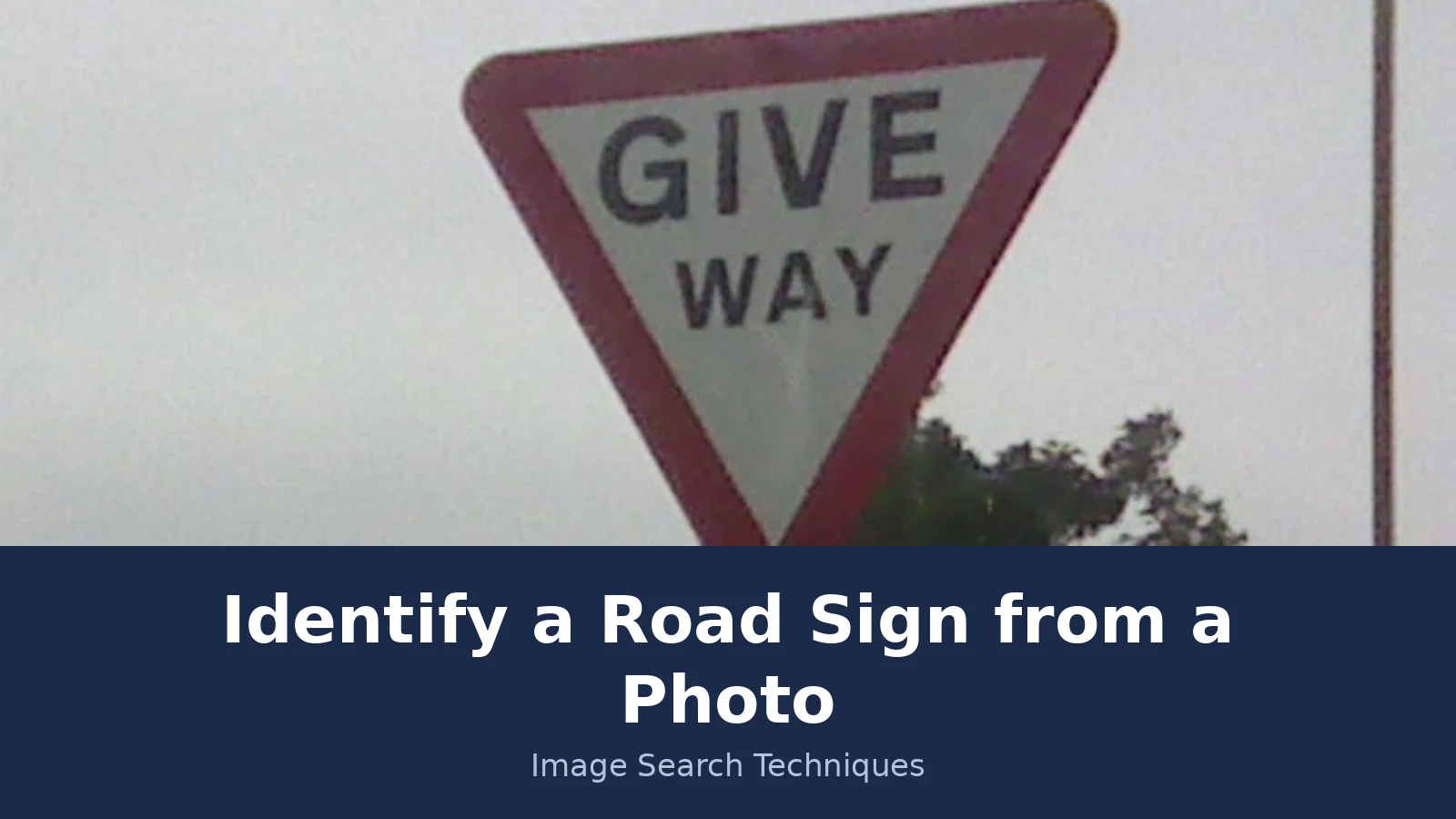
This is a real test, run on 19 November 2026, on a real photo. The photo is Geograph photo 5118587, taken by Gary on 14 July 2023 on Alfreton Road, Codnor, Derbyshire, and shared under a CC BY-SA 2.0 licence. It shows a UK Give Way sign on a grey pole: a white triangle pointing down, with a thick red border and the words GIVE WAY in black capitals. Trees stand behind it, and a small estate agent board is visible in the background. We uploaded that exact photo to all three engines and wrote down what each one did.
Yandex was the only engine that named the sign. Under its heading “Image appears to contain” it tagged the photo “give way”, “give way to”, “road traffic sign” and “road sign”. Its similar images were all Give Way sign photos, mostly from Alamy, and its Sites tab listed 19 pages, headed by an Alamy Give Way stock photo and a “Way Out” sign at Edale station, followed by three music pages that matched the words GIVE WAY rather than the sign. Yandex showed no total count for exact or similar matches, and it did not return the Geograph page the photo came from.
TinEye returned 35 results after searching 86.8 billion images, and gave a first indexed date of 18 April 2008. TinEye does not name the sign at all: it returns matching images, and the identification comes only from the result pages and their filenames. Its top five results, by best match, were all other Give Way sign photos, mostly stock: a Shutterstock mountain traffic symbol, an Alamy close up of a UK triangular Give Way sign, an Adobe Stock Give Way sign with snowy mountains, another Alamy Give Way photo, and an Adobe Stock video of a Give Way sign in the Falkland Islands. Fourteen of the 35 results were stock results. Filtering by the website geograph returned no matches, so the exact source photo was not found. Sorting by oldest surfaced a file called 602.jpg and an OpenStreetMap result for “UK traffic sign 602”, which is how the diagram number turned up, not from TinEye itself.
Google Lens did not run at all. Both attempts on 19 November 2026 ended on Google’s “unusual traffic” page. The first attempt reached a reCAPTCHA image grid that kept presenting new rounds until the two minute session expired. The second attempt showed a plain text version of the same page with nothing to click. No Lens identification, no match counts and no matching pages were ever seen. Lens is usually the best engine for naming an object in a photo, but on this day it would not run, and this guide says so plainly rather than inventing a result. If Lens refuses your upload, try again later and use Yandex and TinEye in the meantime.
Then we checked the answer against the official list. The sign is diagram 602 in the UK Traffic Signs Regulations, shown on the Highway Code traffic signs page. Highway Code rule 172 says that at a junction with broken white lines across the road, you must give way to traffic on the main road. It is an order, not a warning, even though it looks like a warning triangle. The American equivalent is the Yield sign, sign code R1-2 in the MUTCD: the same inverted triangle, the same red border, a different word. Same shape, same job, different country. Answer capsule: Yandex named the sign, TinEye showed 35 matching photos without naming it, Lens would not run, and the Highway Code confirmed diagram 602, so the answer held up across every check we could run.
What if the reverse search finds nothing?
A zero result is the most misunderstood outcome in reverse image search. It does not mean the sign does not exist, and it does not mean your photo is wrong. It means the engines could not match that photo to anything they have already indexed. Rare signs, new signs, signs photographed at an angle, signs partly hidden by branches, and photos taken at night or in rain all come back empty more often than a clean daylight photo of a common sign.
When a search returns nothing, change one thing at a time. Crop tighter around the sign and try again. Try a different engine, because Yandex, TinEye and Lens index different collections, and a photo one engine misses is often one another engine finds. If the photo still returns nothing, search by description instead: type the shape, the colour and the words on the sign into a normal search, for example “red triangle sign” plus the words you can read. Then check the official list directly. In the UK that is the Highway Code traffic signs page and the Department for Transport booklet Know Your Traffic Signs. In the US it is the MUTCD sign charts.
Some signs are genuinely hard, and that is worth knowing before you blame the search. A quiz in the Eastern Daily Press from March 2025 asked readers to name five rare UK signs, and the answers show how far the system reaches: a migratory toad crossing sign, a sign warning of explosives in a built up area, a narrow bridge sign that means one car at a time, a sign that means no vehicles except pedal cycles pushed by hand, and a slippery surfaces sign. If your photo shows one of those, a reverse search may still find it, but the official list is the faster route. Google’s own AI Overview for this exact question does the same thing in reverse: it asks you to upload the photo, or to describe the shape, the colour, the symbol or words, and the location. Those are the same four clues this guide uses, so if the engines fail you, work through the four clues by hand. Answer capsule: A zero means not found, not that the sign does not exist, so crop tighter, try another engine, then search by description and check the official list.
What a photo cannot tell you
A photo can name a sign, but it cannot do everything, and the limits matter as much as the method. The first limit is the country. The same shape can mean different things in different countries, so never take one country’s meaning and apply it everywhere. A red triangle warns in the UK, a yellow diamond warns in the US, and a red circle is a prohibition in the UK while most American regulatory signs are white rectangles. Check the list for the country where the sign stands, and say the country in your notes before you trust the answer.
The second limit is the law. This guide tells you what a sign means, not what happens if you ignore it. It is not driving test teaching, and it is not legal advice about fines or penalty points. If you need the legal position, read the rule in the Highway Code or check with your local driving authority, and do not rely on a search result for a legal answer.
The third limit is safety, and it comes before everything else. Do not photograph a sign while you are driving, and do not stop in a dangerous place to get a better shot. A photo you take from the passenger seat, or after you have parked safely, is just as useful and costs you nothing.
The last limit is certainty. A reverse search match suggests a sign’s name, it does not prove it. If the photo is blurred, or the sign is partly hidden, the engines can match the wrong sign, so confirm every answer against the official list before you act on it. Sometimes the photo you took holds two questions at once, a sign and the car parked under it, and if the car is the one you want to name, our guide to identifying a car from a photo takes that question on its own. Answer capsule: A photo names the sign, the country gives it its meaning, the official list confirms it, and nothing in a photo tells you the fine.
FAQs
Can I identify a road sign from a photo?
Yes. Photograph the sign straight on and note the country where you saw it. Read its shape and colour first, then reverse search the photo on Google Lens, TinEye or Yandex. Confirm the name the search gives you against the official sign list for that country, such as the Highway Code in the UK or the MUTCD in the US.
What is the fastest way to identify a road sign?
Read the shape and colour first. A red triangle warns in the UK, a yellow diamond warns in the US, and a red ring means an order in the UK. Then crop the photo down to the sign and reverse search it. The shape narrows the answer to a handful of signs, and the search usually names the exact one.
Why does the country matter when identifying a road sign?
Because the same shape can mean different things in different countries. A red triangle is a warning in the UK, while warnings in the US are yellow diamonds. Give Way in the UK and Yield in the US are the same sign with different words. Always check the official list for the country where the sign stands.
What is the difference between a Give Way sign and a Yield sign?
They are the same sign with a different word. Both are an inverted triangle with a red border and a white centre, and both tell you to give way to traffic on the road you are joining. Give Way is the UK name, under Highway Code rule 172 and diagram 602, while Yield is the US name, under MUTCD sign code R1-2.
Why did Google Lens not identify my road sign photo?
Lens sometimes refuses uploads and shows an unusual traffic page, which is what happened twice in our own test on 19 November 2026. The page offers no result at all. Wait and try again later, and use Yandex or TinEye in the meantime. Yandex named our Give Way sign, and TinEye returned 35 matching photos.
Can a reverse image search name any road sign?
No. Common signs in clear daylight photos are usually named, but rare signs, new signs, angled photos and signs partly hidden by branches often return nothing. A zero means the photo was not matched, not that the sign does not exist. Crop tighter, try another engine, then search by description and check the official list.