


🔎 Reverse Image Search
Image search techniques made simple: upload a photo or paste a URL and search 6 engines at once. 100% free, nothing stored.
🔒 Your image is never stored on our servers longer than 24 hours and is never shared.
A message lands in your Instagram inbox. It says a copyright violation has been found in one of your posts, and your account will be closed within 24 hours unless you give feedback through the link below. It looks urgent, it looks official, and it comes from a verified account. Most people tap the link. That tap is the whole scam.
Direct answer: a fake Instagram copyright message is a phishing DM, not a real warning. Instagram never sends copyright notices by direct message, so any DM that threatens to close your account within 24 hours and links to an appeal form is a scam. Do not tap the link. Check Account Status instead, then report and block the sender.
This guide shows you how to read one of these messages line by line, using a real phishing DM from 2020 that was sent from a hijacked verified account. You will see the exact wording, what a reverse image search of the screenshot found, and the three checks inside the Instagram app that settle the question in under a minute. The facts come from Instagram’s own Help Center pages, checked on 21 November 2026, and from the original reporting of the scam.
What a fake Instagram copyright message is: a direct message, or sometimes an email, that pretends Instagram found a copyright problem in your post. It pressures you to act fast, usually within 24 hours, and it points you to a login page that is not Instagram. The page steals your password, and in a newer variant reported in September 2026 the scammers file fake copyright complaints first, get the account suspended, and then demand a ransom to withdraw them.
How can you tell a fake Instagram copyright message from a real one?
Start with the one rule that settles most cases on its own. Instagram’s Help Center page on avoiding scams states it plainly: Instagram will never send you direct messages about your account in the Instagram app. A copyright warning that arrives as a DM is therefore fake by definition, whatever the sender’s name, blue tick or follower count. The same page says you can view official Instagram emails sent within the last 14 days in your Instagram Settings, which is where a genuine email notice would show up.
That rule is the whole article in one sentence, and it is worth stating again because it is the point every other check builds on. If the message is a DM, it is not from Instagram. No real copyright notice has ever been delivered that way, and no appeal form lives at the end of a DM link. Real notices appear in Account Status inside the app, in Support requests, or by email from one of Instagram’s official domains, and you can check all three yourself without tapping anything in the message.
The table below is the read table for this article. Run any copyright message through it, row by row, and a fake one fails most rows in seconds.
| What to read | A real notice | The fake DM |
|---|---|---|
| Where it arrives | Account Status, Support requests, or official email | A direct message in the app |
| Who it greets | Your account, by name, in the app | “Hi Instagram User”, no name at all |
| The deadline | No 24 hour closure threat in a DM | “Closed within 24 hours” unless you act |
| The link | No link to tap in a DM | A link to a lookalike domain, not instagram.com |
| The sender | Instagram itself, inside the app | A hijacked or spoofed account, even a verified one |
| The wording | Plain, specific, names the post | Vague, odd punctuation, no post named |
Three of those rows deserve a closer look, because they are the ones people argue with. First, the greeting. A real notice is tied to your account and appears in a place that already knows who you are, so it has no reason to open with a generic greeting. The 2020 phishing DM opened with “Hi Instagram User”, which is the mark of a message sent to thousands of accounts at once. Second, the deadline. Instagram does not threaten to close your account within 24 hours through a DM, and urgency is the oldest pressure trick in phishing. A deadline that short exists to stop you thinking, not to give you a fair chance to appeal. Third, the sender. A blue tick proves an account was verified once, not that the person using it now is the owner. The 2020 DM came from a verified account that had been hijacked, which is exactly why the tick fooled people.
Two more checks back up the table. Look at whether the message names the post. The fake DM says a violation “has been detected in a post on your account” but never says which post, what it contains, or who complained. A genuine copyright report has to identify the work, so vagueness is itself a tell. Then look at the link, without tapping it. The 2020 DM pointed to a domain that was not instagram.com, and the 2021 email variant used a shortened bit.ly link that led to fb-notify.com. Instagram’s own domains for this kind of mail are @support.facebook.com, @support.instagram.com, @facebookmail.com, @mail.instagram.com and @global.metamail.com. Anything else is not Instagram, even if the page it opens looks like Instagram.
Our full scam guide runs the same read on other artefacts, from fake bank letters to locked account screenshots, and the method is the same every time: read the message as a document, not as an order. If you want the wider pattern, our photo scams complete guide collects them in one place, with a check for each type.
Answer capsule: a copyright warning that arrives as a DM is fake, because Instagram never sends account messages by DM, and the greeting, deadline, link and sender in the table above confirm it.
What does the real 2020 phishing DM look like, line by line?
The best way to learn the tells is to read a real one. The example below is a genuine phishing DM, documented by PetaPixel on 29 June 2020 from reporting by Fstoppers, and corroborated by Hackread on 30 June 2020. It was sent from @thenorthfacechile, the verified account of The North Face Chile, which had been hijacked. The North Face Chile confirmed on 4 July 2020 that the account had been hacked and that access was restored. The hijack was first noticed on 26 June 2020.
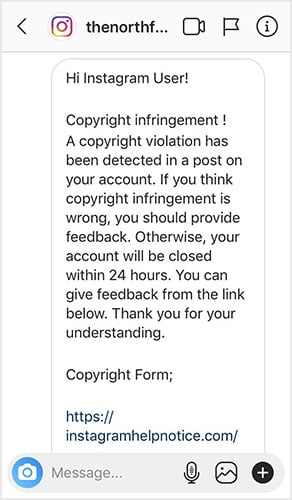
Read the message as a document, line by line. The greeting is “Hi Instagram User!” No name, no username, no account detail. A message sent to one person about their account would use their name. This one was blasted out, and the greeting gives that away before anything else. The next line is “Copyright infringement !” with a space before the exclamation mark, a small punctuation slip that a real Instagram notice would not contain. It reads like a message written in a hurry, or translated, and that looseness runs through the whole text.
The body says a copyright violation has been detected in a post on your account, and that if you think the infringement is wrong you should provide feedback. Otherwise, your account will be closed within 24 hours. Notice what is missing. No post is named. No date is given. No complainant is named. No copyrighted work is described. A genuine copyright complaint has to identify the work and the post, because without that there is nothing to appeal against. This message gives you nothing to check, only a threat and a link.
The last line is “Copyright Form;” followed by the link. The semicolon after “Form” is another small slip, the kind of detail that survives because the scammers copy the same text thousands of times. The link itself went to instagramhelpnotice.com, a domain that is not Instagram. The page it opened was a fake login form, and the “Next” button on that form led to a fake login page designed to steal the password. None of that is visible in the DM itself, which is why the domain matters more than the page design. A convincing page on a fake domain is still a fake page.
The sender is the part that fooled people, so it deserves its own paragraph. @thenorthfacechile was a real verified account with a large following, and the blue tick made the message look official. PetaPixel put the follower count at over 151,000, Hackread reported 146,000, and the profile screenshot in the coverage shows 151k followers, 4 posts and 0 following. The numbers differ between sources, and PetaPixel also reported at least 1,098 posts before the hijack, against the 4 posts visible in the screenshot, which suggests the hijackers deleted the account’s posts. Report the conflict honestly rather than picking one figure: the account was large and verified, and it was not in its owner’s hands when the message went out. A verified account that suddenly starts sending copyright threats, has almost no posts left, and follows nobody is an account that has been taken over, not an account doing official business.
The same lesson applies to any account that messages you out of the blue. A hijacked account is the scammers’ favourite disguise, because it borrows trust the scammers did not earn. If a brand account, a creator account, or any verified account sends you a warning you did not expect, treat the account as compromised until the app itself says otherwise. Our guide to reporting an impersonation profile that uses your photos covers the other side of the same trick, when the hijacked or copied account is pretending to be you.
Answer capsule: the 2020 DM fails every row of the read table, from its nameless greeting and 24 hour threat to its lookalike domain, and its verified sender was a hijacked account, not Instagram.
What did a reverse image search of the screenshot find?
A screenshot is a photo too, and reverse searching it is a fast way to check whether other people have already met the same message. We ran the PetaPixel screenshot of the 2020 DM through Google Lens and TinEye on 21 November 2026, and tried Yandex as well. The results show the message’s history, and they show how the three engines disagree, which is itself useful.
Google Lens found 9 exact matches for the screenshot. The matches were Quora threads asking about the Instagram copyright infringement scam, the original Fstoppers article from 29 June 2020, a WordPress copy of the same Fstoppers article, a That’s Nonsense warning from 29 March 2021, a Facebook post from 26 December 2021, a Gadgets To Use roundup of Instagram scams from 29 September 2022, and two more 2020 copies on PTTL.gr and FotoNerd. PetaPixel itself did not appear in the exact matches, though it did appear in the visual matches. Lens also generated its own AI summary for the image, calling the message a phishing attempt rather than an official notice, and naming the sender mismatch, the suspicious link to instagramhelpnotice.com, and the 24 hour closure threat as the reasons.
TinEye found 2 results after searching 86.8 billion images, and said the image was first indexed on 7 October 2019, which is earlier than the June 2020 DM. That date is worth pausing on. It means the image file, or a near identical copy of it, was already on the web months before this DM was sent, which fits a scam template that gets reused and reposted. The two results were a semadsk.ru copy dated October 2019 and the Fstoppers file, instagram-hack-phishing-attempt.jpg, from May 2021. PetaPixel was not listed by TinEye either. Two engines, two different lists, and neither one complete on its own.
Yandex produced no usable result, and that is not a zero. Its visual search dialog said it could not find the image at the address given, and a direct URL attempt returned no results with an empty query, which means no image was ever submitted. The image URL loads fine in a browser, so the failure sits with Yandex’s fetcher, not with the image. We report it as blocked, not as a zero, because a failed search proves nothing about the image.
What does all of this prove? Two things, and neither is a verdict on its own. First, the screenshot is not new. It has been circulating in scam warnings since at least 2019, and the same DM text has been reported by different victims for years. If you receive this exact message today, you are receiving a template, not a notice about your account. Second, the engines disagree, so one engine is never enough. Lens found nine matches and TinEye found two, with almost no overlap. Run both, and a third if you can, before you decide a screenshot is unknown. The same habit catches a stolen profile photo, which is why our guide to spotting a catfish starts with the same reverse search routine: save the image, search it, and see who else has used it.
Answer capsule: Lens found 9 exact matches and TinEye found 2 for the same screenshot, which proves the DM is a reused template, while Yandex failed to run at all and counts as blocked, not zero.
How do you check a copyright notice inside the Instagram app?
If the message is real, the app will say so. If the message is fake, the app will say nothing, and that silence is your answer. Do the three checks below in order, and do not tap anything in the message while you do them. All three use Instagram’s own screens, and all three were verified against the Help Center on 21 November 2026.
- Check Account Status. Open your profile, tap the menu, then tap Account Status. This screen shows whether any of your content has been flagged for breaking the rules, including copyright. If a copyright strike existed, it would appear here. If the screen is clear, no strike exists, and the DM is lying about it.
- Check Support requests. Go to Settings, then Help, then Support requests, then Violations. This is where Instagram records reports and appeals, and where you can see the status of a review request. A real copyright action leaves a record here, with options to request a review. A DM threat leaves nothing.
- Check Recent emails. Go to Settings, then Meta Account, then Login and security, then Recent emails, and tap your Instagram profile. Instagram lists its official emails from the last 14 days here, with security and login mail under Security and everything else under Other. A genuine email notice would be listed. Some people still see Accounts Center instead of Meta Account, and the Help Center notes that too, so follow the labels on your own screen.
Two notes on the details. First, the official sender domains. Instagram’s Help Center lists @support.facebook.com, @support.instagram.com, @facebookmail.com, @mail.instagram.com and @global.metamail.com. Note that @meta.com is not on that list, even though at least one guide on this scam says it is. If an email claims to be from Instagram and comes from any other domain, it is not from Instagram. Second, do not go looking for a “Notifications, then Copyright” screen. No Help Center page describes such a route, and a search of Instagram’s help pages for that combination turns up only DMCA counter notification pages, which are a different thing entirely. We do not assert that route in this guide, and you should not rely on it if another site tells you to.
Instagram’s own page on reviewing recent emails from Instagram is the authority for the third check, and it is worth reading directly if you are unsure. It also repeats the rule that Instagram will never reach out to you about profile security through direct messaging. For the full picture, Instagram’s page on reviewing recent emails sent from Instagram gives the steps for your device, and its page on avoiding scams on Instagram states the no-DM rule in full.
One more thing to check while you are in the app: the sender’s profile. Open it from the DM, but do not reply. Look at the post count, the following count, and the recent posts. A hijacked account often shows a gutted profile, with most posts deleted and nobody followed, like the 2020 example. A brand new account with a stolen profile picture and a copied bio is a spoofed account, not a hijacked one, and the same rule applies: do not trust it, and do not tap its links.
Answer capsule: Account Status, Support requests and Recent emails are the three in-app checks, and a real notice appears in at least one of them while a fake DM appears in none.
What about the email version, and the 2026 ransom variant?
The same scam also arrives by email, and the email version is harder to spot because email is a channel Instagram does use. The best documented example comes from Paul Ducklin at Sophos, writing on Naked Security on 30 December 2021. The email was addressed to @nakedsecurity and said a post had been reported as infringing copyright, adding that the account would be removed if no objection was made. An Appeal button led through a shortened bit.ly link to a personalised page on fb-notify.com.
What made that page dangerous was how personal it was. It showed the correct account statistics and an image from the victim’s second to last post, which made it feel like a real Instagram page. It asked for the password, gave a fake password error, then a fake success message, and finally redirected to Instagram’s real copyright page, so the victim would think everything had worked. The personal details were almost certainly scraped from the public profile, which costs the scammers nothing. A page that knows your follower count is not a page that knows you. It is a page that read your public profile.
Run the email through the same table as the DM. The sender domain is the first row, and fb-notify.com is not Instagram. The link is the second row, and a bit.ly shortener hides the destination, which is itself a reason not to tap it. The threat is the third row: remove the account unless you object now. And the check is the same as before: open the app, look at Account Status, Support requests and Recent emails. If nothing is there, the email is fake, whatever it says. The same locked account trick is used against other brands too, and our check of the fake Microsoft account locked screenshot reads an almost identical message the same way, line by line.
Ducklin’s own conclusion was stricter than the Help Center. He wrote that Instagram will never email you about copyright infringement, while the Help Center says genuine notices can arrive by email and lists the official domains. The Help Center is the authority here, and the safe rule is the narrower one: a copyright email is only real if it comes from an official domain and also appears in Recent emails inside the app. Ducklin’s version is a good habit, but it is not the official position, and this guide follows the Help Center.
Then, in September 2026, the scam changed shape. Malwarebytes reported on 10 September 2026, from BBC reporting, that criminals were abusing Meta’s own copyright reporting system to get Instagram accounts suspended, then demanding a ransom to withdraw the complaints. They file fake copyright complaints claiming an account uses material it does not own, repeated complaints trigger a temporary suspension, and then the criminals move the conversation to another platform such as Telegram and demand payment to withdraw the complaint. The BBC interviewed the owner of a history focused Instagram account who had been hit by copyright claims several times from the same email address, and who eventually paid 50 dollars in cryptocurrency because it could take weeks for Meta to respond. Meta told the BBC that using automated systems to submit false reports violates its policies, and that it takes action against accounts that abuse the copyright reporting system, including disabling accounts and pursuing legal action where appropriate.
This variant matters because the suspension is real, even though the complaint is fake. The victim’s account really is suspended, and the demand really does arrive, but the way out is not to pay. Paying tells the scammers the account is worth ransoming, and it does not stop them filing again. The way out is the same in-app route: appeal through Account Status and Support requests, report the ransom demand, and wait for the review. It is slow, and that slowness is exactly what the scammers are selling against. Do not pay a ransom for your own account, and do not move the conversation to Telegram or any other app at the scammer’s request.
Answer capsule: the email version hides behind a shortener and a personalised fake page, and the 2026 variant files fake complaints to force a real suspension, but both are beaten by the same in-app checks and neither is ever fixed by paying.
What should you do if you already tapped the link?
First, do not panic, and do not finish the form. If you only tapped the link and did not type anything, close the page. A tap on its own does not give away your password. If you typed your password, or any login code, act now, in this order, and do it from the real Instagram app, not from any link.
- Change your password in the app. Open Instagram, go to Settings, then Accounts Center, then Password and security, and change the password. Pick one you have not used anywhere else. Do this before anything else, because the scammers will try the stolen password quickly.
- Turn on two factor authentication. In the same Password and security screen, switch on two factor authentication with an authenticator app if you can. This stops the stolen password working on its own, which is the whole point of the exercise.
- Check your login activity and sign out everywhere. Look at where your account is signed in, and sign out of any session or device you do not recognise. Then sign out of all sessions if the option is offered, and sign back in only on your own devices.
- Check your email and recovery details. Make sure the email address and phone number on the account are still yours. Scammers who get in often change these first, so that a password reset goes to them instead of you. If they have been changed, use Instagram’s account recovery from the login screen.
- Report the DM and block the sender. Open the DM, tap the sender’s name, tap Report, choose Scam or fraud, then block the account. Reporting helps Instagram shut the account down before it messages anyone else.
- Check what the account did while it was open. Look at your recent posts, messages, bio and profile picture. Scammers who get into an account sometimes use it to message your followers with the same scam, so warn your followers if you see messages you did not send.
Do not do the things the scammers want you to do next. Do not reply to the DM to argue, because a reply confirms your account is active and monitored. Do not ring any number in the message, because the number belongs to the scammers, not to Instagram. Do not send money, gift cards or cryptocurrency to anyone who offers to fix the problem, and do not move the conversation to Telegram or WhatsApp. The same locked account trick runs against other brands, and our check of the fake Apple ID locked screenshot covers the same recovery steps for an Apple account, in case the same message reaches you there.
If you entered payment details anywhere, ring your bank on the number on the back of your card and tell them what happened, and watch your statements for a few weeks. If the account was used to message your followers, tell them plainly that the messages were not from you, and ask them not to tap any links in them. And if the account is suspended because of fake complaints, as in the 2026 ransom variant, appeal through Account Status and Support requests, and report the ransom demand to Instagram and to the police. This is general information, not legal advice, and a solicitor can advise if money has been taken.
Answer capsule: change the password in the app, switch on two factor authentication, sign out everywhere, check the recovery details, then report and block, and never pay anyone who offers to fix it.
Is the 2019 copy-paste copyright hoax the same thing?
No, and mixing the two up is the one trap in this topic. In 2019 a chain post went viral telling people to copy and paste a message claiming that a new Instagram rule, supposedly announced by Channel 13 News, would let Instagram use their photos unless they posted the message, citing the Rome Statute and a clause numbered UCC 1-308. Instagram chief Adam Mosseri debunked it, and news outlets reported it as a hoax. Posting the message did nothing, because a copied paragraph cannot change Instagram’s terms, and Instagram never announced such a rule.
The hoax and the phishing DM share one word, copyright, and nothing else. The hoax has no DM, no link, no 24 hour closure threat, and no attempt to steal a password. It is a chain post that spreads by copying, and the only harm it does is confusion. The phishing DM is a targeted message with a link to a fake login page, and its whole purpose is to steal an account. One is a rumour. The other is a crime. If you see someone warning about the “new Instagram rule” post, that is the hoax, and it is not the message this guide is about.
The distinction matters because the fix is different. The hoax needs nothing except not reposting it. The phishing DM needs the checks in this guide, and a report. If a friend forwards you the copy-paste post, tell them it was debunked in 2019 and move on. If a friend forwards you a screenshot of a copyright DM with a link and a deadline, tell them not to tap it, and walk them through Account Status.
Answer capsule: the 2019 copy-paste hoax is a chain post with no link and no threat, while the phishing DM is a message with a link and a 24 hour deadline, so they are different messages with different fixes.
FAQs
Does Instagram send copyright warnings by DM?
No. Instagram’s Help Center states that Instagram will never send you direct messages about your account in the Instagram app. Real copyright notices appear in Account Status, in Support requests, or by email from an official domain. Any copyright warning that arrives as a DM is fake, whatever the sender’s name or blue tick.
What does a real Instagram copyright notice look like?
A real notice appears inside the app, in Account Status or Support requests, or by email from @support.instagram.com, @facebookmail.com, @mail.instagram.com, @support.facebook.com or @global.metamail.com. It names the post and the work concerned, and it appears in Recent emails in Settings for 14 days. It never arrives as a DM with a link.
Can a verified account send a fake copyright message?
Yes. The 2020 phishing DM came from @thenorthfacechile, a verified account with over 151,000 followers that had been hijacked. A blue tick proves an account was verified once, not that the current user is the owner. Check the profile for deleted posts and zero following, and verify the message in Account Status before trusting it.
How do I check if my Instagram account really has a copyright strike?
Open your profile, tap the menu, then tap Account Status to see flagged content. Then check Settings, Help, Support requests, then Violations for the record of any action. Finally check Settings, Meta Account, Login and security, then Recent emails for official mail from the last 14 days. A real strike appears in at least one of these.
What happens if I clicked the link in a fake copyright message?
If you only tapped the link and typed nothing, close the page, as a tap alone does not give away your password. If you entered your password or a code, change the password in the app at once, turn on two factor authentication, sign out everywhere, and check your recovery email. Then report the DM and block the sender.
How do I report a fake Instagram copyright message?
Open the DM, tap the sender’s name at the top, tap Report, then choose Scam or fraud, and block the account afterwards. Reporting helps Instagram shut the account down before it messages anyone else. Do not reply to the message first, as a reply confirms your account is active and monitored by the scammers.






