🔎 Reverse Image Search
Image search techniques made simple: upload a photo or paste a URL and search 6 engines at once. 100% free, nothing stored.
🔒 Your image is never stored on our servers longer than 24 hours and is never shared.
A second-hand console with no box, a charity-shop find with a faded label, or a listing photo that shows the machine but never names it. If you want to identify a games console model from a photo, the picture itself usually holds the answer, as long as you know which marks to read and in which order to read them.
Short answer: Photograph the front, the back label and the ports, then read the model code printed on the label or the box. That code decides the exact model. A reverse image search on the same photo then confirms the model family and shows you matching listings and guides. A photo alone can only suggest a model family, so the label code is what turns a good guess into a certain answer.
This guide works through the method step by step, with a real Nintendo Switch photo tested live on three search engines. It covers Switch, PlayStation and Xbox, because the same routine works on all three. You will not need to open the console at any point. Opening a console can damage it and can void a warranty, so leave the screws alone.
What can a photo actually tell you about a console model?
Answer capsule: A photo can name the model family with confidence, and it can name the exact model when the label code is legible.
Start by separating two questions that buyers often mix up. The first is which family the machine belongs to: a Nintendo Switch, a PlayStation 4, an Xbox One. The second is which exact model inside that family it is: the original Switch or the revised one, the slim PlayStation 4 or the fat one, the Xbox One S or the Xbox One X. A single front photo usually settles the first question. The second question needs the label code, because makers reuse the same name and the same shell across revisions that differ inside. Note the difference between the machine and the game on its screen: if the photo shows gameplay rather than hardware, our identify a video game from a screenshot guide is the one to use.
The Nintendo Switch is the clearest example. The original Switch and the revised Switch look identical from the front. Both are called Nintendo Switch. Both have the same 6.2 inch screen, the same detachable Joy-Con controllers and the same dock. The difference is inside: the revised model has a newer chip and a longer battery life, about 4.5 to 9 hours against about 2.5 to 6.5 hours on the original, according to Nintendo. The only way to tell them apart from a photo is the model code on the back of the console. The original reads HAC-001. The revised one reads HAC-001(-01). That small suffix is the whole answer, and it is why the label photo matters more than the front photo.
Definition: model code. A model code is the short code the maker prints on the console, usually on a label on the back or the bottom, and on the box. It names the exact hardware revision. A serial number is different: it names one single unit, not a model, and it should never be shared in a public photo. This guide uses model codes only. Any serial number in a photo here is blurred out.
How do you photograph a console so the model can be read?
Answer capsule: Take four photos: the front, the back label, the ports, and the box label if you still have the box.
One wide shot of the whole console is not enough. Work through the four shots in order, and check each one on your phone screen before you move on. A blurry label photo is the most common reason an identification fails, and it is fixed in ten seconds by retaking the shot.
- The front, straight on. Put the console on a plain surface in daylight, fill the frame with it, and keep the camera level with the machine. This shot settles the family: the shape, the controller layout and the branding. Avoid flash, which washes out the print on dark plastic.
- The back label, close up. Turn the console over and photograph the printed label. On a Switch the model code sits on the back of the console, near the bottom edge by the USB-C port. On a PlayStation 4 it sits on the back panel. Get close enough that the small print is readable, and take a second shot at a slight angle if glare hides a line. Nintendo’s own support pages say the same thing: if you are unsure which system you have, check the text on the back of the system for the model number.
- The ports and the disc drive. Photograph the side or the front edge where the ports sit. A disc slot, a cartridge slot, a memory card slot and the USB and HDMI ports all narrow the model down. A digital-only console has no disc drive at all, and that single fact rules out every disc model in the family.
- The box label, if you have the box. The box carries the same model code, usually on a white sticker on one end. Photograph it as well, but remember that boxes and consoles get mixed up in used sales. The code on the console itself always wins over the code on the box.
If you are buying from a listing and the seller only posted one front photo, ask for the back label photo before you pay. A seller who cannot or will not photograph the label is a warning sign in itself. A genuine seller with the console in hand can take that photo in a minute.
Which marks on a console decide the exact model?
Answer capsule: The model code decides it. Shell shape, ports and controllers narrow the field, and the code confirms it.
Work through the marks in this order, from the weakest evidence to the strongest. The table below is the ranking asset for this guide: every mark, what it proves, and how much to trust it.
| Mark to read | Where to find it | What it proves | How much to trust it |
|---|---|---|---|
| Shell shape and size | Front photo, whole console | The model family, and sometimes the revision: slim versus fat, handheld versus docked | Suggests the family, never the exact model |
| Controller design | Front photo, controllers attached or beside the console | The family and the generation: detachable Joy-Con, DualShock 4, Xbox One controller | Suggests the family, never the exact model |
| Port layout | Side or front edge photo | Disc drive versus digital-only, USB-C versus older ports, HDMI present or absent | Rules models in or out, rarely confirms one alone |
| Disc drive | Front or side edge photo | Whether the console plays discs at all: a digital-only model has no drive | Decisive for disc versus digital, nothing else |
| Model code on the label | Back or bottom label, or the box sticker | The exact hardware revision, for example HAC-001 against HAC-001(-01) | The decider: this is the answer |
| Serial number prefix | Same label, or System Settings on the console | The production batch, which can separate early and late units of one model | Supporting evidence only, and never share the full number |
Two warnings belong with this table. First, the same name does not mean the same machine. The original Switch and the revised Switch share a name, a shell and a screen, and only the model code separates them. The same trap exists elsewhere: a PlayStation 4 Slim and the original PlayStation 4 share a name and a library, and an Xbox One S and an Xbox One X share a name and a controller. Second, a special edition changes the paint, not the hardware. A limited-run colour or a bundled game tells you nothing about the revision inside. Read the code, not the colour.
How do you reverse search the photo to confirm the model?
Answer capsule: Upload the front photo to Google Lens first, then cross-check it on TinEye and Yandex, and compare what the three engines say.
A reverse image search does not read the label for you. What it does is show you where the same photo, or photos of the same console, have already appeared: the maker’s own pages, reviews, listings and guides. That context often names the model outright, and it shows you which revision other people matched the same machine to. Run all three engines, because they index different corners of the web and they disagree in useful ways. The same routine works for any object, not just consoles: our find an item by image guide walks through the same three engines for anything from a lamp to a laptop.
- Google Lens. Open lens.google.com, upload the front photo, and read the name Lens gives the console and the exact matches it lists. Lens is usually the best at naming a console from a front photo, because it has seen the maker’s own product shots.
- TinEye. Upload the same photo at tineye.com and note the match count and the earliest indexed date. TinEye is the best at showing how old a photo is and where it first appeared, which matters when a listing reuses an old stock photo.
- Yandex Images. Run the visual search at yandex.com/images and read the tags it gives the console, plus the similar images and the sites behind them. Yandex is often the strongest on model names for hardware, and it lists other sizes of the same image.
Use the original file, not a screenshot of it. A screenshot is a rendered copy, and it can lose the fine detail that separates one revision from another. If the only copy you have is a screenshot, say so in your notes, and treat a vague result with suspicion.
Worked example: a Nintendo Switch, searched live
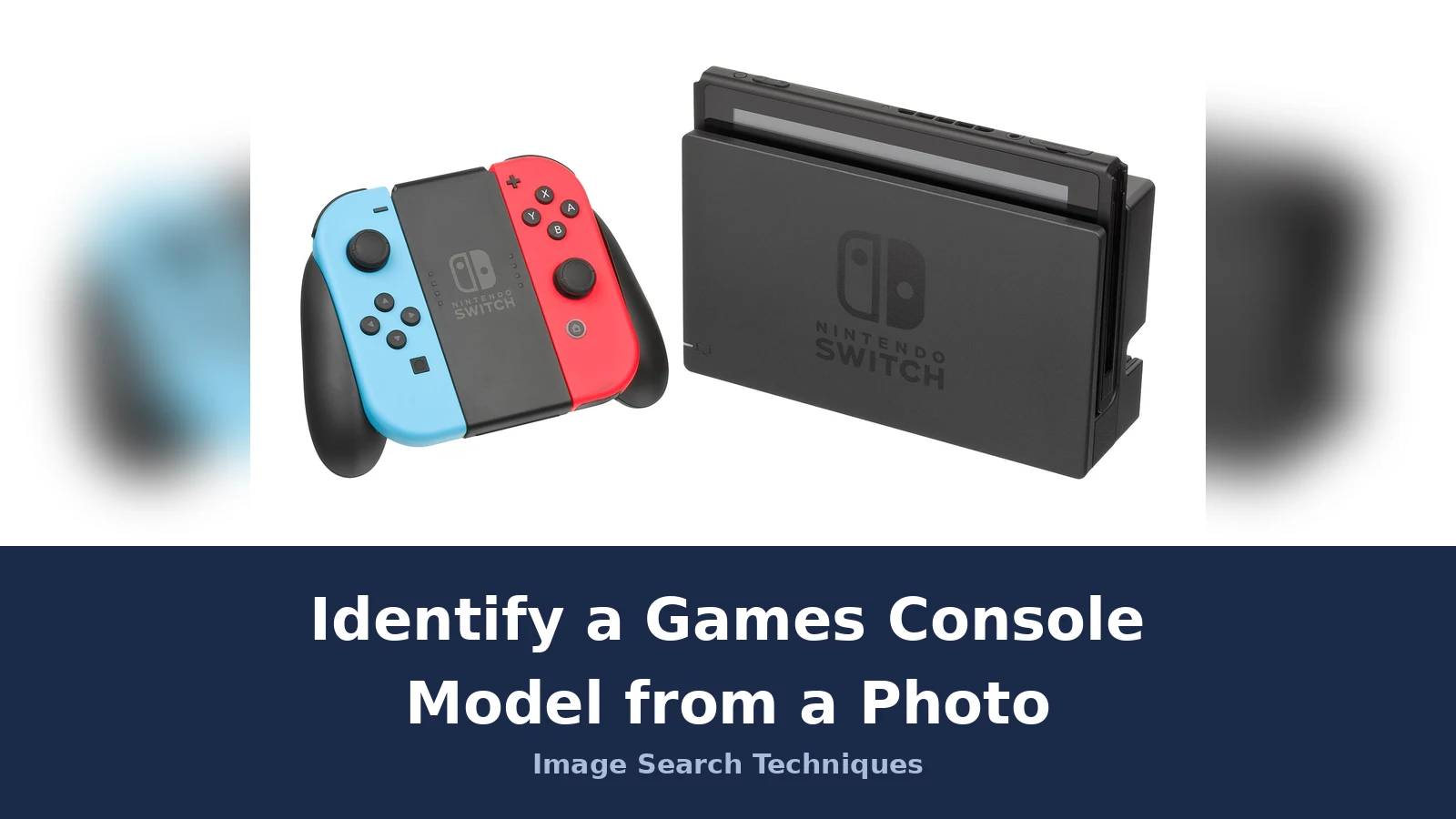
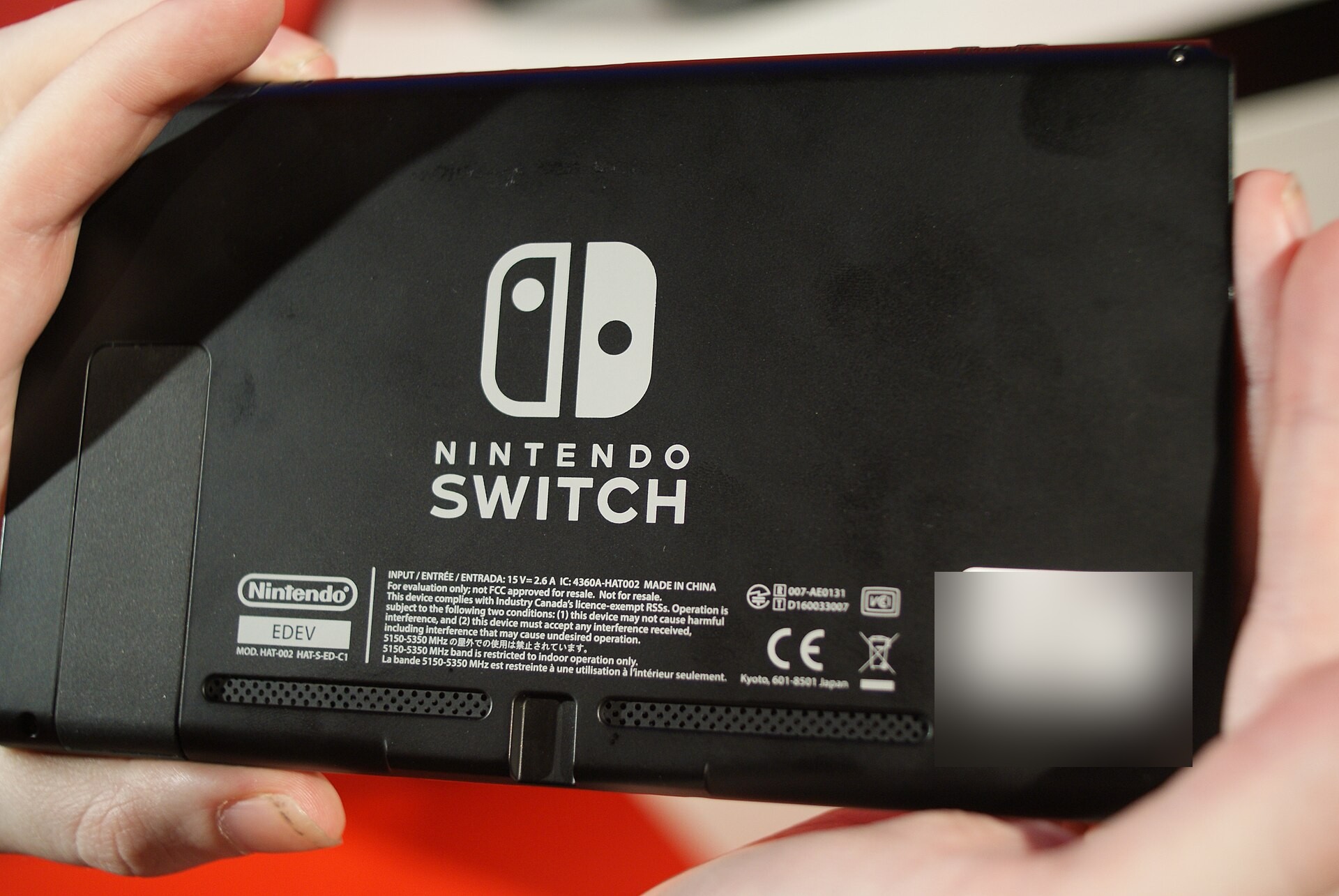
The test photo is a public-domain photograph of a Nintendo Switch in its dock, taken by Evan Amos on 21 June 2017, a few months after the console launched in March 2017. It shows the original Switch: the docked console with the neon blue and neon red Joy-Con controllers in the grip. The file is 4900 by 2800 pixels. A second photo, the back of a Switch taken by Elvis untot on 17 January 2017, shows the label where the model code lives. That unit is a pre-release evaluation model, so its code reads HAT-002 rather than the retail HAC-001, and its label carries the words “For evaluation only; not FCC approved for resale”. It still demonstrates exactly where the code sits and how it reads, and the serial number on its barcode sticker is blurred in the copy used here.
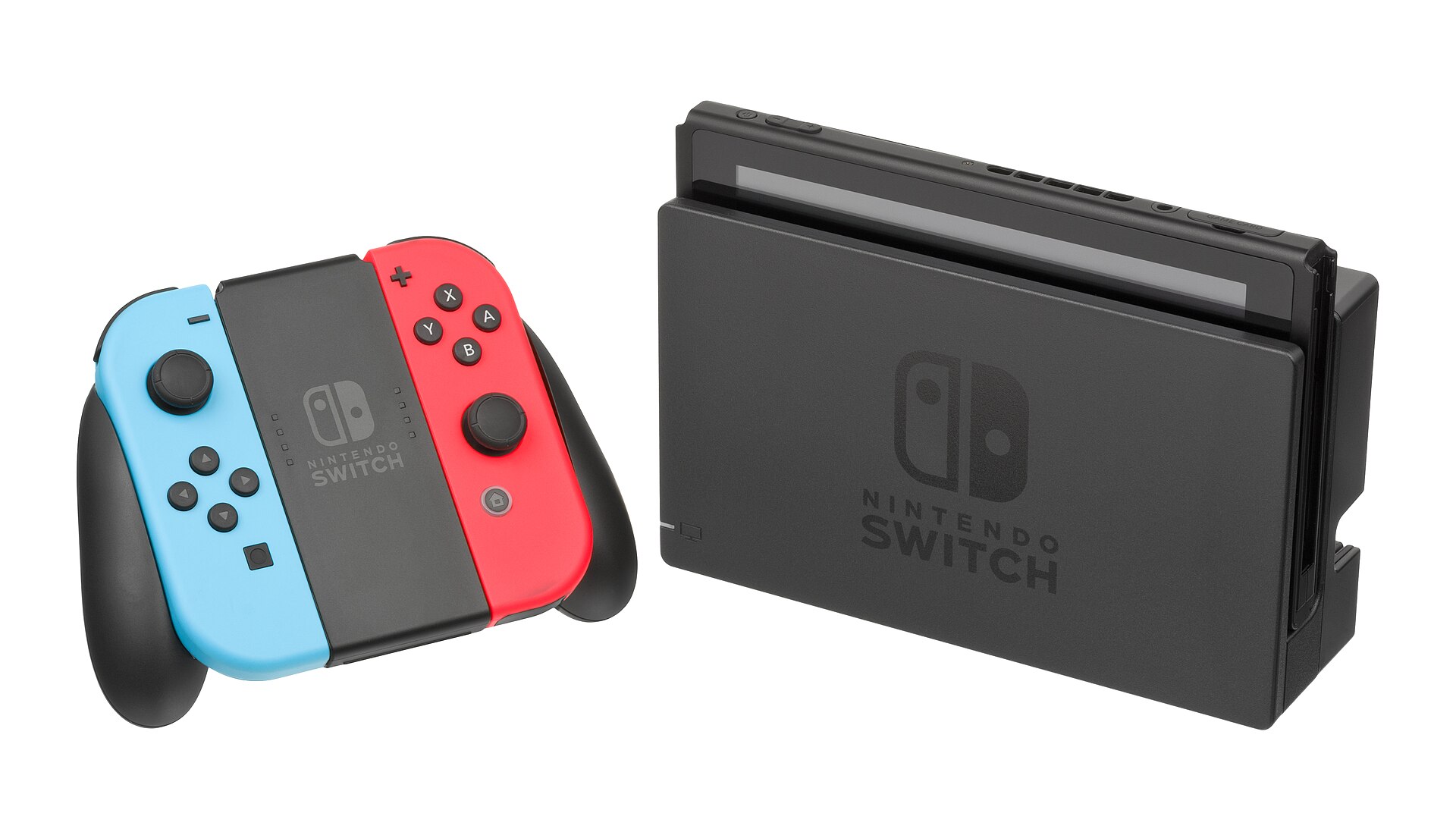
Both photos were reverse searched live on 21 November 2026. Here is what each engine returned.
| Photo and engine | What it returned | Did it name the model? |
|---|---|---|
| Docked Switch, Google Lens (file upload) | No total shown. Top exact matches were dock listings: Walmart Dock Set, Galaxus, eBay dock. Lens auto-cropped the search to the dock only, so its matches are dock-centric. | Partly: it named the Switch Dock, not the console model |
| Docked Switch, TinEye | 390 results out of 86.8 billion, first indexed 24 Sep 2017. Top matches: Wikipedia Nintendo Switch, the Commons file page, charcas.me, Tom’s Guide. | Yes, through the Wikipedia match |
| Docked Switch, Yandex | 18 sizes including the original 4900 by 2800. Tags named the Nintendo Switch game console, and also the Switch Lite. Dozens of similar images, no total shown. | Yes, plus a wrong Lite tag |
| Back of console, Google Lens (file upload) | No total shown. Top exact match was the Commons file itself, then Consolevariations EDEV pages, Reddit and The Boar. | Yes, exactly: EDEV unit, HAT-002 and HAT-S-ED-C1 |
| Back of console, TinEye | 12,888 results out of 86.8 billion, first indexed 20 Oct 2016. That total counts partial matches such as logo crops, so the honest figure is the exact file, found at Reddit, Google Plus, gambarluculo and gamepedler. | Yes, through the exact-file matches |
| Back of console, Yandex | 15 sizes including the original 3872 by 2592. Tags named the Switch and, wrongly, the Switch Lite. Similar images included an early tester unboxing and a model-check guide. | Yes, plus a wrong Lite tag |
Three honest lessons come out of that table. First, Lens is only as good as the crop it chooses: on the docked photo it locked onto the dock, not the console, so its matches were dock listings and it never named the console model. If Lens crops the wrong part, tap the image and drag the crop box over the console itself before you read the results. Second, Yandex names the model fast, but it also tags the Switch Lite on two photos taken in 2017, two years before the Lite existed. A tag is a suggestion, not a verdict, and a tag that is impossible on the dates should be ignored. Third, TinEye’s big totals need reading with care: the 12,888 for the back photo counts partial matches such as logo crops and thumbnails, and its earliest date of 20 October 2016 predates the photo itself. The useful number is the exact file and where it sits, and on that count the back photo is clearly the EDEV unit. Lens read the back label best of the three: it named the EDEV unit, gave both model numbers HAT-002 and HAT-S-ED-C1, and contrasted them with the retail HAC-001, quoting the “For evaluation only” line from the label. That is the label code doing its job, and it is why the back photo matters more than the front one.
How do you read the label code and confirm it on the maker’s page?
Answer capsule: Read the MOD. line on the back label, match it against the maker’s model list, and check the serial prefix only as a second opinion.
On a Nintendo Switch, the model code sits on the back of the console, near the bottom edge by the USB-C port. Nintendo’s own support pages confirm this: check the text on the back of the system for the model number, and on the OLED model open the adjustable stand to find it. The codes to know are:
- HAC-001: the original Nintendo Switch, launched March 2017, battery about 2.5 to 6.5 hours.
- HAC-001(-01): the revised Nintendo Switch, from mid 2019, same shell and screen, battery about 4.5 to 9 hours. The (-01) suffix is the only visible difference.
- HEG-001: the Nintendo Switch OLED model, 7.0 inch OLED screen, 64 GB storage, battery about 4.5 to 9 hours. The model number sits under the rear stand.
- HDH-001: the Nintendo Switch Lite, 5.5 inch screen, fixed controllers, no TV dock, battery about 3.0 to 7.0 hours.
Those battery figures come from Nintendo’s own technical specifications page, which lists the OLED model, the HAC-001(-01) console and the Lite side by side. The original HAC-001 figure comes from Nintendo’s own comparison when the revised model launched. If the code on the label and the battery life in the listing disagree, trust the code: battery figures get copied wrong in listings far more often than a printed label does.
The serial number is a useful second opinion, and nothing more. Switch serials start with XAW on the original model, XKW on the revised model, XTW on the OLED model and XJW on the Lite. You can find the serial on the same white sticker as the model code, or in System Settings under Serial Information. Never publish the full serial number, and never ask a seller to send it to you in full: the first three letters are enough to confirm the batch, and the rest is private. The same rule applies to any device: our identify a phone model from a photo guide uses the same label-code routine, with the serial blurred in every example.
For PlayStation and Xbox the routine is the same, only the codes change. A PlayStation 4 carries its model code on the back panel, in the CUH-1xxx range for the original, CUH-2xxx for the Slim and CUH-7xxx for the Pro. An Xbox One carries its code on the back or the bottom, and the One S and One X differ in size, ports and power supply as well as in code. In every case, the code on the console beats the code on the box, the listing title and the seller’s memory, in that order. Older hardware follows the same logic: a camera or a watch is identified the same way, by reading its marks against the maker’s list, as our identify a vintage camera from a photo guide and our identify a watch from a photo guide both show.
What if the photo gives no clear answer?
Answer capsule: Ask for a back label photo, and if none is coming, treat the model as unconfirmed and price it as the cheaper revision.
Some photos will not settle the question, and an honest “I cannot tell from this photo” is worth more than a confident guess. The common dead ends, and what to do about each:
- The label is blurry or out of frame. Ask the seller for a close-up of the back label. If the listing has no label photo at all, that is the single most useful photo to request.
- The photo is a stock image, not the actual console. TinEye’s earliest-indexed date often gives this away: a photo first indexed years ago, on a review site, is not a photo of the console for sale. Ask for a fresh photo of the actual unit, with today’s newspaper or a handwritten note beside it if you want proof.
- The box and the console disagree. Trust the console. Boxes get swapped in used sales, in house clearances and in charity shops. If the box says one model and the label says another, the label is right.
- The console is a special edition. Special editions change the shell colour and the bundled game, not the hardware revision. Read the code, not the paint.
- The engines disagree. Lens may name one model while Yandex tags another. When that happens, the label code breaks the tie. If there is no label photo, the model is unconfirmed, and you should not pay the price of the more expensive revision for it.
One more caution: never advise opening a console to identify it. The model code is printed on the outside for a reason, and opening the shell risks damaging the machine, stripping a screw, or voiding a warranty. If the outside of the console cannot identify it, the inside will not help a buyer anyway, because the parts that differ between revisions are not labelled for a casual look.
How do you check a console model before you buy it second-hand?
Answer capsule: Read the label code, reverse search the listing photos, and confirm the parts and the price against that exact model.
The identification is only half the job when money is involved. Once the code gives you the exact model, check three things before you pay. First, the parts: the revised Switch and the OLED model use the same Joy-Con controllers, but the Lite has fixed controls and cannot dock, and a digital-only PlayStation 5 has no disc drive, so the games and accessories you already own may not fit. Second, the price: a revised Switch is worth more than an original one, and an OLED model more again, so a listing priced as the newer model but carrying the older code is either a mistake or a deliberate mislabel. Third, the condition: ask for a photo of the console switched on, showing the home screen, because a photo of a dead console tells you nothing about whether it works.
Keep the evidence. Save the listing photos, the label photo and the reverse search results before you pay. If the console that arrives is a different model from the one in the listing, those saved photos are what a marketplace dispute or a return claim will turn on.
FAQs
Can Google Lens identify a games console model from a photo?
Usually it can name the model family, but not always the exact model. In our test Lens locked onto the dock instead of the console, so its matches were dock listings. Check the crop box Lens draws, drag it over the console itself, and always confirm the answer against the model code on the back label.
Where is the model number on a Nintendo Switch?
On the back of the console, near the bottom edge by the USB-C port. On the OLED model, open the adjustable stand on the rear to find it. Nintendo support says the same thing: check the text on the back of the system for the model number. The serial number is on the same sticker and in System Settings.
What is the difference between HAC-001 and HAC-001(-01)?
The two consoles share a name, a shell and a screen. The revised model, HAC-001(-01), has a newer chip and a longer battery life, about 4.5 to 9 hours against about 2.5 to 6.5 hours on the original. The (-01) suffix on the back label is the only visible difference between them.
Can a photo prove which exact model a console is?
No. A photo can suggest the model family with confidence, and it can prove the exact model only when the label code is legible in the shot. Without a readable code, the model is unconfirmed, however clear the front photo looks. Ask the seller for a close-up of the back label before you pay.
Why did Yandex tag my 2017 Switch photo as a Switch Lite?
Tags are suggestions, not verdicts. The Switch Lite launched in 2019, so a Lite tag on a photo taken in 2017 is impossible on the dates, and our test saw exactly that error twice. Ignore any tag that cannot fit the photo date, and trust the model code on the label instead.
Should I share a photo that shows the serial number?
No. Blur the serial number and the barcode in every photo you publish or send to a stranger. The serial names one single unit, not a model, and it can be misused. The first three letters are enough to confirm the production batch, and the model code is the part that identifies the model.