🔎 Reverse Image Search
Image search techniques made simple: upload a photo or paste a URL and search 6 engines at once. 100% free, nothing stored.
🔒 Your image is never stored on our servers longer than 24 hours and is never shared.
Short answer: to identify a game from a screenshot, upload it to Google Lens, crop it to the game scene only, and read the matching pages it returns, for a well-known game, the title is usually named within a minute. If Lens finds nothing, read the HUD and art style for clues, search those clues as words, then confirm the suspected title against a game database such as MobyGames. Ask the r/tipofmyjoystick community only after the searches have failed.
Identifying a game from a screenshot is a reverse image search problem with a twist: the image is not a photograph of a real thing, so the search engine can only match it against screenshots and artwork that other people have already published. A physical board game is the opposite case, a photograph of a real thing, and our guide to identify a board game from a photo runs the same three engines on a real box and shows how the box art, publisher mark and copyright line name the game and its edition. That works well for popular games and poorly for obscure ones, which is why this guide pairs the search with a clue checklist and a verification step. Follow the order below (search, clues, database, community), and you will name most screenshots without guessing.
A screenshot, for this guide, means a still image captured from a game while it is running: gameplay, a title screen, a menu, a cutscene or a loading screen. It does not mean a photograph of a television or a monitor, which adds glare and distortion that confuse every search engine. If your image is a photo of a screen, recapture it properly first (on PC use the game’s screenshot key or Windows + Print Screen, on PlayStation or Xbox use the Share button, on Switch use the Capture button), because a clean capture is the single biggest factor in whether the search works.
What is the fastest way to identify a game from a screenshot?
Reverse image search is the fastest route: upload the screenshot to Google Lens and look for pages that contain the same image or a similar one. Google’s own help page says Lens can be used to “learn more about an image or the objects around you” and that results include “websites with the image or a similar image”, for a game screenshot, those websites are usually the game’s wiki page, its store page, or a guide that uses the same screenshot. When the game is popular, that is often the whole job, finished in under a minute.
Speed depends on how widely the exact scene has been published. A title screen, a famous location or a named character appears on hundreds of pages, so Lens matches it easily. A random corridor in a little-known indie game may appear nowhere at all, and then no search engine can name it from the pixels alone. That is not a failure of the method; it is the limit of it, and the clue checklist further down exists for exactly that case.
How do I reverse image search a game screenshot?
Work through these steps in order. They take about two minutes, and each one removes a common reason for a failed match.
- Crop to the game scene. Open the screenshot in any image editor and cut away phone status bars, chat overlays, captions, watermarks, desktop taskbars and black borders. Search engines match what is inside the frame, and a caption or a Discord sidebar can pull the results towards unrelated images. Keep the HUD (health bars, minimaps and menus are clues, not noise), but remove everything that is not the game.
- Upload it to Google Lens. Go to lens.google.com, click the upload area and choose the cropped file, or drag the file onto the page. In Chrome you can also right-click any image on a web page and choose “Search with Google Lens”. Google’s help page lists all three routes: upload, drag and drop, and search by image URL.
- Drag the crop box onto the most distinctive part. If Lens focuses on the wrong element (a tree instead of the character, a wall instead of the logo), drag the corners of the selection box until it covers the distinctive region: a character’s face, a logo, a named place, a unique weapon or vehicle. A distinctive crop beats a full-frame search when the frame is busy.
- Read the “exact matches” first, then the “similar images”. An exact match names the page that published this precise screenshot, which usually names the game in the page title or caption. Similar images are looser: they show the same game, the same art style, or a lookalike game, so treat them as candidates to check, not as answers.
- Try the other engines if Lens draws a blank. Run the same cropped file through TinEye, which finds exact copies only, and through Yandex Images, which is often stronger on screenshots and artwork that Google has not indexed. Different engines index different corners of the web, so a blank on one is not a blank everywhere.
- Search by URL when you have one. If the screenshot is already online (in a forum post, a tweet or a Discord message), copy its direct image address and paste it into Lens as a search by URL instead of downloading and re-uploading it. The result is the same, and it avoids compression changing the file.
One honest warning: Lens sometimes returns a confident-looking wrong answer. A screenshot of one fantasy game can match another fantasy game with a similar palette, and a page can carry the wrong caption. A reverse search result is a candidate title, never proof. The verification step later in this guide is what turns a candidate into an answer. Our step-by-step guide to reverse image search covers the phone and desktop steps in detail, and our Google reverse image search guide covers Lens specifically.
What clues in a screenshot name the game?
When the search engines come back empty, the screenshot itself still holds the answer. Games leak their identity through their interface and their art, and a few minutes of reading those signals narrows the field from thousands of games to a handful. Work through the checklist below and write down what you find; the notes become your search terms in the next step.
| Clue | What to look for | Why it narrows the field |
|---|---|---|
| HUD layout | Health bar shape and position, minimap style, ammo counter, objective text, button prompts (△ ○ × □, A B X Y, E / F keys) | Button prompts reveal the platform; HUD shape is often unique to one series |
| Art style | Photorealistic, cel-shaded, pixel art, low-poly, hand-painted, anime, voxel | Style plus genre cuts thousands of candidates to dozens |
| Characters | Named characters, distinctive outfits, species, weapons, vehicles | A named character is often searchable on its own |
| Text on screen | Place names, faction names, item names, quest text, damage numbers, language | Exact words are the strongest text-search terms you have |
| Logos and marks | Publisher logo, engine splash, rating box, platform badge, watermark | A logo dates the game and names the publisher directly |
| Setting | Era, architecture, technology level, landscape, weather, time of day | Setting plus art style is often enough to exclude whole genres |
| Perspective | First-person, third-person, top-down, side-scrolling, isometric | Perspective plus genre is a strong database filter |
| Menu and font | Font style, menu layout, save-screen design, loading tips | Fonts and menus are surprisingly consistent within a series |
The HUD is the single most useful clue, which is why the cluster query “name the game from the HUD” exists at all. Button prompts are decisive: PlayStation symbols mean a PlayStation game or a PlayStation port, Xbox letters mean Xbox or PC with an Xbox controller, keyboard prompts such as “Press E” mean a PC game. A minimap in the corner with a compass strip across the top points towards open-world games; a grid of ability icons with cooldown timers points towards a MOBA or an MMO; a single health bar and a crosshair point towards a shooter. None of these names a game on its own, but together they describe a small family of games, and a family is small enough to search by hand.
Read any text in the screenshot literally. A place name, a faction name or an item name is a search term you can type into a search engine inside quotation marks, and a distinctive phrase from quest text can lead straight to a wiki page. If the text is in a language you do not read, screenshot it and run it through a translation app first; a translated place name is still a place name.
How do I check a suspected game title is right?
Never accept a first result on trust. A candidate title from Lens, from a clue search or from an AI tool is a hypothesis, and the check takes two minutes. Open the game’s page on MobyGames (a game database whose search page lists 339,336 games and 1,108,429 screenshots, verified 12 November 2026), and compare its screenshots with yours. MobyGames has no image upload, so this is a manual comparison: open the suspected game’s page, look at its screenshots, and check the art style, the HUD, the characters and the setting against your image. If they match, you have your answer. If they do not, the candidate is wrong, and you have ruled something out, which is progress.
Cross-check on a second database when the first is inconclusive. IGDB lists more than 280,000 games with covers and screenshots on each game page, and Steam’s store pages carry screenshots and trailers for every listed game. The checks that matter are concrete: does the HUD match, does the character match, does the place match, and does the release year fit the graphics? A game released in 2015 cannot be the source of a screenshot with a 2024 interface, and a game with no minimap cannot be the source of a screenshot that has one.
Keep a note of what you ruled out. If you later ask a community for help, “it is not this game, I checked” saves everyone time and stops the thread from repeating your work.
What if reverse search finds nothing at all?
Start with the clues as words. Search for a description of what you can see: the genre, the perspective, the art style, and the most distinctive visible element, in one query. “Isometric pixel art farming game with a dog companion” is a better query than “old game with a farm”, because each extra detail removes candidates. Add the platform and the approximate year if you know them: “PS2 third-person samurai game 2004” is a query a search engine can actually answer.
Try an AI vision tool as a lead, not as an answer. Upload the screenshot to ChatGPT or Gemini and ask what game it is from, then treat the reply the way you would treat a Lens result: a candidate to verify against MobyGames, not a verdict. Our guide to identifying a photo with ChatGPT and Gemini explains how to upload an image and how to phrase the question so the answer is checkable. AI tools are honest about uncertainty only sometimes, so a confident-sounding wrong title is the most common failure here. Always run the verification step.
There is no dedicated public tool that identifies a game from an arbitrary uploaded screenshot, and it is worth saying so plainly, because several guides imply otherwise. One named in other articles, Screenshot2Game, has no live site or working address that could be found in November 2026, so do not waste time looking for it. Daily guessing games such as GuessThe.Game at guessthe.game are a different thing entirely: they show you a mystery screenshot and ask you to guess the game, which trains recognition but cannot identify your own screenshot. Research into machine identification supports the honest position: a 2023 study, “From Pixels to Titles”, trained models on 170,881 screenshots from 8,796 games and reached 74.51% accuracy with its best model, which means even a purpose-built system gets roughly a quarter of screenshots wrong, and it is weakest on pixel-art games with similar palettes.
When the searches and the clue work have both failed, ask people. The Reddit community r/tipofmyjoystick exists for exactly this: users describe a game they cannot name and other users identify it, often within hours. Attach the screenshot to your post and add the written details the community asks for, using its posting template: the platform or platforms, the genre, the estimated year of release, the graphics and art style, any notable characters, the notable gameplay mechanics, and any other details you remember. Put the platform and year in the post title in brackets, as the community requires, for example “[PC] [2010s] Isometric strategy game with elephants”.
Write down everything the screenshot shows before you post, using the clue checklist above, and say what you have already tried and ruled out. A post that says “I searched Lens, it found nothing; it is not Age of Empires, I checked” gets better answers than a bare image, because it tells helpers where not to start. Read the subreddit’s sidebar and rules before posting (they change, and a post that breaks them gets removed instead of answered), and remember that posting needs a Reddit account. Do not include personal information in the post, and do not pay anyone who offers identification help for a fee; identification help in this community is free, and a payment request is a red flag.
Worked example: how to identify a game from a screenshot
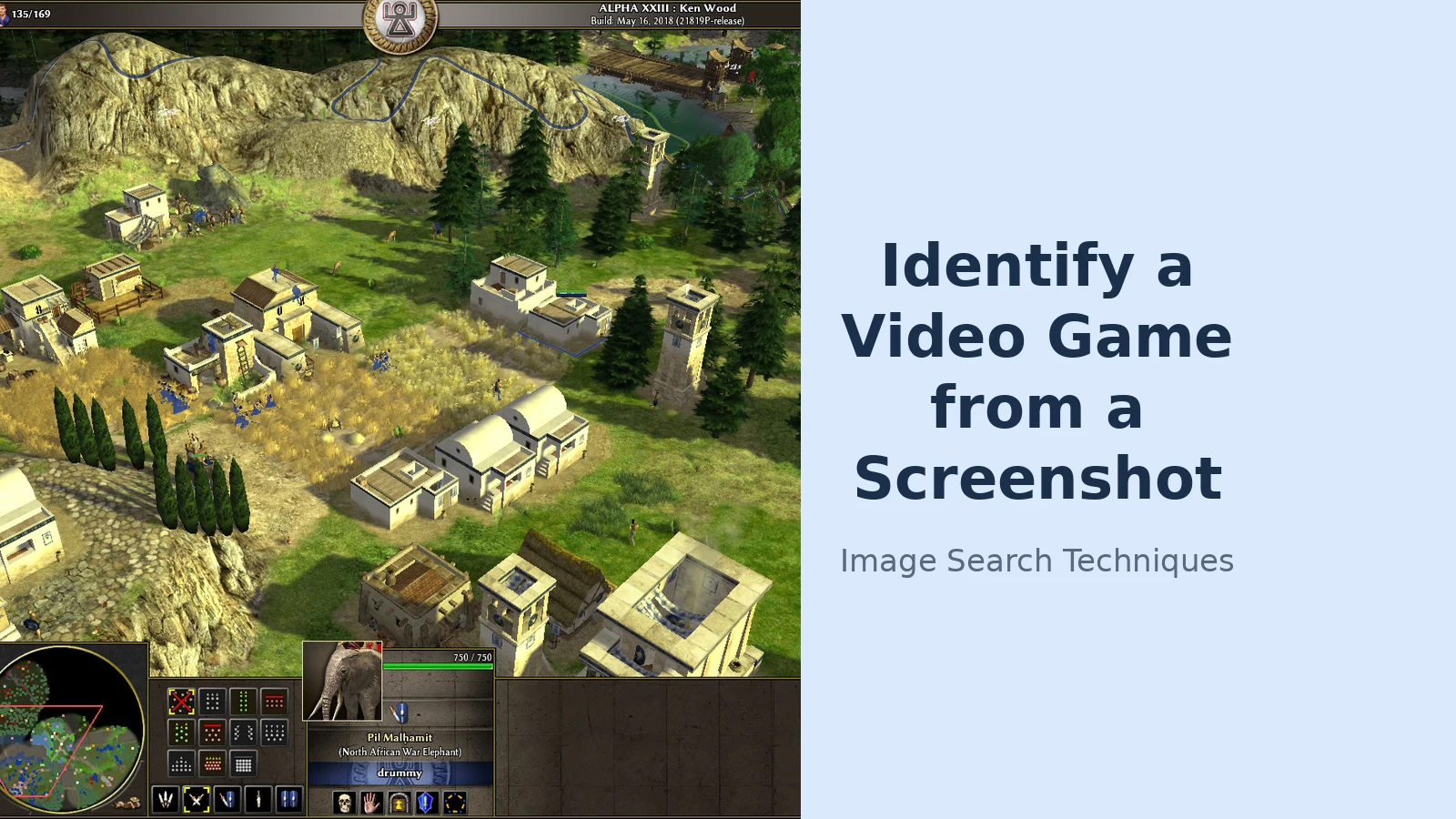
To test the method honestly, I took a real screenshot (a 2019 capture of the free open-source strategy game 0 A.D., Alpha 23 “Ken Wood”, showing an ancient village with a minimap and unit bar along the bottom), and ran it through Google Lens, TinEye and Yandex Images by URL, exactly as this guide teaches. The screenshot is published on Wikimedia Commons under a CC BY-SA licence, so anyone can repeat the test.
Google Lens: failed once, then named it. The first attempt by URL loaded the visual-search page but the results never rendered, the control changed to a disabled “Expired visual search” button and the Exact matches tab reported “Something went wrong: No image at the URL”. The same URL on an immediate fresh retry worked: the first Visual match was “File:0 A.D. Alpha 23.jpg, Wikimedia Commons”, the related searches shown were “Age of Empires” and “0 A.D.”, and the first web result was the Commons file page itself, with the snippet “Jan 26, 2019: This is a screenshot of a free and open-source game 0 A.D. Alpha 23 ‘Ken Wood’, taken by me…”, followed by the Wikipedia page “0 A.D. (video game)”. The Exact matches tab showed at least six results, all the same screenshot, on Libregamewiki, Wikimedia Commons and a handful of gaming site. The lesson is practical: a Lens failure on the first try is often transient, so retry the same URL once before giving up. No sign-in was used at any point.
TinEye: two matches, and both named the game. Searching the same URL, signed out, TinEye searched 86.7 billion images and returned exactly two results, first indexed 19 September 2019. The first was a 320 × 179 copy on libregamewiki.org linking to that site’s “0_A.D” page (which names the game directly), and the second was the original 1,750 × 979 file on the Wikimedia Commons file page. TinEye finds copies, not lookalikes, so two matches is a thin result; but here both copies sat on pages that name the game, so the identification still held.
Yandex Images: the clearest labels. Searching by URL, signed out, Yandex tagged the image under “Image appears to contain” as “real time strategy game”, plus Russian tags for strategy and screenshot, and listed the original at nine sizes from 1750×979 down to 120×67. Its Similar images led with the Commons file page, and its Sites tab listed eight sites containing the image, led by the Commons file page, then a Libregamewiki copy and a historical-games site. Yandex did not print the words “0 A.D.” in the tags it showed, but every leading result was a page about 0 A.D., the identification came from the results, not from a label.
| Engine | What I did | What happened |
|---|---|---|
| Google Lens | Search by image URL, signed out, two attempts | First attempt failed (“No image at the URL”); retry named 0 A.D., first result the Commons file page, 6+ exact matches |
| TinEye | Search by image URL, signed out | 2 results over 86.7bn images, first indexed 19 Sep 2019: Libregamewiki “0_A.D” page + Commons file page |
| Yandex Images | Search by image URL, signed out | Tagged “real time strategy game”; Similar images and Sites tab both led with the Commons file page |
What the test demonstrates is the point of the whole guide: the search engines are a first pass, not a verdict. When one of them names the game, verify it against the database screenshots. When none of them does, the HUD (the minimap, the unit portraits, the “135/169” population counter, the “ALPHA XXIII: Ken Wood” build label across the top) still describes the game precisely enough to search by words or to ask the community with confidence.
Why do some game screenshots never get identified?
Four reasons cover almost every failure to identify a game from a screenshot, and recognising which one applies saves you from repeating a search that cannot work.
- The game is too obscure. A small indie game, a mobile game with a short life, or a game from the 1980s may have almost no screenshots indexed anywhere. No search engine can match an image it has never seen.
- The scene is too generic. A plain corridor, a grassy field or a common pixel-art palette looks like hundreds of other games. Research on screenshot identification finds exactly this: distinctive art styles are identified reliably, while similar-looking games confuse both machines and people.
- The image has been altered. Heavy mods, custom skins, reshade filters, a cropped detail or a screenshot taken through a phone camera all move the image away from anything indexed. A photo of a screen is the worst case: glare and moiré patterns dominate the pixels.
- The game is unreleased or private. A screenshot from a closed beta, a leaked build or a developer’s private test cannot be matched against public pages, because the public pages do not exist yet.
When the failure is obscurity or a generic scene, the community route is your best remaining option, because a person who played the game can recognise it from a detail no search engine indexes. When the failure is a photo of a screen, recapture the screenshot properly and start again. That single fix solves more failed searches than any other step in this guide.
Is identifying a game from a screenshot the same as checking game footage is real?
No, and the two jobs should not be mixed. This guide names the game in a screenshot. Checking whether a clip of supposed war footage is real or is actually game footage is a different question, with different evidence: it asks whether the footage is authentic, not what its title is. If the screenshot you are looking at is presented as real-world footage (a news clip, a battlefield video, a viral post claiming to show a real event), stop and use our guide to whether war footage is real or a video game instead, because the checks there are built for authenticity, not identification. Naming the game is useful inside that check, but it is only one step of it.
Once the game is named, confirm the edition before you buy or download anything. Many games share a name across a series (a screenshot from one entry is not proof about another), and remasters, remakes and mobile ports can look very different from the original. Check the exact title, the platform and the year on the database page you used to verify it, and buy from the official store or the publisher’s site. If the screenshot came from a friend’s post or a forum and you want to play the game yourself, the same verification step protects you from downloading a similarly named lookalike.
The method in this guide is short on purpose: search the image, read the clues, verify the title, ask people last. If the photo shows the console rather than the game on its screen, our guide to identify a games console model from a photo reads the shell, the ports and the label code instead. Most screenshots are named at step one. The ones that are not named by the clues, and the handful that survive both are exactly the cases a community exists to solve. The same photo-first approach works for other subjects too: see our guide to identifying what is in a picture.
Can Google Lens identify a game from a screenshot?
Yes, often, for a popular game Lens usually returns the game’s wiki or store page within a minute, especially from a title screen or a distinctive scene. Crop the screenshot to the game scene first and drag the selection box onto the most distinctive part. For obscure games it often finds nothing, so confirm any result on a game database.
Is there an app that identifies a game from a screenshot?
No dedicated public app does this reliably as of November 2026. No upload-a-screenshot, get-the-name service exists, and one named in other guides, Screenshot2Game, has no working site. Daily guessing games such as GuessThe.Game train recognition but cannot identify your own screenshot. Use Google Lens first, then the clue checklist, then a game database or the r/tipofmyjoystick community.
What should I include when asking Reddit to identify a game?
Attach the screenshot and add the platform, genre, estimated year of release, graphics and art style, notable characters and gameplay mechanics, using the r/tipofmyjoystick posting template. Put the platform and year in brackets in the title. Say what you already tried and ruled out, and read the subreddit’s sidebar and rules before posting so your post is not removed.
Why can’t reverse image search find my game screenshot?
Usually because the game is obscure, the scene is generic, or the image has been altered. Small indie games have few indexed screenshots, plain corridors and common pixel-art styles match hundreds of games, and mods, filters or a photo of a screen move the image away from anything indexed. Crop, retry once, use the clue checklist or ask the community.