🔎 Reverse Image Search
Image search techniques made simple: upload a photo or paste a URL and search 6 engines at once. 100% free, nothing stored.
🔒 Your image is never stored on our servers longer than 24 hours and is never shared.
A bridge photo with no caption is a puzzle with most of the pieces already in it. The towers, the span, the deck, the river below and the skyline behind it all narrow the answer down, often to a single bridge. You just need to read them in the right order and then check what you think you see.
Short answer: To identify a bridge from a photo, first name its type from the span and towers, then run the photo through a reverse image search such as Google Lens or TinEye, and finally check the name against a bridge database such as Structurae before you state it as fact. A photo can only suggest a likely bridge, so the database check is what turns a good guess into a name you can trust.
That order matters. If you start with the search, you get an answer without knowing why it is right, and you cannot tell when it is wrong. If you start with the structure, you know what to check the search result against. This guide works through both, then shows a real photo of Tower Bridge being named step by step, with the actual results from three search engines.
What does it take to name a bridge from one photo?
A bridge can usually be named from one good photo, because its shape is its fingerprint: the span type, the towers, the deck and the setting rarely repeat together.
Start by accepting what a photo can and cannot do. It can show you the bridge’s design, its colour, its size relative to the river and the land around it. It cannot prove the name on its own. Two bridges can share a design, especially suspension bridges, and a photo taken from an unusual angle can hide the very feature that would settle it. So the honest answer is often “this most resembles X”, and the last step is always a check against a named source.
That is the rule this whole guide follows. Nothing below presents a guess as a fact. Where a name is stated, it was checked on Structurae, the bridge database, at the time of writing.
Three words to know before you start. The span is the stretch of bridge between two supports, and its shape tells you the bridge type: an arch curves, a suspension span hangs from cables, a cable-stayed span is held by straight cables from a tower, a truss span is a lattice of steel, and a bascule span lifts in two leaves. The towers are the tall supports the span hangs from or rests on, and their shape, number and colour are often the most recognisable part of a bridge. The deck is the road or walkway itself, and whether it sits above, below or through the structure helps separate lookalikes.
Keep those three in mind and most bridge photos start talking. A single stone arch over a river with towers at each end points one way. Twin steel towers with cables fanning down to the deck points another. Two stone towers with a lifting middle section points to a very short list indeed.
How do you identify a bridge from a photo?
Work in five steps: read the structure, check the file, reverse search the image, check a bridge database, and confirm the place on a map.
The method is simple, and the order is the point. Each step either names the bridge or narrows the list for the next one.
- Read the structure first. Name the span type, count the towers, note the colour and the material, and look at what the bridge crosses and what stands beside it. Write these down before you search, so the search result has something to be checked against.
- Check the photo file. If you still have the original file, look at its details before you upload it anywhere. Some photos carry embedded location data, and a tool such as Geoimgr can read it. A GPS tag is a lead, not proof, and many photos have the location stripped out when they are shared or screenshotted, but when it is there it saves a lot of guessing.
- Run a reverse image search. Upload the photo to Google Lens, then to TinEye, and if the first two disagree, to Yandex Images as well. Famous bridges are usually named straight away. Record what each engine says, including when it says nothing, because a blank result is information too.
- Check the name in a bridge database. Look the name up on Structurae, or on the bridge authority’s own site, and compare the span type, the towers, the location and the river. If the database page does not match what is in your photo, the search engine was wrong, not the database.
- Confirm the place on a map. Open the location on satellite imagery and check that the river, the roads and the buildings around the bridge match the photo. This last step catches the lookalikes, the bridges that share a design but stand in different cities.
Two cautions belong here. First, never upload a photo that shows private information, such as a document or an address, to a public search engine. Second, never use a face recognition tool for this job. The question is whether the photo of a bridge is reused, not who any person in it is, and no face tool belongs in a bridge check.
What should you look for first: span, towers or deck?
Look at the span first, because it names the bridge type, then the towers, because their shape is usually the most distinctive feature, then the deck and the setting.
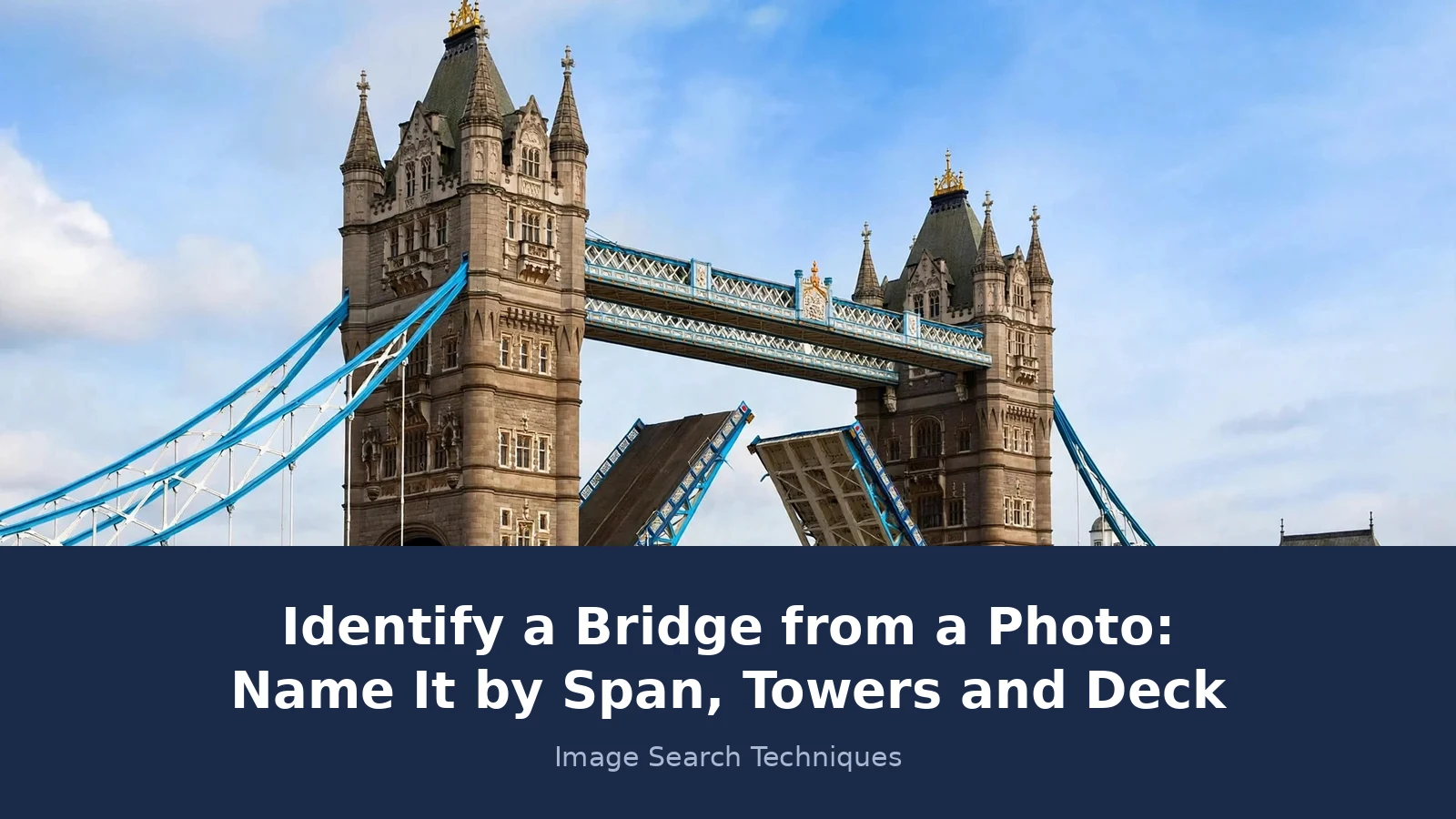
Start with the span. The shape of the gap the bridge crosses, and how the deck is held up across it, puts the bridge into one family at once. An arch bridge curves over the water. A suspension bridge hangs its deck from cables draped between towers. A cable-stayed bridge holds its deck with straight cables running down from a single tower or a pair of towers. A truss bridge shows a lattice of steel above or below the deck. A cantilever bridge reaches out in arms from its piers, the Forth Bridge being the famous example. A bascule bridge, like Tower Bridge, has a middle section that lifts in two leaves to let ships through.
Then look at the towers. Count them, note their shape and their colour, and check whether they are stone, steel or concrete. Towers are what most people remember about a bridge, and they are what separates bridges inside the same family. Two stone Gothic towers with a lifting middle span is Tower Bridge. Two orange steel towers with Art Deco styling is the Golden Gate. A single tall pylon over a valley is a cable-stayed bridge, and which one depends on the setting.
Then the deck and the setting. Is the deck a road, a railway, or both? Does it run through the structure or sit on top of it? What river or valley does it cross, and what buildings stand at either end? A bridge over a wide river in a city looks different from the same design over a gorge, and the setting is often what finally separates two bridges that share a span type.
Colour and light deserve a note of their own. Colour is a strong clue, but paint changes. Tower Bridge was painted red, white and blue for the Silver Jubilee in 1977 and later returned to blue and white, so an older photo shows different colours on the same bridge. Light matters too: a photo taken at dusk can make a steel bridge look darker than it is, and a foggy photo can hide a tower altogether. Use colour as a clue, never as the whole case.
The bridge-traits checklist
Work through this table against your photo before you search. Tick what you can see, and note what you cannot. The gaps matter as much as the ticks: a feature you cannot see is a reason to be careful, not a reason to guess.
| Trait | What to record | Why it narrows the answer |
|---|---|---|
| Span type | Arch, suspension, cable-stayed, truss, cantilever, beam or bascule (lifting) | Puts the bridge into one family at once |
| Number of spans | Count the spans between supports | Famous bridges often have a distinctive span count |
| Tower shape | Stone or steel, pointed or flat topped, one tower or two | Often the most recognisable feature in the photo |
| Tower colour | The painted colour, and whether it looks original or repainted | Separates bridges that share a design, but paint changes over time |
| Deck and cables | Deck above, below or through the structure; cable pattern (draped, straight fan, vertical hangers) | The cable pattern alone can separate suspension from cable-stayed |
| Setting and river | The river, valley or bay, and the buildings or skyline at each end | The same design in a different place is a different bridge |
| Colour and lighting | Time of day, weather, and whether the photo is old or recent | Explains why the same bridge can look different in two photos |
| Signs and text | Road signs, place names, number plates, language on signs | A single sign can name the country or the city |
Famous bridges and their lookalikes
Some bridges are famous enough that a search engine names them at once. Others look so much like a famous bridge that the search gets them wrong. This split is the part most guides skip, and it is where a careful check earns its keep.
| Famous bridge | Its giveaway traits | Lookalike to rule out |
|---|---|---|
| Tower Bridge, London | Twin stone Gothic towers, lifting bascule middle span, blue and white steel, River Thames | London Bridge, half a mile upstream: a plain concrete bridge with no towers at all. The two are confused by name more than by looks. |
| Golden Gate Bridge, San Francisco | Orange-red suspension span, two Art Deco steel towers, San Francisco Bay | The 25 de Abril Bridge in Lisbon, which shares the colour and a similar suspension design. Check the setting and the tower detail, not the colour alone. |
| Forth Bridge, Scotland | Red cantilever truss, three diamond-shaped towers, Firth of Forth | Other steel cantilever truss bridges, including the Quebec Bridge in Canada. The Forth Bridge’s three-tower shape is the tell. |
| Millau Viaduct, France | Tall cable-stayed spans on slender pylons over a deep valley | Other modern cable-stayed viaducts. The valley setting and the height of the pylons are what set Millau apart. |
| Stari Most, Mostar | Single stone arch over the Neretva river, with towers at each end | Other single-arch stone bridges in old towns. The river, the towers and the town around it confirm Mostar. |
The rule for lookalikes is simple. A shared design is not a match. Confirm the setting, the towers and the deck against the database entry before you name the bridge, and if two candidates still fit, say so rather than picking one. Lighthouses work the same way: our guide to identifying a lighthouse from a photo shows how stripes, tower shape and coastline separate Eddystone from its lookalikes.
Worked example: naming Tower Bridge from a real photo
A real photo of Tower Bridge, reverse searched live on three engines, was named correctly by all three, and the name was then checked against the bridge’s Structurae entry.
The photo used here is a Wikimedia Commons picture of Tower Bridge, London, taken at dusk with the bridge lit up. Its exact file name is Tower Bridge London Feb 2006.jpg, it was taken by Diliff (David Iliff) on 10 February 2006, and it is shared under a CC BY-SA 3.0 licence. It is a large file, 9,462 by 4,734 pixels, and a featured picture on Commons. It shows both towers, the high-level walkways between them, the central bascule span, the suspension side spans, the deck and the River Thames. It is a good test photo precisely because it shows every trait in the checklist at once.
First, the checklist read, done before any search. Span type: a combined bascule and suspension bridge, with a lifting middle section and suspension side spans. Towers: two, stone clad, Gothic in style, with pointed tops. Deck: a road deck with pedestrian walkways above it between the towers. Setting: a wide river in a city, with buildings on both banks. Colour: blue and white steelwork, lit up against a dusk sky. That read already points at a very short list, and Tower Bridge is the only bridge on it with twin stone towers and a lifting middle span.
Then the photo was run through three reverse image search engines, live, on 23 November 2026. Here is what each one actually returned.
| Engine | Named the bridge? | What it returned |
|---|---|---|
| Google Lens | Yes, Tower Bridge | 60 visual matches in the first load, and 404 exact matches counted from the page. The first visual result was the exact source file page on Wikipedia, and the fourth was the exact Commons file page. Lens also described it as a combined bascule and suspension bridge crossing the River Thames in London. |
| TinEye | Yes, Tower Bridge | 1,541 results across 86.9 billion images searched. The photo was first indexed on 5 February 2008. The exact source file appeared on en.wikipedia.org as a 1024 pixel version dated 3 October 2015. Top matches described Tower Bridge, London. |
| Yandex Images | Yes, Tower Bridge | Five tags, all naming Tower Bridge in London, 18 sizes listed including the original, 20 site links in the first load, and 79 similar images, all of Tower Bridge. The exact file name appeared in the results, though no direct Commons link was among the first 20 sites. |
Two honest notes about the searches. First, Lens refused the direct image address twice, saying there was no image at the address, and the search only worked through the Commons redirect address that serves the same file at 1,024 pixels wide. That is a reminder that a failed upload is a problem with the address, not with the photo. Second, Yandex listed the original size as 9,462 by 4,774 pixels, while the Commons file page says 9,462 by 4,734. A small mismatch like that in one engine’s listing is worth noting and not worth worrying about: the bridge named was right, and the file name matched.
Finally, the name was checked on Structurae, the bridge database, on the Tower Bridge entry. Structurae describes it as a combined bascule and suspension bridge in London, built between 1886 and 1894, crossing the River Thames close to the Tower of London. The two towers are each 65 metres (213 feet) high, built on piers. The central span of 61 metres (200 feet) between the towers is split into two equal bascules, which can be raised to let river traffic pass. The two side spans are suspension bridges, each 82 metres (270 feet) long. The bridge was officially opened on 30 June 1894, and was designed by the architect Sir Horace Jones and the engineer Sir John Wolfe Barry. Every one of those facts matches what is visible in the photo, so the name stands.
That is the whole method in miniature. The checklist read pointed at Tower Bridge, three engines agreed, and the database entry confirmed the span, the towers, the deck and the place. Any one of those steps alone would have been a guess. Together they are a named bridge.
Why do two bridges keep getting mixed up?
Bridges get mixed up for three reasons: they share a design, they share a name, or the photo hides the feature that would separate them.
Shared design is the biggest cause. Suspension bridges especially follow the same pattern: two towers, cables draped between them, a deck hanging below. From a distance, one orange suspension bridge looks much like another, and a photo taken from the side can hide the towers altogether. That is why the checklist starts with the span and then moves to the towers, the deck and the setting. Colour alone will not separate the Golden Gate from the 25 de Abril Bridge, but the setting and the tower detail will.
Shared names cause a different kind of mix-up. Tower Bridge and London Bridge are the classic pair. People say “London Bridge” when they mean the famous one with the towers, but London Bridge is a plain concrete bridge about half a mile upstream, with no towers at all. Structurae notes the confusion directly. If a search result says London Bridge and the photo shows two stone towers, the result is wrong, and the checklist is what tells you so.
The third cause is the photo itself. A cropped photo can cut off a tower. A night photo can hide the colour. A photo taken from directly underneath can make a cable-stayed bridge look like a suspension bridge, because the cables all run the same way from below. When a key feature is missing from the frame, the honest answer is to say which features are missing and what they would have shown, rather than to guess past them. The same lookalike problem shows up with other large subjects, and identifying a ship from a photo needs the same kind of check.
What if the reverse search finds nothing?
A blank reverse search does not mean the bridge does not exist. It usually means the photo is cropped, new, private, or taken from an angle no indexed photo shares.
Start by checking the photo itself. A heavy crop removes the context the engines match on, so try the widest version of the photo you have. A screenshot of a photo is worse than the photo, because the screen texture and the compression change the image. If you have the original file, use that. If the photo is a scan of a print, a straight, well-lit scan works better than a photo of the print taken at an angle.
Then try the other engines. Lens, TinEye and Yandex index different collections, and a photo one of them misses is often found by another. In the worked example above, all three named Tower Bridge, but for a less famous bridge that is rarely the case. Try each one, and try a second version of the photo, such as a tighter crop on the towers, if the full photo finds nothing.
Then use the clues in the frame. Read the signs. A road sign, a place name, a number plate or the language on a sign can name the country or the city, and from there a search for bridges in that place narrows fast. Bridges are landmarks, and our guide to reverse image search for landmarks covers the wider case of naming a place from a photo. Look at the river and the banks. A wide tidal river in a city and a narrow gorge in the mountains suggest very different lists. Ask where the photo was taken, if anyone who was there can say. The AI Overview for this question suggests exactly this, asking the reader for the region, the city or the body of water they think the bridge might be near, and for visual details such as the type, the colour and the tower shape.
Then check the file details. If the original file still carries location data, a tool such as Geoimgr can read the embedded GPS coordinates. That only works when the location was recorded and not stripped out, which is often not the case for photos shared through messaging apps, but it costs nothing to check.
Finally, consider the AI location tools. Tools such as Picarta can estimate coordinates from a photo, and Apple’s Visual Look Up can match a bridge from its landmarks and architecture. Treat their answers as leads, not verdicts. The AI Overview for this question carries the warning that AI responses may include mistakes, and that is the right attitude: use the estimate to point the database check in a direction, then let the database and the map decide.
If nothing works, say so. A bridge photo that no engine can place and no database can match is an unsolved photo, and an honest “not identified yet” is better than a name attached to the wrong bridge. New bridges, private footbridges and photos taken from unusual angles are the usual reasons, and a better photo, or a note of where it was taken, often solves them later.
When is a photo match not enough?
A photo match is not enough when it is the only evidence. A name is only safe to state once a bridge database or the bridge authority agrees with what the photo shows.
This is the lock the whole guide runs on. A visual match suggests a bridge, it never proves it. A search engine can match the wrong bridge, especially when two bridges share a design, and a photo can be mislabelled on the page it is found on. The database check exists to catch both. If Structurae or the bridge authority says the bridge in your photo has two towers and the candidate has one, the candidate is wrong, however confident the search result looked.
The same caution applies to AI tools that give a confidence score. A tool that says it is 99 percent sure has still only matched a pattern, and its training data may not include the bridge you are looking at. Use the score as a hint about where to look next, not as a verdict. The top competitor guide for this question, from GeoSpy, shows its own tool naming Stari Most in Mostar at 99 percent confidence, but it never runs a named photo through an independent search engine or shows real results, so there is nothing to check its score against. This guide does the opposite: it shows the actual counts from three engines and then checks the name against the database, so the reader can see every step.
There is also a limit on what should be identified at all. A bridge is a public structure, and naming it is a straightforward identification. The same method must never be turned on a private person in the photo, and no face recognition tool should be used to identify anyone in it. The question is the bridge, and the answer stays on the bridge. Bridges are not the only public structures people try to name from a photo; the same method names a statue from a photo too.
How to use this method on your own photo
Start with the checklist, search with the widest version of the photo, and do not state a name until a bridge database agrees with the span, the towers and the place.
Take the checklist from the table above and work through it against your photo, trait by trait, before you open any search engine. Then run the photo through Lens and TinEye, and Yandex if the first two disagree. Compare what they say with your checklist read. Then look the name up on Structurae or the bridge authority’s site, and check the span type, the towers, the location and the river. Finish by confirming the place on satellite imagery, matching the river, the roads and the buildings to the photo. The same read-first approach works for any subject, and our guide to finding an item by image shows the general method.
If the engines agree, the database agrees, and the map agrees, you have a name you can state. If any one of the three disagrees, go back to the checklist and look again. The disagreement is usually telling you something: a tower you miscounted, a lookalike you have not ruled out, or a photo that hides the very feature that would settle it.
That is the whole skill. It is not about knowing every bridge. It is about reading the structure in front of you, testing it against real search results, and checking the name before you trust it.
Can Google Lens identify a bridge from a photo?
Yes, for well known bridges. In a live test on a photo of Tower Bridge, Lens named it correctly, returned 60 visual matches and 404 exact matches, and the first result was the exact source file page. For a less famous bridge it may return lookalikes instead, so always check the name against a bridge database before trusting it.
What details in a photo identify a bridge?
The span type comes first, then the towers, then the deck and the cable pattern. After that, the setting matters: the river, the valley, the buildings and any signs in the frame. Colour helps, but paint changes over time, so never rely on colour alone to name a bridge.
Why does a reverse image search sometimes find nothing?
A blank result usually means the photo is cropped, a screenshot, newly built, or taken from an angle no indexed photo shares. Try the widest original version of the photo, then try TinEye and Yandex as well, since each engine indexes a different collection of images.
Is Tower Bridge the same as London Bridge?
No. Tower Bridge is the twin towered bridge with a lifting middle span over the River Thames, opened in 1894. London Bridge is a plain concrete bridge about half a mile upstream, with no towers at all. The two are confused by name far more often than by appearance.
Can photo location data name a bridge?
Sometimes. If the original file still carries GPS coordinates, a tool such as Geoimgr can read them, and that points straight at the place. But location data is often stripped out when a photo is shared or screenshotted, so treat it as a useful lead rather than a method that always works.
How do I tell two similar suspension bridges apart?
Compare the towers, the deck and the setting, not the colour or the general shape. Two suspension bridges can look alike from a distance, so check the tower design, the cable pattern and the river or bay against a bridge database entry, and confirm the place on a map.