


🔎 Reverse Image Search
Image search techniques made simple: upload a photo or paste a URL and search 6 engines at once. 100% free, nothing stored.
🔒 Your image is never stored on our servers longer than 24 hours and is never shared.
Your CSCS card photo is the photo taken at your CITB test centre, and you only upload your own when you apply through an approved alternative. It must be a colour head-and-shoulders photo on a plain white background, less than two years old, saved as a JPG. If it fails, CSCS asks for a new one and approval waits.
This guide explains the CSCS card photo requirements in full, using the official CSCS page as the source. It covers the two routes your photo can take, the complete checklist, the reasons photos get rejected, and what a rejected photo does to your timeline. Nothing here comes from a photo-tool site. CSCS publishes a short list of rules, and this guide works through every one of them.
Which photo does CSCS use for your card?
In most cases, you never upload a photo at all: CSCS reuses the one taken at your test centre.
There are two routes, and which one you are on decides whether you need to think about your photo at all. CSCS states the split plainly on its photo requirements page: the photograph taken at the centre for your CITB Health, Safety and Environment test, or for the CIC Health and Safety Course, will in most instances be used on your card.
That is route one, and it covers most applicants. You sit the CITB HS&E test, or the CIC course, and a photo is taken at the centre. When you then apply for the card, CSCS reuses that photo. You do not choose it, crop it or upload it. If it is a poor photo, that is a problem, but it is a problem you discover at the centre, not in the application.
Route two applies when you use an approved alternative to the CITB test or the CIC course. In that case CSCS asks you to upload a passport style photograph along with valid photo ID as part of your application. This is the only route where the photo is in your hands, and it is the route this guide is mostly about.
| Route | How the photo is supplied | Who controls it | Where it goes wrong |
|---|---|---|---|
| Test centre (CITB HS&E test or CIC course) | Taken at the centre, reused on the card in most instances | The centre | A bad centre photo follows you onto the card |
| Approved alternative to the test | You upload a passport style photo with valid photo ID | You | Any rule on the CSCS list can send it back |
Either way, the card itself is applied for after the test, not as part of it. Passing the test does not issue a card. You still need to submit an application to CSCS, using your qualification evidence and proof of passing the test within the previous two years. CSCS says to apply through the My CSCS app once you have your test details and qualification information, and the card costs £36. If you are new to the industry and applying for a Provisional card, you only need the test pass, and that card lasts six months and is not renewable.
What are the CSCS card photo requirements?
CSCS publishes one short list, and every rule on it is a pass or fail check.
A passport style photograph, as CSCS uses the phrase, is a plain front-facing head-and-shoulders colour photo of the kind used on a passport. But do not import passport rules into it. CSCS does not state a size in millimetres, a pixel dimension or a file-size cap. The photo-tool sites that sell a “passport size” CSCS crop are adding rules CSCS never published, and a photo cut to their numbers can still fail on the rules CSCS did publish.
Here is the full list, exactly as CSCS publishes it, grouped so you can check your photo against it.
The file itself. The photo must be in colour, taken against a plain white background, clear and in focus, no more than two years old, and unaltered by computer software. The image must be a JPG or JPEG file. CSCS says plainly: do not send images in PDF file format.
The framing. The image must show a close-up of full head and shoulders, without any other objects or people in the frame. The photo must also show you in clear contrast to the background, which is why the plain white background matters: a dark top against a white wall passes, a white top against a white wall may not.
You in the photo. You must be facing forward and looking straight at the camera, with a neutral expression and mouth closed, and without anything covering your face. Your eyes must be open, visible and free from reflection or glare from glasses. They must not be covered by sunglasses, tinted glasses, glasses frames or hair. The photo must be without any red eye, and without shadows.
One rule deserves a second look: without a head covering, unless worn for religious or medical reasons. That is the only exception CSCS allows. A hard hat is not a religious or medical head covering, and neither is a cap, a beanie or a hood. Take them off for the photo, even though you will wear a hard hat on site. The card photo is an ID photo, not a picture of you at work.
Another rule people misread is “unaltered by computer software”. That covers filters, beautifying apps, background removal tools and anything that changes what the camera saw. A phone photo straight from the camera is fine. A photo run through a filter that smooths skin or brightens eyes is not, because CSCS can no longer trust that the face in the photo is the face in front of them. The full official list is on the CSCS photo requirements page, and it is the only source this guide treats as the rules.
Why do CSCS photos get rejected?
Every rejection traces back to one of the published rules, and most of them are fixed in five minutes with a retake.
CSCS puts it simply: if the photograph does not meet the requirements listed on its page, CSCS may ask you to provide a new one. There is no appeal to make and no fee to pay for a second try. You take a new photo that follows the rules and send it in. The table below lists the reasons that actually send photos back, with the fix for each.
| Why it gets rejected | The rule it breaks | The fix |
|---|---|---|
| Busy or coloured background | Plain white background | Stand against a plain white wall, nothing on it |
| Shadows on the face or the wall | Without shadows | Face a window in daylight, no lamp behind you |
| Glare on glasses | Eyes free from reflection or glare | Take the glasses off, or move the light source |
| Sunglasses or tinted lenses | Eyes not covered by sunglasses or tinted glasses | Take them off, no exceptions in the rules |
| Hair across the eyes | Eyes not covered by hair | Brush hair back from the face |
| Hard hat, cap or hood | No head covering unless religious or medical | Take it off for the photo |
| Smiling or mouth open | Neutral expression, mouth closed | Relax the face, lips together |
| Photo more than two years old | No more than two years old | Take a new one, do not reuse an old favourite |
| Sent as a PDF | JPG or JPEG only | Save or export the photo as a JPG |
| Filtered or edited | Unaltered by computer software | Use the photo straight from the camera |
| Too far away, full body, other people in frame | Close-up of full head and shoulders | Move closer, frame head and shoulders only |
| Blurry or out of focus | Clear and in focus | Use the rear camera, hold the phone steady |
The most common rejection is the background. People photograph themselves against a bedroom wall with a poster on it, a kitchen with tiles behind them, or a garden fence, and each of those fails the plain white background rule on its own. A white wall with nothing on it is the whole fix. The second most common is glasses glare. A photo taken under a ceiling light puts a white bar across one lens, and that alone is enough for CSCS to ask for a new photo. If your glasses glare under the lights you have, take them off for the photo rather than fighting the light.
The same failure pattern shows up across the UK official photo rules. A rejected passport photo fails for the same reasons, glare, shadows and a busy background, which is why the fix list for one works for the other. Our passport photo rejection guide walks through the same causes on the passport side, and the lighting advice there applies here word for word.
What happens if CSCS asks you to provide a new photo?
Nothing moves until the new photo lands: approval, the digital card and the posted card all wait behind it.
A rejected photo does not cancel your application and does not send you back to the test. It pauses it. CSCS asks you to provide a new photo, you supply one that meets the rules, and the application carries on from where it stopped. What it costs you is time, and the amount depends on how fast you retake the photo.
The timeline works like this. Once your application is approved, you immediately have access to your digital CSCS card in the My CSCS app. In most cases that digital card lets you onto site, although CSCS says to check that the site accepts digital cards first. The digital card can also be scanned using CSCS Smart Check. Your physical card is then posted to you and should arrive within seven to ten working days.
Every one of those steps sits behind approval, and approval sits behind a photo that passes. So a photo rejected on a Monday, retaken the same day and re-uploaded the same evening, may cost you a day. A photo rejected on a Friday, left until the following week because nobody at home can take a straight picture of you, costs you a week. The delay is yours to control, and the fastest fix is a retake the same day, not a debate about whether the first photo was good enough.
That is also why the upload route deserves more care than the test-centre route. On the test-centre route the photo is taken for you and reused. On the upload route you are the one who has to get it right, and you are the one who pays in days when it is wrong. Check the photo against the full list before you upload it, not after CSCS sends it back. The timing facts in this section come from CSCS’s own guide to what happens after you pass the test, published on its site in March 2026.
How do you take a photo that passes first time?
A plain white wall, daylight from a window and a phone on a stack of books will pass the CSCS rules.
You do not need a studio. You need a white wall and decent light, and you need to follow the steps in order. Ask someone else to take it if you can: a photo taken by another person is steadier and easier to frame than a selfie at arm’s length.
- Find a plain white wall with nothing on it. A white door works if you have no bare wall. Stand about a metre in front of it so your shadow does not fall on the wall behind you.
- Face a window in daylight. The light should fall on your face, not on the camera. Turn off the ceiling light above you, because that is what puts glare on glasses and shadows under your chin.
- Put the phone at eye level, on a shelf or a stack of books if nobody is holding it. Use the rear camera if you can, and use the timer so you are not leaning forward to press the button.
- Frame a close-up of your head and shoulders. Your whole head must be in the frame with a small gap above it, and your shoulders must be visible at the bottom. Nobody else in the frame, nothing else in the frame.
- Look straight at the camera with a neutral expression and your mouth closed. Take off sunglasses and tinted glasses. If you wear ordinary glasses and they glare, take them off too. Brush hair back from your eyes.
- Take off any hat, cap, hood or hard hat. The only head coverings CSCS allows are religious or medical ones.
- Check the file before you upload it. It must be a JPG, in colour, clear and in focus, with no filter applied. If your phone saved it as a HEIC or PNG file, export or convert it to JPG first.
- Upload it through the My CSCS app with your valid photo ID, and keep the original file on your phone until the card is approved, in case CSCS asks for it again.
Two of these steps catch people out more than the rest. The first is the shadow step. Standing close to the wall puts a hard shadow of your head on the wall, and that shadow alone breaks the “without shadows” rule. A metre of space between you and the wall fixes it. The second is the glasses step. People keep their glasses on because they always wear them, then wonder why the photo came back. CSCS does not require you to wear glasses in the photo. It requires your eyes to be open, visible and free from glare, and taking the glasses off is the simplest way to meet that.
The same capture problems, glare, shadows and a busy background, trip up the other UK official photo checks too. The GOV.UK One Login identity check fails on the same glare and lighting faults, and our guide to fixing a failed GOV.UK One Login photo check walks through them step by step. The UK eVisa photo upload has its own separate size window of 50KB to 6MB, which CSCS does not publish for its own uploads, and our UK visa photo upload guide covers that one. Do not mix the two rule sets: what the eVisa upload wants is not what CSCS wants.
Worked example: two real photos checked against the CSCS rules
I checked two real photos against every CSCS rule, and both failed on something you would not spot at a glance.
Neither photo was submitted to CSCS. This is an audit against the published rules, using two real photos from Wikimedia Commons, and it shows how a photo that looks fine can still fail. The point is not that these two photos are bad photos. The point is that a CSCS photo is judged against a list, not against whether it looks good.
Photo A: a professional headshot. The first photo is a professional headshot of a man in a blue blazer, a 1400 by 1400 pixel JPEG from Wikimedia Commons, released under a CC0 licence. It looks like the kind of photo that should pass. Checked against the CSCS list, it passes almost everything: it is in colour, clear and in focus, a close-up of head and shoulders, facing forward and looking straight at the camera, with a neutral expression and mouth closed, nothing covering the face, eyes open and visible, no glasses, no red eye, and no harsh shadows on the face.
It fails on one rule, and one rule is enough. The background is not a plain white background. Behind him are sheet music on a stand, a piano and a plant. That breaks the background rule on its own, so CSCS would ask for a new photo. Two things cannot be checked from the image alone: whether the photo is less than two years old, and whether it was altered by software. Both are rules, and both need the file’s history, not just the picture.
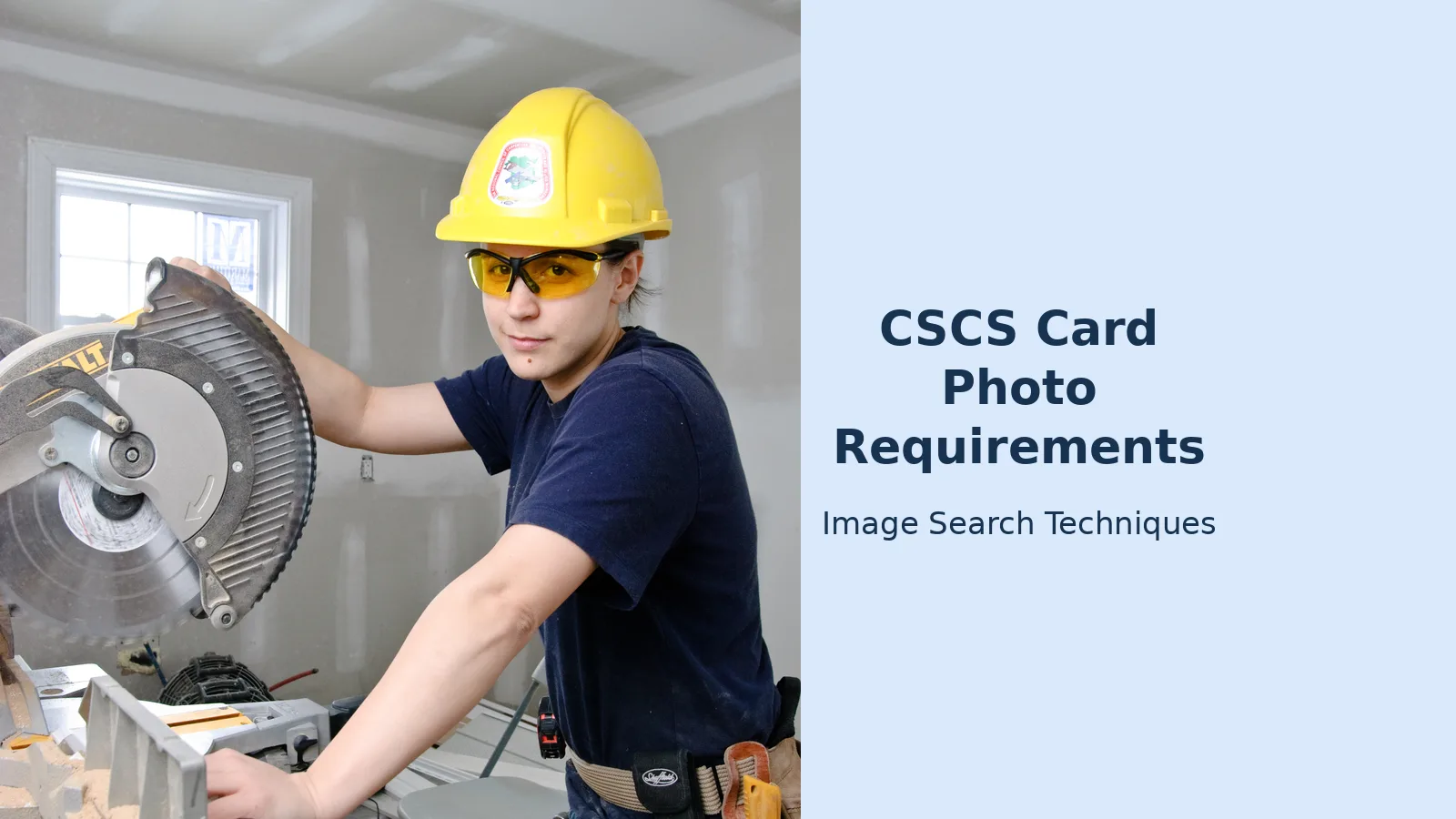
Photo B: a construction worker with a chop saw. The second photo is a woman in a yellow hard hat and safety glasses, holding a chop saw in a workshop, a 2592 by 3872 pixel JPEG from Wikimedia Commons, released under a CC BY 2.0 licence. It is a good photo of a person at work, and it fails at least five CSCS rules.
| CSCS rule | Photo A: headshot | Photo B: worker with chop saw |
|---|---|---|
| Colour | Pass | Pass |
| Plain white background | Fail: sheet music, piano, plant | Fail: busy workshop, tools, shelves |
| Clear and in focus | Pass | Pass |
| Close-up, head and shoulders | Pass | Fail: half body with a power tool |
| No other objects or people | Pass | Fail: chop saw in frame |
| Facing forward, looking at camera | Pass | Pass |
| Neutral expression, mouth closed | Pass | Pass |
| Nothing covering the face | Pass | Fail: safety glasses |
| No head covering unless religious or medical | Pass | Fail: hard hat |
| Eyes open, visible, no glare | Pass | Fail: eyes behind safety glasses |
| No red eye | Pass | Pass |
| Without shadows | Pass | Fail: shadows across the face |
Photo B is the more useful warning of the two, because it is the photo people actually try to send. It shows a real worker, in real work clothes, doing real work, and none of that helps. A hard hat is a head covering. Safety glasses cover the eyes. A workshop is not a plain white background. The photo fails because it is a photo of someone working, and CSCS wants a photo of someone facing a camera against a white wall.
One last check I ran on both files: each one is a JPEG, confirmed before writing by reading the file itself. That matters because CSCS accepts JPG and JPEG only and says not to send images in PDF format. A PDF export of either photo would fail before any rule was read, however good the picture inside it looked.
Common mistakes that get a CSCS photo rejected
Most rejections come from trusting a tool site or a guess instead of the CSCS page.
Trusting “passport size” tool sites. CSCS publishes no dimensions, no pixel count and no file-size cap. A site that sells you a 35 by 45 millimetre CSCS crop is selling you a passport rule dressed up as a CSCS rule. Use the CSCS list, not the tool site’s list.
Sending a PDF. CSCS says JPG or JPEG only, and says not to send PDF files. Phones and scanners both love to save as PDF, so check the file type before you upload, not after CSCS sends it back.
Reusing an old photo. A photo from three years ago fails the two-year rule even if you look the same in it. CSCS wants a photo taken within the last two years. If you cannot remember when it was taken, take a new one.
Using a filtered photo. A filter that smooths skin, brightens eyes or removes a background counts as altering the photo by computer software. Send the photo straight from the camera.
Assuming the test-centre photo is automatic. CSCS says the test-centre photo will in most instances be used on your card. In most instances is not always. Check which photo is on your application before you assume.
Paying a third-party site to apply for you. The card costs £36 from CSCS. Sites that charge more to complete the application on your behalf give you nothing extra for the money. Apply direct through CSCS.
Posting your photo online to ask if it will pass. People post their photo on a forum or a social group and ask strangers whether CSCS will accept it. That hands a clear photo of your face to people who can copy it, and strangers cannot answer the question anyway, because they cannot check the file type or the date it was taken. Check it against the list in this guide instead, and if you want to understand what a photo of you can be used for once it is online, read our face search and photo privacy guide.
The same plain-background logic runs through the rest of the UK official photo rules. The Blue Badge photo rules work the same way, a plain background, a clear face, no shadows, and our Blue Badge photo guide is the closest sibling to this one. If your CSCS photo passes, it will look a lot like a Blue Badge photo, and that is not a coincidence: the two schemes publish nearly the same list.
Can I use my passport photo for a CSCS card?
Yes, if it meets every CSCS rule and it is less than two years old. In most cases you will not need to upload anything, because CSCS reuses the photo taken at your test centre. You only upload your own photo when you apply through an approved alternative to the CITB test, and then you send it with photo ID.
What file format does CSCS accept for a card photo?
JPG or JPEG only. CSCS says not to send images in PDF format. The photo must also be in colour, clear and in focus, and unaltered by computer software, so do not send a filtered or beautified version of your photo. Check the file type before you upload it.
Can I wear glasses in my CSCS card photo?
Yes, but your eyes must be open, visible and free from reflection or glare, and nothing may cover them. Sunglasses and tinted glasses are not allowed. If your frames throw glare under the lights you have, take the glasses off for the photo rather than fighting the light.
How long does a CSCS card take if my photo is rejected?
Approval waits until you supply a photo that passes, so the delay is the time it takes you to retake and upload one. Once approved, your digital card appears in the My CSCS app at once, and the physical card should arrive within seven to ten working days after approval.
Can I wear a hard hat in my CSCS photo?
No. CSCS allows a head covering only for religious or medical reasons, and a hard hat is neither. Take it off for the photo, even though you will wear one on site. The card photo is an ID photo, not a picture of you at work, and the same rule covers caps, beanies and hoods.
Do I need to upload a photo if I passed the CITB test?
Usually not. CSCS says the photograph taken at the centre for your CITB Health, Safety and Environment test will in most instances be used on your card. You upload your own photo when you apply using an approved alternative to the test, along with valid photo ID.






