


🔎 Reverse Image Search
Image search techniques made simple: upload a photo or paste a URL and search 6 engines at once. 100% free, nothing stored.
🔒 Your image is never stored on our servers longer than 24 hours and is never shared.
A competitor stole my before and after photos. Save the proof first, then find every copy with reverse image search, then ask once in a short email. If that fails, send a takedown notice to the company hosting their site. Most cases end there, and none of it needs a lawyer to start.
Before and after photos are the work. A kitchen fitter’s before and after is not decoration, it is the reason the next customer calls. A roofer’s pair of shots does the selling that a paragraph never will. When another firm puts your job on its website as its own, it is not flattery and it is not a misunderstanding you can shrug off. It is your work selling someone else’s jobs. This guide walks through the whole fix, from proving the photos are yours to getting the copies off every surface they landed on.
One thing to get straight first. This article is about theft of your real job photos. It is general information, not legal advice. If a fake transformation is being advertised, with photos that were never a real job at all, that is a different problem and our guide to checking fake before-and-after photos covers it.
Is it actually yours? Who owns a before-and-after photo?
Short answer: the person who took the photo owns it, and in most trades jobs that is you or your crew. Copyright starts the moment the photo is taken. You do not need to register anything, add a watermark, or print a copyright line in your footer for that protection to exist. What trips people up is that the owner is the photographer, not always the business. Work out which of these fits before you send anything, because the takedown notice has to come from the owner or someone the owner has authorised.
| Who took the photos | Who owns them | What you can do |
|---|---|---|
| You or your crew, on the job | Your business | Send the takedown yourself. This is the clear case. |
| A photographer you hired | Usually the photographer, unless your agreement says otherwise | Ask them to send the notice, or get written permission to act for them. |
| The customer, who sent them to you | The customer | You can ask the copier to remove them, but a formal notice should come from the customer. |
| A supplier or manufacturer gallery | The supplier | Not yours to claim. The competitor may hold the same licence you do. |
Two traps sit in this table. The first is the hired photographer. Plenty of tradespeople pay for a shoot and assume the photos are theirs. Check the agreement. If it says the photographer keeps the copyright and you have a licence to use the images, then the photographer is the one who files the notice, or you file with their written permission attached. The second trap is the supplier gallery. If your “before and after” came from a manufacturer’s brochure or a supplier’s website, your competitor may have downloaded the same files perfectly legally. Only claim photos your side actually took.
Text works the same way, with one catch. Copyright protects the actual sentences on your site, not the facts behind them. Nobody owns “licensed and insured”, a list of the towns you cover, or the idea of a “free estimates” button. If a competitor’s site simply has the same sections as yours, that is not copying. If whole paragraphs match word for word, or with a few words swapped, that is. When you report, stick to the photos and any copied wording, and leave the shared ideas alone.
What should you save before you say a word?
Save the proof first, because the moment a copier knows you have noticed, the page can change. Photos come down, pages get rewritten, and the evidence you needed quietly disappears. Do this quietly, before any email goes out. It takes about half an hour and it is the difference between a takedown that works first time and one that stalls.
Start with their side. Screenshot every page where your photos appear, on your phone and on your computer, with the web address and the date visible in the shot. Save each page to the Wayback Machine at web.archive.org, using Save Page Now, which keeps a dated public copy nobody can edit later. Do the same for your own page, so the dates are on the record both ways. Note the exact page addresses and which of your photos appear on each one. A takedown form will ask for both, and “their whole site” is not an answer.
Then gather your side, the trades proof pack. This is the ranking asset of the whole process, and it is what separates a complaint that gets answered from one that gets ignored.
| Piece of proof | Where to find it | Why it matters |
|---|---|---|
| The original photo files | Your phone camera roll or camera card | They carry the date, and often the location, the photo was taken. Keep them untouched. |
| The dated job folder | Your phone, computer or cloud drive | A folder named for the job and the date shows the photos lived with your work, not theirs. |
| Invoice and message timestamps | Your invoicing app and email or messages | An invoice for the job, dated before their page appeared, ties the photos to a real job. |
| Your own published page | Your website or social media | A public post with a date shows you published first. |
| The customer’s confirmation | A short message or email | If the customer confirms the job was yours, it closes the “maybe it was their job” argument. |
One more check before you move on. Work out how far the copying goes. Run each photo through a reverse image search and see where else it shows up. The result often changes the story. Sometimes the “competitor” is a cheap web design shop that filled a dozen client sites with photos scraped from local businesses, and the owner of the copying company has no idea. That changes the tone of your first message completely, and it changes who you send it to.
A competitor stole my before and after photos: how do you find every copy?
You find every copy by searching with the photos themselves, not with words. A reverse image search takes your before shot and your after shot and shows you every page on the web using them. Run both shots, because copiers often take one and not the other, and run the pair as a combined image too if that is how you published it. Our guide to reverse image search walks through the steps on each engine; the method below is the order that works for a trades sweep.
Search the after shot first. It is the one that sells, so it is the one copiers take. Then search the before shot, then any close-up or detail shot from the same job. For each search, save the list of pages that use the photo. You are looking for three things: the competitor’s own site, their Google Business Profile, and their social pages. A copy on a directory or a review site counts too, and you will deal with those in the takedown step.
Then work the sweep in this order, because it follows where customers actually see the photos. First their website, page by page, including the gallery and any “our work” page. Then their Google Business Profile, where stolen photos often sit at the top of the listing and customers see them first. Then their Facebook page, including the photos tab and any ads, because a stolen job photo in a Facebook ad is reaching people your website never will. Then the directories: Yelp, Houzz, Checkatrade, TrustATrader, Nextdoor, and any trade-specific directory in your area. Check the ad library too. Meta’s Ad Library is public, and a competitor running your kitchen photo as a paid ad is a different level of problem from a quiet copy on a gallery page.
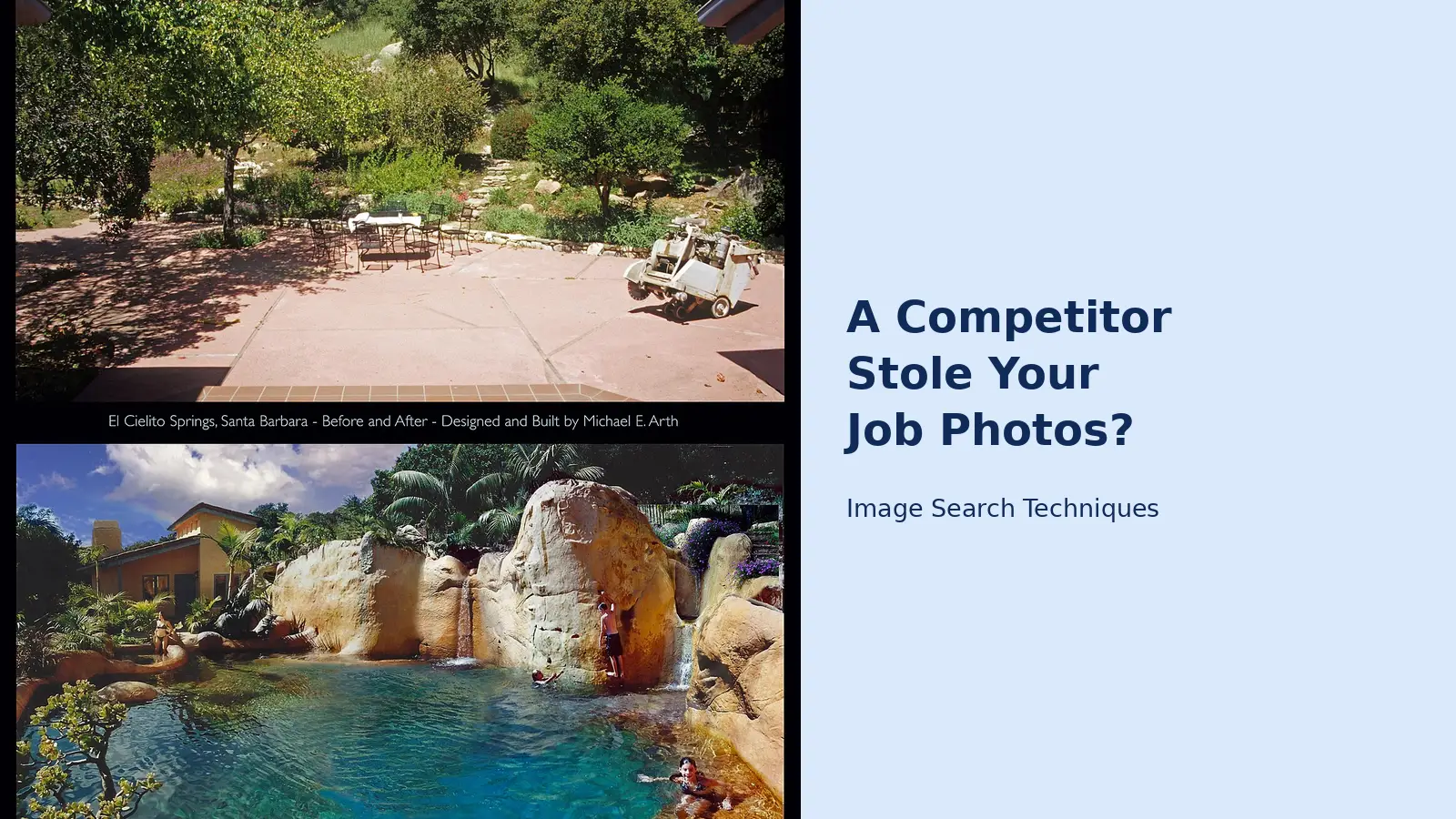
Here is the test, run for real on 13 November 2026 through the site’s own reverse image search tool. The photo is a genuine before-and-after pair: “El Cielito Springs, Santa Barbara, Before and After by Michael E. Arth”, a house and garden renovation published on Wikimedia Commons on 11 September 2019. Pasting the image address failed with the tool’s message “Could not load that image”, so the file itself was uploaded instead (1280 by 1595 pixels). No engine asked for a CAPTCHA.
| Engine | What it found |
|---|---|
| Google Lens | 1 exact match, but only a Wikimedia Commons category page, not the file page itself. Visual matches put the Commons file page at the top. |
| TinEye | 1 result out of 86.7 billion images, and it was the exact source: the Commons file page, first indexed 21 May 2025. Nothing else. |
| Bing Visual Search | 1 page with this image, a Commons category page, not the file page. Bing also misread the photo as the “Hefner Mansion Pool”. |
| Yandex Images | 1 site containing the image, and it was the exact Commons file page. Yandex also identified the location as Santa Barbara. |
| Not a reverse search at all through the tool. Its button opens a domain keyword search that returned 7 unrelated pins about domains. |
Two things worth noting. The tool’s Google button and its Lens button open the same Lens search, so those two are one result, not two. And TinEye and Yandex found the exact source while Lens and Bing only found category pages, which is why the sweep runs on more than one engine.
Two lessons from that test are worth carrying into your own sweep. First, a real before-and-after pair is findable. The engines knew this image, and they knew where it lived. If your photos have been on your own site or social media for any length of time, the same will be true of yours. Second, the engines disagree. One finds the source and another misses it, and one locks onto the wrong detail in the frame. That is why you run more than one engine and more than one photo from the job, and why a blank result on one engine proves nothing on its own.
Keep a simple log as you go: photo, engine, pages found, date. You will need it when you file the reports, and it stops you searching the same photo twice. If you find the photos on more than one business, note that too. One copier is a dispute. The same photos on five sites usually means a web design shop scraped them, and the fix runs through the designer, not five separate owners.
What do you send first, and what if they ignore you?
You send one short, polite email. Most copying gets fixed right here. Plenty of owners who did it did not build their own site, and they are not eager to fight about it. Keep it short and factual, and give them a date about five days out.
Something like this works. “Hi, I am the owner of [your business]. The photos of [the job] on your page at [address] were taken by my crew and are on my website at [your page], published [date]. Please remove them by [date]. If they are still up after that, I will file a takedown notice with your web host. Thanks.” No threats, no lawyer talk, no insults. You want them to read it and quietly delete the photos, not dig in. Send it to the email on their site, and if there is a web designer credit in the footer, send a copy there too, since the designer is often the one who actually did it.
If they ignore you, or if they reply with a refusal, the next step is the one that usually ends it. Under the DMCA, a US law, the company that hosts a website has to act on a proper copyright complaint or risk being held responsible itself, so most hosts remove the content quickly. To find the host, put their domain into a “who is hosting this” lookup tool, or check the domain’s record at lookup.icann.org. Then look on the host’s website for a “copyright”, “DMCA” or “abuse” page. The US Copyright Office keeps a directory of designated agents at copyright.gov/dmca-directory, and many hosts are listed there.
A valid notice needs a few specific things, and most hosts give you a form that asks for them: what your work is, with a link to where you published it; exactly where the copy is, with the full page address and which photos; your name, address, phone and email; a statement that you believe in good faith the use is not authorised; a statement, under penalty of perjury, that the notice is accurate and that you own the work or are allowed to act for the owner; and your signature, which is usually your typed full name. Attach your proof pack. The original files, the invoice date and your published page are what make a host act fast instead of asking questions.
Two cautions. Only send a notice for work that is really yours, because false notices carry legal risk of their own. And the copier is allowed to file a counter-notice saying you are wrong. If they do, the host can put the content back after about two weeks unless you file a lawsuit. That is the point where a lawyer earns their fee, and it is also the point where most small cases stop, because the goal was getting the photos down, not going to court.
If you are in the UK, the route is the same shape with different names. Copyright arises automatically under the Copyright, Designs and Patents Act 1988, no registration needed. There is no DMCA, but every host has an abuse or copyright complaints process, and a clear notice with your proof pack gets the same result. For small claims, the Intellectual Property Enterprise Court runs a small-claims track, and our site has a guide to that route if the dispute ever gets that far.
How do you get the copies off Google, Facebook and their listing?
The copy may live in more places than one website, and the host notice only fixes the website. Work through the rest of the sweep, one surface at a time, with the right form for each.
| Where the copy sits | What to file | What it does |
|---|---|---|
| Google Search results | Google’s legal removal request for copyright | Drops the infringing page from search results. It does not delete the page from the internet, which is why the host notice still matters. |
| Their Google Business Profile | Report the photo on Google Maps | Showing work you did not do misleads customers, which Google’s own content rules do not allow. |
| Facebook or Instagram | Meta’s intellectual property report form | Link the post and your original. File per post, not per account. |
| Directories like Yelp or Houzz | Each site’s copyright or report route | Search the site’s help pages for “copyright” and follow its form. |
| A paid ad using your photo | Report the ad on the platform, plus the host notice | Ads get reviewed fast, and a reported ad leaves a record if the account repeats it. |
Start with Google, because that is where the copy competes with you. Google’s legal removal request asks for the same things the host notice asked for: your work, the infringing page, and your contact details. File it for each page that carries your photos. It removes the page from search results, not from the internet, so do not skip the host notice and rely on this alone. The two together are the combination that works: the page comes down, and it stops appearing in search while it is still up.
Then the Google Business Profile, because that is where customers see the photos first. Open the photo on Google Maps and use its report option. A business showing your kitchen or your driveway as its own work is misleading customers, and Google’s own content rules do not allow that. The same goes for Facebook and Instagram. Meta has an intellectual property report form for photos posted without permission. Link the post and your original, and file one report per post rather than one vague report about an account. The forms are scoped to specific content, and a precise report moves faster than a general one.
Directories are slower and messier, because each one has its own process. Yelp, Houzz, Checkatrade and the rest each have a way to report content that is not the poster’s. Search the site’s help pages for “copyright” and follow the form you find. Keep a note of every reference number. If the shop returns, or the same photos pop up on a new account, those reference numbers are what turn a first report into a repeat-offender case.
What if they put the photos back, or you want money for it?
Most cases end with the email or the host notice, and that is the right outcome for most owners. Getting the photos down is the whole goal, and the steps above handle it for nothing but an hour of your time. But three situations call for more.
The first is a counter-notice. If the copier files one, the host can put the content back after about two weeks unless you file a lawsuit. Do not send a second notice for the same photos. At that point, talk to a copyright lawyer, because the dispute has moved from a form to a legal question. The second is repetition. If they keep putting your work back up, or they copied your whole site including your business story and reviews, a lawyer is worth the call, because the pattern is what a court cares about. The third is passing off. If they are using your name, your reviews or your photos in a way that is costing you jobs, that is beyond a takedown form.
If you want money for the copying, know two things before you spend anything. Suing for copyright in a US federal court generally requires registering the work with the US Copyright Office first, and the bigger damages are only available if you registered before the copying started or soon after you first published. There is also a cheaper route. The Copyright Claims Board, a small-claims tribunal run by the Copyright Office, handles claims up to $30,000 according to the Copyright Office, without hiring a lawyer. If your job photos are the heart of your marketing, registering them in batches is worth looking into before you ever need it. In the UK, the Intellectual Property Enterprise Court small-claims track plays the same role for lower-value disputes.
Do not pay anyone who offers to “remove the copies for you” for a fee you did not agree in advance. The forms in this guide are free, and the people selling removal services are usually filing the same forms you can file yourself. The one exception is a lawyer you have chosen yourself, for a dispute that has already passed the takedown stage.
How do you stop a competitor stealing your job photos again?
You cannot make a photo unstealable. Anything on the public web can be saved by anyone. What you can do is make your work easy to prove as yours and hard to pass off as someone else’s. That is the best defence, and it is mostly habit.
Put your real job photos on your own site, not just social media, and keep adding new ones as jobs finish. Owners who never had their own website often have the hardest time proving their work is theirs. If your best photos only live in a Facebook album or a text thread with a customer, it is your word against a competitor’s polished site. If they live on your website, on your domain, with your business name on every page and a public archive date, the proof is already done.
It also matters for Google. When two pages have the same wording, Google generally shows one and quietly drops the other, and it tends to keep the version it found first. A competitor copying a page that Google already knows is yours mostly hurts the competitor. A competitor copying a business that has no site at all gets to look like the original. That is the real cost of having no site, and it is the reason a simple site with dated job pages beats a social-only presence every time.
A few habits make you harder to copy and easier to defend. Shoot the job so it is clearly yours. Your truck in the driveway, your yard sign, a crew shirt in the corner. A small logo in the corner works too, though a determined copier can crop it. Write your pages about things only you can say: your towns, your licence number, the kind of jobs you actually take, how you handle a callback. Specific, true wording is hard to pass off. And keep your originals. Back up the full-size files with their dates. They are your receipts. If you ever have to prove a photo is yours, the original file with its date is the single most convincing thing you own.
If the photos being stolen are product shots rather than job photos, the routes are different. Our guide to fake shops using your product photos covers the Instagram and TikTok impersonation forms and the sweep method for product images. And if the copying has spread to listings on marketplaces, our copycat listings guide covers that side. For the bigger picture, keeping your whole photo library safe, start with our complete guide to protecting your photos online.
Frequently asked questions
Estate agents face the same theft with listing photos rather than job photos. Our estate agent guide to cloned listings covers the monthly audit, the evidence pack and the portal report routes for a cloned property listing.
A competitor is using my before-and-after photos on their website. Is that illegal?
Usually, yes. A photo is protected by copyright the moment it is taken, and the person who took it owns it. If you or your crew took the before-and-after shots, a competitor posting them as its own work is infringing your copyright. If a customer or a hired photographer took them, that person may own them instead.
How do I get a competitor to take down my stolen job photos?
Send one short, polite email asking them to remove the photos within about five days, and copy their web designer if one is credited. If they ignore you, send a DMCA takedown notice to the company hosting their website, found with a hosting lookup tool. Most hosts act quickly, because the law puts the responsibility on them.
How do I find every copy of my before-and-after photos?
Search with the photos themselves, not with words. Run your after shot and your before shot through a reverse image search, and save every page that uses them. Then work the sweep in order: their website, their Google Business Profile, their Facebook page, and the directories. Check Meta Ad Library too, for paid ads using your photo.
Can I get the copied page out of Google search?
Yes. Google has a legal removal request for copyright that can drop the infringing page from Google Search. It removes the page from search results, not from the internet, so send a takedown notice to the web host as well. Use both together: the page comes down, and it stops appearing in search while it is still up.
Do I need a lawyer if someone stole my website content?
Most cases end with an email or a takedown notice and never need one. A lawyer makes sense if the copier files a counter-notice, keeps putting your work back up, copied your whole site, or is passing off your name and costing you jobs. For money claims, the Copyright Claims Board handles US disputes up to $30,000.
What if the photos were taken by a hired photographer or the customer?
Then that person usually owns the copyright, not your business, unless your agreement says otherwise. Ask the photographer to send the takedown notice, or get their written permission to act for them. If the customer took the photos, the formal notice should come from the customer, though you can still ask the copier to remove them yourself.






