


🔎 Reverse Image Search
Image search techniques made simple: upload a photo or paste a URL and search 6 engines at once. 100% free, nothing stored.
🔒 Your image is never stored on our servers longer than 24 hours and is never shared.
Short answer: your photo was rejected because it breaks one of the six SIA licence photo requirements on the GOV.UK page. It must be a colour, in-focus close-up of your full head and upper shoulders, against a white or cream background, a true likeness of you, and untouched by software. Most failures come down to the background or the framing.
If you are waiting on a Security Industry Authority licence, a photo problem is one of the most frustrating delays there is. The training is done. The form is submitted. The fee is paid. Then a message arrives asking for a new photo, and the clock starts again. This guide explains the SIA licence photo requirements exactly as they stand on GOV.UK in November 2026, which route you are on, why photos get turned down, and how to take one that passes first time.
A quick note on what this guide is not. It covers photo rules only. It does not cover licence eligibility, training, criminal record checks or right to work. Those are separate parts of the application, and the SIA decides them on its own criteria. If you need those, start at the SIA’s own guidance page, linked at the end of this article.
What is the SIA licence photo for?
The Security Industry Authority is the public body that regulates the private security industry in the UK under the Private Security Industry Act 2001. It licenses people who work as door supervisors, security guards, CCTV operators, close protection officers, cash-in-transit couriers, key holders and vehicle immobilisers in Northern Ireland, plus non-front line managers and supervisors.
Your photo does two jobs. The SIA checks it against the photo in your Group A identity document, and it prints it on your licence photocard if you are applying for a front line licence. That is why the standard is strict. A photo that is good enough for a social media profile is not automatically good enough for a licence card that a venue manager or a police officer will check at a glance.
One more fact worth knowing before you start. The licence fee is £204 for one licence, changed on 1 April 2026, and it is not refundable. GOV.UK says so plainly: you will not get the money back if your application is not successful, or if it is cancelled because you gave wrong information. A second licence in the same application costs £102. Licences last three years, except a vehicle immobiliser licence, which lasts one year. A photo delay does not cost you a second fee, but it does cost you time, and time is the one thing a job offer usually will not wait for.
Which route are you on? The three ways your photo reaches the SIA
This is the part most guides skip, and it is the part that causes the most confusion. There is no single SIA photo process. Which rules apply to you depends on which of three routes the SIA puts you on, and the SIA tells you which one in the “next steps” message it sends after you submit your application form. The table below is the whole system in one place.
| Route | Who takes the photo | What you do | Which photo rules apply |
|---|---|---|---|
| Post Office | A member of Post Office staff | Take your application reference number and your original identity documents to a participating branch within three months of completing your online application | The staff member takes a digital photo of you at the counter. You do not supply a photo at all |
| Employer | Your employer | Your employer applies for you, checks your documents and takes your photo | Your employer takes the photo. This route is only open if your employer is an SIA approved contractor |
| Provide it yourself | You | The SIA asks you to send a photo, usually as an upload to your SIA online account | All six official rules below apply to the photo you send. This is the only route where your own photo can be rejected |
Read that again, because it changes everything about a rejection. If you went to the Post Office, your photo cannot really be “rejected” in the usual sense. A member of staff took it at the counter, checked your documents, recorded your electronic signature and sent the photo to the SIA electronically. If something is wrong after that, the SIA will usually ask for more information, not a new photo. The photo rules below bite on the third route, where you supply the photo yourself, and on the training-course photo some providers ask for on day one, which is a different thing again.
The Post Office route has its own deadlines. The Post Office says you must send everything to the SIA within 21 days of visiting the branch, or your application may be withdrawn. Until the SIA receives your documents it cannot progress your application. If the Post Office posts extra documents for you, there is an additional fee, and you need a covering note with your reference number and your full name and address. Check the branch handles SIA licence applications before you travel: the GOV.UK page says so, and not every branch does.
The employer route is narrower than people think. Your employer can only apply on your behalf if it is an SIA approved contractor. If it is, you do not complete the online application and you do not pay the fee: your employer does both. You still create an SIA online account and link it to your employer’s account, and you still follow the next steps message. If your employer is not an approved contractor, this route is closed to you, and you apply yourself.
There is a fourth, smaller case. If you live outside the UK, the next steps message usually asks you to upload your identity documents, a photo of yourself with a signature from a UK passport holder, a form with details about that passport holder, and evidence of an overseas criminal record check for the country you live in. The printed photo with a countersignature belongs to this route. It is not the normal UK route, and it is not what the old blog posts describe.
What are the official SIA licence photo requirements?
Here are the rules exactly as GOV.UK states them, on the “Apply for an SIA licence” page last updated on 19 June 2026. If the SIA asks you to provide the photo yourself, it must be:
| The rule | What it means in practice |
|---|---|
| In colour, not black and white | A black and white photo fails outright, however sharp it is. The photo must be in full colour. |
| Clear and in focus | No blur, no grain, no camera shake. If the edges of your face are soft, take it again. |
| A true likeness of you | It must look like you do now. An old photo that no longer resembles you is not a true likeness, even if it once was. |
| A close-up of your full head and upper shoulders | Head and shoulders fill the frame. A full-body shot, a waist-up shot or a photo taken from across the room fails. |
| Taken against a white or cream background | Plain white or plain cream only. Not pale blue, not magnolia with a pattern, not a door, not a garden. |
| Not changed using computer software | No filters, no retouching, no background removal, no beauty mode. What the camera captured is what you send. |
That is the complete current list. Notice what is not in it. There is no print size, no file size and no “taken within the last month” rule on the current GOV.UK page. Tool-selling sites state those figures as if they were SIA rules. They are not. The SIA’s rule is “a true likeness of you”, and a photo from five years ago that still looks exactly like you would pass that test in principle, though in practice a recent photo is the safe choice.
The pose detail sits behind the words “passport-style”. The SIA’s photograph checklist, which the guidance used to spell out in full and which training providers still reproduce word for word, adds this: face forwards and look straight at the camera, keep a plain expression with your mouth closed, keep your eyes open and visible, keep hair out of your eyes, wear no head covering unless it is for religious or medical reasons, cover nothing on your face, wear no sunglasses or darkened lenses, and have no shadows on your face or behind you. Clear glasses are fine. Those details are the difference between a photo that is technically in colour and in focus, and a photo the SIA can actually use.
Two points in that list catch people out. The first is head coverings. A turban, a hijab or another religious head covering is allowed. The rule is about hats worn for fashion or warmth, not about religious dress. The second is glasses. Clear glasses are allowed, and the checklist says so. Sunglasses and tinted lenses are not. If your glasses darken in sunlight, take them off for the photo, or take the photo indoors where they stay clear.
Why do SIA licence photos get rejected?
The SIA does not publish a rejection list, and it does not stamp “rejected” on a photo. What happens in practice is a “further information request”. The SIA asks you for more information, and your application does not move to the next stage until you follow the instructions in that message. A photo problem is one of the commonest reasons for such a request. These are the causes, in the order they seem to come up.
The background is wrong. This is the single most common failure, and the easiest to fix. The rule is white or cream. A pale blue wall, a grey door, a bookshelf, a garden fence or a car park all fail. The background must also be plain: no pictures, no shadows, no other people, no objects. Stand in front of a plain white or cream wall, in even light, and the problem disappears.
The framing is wrong. The photo must be a close-up of your full head and upper shoulders. Photos taken too far away fail because the head is too small in the frame. Photos cropped too tight fail because the top of the head or the shoulders are cut off. Hold the camera at eye level, about an arm’s length away, and check that the whole head and both shoulders are inside the frame before you send it.
The photo is too dark, too bright or full of shadow. A face in shadow, a bright window behind you, or a flash that washes your features out will all cause trouble. The checklist is explicit: no shadows on your face or behind you. Face a window in daylight, with the light falling on your face, and keep the wall behind you evenly lit.
Glasses or headwear break the rules. Sunglasses, tinted lenses, a baseball cap or a beanie will get the photo sent back. So will hair falling across your eyes. Clear glasses and religious head coverings are fine, as above, but everything else that covers the face or the eyes is a problem.
The photo has been edited. Filters, retouching, background removal apps and “passport photo” tools that swap in a white background all count as changing the photo with computer software. The SIA’s rule bans exactly that. If the background in your photo is wrong, fix the background in the real world and take the photo again. Do not fix it in an app.
The photo does not look like you any more. A photo from years ago, a photo with a very different hairstyle, or a photo of someone else entirely will fail the identity check, because the SIA compares your photo with the photo in your Group A identity document. If the two do not match, the application stalls while the SIA asks questions.
The wrong route was used. Some applicants post printed photos to the SIA when nobody asked for them, or upload a photo when their next steps message told them to go to the Post Office. Follow the next steps message, not a blog post. If it says Post Office, go to the Post Office and let them take the photo. If it says upload, upload.
What the top Google result gets wrong about SIA photos
The page that ranks first for this question is a Get Licensed blog post whose core text dates from 2013. It still shows a thumbnail image from September 2013, and it still talks about writing your name and date of birth on the back of a print. That was the old paper process. It is not the current one, and following it today will cost you time.
Its biggest error is the background. It says white is the preferred colour, “but soft blues will work as well”. That directly contradicts the current GOV.UK rule, which allows white or cream only. A soft blue background fails. If you followed that page, you would take a photo against a pale blue wall, send it in, and wait for a further information request. The page also says the suggested size is 45mm by 35mm and tells you to write your application number, or your name and date of birth, on the back of the photograph. That is the printed-photo routine. In the current UK process there is no print to write on: the Post Office captures your photo digitally, or you upload a file. Printed photos with a signature from a UK passport holder are for applicants living outside the UK.
The same page says “don’t wear a hat” with no exception, which would worry anyone who wears a turban or a hijab. The SIA’s rule allows head coverings for religious or medical reasons. It also says the photo must be recent without saying what recent means, while tool-selling sites invent a one-month window that appears nowhere on GOV.UK. And it never mentions the three routes at all, so a reader has no way of knowing that in most cases the Post Office takes the photo for them and they never need to supply one.
None of this makes the old page useless. Its advice on colour, focus, framing and avoiding dark backgrounds is broadly right. But it is thirteen years old, and the process it describes no longer exists. For the rules themselves, the current GOV.UK page is the only source that matters, and this article takes every rule from it.
Worked example: two real security guard photos audited against the rules
A rule list is easy to read and easy to misjudge against your own photo. So I audited two real, public photos of security guards against the six official rules, the same way you should audit your own photo before you send it. Both photos are from Wikimedia Commons, both are real people photographed at work, and neither one would pass as an SIA licence photo. That is the point: a good photo of a guard at work and a good licence photo are different things.
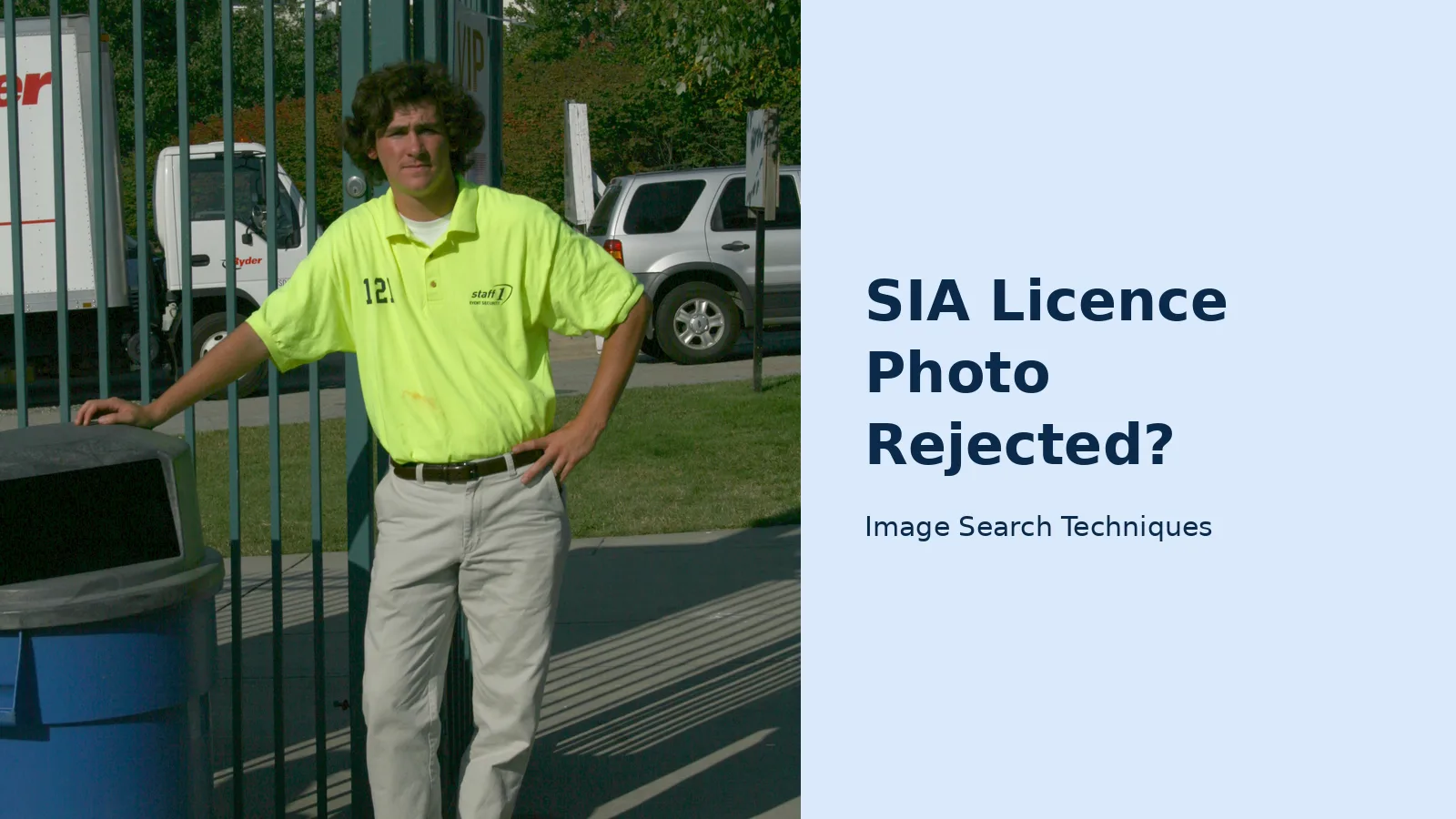
Photo A: a security guard at a beer festival. This is a 2008 photograph by Ildar Sagdejev, taken at a beer festival in the United States and published under a Creative Commons licence. It shows a young man in a hi-vis yellow polo shirt, standing by a gate with his hand on a bin, trucks and an SUV behind him.
| Official rule | Photo A |
|---|---|
| In colour | Pass. Full colour throughout. |
| Clear and in focus | Pass. Sharp, well exposed, no blur. |
| A true likeness | Fail in practice. The photo is from 2008, so the man in it is eighteen years older now. |
| Close-up, head and upper shoulders | Fail. This is a full-body shot from head to shoes. |
| White or cream background | Fail. The background is a fence, trees, a truck, an SUV and a bin. |
| Not changed by software | Caution. The file data shows it was processed in GIMP, an image editor, after it was taken. |
| Pose detail | Mostly pass: facing the camera, eyes visible, plain expression. Fail on shadows: strong fence shadows fall across the ground and the scene. |
Photo B: a Sikh security guard at Jallianwala Bagh. This is a 2014 photograph of a uniformed guard in Amritsar, India, published under a Creative Commons licence. It is a head-and-shoulders portrait against a dark brick wall, and it is the more instructive of the two, because the thing people assume is the problem is not the problem at all.
| Official rule | Photo B |
|---|---|
| In colour | Pass. Full colour throughout. |
| Clear and in focus | Pass. Sharp portrait, eyes clearly visible. |
| A true likeness | Pass in principle. A recent, recognisable portrait of the man. |
| Close-up, head and upper shoulders | Pass. Head and shoulders fill the frame. |
| White or cream background | Fail. The background is a dark brick wall. |
| Not changed by software | Pass. No sign of editing; the file is straight from the camera. |
| Pose detail | Mostly pass: facing the camera, eyes open and visible. Two notes: the turban is a religious head covering, which the rules allow, and the mouth is slightly open in a half smile, where the checklist asks for a plain expression with the mouth closed. |
The lesson from both photos is the same. The background rule is the one that fails most often, and it is the one people argue with most. Photo B is a good portrait by any normal standard, and it still fails, because the wall behind the guard is dark brick instead of white or cream. The turban is not the problem. The smile is a minor note. The wall is the fail. If you take one thing from this article, take this: sort the background first, in the real world, before you press the shutter.
Both photos were also run through the site’s own reverse image search tool on 13 November 2026, to show what the engines actually do with a photo of a person at work. The point is not the guard photos themselves. It is that a photo like this is easy to find again, and that the engines disagree with each other, so one engine is never enough.
| Engine | Photo A: Beer Fest guard | Photo B: Sikh guard |
|---|---|---|
| Google Lens | 0 exact matches. The page opened in AI Mode, stayed on “Thinking”, and the Exact matches tab showed “Something went wrong: No image at the URL”. Source not found. | 0 exact matches. The same failure: AI Mode stuck on “Thinking”, then the same “No image at the URL” error. Source not found. |
| 0 exact matches. The tool’s Google button opens the same Lens page, so it produced the same error. Source not found. | 0 exact matches, same Lens destination and same error. Source not found. | |
| Bing | 1 page with this image: the Wikipedia “Security guard” article, not the Commons file page. The button also opens a keyword search for “Security Guard Uniform Identification”. | 0 pages with this image. Bing misread the photo as a “Punjab Police officer wearing a brown tactical vest over a green shirt”, which is wrong. |
| Yandex | Exact image found in 11 sizes, on 10 sites including the original Commons file page. It locked onto the polo shirt, so most similar images were yellow and green polo shirts. | Exact image found in 3 sizes, on 4 sites including the Commons file page and the original Flickr photo page. |
| TinEye | 2 results, both on Commons: the full file, first indexed 2 April 2013, and an 80 by 120 thumbnail. 86.7 billion images searched. | 0 matches in 86.7 billion images. TinEye said it had probably not yet crawled a page carrying the image. |
| 0 exact matches. This is not a visual search: the tool opens a keyword search for the upload.wikimedia.org domain, and the first screen showed 29 unrelated pins. | 0 exact matches, same domain keyword search, 30 unrelated pins on the first screen. |
Yandex found the source of both photos. TinEye found Photo A only. Bing found Photo A only on Wikipedia, not on Commons, and nothing for Photo B. Lens failed outright on both, which is a tool failure, not a verdict that the photos are not online. And Pinterest did not search the image at all. If you ever check whether a photo of you is already online, run more than one engine, and treat a blank result as unproven, never as proof the photo is not out there.
What happens after a photo rejection, and how long does it add?
First, the language matters. The SIA rarely says “rejected” about a photo. It sends a further information request, and your application status stays at “next steps” or “checks in progress” until you do what the message asks. GOV.UK is blunt about this: you must follow all the instructions in these messages. If you do not, the SIA will not be able to complete its application checks, and your application will not move to the next stage.
The SIA gives no fixed time for a photo fix. It cannot tell you exactly how long your application will take, because it depends on your address history, your criminal record, your right to work, how many applications it is processing, and how quickly the organisations it works with respond. It does offer a decision timescale indicator on its website, which gives an estimate based on the details you enter. That estimate is not a guarantee.
What you can control is your own speed. Read the further information request the day it arrives. Take a new photo against a white or cream wall, check it against the six rules in this guide, and upload it the same day. Do not wait for a reminder. And remember the two hard deadlines in the process: bring your reference number to the Post Office within three months of completing your online application, and send everything to the SIA within 21 days of the Post Office visit, or your application may be withdrawn. A photo problem is fixable. A withdrawn application is a fresh application, a fresh £204, and a fresh wait.
If your application is refused for a different reason, that is a separate process with its own guidance, and it is not a photo problem. Do not confuse the two. A further information request about a photo is a delay, not a refusal, and it is resolved by sending a photo that meets the rules.
How to take a photo that passes first time
Follow these steps in order, and check the result against the table above before you send it.
- Find a plain white or cream wall. Not off-white with a pattern, not a door, not a curtain. A bare interior wall in daylight is ideal. If you have no white wall, a plain white sheet pinned flat against a wall works, as long as it has no creases or shadows.
- Stand facing a window in daylight. The light should fall on your face, not from behind you. Never stand with a bright window behind you: the camera will darken your face and the wall will blow out to white in a way that hides your features.
- Put the camera at eye level, about an arm’s length away. Use a phone on a tripod or a stack of books, or ask someone to take it. Do not hold the phone above you or below you, and do not use the front camera at arm’s length if you can avoid it: the wide lens distorts the face at close range.
- Frame head and upper shoulders. Your whole head and both shoulders must be inside the frame, with a small margin above the head. Take several shots and pick the sharpest.
- Look straight at the camera with a plain expression and your mouth closed. Eyes open, hair out of your eyes, no sunglasses, no hat unless it is for religious or medical reasons. Clear glasses are fine.
- Turn off every filter, beauty mode and background blur. Check the photo is in colour, in focus and unedited. If your phone applied a portrait-mode blur to the background, turn portrait mode off and retake it.
- Compare the photo with your Group A identity document. If the person in the new photo is plainly the same person as the person in your passport or driving licence, send it. If it is not, take it again.
If your next steps message told you to go to the Post Office, skip all of this and go to the Post Office. The staff there will take the photo for you, and it will meet the standard by definition. That is the simplest route through the whole process, and it is the route most UK applicants are given.
Common mistakes that delay SIA licence applications
Most photo delays come from a short list of avoidable mistakes. Run through it before you upload anything.
- Using a photo from years ago. The SIA compares your photo with your identity document. If you have changed since the old photo was taken, send a new one.
- Trusting a “passport photo” app. Apps that cut you out and paste you onto a white background are changing the photo with software, which the rules ban. Take the photo against a real white wall instead.
- Photographing a printed photo. A photo of a photo is not a photo of you. It will be soft, it will show the print texture, and it will fail on focus and likeness.
- Sending a selfie taken in a car or a bathroom. The background will be wrong, the light will be wrong, and the framing will be wrong, all at once.
- Wearing sunglasses or a hat for the photo. Take them off. The only exception is a head covering worn for religious or medical reasons.
- Ignoring the next steps message. If it says Post Office, go to the Post Office. If it says upload, upload. Do not guess which route you are on.
- Leaving it for weeks. The 21-day rule after a Post Office visit is real, and a further information request does not pause the rest of the process. Answer the same day if you can.
One last check before you send anything. Open the photo full screen on a computer, not a phone. Look at the background first, then the framing, then the face. If the background is white or cream and plain, the head and shoulders fill the frame, the face is sharp and evenly lit, and nothing has been edited, you have a photo the SIA can use. If any one of those fails, take it again. It takes five minutes. A further information request takes weeks.
For the official rules themselves, read the SIA’s own guidance on applying for an SIA licence on GOV.UK, and the Post Office’s SIA licence application service page for the branch route. If your photo trouble is part of a wider identity-check problem, our guides to fixing a rejected passport photo, fixing a failed GOV.UK One Login photo ID check and Blue Badge photo rules cover the same pattern on other official schemes. The face search and photo privacy guide is the hub for the whole series, and if you want to check where a photo of you already appears online, our reverse image search guide walks through the process step by step.
FAQs
What are the SIA licence photo requirements?
Your photo must be in colour, clear and in focus, a true likeness of you, a close-up of your full head and upper shoulders, taken against a white or cream background, and not changed using computer software. Those are the six rules on the current GOV.UK guidance page, last updated in June 2026.
Can I use a photo with a blue background for my SIA licence?
No. GOV.UK allows a white or cream background only. The top-ranking blog post on this topic says soft blue backgrounds work, but that contradicts the current official rules, so a blue background risks a further information request and a delay while you send a new photo.
Does the Post Office take my SIA licence photo?
Yes, on the Post Office route. A member of staff checks your identity documents, takes a digital photo of you, records your electronic signature and sends everything to the SIA. Bring your application reference number within three months of completing your online application, and original documents, not photocopies.
Can I wear glasses or a head covering in my SIA licence photo?
Clear glasses are fine, and head coverings worn for religious or medical reasons are allowed. Sunglasses, darkened lenses and hats worn for fashion are not. Your eyes must be open and visible, your hair must be out of your eyes, and nothing else may cover your face.
What happens if my SIA licence photo is rejected?
The SIA sends a further information request and your application does not move forward until you follow its instructions. Send a new photo that meets the six official rules as soon as you can. A photo problem is a delay, not a refusal, but ignoring the request can stall the application.
How much does an SIA licence cost, and is the fee refundable?
One licence costs £204, a figure that changed on 1 April 2026, and the fee is not refundable even if your application is refused or cancelled. A second licence in the same application costs £102. Licences last three years, except a vehicle immobiliser licence, which lasts one year.






