


🔎 Reverse Image Search
Image search techniques made simple: upload a photo or paste a URL and search 6 engines at once. 100% free, nothing stored.
🔒 Your image is never stored on our servers longer than 24 hours and is never shared.
To tell if an image is AI-generated, check three things: visual tells (distorted hands, warped text, too-perfect skin, impossible lighting), the file’s metadata and Content Credentials, and a dedicated AI image detector backed up by a reverse image search. No single test is reliable on its own, so the trick is to stack several signals. This guide walks through all 9 checks, a quick spotting checklist, the best detector tools in 2026, and how to combine them for a confident answer. You can also check if your work was used to train AI
AI image generators have become good enough that a single glance is no longer proof of anything. Whether you are verifying a news photo, a dating-profile picture, a product listing, or an image before you republish it, these techniques will help you separate the real from the synthetic.
What Does “AI-Generated Image” Mean?
An AI-generated image is a picture created by a generative model — such as Midjourney, DALL·E, Stable Diffusion, or Google’s Imagen — from a text prompt or another image, rather than captured by a camera. These models predict pixels based on patterns learned from billions of training images, which is exactly why they leave subtle, repeatable mistakes. Learning where those mistakes hide is the fastest way to catch a fake.
Quick Checklist: Signs an Image Is AI-Generated
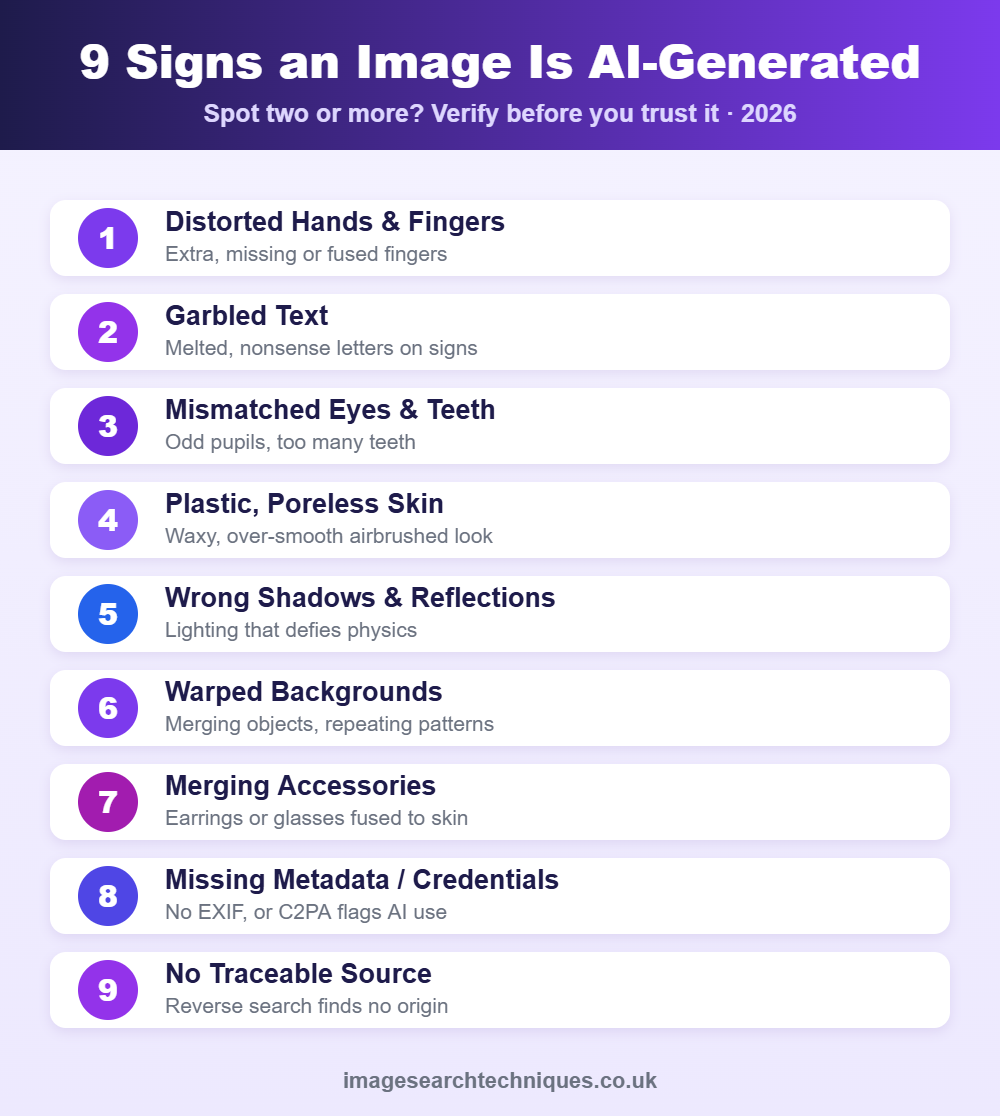
Use this table as a fast first pass. If two or more signs show up, treat the image as likely AI-generated and verify further.
| What to check | Tell-tale sign of AI |
|---|---|
| Hands & fingers | Extra, missing, or bent fingers; fused knuckles |
| Teeth & eyes | Too many teeth, mismatched pupils, odd reflections |
| Text in the image | Garbled, melted, or nonsense letters on signs/labels |
| Skin & textures | Waxy, airbrushed “plastic” look with no pores |
| Backgrounds | Warped objects, blurred nonsense, repeating patterns |
| Lighting & shadows | Shadows that fall the wrong way or don’t match |
| Jewellery & accessories | Earrings, straps, or glasses that merge into skin |
| Metadata | Missing camera data, or Content Credentials flag AI |
1. Check the Hands, Teeth, and Eyes
Hands are still the number-one giveaway. AI often renders six fingers, missing thumbs, or knuckles that bend the wrong way. Zoom in on teeth (generators frequently draw too many or uneven rows) and eyes, where pupils may be different sizes and reflections in each eye often fail to match. These small anatomical errors are the quickest manual check you can do.
2. Look for Warped Text and Background Details
Generative models struggle with written language. Signs, labels, book spines, and logos in AI images often show melted, repeated, or nonsense characters. Scan the background too: look for objects that merge into each other, doorways that lead nowhere, or patterns (tiles, railings, crowds) that repeat unnaturally. Real photos keep crisp, legible text and coherent backgrounds.
3. Inspect Lighting, Shadows, and Reflections
Physics is hard for AI. Check whether every shadow falls in the same direction and whether reflections in mirrors, windows, and water actually match the scene. Multiple light sources that don’t agree, or a subject with no shadow at all, are strong signs of a synthetic image.
4. Spot Over-Smooth “Plastic” Skin and Textures
Many AI portraits have an unnaturally flawless, waxy finish — no pores, no fine hairs, perfectly even tone. The same over-smoothing shows up in fabric, hair, and fur, which can look airbrushed or blended. Genuine photographs almost always contain small imperfections and texture that current models tend to erase.
5. Run a Reverse Image Search
A reverse image search can reveal whether a picture has a real-world history — appearing on stock sites, news articles, or social profiles — or whether it has no traceable origin, which is common for freshly generated images. It also exposes the opposite case: a real photo being passed off as AI, or an AI image reused across scam profiles. See our step-by-step guide to reverse image search and the full range of image search techniques you can combine here.

6. Check Metadata and C2PA Content Credentials
Every real photo carries EXIF metadata — camera model, lens, date, and settings. If that data is completely missing, the image may have been generated or stripped. More reliably, many AI tools now attach C2PA Content Credentials, a tamper-evident “nutrition label” that records whether and how AI was used. You can inspect these at the official Content Credentials Verify tool. Remember that absent metadata is a hint, not proof — social platforms strip EXIF from ordinary photos too. See how to check a photo’s Content Credentials (C2PA).
7. Run It Through an AI Image Detector
AI image detectors analyse pixel-level patterns and generation artefacts that the human eye misses, returning a probability that an image is synthetic. They are a useful second opinion but not infallible — they can be fooled by compression, screenshots, and editing. Treat a detector’s score as one signal among several, never as a final verdict.
8. Watch for Impossible or Inconsistent Details
Step back and ask whether the whole scene makes sense. Count fingers and limbs, check that earrings match, that glasses sit correctly, and that clothing seams line up. AI frequently produces asymmetric accessories, straps that vanish, buttons that don’t align, and limbs that connect at odd angles. One impossible detail is often enough to confirm a fake.
9. Combine Signals — No Single Test Is Perfect
The most reliable method is to stack evidence. A confident conclusion usually comes from two or more agreeing signals: a visual tell plus missing Content Credentials, or a detector flag confirmed by a reverse image search that finds no origin. As generators improve, any one test becomes easier to beat — but faking all of them at once is far harder.
Best AI Image Detector Tools in 2026
Several detectors are worth keeping in your toolkit. Use more than one and compare results:
- Content Credentials (C2PA) — the industry-standard provenance check backed by Adobe, Google, and others.
- Dedicated AI-image detectors — services such as Hive, Sightengine, and “Was It AI” give a synthetic-probability score.
- Reverse image search — Google Lens, TinEye, and Yandex to trace (or fail to trace) the image’s origin.
- Manual inspection — your own eyes on hands, text, and lighting remain one of the best tools.
Why Detecting AI Images Matters
Synthetic images now drive misinformation, fake product listings, romance scams, and impersonation. Being able to verify a picture protects you from being deceived and stops you from unknowingly sharing a fake. If you are worried about your own photos being copied or edited by others, read how to find out if someone is using your photos online, and before reusing any image, check whether it is copyrighted.
Frequently Asked Questions
How can I tell if an image is AI-generated for free?
Start with free manual checks: zoom in on hands, teeth, eyes, and any text for distortion, and look for over-smooth skin and inconsistent shadows. Then run a free reverse image search and check the file’s Content Credentials at contentcredentials.org. Combining these costs nothing and catches most fakes.
Are AI image detectors accurate?
They are helpful but not perfect. Detectors can be fooled by screenshots, compression, and editing, and they sometimes flag real photos as fake. Use a detector as one signal and confirm with visual checks, metadata, and a reverse image search before deciding.
What is the biggest giveaway of an AI image?
Hands and text are the most common giveaways. Look for extra or fused fingers and for melted, nonsense letters on signs and labels. Mismatched eye reflections and over-smooth, poreless skin are close behind.
Can metadata prove an image is AI-generated?
Not on its own. Missing EXIF data is a hint, because social platforms also strip metadata from real photos. Tamper-evident C2PA Content Credentials are far more reliable, as they record whether AI was used, but not every image carries them.
Does reverse image search detect AI images?
Indirectly, yes. A reverse image search shows whether a picture has a real history online. Genuinely new AI images usually have no traceable source, while real photos appear on multiple sites, so a blank result alongside other AI signs is telling.
Will AI images become impossible to detect?
Visual tells are shrinking as models improve, but provenance standards like C2PA Content Credentials are expanding at the same time. The reliable long-term approach is to combine provenance checks, detectors, and reverse image search rather than relying on the naked eye alone.
Want to trace where an image really came from? Try our free reverse image search tool to verify any picture in seconds.
Related guides
- How To Verify A News Photo Is Real
- Is Someone Using My Photos Online
- Remove Your Photos From Google
- How To Check If An Image Is Copyrighted
To choose the right tool, see our best AI image detector tools compared, with real test results for Hive, AI or Not, SynthID and C2PA.
