🔎 Reverse Image Search
Image search techniques made simple: upload a photo or paste a URL and search 6 engines at once. 100% free, nothing stored.
🔒 Your image is never stored on our servers longer than 24 hours and is never shared.
Direct answer: What haircut is this? Run the photo through Google Lens, ask ChatGPT to describe it, then read four features: length on top, fade or taper on the sides, texture, and parting. That combination gives you the name, but names vary by salon and country, so take the photo and an ask sheet to your barber.
You have seen a haircut you like, on Instagram, on TikTok, on a friend, and you have screenshotted it. Now you need its name, because “the one in this photo” is not something you can say to a barber with confidence. This guide shows you how to identify a haircut from a photo in three moves: reverse-search the photo, ask an AI chat app to describe it, and read the cut yourself with a four-feature framework. At the end you will have a filled-in ask sheet you can take to the chair.
One warning up front, because it shapes everything below: haircut names vary by salon, by country and by hair type. The same short back-and-sides cut is a crew cut in Britain and America and a half-box in Russia. Treat every name in this guide as what to ask for, never as a guaranteed outcome, the photo and the four features are what actually get you the cut.
What does a haircut name actually describe?
A haircut name is shorthand for four choices a barber makes: how long the hair is left on top, how the sides and back are graduated, what texture the hair is cut to show, and where, if anywhere, it parts. Say “textured crop” and a barber hears short on top, choppy texture, fringe pushed forward. Say “crew cut” and they hear short on top, tapered sides, straight texture, no parting.
That is why two cuts can share a name and still look different, and why the same cut can carry two names. The name is only useful if you can also describe the four features behind it. Everything in this guide comes back to that: tools can suggest a name, but the features are what let you check it, and what let your barber reproduce it on your head, with your hair.
What do you need before you start?
You need the clearest copy of the photo you can get, and ideally three angles of the same cut: front, side and back. One front-facing photo hides the sides; one side photo hides the parting. If you only have one angle, the side view is the most useful, because it shows the top length and the sides in the same frame.
Check the photo before you search it:
- Light: the hairline, the ears and the neckline should be visible, not lost in shadow or blown out by flash.
- No filter: heavy filters smooth out texture, which is one of the four features you need to read.
- Hair as worn: a photo taken with the hair wet or loaded with product hides its natural texture and true length.
- Head and shoulders: crop out the background and other people so the search tools compare hair, not scenery.
If the photo is a still from a video, pause on a frame where the head is still and the hairline is sharp. And keep the search to the hairstyle: you are identifying a cut, not the person wearing it, so there is no reason to run the photo through a face-recognition tool.
How do you identify a haircut from a photo with Google Lens?
Google Lens is the fastest first step, because it matches your photo against similar photos on the web, and salon and barber pages usually name the cut in their title or caption. It does not label the cut itself, so read its results as a shortlist of candidate names, not as an answer.
- Save the photo to your phone. Screenshot it or download it, then crop it to the head and shoulders so the cut fills the frame.
- Open Lens and upload it. Go to lens.google.com, or tap the Lens icon in the Google app, and upload the photo, or paste the photo’s web address. Google’s own support page explains how to search with an image on desktop and mobile.
- Read the words that repeat. Look across the top results for the names that keep appearing, “crew cut”, “taper fade”, “textured crop”, and note which one appears most often. That is your leading candidate.
- Tap a result that looks like the same cut. Open the salon or barber page behind it and read its caption: a page titled “textured crop for straight hair” is telling you the name directly. If you want the full method, our guide to reverse image search and our Google reverse image search guide walk through Lens step by step.
- Tighten the search if the results are noisy. If the first page is all try-on apps and product adverts, crop the photo tighter or add a word to the search, such as “crew cut men”, Lens follows the words you give it as well as the pixels.
Lens works best on a clear, unfiltered photo. A heavily filtered or AI-generated image returns lookalikes rather than the cut itself, so if the results look nothing like your photo, the photo, not the tool, is usually the problem.
How do you ask ChatGPT or Gemini to name a haircut?
An AI chat app does what Lens cannot: it describes the cut in words. Upload the photo and ask a specific question, not a vague one. This prompt works well:
“What haircut is this? Describe the length on top, the sides and back, the texture and the parting, then give me the most likely name and two close alternatives.”
Ask for the four features separately, because that is what you will check. Then ask a follow-up: “What would you call this in a UK barbershop?”, that pulls the local name rather than the American or salon-marketing one. If the answer names a cut you have never heard of, ask it to explain the name in terms of the four features before you trust it.
Know the limits before you rely on the answer. OpenAI’s ChatGPT Image Inputs FAQ says image inputs are available on Free and paid ChatGPT plans, that you upload through the + button (“Add photos & files”), that PNG, JPEG and non-animated GIF files are supported with a 20 MB limit per image, and that ambiguous or unclear images may give less accurate results. A blurry screenshot therefore gets a hedged answer, and you should treat it as a suggestion, then check it against the framework below. Our guide to identifying a photo with ChatGPT and Gemini covers the same upload-and-ask method in more depth.
Never take one AI answer as the name. If Lens and ChatGPT agree, you have a strong candidate. If they disagree, trust the framework in the next section over either tool: tools match pictures, they do not measure hair.
How does the length × fade × texture × parting framework work?
This is the Ranking Asset for this guide: a four-feature framework that names any haircut. Read the features in order, top to bottom, and the name assembles itself.
| Feature | What to look at | Common options |
|---|---|---|
| Length on top | The longest hair on the crown, judged against a finger | Buzzed (one clipper guard); short (about a finger-length); medium (two to three fingers); long (past the ears) |
| Sides and back | How the hair shortens from the top to the neckline | Taper (gradual, hair visible throughout); fade (blends down to skin); undercut (one short length, disconnected from the top); scissor-cut (no clippers) |
| Texture | How the ends sit when the hair is dry | Straight and flat; textured or choppy; curly; wavy |
| Parting | Where the hair divides, if anywhere | Side part; middle part; combed forward; no part (pushed up or back) |
Work through the four rows for your photo and write down one option per row. A name is simply the combination: short top + textured + combed forward is a textured crop; short top + taper + straight + no part is a crew cut; long top + fade + straight + side part is a side part with a fade. If you cannot decide one row, the parting is hidden, say, note that too, and ask your barber to decide it in the chair. A half-filled framework with one honest gap beats a confident guess.
What are the most common haircut names, and what do they mean?
Use this table to match the framework reading to a name. The “ask for” column is the phrase to use with your barber, alongside the photo.
| Name | What to look for | Ask for |
|---|---|---|
| Buzz cut | One length all over, cut with clipper guards | “A number 2 buzz all over” |
| Crew cut | Short on top, tapered sides, neat and flat | “A crew cut, short on top with a taper” |
| Textured crop / French crop | Short choppy top pushed forward, short fringe | “A textured crop, choppy on top, fringe forward” |
| Low, mid or high fade | Sides blend to skin; the blend line sits low, mid or high on the head | “A mid skin fade” |
| Taper | Gradual shortening with no skin showing | “A taper, not a skin fade” |
| Undercut | Long top with sides cut to one short length and a sharp disconnect | “An undercut, disconnected” |
| Quiff | Longer front swept up and back | “A quiff, length left at the front” |
| Pompadour | Long top swept up and back with volume | “A pompadour, volume on top” |
| Side part | A defined parting with neat sides | “A classic side part” |
| Curtain cut | Middle part with a longer fringe framing the face | “A curtain cut, middle part” |
| Bob | Jaw-length, one length or layered | “A bob, jaw length” |
| Pixie cut | Very short and textured, close at the back and sides | “A pixie, short and textured” |
| Shag / wolf cut | Heavy layers, volume at the crown, choppy ends | “A shag, lots of layers” |
These are the names most British and American barbers will recognise, but a “taper” in one shop can be a “fade” in another, and a “crop” in one city can be a “French crop” in the next. Always give the name with the features, never the name alone.
Worked example: what haircut is this crew cut?
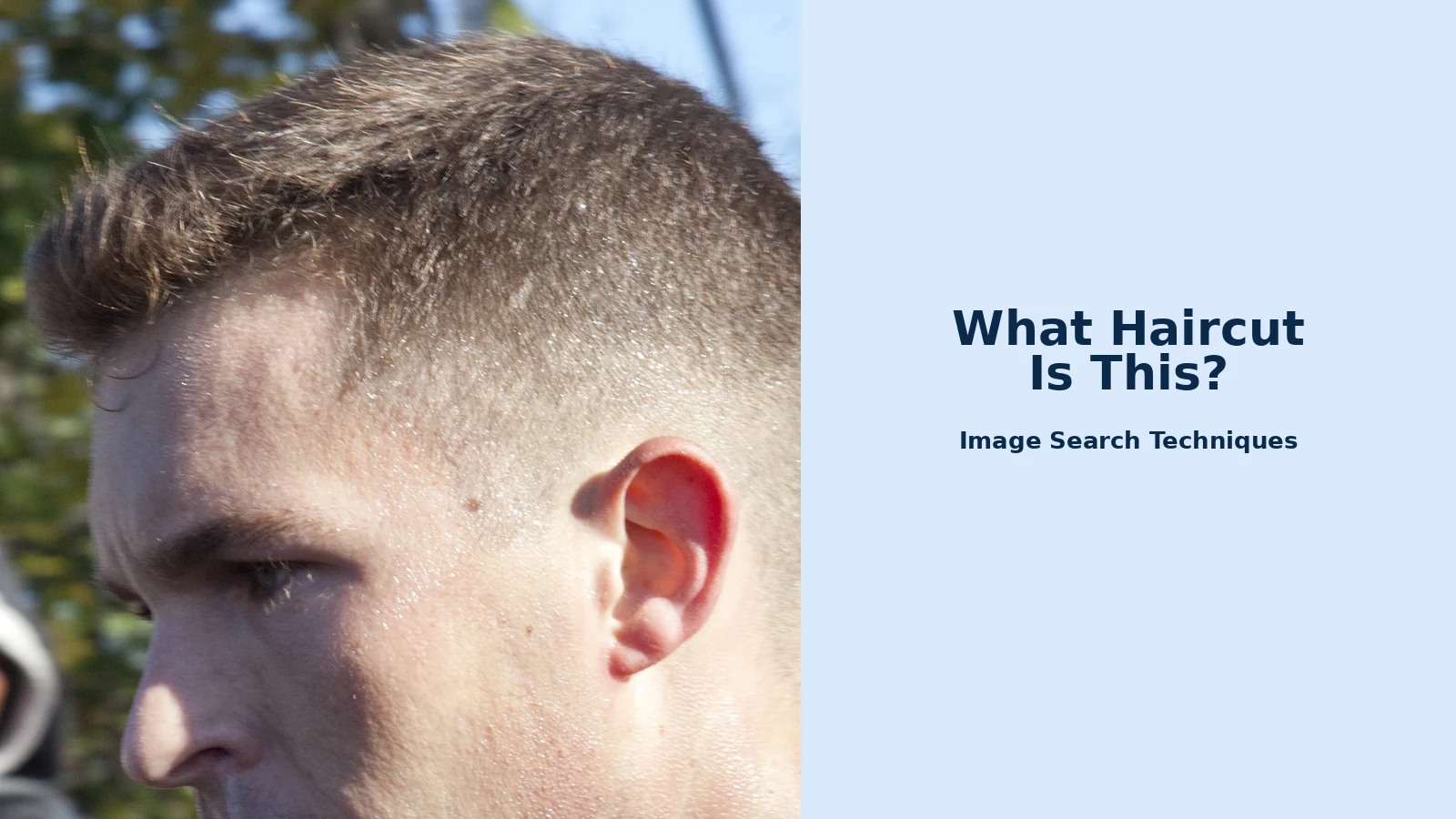
Here is the method run end to end on a real photo, so you can see what each tool actually does. The test photo is a public-domain US Marine Corps photograph on Wikimedia Commons, captioned “Crew Cut, Semi Short Taper”: a side profile of a man with a short top and tapered sides. I ran it by URL through three search engines on 12 November 2026, signed out, and read the results honestly.
- Google Lens by URL: no readable result. Lens returned a 303 redirect and, from a signed-out fetch, no identification text came back. That is a limit of the by-URL route, not of Lens itself, in the Google app, uploading the same photo works normally.
- TinEye by URL: no result. TinEye returned a 403 and blocked the request, so it never searched.
- Yandex Images by URL: worked. Yandex returned the original file at its true size (2104 × 3176 pixels), tagged it with Russian labels including “прическа полубокс”, a half-box haircut, and showed similar crew-cut photos, including a “Lange Crew Cut” result.
Then the framework reading, done by looking at the photo itself. Length on top: short, about a finger-length, combed forward. Sides and back: a semi-short taper, graduated smoothly, with hair still visible at the nape, not a skin fade. Texture: straight. Parting: none. That combination is a crew cut with a semi-short taper, which is exactly what the file’s own caption says.
Two lessons fall out of this test. First, reverse search is better at finding the same photo and its lookalikes than at naming the cut: Yandex found the file and its cousins, but the name came from reading the four features. Second, the lock is real and visible here: Yandex’s “half-box” is the Russian name for the same short-back-and-sides family. Same cut, different name, different country, which is why the ask sheet below carries the features as well as the name.
How do you turn the name into an ask sheet for your barber?
Copy this sheet into a phone note, fill it in from your framework reading, and attach the photo to the same note. Show the barber the photo first, then read the sheet aloud.
- The cut I want: ___ (name, for example “crew cut with a semi-short taper”)
- Length on top: ___ (for example “short, about a finger-length”)
- Sides and back: ___ (for example “taper, not a skin fade”)
- Texture: ___ (for example “straight, flat”)
- Parting / fringe: ___ (for example “no parting, combed forward”)
- Say: “I’d like a [name], [length] on top, [sides] on the sides, [texture], [parting]. Here’s the photo.”
- Ask the barber: Will this suit my hair type? How often will it need tidying? What product should I use, if any?
Keep the sheet after the appointment and note what the barber actually did differently. Next time, the sheet is already half-filled, and if the result was not what you wanted, you can point to the exact feature that went wrong instead of saying “it just looks off”.
What if Lens and ChatGPT disagree, or the photo is a screenshot?
If the tools disagree, trust your framework reading over either of them. Lens matches pictures and ChatGPT describes them, but neither measures hair: a taper and a low fade can look identical in a small photo, and only the sides, seen clearly, settle it. When in doubt, pick the name both tools came closest to, and let the barber decide between the two in the chair.
If the photo is a screenshot, crop it tight around the head, brighten it slightly, and avoid frames where the head is moving. If the only copy you have is soft or heavily compressed, our guide to reverse image searching a blurry photo explains how to get a usable result from a poor image.
Watch out for AI-generated photos, too. Try-on apps render a chosen style onto your own selfie, which is genuinely useful for previewing a cut, Kurli’s own page says its face-shape read and top pick are free while the renders are the paid step, and that photos are sent to Google Gemini for the recommendations; Coifly’s store listing says it can generate a stylist card with the name of the cut and what to ask for. But a render is a preview, not a promise: it can invent texture and length that real hair will not hold. Use it as a starting point, then name the cut with the framework before you book.
Finally, if the photo you are holding could be anything, a cut, a product, a place, a plant, start with our guide to identifying any picture, which covers the general method this article builds on.
What should you ask your barber instead of just saying the name?
Say the name, describe the four features, and show the photo, in that order. Then ask the questions that decide whether the cut will work on you: will this suit my hair type, thick or fine, straight or curly? How short can the sides go before it looks like a different cut? How long before it needs a tidy-up, a fade usually wants attention every two to three weeks, while a longer top grows out more forgivingly? And what will it look like after two weeks of growth, when you are living with it rather than leaving the shop?
If your barber has never heard the name you bring in, that is not a problem: a good barber cuts what they see, not what it is called. The photo plus the four features is enough. And if the cut comes out wrong, the ask sheet tells you exactly which feature to correct next time, length, sides, texture or parting, instead of starting from scratch.
So screenshot the cut, run it through Lens, ask ChatGPT to describe it, read the four features, and take the photo and the ask sheet to the chair. The name gets you in the door; the features get you the haircut.
Can Google Lens name a haircut from a photo?
Lens finds visually similar photos rather than naming the cut itself. Upload a cropped, well-lit photo and read the words that repeat across the top results, ‘crew cut’, ‘taper fade’, ‘textured crop’, then check the name against the four-feature framework. If the results are all try-on apps or adverts, crop tighter or add a word to the search.
What should I ask my barber for if I only have a photo?
Show the photo, then give the name plus the four features: length on top, fade or taper on the sides, texture, and parting. For example: ‘a crew cut, short on top with a semi-short taper, straight, no parting.’ Then ask whether it suits your hair type, how often it will need tidying, and what product to use.
Why does the same haircut have different names in different countries?
Haircut names are salon shorthand, not standard terms, so the same short back-and-sides cut is a crew cut in Britain and America and a half-box in Russia. The features stay the same even when the name changes, which is why you should describe the length, sides, texture and parting as well as saying the name.
Can an app show me the haircut on my own photo before I book?
Yes. AI try-on apps render a chosen style onto your own selfie so you can preview it. Kurli’s own page says its face-shape read and top pick are free while renders are paid, and Coifly offers a stylist card with the cut’s name. Treat a render as a preview, not a promise, name the cut with the framework first.