


🔎 Reverse Image Search
Image search techniques made simple: upload a photo or paste a URL and search 6 engines at once. 100% free, nothing stored.
🔒 Your image is never stored on our servers longer than 24 hours and is never shared.
You took a photo of a statue on holiday, or in a town square, and now you want its name. The fastest route is a reverse image search, then a quick read of the photo itself, then a check in a public art database. That order matters. A search engine can name a famous statue in seconds, but it can also guess, so the plaque and the database are what turn a guess into an answer.
To identify a statue from a photo, reverse search the image with Google Lens, TinEye, Yandex and Bing, then read the plaque, the style, the material and the setting in the photo, and check the name in a public art database such as Art UK. If one engine names it and the database agrees, you have your answer.
What is the fastest way to identify a statue from a photo?
The fastest way is a reverse image search first, a plaque read second, and a database check third. Most famous statues are named in under a minute. The rest need the slower steps, and skipping them is how a wrong name sticks.
Start with the best version of the photo you have. That means the full statue, upright, in daylight, with the base in the frame. If you also photographed the plaque, keep that shot separate. It is your second search image, and it often settles the question on its own. Our full guide to finding an item by image follows the same order, and it works for statues because the method does not change with the subject.
Run the photo through more than one engine. In the worked test below, only one of four engines named the statue, and two returned nothing at all. If you had trusted the first engine you tried, you would have gone home empty handed. Four engines take about five minutes, and that is the whole job for a well known statue.
One warning before you start. Some of the top results for this question are not identification tools at all. They are statue generators, apps that turn your photo into a statue image. They will not name the statue in your photo, and their download buttons will waste your time. A real identifier tells you a name, an artist and a place. If the page offers neither, close it.
How do I reverse search a statue photo?
Reverse searching a statue photo is the same job as reverse searching any photo, and our step by step reverse image search guide covers the clicks for each engine. The short version is this.
- Save the clearest version of the photo. Use the original file from your camera roll, not a screenshot of it, and crop tight around the statue so the engine spends its attention on the sculpture and not on the sky.
- Open Google Lens and upload the photo. Look at the Exact matches tab first. An exact match is the same photo on another page, and the page title often carries the statue name.
- Run the same photo through TinEye. Sort by oldest if you can. The earliest page to host the image is often the source, and the source usually names the statue.
- Run it through Yandex Images and Bing Visual Search too. Yandex is strong on visual tags, and it will often name a statue that Lens misses. Bing is weaker for this job, but it costs nothing to try.
- Search the plaque photo separately if you have one. Text in a plaque is searchable, and a plaque search can name a statue that the full view search missed.
The search engines are not the only option. Your phone already has tools that can name a statue from a photo. Lens App gives one free web scan a day and names the subject from a photo, with landmarks and monuments among the subjects it covers. On an iPhone, open the photo in Apple Photos, swipe up and tap the information button: if it has sparkles, Visual Look Up has recognised something, and art and landmarks are among the subjects it covers. Artist Ninja offers a free reverse image search that looks for similar images across search engines. Whichever tool you use, a sharp, well-lit photo of the whole statue gives every tool more to work with.
Search by image URL works as well as an upload when the photo is already online. A file upload from your own phone usually works better than a URL search, because the engine gets the full file instead of a copy fetched from a link. If you want one place to start, the free tool on the imagesearchtechniques.co.uk homepage searches six engines at once. Either way, run all four engines before you decide the statue is unidentifiable.
The worked example: Angel of the North
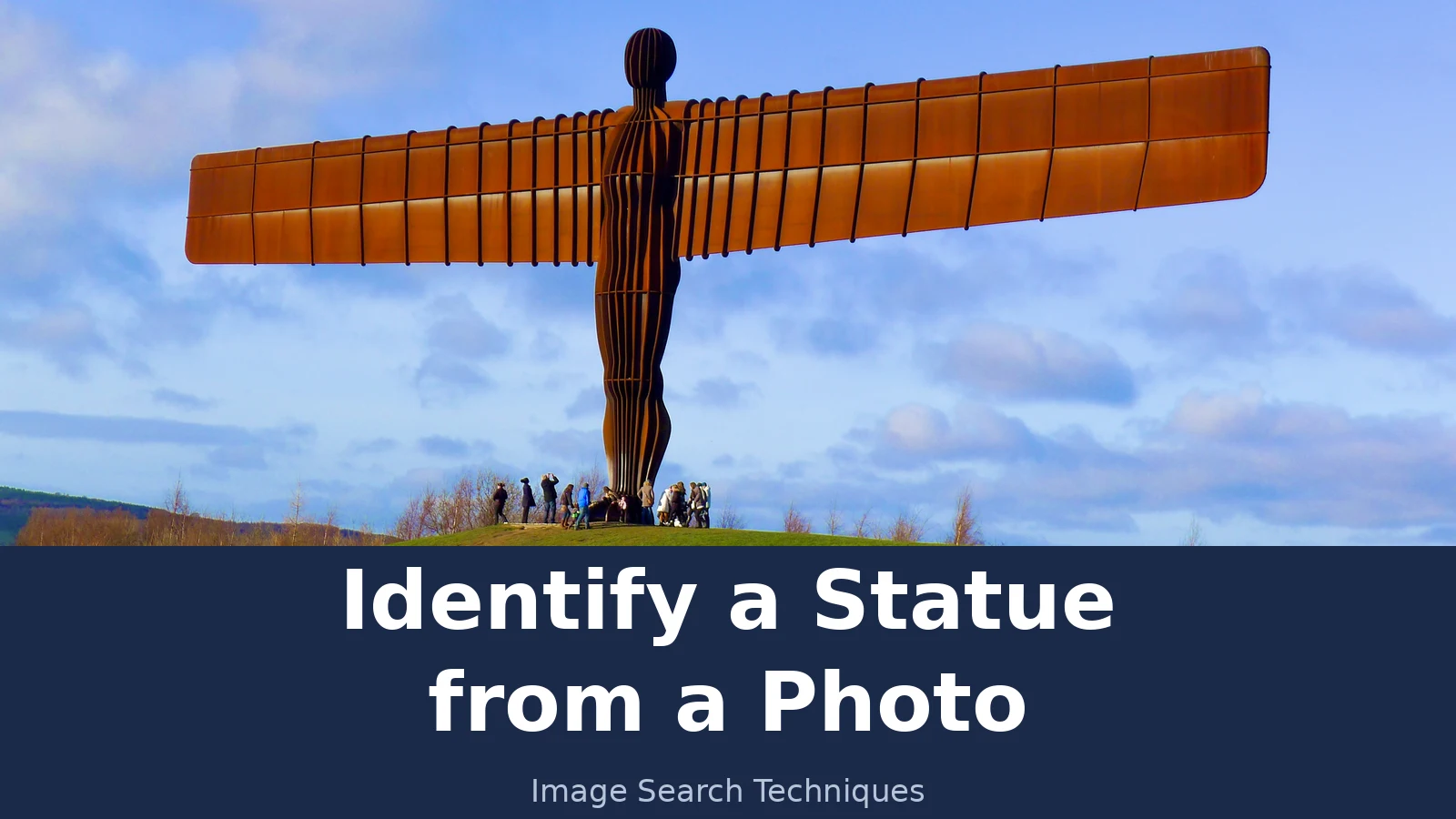
We tested this method on a real photo on 17 November 2026. The photo shows the Angel of the North in Gateshead, photographed by Alvin Leong on 29 December 2013 and shared under a Creative Commons Attribution-Share Alike 2.0 licence. The file is 3,968 by 2,232 pixels. It is a famous statue, so this was a fair test, not a hard one. Each engine was searched by image URL, because the browser session used for the test could not upload a local file. A file upload on your own phone may behave differently, and that is worth knowing before you read the scores.
| Engine | Named the statue? | What it showed | Linked the Commons file page? |
|---|---|---|---|
| Google Lens | No | 0 results. Three attempts all failed with the message “No image at the URL. Try again with a different URL or image.” No count was ever shown. | No |
| TinEye | No | 13 results across 86.8 billion images searched. First indexed 12 May 2016. It listed pages hosting the image, including the BBC, Yahoo, Airbnb and Metro, but named nothing. | No, 0 of the 13 results |
| Yandex Images | Yes, exactly | First tag was “angel of the north”. Further tags named Antony Gormley sculptures. 14 sizes listed, 18 similar thumbnails on the first screen, 11 sites listed. | Yes |
| Bing Visual Search | No | 0 results shown. It twice showed the message “Image uploaded successfully” and then never rendered a results page. | No |
Pinterest was not tested, because it needs a login and we do not log in to test an engine. That is the honest scoreboard: one engine out of four named the statue, one found the image without naming it, and two returned nothing. If we had stopped after Lens, the test would have failed on one of the most photographed statues in Britain. Run all four.
The Yandex answer was then checked, not trusted. Wikipedia’s page on the sculpture confirms the details: the Angel of the North is a contemporary sculpture by Antony Gormley, completed in 1998, 20 metres tall with a wingspan of 54 metres, made of COR-TEN weathering steel, weighing 208 tonnes, and commissioned by Gateshead Council. Art UK, the UK public art database, holds a record for the Angel of the North Maquette from 1997, in the Gateshead Council Art Collection. Engine answer, plaque facts and database record all agreed, so the identification was settled.
What should I read in the photo itself?
Engines fail, plaques fade, and some statues are too new or too local for any database. The photo itself is your backup, and a statue photo holds more clues than most subjects. Read it in this order.
| What to read | What it tells you | Where to check it |
|---|---|---|
| Inscription or plaque | The name, the artist, the date, and often the donor or the reason it was built. This is the single best clue in the photo. | Photograph it close up and search it separately. Read every line, including small text at the bottom. |
| Subject | Who or what it shows. A person, an animal, or a mythological figure. Attributes narrow it fast: a sword, a lyre, a laurel wreath, a horse, wings. | Search the web with a description, for example “bronze statue of a man on horseback” plus the place. |
| Style and clothing | The period. Roman dress, Victorian dress, modern abstract shapes, and religious robes each point at a different century and a different kind of statue. | Compare with dated statues in the same style on Wikipedia or Wikimedia Commons. |
| Material | Bronze, marble, stone, or weathering steel. Bronze often turns green outdoors. Marble is pale and veined. Weathering steel is rust brown, like the Angel of the North. | Note the colour and the surface in daylight. Material plus subject is a strong search pair. |
| Setting | The place. Street names, shop signs, the language on signs, the architecture behind it, and the landscape around it. A square can name the statue. | Search the place first if the statue will not resolve. A wide shot of the square often identifies the location, and the location identifies the statue. |
| Reverse search result | Whether any engine has seen this exact photo before, and which pages host it. Even a nameless match can lead to a page that names it. | Open the matching pages, not just the thumbnails. The page title and the caption do the naming. |
The table above is the whole method in one place. Work down it, and write down what each row gives you. A statue with a readable plaque, a clear subject and a recognisable setting is identified in minutes. A statue with none of those needs the next section, and it needs patience.
One habit makes every row easier. When you photograph a statue, take three shots: the whole statue with its base, a close up of the plaque, and a wide shot that shows the street or the square. Three photos take thirty seconds, and they give the search engines and the databases three different things to work with. Our guide to identifying a flag from a photo uses the same habit, because the plaque on a statue and the design of a flag do the same job: they are the readable clue inside the image.
How do I check the answer in a public art database?
A search engine gives you a lead. A database gives you a confirmation. Check the name in at least one of these before you trust it.
Start with Art UK, the database of public art in the UK. Search the statue name, the artist, or the place. A record there gives you the title, the artist, the date, the material and the location, and it is the kind of source a museum would use. The Angel of the North test above was confirmed there through the maquette record, which lists Antony Gormley as the artist and Gateshead Council Art Collection as the holder.
Then check Wikipedia and Wikimedia Commons. A Wikipedia page for a statue gives you the artist, the date, the dimensions and the history, and the Commons file page for your exact photo names the photographer, the date and the licence. If the engine answer and the Wikipedia page agree on the artist and the place, the identification is solid. If they disagree, trust the database and the plaque, not the engine.
For statues in the UK, also check whether the statue is listed. Historic England’s National Heritage List records listed statues with a description and a location, and a listing entry is an authoritative confirmation. Council and museum pages are worth checking too, because the council that commissioned a statue usually keeps a page about it, and a local museum often holds the maquette or the archive. If the statue stands outside the UK, the same rule applies: look for the city council, the parks department, or the museum that owns the land it stands on.
Keep a note of what you checked. A name with one source is a lead. A name with an engine match, a plaque read and a database record is an answer. That is the standard this article applies to its own worked example, and it is the standard to apply to yours.
What if no search engine names the statue?
Some statues will not resolve on any engine. New statues, local memorials, statues in small towns, and statues photographed from an unusual angle all fail more often than famous ones. That is a zero, not proof the statue has no name. Work the slower routes.
Search the web with a description instead of a photo. Type what you can see, plus the place: “bronze statue of a man on horseback” and the town name, or “stone angel statue” and the churchyard name. Description searches find council pages, news articles and blog posts that a reverse search never touches, because those pages may not host your photo at all.
Ask people who identify things. Mountains follow the same order too: our guide to identify a mountain from a photo runs the same reverse search and peak-read check on a real Matterhorn photograph. Reddit has r/whatisthisthing and r/Statues, and both take photo posts. Post the photo, the place where you took it, and the plaque text if you could read any of it. The place matters more than anything else, because a local reader may walk past the statue every day. Give the same details you would give a search engine: subject, material, setting, and any words on the plaque.
AI chatbots can help as a lead, not as an answer. ChatGPT, Gemini and Claude will all look at a statue photo and suggest a name, but they can also invent one with total confidence. Treat any chatbot answer the same way you treat an engine answer: check it against a database and a plaque before you trust it. A chatbot that names a statue nobody else can confirm has given you a guess, not an identification.
If the statue is local and the online routes fail, contact a local historical society or a museum. Email them the photo, the place, and the plaque text. Societies and museums keep records of public art in their area, and a curator can often name a statue from a description alone. This is the slowest route, but it is also the one that works when every engine returns nothing.
Skip face search tools for this job. Services such as PimEyes match the faces of people, not sculptures, and they are paid face recognition services. A statue of a person is not a person, and a face match will not name the sculptor, the date, or the place. Use the tools built for images and places, not the ones built for faces.
Can I identify a statue from a photo without a plaque?
Yes, but the photo has to work harder. Without a plaque, the identification rests on the subject, the style, the material and the setting, and on getting a clean image into the search engines. A few habits make the difference.
Photograph the whole statue first, with the base in the frame. The base often carries the inscription even when there is no separate plaque, and the shape of the plinth is itself a clue. Then take a second photo from a different angle. Statues look different from the side, and an engine that fails on a front view sometimes succeeds on a three quarter view. Shoot in daylight, and avoid deep shadow across the face or the inscription. If the statue is behind glass or a fence, move until the reflection or the bars are out of the frame.
Crop tight before you search. Cut out the sky, the crowd and the empty pavement, and leave the statue filling the frame. A tight crop tells the engine what matters in the image, and it is the single easiest fix for a search that returns nothing useful. Try the cropped version on all four engines, not just one. Our guide to identifying a painting from a photo makes the same point, because a painting and a statue fail in the same way when the subject is small inside a busy frame.
If the photo is old, cropped, or blurry, say so to yourself before you judge the result. A reverse search can still work when the silhouette is clear, because the shape of a statue is often enough for an engine to match. But a blurry photo of an unknown statue in an unknown place is a hard case, and it may need the description search and the local society route from the previous section. A zero on a bad photo is a zero on that photo, not a verdict on the statue. Take a better photo if you can go back, and search that one instead.
Finally, remember that a famous statue and a local statue need different expectations. A famous statue is usually named by at least one engine, as the Angel of the North was by Yandex. A local war memorial or a statue in a small park may never appear in a search engine at all, and its name may live only on the plaque and in the council record. Both are identifiable. The difference is only how many steps the job takes.
FAQs
Can Google Lens identify a statue from a photo?
Yes, it can, but it does not always work. In our test on a photo of the Angel of the North, Google Lens returned no results, while Yandex named the statue exactly. Use Lens first because it is fast and free, then run the same photo through TinEye, Yandex and Bing before you decide the statue cannot be identified.
What is the best reverse image search for statues?
There is no single best engine, because the winner changes with the photo. In our test Yandex named the statue, TinEye found the image without naming it, and Lens and Bing returned nothing. Run all four engines on the same photo. The engine that names it is the best one for that statue.
How do I find the name of a statue with no plaque?
Read the subject, style, material and setting in the photo, then search the web with a description plus the place, for example bronze statue of a man on horseback and the town name. Check the name in a public art database such as Art UK. If that fails, ask on Reddit r/whatisthisthing or contact a local historical society.
Can I identify a statue from a cropped or blurry photo?
Sometimes. A reverse search can still match a statue when its silhouette is clear, even if the photo is cropped. Crop tight around the statue before you search, and try a second angle if you have one. If the photo is very blurry, the engines will struggle, and a better photo or a description search is the honest next step.
Is it free to identify a statue from a photo?
Yes. Google Lens, TinEye, Yandex Images and Bing Visual Search are all free to use, and public art databases such as Art UK and Wikimedia Commons are free to search. You do not need to pay for an app or a subscription. Paid identifier apps add little, because the free engines and the free databases do the same job.
What do I do if two sources give different names for a statue?
Trust the plaque and the public art database over a search engine. Engines guess, and they repeat each other’s mistakes. Check the name in Art UK or on Wikipedia, and read the plaque photo again. If the database and the plaque agree, that is the answer, even if an engine said something different.






