


🔎 Reverse Image Search
Image search techniques made simple: upload a photo or paste a URL and search 6 engines at once. 100% free, nothing stored.
🔒 Your image is never stored on our servers longer than 24 hours and is never shared.
Short answer: Yes, usually, but it depends on what the screenshot shows and how you use it. A screenshot of your own work is fine. A screenshot that comments on the page it shows is often fair use in the US or fair dealing in the UK. A screenshot that just borrows a photo for decoration is not. The same question comes up with photos trapped inside a deck: our guide to reverse image search a photo in PowerPoint shows how to trace the picture to its source first, because finding the source does not grant a licence.
Bloggers take screenshots every day. A tutorial needs one. A review needs one. A post about a tool that does not show the tool is hard to follow. So can I use screenshots in a blog post without asking anyone first? Most of the time, yes. But the answer changes with what is inside the frame, and the safest bloggers are the ones who check before they publish, not after a takedown email arrives.
This guide works through the rules in plain language, first in the US and then in the UK, and then runs a real test on a real screenshot so you can see where the line sits. It is general information, not legal advice. Copyright is decided case by case, and the rules differ by country. If a screenshot matters to your business, ask a lawyer before you rely on it.
What is a screenshot in the eyes of the law?
Answer capsule: A screenshot is a copy of whatever it captures, and pressing a key does not give you any rights in it.
The first thing to get straight is what a screenshot actually is. When you capture a page, a photo, a film frame or a chat, you are making a digital copy of that work. The law treats it the same way it treats a photocopy. The person who made the underlying work still holds the rights in it, and posting your screenshot to your blog uses their reproduction and distribution rights, not yours.
In the US, federal copyright law gives creators the exclusive right to reproduce their work, prepare versions based on it, and distribute copies to the public. That is section 106 of the Copyright Act. A screenshot of a professional photograph from a portfolio site is, for legal purposes, a reproduction of the photographer’s work. The browser toolbar around it changes nothing.
Your screenshot does not get its own copyright either. A plain capture fails the originality test, because pressing a key to record exactly what is on screen is a mechanical act, like running a page through a photocopier. The US Copyright Office treats exact reproductions of existing works, including photocopies, scans and format conversions, as mere copies that do not qualify for their own copyright. Adding a red circle and an arrow does not change that. You would need to add substantial original creative material, such as a designed layout that comments on the image, before the new material could count as yours, and even then you would still need permission for the underlying work.
So the question is never “I took it, so it is mine.” The question is always “what does it show, and what am I doing with it?” That is where the rest of this guide comes in.
When can you use screenshots in a blog post?
Answer capsule: Screenshots of your own work are safe, screenshots that comment on what they show are often allowed, and screenshots of other people’s photos as decoration are not.
Some screenshots carry no copyright risk at all, because the underlying content is unprotected or already yours.
Your own work. If you made the material on screen, you hold the copyright and you can screenshot it freely. Your own designs, your own code, your own spreadsheets, your own website. This is the simplest case, and it covers most tutorial screenshots on this site. When you write a guide about your own tool, the screenshots are yours twice over.
Public domain material. Works whose copyright has expired carry no restrictions. A screenshot of a public domain painting or a 19th century newspaper article raises no copyright issues. Our guide on how to check whether an image is copyrighted walks through how to tell whether something has really fallen into the public domain, because a photo of a public domain painting can still be a new copyrighted work in some cases, so check first.
US government works. Copyright protection is not available for any work of the United States Government, so screenshots of federal agency websites, NASA images and congressional reports are free to use. State and local government works may or may not be copyrighted depending on the jurisdiction, so do not assume a city council page is free.
Creative Commons material. Content released under a Creative Commons licence can be used according to the licence terms. Some licences require attribution, some forbid commercial use, some forbid changes. A screenshot of such content is fine as long as you follow the specific licence conditions, and you should check a photo’s licence before you use it rather than guessing from where you found it.
Commentary, criticism, teaching and reporting. This is the big one for bloggers, and it gets its own section below. A limited screenshot used to critique, review, report on or teach about a tool or website can be allowed under the fair use doctrine in the US, especially if you only show the part you need and you add your own analysis. The same idea exists in the UK as fair dealing, with different limits. A screenshot that illustrates a point you are making about the content it shows sits in far stronger territory than a screenshot you grabbed because it looks nice.
Ask bloggers and most will tell you that screenshots of websites and tools are normal practice, and that readers expect them. That is true as a description of what people do. It is not a legal defence. Common practice does not make an infringing use fair, and a rights holder can still object. Treat “everyone does it” as a comfort, never as a rule.
How does fair use work for screenshots?
Answer capsule: Fair use is a four-factor balancing test, and the strongest factor for bloggers is whether the screenshot serves a different purpose from the original.
Fair use is the doctrine that lets you use a copyrighted work without permission in certain circumstances. Section 107 of the US Copyright Act names criticism, comment, news reporting, teaching, scholarship and research as the kinds of use that may qualify. Courts weigh four factors together, and no single factor decides the case. The U.S. Copyright Office Fair Use Index sets out the four factors and the cases behind them, and it is worth reading before you lean on fair use for anything commercial.
| Factor | What the court asks | What helps a blogger | What hurts a blogger |
|---|---|---|---|
| 1. Purpose and character | Is the use transformative, and is it commercial? | The screenshot criticises, reviews or teaches about what it shows | The screenshot decorates a commercial post and serves the same purpose as the original |
| 2. Nature of the work | How creative is the original? | The screenshot shows factual material, like documentation or a settings page | The screenshot shows a film, a painting or an unpublished draft |
| 3. Amount used | How much of the work did you take? | You cropped to the one panel your point needs | You captured a whole photograph, which is the entire work in one shot |
| 4. Market effect | Does your use replace the original? | Your post sends readers to the original, or comments on it | Your screenshot lets readers skip paying for or visiting the original |
Factor one does most of the work. Courts ask whether your use is transformative, meaning it serves a different purpose or adds new meaning rather than simply substituting for the original. A screenshot inside a product review, an educational tutorial or a critical commentary is more likely to be transformative than the same screenshot used as decoration on a commercial website. That is the single most useful sentence in this whole guide, and it is the test our worked example below is built around.
The Supreme Court tightened this analysis in 2023, in Andy Warhol Foundation v. Goldsmith. The Court held that when the original work and the secondary use share the same or a very similar purpose, and the secondary use is commercial, the first factor is likely to weigh against fair use, even if the new work adds creative expression. In that case, a Warhol portrait of Prince licensed to a magazine was found to share substantially the same purpose as the original photograph it was based on, because both were used as portraits of Prince in magazine articles about Prince. Adding artistic flair was not enough to make the purpose different.
For screenshots, that means context matters enormously. Using a screenshot of a news article to report on the controversy that article generated has been found transformative, because the screenshot identified and provided commentary on the underlying story rather than replacing it. But using a screenshot of someone’s photograph as the main visual in your own commercial content, serving the same illustrative purpose the original served, looks much worse after the Warhol decision. The same image, two purposes, two very different answers.
Factor three has a trap in it that catches bloggers. A screenshot of a single frame from a two-hour film captures a tiny fraction of the whole work, which favours fair use. But a screenshot of a photograph captures the entire work in one shot, which cuts the other way. The question is how much of the copyrighted work your screenshot reproduces relative to the whole, not how much of your screen it fills. Cropping to the relevant panel helps, and our worked example shows why.
Factor four asks whether your screenshot serves as a substitute for buying, licensing or viewing the original. Using a screenshot of a paywalled article so your audience does not have to subscribe is a textbook example of market harm. A screenshot used in criticism that drives people toward the original work causes little market damage and may even benefit the copyright holder. If your screenshot saves the reader a purchase, a subscription or a visit, that factor is working against you.
There is no formula and no safe percentage. The Copyright Office says so plainly: courts evaluate fair use claims case by case, and no fixed amount of a work may be used without permission. Anyone who tells you “ten percent is fine” or “one screenshot is always fair use” is inventing a rule that does not exist.
What about fair dealing if your blog is in the UK?
Answer capsule: UK fair dealing is narrower than US fair use, it only covers listed purposes, and a photograph cannot be reproduced for reporting current events.
US fair use and UK fair dealing are different doctrines, and they must not be mixed up. Fair use is an open balancing test that can apply to any purpose. Fair dealing only applies to the specific purposes listed in the Copyright, Designs and Patents Act 1988, and only if the dealing is fair. The GOV.UK guide to exceptions to copyright sets out the main ones, and two of them matter most to bloggers.
Criticism, review and quotation. Fair dealing for criticism, review or quotation is allowed for any type of copyright work, and a sufficient acknowledgement is required. This is the UK cousin of the commentary argument in the US, and it is the one that covers a blog post reviewing a website or a tool, with a screenshot to show what you are talking about. Keep the screenshot tied to the criticism. The further it drifts from the point you are making, the weaker the argument gets.
Reporting current events. Fair dealing for reporting current events is allowed for any type of copyright work other than a photograph. That exception for photographs is deliberate. The law intends to stop newspapers and magazines reproducing photographs for reporting current events when those photographs first appeared in a competitor’s publication. So a screenshot of a news page used to report the story may be defensible, but a screenshot that reproduces the news photograph itself is not covered by this exception. That distinction matters a lot for bloggers who write about the news, and it is the detail most US-focused guides never mention.
Non-commercial research and private study. You may copy limited extracts for non-commercial research or private study, but only when the use is fair dealing, and copying the whole work would not generally count as fair dealing. A screenshot of a whole article for your own research notes is a different thing from publishing that screenshot on a monetised blog.
There is no statutory definition of fair dealing. The question the courts ask is how a fair-minded and honest person would have dealt with the work. The factors they look at are whether your use affects the market for the original, and whether the amount you took was reasonable and appropriate for your purpose. Usually only part of a work may be used. Sufficient acknowledgement is required where you copy all or a substantial part of a work for criticism, review or news reporting, unless it is impossible for practical reasons.
If your blog is read in both countries, and most blogs are, write for the stricter rule. A screenshot that passes US fair use can still fail UK fair dealing, because fair dealing only covers listed purposes and photographs get special treatment. The routine at the end of this guide is built to satisfy both.
The test we ran: one screenshot, two very different uses
Answer capsule: The same screenshot can be a fair use when it comments on a page and a plain copy when it is cropped to just the photo inside it.
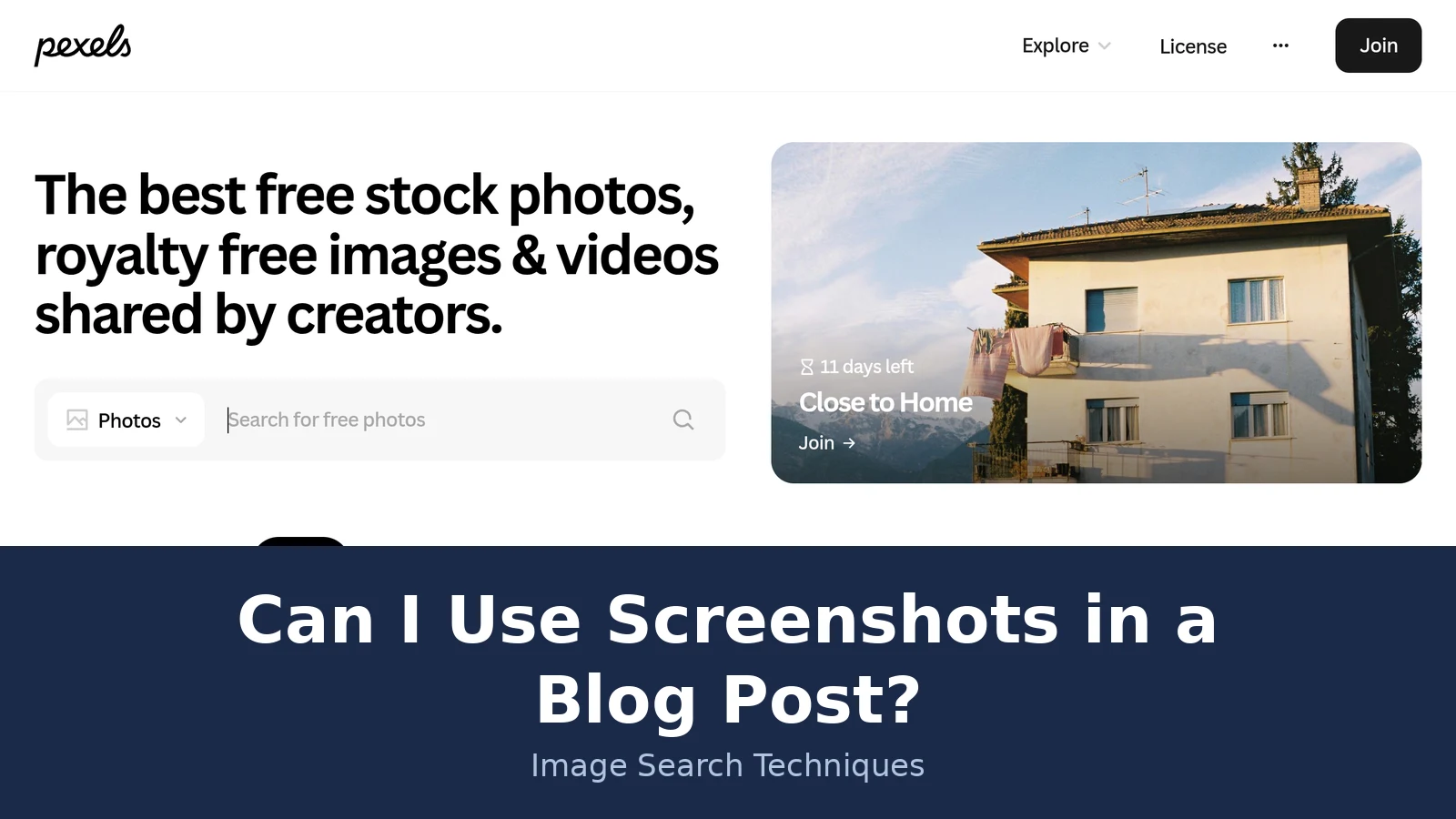
Guides like this one usually stop at the theory, so we ran the test for real. On 19 November 2026 we took a screenshot of the Pexels homepage, the free stock photo site, at 2560 by 1600 pixels. The capture shows the Pexels logo and navigation at the top, the headline “The best free stock photos, royalty free images and videos shared by creators”, a search bar, and on the right a large hero photograph of a house exterior with washing hanging on a balcony, carrying the banner “Close to Home” with “11 days left”. Below that sit the navigation tabs and a “Free Stock Photos” section, with trending topics listed as Veterans Day with 472K, Diwali with 6K, Thanksgiving with 7K, Thanksgiving Table with 201K, and Merry Christmas with 40K. The screenshot file is saved with our notes for this article. Nothing in it has been staged. It is the homepage as it appeared that day.
Then we worked through the two versions the brief for this article calls for. Version one is the full screenshot, used in a blog post that reviews how stock photo sites present their homepages. Version two is the same screenshot cropped down to just the hero house photograph, roughly the region from x1340 to x2490 and y245 to y880 in the original capture, used as the header image of an unrelated blog post about houses. Same file, same day, two very different legal positions.
| Question | Version 1: full screenshot to critique the layout | Version 2: cropped to just the hero photo as decoration |
|---|---|---|
| What is the screenshot for? | To show readers the layout being discussed, with the writer’s own commentary on it | To illustrate a post about houses, with no comment on the photo itself |
| What does it show? | The whole page: logo, headline, search bar, navigation, and the photo as one element among many | The entire photograph and nothing else |
| Purpose and character | Transformative: the page is the subject of the criticism, not a substitute for it | Not transformative: the photo serves the same illustrative purpose it served on Pexels |
| Amount taken | The whole page, but the photo is a small fraction of what is shown | The whole photograph, which is the entire work in one shot |
| Market effect | None, and probably positive: readers who want the photos still have to visit Pexels | Direct substitution: the reader gets the photo without ever visiting Pexels |
| UK fair dealing | Criticism and review, with acknowledgement of the source | No listed purpose applies, and it reproduces a photograph |
| Verdict | Strong fair use and fair dealing argument | Weak on every factor, do not publish it |
Version one is the classic strong case. The screenshot is there because the writer is talking about the page. The photo is a small part of a larger frame, the writer adds analysis the original never had, and nobody reads the post instead of visiting the site. A reader who wants the stock photos still has to go to Pexels. That is the pattern the four factors reward.
Version two fails on every factor. Cropping changed what the image is. It is no longer a screenshot of a page being discussed. It is a photograph, reproduced in full, doing exactly the job the original photograph did. Factor one fails because the purpose is the same. Factor three fails because the whole work is taken. Factor four fails because the post now supplies the photo instead of sending the reader to get it. And in the UK, no fair dealing purpose covers it at all.
One honest qualification belongs here. In this exact case, the hero photograph is a free Pexels image, so downloading it properly from Pexels under its licence would have been free anyway. The comparison is a method demonstration, not a claim that this particular crop would have been sued over. Change the photograph to a news photograph or a photographer’s portfolio shot, where no free licence exists, and the same crop turns a defensible use into a plain reproduction. That is the point of the exercise: the crop is what changes the answer, not the file you started from.
The fix for version two is simple, and it is the fix the whole guide keeps coming back to. Blur or remove the photo from the screenshot, and use a photo you actually have the rights to instead. Or download the photograph properly from its source under a licence you have read, instead of laundering it through a screenshot. A screenshot cannot clean a photograph. If you would not be allowed to download the photo and use it, screenshotting it does not make it allowed.
What can still get you in trouble?
Answer capsule: Copyright is only one risk. Terms of service, privacy, trademarks and movie screenshots can each cause trouble on their own.
Getting the copyright analysis right is not the whole job. Four other risks sit beside it, and any one of them can cause a problem even when the fair use argument is sound.
Terms of service. Copyright law is not the only framework that governs screenshots. Most software, streaming services and websites have terms of service or end-user licence agreements that impose their own restrictions. Because a software licence grants you permission to use the product rather than ownership of it, the publisher can limit what you do with it, including forbidding screenshots. Fair use is a defence to copyright infringement, but it is not a defence to breach of contract. If you agreed to terms that prohibit screenshots when you signed up for a streaming service, using a screenshot of that service’s content could expose you to a breach of contract claim even if the same screenshot would qualify as fair use. Enforcement against an individual sharing one image for commentary is rare, but commercial users, competitors and anyone using screenshots at scale should read the relevant terms first. This is one of the points Google’s AI Overview raises for this exact question, and it is right to raise it.
Privacy and personal data. Screenshots can accidentally include personal data, private messages, login details, email addresses, URLs carrying tokens, or private balances. A screenshot of a private conversation or a non-public social media post can raise privacy claims that have nothing to do with copyright, including public disclosure of private facts where the content would be highly offensive to a reasonable person and is not a matter of legitimate public concern. Never screenshot private messages or paywalled content as a workaround for getting at the material inside them. Blur or crop out names, emails, token URLs and balances before you publish, and check the corners of the frame, not just the middle.
Trademarks and recognisable people. A screenshot does not strip away trademark protection either. A logo in the frame stays a trademark. And a screenshot that prominently features a recognisable person can raise right-of-publicity concerns in the US, where most states protect people against unauthorised commercial use of their name or likeness. Using a screenshot of someone’s face to sell a product or promote a service without their consent can trigger liability regardless of whether the screenshot itself involves any copyright issue. Our guide to fair use images on your blog covers the same ground for photographs, and the same caution applies to the people inside a screenshot.
Movies, TV and games. Capturing movies, TV shows, video games, news articles or copyrighted illustrations carries higher risk, because those works are protected, and a screenshot can still count as copying a portion of them. A single frame of a film is a small fraction of the film, but a film frame used as your post’s header image is doing the same job as a poster, and that is where the argument gets thin. Movie screenshots are a slice of this topic with their own rules, and our guide to movie screenshots on Instagram covers that ground in detail, so this article keeps them out of the worked example.
What happens if your use is not fair. The most common first step is a takedown notice under the Digital Millennium Copyright Act. The rights holder sends a written notice to the platform’s designated agent identifying the infringing material, and the platform removes it. If you believe the takedown was a mistake, you can file a counter-notification, and the platform must restore the material within 10 to 14 business days unless the rights holder files a lawsuit in that window. A cease-and-desist letter may follow, and that is a demand to stop, not a lawsuit, though ignoring it often leads to one. Before a copyright holder can sue over a US work, they must first register the copyright. If a lawsuit proceeds, a court can award statutory damages ranging from $750 to $30,000 per infringed work under section 504 of the Copyright Act. Wilful infringement can push that ceiling to $150,000 per work, while an infringer who had no reason to know their conduct was infringing may see the floor reduced to $200. Attorney’s fees routinely reach five figures, so even a successful defence is expensive. None of that is meant to frighten you off screenshots. It is meant to explain why the five-minute routine below is worth doing.
A five-minute routine before you publish a screenshot
Answer capsule: Crop to what your point needs, blur anything private, credit the source, and ask whether your screenshot replaces the original.
Run through these steps for every screenshot before it goes live. Five minutes now is cheaper than a takedown email later.
1. Ask what the screenshot is for. Write one sentence saying what point the screenshot makes. If you cannot write that sentence, the screenshot is decoration, and decoration is the weakest use there is. Cut it or replace it with an image you have the rights to. Our guide to protect your photos online is a good place to start if you need a refresher on where safe images come from.
2. Crop to what matters. Capture only the specific section needed to make your point. A screenshot of two sentences from an article is easier to defend than a screenshot of the entire page. A screenshot of one settings panel is easier to defend than a screenshot of a whole application. On Windows, press Windows, Shift and S to capture an area. On a Mac, press Shift, Command and 4 for the same thing. Clean captures also look better, which is a bonus.
3. Blur or remove anything private. Check the whole frame before you publish, including the corners. Blur or crop out names, email addresses, URLs with tokens, private balances, login details and private messages. If a recognisable private person appears in the frame and your post is not about them, blur the face or crop them out. If the screenshot shows a photograph, ask whether the photo is doing work your words should be doing, and blur or remove the photo if the answer is yes.
4. Add context and credit. Pair the image with an explanatory caption and a link or credit to the original source where appropriate. Attribution does not make an infringing use legal, but it demonstrates good faith, and it can influence how a court views your intent. Include the creator’s name, the original source, and a link when you can. In the UK, sufficient acknowledgement is a requirement for the criticism, review and news reporting exceptions, not just good manners.
5. Check the terms and the licence. If the screenshot shows a service with terms of service, check whether those terms restrict screenshots or commercial use. If it shows a photograph, check the licence. “Found on Google” is not a licence, and neither is “I screenshotted it instead of downloading it”. Our licence check guide is linked above, and it takes two minutes.
6. Ask the substitution question. Would a reader use your screenshot instead of visiting, buying or licensing the original? If the answer is yes, do not publish it. If the answer is no, and the screenshot is tied to a point you are making about what it shows, you are in the strongest position the law offers a blogger.
That is the whole routine. It will not make every screenshot safe, because no checklist can guarantee that. Fair use is decided case by case, and fair dealing is judged on the facts. But a screenshot that passes all six steps is the kind of use the law was written to allow, and a screenshot that fails the first step was never going to be one.
One last note on the question this article started with. Can I use screenshots in a blog post? Yes, in the ordinary run of blogging, where the screenshot shows a tool or a page you are writing about, cropped to what your point needs, with your own words doing the work around it. The bloggers who get into trouble are not the ones who screenshot a settings page for a tutorial. They are the ones who screenshot a photograph and call it their header image. Keep the screenshot tied to your point, and keep the photograph out of it unless you have the rights to it.
FAQs
Can I use screenshots in a blog post if I give credit?
Credit helps, but it does not make an infringing use legal. Attribution shows good faith, and in the UK a sufficient acknowledgement is required for the criticism, review and news reporting exceptions. The use itself still has to be fair, so credit the source and then run the fair use or fair dealing test as well.
Is it fair use to screenshot a website for a tutorial?
Usually, yes. A tutorial screenshot teaches the reader about the tool or page it shows, which is a listed fair use purpose, and it adds your own explanation around it. Crop to the panel your step needs, and do not include a photograph inside the frame unless you have the rights to it.
Can I screenshot a photo from Instagram or Pinterest for my blog?
No, not as a way to use the photo. A screenshot of a photograph reproduces the entire photograph, and the photo keeps its copyright no matter how you captured it. Credit is not permission, and finding it on a social platform is not a licence. Download it properly under a licence you have read, or use a free source.
Can I use a screenshot of a movie or TV show in a blog post?
It carries higher risk than a screenshot of a website or an app. A film frame is a small part of a long film, which helps, but if you use it as your header image it does the same job as a poster, which hurts. A frame used to criticise a scene is stronger than a frame used for decoration.
Do I need permission to screenshot my own website?
No. If you created the material on screen, you hold the copyright and you can screenshot it freely. That covers your own site, your own designs, your own code and your own documents. The only thing to watch is other people’s material inside your own pages, such as a stock photo in your header, which keeps its own rights.
What should I blur in a screenshot before publishing?
Blur or crop out names, email addresses, URLs carrying tokens, balances, login details and private messages, plus the faces of private people who are not the subject of your post. Check the corners of the frame and your browser tabs too. If a photograph sits inside the screenshot, blur or remove it unless you have the rights to publish it.






