


🔎 Reverse Image Search
Image search techniques made simple: upload a photo or paste a URL and search 6 engines at once. 100% free, nothing stored.
🔒 Your image is never stored on our servers longer than 24 hours and is never shared.
Finding a great photo on Flickr is the easy part. Knowing whether you can put it on a blog that earns money, in a client brochure, or on a product page is the part that trips people up. The short version is that most Flickr photos are not free to use at all, and the ones that are free come with conditions you have to follow. This guide walks through the rules in plain language, so you can check any Flickr photo before it goes live.
Short answer: Can I use Flickr photos commercially? Yes, some of them. A photo is safe for commercial use when its licence allows it, such as CC BY, CC BY-SA or CC BY-ND, or when it is CC0 or in the public domain, or when the photographer has given you permission. Every other photo, including All Rights Reserved photos, needs permission first.
What Does Commercial Use Mean for a Flickr Photo?
Before you read a licence, you need to know what counts as commercial. Creative Commons defines commercial use as use that is primarily intended for, or directed towards, commercial advantage or monetary compensation. That is a wide net, and it catches far more than selling the photo itself.
Definition: commercial use. Any use mainly aimed at making money or gaining a business advantage. It covers advertising, product packaging, client work, sponsored posts, and a blog or site that runs ads or affiliate links. A use does not stop being commercial just because you did not charge for the photo itself.
If your blog runs ads, the photos on it are part of a money-making page. The same goes for a business site, a landing page, a newsletter that sells something, or a social post that promotes a product. A photo in a paid course, a brochure, or a client website is commercial too. When in doubt, assume your use is commercial and check the licence against that standard.
Two common mistakes sit behind most bad decisions. The first is thinking that a charity, school, or non-profit project is automatically non-commercial. It is not. A non-profit can still use a photo commercially, for example in a fundraising campaign or a paid event poster. The licence looks at the purpose of the use, not the legal form of the user. The second mistake is thinking that a small blog does not count. Size does not matter. A personal blog with one ad unit is still a commercial use.
In short: if the photo helps you earn money or promote a business, treat the use as commercial and only use licences that allow it.
What Is the Default Licence on Flickr?
Every photo uploaded to Flickr starts life as All Rights Reserved unless the photographer changes it. Flickr own Help Center says so plainly: by default, all images uploaded to Flickr are set to All Rights Reserved, which means the photographer holds the copyright and all associated rights. That default is the single most important fact in this whole guide, because most Flickr photos never get their licence changed.
All Rights Reserved means you need the photographer direct permission before you use the photo for anything, including a blog post. Downloading the file does not change that. Flickr lets you download many photos, and the download button is not a permission slip. The fact that a photo is publicly visible is not permission either. A public post is not public domain, and being able to see a photo is not the same as being allowed to use it.
The phrase “found on Flickr” is not a licence. It tells you where you saw the photo and nothing about what you may do with it. If you cannot see a licence on the photo page, or the page says All Rights Reserved, the safe answer is no. Contact the photographer and ask, or pick a different photo.
Our full guide to protecting your photos online covers the same default from the other side, what happens when someone else takes your photo. The rule is the same in both directions: the photographer owns the photo from the moment it is taken, and only the photographer, or a licence they chose, can give use away.
In short: assume every Flickr photo is All Rights Reserved until the photo page itself proves otherwise.
Which Flickr Licences Allow Commercial Use?
Flickr supports six Creative Commons licences, plus CC0 and the Public Domain Mark. Every Creative Commons licence on Flickr needs attribution, which means you must credit the photographer. None of them lets you pass the photo off as your own work. The table below is the decision tool for this guide. Read the row for the licence on your photo, and check both the commercial column and the modify column before you use it.
| Licence | Commercial use | Modify or crop | What it means in practice |
|---|---|---|---|
| CC BY | Yes | Yes | Use it, change it, earn from it, as long as you credit the photographer. |
| CC BY-SA | Yes | Yes | Same as CC BY, but anything you make from it must carry the same licence. |
| CC BY-ND | Yes | No | Use it commercially, but share it exactly as it is, with credit. No cropping, no text over it. |
| CC BY-NC | No | Yes | Change it if you like, but only for non-commercial use, with credit. |
| CC BY-NC-SA | No | Yes | Non-commercial use only, with credit, and your version must carry the same licence. |
| CC BY-NC-ND | No | No | The strictest licence. Share it unchanged, for non-commercial use only, with credit. |
| CC0 | Yes | Yes | The photographer gave up copyright as far as the law allows. No credit needed, though giving it is polite. |
| Public Domain Mark | Yes | Yes | Marks a work already in the public domain, for example because copyright expired. Check the note on the photo first. |
Three of the six Creative Commons licences allow commercial use: CC BY, CC BY-SA, and CC BY-ND. The other three carry the NC condition, which rules out commercial use entirely. That is the first filter to apply, and it is the one people get wrong most often. If the licence name has NC in it, the photo is not for your blog, your ad, or your client work.
The second filter is the ND condition. NoDerivatives means you cannot change the photo at all. Cropping counts as a change. So does adding a text overlay, adjusting the colours, or dropping the photo into a collage. If you need to crop a photo to fit your layout, a CC BY-ND photo is the wrong choice, even though commercial use itself is allowed. Pick a CC BY or CC BY-SA photo instead, and keep your edit within the licence terms.
The SA condition is the quiet trap. ShareAlike means that if you adapt the photo, your adapted version must be shared under the same licence. That is fine for a blog post, but it can clash with a client project where the client expects to own the finished work outright. Check with the client before you build a deliverable around a CC BY-SA photo.
CC0 and the Public Domain Mark sit outside the six licences. With CC0, the photographer has waived copyright as far as the law allows, so you can use the photo commercially and change it, with no conditions. The Public Domain Mark is different: it labels a work that is already in the public domain, such as a very old photograph whose copyright has expired. The practical result is similar, but you should still read the note on the photo, because the mark is a label applied by someone, not a legal guarantee.
Flickr Commons is a separate programme, run with libraries, archives, and museums, and its photos carry the label “no known copyright restrictions”. That means the institution looked and found no copyright it knows of that would stop you using the photo. It is not the same as CC0, and it is not a promise that no rights exist. Read the rights note on each Commons photo before you use it commercially, and credit the contributing institution, which most of them ask for. For the full detail on each licence, see the Creative Commons licence guide.
One more rule is worth knowing. A Creative Commons licence cannot be taken back once it has been given. If you download a CC BY photo today and the photographer switches it to All Rights Reserved tomorrow, your use under the original CC BY terms still stands. Keep a record of the licence as it was when you got the photo, such as a screenshot of the photo page showing the licence. That record is your proof if anyone questions the use later.
In short: only CC BY, CC BY-SA, CC BY-ND, CC0, and the Public Domain Mark allow commercial use, and every CC licence needs attribution.
How Do I Check a Flickr Photo Before I Use It?
Checking a photo takes a few minutes, and it is the step that separates a safe use from a copyright claim. Work through the steps in order, and do not skip the reverse search at the end, because the licence on the page is only as honest as the person who uploaded the photo.
- Search with the licence filter on. On Flickr, run your search, then open the licence menu, usually labelled “Any licence”, and pick “Find content to use commercially”. If you plan to crop or edit the photo, also pick “Find content to modify, adapt, or build upon”. Filtering first saves you from falling in love with a photo you cannot use.
- Open the photo page and read the licence there. The licence sits directly under the photo. Search results can lag behind a licence change, so the photo page is the version that counts. If the page says All Rights Reserved, stop here.
- Match the licence to your use with the table above. Check the commercial column first, then the modify column if you plan to crop or edit. If either answer is no for your planned use, pick another photo.
- Look at the uploader. Does the account look like the photographer? A real photographer account usually has a history of similar photos, a profile, and comments from other photographers. A new account with one famous-looking photo and no history is a warning sign. Uploaders sometimes post work they do not own, and a wrong licence on a stolen photo protects no one.
- Reverse search the photo. Upload it to Google Lens and TinEye and see where else it appears. If the same photo shows up on a stock site, a news site, or under a different name, the Flickr licence may not be genuine. If it only appears on the photographer own Flickr page, that supports the licence.
- Save your evidence. Screenshot the photo page showing the licence, the photographer name, and the date. Save the photo page link. If you ever need to show that you checked, this is the file you will reach for.
If you want a deeper method for step 2 and step 3, our guide on how to check a photo licence before you use it walks through the same checks with more examples.
Worked example: a London street scene under CC BY
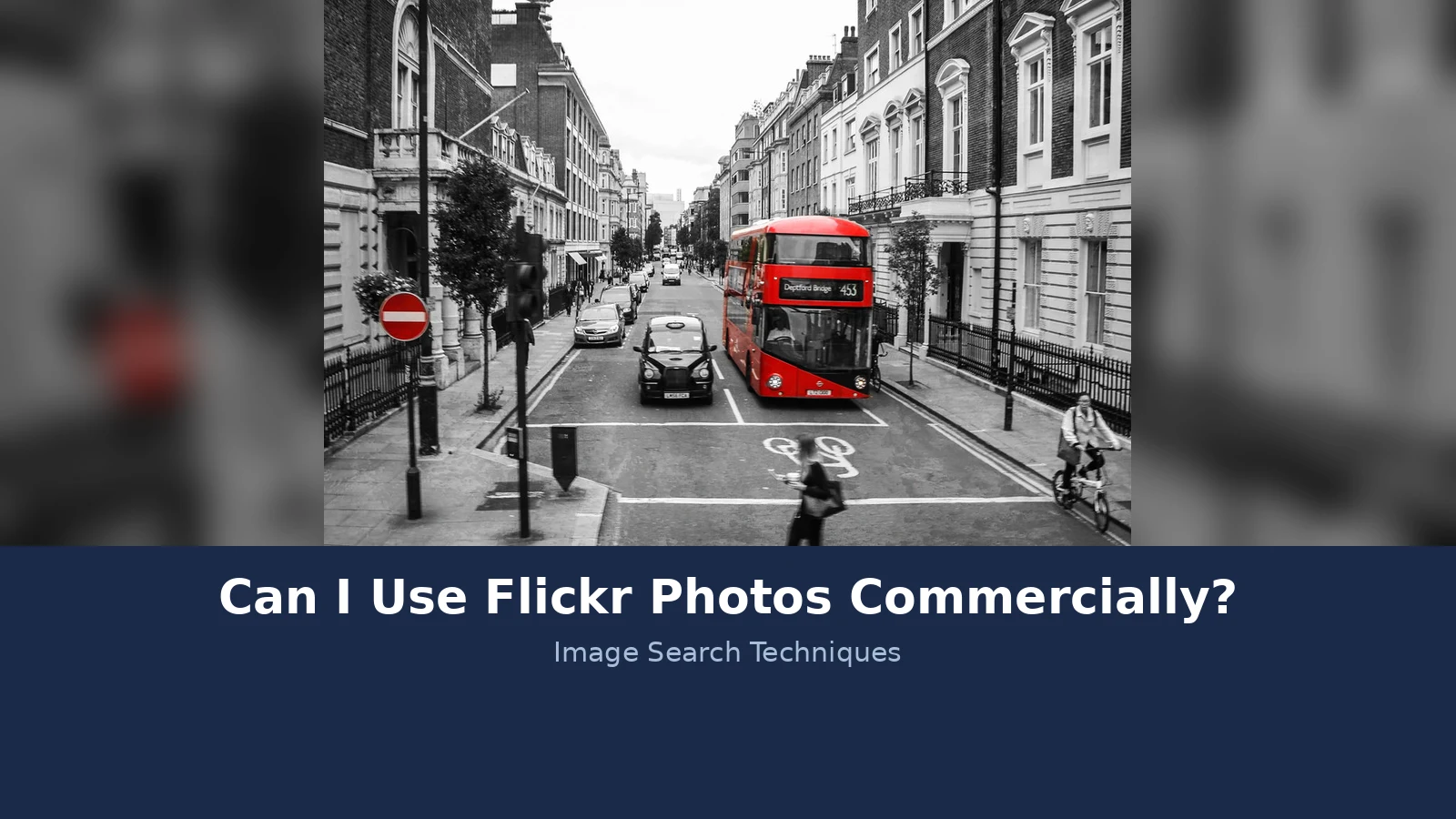
Here is the check run on a real photo. The photo is “London Street Scene” by See1,Do1,Teach1, on Flickr at flickr.com/photos/mpaulmd/35625021023. It was taken on 2 August 2017 and shows a red route 453 bus heading for Deptford Bridge on New Cavendish Street in London, with a black cab, a woman crossing the road in the foreground, and a cyclist on the right. The photo page shows the licence as CC BY, and the same licence is recorded on Wikimedia Commons, where the photo was reviewed and confirmed as CC BY 2.0 on 1 September 2020.
Working through the table: CC BY allows commercial use, and it allows changes. So the photo can go on a monetised blog, and it can be cropped to fit the layout, as long as the photographer is credited. The credit line for this photo reads: “London Street Scene” by See1,Do1,Teach1, licensed under CC BY 2.0, via Flickr. That covers the title, the author, the source, and the licence, which is the TASL pattern Creative Commons recommends.
Then the traps. The photo shows two recognisable people, the woman crossing and the cyclist, and the bus carries Transport for London branding. The CC BY licence clears the photographer copyright only. It says nothing about the people in the frame or the branding on the bus, so the next section works through those two questions on this exact photo.
Google Lens found no exact matches for this photo on 21 November 2026. It recognised the scene as a red double decker New Routemaster bus on route 453 towards Deptford Bridge in London, and its visual matches were other route 453 bus photos, not this one. That is a useful result in itself: a CC BY photo of an ordinary street scene is not widely copied, so the licence check matters more than the match count. TinEye could not run the same search. Its page kept failing its Cloudflare verification, so no TinEye count is available. That is a blocked test, not a zero.
In short: filter by licence, read the licence on the photo page, check the uploader, reverse search the photo, and save a screenshot of the licence.
What Can Still Go Wrong With a CC Licensed Photo?
A Creative Commons licence is a strong starting point, but it clears exactly one thing: the photographer copyright. Three other problems can still sink a commercial use, and none of them shows up in the licence table.
First, the people in the photo. A CC licence says nothing about the rights of a recognisable person in the frame. If you use a photo of an identifiable person in advertising, on a product, or in any way that suggests they endorse your business, you can face a claim based on that person privacy or publicity rights, whatever the licence says. In the United States, several states have publicity laws that give people control over commercial use of their likeness. Editorial uses, such as a news article or an educational piece, are far less exposed, but an ad is the riskiest use of all. Go back to the worked example: the woman crossing the road and the cyclist are both recognisable. Using that photo to illustrate a blog post about London buses is one thing. Using it as the hero image for a cycling holiday ad, where the cyclist looks like he is endorsing the trip, is a different use, and it needs a separate think, and quite possibly a model release.
Second, trademarks and private property. The same gap applies to logos, shop signs, branded products, and distinctive buildings. A CC licence from the photographer does not override a trademark holder rights, and it does not give you permission to use a private building commercially. The red bus in the worked example carries Transport for London branding, which is fine in an editorial photo of a London street, and risky if the photo is used in a way that suggests Transport for London endorses your product. When a logo or a brand is prominent in the frame, ask whether your use could look like an endorsement. If it could, pick a different photo or get advice.
Third, the uploader might not own the photo. Anyone can upload anything to Flickr and pick any licence. A stolen photo with a CC BY label on it is still a stolen photo, and the real photographer can still come after you. This is why the reverse search in the check above matters so much. It is the only step that tests whether the photo really belongs to the person who posted it. If the same image appears on a stock library, a press agency, or another photographer portfolio, stop and do not use the Flickr copy.
Attribution itself can also trip you up. Every Creative Commons licence requires credit, and getting it wrong can end your right to use the photo. Under the CC 4.0 licences, your rights end automatically the moment you break a condition, and you get a 30 day period after discovering the breach to fix it. If you fix it in time, your rights come back. If you do not, you are using a copyrighted photo without permission. The fix is simple: give the credit properly, using the TASL pattern, title, author, source, and licence, and keep it next to the photo. Our guide on how to credit a photo properly shows the exact format.
In short: a CC licence clears the photographer copyright only. People, brands, property, and stolen uploads are separate problems that need their own checks.
Can I Use Flickr Photos Commercially in the UK?
If you are based in the UK, or your audience is, the UK rules are the ones that matter most for your blog, and they are different from the American rules that most Flickr guides describe. This section covers the UK position first, then the US position, so the two are never mixed up.
The UK position: there is no fair use
The UK does not have fair use. It has fair dealing, which is a much narrower set of exceptions, and each one only covers a specific purpose. The GOV.UK guidance on exceptions to copyright lists them, and the list is short: non-commercial research and private study, criticism and review, reporting current events, teaching, helping disabled people, time shifting, and parody.
For a blogger, two of those matter most, and both are narrow. The teaching exception, in section 32 of the Copyright, Designs and Patents Act 1988, allows fair dealing with a work for the sole purpose of illustration for instruction, but only when the use is non-commercial, only by a person giving or receiving instruction, and only with a sufficient acknowledgement. A monetised blog post is a commercial use, so it falls outside that exception. The criticism and review exception allows fair dealing for the purpose of criticism or review, with a sufficient acknowledgement, but the photo has to be the thing being criticised or reviewed. Using a photo to decorate a post about something else is not criticism or review.
One detail catches people out: fair dealing for reporting current events does not cover photographs at all. The GOV.UK guidance says so directly. A photograph cannot be reproduced under the reporting current events exception. And fair dealing itself has no fixed definition in UK law. The question the courts ask is how a fair-minded and honest person would have dealt with the work, looking at whether the use harms the market for the original and whether the amount taken was reasonable.
On people in photos, the UK has no general image right or publicity right like some American states. But that does not mean a recognisable person in a commercial photo is risk free. If a photo is used in a way that falsely suggests the person endorses a product or business, the person may have a claim in passing off. And where a photo identifies a living person, UK data protection law can apply, because a photo of an identifiable person can count as their personal data. The practical point for a blogger is simple: do not use a photo of a recognisable stranger to sell something, even if the licence allows commercial use.
The US position: fair use is wider, but it is not a free pass
American fair use, in section 107 of the Copyright Act, is a broader doctrine. A court weighs four factors: the purpose and character of the use, the nature of the work, the amount used, and the effect on the market for the original. Commercial purpose weighs against fair use, but it does not decide the question on its own. Uses that transform the work, adding something new with a different purpose, are more likely to be fair. The US Copyright Office is clear that there is no fixed percentage or amount that is always safe.
That matters if your blog has American readers or your host is American, but it does not replace the UK rules. If you are in the UK, plan your use against UK fair dealing first. Fair use is an American doctrine, fair dealing is a British one, and they are not interchangeable. A use that might be fair in the US can still infringe in the UK.
The money at stake is real in both countries. Under American law, statutory damages for copyright infringement run from $750 to $30,000 per work, and up to $150,000 per work if the infringement was wilful. In the UK there is no fixed statutory damages figure like that, and a claim would normally be for the loss suffered, but legal costs and the hassle of a claim are reason enough to check first.
In short: the UK has narrow fair dealing, not American fair use, and a commercial blog falls outside the teaching and research exceptions.
Before You Publish: A Checklist for Your Blog
Run this checklist on every Flickr photo before it goes live on your blog. It takes five minutes, and it is the habit that keeps a monetised blog out of trouble.
| Check | What to confirm |
|---|---|
| Licence | The photo page shows CC BY, CC BY-SA, CC BY-ND, CC0, or the Public Domain Mark. Anything with NC, or All Rights Reserved, is out for commercial use. |
| Your edit | If you cropped, recoloured, or added text, the licence must allow changes. ND licences do not. |
| Attribution | Title, author, source link, and licence are written next to the photo, and the credit is correct. |
| People | No recognisable person is used in a way that suggests endorsement. If one is, get a model release or pick another photo. |
| Brands | No logo or trademark is prominent in a way that could look like an endorsement of your business. |
| Source | A reverse search shows the photo belongs to the Flickr uploader, not a stock site or another photographer. |
| Evidence | You saved a screenshot of the photo page showing the licence, and the page link. |
If a photo fails any row, do not publish it. Either fix the problem, for example by using the photo unedited under an ND licence, or pick a different photo. There are millions of CC BY photos on Flickr, and a different one is always cheaper than a dispute.
When no licence fits, you still have options. You can contact the photographer directly through FlickrMail and ask for permission, explaining exactly how you want to use the photo. Many photographers will agree, sometimes for free and sometimes for a fee, and some have licensing links on their photo pages. Get any permission in writing and keep it with the photo. Alternatively, look for a photo under a clearer licence, or check whether a different source covers your need. Unsplash photos work under a different licence from Flickr, and our guide on whether you can use Unsplash photos commercially explains where the two platforms differ.
Finally, know when a photo is in the public domain rather than merely free to view. Age, not availability, puts a photo in the public domain, and the rules differ by country. Our guide on how to tell if a photo is in the public domain walks through the checks. A photo that is old is not automatically public domain, and a photo that is public is not automatically public domain either.
In short: licence, edit, credit, people, brands, source, evidence. Seven checks, five minutes, and only publish when all seven pass.
FAQs
Can I use a Flickr photo on a blog that runs ads?
Yes, if the licence allows commercial use. A blog with ads counts as commercial, so only CC BY, CC BY-SA, CC BY-ND, CC0, or the Public Domain Mark will do. Any licence with NC in the name rules the photo out. Check the licence on the photo page itself, and credit the photographer next to the photo.
What happens if I use an All Rights Reserved Flickr photo?
The photographer can ask you to remove it and can claim for the use, because All Rights Reserved means no permission was given. If you realise the mistake, take the photo down at once and replace it with a properly licensed photo. Do not argue that the photo was public, because public visibility is not permission.
Do I need to credit a CC0 photo from Flickr?
No. CC0 needs no credit, because the photographer has waived copyright as far as the law allows. Giving credit is still good practice, and it helps your readers trust your sources. Every Creative Commons licence, by contrast, does need credit, so do not mix up CC0 with CC BY when you read the licence.
Can I crop a Flickr photo before I use it on my blog?
Only if the licence allows changes. CC BY, CC BY-SA, CC BY-NC, and CC BY-NC-SA all allow adaptations, and cropping counts as an adaptation. CC BY-ND and CC BY-NC-ND forbid any change, so you must use the photo exactly as shared. If you need to crop, pick a photo with a licence that allows it.
Is a Flickr Commons photo free to use commercially?
Usually, but check the rights note on each photo first. The label no known copyright restrictions means the institution looked and found no copyright it knows of, which is not the same as a guarantee. Most Commons photos are fine for commercial use, and crediting the contributing institution is good practice and often requested.
Can the photographer change the licence after I download a photo?
A Creative Commons licence cannot be taken back once it is given, so your use under the original terms still stands if the photographer later switches the photo to All Rights Reserved. Keep a screenshot of the photo page showing the licence and the date you downloaded it, because that record is your proof if anyone questions the use.






