


🔎 Reverse Image Search
Image search techniques made simple: upload a photo or paste a URL and search 6 engines at once. 100% free, nothing stored.
🔒 Your image is never stored on our servers longer than 24 hours and is never shared.
You found the perfect photo on Pexels. It is free, it is sharp, and it fits your blog post exactly. The download button asks nothing of you. No payment, no account, no licence form. So can you just use it in your business, in an ad, or on a product you sell?
Can I use Pexels photos commercially? Yes, on a blog, in ads, in print and in products you sell, and you do not have to credit the photographer. But the licence has limits. You cannot sell the photo unaltered, imply that a person or brand endorses you, or use a visible trademark on goods for sale.
That short answer covers most uses. The trouble starts in the details. The Pexels Licence is generous, but it is not a blank cheque. It covers the copyright in the photo, and only the copyright. It does not clear the person in the frame, the logo on the cup, or the building in the background. It also says nothing about where you found the file. A photo that looks like a Pexels photo may have been re-uploaded somewhere else entirely, under no licence at all.
This guide works through the licence as Pexels writes it, tests one real photo against it, and gives you a check you can run before you publish. Everything here is general information about how the licence reads. It is not legal advice, and for a high value use, a short call with a solicitor costs less than a dispute.
What the Pexels Licence is: the set of terms Pexels attaches to the photos and videos on its site. It is a free licence for personal and commercial use. It replaces the need to ask the photographer, but it does not replace the other rights that can sit inside a photo, such as a person’s right over their own image or a brand’s trademark.
What does the Pexels Licence let me do?
Answer in one line: you can use a Pexels photo for almost any commercial purpose, and you can edit it first.
The licence page opens with a plain statement. All photos and videos on Pexels are free to use. That covers a long list of uses that Pexels spells out. You can put a photo on a website, a blog or an app, including a shop, a newsletter, an e-book, a presentation, or a template you sell. You can use it in ads, banners and marketing campaigns. You can print it in flyers, postcards, invitations, magazines, albums, books and on CD covers. You can post it on social media. In short, the ordinary commercial life of a blog or a small business is covered.
Editing is allowed too. The licence says you can modify the photos and videos as you like. Crop the photo, change the colours, add text over it, combine it with other images. A cropped and captioned Pexels photo on your blog is a normal use, and the licence expects it. The one thing editing does not do is erase the limits in the next sections. A heavy edit does not turn a forbidden use into a permitted one.
There is one more point worth noting before you download anything. Pexels changed its terms in October 2026, and the licence no longer describes itself as royalty free. That change of wording does not change the price. It is still free. But it is a reminder to read the licence on the day you use a photo, not to rely on what it said last year. Terms change, and the version that counts is the one live when you publish.
Some photos on Pexels carry a different mark. A small number are marked CC0, which means they sit under the Creative Commons CC0 public domain dedication rather than the Pexels Licence. The photo page tells you which licence applies, so check the mark on the page you download from. Most photos carry the standard Pexels Licence, and this guide is about that licence.
Do I have to credit the photographer?
Answer in one line: no, attribution is not required, but a credit costs you nothing and helps the photographer.
The licence is clear on this point. Attribution is not required. Giving credit to the photographer or to Pexels is not necessary, though Pexels says it is always appreciated. That means a blog post can run a Pexels photo with no caption credit and still be inside the licence.
Two cautions belong here. First, credit is not permission. A credit line does not turn an unlicensed photo into a licensed one, and it does not fix a use the licence forbids. If a photo is not actually Pexels licensed, writing the photographer’s name under it changes nothing. The licence comes first, the credit second. Second, a credit line is still good practice. It costs one line of text, it helps readers find the source, and it keeps a record of where the photo came from if anyone asks later. Our guide to how to credit a photo properly shows a format that works on a blog without cluttering the page.
There is also a practical reason to keep a note of the source even when no credit is shown. If a photo is ever challenged, the first thing you will be asked is where it came from. A credit line, a saved page URL and a screenshot of the photo page answer that question in seconds. A photo with no record behind it leaves you guessing.
What does the Pexels Licence forbid?
Answer in one line: five hard limits, and each one is easy to trip over by accident.
The licence gives a lot, then draws five lines. The table below is the Ranking Asset for this article. Read it as a checklist before you publish, not after.
| What the licence forbids | What it means for a blogger or small business | Pass or fail in our worked example |
|---|---|---|
| Showing an identifiable person in a bad light, or in a way that is offensive | Do not use a recognisable person to illustrate a negative story, a scam warning, or an embarrassing topic | Risk: the photo shows a recognisable woman, so the context of use matters |
| Selling unaltered copies of a photo or video | Do not sell the file as it is, as a poster, a print, or printed on a physical product, without changing it first | Pass: a blog illustration is not a sale of the file |
| Implying endorsement by a person or brand in the image | Do not place the photo where readers could think the person or the brand recommends your product | Risk: the Starbucks logo sits in the frame, so placement matters |
| Redistributing or selling photos on other stock photo or wallpaper platforms | Do not re-upload the file to another stock site, a wallpaper site, or a free photo pack of your own | Pass: using it on a blog is not redistribution |
| Using the photo as part of a trademark, design mark, trade name, business name or service mark | Do not make a Pexels photo your logo, your brand mark, or part of your business name | Pass: a blog illustration is not a trademark use |
Two of the five limits catch people out because they sound narrower than they are. Selling unaltered copies does not only mean selling the file itself. It covers selling the photo as a poster, as a print, or printed on a physical product such as a mug or a T-shirt, without modifying it first. A blog that sells merchandise needs to read that line twice. If the photo goes on a product, it has to be changed first, and even then the trademark rule in the next section can still block it.
The endorsement limit is the other quiet one. It is not only about writing “Starbucks recommends my course” under a photo. It is about placement. A photo of a smiling person holding a branded cup, placed at the top of a sales page for your own coffee product, can imply an endorsement even if you never write the words. Readers connect the face and the logo with the product on the page. If the photo could be read that way, move it, crop the brand out, or pick a different photo.
The redistribution limit matters for anyone who shares photo packs. You cannot take Pexels photos and re-upload them to another stock site or wallpaper platform, and you cannot bundle them into a free download pack of your own. Downloading for your own use is fine. Passing the files on as a collection is not.
Worked example: one photo, one logo, three traps
Answer in one line: the photo is free to use, but the logo in the frame and the person holding the cup both add conditions the licence alone does not clear.
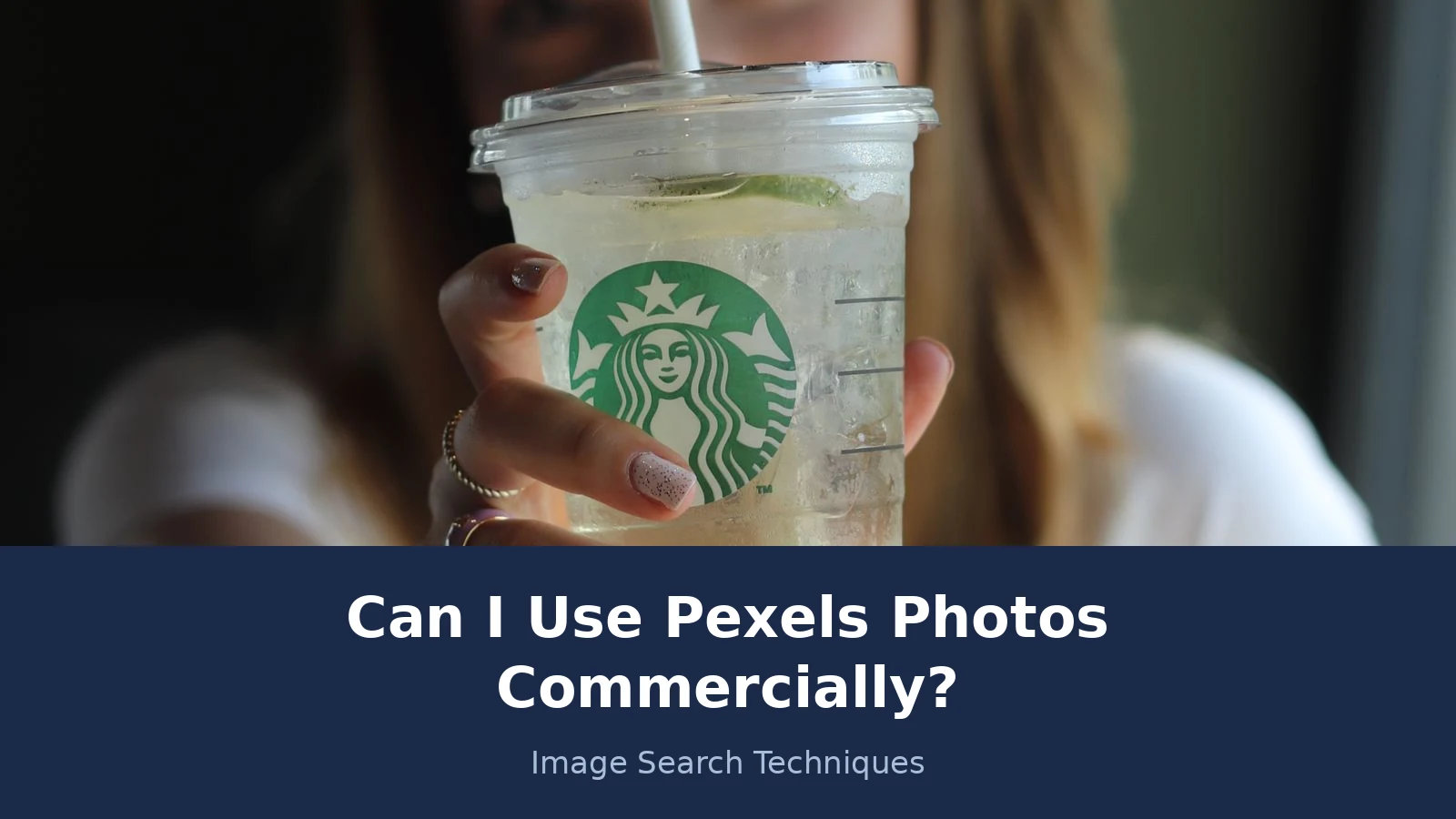
Here is the photo this guide was tested on. It is a real Pexels photo, and you can open it yourself at pexels.com/photo/woman-holding-a-starbucks-clear-plastic-cup-8490619/ . The photo shows a close up of a woman holding a Starbucks cold drink in a clear plastic cup with a paper straw. Her face is visible, slightly out of focus behind the cup. The green Starbucks siren logo is clear on the cup. The photographer is Ummu. The photo measures 4000 by 6000 pixels. It was posted on 25 June 2021, and at the time of writing it had 424 downloads, 127.2K views and 5 likes. The licence statement on the photo page reads “License: Free”, with a green tick that links to the Pexels Licence. There is no CC0 mark, so the standard Pexels Licence applies.
The licence read is simple. A blog illustration is a permitted commercial use. No attribution is required. The photo can be cropped or edited. None of the five forbids is triggered by placing it in an article about photo licences, because the article does not sell the file, does not use it as a trademark, and does not redistribute it. That is the first half of the answer.
The second half comes from a reverse image search. The photo was searched live on 21 November 2026, on Google Lens and on TinEye, using the image URL from the Pexels page. Google Lens returned 29 entries under exact matches. Fourteen of them were Pexels pages, including the source page and Pexels pages in other languages. Ten were Instagram posts, mostly hotel and resort accounts using the image in 2026 posts, cropped to 1439 by 1919 pixels. Two were Facebook posts. One was a Kitchen Divas blog article from 9 October 2026, one was a News18 Hindi article, and one was a Korean article. One honest caveat: Lens groups loosely. Its exact matches also swept in different photos from the same Ummu shoot, including “Iced Coffee in Starbucks Clear Plastic Cup”, photo 8490617, and a similar shot by Melike B, photo 11993888. Those are different shots, not this file, so the count of 29 is Lens grouping, not 29 copies of one file.
TinEye told a different story. It returned 0 matches, on both the resized image URL and the full size image URL, out of 86.8 billion images searched. TinEye said it had probably not yet crawled any pages where the image appears. A Cloudflare verification notice appeared on the page during both runs, but both searches completed and showed full results pages, so this was a genuine zero, not a block. The contrast is the lesson. Lens finds the image all over the web. TinEye had not crawled those pages. One engine is never the whole picture, and a zero on one engine proves nothing on its own.
The same image also circulates on Instagram, Facebook and blogs under those posters own captions, with no licence statement at all. No instance was found of it offered under a different licence, and no paid stock listing turned up. But the point stands. The file you meet on Instagram is the same file, with no licence attached. Only the copy on the Pexels page carries the Pexels Licence. If you had found this photo on Instagram first, you would have no licence to use it, and no way to know it was a Pexels photo until you traced it back.
Now run the photo through the licence table. Three rows need a decision, not a tick.
First, the person. The woman is recognisable, even though her face is soft behind the cup. The licence forbids showing an identifiable person in a bad light or in an offensive way. An article about photo licences is a neutral context, so this use passes. The same photo at the top of an article about drink spiking, food poisoning, or a coffee chain scandal would fail. The photo does not change. The context does. That is why the person trap is about placement, not about the file.
Second, the logo. The Starbucks siren is a registered trademark, and it sits in the centre of the frame. The licence page itself does not clear it. The Pexels Terms of Service, section 5, last updated 20 October 2026, says that if content depicts trademarks, logos or brands, you cannot use that content for commercial purposes in relation to goods and services, and in particular you cannot print it on merchandise or other physical products for sale. A blog illustration about licences is not a use in relation to goods and services, so it passes. The same photo printed on a T-shirt for sale would fail twice over, once under the trademark rule and once under the unaltered sale rule. The logo is the reason this photo can illustrate an article but cannot sell a product.
Third, the source. The photo is genuinely Pexels licensed, but only the copy on the Pexels page proves it. The Instagram and Facebook copies prove nothing. If you download from a re-upload, you hold a file with no licence, even though the identical file is free on Pexels. Always trace the file back to its original page before you use it.
What about the people, brands and property inside the photo?
Answer in one line: the Pexels Licence covers the photographer’s copyright only, so people, trademarks and property in the frame need their own check.
This is the sentence most users never read. It is not on the licence page. It sits in the Pexels Terms of Service, section 5, last updated 20 October 2026. The terms say that content may be subject to additional rights, including personality rights, moral rights, privacy rights, property rights and intellectual property rights. Before using any content, you must consider whether you need the consent or licence of a third party. Pexels adds that it does not warrant that any consents or licences have been obtained in relation to any content. Put simply, Pexels clears the photographer. It does not clear anyone else.
Personality rights are the first of those extra rights. A recognisable person in a photo has rights over how their image is used, and those rights vary by country. A model release is the document that settles the question. It is a signed agreement in which the person in the photo agrees to the use. Pexels does not publish model releases for its photos, and it does not promise that one exists. For an ordinary blog illustration, the risk is low, because the licence already forbids the offensive and defamatory uses that cause most trouble. For an advert, a product page, or any use that ties a real person to a claim about a product, the risk is higher, and a photo with a recognisable person is the wrong choice unless you hold a release. Our guide to protecting your photos online covers the other side of the same question, how to keep your own images safe once they are public.
Trademarks are the second extra right, and the Starbucks cup shows how they work. A logo in a photo is not cleared by a free photo licence. The terms bar commercial use of trademark depicting content in relation to goods and services, and bar printing it on merchandise or physical products for sale. Editorial and illustrative use, such as a blog article about the licence itself, sits outside that bar. Advertising your own competing product with a photo that carries a rival logo sits inside it. When in doubt, crop the logo out or choose a photo without one. Cropping is allowed under the licence, and it removes the problem at the source.
Property is the third extra right, and it is the easiest to overlook. A private home, a recognisable building, a piece of art on a wall, or a distinctive interior can all carry rights of their own. A photo of a public landmark is usually fine. A photo taken inside a private home, or of a building whose owner controls commercial photography, can need a property release. The same logic applies as with people. The licence covers the photo. It does not cover the thing in the photo.
There is one more gap to know about. Uploaders sometimes upload work they do not own. Pexels reviews uploads, but a stolen photo can still slip through, and a photo that was free yesterday can be removed tomorrow if the real owner complains. That is why the provenance check in the last section matters. A licence is only as good as the uploader who attached it.
Can I use Pexels photos commercially on my blog?
Answer in one line: yes, a blog is one of the clearest permitted uses, with a short check before you publish.
A blog post is exactly the kind of use the licence is written for. The licence names a website, a blog or an app as a permitted use, including a blog that earns money from ads, affiliate links, or a shop. You can illustrate a post, use a photo as a header image, or build a whole article around one. You can edit the photo first. You do not need to credit the photographer, though a credit line is good practice.
The same rules apply on a blog as anywhere else. Do not use a recognisable person to illustrate a negative story. Do not place a branded photo where it could imply an endorsement. Do not sell the unaltered photo as a print or a product. Do not use the photo as your logo. None of those are normal blog uses, which is why blogs rarely hit trouble. The risk on a blog is almost always the source, not the use. A photo pulled from a social media repost, a wallpaper site, or a free photo pack of unknown origin carries no licence, even if the same photo is free on Pexels.
Run this short check before you publish any photo on a blog.
- Open the original Pexels photo page and confirm the licence statement reads “License: Free”. Save the page URL.
- Read the photo for people, logos, brands and private property. If any are prominent, decide the context first.
- Reverse search the image to confirm the Pexels page is the earliest and original source, not a re-upload.
- Take a screenshot of the photo page and keep it with the file. It is your record if anyone asks.
- Credit the photographer if you can, one line under the photo or in a credits note at the end of the post.
- If the photo will sit on a sales page, an advert, or a product, check the person and the logo again. A blog illustration and a sales image are different uses.
Unsplash works on a similar model, and readers often ask how the two compare. Our guide on whether you can use Unsplash photos commercially works through the Unsplash licence in the same way, including the points where the two licences differ. The habit is the same on both sites. Read the licence, check the people and the logos, and trace the file back to the original page.
Does US fair use or UK fair dealing change the answer?
Answer in one line: no, and the two doctrines are different, so do not mix them up.
Fair use and fair dealing are often spoken of as if they were one rule. They are not. Fair use is a US doctrine. Fair dealing is the UK version, and it is narrower. If your blog is read in both countries, the stricter rule is the one to plan around, because a use that is fair in one country can still be challenged in the other.
In the US, fair use is decided by four factors set out by the US Copyright Office: the purpose and character of the use, including whether it is commercial or nonprofit educational; the nature of the copyrighted work; the amount and substantiality of the portion used; and the effect of the use on the potential market for, or value of, the work. No single factor decides the question. A commercial blog post that uses a whole photo, in a way that could replace the market for that photo, is a weak fair use case. That is why a licence matters more than a fair use argument for ordinary blog photos. Our guide to fair use images on your blog works through the four factors with blog examples.
In the UK, fair dealing is set out in the Intellectual Property Office guidance on exceptions to copyright, last updated 4 January 2021. Fair dealing for non-commercial research or private study allows copying limited extracts of a work, but you must be genuinely studying, and copying the whole work would not generally count as fair dealing. Fair dealing for criticism, review or quotation is allowed for any type of copyright work, provided there is sufficient acknowledgement. Fair dealing for reporting current events is allowed for any type of work except a photograph. That last point matters for bloggers. A photo used to report the news does not get the reporting exception in the UK. A photo used to criticise or review something can, with acknowledgement, but the photo must be part of the criticism, not just decoration.
None of this changes the Pexels answer. A Pexels photo on a blog is permitted by the licence, so you do not need to rely on fair use or fair dealing at all. The doctrines only matter when the licence does not cover you, for example when the photo is not actually Pexels licensed, or when you want to use a photo in a way the licence forbids. In that case, the US and UK rules give different answers, and the UK answer is usually the narrower one. Plan for the narrower one.
How do I check a photo is really Pexels licensed?
Answer in one line: trace the file back to its original Pexels page, and treat any copy found anywhere else as unproven.
The re-upload trap is the single biggest risk in this whole topic. The licence belongs to the copy on the Pexels page. A copy on Instagram, on a wallpaper site, or in a free photo pack carries no licence with it. The file is identical. The rights are not. The check below takes about two minutes, and it is the same check a competitor page, Lucky Graphics, recommends in its own guide, though that page has no UK side at all, which is the gap this article fills.
Start on the Pexels page itself. Search Pexels for the photo, or follow the link from wherever you found it, and confirm three things on the page: the photo is there, the photographer name matches, and the licence statement reads “License: Free”. If the page is gone, the photo was removed, and you should not use the file. A removed photo is a warning, not a bargain.
Next, reverse search the image. Upload the file to Google Lens and to TinEye, and look for the earliest source. The Pexels page should be the original. If the same image appears on a stock site with a price tag, or on a photographer’s own portfolio under different terms, stop and work out which source is real. Our guide on how to check a photo licence before you use it walks through the reverse search step by step, including what a zero on one engine means. As the Starbucks photo showed, Lens can find 29 matches while TinEye finds none, because the two engines crawl different pages. One engine is never the whole picture.
Finally, keep a record. Save the Pexels page URL, take a screenshot of the photo page showing the licence statement, and note the date you downloaded the file. If the photo is ever removed from Pexels, or if someone challenges your use, that record is the difference between a five minute answer and a long argument. A licence you cannot prove is almost as weak as a licence you do not have.
The short version of this whole guide fits in one sentence. Pexels photos are free for commercial use, including on a blog, in ads and in print, with no attribution required, but the licence covers the photo only, never the people, the logos or the property inside it, and only the copy on the original Pexels page carries the licence. Check the page, check the frame, and keep the record. Do that, and the free photo stays free. Pexels and Shutterstock sit at opposite ends of the same question, one free licence and one paid licence, so for the paid side see can you use Shutterstock images on your blog, which covers the Standard, Enhanced and Editorial licences and the monetised blog question.
FAQs
Can I use Pexels photos commercially on my blog?
Yes. The Pexels Licence allows commercial use on a website, a blog or an app, including a blog that earns money from ads or affiliate links. You can use the photo in marketing, in print, and on social media. No attribution is required, though a credit line is good practice and helps if anyone asks where the photo came from.
Can I sell a Pexels photo as a poster or a print?
No, not as it is. The licence forbids selling unaltered copies of a photo or video as a poster, a print, or on a physical product. You must modify the photo first. Even then, a photo with a visible brand logo cannot be printed on merchandise for sale, because the trademark rule still applies.
Do I need to credit the photographer on Pexels?
No. Attribution is not required under the Pexels Licence, and you can publish a photo with no credit line at all. Pexels says credit is always appreciated. Keep a note of the source even when no credit is shown, because a credit does not replace a licence, and a licence is easier to prove with a record.
Can I use a Pexels photo that shows a brand logo?
It depends on the use. A blog illustration or an article about the photo itself is fine, because it is not a use in relation to goods and services. Selling a product with the logo photo, or printing it on merchandise, is barred by the Pexels Terms. When in doubt, crop the logo out or pick a photo without one.
What if I found the photo on Instagram, not on Pexels?
Treat it as unlicensed. The Pexels Licence belongs to the copy on the original Pexels page, and a copy on Instagram carries no licence with it. Trace the file back with a reverse image search and open the original page. If you cannot find that page, do not use the photo.
Can I use a Pexels photo as my business logo?
No. The licence forbids using a photo as part of a trademark, design mark, trade name, business name or service mark. A logo must be original to your business and protected as your own mark. Use a Pexels photo to illustrate a blog post or a page, and commission or design a separate mark for the brand itself.
Pixabay and Pexels share the same free-use headline, but Pixabay’s licence changed twice and it offers no indemnity at all, so read our guide to using a photo from Pixabay before you use one commercially.






