


🔎 Reverse Image Search
Image search techniques made simple: upload a photo or paste a URL and search 6 engines at once. 100% free, nothing stored.
🔒 Your image is never stored on our servers longer than 24 hours and is never shared.
Your dog or cat is missing, you have posted everywhere, and then a stranger messages you: “I found your pet.” They send a photo, and your heart jumps. Before you reply with thanks, or money, stop. That photo is the one thing you can check, and this lost pet scam guide shows you how to check it properly.
Direct answer: A lost pet scam is a fraud where a stranger claims they found your missing pet, sends a photo as proof, and demands payment first. Check the photo before you pay: reverse-search it, ask for a photo showing a marking you never published, and insist on a video call or a meeting. Never pay a release or vet fee first.
A lost pet scam targets you at the worst possible moment. You have already told the internet your pet is missing, what it looks like, and how desperate you are. Scammers watch lost-pet groups and pages, then use the details you posted to build a story that feels personal. The photo is what makes the story believable, and it is also the scammer’s weakest point, because a photo can be tested in ways a phone call cannot.
What is a lost pet scam?
A lost pet scam is a fraud in which someone who does not have your pet claims they found it, then asks for money, a reward, a transport fee, or an emergency vet bill, before they will return it. The contact usually arrives within hours of your post, by text, phone call, or a message on the same Facebook group or site where you asked for help.
The pattern is consistent enough that the US Federal Trade Commission (FTC) described it in a consumer alert published on 24 June 2026. The FTC says scammers “pretend to be law enforcement or an animal hospital, claiming to have your pet who’s had an emergency”, and adds that they “might even use AI to create fake photos or videos of your pet in distress”. The alert’s rule is blunt: “If someone says the only way to pay for your pet’s treatment is with a gift card, a payment app, cryptocurrency, or a wire transfer service, you’re dealing with a scammer.”
There are three common versions of the scam:
- The finder who wants a reward first. They say they have your pet and will bring it to you once you send money for petrol, a carrier, or their trouble.
- The vet emergency. They say your pet was hit by a car and is in surgery, and the vet will not treat it until you pay. The clinic is usually fake, or real but never heard of your pet.
- The official voice. They claim to be police, animal control, or shelter staff, and use that authority to rush you. Maryland’s Attorney General warned in May 2025 that callers posing as shelter staff used caller ID spoofing so the call looked genuine, then asked for payment by Zelle, Cash App, Venmo, or PayPal.
Our complete guide to photo scams covers the wider family of frauds that start with a picture. This article stays on one job: testing the “proof” photo a supposed finder sends you. For the search side, how to use photos to find a lost pet in the first place, see our guide to finding a lost pet with a photo, which this article does not repeat.
What does the fake “proof” photo usually look like?
Scammers have three sources for the photo they send you, and each one fails a different check. Knowing which type you are looking at tells you which test to run first.
| Photo type | How it is made | What gives it away |
|---|---|---|
| Your own photo, edited | The scammer takes the picture from your lost-pet post and changes the background or adds a vet setting | A reverse image search finds your original post; the pet’s pose and markings match your photo exactly |
| A stock or stolen photo | A picture of a similar-looking animal is taken from a stock library, a breeder’s page, or another owner’s post | A reverse image search finds the same photo on a stock site or under a different pet’s name |
| An AI-generated image | Your posted photos are fed into an image generator to create a “found at the vet” scene | Odd details, garbled text, melted fur, wrong paws, and no earlier copy of the image anywhere online |
The edited-copy version is the most common. The FBI has warned that some scammers send back the exact image you posted, only edited, for example, your dog’s photo placed against a clinic background. That is why the first check is always a reverse image search: if the “proof” photo is your own photo with a new background, the search will find your original.
The AI version is newer and harder. AARP reported in July 2026 that Bill Cosens, whose beagle mix Archer went missing near Deltona, Florida, in March 2026, was called by someone claiming to be from a vet’s office: Archer had been hit by a car and needed emergency surgery costing $2,746. The caller sent a photo. Cosens and his wife were about to pay when they paused, looked up the vet’s office, and found it did not exist. Their children told them the image was likely generated by AI. The BBC reported a similar case in the UK, where Sarah Robinson of Northampton was sent a photo of her missing cat Cookie sitting by a window, then told to pay £40,000 or the cat would be killed.
Both cases share the same lesson: the photo looked convincing, the story created panic, and the demand came before any chance to see the animal. The photo check below is designed to break that sequence.
What is the withheld-marking test?
The withheld-marking test is the strongest single check in this guide. It works because it asks the supposed finder to produce a photo that only a person standing next to your pet could take, showing a detail you deliberately never published.
When you post about a lost pet, you show the world what the animal looks like. A scammer can copy everything in that post. What they cannot copy is a detail you kept back: a small white patch under the chin, a nick in the left ear, a spot on the belly, the colour of the inside of one ear. Choose one such marking now, before you reply to anyone, and keep it to yourself.
Here is the full routine. It is the Ranking Asset for this article: run it in order, and do not pay until every step passes.
- Pick your withheld marking. Choose two or three details you never showed in your post and never mentioned in a comment. Write them down. Do not tell the finder what you are looking for.
- Ask for a fresh photo of that marking. Ask for a new photo showing one of the markings, taken from an angle you never published. A real finder can walk over and take it. A scammer has only your posted photos to work from.
- Ask for a short live video. Ask for a live video call, or a short video taken now, in which the person calls your pet by name and shows the marking in the same shot. A still photo can be faked; a live call is far harder to stage.
- Reverse-search every photo they send. Run each photo through a reverse image search before you reply. If it matches your own post, a stock library, or another owner’s page, the claim is finished. The steps are in the next section.
- Check the background against their story. If they say the pet is at a named vet clinic, does the photo show that clinic, its sign, its waiting room, its flooring? Look the clinic up yourself and call the number you find, not the number they give you.
- Refuse any payment until you have seen the animal. Never pay a release fee or a vet bill before an in-person meeting or a live video sighting. A genuine finder, vet, or shelter can wait while you verify. This is the rule the whole routine protects, and it has no exceptions.
If the person refuses the fresh photo, refuses the video call, or answers with anger and a new deadline, treat that as your answer. A real finder who wants to reunite you with your pet has nothing to lose from a two-minute video call. A scammer has everything to lose.
One caution: a passed test is good evidence, not proof. A live video call is strong, a fresh photo of a withheld marking is strong, and the two together are stronger still. But as the FTC notes, scammers now use AI-generated video too, so keep the in-person meeting as the final step whenever you can.
How do I reverse-search the “proof” photo?
Reverse image search is the fastest way to catch a reused photo. It compares the picture you were sent against billions of images already on the web and shows you where else it appears. Run it on every photo a supposed finder sends, before you answer any question about payment.
- Save the photo they sent. On your phone, long-press the image and save it to your photos, or screenshot it if saving is blocked. You need the file itself, not a link to the chat.
- Search it with Google Lens. Open Lens, upload the saved photo, and look at the matches. Our Google reverse image search guide walks through the upload step on phone and desktop, including what to do when Lens finds only similar-looking animals instead of the same photo.
- Run the same photo through TinEye. TinEye is better than Lens at finding exact copies, including cropped and re-coloured versions, and it shows the earliest date each copy appeared. If the earliest copy is your own post, the photo is yours, edited.
- Try Yandex Images as a third check. Yandex indexes different sources from Google and sometimes finds matches the others miss, especially photos first published on social media. Our how-to guide for reverse image search explains the full workflow across all three tools and how to read the results.
- Read the results, not the headline. Three outcomes matter. A match to your own post means the photo is your picture, edited. A match to a stock site or another owner’s page means it is stolen. No match at all means nothing on its own: a new AI image or a freshly cropped edit has no earlier copy to find, so a clean result never proves the photo is genuine.
Save screenshots of the search results as you go. If you report the scam later, the screenshots are your evidence, and they take seconds to capture while the chat is still open.
Worked example: I tested the checks on a real dog photo
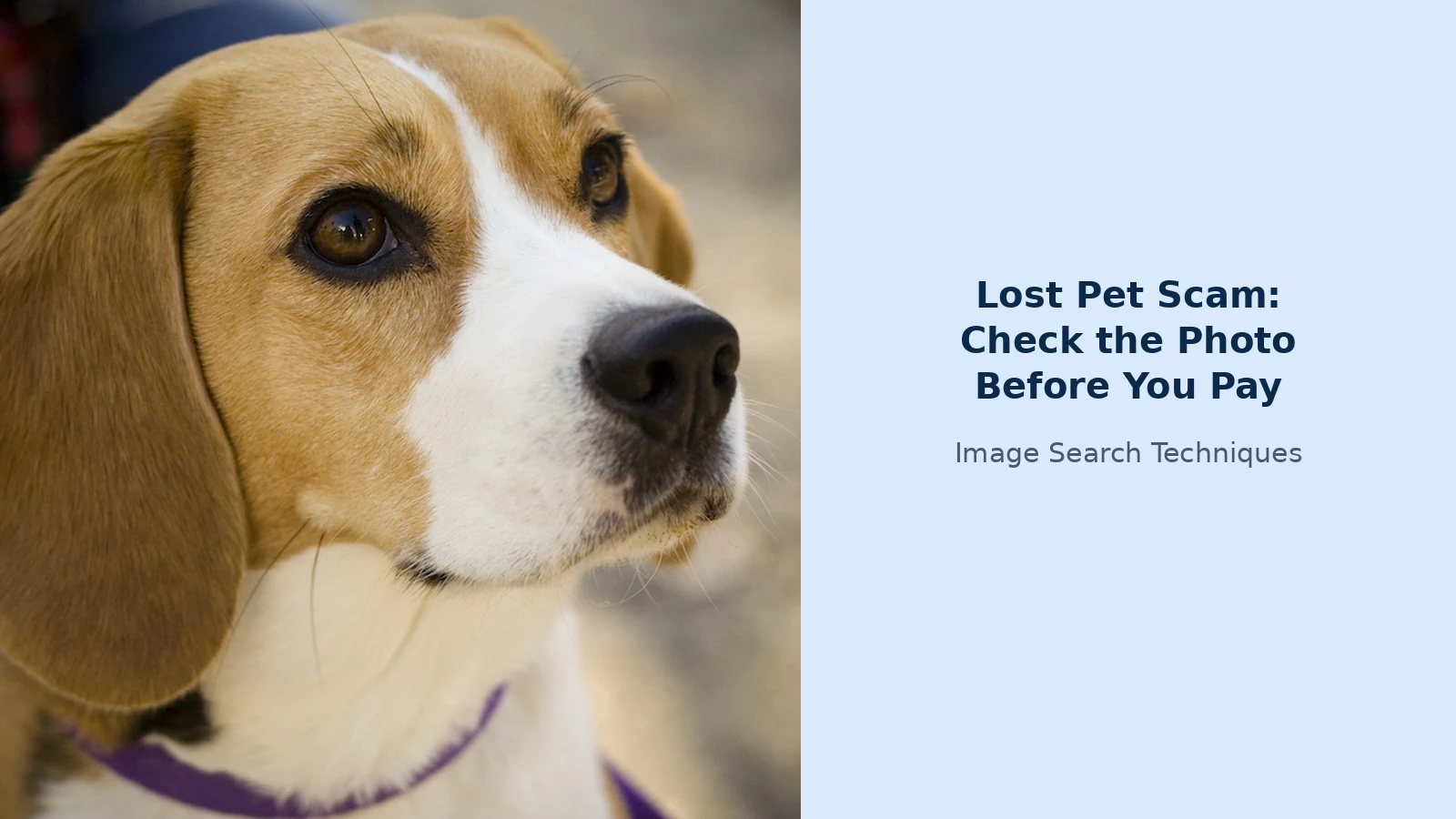
To see how these checks behave in practice, I ran them on a real, public photograph: a portrait of a beagle named Camry, published on Wikimedia Commons under a CC BY 2.0 licence. I treated it as if it were a “proof photo” sent by a stranger claiming to have found my dog, and ran the same steps this article recommends.
First, the photo itself. It is a close portrait: a tan-and-white beagle, white blaze down the face, dark eyes, black nose, wearing a purple collar. If this were my lost dog, the withheld marking would be easy to pick, the exact shape of the white blaze, or the small dark spot on the muzzle, because those details are visible in the photo but I would never have described them in a post.
Google Lens was the first check, and it failed before it started. Opening the Lens search for the photo’s URL redirected to Google’s “unusual traffic” page, which asked for a CAPTCHA; the image challenges expired or were rejected, and after moving to a fresh browser the page simply said to try again later. No Lens results were obtained at all. That matches what happened on earlier articles in this round: Lens by URL is regularly blocked for automated requests, and a blocked search is not a clean result, it tells you nothing about the photo.
Yandex Images worked. I ran its search by image URL on the same file on 12 November 2026 and it loaded results immediately: it tagged the photo “Beagle”, showed similar images of other beagles, and listed the photo at its original 1024×683 size alongside pages such as a scenthound category page. It identified the breed correctly and found lookalike photos, which is exactly the behaviour that would expose a stock or stolen photo, since a borrowed image shows up with its real source attached.
TinEye was the second check. I ran its search-by-URL on the same Commons file on 12 November 2026. TinEye refused the request outright, returning a 403 bot-block page instead of results. That is a real limitation worth knowing about: TinEye sometimes blocks automated or datacentre requests, so if it fails for you, try uploading the saved photo in the TinEye app or in a normal browser tab rather than through a link, and do not treat a block as a clean result.
What does the test show? Two things. First, a well-known public photo is exactly the kind of image a scammer can pass off as a found pet, because it looks like an ordinary pet portrait and carries no watermark. Second, the checks themselves are only as reliable as the tools on the day: Lens can be blocked by a CAPTCHA and TinEye can refuse a URL search, so the withheld-marking test and the live video call matter more than any single search result. A photo that passes every search still has to pass the fresh-photo test before you pay anything.
How do I spot an AI-generated or edited pet photo?
No single detail proves a photo is AI-generated, and modern generators are good enough that a careful fake can pass a quick look. What you are looking for is a cluster of small wrongnesses, plus one structural fact: a real photo of your pet should be consistent with the pet you know.
| What to look at | What looks wrong in a fake |
|---|---|
| Paws and legs | Extra toes, missing claws, legs that bend the wrong way or melt into the floor |
| Fur and whiskers | Fur that smears into the background, whiskers that stop halfway or fork for no reason |
| Eyes | Uneven pupils, reflections that do not match the room, a glassy stare that looks painted on |
| Collar and tags | Letters that are almost words but are not, tag shapes that change between photos |
| Background text | Vet signs, posters, or screens with garbled or misspelled words |
| Light and shadow | Light falling from two directions at once, or a shadow pointing the wrong way for the window |
| Consistency | The same pet with different markings, different collar, or a different coat pattern in each photo |
Compare the photo against the pictures you already have. Does the blaze on the forehead match? Is the collar the one your pet was wearing? Scammers who edit your own photo usually keep the animal identical and change the background, so look hardest at the edges where the animal meets the new setting: a halo of blur, a sharp cut-out line, or fur that ends too neatly against a clinic wall.
If you have access to an AI-image detector, you can run the photo through it, but treat the verdict as a hint, not a ruling. Detectors are wrong in both directions, and a “likely real” result on a fake photo is worse than no result at all. The withheld-marking test and the live video call are the checks that decide; the AI tells are supporting evidence.
What proof should I ask for instead of a photo?
A photo is the weakest proof a finder can offer, because it is also the easiest to fake. When someone says they have your pet, ask for proof that requires them to be standing next to the animal right now.
- A live video call. Ask them to call you on video, show the pet, call it by name, and show the withheld marking in the same shot. Agree the time yourself rather than accepting theirs, so they cannot pre-record it.
- An in-person meeting in a public place. Offer to meet at the vet clinic they named, a police station, or a busy public place, with someone else with you. A genuine finder will agree; a scammer will find reasons not to.
- The clinic, verified by you. If they say your pet is at a vet, look the clinic up yourself, call the number on its own website, and ask whether your pet is there. The FTC gives exactly this advice: look up the number of the shelter the person says they are calling from and call it yourself. Never use a number the caller gives you, and never pay an account number they send in a message.
- The microchip check. If your pet is microchipped, ask the clinic or shelter to scan it and confirm the number matches your records. A scammer cannot fake a chip reading, and a real clinic does this as a matter of routine.
Never share a verification code sent to your phone. The FBI lists a request for such a code as a warning sign in these scams: a person who found your pet has no reason to need a code that proves your identity to an account. The same applies to passwords, banking details, and one-time passcodes of any kind. If they ask, stop replying and report the number.
If the person refuses the video call and the meeting, but keeps sending photos and deadlines, you have your answer. End the conversation, save the screenshots, and report the account on the platform where they contacted you.
What do I do if I already paid, and where do I report it?
If you have already sent money or shared a code, act quickly and do not blame yourself. These scams are built by professionals to work on people who are frightened and in a hurry, and the FTC’s own alert says the pressure is deliberate.
- Contact your bank or payment app now. Explain that you believe you were scammed and ask whether the payment can be stopped or reversed. Card payments and bank transfers have the best chance; gift cards, wire transfers, and cryptocurrency are much harder to recover, which is exactly why scammers ask for them.
- Secure your accounts. If you shared a code or a password, change that password, turn on two-factor authentication, and check for unfamiliar logins. If you shared banking details, ask your bank about a fraud alert.
- Save everything. Screenshot the messages, the photos they sent, the payment receipt, and the profile or number that contacted you. Keep the originals; do not delete the chat.
- Report it. In the US, report the scam to the FTC at ReportFraud.ftc.gov and to the FBI’s Internet Crime Complaint Center at ic3.gov. In the UK, report it to Report Fraud, the national reporting service that replaced Action Fraud, at reportfraud.police.uk. Also report the account to the platform where the message arrived, so it cannot target the next owner.
Fake vet bills deserve a check of their own. Scammers often send a screenshot of an invoice or a payment screen to make the emergency feel documented, but a screenshot proves nothing about who wrote it. Our guide to fake payment screenshots shows how to test one, including calling the clinic on a number you look up yourself rather than trusting the number on the bill.
Finally, go back to your lost-pet post and add one line: that you will never pay before seeing your pet in person, and that anyone claiming to have found it should expect a video call first. It will not stop the scammers from trying, but it tells the real finders exactly how to reach you, and it tells the fakes that you already know the test.
Someone sent me a photo of my lost dog. How do I know it is really my dog?
Ask for a fresh photo showing a marking you never published, then a live video call where the person shows that marking and calls your pet by name. Reverse-search every photo they send: a match to your own post or a stock site ends the claim. Never pay before an in-person meeting or a live video sighting.
Can a scammer fake a photo of my pet?
Yes. The FTC warned in June 2026 that scammers steal and manipulate pet images and use AI to create fake photos or videos of a pet in distress. Some send back your own posted photo with an edited background; others generate a new image from your photos. That is why a single photo is never enough proof on its own.
Should I pay a vet bill before I see my pet?
No. Never pay a vet bill before you have seen your pet in person or on live video. Call the clinic on a number you look up yourself; it will confirm whether your pet is there. The FTC says that if the only payment options are gift cards, payment apps, crypto, or wire transfers, you are dealing with a scammer.
I already sent money to someone who claimed they found my pet. What now?
Contact your bank or payment app immediately and ask whether the payment can be stopped or reversed. Change any password or code you shared and turn on two-factor authentication. Save screenshots of the messages, photos, and receipts, then report it to the FTC at ReportFraud.ftc.gov or the FBI at ic3.gov in the US, or to Report Fraud in the UK.






