


🔎 Reverse Image Search
Image search techniques made simple: upload a photo or paste a URL and search 6 engines at once. 100% free, nothing stored.
🔒 Your image is never stored on our servers longer than 24 hours and is never shared.
An email lands in your inbox saying your Amazon account has been suspended. It looks official. It has the Amazon logo, a subject line in capitals, and a yellow button that says Verify Your Account. Your first instinct is to click it and sort the problem out. Do not. That message is the artefact this article owns: the fake Amazon account suspended screenshot, read line by line, checked against Amazon’s own rules, and reverse searched live.
Short answer: A fake Amazon account suspended message is usually a phishing email, not a real suspension. Check two things before you touch any button. The sender address must end in amazon.com, and the same message must appear in your Amazon Message Centre. If either check fails, delete the message and report it. That is the whole test, and it takes two minutes.
What this article covers: one artefact only, the “account suspended” or “account locked” email or message. It does not cover fake order confirmations, which are a different artefact with different tells. Everything here is general information, not legal advice. No link or number from the scam screenshot is printed anywhere in this article.
What does a fake Amazon account suspended message look like?
Answer capsule: It looks like an urgent account notice with a logo, a generic greeting, a vague reason, and a button, and the urgency is the point.
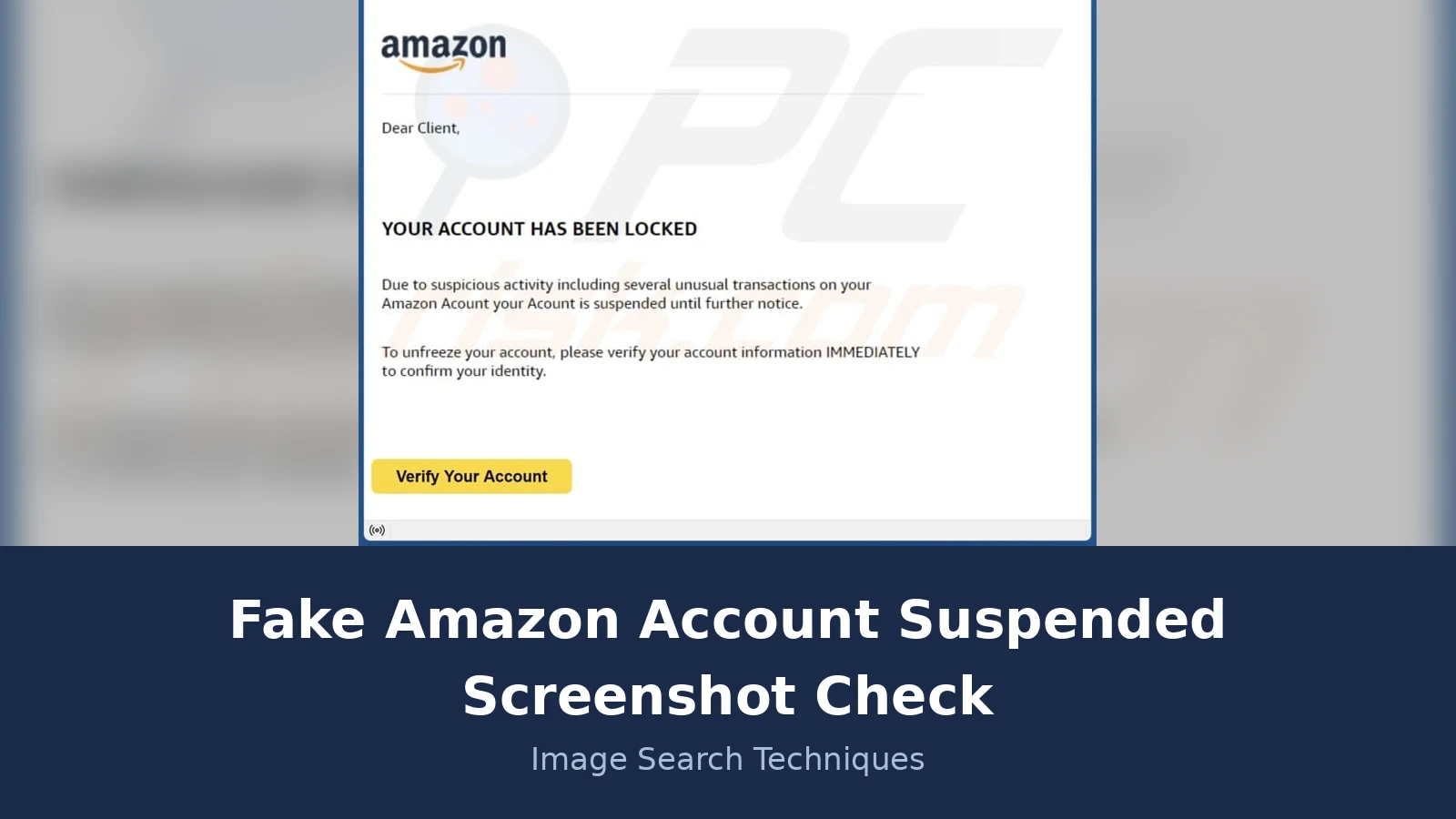
Every version of this message follows the same shape. The subject line shouts, usually in capitals: YOUR ACCOUNT HAS BEEN LOCKED, or Account Suspended, or a variation with an ID code attached. The body opens with a generic greeting, Dear Client or Dear Customer, never your name. Then comes the reason, always vague: suspicious activity, several unusual transactions, a billing issue. No order number, no date, no amount, nothing you can check against your own account. Then the deadline: verify your account information IMMEDIATELY, or the account is suspended until further notice. Then the button.
The button is the trap. In the PCRisk documented example, which is the worked example in this article, the button reads Verify Your Account and leads to a page built to look like an Amazon sign-in screen. That page asks for an email address or phone number and a password. Type them in and the scammers have your login. With your login they can order goods on your saved payment methods, change your delivery address, and try the same password on your email and your bank.
The logo is the part that fools people. Scammers copy it well, and a copied logo proves nothing. A real Amazon message and a fake one can carry the same logo. That is why this article never treats the logo as evidence. The checks that matter are the sender domain and the Message Centre, and both are covered below.
Real Amazon suspensions do happen, and they are covered later in this article, but a real suspension shows up in your account. It does not arrive only as an email with a button. Keep that distinction in mind through the whole check: the email is a claim, and the claim has to be verified somewhere the scammer cannot reach.
If you have seen a similar trick with another brand, the same reading method applies. Our fake Microsoft account locked screenshot check works through the same display-name trap, and the photo scams complete guide collects the whole family of letter, text and screenshot artefacts in one place.
How do I check the sender domain in a screenshot?
Answer capsule: Ignore the display name, read the real address behind it, and trust only an address ending in amazon.com.
The display name is the human readable part of the From field, and it is trivial to fake. Anybody can set a display name to Support, Amazon, or Amazon Security. The real address sits behind it, and that is the part you must read. On a desktop email client, click or hover on the sender name to reveal the full address. On a phone, tap the sender name or the small arrow beside it. If the message is a screenshot someone sent you, ask them to open the original email and read the address out, because a screenshot can crop the From field.
Amazon’s own help page states the rule plainly: approved Amazon emails contain amazon.com and are sent from an amazon.com email address. A message from an address on any other domain is not from Amazon, however convincing the body looks. Common fakes use lookalike domains with a digit swapped in, an extra hyphen, or a different ending, and some use a free mailbox or an email provider domain that has nothing to do with Amazon at all.
In the worked example below, the display name reads Support, which sounds official. The real address behind it sits on an Australian email provider domain, not on amazon.com. That alone ends the check. There is no need to read further, and there is no need to click anything to be sure.
Three more domain tells are worth knowing. First, check the reply-to address as well as the From address. A fake can show a plausible From address while the reply-to points somewhere completely different. Second, in Gmail, Yahoo and Apple Mail, a genuine message from Amazon shows the Amazon smile logo beside it in the inbox. The logo is a supporting clue, not proof on its own, because a missing logo can have innocent causes. Third, read the To field. In the worked example the message was addressed to the same non-Amazon address it came from, which means it was sent to the scammer’s own inbox rather than to a customer. A real Amazon message is addressed to the email address held on your account.
One caution: a plausible domain is not enough on its own. A second documented variant of this same artefact showed a From address on one of Amazon’s own short domains, which is why the domain check is only half the test. The other half is the Message Centre, and a scammer cannot fake that.
How does the Message Centre check work?
Answer capsule: Every genuine Amazon email also appears in your Message Centre, so a message that is not there was not sent by Amazon.
This is the single most reliable check in the article, and it comes from Amazon itself. Amazon’s own guide to identifying fake emails says: Message Centre will have all email communication sent by Amazon. If the email does not appear in Message Centre, then it was not sent by Amazon. Read that again, because it turns a judgement call into a yes or no test. You do not have to decide whether the wording looks right. You only have to look in one place.
To run the check, open your Amazon account yourself. Type the address into your browser, or open the Amazon app. Never follow a link in the suspicious message to get there. On the website, go to Accounts and Lists, then Your Messages, then Inbox. In the app, go to Account, then Message Centre, then Your Messages. Look for the suspension message. If it is there, it is genuine, and you can act on it through your account. If it is not there, it was not sent by Amazon. Delete the email and report it.
For sellers the equivalent check is Performance Notifications in Seller Central. Amazon’s seller guidance says all legitimate Amazon communications are mirrored there, and if a message is not in your notifications it is likely fake. Buyers use Message Centre, sellers use Performance Notifications, and the principle is the same in both cases: the real message lives inside your account, where the scammer cannot put it.
Do this check before you click anything, and do it even when the email looks perfect. A perfect looking fake is still a fake, and the Message Centre is the one place its makers cannot reach. Amazon’s full guidance is in its own guide to identifying fake emails, which also covers the smile logo, misspelt sender addresses, and links that resemble Amazon but are not Amazon.
What does the worked example show, line by line?
Answer capsule: The PCRisk documented screenshot fails the domain check, the greeting check, the spelling check and the deadline check, four fails out of four.
The worked example is the screenshot PCRisk documented in 2024 under the title “Amazon – Your Account Has Been Locked”. It is a screenshot of the email as it appeared in a Mozilla Thunderbird inbox, and it is the same image PCRisk hosts on its English, German and Spanish pages. Here it is, read line by line against the table in the next section.
Subject: YOUR ACCOUNT HAS BEEN LOCKED, in capitals. Real Amazon subject lines do use capitals sometimes, so this alone proves nothing, but it sets the tone for everything that follows.
From: the display name reads Support. The real address behind it sits on an Australian email provider domain, not amazon.com. Fail one. The To field shows the same address, so the message was addressed to the scammer’s own inbox. Fail one again, from a different angle.
Greeting: Dear Client. Amazon knows your name and uses it in genuine account messages. A generic greeting is one of the oldest tells in phishing, and it is here in the second line. Fail two.
Body: “Due to suspicious activity including several unusual transactions on your Amazon Acount your Acount is suspended until further notice.” Read it slowly. The reason is vague, with no transaction, no date and no amount. And the word Account is misspelt as Acount, twice, in a single sentence. Amazon’s genuine messages go through quality review, and two misspellings of its own product name in one sentence do not survive that review. Fail three.
Deadline: “To unfreeze your account, please verify your account information IMMEDIATELY to confirm your identity.” The capital letters are doing the work here. They create urgency so you act before you check. A genuine account message does not threaten instant closure in an email. Fail four.
Button: a yellow Verify Your Account button. Clicking it takes the reader to a page built to mimic Amazon’s sign-in screen, which asks for an email address or phone number and a password. That is the whole purpose of the message. Everything above the button exists to make the click feel reasonable.
We reverse searched the screenshot live on 21 November 2026, using the method in our how to reverse image search guide. The results were honest and mixed, which is normal for a documented scam image. TinEye searched over 86.8 billion images and found 0 matches, which means TinEye has not yet crawled a page carrying this image, not that the image is genuine. Yandex found exact matches: 9 pages carrying the image, including PCRisk’s English, German and Spanish pages and several mirrors, in the original 790 by 759 size and a smaller 474 by 455 copy. Google Lens could not be completed: the upload went through, but Google showed its unusual traffic reCAPTCHA wall instead of results, so Lens produced no count at all. A blocked engine is reported as blocked, never as zero.
What the search proves is narrow but useful. The image is a documented scam screenshot, and the earliest copies sit on PCRisk’s scam documentation pages, not on any Amazon page. The search also shows why two engines matter: TinEye alone would have told you nothing, and Yandex alone would have told you everything. Run both, and report each result as it is.
The account-alert read table
Answer capsule: Read eight fields in order, and any single fail is enough to delete the message.
This table is the Ranking Asset for this article. Work through it top to bottom on any account suspension message, and stop at the first fail. You do not need a second fail to be sure.
| What to read | What the fake shows | What a real Amazon message shows |
|---|---|---|
| Sender domain | Display name “Support” over an address on a non-Amazon email provider domain | Address ends in amazon.com; Gmail, Yahoo and Apple Mail show the Amazon smile logo |
| Greeting | “Dear Client,” or “Dear Customer,” | Your name, as held on your account |
| Reason given | Vague “suspicious activity” and “several unusual transactions”, no order, date or amount | Specific, and the same information appears in your account |
| Spelling | “Acount” misspelt twice in one paragraph | Professional copy, proofread before sending |
| Deadline wording | “IMMEDIATELY” and “suspended until further notice” | No threat of instant closure in an email; action happens in your account |
| Button or link | “Verify Your Account” button leading to a sign-in page | Links go to amazon.com pages, and you can reach the same page by typing the address yourself |
| Payment ask | Asks you to verify account information, which leads to password and payment details | Amazon never asks for your password or payment details by email |
| Message Centre | Nothing in Message Centre | The same message appears in Message Centre |
Notice what the table does not include: the logo. A copied logo looks identical to a real one, so it cannot separate a fake from a genuine message. Leave it out of your check entirely. Notice too that the Message Centre row is last, not first. Read the cheap tells first, because they take seconds, and keep the Message Centre as the decider for the rare message that passes the first seven rows.
What if the message is real? How a genuine Amazon suspension works
Answer capsule: A real suspension is visible inside your account, with a reason and an appeal route, and it never depends on a button in an email.
Amazon does suspend accounts, for real reasons. The main ones are policy violations, suspicious activity, and payment issues. For sellers, that means counterfeit goods, banned items, or performance metrics falling below the required standard. For buyers, it usually means unusual login attempts, suspected fraud, or repeated chargebacks and payment method problems. None of that changes the check. A real suspension is a state of your account, not a property of an email, so it shows up when you open your account yourself.
For sellers, the route is Performance Notifications in Seller Central, where the suspension notice and the appeal route both live. For buyers, the route is Contact Us on the Amazon site, reached by typing the address yourself. In both cases the next step happens inside your account, after you have signed in through the front door, not through a link in a message.
There is one more difference worth naming. A genuine suspension notice tells you what happened and what to do about it, in specific terms. It names the policy or the problem, and it points to an appeal or a fix. A fake tells you almost nothing about the problem and everything about the urgency, because its purpose is the click, not the resolution. If the message cannot say what you supposedly did, when, or on which order, treat that silence as evidence.
A similar pattern shows up across brands. Our fake Apple ID locked screenshot check works through the same shape: a locked account claim, a generic greeting, and a button that leads to a fake sign-in page. The brand changes and the reading method stays the same.
What to do if you already clicked the button
Answer capsule: Change your password from Amazon’s own site, turn on two-step verification, check your orders, then report the message.
First, do not panic, and do not click anything else in the message. Open Amazon yourself, by typing the address or opening the app, and change your password there. If you use the same password anywhere else, change it there too, starting with your email account, because the email account is the key to resetting everything else. Then turn on two-step verification on your Amazon account if it is not already on.
Next, check your account for damage. Look at Your Orders for orders you did not place, and check your payment methods and delivery addresses for changes you did not make. If you see an order you did not place, contact Amazon through Contact Us and your bank, in that order. If you entered card details on the fake page, call your bank and ask them to block the card and watch for new charges.
Then report the message. Forward the suspicious email to stop-spoofing@amazon.com, which is the address Amazon’s own security guidance gives for reporting. In the UK, report the fraud to Report Fraud, the national cyber crime and fraud reporting service. In the US, the equivalent route is the Federal Trade Commission’s fraud report site. Before you delete the message, save evidence before you report: keep a screenshot of the full message, including the sender address and the subject line, because a report without the evidence is much weaker than one with it.
Finally, remember the scale of this problem. Amazon Business reported that Amazon took down more than 70,000 phishing websites and 14,000 fraudulent phone numbers in 2025. The fake you received is one of thousands, and the people behind it send the same message to huge lists of addresses, hoping a small share of readers click. You are not being singled out, and you are not foolish for nearly clicking. The message was built by professionals to look real. The two minute check in this article is the answer to that, and it works every time you use it.
How this check was done: the worked example is the PCRisk documented “Amazon – Your Account Has Been Locked” email screenshot, read line by line on 21 November 2026. The screenshot was reverse searched live on TinEye (0 matches out of 86.8 billion images), Yandex (9 pages carrying the image, including PCRisk in English, German and Spanish), and Google Lens (blocked by a reCAPTCHA wall, no result). Amazon’s rules were taken from Amazon’s own help pages, read the same day: the Message Centre rule, the amazon.com sender rule, and the stop-spoofing@amazon.com reporting address. The top competitor, GetMozo’s fake Amazon order confirmation guide, was read in full. It mixes order confirmation and suspension in one guide and never performs a reverse search or a line-by-line teardown, which is the gap this article fills.
FAQs
Can Amazon suspend my account by email alone?
No. A suspension is a state of your account, not a property of an email. A genuine suspension shows in your account when you open it yourself, and the same message appears in your Amazon Message Centre. An email that claims your account is suspended, but appears nowhere in your account, was not sent by Amazon. Delete and report it.
What email address does Amazon use for account messages?
Genuine Amazon emails come from an address ending in amazon.com. Amazon states this rule on its own help pages, and Gmail, Yahoo and Apple Mail show the Amazon smile logo beside genuine messages. A message from any other domain is not from Amazon, however convincing the body looks. Check the real address behind the display name, not the name itself.
Why did TinEye find nothing for the screenshot?
TinEye searches only pages it has crawled, and it had not crawled a page carrying this screenshot, so it returned zero matches out of 86.8 billion images. A zero means the image has not been indexed, not that it is genuine. Yandex found the same image on nine pages. Run two engines and report each result as it is.
Is it safe to click Verify Your Account to check?
No. Never click a button or link in a message you have not verified. The button in a fake suspension email leads to a sign-in page built to steal your password. Check it this way: read the sender domain, then open your Amazon account and look in Message Centre. If the message is not there, Amazon did not send it.
What should I do if I already entered my password?
Change your Amazon password right away from the Amazon site itself, not through any link in the message. Turn on two-step verification, then check Your Orders and your payment methods for changes you did not make. If you use the same password anywhere else, change it there too, starting with your email account. Then report the message.
How do I report a fake Amazon suspension message?
Forward the email to stop-spoofing@amazon.com, the address Amazon gives for reporting. In the UK, report it to Report Fraud, the national cyber crime and fraud reporting service. In the US, use the Federal Trade Commission fraud report site. Before you delete the message, save a screenshot showing the sender address and subject line. A report with evidence is much stronger.






