🔎 Reverse Image Search
Image search techniques made simple: upload a photo or paste a URL and search 6 engines at once. 100% free, nothing stored.
🔒 Your image is never stored on our servers longer than 24 hours and is never shared.
You have a photo of a beer bottle and no name to go with it. Maybe it is a bottle a friend brought to a barbecue, or a can you spotted in a pub and want to find again. To identify a beer from its label, read the brewery name, the beer name, the ABV and the style words printed on the label, then run the photo through a reverse image search to confirm the match.
Short answer: photograph the label in good light, then read four fields: the brewery name, the beer name, the ABV and the style words such as IPA or stout. Type those words into a search, or upload the photo to Google Lens. If Lens names the same beer the label names, you have a match. Colour alone proves nothing.
This guide covers every point Google’s AI Overview lists for this question, and then goes further than it does. You get a step-by-step label read, a worked example with a real photo searched live on Lens, TinEye and Yandex, and a table of what each engine returns when they disagree. The method is the same one our guide to finding an item from a photo uses: read what is printed first, then let the search engines confirm it, never the other way round.
What can a beer label actually tell you?
A beer label is the printed wrapper on a bottle or a can. It is not the same thing as the brand. The brand is the name the brewery gives the beer, such as Punk IPA. The label is the printed design that carries that brand name, the beer name, the ABV, the style words and, on many bottles, a date or batch code. When you identify a beer from its label, you are reading the label to recover the brand, not guessing from the artwork.
Two terms on the label need a plain definition before you start. ABV means alcohol by volume, the percentage of the beer that is alcohol. A label that reads 5.6% ABV is telling you the strength of the beer, and that figure is one of the best checks you have, because two beers with similar names often have different strengths. IBU means International Bitterness Units, a scale for how bitter a beer is. Not every label prints an IBU figure, so treat it as a bonus clue when it appears, not as a field you must find.
Google’s AI Overview for this question lists five key details to look for on a label. They are worth working through in order, because each one narrows the search.
- Brand and beer name. The brand is usually the biggest word on the front. The beer name sits beside it or below it. Together they are the strongest search terms you have.
- Style and class. Words such as IPA, stout, lager, pale ale or pilsner describe the style. They narrow a search from thousands of beers to the right family.
- Brewery and bottler info. The brewery name, and the town or city where it was made, separate one brewery’s beer from another brewery’s beer with a similar name.
- ABV and IBU. The strength and the bitterness figures separate beers that share a name or a style. Two IPAs at 4.5% and 6.5% are not the same beer.
- Date and batch code. A bottling date or a batch code tells you when the beer was made. It matters because the same label design is often reused across vintages, and the beer inside can change while the label stays the same.
That last point is the one most people miss. A label can name the brewery, the beer, the strength and the style, and still not prove the exact brew in the bottle. Contract brewing makes this worse: one brewery can brew the same label for several brands, and one brand can move its brewing between plants. The label gives you a strong suggestion. The reverse image search and the brewery’s own site give you the confirmation.
Answer capsule: a label can name the brewery, the beer, the strength and the style. It cannot prove the exact brew on its own, because labels are reused across vintages and contract brews.
How do you identify a beer from its label, step by step?
Work through the label in this order. Each step adds one field, and each field makes the search narrower. Do not skip ahead to the search, because a search on a single word such as IPA returns thousands of beers, while a search on all four fields usually returns one.
- Photograph the label straight on. Hold the bottle upright and take the photo square to the label, in daylight or under a bright white light. Fill the frame with the label and keep the text sharp. A photo taken at an angle bends the letters, and a dark photo hides the small print. If the label wraps around the bottle, take one photo of the front and one of the back, because the back often carries the ABV and the brewery address.
- Read the brewery name. This is usually the largest word on the label, and it is the brewery’s brand. If the name is a word you do not recognise, search it on its own first. A brewery name that returns no results is often a sign that the label is a home brew, a one-off collaboration or a taproom-only release, and those need a different approach. Our guide to working out what brand a photo shows uses the same first move: name the brand before you name the product.
- Read the beer name. The beer name is the product name, such as Pink IPA. Write it down exactly as printed, including capital letters and punctuation, because a search for the exact name beats a search for a paraphrase. Watch for words that look like part of the name but are not, such as “limited edition” or a seasonal tag, which describe the release rather than the beer.
- Read the ABV. Look for a figure such as 5.6% or “ALC. VOL. 5.6%”. Write it down with the beer name, because it separates beers that share a name. If two beers share a name and a brewery, the ABV is often the only printed difference.
- Read the style words. IPA, stout, lager, pale ale, pilsner, sour, porter. These words sit near the beer name or in a short description line. They tell you the family, and they give the search engine a second term to match against.
- Check the date or batch code. Look for a bottling date, a best-before date or a short code printed on the neck, the back or the base. A date turns a generic match into a match for one specific release.
- Note the bottle or can shape and the artwork. A tall thin bottle, a short stubby bottle, a 330 ml can or a 440 ml can, and the colours and pictures on the label, are useful when the text is unreadable. They are supporting clues only. They never replace the four text fields.
The label-reading table
Use this table as a checklist. Read each row against your photo before you search.
| Label field | What to read | What it proves | Where it can mislead |
|---|---|---|---|
| Brewery name | The largest word, usually at the top | Which brewery made the beer | Contract brews can carry another brewery’s name |
| Beer name | The product name, exactly as printed | Which beer in the brewery’s range it is | Similar names exist across breweries |
| ABV | The strength figure, such as 5.6% | Separates beers that share a name | The same beer can change strength between releases |
| Style words | IPA, stout, lager, pale ale, pilsner | The family the beer belongs to | Style words are used loosely by some brewers |
| Bottle or can shape | Height, width, 330 ml or 440 ml | Narrows the format when text is unreadable | Many beers share the same bottle shape |
| Label artwork | Colours, pictures, logos, patterns | Helps you spot the label in search results | Colour alone identifies nothing |
Warning: label colour alone identifies nothing. A pink label does not name a beer, a green label does not name a brewery, and two beers from different breweries can share the same colour scheme. Colour is useful only after the text fields have done the work, as a quick visual check that the match on screen is the same label you photographed. If the text says one beer and the colour suggests another, trust the text.
Answer capsule: read the brewery, the beer name, the ABV and the style words in that order, then search on all four together. Colour and artwork are checks, not evidence.
Can Google Lens identify a beer from a photo of its label?
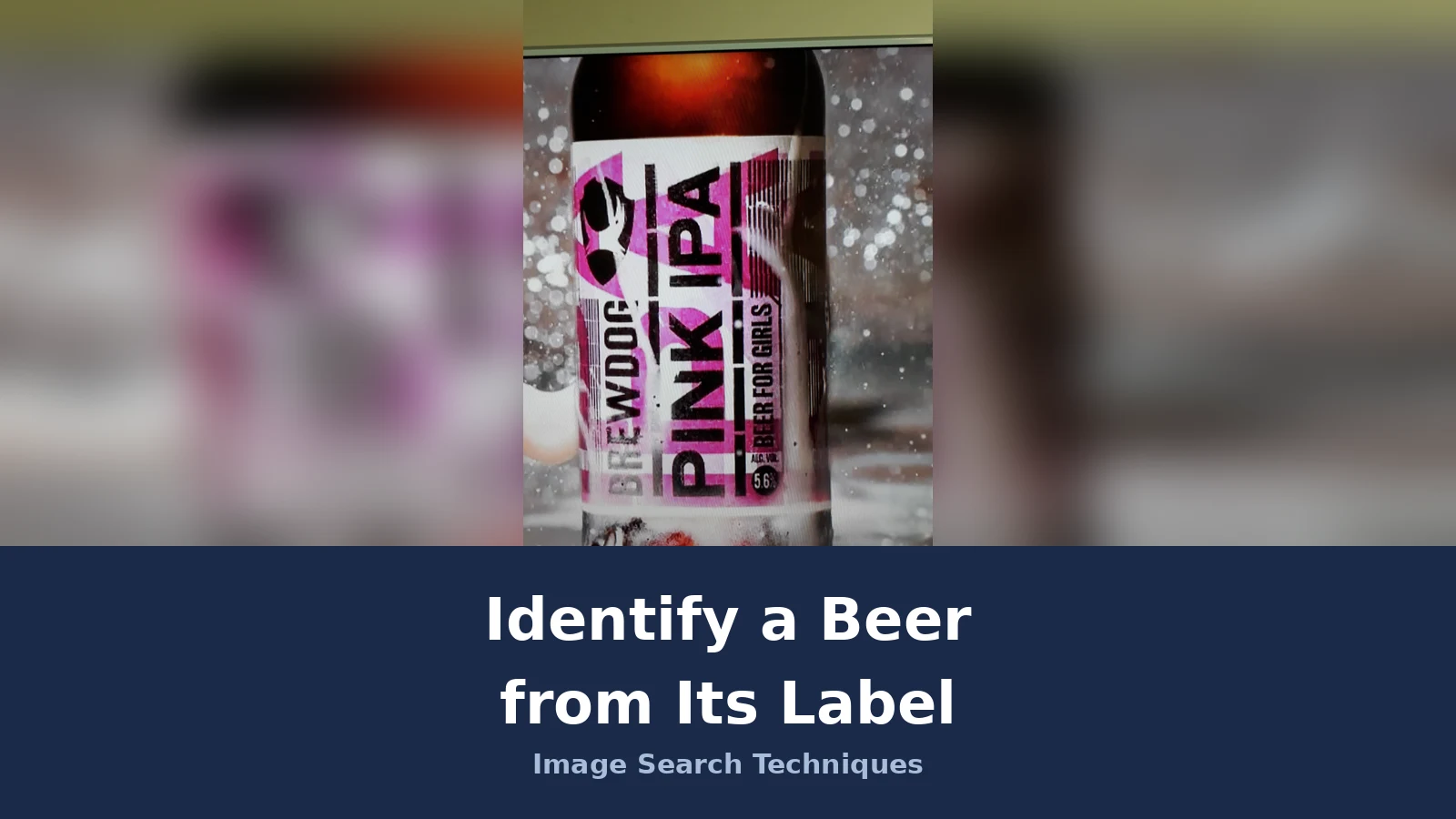
Yes, when the photo is sharp and the label is a real product that appears online. The test below is a real one, run live on 21 November 2026 on a real photo. The photo is “Brewdog Pink IPA.jpg” from Wikimedia Commons, taken by Iain Cameron on 7 March 2018 and shared under a CC BY 2.0 licence. It shows a bottle with a pink label that reads BREWDOG, PINK IPA, BEER FOR GIRLS and ALC. VOL. 5.6%. The same photo is the one our banner is built from.
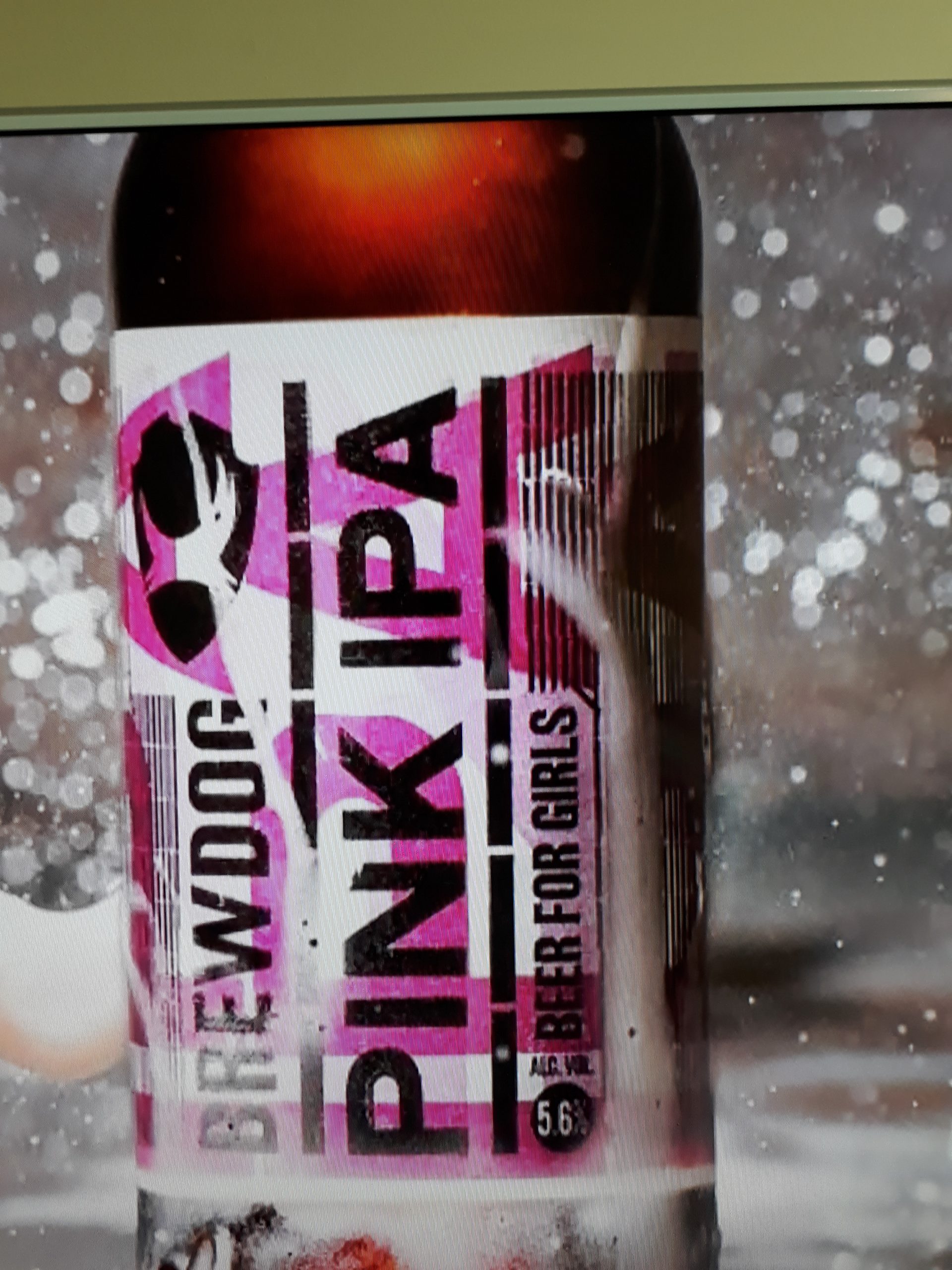
Photo: Iain Cameron, CC BY 2.0, via Wikimedia Commons. File: Brewdog Pink IPA.jpg, 7 March 2018.
Reading the label first, before any search, gives four fields. Brewery: BREWDOG. Beer name: PINK IPA. Style words: PINK IPA and BEER FOR GIRLS. ABV: 5.6%. Those four fields are the whole identification, and the engines below were asked to confirm them, not to invent them.
Google Lens
Uploading the photo file to Google Lens identified the beer as BrewDog Pink IPA. Lens returned 2 exact matches: the Wikimedia Commons file page for the photo itself, and a Gripeo page. It showed at least 60 visual matches, including coverage of the beer from the Guardian, the BBC, Eater London, Slate, Refinery29 and Forbes. Lens also read the text on the label and offered the tokens BREWDOG, PINK, IPA, 5.6, BEER, FOR and GIRLS as selectable text. Its own summary described Pink IPA as a limited-edition 5.6% beer from the Scottish brewery, released as a satirical “beer for girls” ahead of International Women’s Day in March 2018. One honest note: an earlier attempt to run Lens from the photo’s web address failed four times, with Lens showing an expired visual search and no results. The file upload worked where the web address did not, so if Lens fails on a link, upload the file itself.
TinEye
TinEye found 59 results for the same photo, searching 86.8 billion images, with the first match indexed on 6 March 2018. The matches were the same photo at different sizes and crops on refinery29.uk, mashable.com and theguardian.com, all from March 2018 coverage of the beer. TinEye’s strength here is that it finds the same image, not just similar images, so it confirms that the photo itself is a real, widely published picture rather than a one-off snap.
Yandex Images
Yandex identified the object as BrewDog and tagged the image “brewdog punk ipa”, “punk ipa”, “pink beer”, “IPA beer” and “beer for women”. It showed 11 sizes of the exact image, 8 sites containing information about it, and 40 similar-image thumbnails on the first page. Yandex also showed the trap in this test: its top tag names the beer “brewdog punk ipa”, even though the label actually reads PINK IPA. Pink IPA was a pink-label variant of Punk IPA, so the engine linked the photo to the better-known parent beer. If you had trusted the top tag alone, you would have named the wrong beer. The label text is the correction: PINK IPA at 5.6%, not Punk IPA.
| Engine | Result for the Pink IPA photo | What it proved |
|---|---|---|
| Google Lens (file upload) | Identified as BrewDog Pink IPA; 2 exact matches; 60 or more visual matches; label text read | The beer name and the label text, confirmed |
| Google Lens (web address) | Failed 4 times, expired visual search, no results | A failed run is not a zero; upload the file instead |
| TinEye | 59 results; first indexed 6 March 2018 | The photo is real and widely published |
| Yandex Images | Tagged “brewdog punk ipa”; 11 sizes; 8 sites; 40 similar images | Useful, but it misnamed the beer, so check the label |
The last step is the brewery’s own site. BrewDog no longer lists Pink IPA: the product page returns a 404, which tells you the beer is discontinued. The parent beer is still live. BrewDog’s own Punk IPA product page lists it at 5.4% ABV as an IPA, with the can reading “Alc. 5.4% Vol.”. That 5.4% belongs to Punk IPA. The photographed Pink IPA label reads 5.6%, and that is the figure to use for the beer in the photo. Mixing the two up is the easiest mistake in this test, and it comes from trusting a search result instead of reading the label in front of you.
The same photo-search method works for food and drink generally. Our guide to reverse image search for food runs the same three engines over a dish or a product photo and shows how to read the results when the engines disagree.
Answer capsule: Lens named the beer correctly from a file upload, TinEye confirmed the photo is real, and Yandex misnamed it as Punk IPA. The label text, 5.6% on a Pink IPA label, settles the question.
What do you do when the engines disagree or find nothing?
Engines disagree often, and a disagreement is useful information, not a dead end. Treat each engine as one witness. When two engines agree with the label and one does not, trust the label and the two that agree. When no engine finds the beer, the label is usually a taproom-only release, a one-off collaboration, a home brew or a beer from a brewery too small to appear online, and the printed words are all you have. That is still an identification, as far as the label allows.
| Method | What it needs | What it returns | When it fails |
|---|---|---|---|
| Google Lens | A sharp photo, file upload works best | Beer name, exact matches, similar images, label text | Web address searches can expire with no result |
| TinEye | The same photo, any size | Exact copies of the photo across the web | Finds nothing for a photo never published online |
| Yandex Images | A photo, any size | Tags, sizes, sites, similar images | Can misname a variant as its parent beer |
| Barcode scanner apps | A readable barcode on the bottle or can | A ranked list of beers with matching names and ABVs | Taproom-only cans and one-off beers have no barcode record |
| US federal label register | The brewery or beer name | The label as filed, with the approval date | US labels only, and only labels that needed approval |
| Untappd | A photo of the label or a typed name | Beer listings matched by users | User-typed entries can carry errors |
Two tools in that table deserve a closer look. Hopgrail’s beer scanner, the second organic result for this question, reads a barcode against 2,867 known barcodes, or reads the words on the can and ranks beers whose name and ABV come closest, showing each approved label’s artwork beside your photo so you confirm the match yourself. It also compares three methods: barcode lookup, reverse image search and the federal label register, and it puts the register at 540,491 TTB labels with 94,417 label images, the newest filing dated 17 November 2026. Its honest limit is the same as every scanner: a label read never auto-selects a beer, it ranks candidates and you decide. The register itself is the US Alcohol and Tobacco Tax and Trade Bureau’s label approval system. The TTB’s own beer labelling and formulation page explains that brewers must follow the labelling rules in 27 CFR part 7 and the health warning rules in 27 CFR part 16, and that each label needs a Certificate of Label Approval before the beer can be sold. If the beer is American, that register is the strongest confirmation available, because it holds the label exactly as the brewery filed it.
When every engine returns nothing, work the label by hand. Crop the photo tightly around the text and try again, because a wide shot with a hand and a table in it gives the engine too much to match. Then search the words themselves: brewery name plus beer name plus ABV, in quotes. Then check the brewery’s own site, which lists current beers and often keeps old ones in an archive. If none of that works, the label may belong to a beer that was never sold widely, and the honest answer is to say so rather than guess from a similar-looking label.
Answer capsule: when engines disagree, trust the label and the engines that agree with it. When nothing matches, crop tighter, search the printed words, and check the brewery’s site before you guess.
What does the law require on a beer label?
Label rules differ by country, and the difference matters when you read a label from another country. In the United States, the Alcohol and Tobacco Tax and Trade Bureau sets the rules. Its guidance says American labels must list the beer’s name, the brewery, the city and state where it was made, the net contents and the alcohol content, and carry the government warning. The TTB also requires a Certificate of Label Approval for each label before the beer can be sold, which is why the federal register described above exists. If you are reading an American label, those five fields should all be present, and a label missing the brewery or the alcohol content is a reason to be suspicious, not a reason to guess.
On a UK shelf, the rules are different, and the two figures to check first are the alcohol strength and the volume, both printed on the Pink IPA label as “ALC. VOL. 5.6%” alongside the bottle size. The label is the legal record of what is in the bottle, so the figures on it carry more weight than any listing on a shop or app, which may copy an old strength or a different vintage. This guide is about identification only. It does not review taste, and it does not encourage drinking. It treats the label as a document to be read carefully, the same way you would read any other printed record.
Answer capsule: US labels must name the beer, the brewery, the city and state, the net contents and the alcohol content. UK labels put the strength and the volume front and centre. In both cases, the printed label outranks any shop listing.
What are the common mistakes when you identify a beer from a label?
The same five mistakes appear in almost every failed identification. Avoid them and the method in this guide works on most labels.
- Trusting the colour. Pink, green, black or gold tells you nothing on its own. Breweries reuse colour schemes, and two beers from different breweries can look alike at a glance. Colour is a check after the text, never the identification itself.
- Trusting one engine. Yandex called the Pink IPA photo “punk ipa”. One engine, one tag, one wrong name. Run at least two engines and compare them against the label text before you settle on a name.
- Ignoring the vintage. The same label design is reused across vintages, and the beer can change while the label stays the same. A date or batch code is the only printed clue to which release you hold.
- Confusing similar names. Punk IPA and Pink IPA share a brewery, a style and most of a name, and differ by one word and 0.2% ABV. Similar names are the most common cause of a wrong identification, and the ABV is often the only printed difference.
- Searching a cropped or angled photo. A photo that cuts off the beer name or bends the letters gives the engine half a label to match. Retake the photo square on, in good light, before you blame the engine.
The cover-art trap is the same in other subjects. Our guide to identifying a book from its cover shows how cover art alone can point to the wrong edition, and the same warning applies here: the artwork suggests, the printed words decide. The closest parallel is wine. Our guide to identifying a wine from a photo of its label reads the producer, the vintage and the region from the label in the same order, and the same rule holds: the label text is the evidence, the photo search is the confirmation.
Answer capsule: colour, one engine, a missing date, a similar name and a bad photo cause most wrong identifications. Read the text, run two engines, and check the ABV.
FAQs
Can Google identify a beer from a photo of its label?
Yes, when the photo is sharp and the label belongs to a beer that appears online. Upload the photo file to Google Lens, not a web address, because address searches can expire with no result. Lens reads the label text and returns exact matches and similar images. Always check its answer against the words printed on the label.
What app identifies a beer by its label?
Google Lens is the first choice, because it reads the label text and searches the web for the same image. Barcode scanners such as Hopgrail’s beer scanner work when the bottle has a readable barcode, and Untappd matches a label photo against user listings. Use two of them and compare, because user listings and single-engine tags can both be wrong.
Can I identify a beer from the colour of its label alone?
No. Colour alone identifies nothing. Breweries reuse colour schemes, and two beers from different breweries can share the same pink or green label. Use colour only as a quick check after the text fields have done the work. Read the brewery, the beer name, the ABV and the style words first.
What should I do if the label has no brewery name on it?
Search the beer name with the ABV and the style words, in quotes, and check the results against the bottle shape and the artwork. A missing brewery name often means a contract brew, a collaboration or a supermarket own-label beer. If the back label has a bottling address, search that too.
How do I identify a beer from a bottle with no label?
Start with what the bottle shows: its shape, the colour of the glass, the cap, and any embossed text. Photograph those details and run them through Google Lens and Yandex. A bottle with no label and no markings is often a home brew or a refill, and no search can name it with confidence.
Is a beer label photo enough to prove which beer it is?
No. A photo can only suggest a likely beer, never prove the exact brew. The same label design is reused across vintages, and the same beer can be brewed under contract by different breweries. A match is strong when the label text, the ABV and two search engines all agree. Anything less is a likely match, not proof.