


🔎 Reverse Image Search
Image search techniques made simple: upload a photo or paste a URL and search 6 engines at once. 100% free, nothing stored.
🔒 Your image is never stored on our servers longer than 24 hours and is never shared.
To find out what brand something is, take or upload a clear photo and run it through Google Lens or a reverse image search — these identify the logo, product, or clothing and show you the brand and where to buy it. For a logo, crop the image to the logo alone before searching. This guide covers every method, the best free tools, and the exact steps to identify any brand or logo from a picture in 2026.
Whether you have spotted a jacket you love, an unfamiliar logo on a product, a font on a package, or a gadget with no visible name, the answer is almost always hidden in the image itself. Visual-search tools have become good enough to name most brands in seconds — you just need to know which tool to use and how to feed it the right picture.
How Do I Find Out What Brand Something Is?
The quickest method is Google Lens: point your phone camera at the item or upload a saved photo, and Lens matches it against billions of products and logos to name the brand. If Lens is unsure, a reverse image search across Google, Yandex, and Bing usually fills the gap. The single most important trick is to crop the photo to the brand’s logo or the most distinctive part before you search — this removes background noise and dramatically improves the match.
Quick Comparison: Best Tools to Identify a Brand
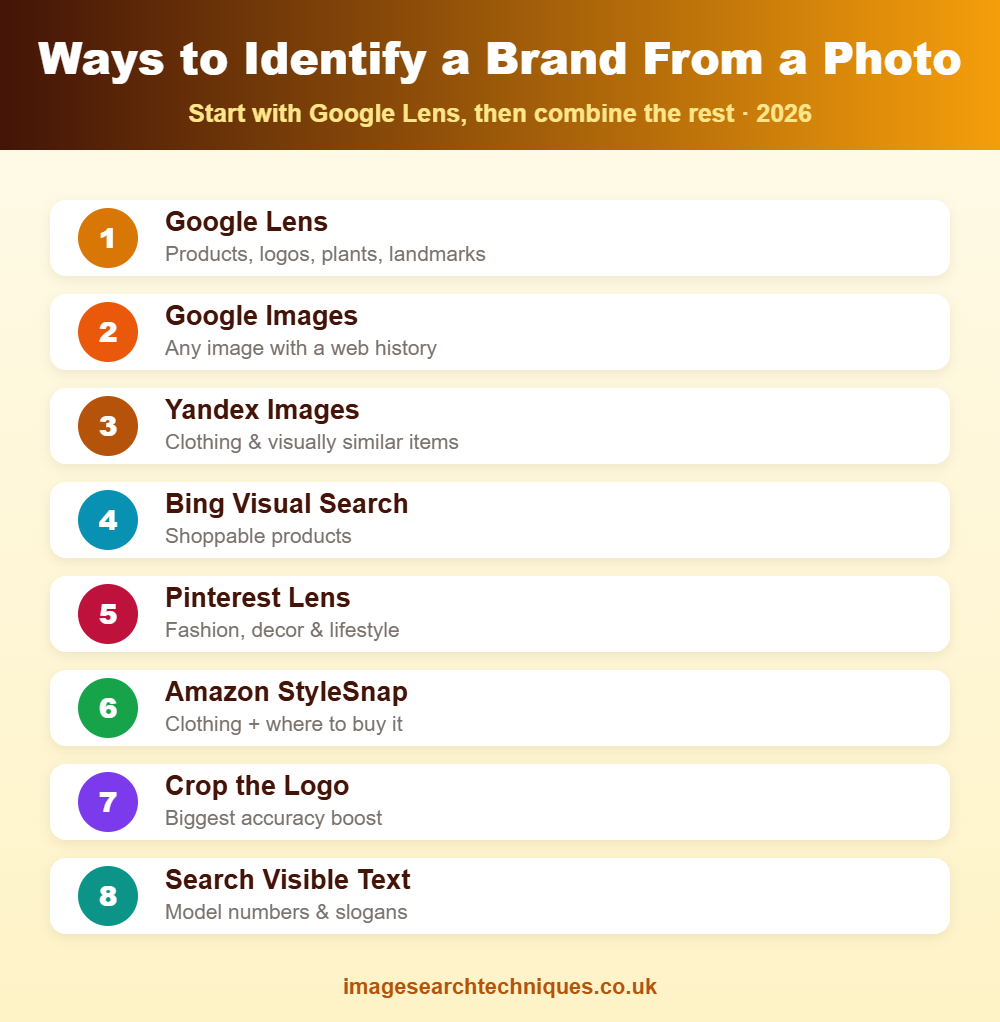
Each tool has a strength. Start with Google Lens, then move down the list if you need a second opinion.
| Tool | Best for identifying | Free? |
|---|---|---|
| Google Lens | Products, logos, plants, landmarks | Yes |
| Google Images | Any image with a web history | Yes |
| Yandex Images | Clothing, faces, visually similar items | Yes |
| Bing Visual Search | Products and shoppable items | Yes |
| Pinterest Lens | Fashion, décor, lifestyle products | Yes |
| Amazon StyleSnap | Clothing and where to buy it | Yes |
1. Google Lens — the Fastest Way
Google Lens is the best all-round brand identifier. On Android, open the Google app and tap the Lens icon; on iPhone, use the Google app or long-press an image in Chrome. Point the camera at the item or upload a saved photo, and Lens returns matching products, the brand name, and shopping links. It recognises logos, sneakers, handbags, electronics, furniture, and more — usually in a second or two.
2. Reverse Image Search When Lens Is Unsure
If Google Lens cannot name the brand, run the photo through a full reverse image search. Each engine indexes different corners of the web, so try more than one: Google for the widest coverage, Yandex for clothing and visually similar items, and Bing Visual Search for shoppable products. See the full set of image search techniques to combine them effectively.
3. Identify a Logo From a Photo
Logos are the clearest brand signal, so give the tool nothing but the logo. Crop the image down to the symbol or wordmark alone, then run it through Google Lens or a reverse image search. A clean, cropped logo matches far more reliably than a busy full-scene photo. If the logo has text, you can also type the visible letters into a normal search as a backup.
4. Identify Clothing and Fashion Brands
Fashion is one of the most searched categories. To identify a dress, jacket, or pair of shoes, crop to the single item and use Google Lens, Pinterest Lens, or Amazon StyleSnap — all three are tuned for apparel and will surface the brand plus shoppable matches. Yandex is especially strong at finding the exact or a near-identical garment when the others fall short.
5. Identify a Brand by Its Font, Packaging, or Text
Sometimes the clue is text rather than a logo. If a package or product shows a distinctive font or slogan, Google Lens can read the text and search it automatically. For an unusual typeface, a font-identifier tool can name the font, which often points straight to the brand. Reading and searching any visible model number or product code is another fast route to the manufacturer.
6. Shopping Apps and Visual Search
Retail apps double as brand identifiers. Amazon’s app lets you search by photo to find the product and its brand; Pinterest Lens is excellent for décor and lifestyle items; and the Google Shopping tab shows the brand alongside prices. These are the best choice when your real goal is not just the name but where to buy the item.
How to Identify a Brand Step by Step
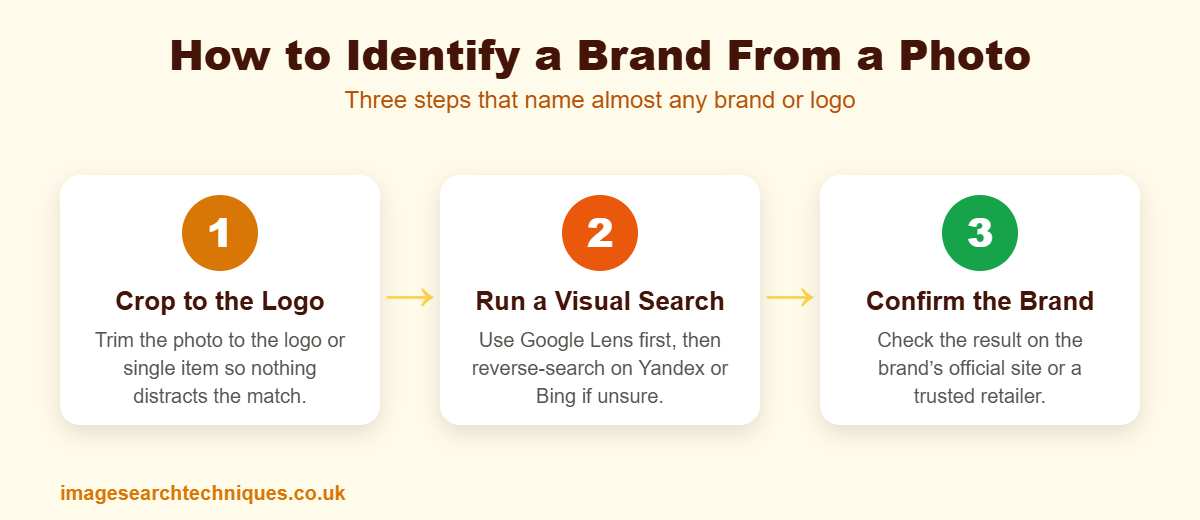
Follow this order for the best hit rate:
- Get the clearest photo you can. Good lighting and focus make a big difference.
- Crop to the logo or the single item. Remove background and other objects.
- Run it through Google Lens first. It identifies most brands instantly.
- If unsure, reverse-search it on Google, Yandex, and Bing — see our step-by-step reverse image search guide.
- Cross-check the result. Confirm the brand on its official site or a trusted retailer before buying.
Tips for Better Brand Matches
- Crop tightly to the logo or product — it is the single biggest improvement.
- Use high resolution — blurry photos match poorly.
- Try two or three tools — each indexes different products.
- Search any visible text or model number as a backup route.
- Confirm on the official site to avoid counterfeits and look-alikes.
Frequently Asked Questions
How can I find out what brand something is from a photo?
Upload the photo to Google Lens or run a reverse image search. Both identify the product or logo and show the brand name and where to buy it. For a logo, crop the image to the logo alone first — it matches far more reliably.
What is the best app to identify a brand or logo?
Google Lens is the best free all-round option. For clothing and shopping, Pinterest Lens and Amazon’s photo search are excellent, and Yandex Images is strong at finding the exact item when others fail.
How do I identify a logo from a picture?
Crop the picture so only the logo is visible, then run it through Google Lens or a reverse image search. A clean, isolated logo gives a much better match than a full-scene photo. If the logo contains text, searching those letters also helps.
Can I identify a clothing brand from a photo?
Yes. Crop to the single garment and use Google Lens, Pinterest Lens, or Amazon StyleSnap, which are tuned for fashion. Yandex is particularly good at finding the exact or a near-identical item and the brand behind it.
Why can’t the tool identify my brand?
The photo may be blurry, too wide, or the brand may be small or new. Crop tightly to the logo or item, use a higher-resolution image, and try a different engine. Searching any visible text or model number often succeeds when image matching does not.
Is there a free way to identify brands from images?
Yes. Google Lens, Google Images, Yandex, Bing Visual Search, and Pinterest Lens all identify brands from photos for free. Combining two or three of them catches almost any brand or logo.
Spotted something you want to identify? Use our free reverse image search tool to find the brand in seconds.
