


🔎 Reverse Image Search
Image search techniques made simple: upload a photo or paste a URL and search 6 engines at once. 100% free, nothing stored.
🔒 Your image is never stored on our servers longer than 24 hours and is never shared.
A sextortion email photo of my house is frightening to open, but it is almost always a mass-mailed bluff. The photo comes from Google Street View, the password comes from an old data breach, and there is no video. Do not pay and do not reply. Check the photo against Street View, save the email as evidence, then report it. The same artefact first method works for other scare mail too, including a fake IRS letter, where the notice code in the corner is the thing to check.
What sextortion means here: sextortion is blackmail that uses intimate images, or the threat of them, to force someone to pay money or send more images. In this version the sender claims to have a video of you, quotes an old password or shows a photo of your house, and demands Bitcoin within a day or two. The mass-mailed version has no video at all. The threat works because the details feel personal, not because the sender has anything real.
This guide is about the photo, not the threat in general. If you have received one of these emails, the fastest way to calm down is to check the photo itself. A photo anyone can download from a map proves nothing about what the sender knows. A photo only a person standing at your door could have taken would be a different matter, and this email will not contain one. The steps below show you how to tell the difference in about ten minutes, using the same checks we ran on a real published example of this scam.
What does a sextortion email photo of my house look like?
The emails follow a set pattern. Knowing the pattern helps, because the shock comes from thinking your case is special. It is not. Thousands of people get the same message with their own name and street filled in.
It usually starts with your full name, sometimes in the subject line. Then comes the photo: your street or your front garden, taken from the road. Under the photo, the sender claims they hacked your computer, installed spyware, and recorded you through your webcam while you watched adult videos. The spyware is often named as Pegasus. That name is real, and it is also the giveaway. Pegasus is surveillance software sold to governments, not a tool a mass emailer would waste on a random inbox. A scammer who really controlled your computer would not need to ask you for money by email.
Then comes the demand. In the wave documented by Krebs on Security in September 2024, the ransom was just short of 2,000 US dollars, payable in Bitcoin by scanning a QR code in the message, with 24 hours to pay. The message often arrives as a PDF attachment, which is another tell: a PDF looks more official than a plain email, and it also helps the message slip past spam filters. It ends with a warning not to reply, and a threat to send the supposed video to your contacts if you tell anyone. The New York State Police warning about the same scam describes the same shape: an email address and personal details bought illegally, a photo of the victim’s home, a Bitcoin demand, and a 24 to 48 hour deadline.
Amounts and deadlines vary from wave to wave. The shape does not. A name, a street photo, a webcam claim, a Bitcoin address, and a short deadline. If your email matches that shape, you are looking at the same mass-mailed scam, personalised with details that were already public.
How did the scammer get a photo of my house?
They almost certainly never came near your house. The photo comes from a public map. Anyone with your address can open Google Maps, drop into Street View, and save a picture of your front door in under a minute. That is the whole trick. The photo feels like proof that someone has been watching your home. It is proof of the opposite: the sender needed a photo and took the easiest public one available.
Your address reaches the scammer the same way your old password does, through data breaches. Addresses, email addresses and passwords leak in breaches, get bundled into lists, and get sold on. The New York State Police put it plainly in its warning: scammers obtain emails and other personal information purchased illegally on the dark web, then use it to make the threat feel real. A public listing can do the same job. If you have ever sold something online, listed a property, or left your address on a public register, that is another route to the same list.
That is why the photo and the password arrive together. Both came from the same kind of source, and neither one shows that the sender knows anything about your life today. A photo of your house from a map and a password from a breach five years old are two public facts stapled together to look like surveillance. If the first contact came through a dating app instead of email, the same photo check applies, and our guide to spotting a catfish walks through it there.
How do I check the photo in the email?
Work through the photo in this order. It takes about ten minutes, and each step answers a different question.
- Save the photo out of the email. Right-click the image and save it, or take a screenshot of the attachment. Do not click any link in the message, and do not scan the QR code. The QR code leads to a Bitcoin wallet, and scanning it proves nothing.
- Open Google Maps and search for your own address. Drop the yellow Street View figure onto the road outside your house. The photo in the email should look like the view from the road, because that is where Street View cameras drive.
- Compare the details. Check the roofline, the bay windows, the door colour, the fence, the bins, the trees, the parked cars and the street sign. Then read the capture date. Street View shows the month and year each panorama was taken in the panel at the top left, and it is never live. Every Street View picture is a photograph from a past drive, sometimes years old. If the email photo matches a Street View capture, the sender used a map.
- Use “See more dates” to step back through older captures. Many streets have several captures going back years. If the email photo matches an old capture, that settles it: the sender used a photo that predates anything they could know about you now.
- Run the photo through reverse image search. Upload the saved photo to our free reverse image search tool and see where else it appears. A match on a scam-reporting site or a news article about this exact email is the end of the question.
Worked example: we checked a real sextortion email and a real house photo
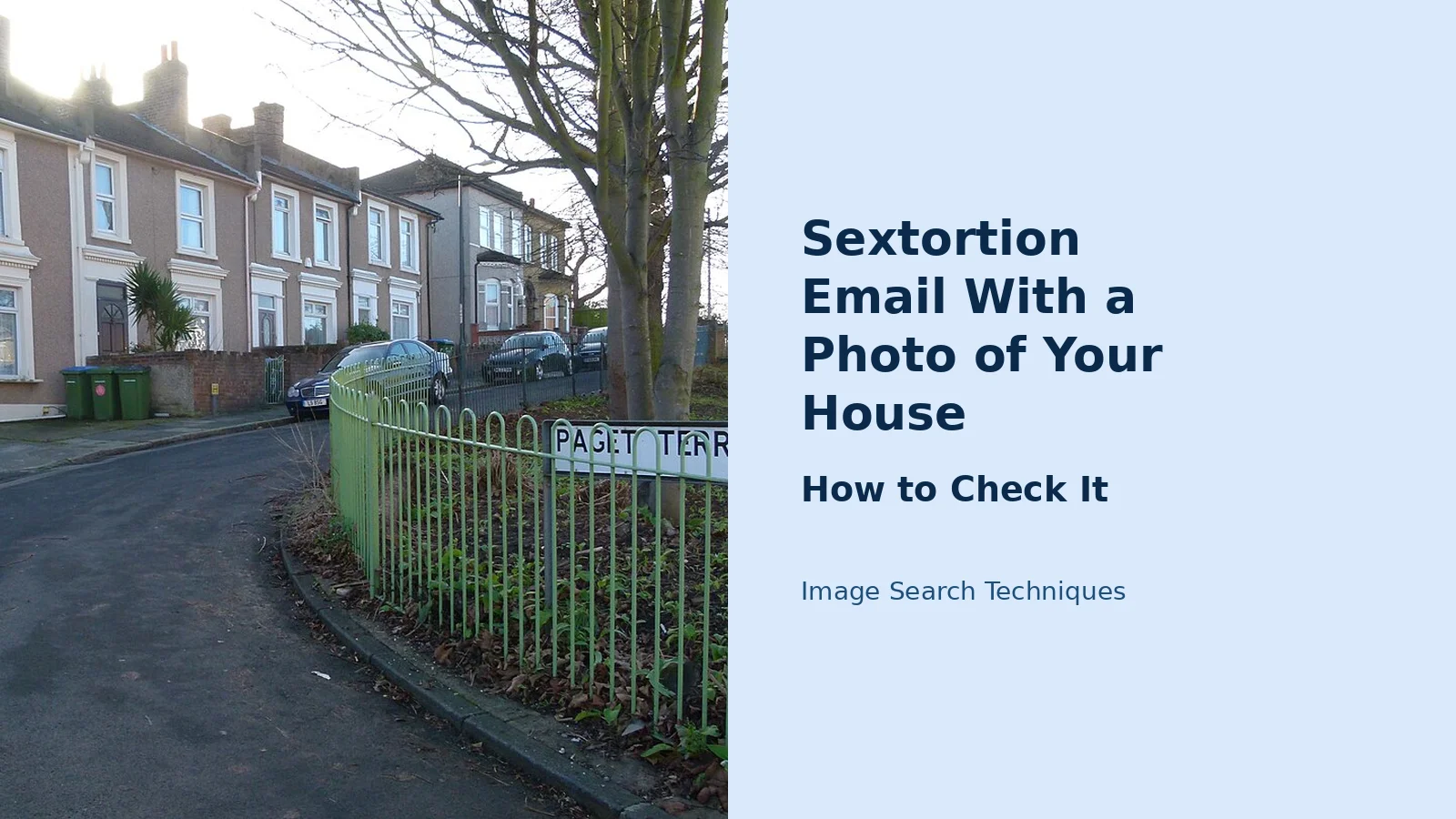
We ran this check for real on 13 November 2026, using the published screenshot from Krebs on Security’s September 2024 report on this scam, and a real photo of terraced houses on Paget Terrace in Woolwich, London. Here is what each engine found.
| Engine | Krebs sextortion screenshot | Paget Terrace house photo |
|---|---|---|
| Google Lens | 13 exact matches. Krebs on Security article first. | 1 exact match. Its AI Overview named the street: Paget Terrace, Woolwich SE18. |
| TinEye | 10 results. First indexed 5 September 2024. Krebs listed twice. | 0 matches in 86.7 billion images. |
| Bing | 5 pages with the image. Krebs not among them. | 0 pages. Misread the street as “Pasey Terrace” in Edinburgh. |
| Yandex | No exact match. Top site was an Avast blog on this scam. | Exact match. Linked the Wikimedia Commons file page. |
| No image search. The tool button opens a keyword search, not the photo. | Same. It contributed nothing. |
The Krebs screenshot is a known scam example, and the search results prove it. Google Lens found 13 exact copies and put the Krebs article first. TinEye found 10 copies and had first indexed the image on 5 September 2024, two days after the article appeared. That is what a circulated scam image looks like in reverse search. If the photo in your email returns results like that, it is not your photo. It is a picture that has been passed around.
Then we checked the house photo against Street View itself. The photo shows brick terraces with white bay windows on Paget Terrace in Woolwich, taken on a grey winter day. In Google Maps Street View at the same spot, the capture date reads June 2019, and “See more dates” lists four captures in total: June 2019, September 2014, June 2012 and September 2009. The scene matches. The same brick terraces, the same white bay windows, the same green metal fence and “Paget Terrace” street sign, and the same T-junction where Paget Terrace meets Eglinton Road are visible in both.
The differences are exactly what you should expect when two photos were taken years apart. The house photo is winter, with bare trees and flat light, and its Wikimedia Commons record dates it to 31 December 2015, a date Street View has no capture for. The June 2019 Street View is high summer, with full leaf canopy and hard shadows. The parked cars are different. Nothing structural has changed. No scaffolding, no building work, no new extension. That is the Street View match check working as it should: the fixed things match, and the changeable things differ, because the photos were taken years apart.
Two honest limits came out of the same test. TinEye found nothing at all for a real, public photo of a real street, and Bing found nothing either, then misread the street name. A blank reverse search proves nothing. It does not mean the photo is private, and it does not mean the photo is fake. It only means that engine has not indexed it. And the Pinterest button on our own tool does not run a reverse search at all. It opens a keyword search, so it contributed nothing to either test. We say so here rather than pretend otherwise.
What would a real proof photo have to show?
This is the test that settles the question. A Street View grab proves the sender can type an address into a map. A real proof photo would have to prove something only a person with access could know. Ask yourself what the photo in your email actually shows, and compare it with this list.
| A real proof photo would show | The email photo shows |
|---|---|
| Something inside your home or garden, not the view from the road | The public front of the house, as seen by any passer-by |
| A detail only a person present could capture, such as an interior room or your car registration | Brickwork and windows that appear on every map site |
| Something dated after the latest Street View capture, such as a new fence or a car you bought last month | Nothing newer than the last Street View drive, often years old |
| A specific thing you could ask for, photographed from an angle you choose | A stock view from the road that anyone can download |
If the sender really had access to your home or your computer, they could show you the inside of your house, a photo taken today, or a detail that changed since the last Street View car drove past. A mass emailer cannot do any of that. That is why the photo is always the outside of the house, taken from the road, months or years old.
Do not message the sender to test them. The test is for your own judgement, not a reply to send. Any reply tells the scammer your address is live and watched, and it will not produce a real answer. Judge the photo you already have. If it could have come from a map, it almost certainly did.
Where did the old password in the email come from?
The password is the second half of the trick, and it comes from the same place as the address: old data breaches. When a website is breached, its user records leak, get bundled into lists, and get sold on. The scammer buys a list that pairs email addresses with passwords, then mails the same threat to everyone on it, filling in each person’s own password and address. That is why the password in the email is often one you recognise but have not used in years. It is real, and it is old, and it proves nothing about your computer today.
You can check this yourself in a minute. Have I Been Pwned keeps a public record of breaches. Enter your email address on the site and it lists the breaches that included it. Its Pwned Passwords service checks a password a different way: only the first five characters of the password’s hash leave your device, so the full password is never sent anywhere. We tried it while writing this guide. The password “password” appears 52,373,976 times in the Pwned Passwords database. That is the scale of reuse these lists are built on.
If the password in the email is one you still use anywhere, change it now, and turn on two-factor authentication on the accounts that matter: email first, then banking, then social media. Use a different password for each important account, and let a password manager remember them. Do not type a password you still use into any random checker site. Have I Been Pwned is the established one, and the hash check above is how it keeps the check safe.
One more thing to check while you are here. If you genuinely worry your device is infected, run a malware scan with the security software you already have, and change the password from a device you trust. The FBI’s own advice for avoiding sextortion includes turning off or covering webcams when you are not using them, and never opening attachments from people you do not know. The PDF in this email counts as an attachment from a stranger.
What should I do now?
Work through this sequence in order. It is short, and each step has a reason.
- Do not reply. Do not pay. Do not scan the QR code. A reply confirms your address is live. A payment cannot be reversed, and the FBI’s Internet Crime Complaint Center says plainly that paying does not guarantee the content will not be shared. Paying usually brings a second demand, not silence.
- Save everything first. Screenshot the email, keep the PDF attachment, save the message headers if your mail app shows them, and note the sender address and the Bitcoin address. Evidence comes before blocking, because blocking and deleting can destroy the record you need for a report.
- Mark the email as phishing or spam, then block the sender. Your mail app’s report button also helps the filter catch the next wave.
- Report it. In the United States, report to the FBI’s Internet Crime Complaint Center at ic3.gov. In the United Kingdom, report to Action Fraud, which also takes reports by phone on 0300 123 2040. A report will not get your money back if you already paid, but it feeds the pattern that investigators use to track these waves.
- Check the breach. Enter your email address at Have I Been Pwned and see which breaches included it. Then check the quoted password the same way.
- Change the quoted password anywhere it is still used, and switch on two-factor authentication. Start with your email account, because that is the key to resetting everything else.
- Shrink the public photo supply. You can blur your house on Google Street View, which stops the next scammer from pulling the same picture, and you can ask Google to remove photos of you from its search results where its removal rules apply. Neither step undoes this email. Both make the next one harder. A Google blur alone is not enough, because Apple Maps, Mapillary and KartaView may hold their own copies: our guide to blurring your house on Apple Maps, Bing and Mapillary covers each one.
- Tell someone you trust. Shame is the weapon here. The email works by making you feel alone with it. Telling a partner, a friend or a family member takes the power out of the threat, and it also means someone else can help you work through the steps above.
This email is one of several photo-led scams, and our complete guide to photo scams covers the other versions of the same trick, from fake payment screenshots to stolen listing photos. The method is the same every time: a real photo, taken out of context, used to make a false claim feel true.
What mistakes make a sextortion email worse?
Most people who lose money to this scam lose it in the first hour, before they have had time to think. The mistakes are predictable, and they are all avoidable.
Paying is the worst of them. Bitcoin payments cannot be reversed, and the scammer has no reason to stop after the first payment. The FBI’s Internet Crime Complaint Center warns that complying with a blackmailer does not guarantee your photos or content will not be shared. Victims who pay are often contacted again with a larger demand, because they have shown they will pay.
Replying is nearly as bad. Any reply, even an angry one, tells the sender that a real person reads that inbox. Mass emails go to millions of addresses, and the scammer’s time goes to the people who answer. Silence costs nothing and tells them nothing.
Deleting the email before saving it is a quieter mistake. If you later decide to report it, you will want the sender address, the Bitcoin address, the headers and the attachment. Save those first, then block and delete.
Clicking links or opening attachments is another. The PDF is part of the trick, and links in these emails can lead to malware or to phishing pages that ask for more details. And if you search for help, beware the “recovery” services that promise to wipe the video for a fee. There is no video to wipe, and the service is often a second scam aimed at the same frightened person.
What if the threat is not a bluff?
Most of these emails are bluffs, and the photo check above is how you tell. But there is a case where the threat is real, and it needs a different response. If someone genuinely has intimate images of you, whether they took them, were sent them, or made a fake from an ordinary photo, do not pay and do not negotiate. Preserve everything, then get help fast.
For adults in the UK and US, StopNCII creates a hash, a digital fingerprint, of each image on your own device, and shares that hash with participating platforms so they can block the image without you uploading it anywhere. If the person in the images is under 18, report to the National Center for Missing and Exploited Children in the US, or to the CEOP Safety Centre in the UK, and use the Take It Down service to help stop the images spreading. If you feel unsafe, contact your local police. In the US that means your local FBI office or 1-800-CALL-FBI. In the UK it means Action Fraud, or 999 if you are at immediate risk.
That is the one place where this article stops being about a photo from a map. Everything else here is the bluff version, and the bluff version is beaten by checking the photo, saving the evidence, and reporting it.
FAQs
Is a sextortion email with a photo of my house real?
Almost never. The photo comes from Google Street View, the password comes from an old data breach, and there is no video. The email is sent to thousands of people at once, with each person’s own name and address filled in. Check the photo against Street View, save the email, and report it instead of paying.
How did the scammer get a photo of my house?
From a public map. Anyone with your address can open Google Street View and save a picture of your house from the road. Your address came from a data breach, a public listing, or a leaked database. The photo proves the sender can use a map. It does not prove anyone has been near your home.
Should I pay the Bitcoin ransom in a sextortion email?
No. Bitcoin payments cannot be reversed, and paying does not guarantee the content will not be shared. The FBI’s Internet Crime Complaint Center says complying with a blackmailer rarely stops the threats, and victims who pay are often contacted again with a larger demand. Save the email and report it instead.
What does it mean if the email quotes a password I really used?
It means your password appeared in a data breach. Breached passwords are bundled into lists and sold, then reused in mass emails like this one. Check the password at Have I Been Pwned, then change it anywhere it is still used and turn on two-factor authentication. A real old password proves a breach, not a hack.
Can I find out when the Street View photo of my house was taken?
Yes. Open your address in Google Maps, drop into Street View, and read the capture month and year in the panel at the top left. Use See more dates to step through older captures of the same spot. Street View is never live, so the date tells you how old the photo in the email really is.
How do I report a sextortion email in the UK or the US?
In the UK, report to Action Fraud online or by phone on 0300 123 2040, and call 999 if you are at immediate risk. In the US, report to the FBI’s Internet Crime Complaint Center at ic3.gov. Save the email, the attachment and the Bitcoin address first, so your report includes the evidence.






