


🔎 Reverse Image Search
Image search techniques made simple: upload a photo or paste a URL and search 6 engines at once. 100% free, nothing stored.
🔒 Your image is never stored on our servers longer than 24 hours and is never shared.
You found the perfect photo for your blog. It has no credit line, no watermark, and no name attached to it. You search for the photographer and find nothing. So can I use a photo if I cannot find the owner? It is a fair question, and the honest answer is less friendly than most bloggers hope.
Short answer: No, not safely. If you cannot find the owner, the photo is an orphan work, but its copyright still applies, and using it without permission can still be infringement. Check first whether it is public domain, then run a diligent search, and in the UK apply for an orphan works licence if you still cannot trace the owner.
This guide explains what an orphan work is, why “nobody claimed it” is not a defence, how to search for the owner properly, and what a real diligent search looks like when it is done on a genuine uncredited photo. It also covers the UK orphan works licence, which is the one legal route the US does not have. Everything here is general information, not legal advice. If a photo matters to your business, speak to a lawyer before you publish it.
What is an orphan work?
Short answer: An orphan work is a copyright work whose owner cannot be found or identified after a proper search. The work is still protected, and the word orphan describes the missing owner, not a free photo.
Orphan work: a work, such as a photograph, for which one or more of the copyright owners is not known or cannot be located. Copyright does not disappear simply because the owner cannot be found.
Photos become orphaned in ordinary ways. A photographer dies and the family loses track of the archive. A small studio closes and its files scatter. A company is bought, merged, or wound up, and nobody keeps the rights paperwork. A print is scanned and shared so many times that the credit line falls off. None of that ends the copyright. In the UK, copyright in a photograph usually lasts for the life of the creator plus 70 years, so a photo can be orphaned and still firmly in copyright for decades.
There is one more point people get wrong. A missing copyright symbol means nothing. Copyright exists from the moment a photo is created, with or without a symbol, a watermark, a name, or a registration. The UK Intellectual Property Office says so plainly in its Copyright Notice on digital images, photographs and the internet, and the same notice is the source for the orphan works definition above. Google’s AI Overview on this exact question says the same thing, and it names the GOV.UK notice among its sources.
Can I use a photo if I cannot find the owner?
Short answer: Usually no. Not finding the owner does not give you permission, and none of the usual excuses changes that.
Start with the three excuses that fail most often. First, “there was no name on it.” As above, a photo needs no name, watermark, or copyright symbol to be protected. Second, “I found it on Google.” Finding a photo on a search engine is not a licence, and neither is finding it on Pinterest, Instagram, or a free wallpaper site. Credit is not permission either. Adding “photo: unknown” under an image does not make the use lawful, it only proves you knew you had no permission. Third, “I will pay if the owner turns up.” Intending to pay later does not protect you. The owner can still ask you to take the photo down, ask for a licence fee, or take the matter further.
There are narrow exceptions, and you should check them before anything else. The photo may already be public domain, which means copyright has expired. It may carry a Creative Commons licence that allows your use. Or your use may fall under a copyright exception, called fair dealing in the UK and fair use in the US, though those two doctrines are different and the UK version is narrower. None of these exceptions is automatic. Each one has to be checked on the facts of your photo and your planned use, and our guide to public domain photos and how to tell walks through the public domain test in full, so this article does not repeat it.
Before you use any photo you did not take yourself, run the same check you would run on a photo with a known owner. Our guide to how to check if an image is copyrighted shows the steps. If that check ends with “owner unknown”, you are holding an orphan work, and the rest of this guide is your route forward.
What happens if the owner turns up later?
Short answer: The owner can ask you to remove the photo, ask for a licence fee, or take legal action, and a careful search beforehand is your best protection, not a guarantee.
The usual first step is a takedown request or an invoice for a licence. Many disputes end there, with the photo removed and a fee paid. But the owner is not obliged to settle quietly. In the UK, the GOV.UK notice warns that infringement can lead to a court claim, and a court can order you to pay the cost of using the photo plus legal costs, and to remove every copy from your website. Deliberate infringement on a commercial scale can even lead to a criminal prosecution.
In the US, the numbers are higher. Statutory damages run from $750 to $30,000 per work, and up to $150,000 per work for wilful infringement. There is an innocent infringer defence in Section 504(c)(2) of the US Copyright Act, which can cut damages to as low as $200 per work, but it does not stop an injunction, and it does not help if you knew the photo was protected and used it anyway. A documented diligent search helps here, because it shows you acted in good faith, but good faith is not a free pass.
There is also a practical risk that has nothing to do with court. Stock libraries and picture agencies now use image recognition to find their photos on the web. A photo that sat quietly on your blog for a year can draw a claim letter out of nowhere, and the letter usually arrives with a fee attached. That is why the search log in the next section matters so much. If you ever have to explain yourself, a dated log of every step you took is worth far more than “I could not find anyone.”
How do I search for the owner properly?
Short answer: A diligent search is a documented hunt through every reasonable source: the photo itself, reverse image search, stock libraries, archives, and registers, with every step and dead end written down.
A diligent search is not one quick Google search. The UK Intellectual Property Office expects you to work through the sources that fit the photo, and to keep a record of what you tried. The list below is the method this site uses, and it matches the IPO’s own diligent search guidance for still visual art. Our guide to how to find the photographer of a photo covers the tracing techniques in detail, and the steps below put them into a log you can keep.
- Read the photo itself. Look for a credit line, a caption, a stamp, or a watermark. Open the file’s metadata and read the EXIF and IPTC fields for an author, a copyright notice, or a source. Check the page where you found the photo for any credit, and follow it back to the earliest version you can find.
- Reverse search the image on more than one engine. Run the photo through Google Lens, TinEye, and Yandex. Each engine indexes different parts of the web, so a photo that is invisible on one can appear on another. Save the result counts and the earliest dated result. Sort by oldest where the engine allows it, because the oldest copy is usually closest to the source.
- Check the stock libraries. Search the photo on Alamy, Getty Images, and Shutterstock. A photo that is sold as stock has a named contributor, and that contributor may be the owner or may know who is. Treat a stock listing as a lead, not as proof of ownership, because libraries also sell access to public domain images they do not own.
- Check the registers and collecting societies. In the UK, check the IPO orphan works register to see whether someone has already licensed the work. For photographs, the IPO guidance names BAPLA, the Association of Photographers, the British Institute of Professional Photography, the British Journal of Photography, the Bureau of Freelance Photographers, and the Royal Photographic Society, plus the collecting societies ACS, DACS, and PICSEL. The Plus Registry and the Copyright Hub are also worth a check.
- Trace the provenance. If the photo came from an archive, a museum, a newspaper, or a family collection, ask that source where it came from. Check newspaper archives, The Gazette, genealogy sites, and wills and probate records if the photographer may have died. The National Archives Discovery catalogue, AIM25, and Archives Hub can help with older material.
- Advertise for the owner. If the photo matters enough, place a notice asking the right holder to come forward. Keep a copy of the notice and the date it ran.
- Write it all down. Keep a dated log of every step, every search, and every dead end, with screenshots or saved result pages. This log is the Ranking Asset of this article, and it is also the document the IPO asks for if you apply for a licence.
The diligent search log
Use this table as your template. One row per step, one line per result, and no step left blank. A row that says “not found” is a result, not a failure, and it belongs in the log.
| Step | What to check | What to record |
|---|---|---|
| 1. Photo itself | Credit line, caption, watermark, file metadata | Author, copyright notice, or “none found” |
| 2. Reverse image search | Google Lens, TinEye, Yandex | Result counts, earliest dated result, any named source |
| 3. Stock libraries | Alamy, Getty Images, Shutterstock | Listing found or not, contributor name, licence type |
| 4. Registers and societies | IPO orphan works register, BAPLA, ACS, DACS, PICSEL, Plus Registry | Match found or not, reference number if any |
| 5. Provenance | Archive, museum, newspaper, family source | Where the photo came from, who held it before you |
| 6. Heirs and records | The Gazette, probate, genealogy sites, National Archives | Any trace of the photographer or their estate |
| 7. Public notice | Advert asking the right holder to come forward | Date, place, and a copy of the notice |
If every row ends in a dead end, you have an orphan work and a search log to prove it. That is the point at which the UK licence route opens up, and it is also the point at which you should stop and ask whether a licensed alternative would do the job instead.
What did a real diligent search actually find?
Short answer: A full search on a genuine 1904 photograph with an unknown author found no photographer anywhere, but it did find the photo for sale on a stock library, which is exactly the trap this guide warns about.
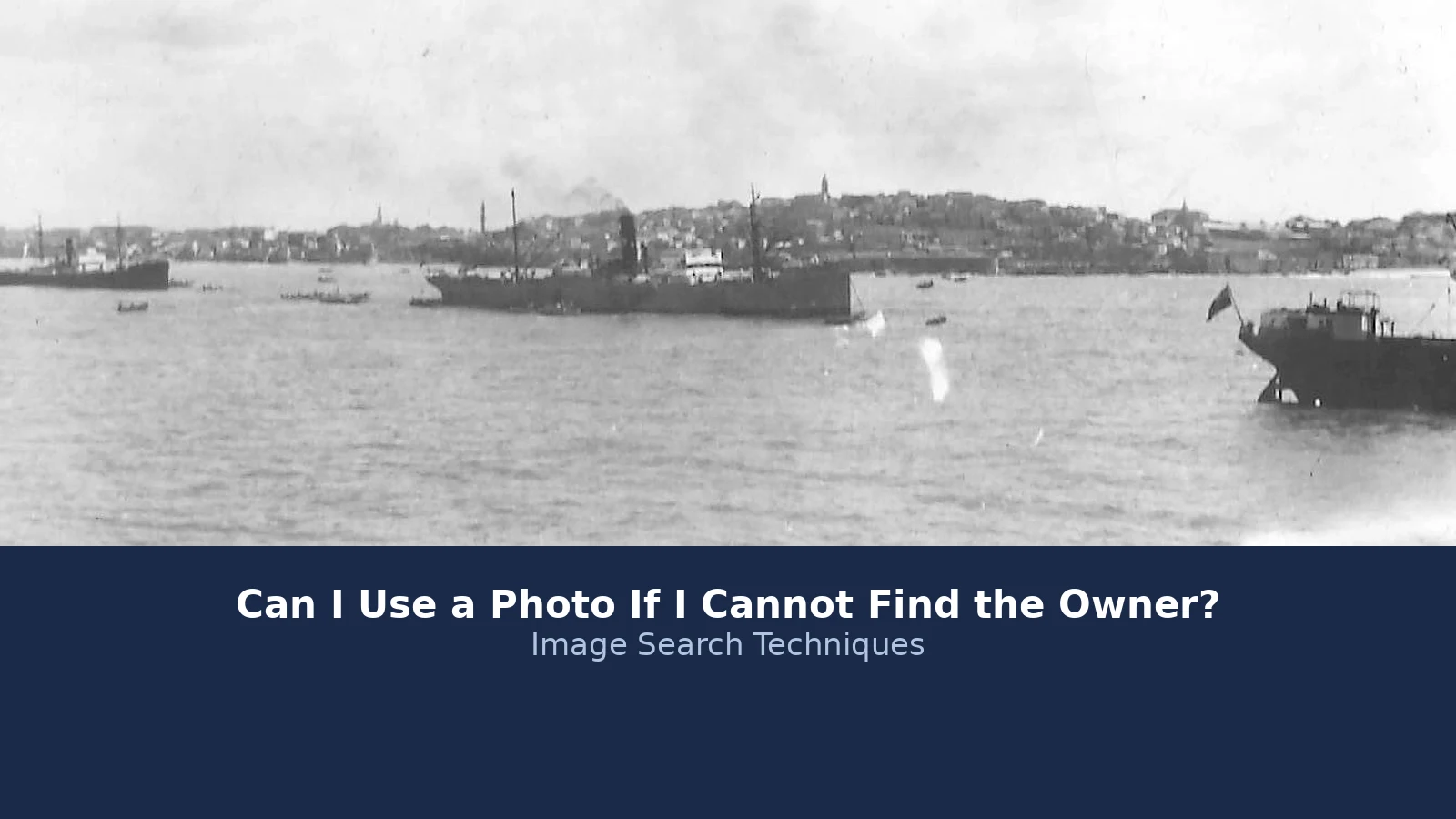
The photo is “Photograph of Egypt, Alexandria”, a harbour scene with steamships in front of the Alexandria skyline. Its Wikimedia Commons file page says the photo was taken in the late nineteenth or early twentieth century, dates it to 1 January 1904, names the source as the Borthwick Institute for Archives at the University of York, and names the author as “Unknown author”. It is part of a digitised glass slides collection from the archives of the Society of the Sacred Mission, and some of the photographs come from the American Colony Jerusalem photographers. The file page marks it public domain, with a CC Public Domain Mark 1.0. The image is 1,343 by 884 pixels and 65 KB. This is the kind of photo bloggers find and assume is safe, so it is the right photo to test.
Here is the search log, step by step, with honest results including the failures.
Google Lens: failed, not zero. Lens never processed the image. Four attempts by image URL all ended the same way: a long “Thinking” pause, then “Expired visual search”, and an Exact matches tab that said “No image at the URL”. The result is 0 exact matches and 0 visual matches, but those zeros mean the search did not run, not that the photo exists nowhere. A failed search is a failed search, and the log says so.
TinEye: 1 result. TinEye searched 86.8 billion images and returned exactly 1 result. Its first indexed date for the photo is 12 April 2026, and the single result is an Alamy listing. That makes the Alamy page the earliest dated copy TinEye knows about. TinEye also showed 21 sponsored Shutterstock thumbnails, but every one was a different ship photograph, not this photo, and sponsored thumbnails are adverts, not matches. Note the figure: TinEye searched 86.8 billion images in this test. One well known guide to orphan works still quotes 31 billion, which is years out of date.
Yandex: found it, but only on Wikimedia Commons. Yandex recognised the scene and tagged it in Russian as a torpedo boat, warships, and a 19th century steamship. Its similar images grid showed about 27 thumbnails on the first screen, and the first one was the photo itself, on its Wikimedia Commons file page. The other thumbnails were other old harbour and naval photographs. Under “sites with information about the image” there were only 5 entries, and all five were on Wikimedia Commons: the file page and its categories. No other site, and no photographer named.
Metadata: almost empty. The file page metadata section holds exactly one field, “IIM version: 2”. There is no author, no copyright notice, no camera, no scanner, and no digitisation date. That is common with old scanned photos. Uploading and downloading also strips metadata, and the GOV.UK notice points out that deliberate removal of metadata that identifies the copyright owner is unlawful, though accidental loss happens all the time.
Stock libraries: found on Alamy, blocked on Getty. Alamy sells the photo as “Photograph of Egypt, Alexandria”, image ID 3E7C73M, rights managed, contributor “Cab Image”, a larger 1,743 by 1,147 pixel file, with a personal licence from $23.00. Read Alamy’s own note carefully: “Access rights only. This is a handout or public domain image supplied by a third party. Alamy grants access to the digital file but provides no warranties regarding copyright or moral rights.” Cab Image is a distributor, not the photographer, and Alamy is selling access to the file, not ownership of the copyright. A text search for the exact phrase “Alexandria Egypt harbour 1904” on Alamy returned 0 results, which shows how little a keyword search tells you. Shutterstock showed no match. Getty Images could not be checked at all: the whole site returned a Cloudflare block page on every attempt, so Getty is recorded as blocked, not as zero.
Conclusion: the owner was not found. No engine named a photographer, the metadata is empty, and the one commercial copy is a distributor selling access to a public domain handout with no copyright warranty. For this particular photo, the Commons copy is the safest version to use, because its public domain marking rests on the 1904 date and the unknown author, and the source is credited as the Borthwick Institute for Archives and the Society of the Sacred Mission glass slides collection. Keep the search log with the photo. And remember the warning inside this result: if you had found the photo on Alamy first and stopped there, you might have paid $23 for a licence to a photo that is already public domain, or assumed Alamy owned it. A diligent search is what stops that mistake.
What is the UK orphan works licence?
Short answer: The UK lets you apply to the Intellectual Property Office for a licence to use an orphan work, for commercial or non-commercial use, in the UK only, for up to seven years.
This is the part the best known guide to this question misses entirely. LegalClarity’s orphan works page is a thorough US guide, but it has no UK side at all: no UK law, no IPO scheme, no licence fees, and no UK diligent search. If you are publishing from the UK, the IPO scheme is the route that matters, and it works like this.
Anyone can apply, for any type of orphan copyright work, for commercial or non-commercial use. Before you apply, you must check that the work is still in copyright, check whether any copyright exception covers your use, and carry out a diligent search using the IPO’s published guidance. You complete the IPO diligent search checklist as one PDF and upload it with your application, along with an image of the work if it is a photograph. The full scheme is set out in the IPO’s orphan works guidance.
| Item | What it costs |
|---|---|
| Application fee, 1 work | £20 |
| Application fee, 2 works | £24 |
| Application fee, 5 works | £30 |
| Application fee, 10 works | £40 |
| Application fee, 20 works | £60 |
| Application fee, 30 works | £80 |
The application fee is non-refundable and is paid by card when you submit. The licence fee itself is separate, and it varies by work. It is calculated and shown at the start of the online application, and some licence fees are price on application. After you apply, the IPO emails a receipt, adds your application to the orphan works register, and aims to contact you within 10 working days. If the licence is granted, you must include the IPO contact details and your application number when you use the work, and credit the right holder if they are known.
The licence has limits, and they matter. It covers use in the UK only, it is non-exclusive, and it lasts up to seven years, after which it can be renewed. If the right holder comes forward, no further licences are issued for that work, and the right holder can claim the licence fee you paid. An application is refused if there was no proper diligent search, if the proposed treatment of the work is derogatory, or if it is not in the public interest. A right holder can also stop an application before a licence is issued. None of this is a free pass. It is a permission slip you pay for, after proving you looked properly.
How does the US handle orphan works?
Short answer: The US has no orphan works licence and no safe harbour, so an American blogger has fewer options than a British one, and must rely on fair use, public domain, or a licensed alternative.
The US Copyright Office studied orphan works, held roundtables in March 2014, and published a final report, “Orphan Works and Mass Digitization”, in June 2015. Its verdict was blunt: for good faith users, orphan works “are a frustration, a liability risk, and a major cause of gridlock in the digital marketplace.” But the study led to no law. The Copyright Act still contains no orphan works provision, and bills to create one failed in 2006 and 2008. There is no American version of the IPO licence to apply for.
What the US does have is fair use, under Section 107 of the Copyright Act. Fair use is decided case by case on four factors: the purpose of the use, the nature of the work, the amount used, and the effect on the market for the original. A small, credited, non-commercial use that does not substitute for the original has a stronger argument than a large commercial use, but no factor on its own settles the question, and fair use is a defence in court, not a permission slip. Do not confuse it with UK fair dealing, which is a narrower set of named exceptions, such as criticism, review, and private study, and works differently.
There are two smaller US routes worth knowing. Section 108(h) lets libraries and archives use works in the last 20 years of their copyright term for preservation, scholarship, and research, after a reasonable investigation, with no commercial exploitation. And the Copyright Claims Board, set up under the CASE Act in 2022, offers a cheaper forum for small copyright claims, capped at $30,000 per case and $15,000 per work, with a 60 day opt out window. Neither route helps an ordinary blogger use an orphan photo on a commercial site, but both show how the US system treats small claims and good faith.
| Point | UK | US |
|---|---|---|
| Orphan works licence | Yes, from the IPO | No scheme exists |
| Safe harbour for good faith use | No, the licence is the route | No |
| Diligent search | Required before a licence | Good practice, shows good faith |
| Main exception | Fair dealing, narrow named exceptions | Fair use, four factors, case by case |
| Copyright duration | Life of creator plus 70 years | Life plus 70 years, or 95 years for works for hire |
What should I use instead of an uncredited photo?
Short answer: Use a photo whose owner you can name: a public domain image, a properly licensed stock photo, a verified Creative Commons image, or one you take yourself.
The simplest answer to this whole question is to pick a different photo. The GOV.UK notice says it first: try to find an alternative image that can be licensed through the creator or a picture library. A licensed alternative removes the problem entirely, and it usually takes less time than a full diligent search.
Start with the public domain. Archives, museums, and libraries publish large collections of out of copyright photographs, and a photo that is genuinely public domain needs no permission. Check the date and the source before you assume anything, and keep the record of why you concluded the copyright had expired. If you are unsure, our complete guide to protecting your photos online sets out the checks in one place.
Next, look at licensed stock. Free libraries such as Unsplash and Pexels, and paid libraries such as Alamy and Shutterstock, give you a licence you can rely on, as long as you read the licence terms. Watch the traps: a licence covers the photographer’s copyright only, not the people, trademarks, or property in the frame, and a free photo can still be a stolen upload. Before you publish any stock photo, run the checks in our guide to how to check a photo licence before you use it.
Finally, consider taking the photo yourself or commissioning one. A photo you took is yours to use, and a commissioned photo comes with terms you agree in advance. It sounds like more work than downloading an old photo, but it is less work than a diligent search, a licence application, or a claim letter. And if the photo you wanted is truly irreplaceable, that is the sign to do the diligent search properly and, in the UK, to apply for the licence, rather than to hope nobody notices.
The rule to carry away is short. Not finding the owner does not make a photo free. Search properly, keep the log, and if the search fails, use the licence route or pick another photo. The photo will still be there tomorrow, and so will its owner.
FAQs
Can I use a photo if I cannot find the owner?
No, not safely. Copyright still applies even when the owner cannot be found, and the photo is called an orphan work. Using it without permission can still be infringement. Check first whether it is public domain, then run a diligent search, and in the UK consider an orphan works licence before you publish it.
What is an orphan work?
An orphan work is a copyright work whose owner is not known or cannot be located, even after a proper search. The word orphan describes the missing owner, not a free photo. Copyright in a UK photograph usually lasts for the life of the creator plus 70 years, so an orphan work can stay protected for decades.
Does crediting an unknown photographer make it legal?
No. Adding a credit line such as photo unknown does not give you permission, and it can work against you because it shows you knew the owner was missing. Credit is not a licence. If you cannot find the owner, you still need a licence, a copyright exception, or a public domain finding before you use the photo.
How much does a UK orphan works licence cost?
In the UK, the application fee for an orphan works licence is £20 for one work, rising by £2 per work to £80 for 30 works. The licence fee itself is separate and varies by work. A licence covers use in the UK only, is non-exclusive, and lasts up to seven years, after which it can be renewed.
Can I use an orphan work in the US?
There is no orphan works licence or safe harbour in the US. The Copyright Act contains no orphan works provision, and bills to create one failed in 2006 and 2008. Your options are fair use, which is decided case by case, a public domain finding, or a licensed alternative. Documenting a diligent search helps, but it is not a defence.
What should I do if the owner contacts me after I use a photo?
Stop and read the message carefully, then take the photo down while you check the claim. Ask for proof of ownership and keep a copy of everything. Do not argue by email or offer a fee on the spot. If the claim looks genuine, take advice and settle it quickly.






