


🔎 Reverse Image Search
Image search techniques made simple: upload a photo or paste a URL and search 6 engines at once. 100% free, nothing stored.
🔒 Your image is never stored on our servers longer than 24 hours and is never shared.
A cash app impersonation scam copies a real person’s photo and $cashtag, then asks you to pay the lookalike account. Check the $cashtag character by character, tap the profile and look at its history, reverse-search the photo, and confirm with the real person on a channel you already trust. Two minutes of checking stops a payment you cannot undo.
It usually starts with a message that looks like it came from someone you know. The photo is right. The name is right. The story is urgent: a new phone, a blocked card, rent due tonight, a refund that needs verifying first. You tap the payment request, and everything feels normal, because the face on the screen is a face you trust.
That is the whole trick. A cash app impersonation scam is a photo problem before it is a payment problem. The scammer does not hack Cash App. They copy a photo, build a $cashtag that looks almost identical to the real one, and let your eyes do the rest. Cash App payments are instant, and Cash App says a completed payment generally cannot be cancelled, so the check has to happen before you tap send, not after.
This guide covers impersonation accounts only: fake profiles, lookalike $cashtags and copied photos. If the scam is a screenshot of a payment, that is a different problem, and our fake payment screenshot guide owns it. This article does not re-teach screenshots. It sits inside our photo scams complete guide, which collects every photo-based scam check on this site.
What is a cash app impersonation scam?
A cash app impersonation scam is a fraud in which a scammer creates a Cash App account using another person’s name and profile photo, then asks that person’s friends, family or customers to send money to it. The victim pays the wrong account, the money moves instantly, and the scammer disappears.
It works in three moves. First, the copy. The scammer takes a profile photo from somewhere public: a social media post, a business page, a marketplace listing, a friend’s tagged photo. Then they pick a $cashtag close to the real one. A $cashtag is Cash App’s unique username. It starts with a dollar sign, it can be at most 20 characters long, it must contain at least one letter, and no two accounts can share one. Because the tag is unique, the scammer cannot take the exact tag. They build one that looks the same at a glance, and that is enough.
Second, the approach. Sometimes the clone sends a payment request with a short, urgent note. Sometimes it sends a message first: “Hey, it’s me, new phone, can you send this back?” Sometimes it does nothing at all. It sits in a marketplace listing, a giveaway post or a comment thread, waiting for someone to pay it. The same stolen-photo trick powers romance fraud too: a stranger builds trust over weeks with a borrowed face, then invents an emergency. If the person asking for money is someone you only know online, read our guide to spotting a catfish as well, because the photo check in this article is only half of that problem.
Third, the pressure. The request is always time-sensitive. Before tonight. My phone dies in an hour. The landlord is waiting. Urgency is the tell. A real friend can wait two minutes while you check. A scammer cannot afford those two minutes, because that is exactly how long the check in this guide takes.
The scale is not small. In 2024, people in the United States reported losing $391 million to scams paid through a payment app or service, across 90,571 reports, according to the FTC’s Consumer Sentinel Network Data Book 2024. The FTC’s category covers payment apps and services, including Cash App, Venmo and PayPal. Those are reported losses, not a survey, and most victims never report at all, so the real figure is higher. The photo is what makes this version of the scam work, and the photo is also what gives it away, if you know where to look.
How does a $cashtag lookalike work?
Your eyes read whole words, not single letters. You see $MayaReyes and your brain registers “Maya Reyes, that’s her”, without checking whether the tag in front of you says $MayaReyes or $MayaReyes_ or $MayaReyez. Scammers build their tags around that habit. They change one small thing, and the tag still looks right on a phone screen.
The table below is the decoder. The names are made up, to show the pattern, not to point at any real account. Read the left column, then look at the pairs in the middle column and notice how little changes.
| The trick | Real tag vs lookalike (made-up example) | Why it fools you |
|---|---|---|
| Zero for the letter O | $JohnSmith vs $J0hnSmith | On a phone screen, 0 and O are almost the same shape. |
| Number 1 for a lower-case L | $AlexStone vs $A1exStone | 1 and l look identical in many app fonts. |
| rn for the letter m | $SamCook vs $SarnCook | The pair rn reads as m when you scan quickly. |
| An underscore added | $MayaReyes vs $Maya_Reyes | An underscore is easy to miss inside a name. |
| Digits added at the end | $MayaReyes vs $MayaReyes22 | You read the name and stop before the numbers. |
| A letter doubled | $MayaReyes vs $MayaReyess | Two s’s where there should be one barely register. |
| A letter dropped | $MayaReyes vs $MayaReye | A missing letter at the end is the hardest change to spot. |
Two things make the decoder worth using every time. First, the display name can be identical. Display names are not unique on Cash App, so the scammer can copy your friend’s name exactly, letter for letter. Only the $cashtag is unique, which is why the $cashtag is the part to compare. Second, the tag is easy to check without paying anything. Open the profile in Cash App and the $cashtag is shown there. You can also type cash.app/ followed by the $cashtag into a browser, which opens the public profile page for that tag. If the name on that page is not the person you expected, stop.
A lookalike tag is the commonest version, but it is not the only one. A scammer can also use a completely different $cashtag and rely on the photo alone, especially in a direct message where you never see the tag at all. That is why the tag check is necessary but not enough. The next section runs the full check, tag and profile together.
The 4-tap check to run before you pay
Run this before every payment to a $cashtag you have not paid before, and before every payment that arrives with an urgent story attached. It takes about two minutes.
- Tap 1: read the $cashtag out loud, letter by letter. Open the profile inside Cash App and compare the $cashtag with the one you already have saved, character by character. If the request arrived by text, email or social media, do not trust the $cashtag printed in the message. Open the app and type the tag yourself, or open cash.app/ plus the tag in a browser and read the name on the profile page. If even one character differs, treat it as a different person, because on Cash App it is.
- Tap 2: look at the profile itself. Check the photo, the display name, and any history you can see. A brand-new account with no history and a copied photo is a warning sign. If it is meant to be your friend, does the account show the same friends, the same old payments, the same details you remember? A clone is usually days old. It has no past to contradict the story, and most people never look.
- Tap 3: reverse-search the profile photo. Save the photo and run it through our free reverse image search tool. If the same face turns up on a stock site, a Flickr archive, a business page or someone else’s social profile, the photo is borrowed. The worked example below shows exactly what that looks like, including the ways the engines can mislead you.
- Tap 4: confirm with the real person, somewhere else. Call the number saved in your phone, not a number in the message. Text the contact you already have. Ask them, in your own words, whether they sent the request. Do not reply inside the thread that asked for money. If they cannot confirm, do not pay. A real friend would rather you double-check than send money to a stranger.
Know what the check cannot prove. A clean result does not prove the account is real. A scammer can use a photo that was never indexed, or a photo taken from a private account. A real person can also have a brand-new Cash App account with no history. The check is not a verdict. It is a filter. It catches the commonest version of this scam, which is a copied photo on a lookalike tag, and it costs you two minutes.
What does the profile photo tell you?
The photo is the first thing you trust, and it is the easiest thing to test. A scammer can copy a name and fake a $cashtag, but they cannot make a borrowed photo into an original one. A reverse image search shows where else that exact photo appears on the internet. If it appears on a stock site, an old archive or another person’s profile, the account using it is not who it claims to be.
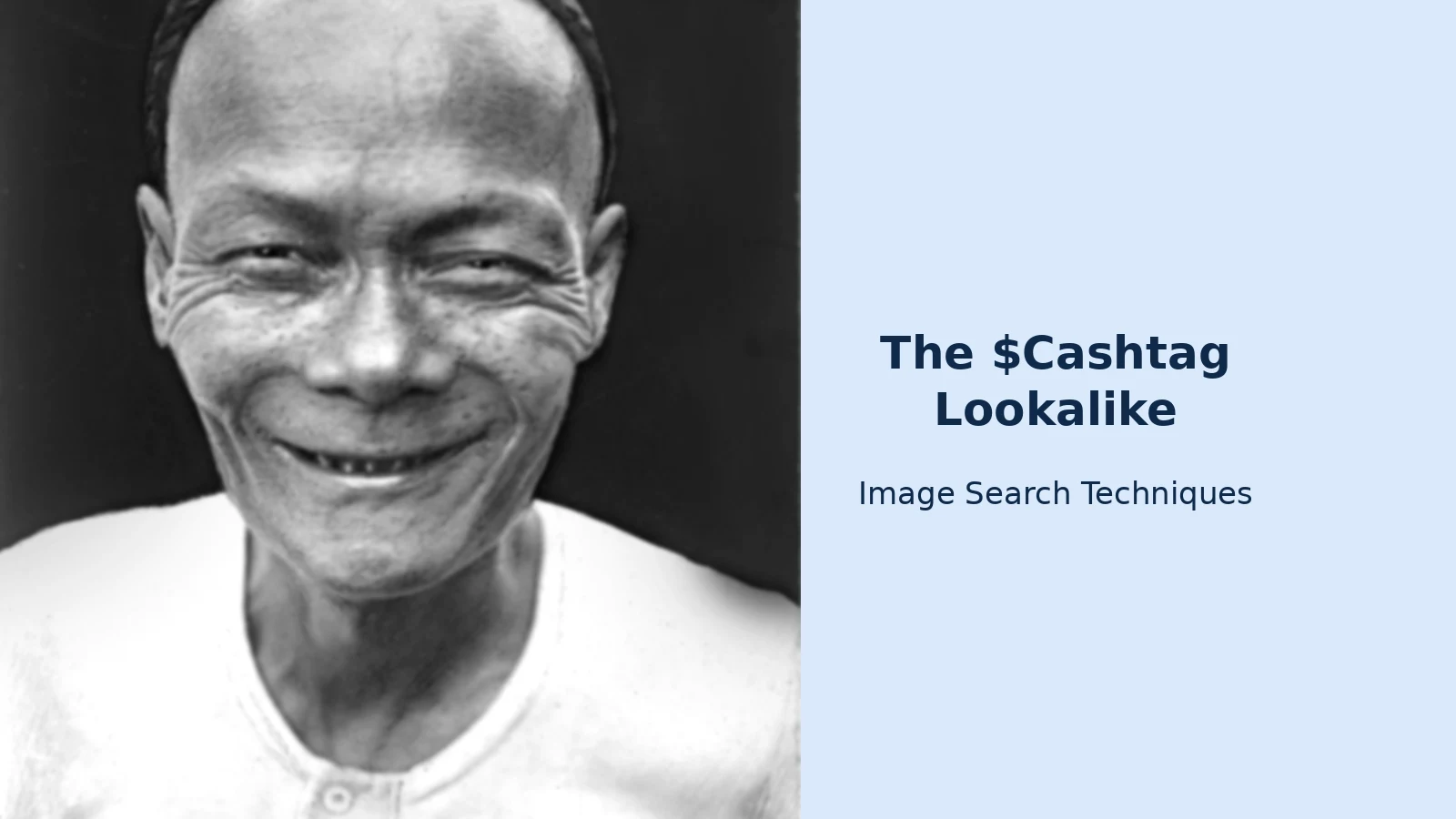
Our Venmo duplicate-account check runs the same photo test on a Venmo profile, and the lesson there is the same: the photo gives the scammer away more often than the username does. To show what the test looks like in practice, I ran a real portrait through our own reverse image search tool on 12 November 2026. The photo is a black-and-white portrait of a smiling man from around the 1930s, held in the UBC Library Chung Collection and listed as having no known copyright restrictions. It was originally posted on Flickr, and it is also on Wikimedia Commons. If a scammer had used this portrait as a Cash App profile photo, here is what each engine would have told me.
| Engine | What happened | What it tells you |
|---|---|---|
| Google Lens | Worked, after a CAPTCHA. 21 exact matches. Its AI Overview described the photo as an unidentified smiling Chinese man from the UBC Library Chung Collection, circa 1930s. Top matches were the exact portrait on Flickr, Fine Art America and Alamy. The exact Commons file page did not appear. | The true source was found, and the man was correctly left unidentified. |
| TinEye | Worked. Exactly 3 results, all Alamy stock pages, first indexed 23 August 2021, from 86.7 billion images searched. No Flickr result and no Commons result. | A real result, but a thin one. One engine alone would have missed the source. |
| Bing | Worked, but misidentified the man as “Chen Kai Guo”, a first-year PhD student at Peking University, with 118,000 results. It showed 40 visual matches, the first two the exact portrait, and 5 pages with the image, 3 of them Alamy. | The copies were found, but the name was plainly wrong for a photo from the 1930s. |
| Yandex | Worked. Descriptive tags only, no name. 10 sizes including the original 1254 by 2000. 24 similar images, the first the exact portrait. Its Sites tab was headed by Flickr, the original source. | The original source was found, with no name attached. |
| Not a visual search. The tool opened a keyword search for the host domain and showed 24 unrelated pins. Pinterest’s own Lens needs a file upload and has no paste-URL option. | Pinterest cannot do this job from an image link. Do not count it as a check. |
Three lessons come out of that test. First, run more than one engine. TinEye found 3 copies while Lens found 21 exact matches, so a single engine can understate the problem badly. Second, trust the source trail, not a name one engine guesses. Lens and Yandex both traced the photo to its real home, the UBC Library collection on Flickr, and both left the man unnamed. Bing found the copies and then attached a false modern identity to a man photographed ninety years ago. If you had trusted Bing’s name, you would have “identified” the wrong person entirely. Third, a photo that appears on a stock site or an old archive is not the profile owner’s photo. It is borrowed, and a borrowed profile photo on a payment request is a reason to stop, not a reason to pay.
One honest note about the test itself: the tool’s “Search All” button opened only the Google Lens tab, so I ran the other engines one by one from the tool. That is a quirk of the tool, not a failure of the method, and the results above are what each engine actually returned on 12 November 2026.
What does the blue checkmark actually prove?
Cash App marks its own official accounts with a blue checkmark. Its help page says payments from Cash App come from the verified account, shown with a blue checkmark. That badge means one thing: the account is Cash App’s own.
It does not mean what most people think it means. A blue checkmark in a screenshot proves nothing, because a screenshot is easy to fake. A checkmark on a social media profile is a different platform’s badge, and it says nothing about a Cash App account. And ordinary Cash App users do not carry the blue checkmark, so its absence on a friend’s profile means nothing at all. The check to run is the one in this guide: the $cashtag, the profile, the photo, and a confirmation on a channel you already trust.
Cash App’s own scam guidance, on its official help page about avoiding scams, sets out the same boundary. Real Cash App support will never ask for your PIN, your sign-in code, your Social Security number or your full card number. It will never ask you to send money to “verify” anything, and there is never a valid reason to send money to an account claiming to be Cash App or Cash App support. If someone does any of those things, Cash App’s own advice is to end the conversation at once and contact support through the app.
You already paid the wrong person. What now?
First, do not panic, and do not send more money. Then work through these steps in order, and save everything as you go: screenshots of the profile, the $cashtag, your chats and the payment details.
- Report it inside Cash App. Open your Activity tab, tap the payment, and choose Report an issue. To report the account itself, open the profile, scroll to the bottom and tap Report. Blocking the account does not create a formal report, so do both if you can: report first, then block.
- Contact Cash App support and ask them to investigate. Reach support through the app, or call 1 (800) 969-1940, which Cash App says is the only phone number for its support team. Be direct about the limit: Cash App says a completed payment generally cannot be cancelled, so ask what investigation and dispute options exist for your case rather than assuming a refund.
- Call your bank if you paid from a linked card. If the money came from a linked debit card, your bank may have a dispute route that Cash App does not. Call the number on the back of your card and ask. Do this the same day. Time matters more than paperwork here.
- File a report with the FTC. Go to ReportFraud.ftc.gov and file a report with the $cashtag, the amount, the date and what happened. The FTC shares reports with law enforcement, and your report helps build the picture of how these scams run. It does not resolve individual cases, and the FTC says so plainly.
- Watch for the recovery scam. After a scam, a second scammer often appears offering to get your money back for a fee, or asking for your sign-in code to “reverse” the payment. That is a scam too. Nobody legitimate charges a fee to recover your money, and nobody from Cash App will ever ask for your sign-in code.
This guide is general information, not legal or financial advice. If a large sum is involved, or the scammer has your personal details as well as your money, speak to your bank and consider reporting it to the police as well as to Cash App and the FTC.
Can someone steal money with just my $cashtag?
No. A $cashtag alone lets someone find your profile and send you money, but it does not give them access to your account. The danger runs the other way: a scammer can copy your $cashtag’s look and your photo to trick your friends into paying the wrong account. Never share your PIN, sign-in code or password.
How do I report a fake Cash App account?
Open the profile in Cash App, scroll to the bottom and tap Report, then follow the prompts. To report a payment, open the Activity tab, tap the payment and choose Report an issue. Save screenshots of the profile, the $cashtag and your chats first, then file a report at ReportFraud.ftc.gov as well.
Can Cash App reverse a payment sent to the wrong person?
Usually not. Cash App says completed payments are instant and generally cannot be cancelled, so the check has to happen before you tap send. Report the payment in the app at once and ask support to investigate. Your bank may be able to help if you paid from a linked debit card, so call them the same day.
Does a blue checkmark mean a Cash App account is safe?
A blue checkmark marks Cash App’s own verified accounts, and it is the one badge Cash App itself describes. It does not appear on ordinary users’ profiles, and a checkmark pasted into a screenshot or a social media bio proves nothing. Check the $cashtag and the profile in the app itself, not the badge in a picture someone sent you.






