


🔎 Reverse Image Search
Image search techniques made simple: upload a photo or paste a URL and search 6 engines at once. 100% free, nothing stored.
🔒 Your image is never stored on our servers longer than 24 hours and is never shared.
Short answer: A Venmo impersonation scam copies your friend’s profile photo and username, then sends you an urgent payment request. Before you pay, tap the profile, compare the username character by character, check the transaction history and friends list, and confirm with your friend outside Venmo. The check takes 60 seconds.
You get a Venmo request from someone who looks exactly like your friend. Same photo. Same name. A believable story, they are stuck, their card is blocked, they need the money back by tonight. It feels rude to doubt them, and the request is urgent, which is exactly the point. Scammers count on you paying first and checking later, because a Venmo payment sent to the wrong person is very hard to undo.
This guide shows you how to spot a copied Venmo profile in under a minute. You will learn what a cloned account looks like, how to compare it with your friend’s real account side by side, how to check the profile photo with a reverse image search, and what to do if you have already sent money. It sits inside our photo scams complete guide, which collects every photo-based scam check on this site. It covers impersonation only: if the scam involves a screenshot of a payment, our fake payment screenshot guide owns that problem, and this article does not re-teach it.
What is a Venmo impersonation scam? A Venmo impersonation scam is a fraud in which a scammer creates a new Venmo account using another person’s name and profile photo, then sends payment requests to that person’s contacts, pretending to be them.
How does the Venmo impersonation scam work?
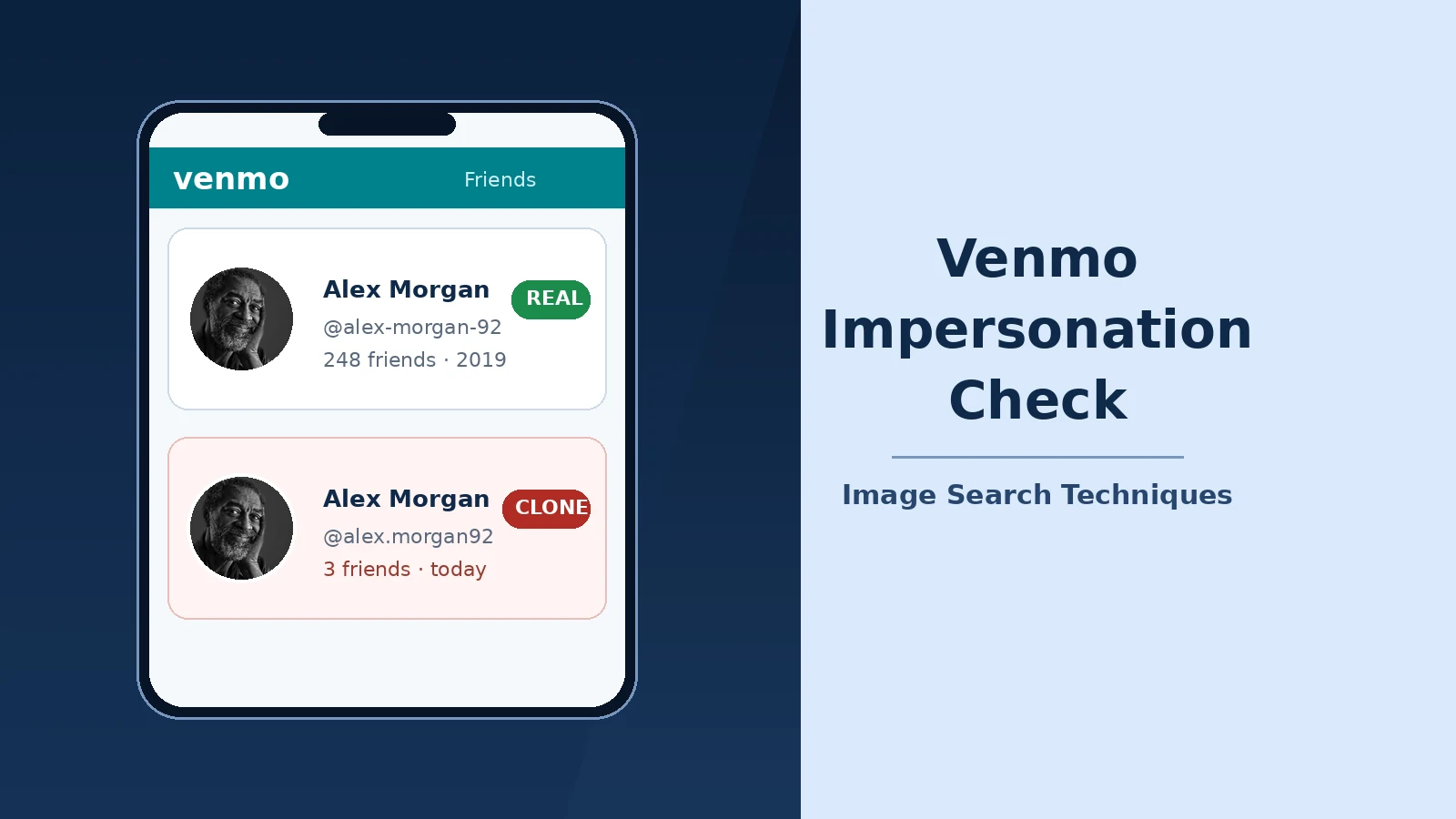
The scam starts with public information. Venmo’s public feed shows who has paid whom, and many people leave their transactions and friends lists visible to everyone. A scammer studies that feed, picks a person with plenty of contacts, and copies their profile photo and display name. Then they create a new account with a username that is almost, but not quite, identical to the real one. Venmo’s own help centre describes this exact pattern: a scammer may change their username and profile picture to impersonate someone you may know. The same stolen-photo trick powers romance fraud too: in a pig-butchering scam, the copied photo is used to build trust over weeks before any money is mentioned.
Next comes the approach. The clone sends you a payment request, often for a round amount such as $50 or $100, with a short, urgent note: “Hey, it’s me, new phone, can you send this back?” or “I’m stuck at the garage, please cover me and I’ll pay you tomorrow.” Sometimes the scammer flips the trick: they send you money first, then message you claiming it was a mistake and asking you to send it back. Either way, the pressure is the same, act now, think later.
The final ingredient is the photo. The profile picture is what your brain trusts first. You glance at the request, recognise the face, and your guard drops before you have read the username. That is why this scam is a photo problem before it is a payment problem, and why the fix starts with the photo and the profile, not with the money.
Three things make this scam effective. First, Venmo usernames are easy to imitate: swapping a hyphen for a full stop, adding a digit, or changing one letter is enough. Second, the clone’s account is brand new, so it has no transaction history to contradict the story, and most people never look. Third, the request usually arrives at a moment when you are busy, so the 60-second check feels like a delay you cannot afford. It is the cheapest minute you will ever spend.
What does a cloned Venmo profile look like?
A clone is built to pass a glance, not an inspection. Put the suspicious profile next to your friend’s real one and the differences appear quickly. The table below is the comparison to run through, every row is something you can check inside the Venmo app in seconds, without any special tool. The same tell-tale signs show up in dating-app fakes, so if you want more practice at reading a suspicious profile, see our guide to spotting a catfish.
| What to compare | Your friend’s real account | The clone account |
|---|---|---|
| Username | The one you have paid before; saved in your history | Nearly identical, a dot instead of a hyphen, an extra digit, one letter swapped |
| Profile photo | The photo you recognise, possibly updated over time | The same photo, copied, sometimes slightly cropped or lower quality |
| Account age | Months or years of history behind it | Created days or hours ago; no older activity at all |
| Transaction history | A long public or friends-only trail of real payments | Empty, or a handful of recent payments that look staged |
| Friends list | Overlaps with yours, mutual friends you both know | Almost no friends, and none you recognise |
| Payment notes | Ordinary, specific notes: rent, dinner, concert tickets | Vague or urgent notes, often identical across payments |
| How it found you | You have transacted with this person before | A new friend request or a request out of nowhere |
No single row proves anything on its own. A real friend can change their photo, and a genuine new account can have a short history. The verdict comes from the pattern: a copied photo plus a near-identical username plus a new account plus no shared friends is not a coincidence, it is a clone. Two or more of those signs together should stop any payment until you have verified the request another way.
The username deserves special attention, because it is the one thing the scammer cannot copy exactly. Venmo usernames are unique, so the clone must differ somewhere. Read it character by character, letter by letter, and compare it with the username in your own payment history. The differences are deliberately small: @alex-morgan-92 becomes @alex.morgan92, or @sarahjones becomes @sarahjones1. Your eyes will skip over it unless you slow down and check it like a password.
How do I run the 60-second duplicate-account check?
Do this the moment any Venmo request feels even slightly off, unusual amount, unusual urgency, a friend you have not heard from in a while, or a request that arrives late at night. Do not accept, decline, or reply first. Open the profile and work through the steps in order.
- Tap the profile photo on the request. Do not judge the request from the small thumbnail in your feed. Open the full profile so you can see the username, the friends count, and the transaction history together.
- Read the username out loud, character by character. Compare it with the username in your payment history for that friend. If even one character differs, a dot, a hyphen, a number, treat the account as a clone until proven otherwise.
- Check the transaction history. Venmo’s help centre says you can tap on a profile to confirm its public transaction history and network information, and that is exactly what this step uses. A real friend has a trail of payments stretching back months. A clone has almost nothing, or a few recent payments that all look alike.
- Check the friends list. A real friend’s account overlaps with yours: mutual friends, people you both pay. A clone’s list is empty or full of strangers. If you cannot see the friends list because of privacy settings, the history check in step 3 carries more weight.
- Reverse image search the profile photo. Save the photo and run it through a reverse image search. If the same photo appears on your friend’s real social profiles, that is consistent with a copy. If it appears on stock sites or on several unrelated profiles, it is stolen. It is the same photo-check method we use for fake dating profiles, and the next section walks through it properly.
- Contact your friend outside Venmo. Text them, call them, or message them on another app, using a number or contact you already have, never a number given in the suspicious message. Ask one question: “Did you just send me a Venmo request?” Venmo gives the same advice on its own help pages: when in doubt, reach out to your friend outside of Venmo to verify that the request is legitimate.
- Decide, then report. If your friend says no, do not pay, do not reply to the clone, and report the account from its profile menu. If your friend says yes, pay the real account, the one already in your history, not the one that just messaged you.
The whole flow takes about a minute once you have done it once. The step people skip is step 6, the outside check, and it is the only step that gives you a certain answer. Everything else is evidence; a message from your friend on a channel the scammer does not control is proof.
A note on what the check cannot do: a clean result does not prove an account is genuine. A scammer can steal a photo that has never been posted publicly, or use a brand-new photo, in which case a reverse image search finds nothing. That is why the check is a decision flow, not a single test, the username, the history, the friends list, and the outside message together are far stronger than any one of them alone.
How do I check a Venmo profile photo with reverse image search?
The photo step of the 60-second check is worth doing properly, because it is the step most people skip. Here is exactly how it works, tested on 11 November 2026 with a real portrait photo, a black-and-white portrait of a smiling bearded man, originally published as Pixabay image 2442565 and now hosted as a Wikimedia Commons file. I uploaded it to the free reverse image search tool on this site and ran it through the engines the tool offers, one by one, to see what each one actually finds.
Google Lens matched the photo to its source. Its exact-matches list included the Wikimedia Commons file itself, plus a string of pages reusing the same photo, a church site, a local newspaper, a counselling practice, and several stock-photo pages. That is the result you want when you suspect a copy: the same face, turning up in places the account owner has nothing to do with.
TinEye was the most precise. It reported 150 results across 86.7 billion images searched, first indexed the photo on 4 July 2017, and traced the earliest match to the original Pixabay file. If a Venmo profile photo has any history online at all, TinEye’s date-sorted results show you where it started, and a photo whose earliest appearance predates the account by years is a borrowed photo, not a new one.
Bing Visual Search went one step further and named the person in the photo, the Texas jazz saxophonist Dewey Redman, with Wikipedia and Find a Grave cards, alongside the same photo reused on blogs, a theatre site, and a wallpaper site. A name match like that is decisive: if the “friend” in the Venmo request is a named public figure, the account is a clone.
Yandex was the weakest of the four, returning only generic tags such as “black and white portrait” and a set of similar images, without surfacing the source file. And the tool’s Pinterest button did not reverse-search the photo at all, it opened a keyword search instead, so it contributed nothing to this check.
Two lessons follow from that test. First, run more than one engine: Lens found the source, TinEye dated it, Bing named the person, and Yandex found almost nothing, any single engine can miss what the others catch. Second, read the results the way the table above teaches you to read them: a match to a stock site, a news page, or a dead musician’s portrait is not a maybe, it is the answer. And remember the limit stated earlier, if no engine finds the photo, that proves nothing on its own, because the scammer may have used a photo that has never been posted publicly. That is when the username, the history, and the message to your friend outside Venmo do the work.
What should I do if I already paid the wrong account?
Act fast, and do not send a second payment to “fix” the first one. If the money is still showing as pending, you may be able to cancel it from the transaction itself, open the payment, look for a cancel option, and use it immediately. Once a Venmo payment completes, you cannot pull it back yourself, so the rest of this section is about recovery, not reversal.
First, message the real friend, the one in your payment history, and tell them what happened, so they know a clone is using their name. Then contact Venmo Support from inside the app: go to Me, then Settings, then Get Help, then Chat With Us, and ask for an agent. Explain that you paid an impersonator account, give the exact username you paid, the amount, and the date and time. Venmo’s help centre is clear that you should contact its Support team if you believe you have been the victim of a scam on Venmo.
Second, report the clone account from its profile and keep screenshots of everything: the request, the profile, the payment confirmation, and any messages. Screenshots are your evidence if the payment is disputed later, and they help Venmo’s team act on the account.
Third, report the fraud outside Venmo as well. In the United States, the Federal Trade Commission takes fraud reports at ReportFraud.ftc.gov, and a report there helps the authorities track impersonation patterns even when an individual payment cannot be recovered. If the amount is large, consider also filing a report with your local police and with the FBI’s Internet Crime Complaint Center. Keep your expectations honest: recovery is not guaranteed, and anyone who contacts you promising to recover the money for a fee is almost certainly running a second scam.
Finally, if you sent money because the clone tricked you into sharing a code or a password, change your Venmo password immediately and turn on every security option the app offers. Venmo states that its agents will never ask for the verification code sent to your phone, if someone claiming to be Venmo support asks for it, hang up.
How do I report a fake Venmo account?
Reporting is quick, and it protects the next person the clone would have targeted. Open the suspicious profile in the Venmo app, tap the three-dot menu in the top corner, and choose Report. Select the reason that fits, impersonation or scam, and add a short description: whose photo it copied, and that it sent you a payment request. Submit the report, then block the account from the same menu so it cannot send you further requests.
Impersonation is not limited to payment apps: scammers also impersonate government agencies, sending photos of badges and warrants to demand payment. Cash App has the same problem with lookalike $cashtags: our Cash App $cashtag lookalike check runs the same kind of test on a Cash App profile before you pay. Our guide to the fake badge photo scam explains why that photo proves nothing and the call-back check that exposes it.
Also warn your friend, because they are the victim too: their photo is being used to defraud their contacts. They can report the account themselves, and they may want to tighten their own privacy settings so scammers cannot harvest their contacts as easily in future. If the scammer contacted you by text message or email pretending to be Venmo itself, forward the message to Venmo’s phishing address rather than replying to it.
Reporting matters even when no money changed hands. Venmo relies heavily on user reports to find impersonator accounts, and a clone that is reported early is often removed before it reaches your friend’s wider circle. A report takes less than a minute, about the same as the check that caught the clone in the first place.
How can I stop scammers copying my own Venmo profile?
You cannot stop someone downloading your profile photo, if it is visible, it can be copied. What you can do is make yourself a harder target and a less useful one. Start with your privacy settings: set your transactions to Private so strangers cannot browse your payment history and work out who your friends are. Venmo’s own guidance points out that scammers use the public feed to find people who have transacted with your friend before, which is why a private feed removes their raw material.
Next, limit who can see your friends list. A public friends list is a ready-made target list for an impersonator: it tells them exactly who to clone and who to approach. Change it to friends-only or private, and review it occasionally for people you no longer know.
Finally, tell your friends how you will, and will not, ask them for money. A simple agreement helps more than any setting: “I will never ask you for money on Venmo without texting you first.” Then, when a clone arrives with an urgent request and no text, your friends already know it is not you. The same habit protects you in reverse: if a “friend” asks for money on Venmo without any message elsewhere, that silence is itself a warning sign.
Venmo is built for paying people you already know and trust, and impersonation scams work by exploiting exactly that trust. The defence is not suspicion of your friends, it is a 60-second habit that confirms which account you are actually looking at before any money moves. Run the check once, and the next clone will not even slow you down.
FAQs
Can someone create a fake Venmo account using my photo?
Yes. Anyone who can see your Venmo profile photo can download it and use it on a new account, because Venmo does not check profile photos against your identity. If it happens to you, report the clone from its profile menu, warn your contacts, and set your transactions and friends list to private.
How can I tell if a Venmo payment request is real?
Open the profile and compare the username character by character with the one in your payment history, then check the transaction history and friends list. A real friend has months of payments and mutual friends; a clone is new, nearly empty, and slightly misspelled. Finally, message your friend outside Venmo and ask if they sent it.
Will Venmo refund me if I paid a scammer?
Usually not. Venmo payments are designed as final transfers between people who know each other, so a completed payment cannot be pulled back by the sender. Contact Venmo Support from inside the app immediately, report the account, and file a report with the Federal Trade Commission. Recovery is possible in some cases, but it is never guaranteed.
Can a reverse image search prove a Venmo account is real?
No. A reverse image search can prove an account is fake when the photo turns up on stock sites or under another person’s name, but a clean result proves nothing, the scammer may have used a photo never posted publicly. Always combine the photo check with the username, the history, and a message to your friend outside Venmo.






