


🔎 Reverse Image Search
Image search techniques made simple: upload a photo or paste a URL and search 6 engines at once. 100% free, nothing stored.
🔒 Your image is never stored on our servers longer than 24 hours and is never shared.
You check in, drop your bag, and a small thought follows you into the room. Is someone watching? It is a fair question to ask in a hotel or a holiday rental, and this guide answers a question readers keep asking on Quora: how can you search for and find hidden cameras in hotels, Airbnbs and other rentals without carrying around any equipment?
Short answer: You can check a hotel room or rental with only your phone. Look at everything facing the bed, shower or toilet, sweep the room with your phone flashlight for a lens glint, look through your phone camera for infrared lights, and scan the Wi-Fi for devices you cannot explain. No single check finds every camera, so use all four.
The same checks work in a home you rent for months, not just a hotel room: our guide to landlord cameras in your rental explains what the rules allow and what to do if you find one.
That short answer is the whole method in one paragraph. The rest of this guide walks through each step properly, shows the checks working on a real hotel room photo, and explains what to do if you actually find something. Everything here uses the phone already in your pocket. There is no gadget to buy first.
What counts as a hidden camera in a hotel room?
A hidden camera is a camera placed where a guest would not expect one, usually inside an ordinary object, and used to record without the guest knowing. The lens can be as small as a pinhead. The camera itself can be built into a smoke detector, a clock, a USB charger, a TV or a picture frame. Some stream live video over Wi-Fi. Others record to a memory card and never send a signal at all. That split matters, because it decides which of your checks can see them.
Before the checks, it helps to know where you stand. Since 30 April 2024, Airbnb has banned security cameras and recording devices that monitor any part of a home’s interior, even if they are switched off or disconnected. Hidden cameras have always been prohibited under the same policy. That is Airbnb’s own rule, published in its Help Centre article on security cameras and other devices in homes. Outdoor cameras are still allowed, but only when the host discloses them and where they are in the listing. Vrbo takes the same line in its Use of Surveillance Policy: surveillance devices must never be used to monitor the inside of a vacation rental, including by pointing a camera in through a window from outside. Hidden or disguised devices are never allowed.
Hotels do not have one platform rule you can point to. A camera in a guest bedroom or bathroom is never normal in a hotel either, and secretly recording someone where they expect privacy is a crime in most places. The platform rules matter because they tell you what to do with what you find. A camera inside an Airbnb breaks Airbnb’s rules on its own, whatever the host says about it. The same goes for a Vrbo rental. Keep that in mind when you reach the reporting steps at the end of this guide.
How common is the worry? In a 2019 survey of more than 2,000 Airbnb guests by IPX1031, 58% said they worried about hidden cameras and 11% said they had found one. Those are self-reported answers from before Airbnb’s 2024 indoor camera ban, so read them as a sign the worry is common, not as a measured rate of cameras today. Real cases do exist. In South Korea in 2019, police said cameras hidden in motel TV boxes, wall sockets and hair dryer holders had filmed about 1,600 guests. In Maryland in 2023, a couple staying at an Airbnb found cameras inside the smoke detectors in the bedroom and the bathroom, according to Montgomery County Police. The risk is real enough to justify a ten minute check, and small enough that a calm, methodical sweep is the right response.
If you are still choosing where to stay, it is worth checking the listing photos before you book. Our guide to checking hotel photos before you book shows how to spot a listing whose pictures do not match the room. The same habit helps here: read the listing again on arrival and note any outdoor cameras or noise monitors the host has disclosed, so you know what should be there and what should not.
Where do hidden cameras usually hide?
A hidden camera needs three things: a view of something private, a power source, and an object nobody looks at twice. That narrows the search a lot. Start with anything that faces the bed, the shower, the toilet or the place where you get changed, then check anything plugged in for no clear reason.
In the bedroom, check first:
- Smoke detectors and air purifiers on the ceiling or high on a shelf, especially ones that look new, bulky or slightly off centre.
- Alarm clocks, radios and speakers on the bedside table, facing the bed.
- USB chargers, power strips and wall adapters, which have constant power and are easy to overlook.
- TVs, set-top boxes and streaming sticks opposite the bed.
- Picture frames, books, lamps and decorations that face the bed.
- Anything with a small dark hole, a lens behind a gap, or a wire going somewhere it should not.
In the bathroom, check first:
- The shower head and anything mounted above or opposite the shower.
- The mirror, including the wall behind it and the light fitting above it.
- Tissue boxes, soap dispensers, toothbrush holders and other small objects at face height.
- Vents, extractor fans and anything screwed to the wall facing the toilet.
In the living room, check first:
- The TV and anything on the shelf below or opposite it.
- Picture frames and decorations facing the sofa or seating area.
- Bookshelves, lamps and routers, which often sit at just the right height.
Look at each object closely rather than glancing at it. Pick up clocks and chargers you do not need and turn them to face the wall, or unplug them. A charger with no phone attached to it and no reason to be there deserves a second look. Read the model label on anything odd. A quick search of the model name can tell you whether the object is supposed to have a lens at all, though you should not need to do that for every item in the room.
What is the no-kit room sweep?
This is the Ranking Asset of this guide: a checklist to find hidden cameras in hotels with nothing but your phone, in about ten minutes, as soon as you arrive and before you unpack. Do it in the bedroom first, then the bathroom, then the living area. Each step looks for a different clue a camera gives off. A camera that slips past one step rarely slips past all of them.
| Step | What to do | What it catches | Time |
|---|---|---|---|
| 1. Read the listing | Re-read the listing for disclosed outdoor cameras or noise monitors, so you know what should be there. | A camera that was disclosed, and should not be indoors anyway. | 1 minute |
| 2. Look with your eyes | Walk the room. Check everything facing the bed, shower or toilet. Look for small holes, odd wires and objects that seem out of place. | Obvious hiding spots and anything plugged in for no reason. | 3 minutes |
| 3. Flashlight sweep | Turn off the lights and close the curtains. Hold your phone flashlight close to your eye and sweep slowly, one wall at a time. | A lens glint, even from a camera that is switched off. | 2 minutes |
| 4. Infrared check | In the dark room, look through your phone camera for small purple or white dots that glow. | Night vision cameras with their infrared lights on. | 2 minutes |
| 5. Wi-Fi scan | Join the room Wi-Fi and run a network scanner app to list the devices on the network. | Cameras streaming on the rental network, named by brand. | 2 minutes |
| 6. Mirror check | In the bathroom, press a fingertip against the mirror and look for a gap between finger and reflection. | A possible two-way mirror, which needs a closer look. | 30 seconds |
Work through the steps in order. The visual check tells you where to aim the flashlight. The flashlight sweep tells you what to look at through the camera. The Wi-Fi scan covers the cameras the physical checks cannot see, and the ones the physical checks can see but you missed. Nothing here needs a purchase, and nothing here needs a second person.
A real room, walked through step by step
Here is the sweep applied to a real hotel room, so you can see how the steps land on ordinary objects. The photo below is a genuine hotel bedroom in Tallinn, photographed in October 2023 and shared on Wikimedia Commons under a CC BY-SA 4.0 licence. It is not a staged example. It is the sort of room you actually check into, and it holds every hiding spot on the list above.
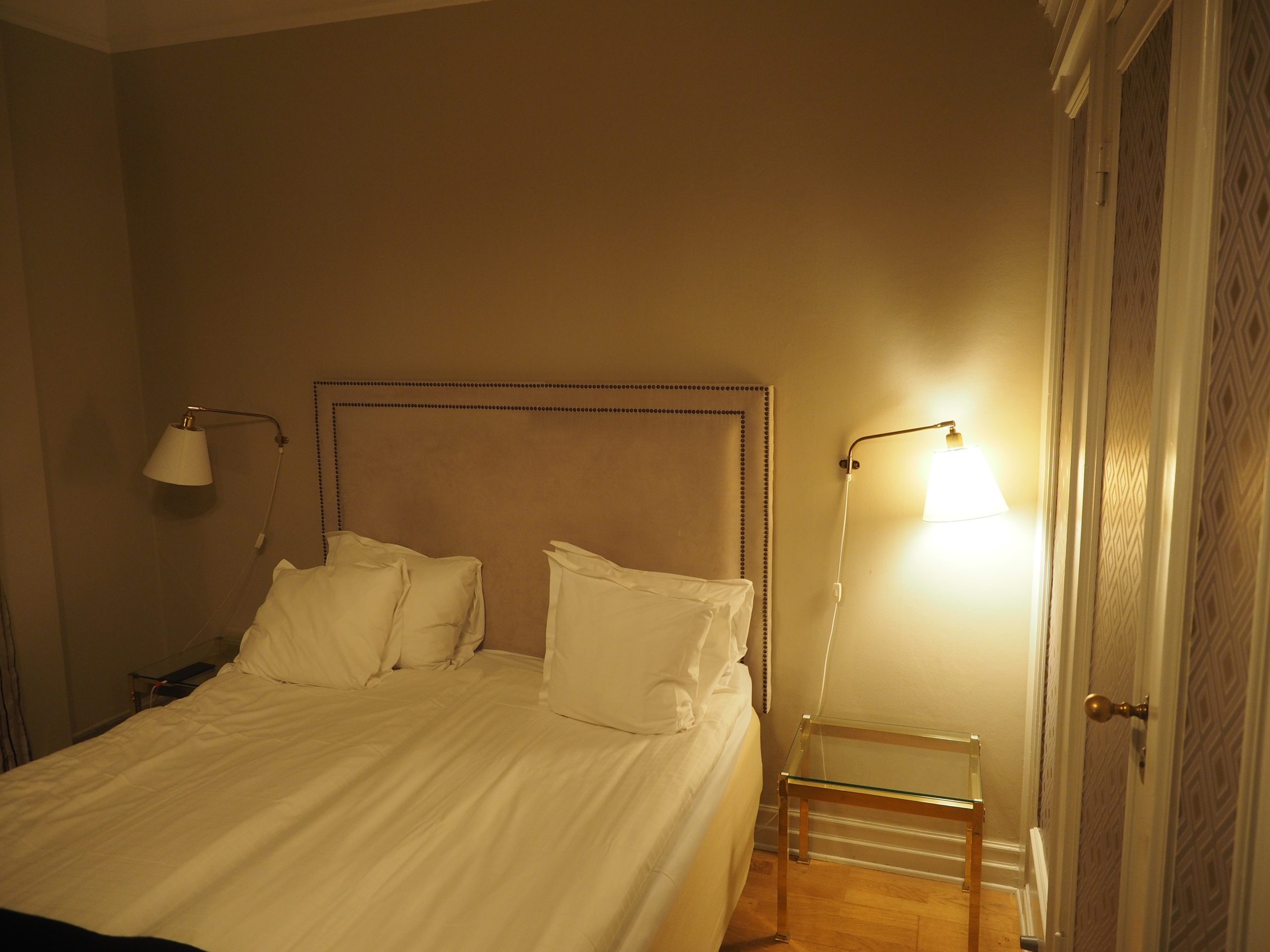
Start at the beds, because that is where a camera would point. Two beds fill the frame, with a shared headboard and a bedside table between them holding a lamp and a telephone. Step two of the sweep, the look with your eyes, would start here. The lamp is a classic hiding spot: it faces the beds, it has power, and nobody looks twice at a lamp. Check the base, the shade and the stem for a small dark hole. The telephone is the same shape of object, plugged in and facing the beds. Pick it up, look at the front and the sides, and check where its cable goes.
The framed picture on the wall above the beds is next. A frame facing the beds is exactly the view a hidden camera wants. Look at it from the side. A lens behind glass shows as a small dark circle, and a frame that is thicker than it needs to be is worth a closer look. The sockets and light switches by the bedside table are the power source for the whole corner, so check anything plugged into them and anything screwed to the wall nearby. The headboard itself is wide and flat, with a seam along the top edge. Run your hand along that seam and look for a pinhole facing the beds.
What the photo cannot show is just as important. The smoke detector is out of frame, above the camera, and it is the first object to check in a real room because it has a ceiling view of the whole bed. The bathroom is through the door on the right, and it needs its own pass with the same steps. The photo also cannot show the Wi-Fi network, which is why step five of the sweep exists. A photo walk-through teaches the order of the checks. The real check happens in the room itself, with the lights off and the phone in your hand.
The point of working through a real room instead of a diagram is that ordinary rooms are full of objects that could hide a camera and almost never do. The lamp in this photo is just a lamp. The telephone is just a telephone. The sweep is not about suspecting every object. It is about giving each one ten seconds of attention, in order, so the one object that is not what it seems has nowhere to hide.
How does a flashlight find hidden cameras in hotels?
A camera lens reflects light straight back toward its source. That is the whole trick. In a dark room, a small lens shows up as a tiny, sharp point of light, often blue, purple or white. Glass, metal trim and dust can glint too, so a glint is a reason to look closer, not proof on its own. Move nearer, change the angle slightly, and see whether the bright point stays sharp and round. A lens keeps its shape as you move. A speck of dust does not.
Do it this way. Close the curtains and turn off all the lights, including the bathroom light and the TV standby glow. Hold your phone flashlight right beside your eye, not out at arm’s length, so the light travels the same path your eyes look along. Sweep slowly, one wall at a time, pointing the light at each hiding spot from the list above. Go slowly enough to actually see what you are lighting. A fast wave across the room will miss a pinhole lens.
This is the single most useful check in the guide, and the one the top competitor article on this topic leads with as well. It works on cameras that are switched off, cameras that record only to a memory card, and cameras that never join a network, because it looks for the lens itself rather than a signal. The Quora answers to this question make the same point from the other side: there is no proven shortcut, so a slow visual check, object by object, is the method that actually works.
Two details make it work better. First, check the room when it is properly dark. Daylight through thin curtains will wash out a small glint. Second, hold the flashlight close to your eye. Light held at your waist throws reflections away from you. Light held at your temple throws them straight back at you. That is why several guides describe the position as holding the flashlight at your temple, and it is worth doing.
Can your phone camera really see infrared light?
Yes, often, and this is the check the top answer on Quora describes. Many cameras use infrared lights to see in the dark. Your eyes cannot see that light, but many phone cameras can. In a dark room, open your camera app and look at the screen while you point the phone around the room. An infrared light shows up as a small, bright purple or white dot that your eyes cannot see in the room itself.
Test your phone before you trust the check. Point a TV remote at your phone camera and press a button. If you can see a bright light on the screen, your camera can see infrared. If you cannot see it, switch to your other camera, front or back, because some phone cameras filter infrared out. The front camera on many iPhones sees infrared more easily than the back camera. On Android phones the result varies by model, so the remote test matters more than the brand.
Then do the check properly. Turn the room lights off and close the curtains. Open the camera app and sweep the room slowly, watching the screen for glowing dots on or inside the objects from the hiding spot list. Pay attention to smoke detectors, clocks and anything facing the bed, because a night vision camera keeps its infrared lights on in the dark. If you see a dot, move closer and check whether it sits inside an object that has no reason to glow.
Now the honest limit, and it is a big one. This check only finds cameras that are using infrared at that moment. Many small hidden cameras have no infrared lights at all, and a camera that only records in daylight will never glow. A related answer on Quora makes exactly this point: many pinhole and disguised cameras have no infrared LEDs, so the phone camera check will not catch them. That is why this check sits in the middle of the sweep rather than at the start. A dark screen proves nothing. It only means no infrared light is showing right now.
The same limit applies to the apps that promise to find hidden cameras with your phone. Detector apps that use the magnetic sensor react to metal and electronics in general, so they can beep in places with no camera at all. Treat a beep as a reason to look closer, never as proof, and treat silence the same way. A Wi-Fi scanner is more useful than a detector app, because it lists real devices, but it has its own limits, which the next section covers. Our later article in this round looks at detector apps on their own and tests what a phone can and cannot sense. Here, the manual checks carry the weight.
What does a Wi-Fi scan actually tell you?
If a camera streams live video, it has to be on a network. Join the rental Wi-Fi and run a network scanner app such as Fing, and the app lists the devices it can see from your connection, often with the brand or model. Fing’s own site describes this as finding hidden cameras and spy devices in a matter of seconds, and names its catalogue of device models as the reason it can label what it finds. A device labelled as a camera, or named for a camera brand such as Nest, Ring or Hikvision, on a network that should hold only a router and a TV deserves a closer look.
Run the scan this way. Connect to the Wi-Fi the host gave you, open the scanner, and let it finish listing devices. Read the list slowly. Ignore your own phone and laptop. Look for anything you cannot account for, and look at the brand names rather than the device names, because a camera can be renamed but its brand is harder to hide. If a device looks like a camera, note its name and address, then go and look at the room again with the flashlight. The scan cannot tell you which room a device is in, so the physical checks still have to do that part.
I ran a scan on a small network of my own while writing this guide, and the list held a single device: the router. That is the normal result on a quiet network, and it shows what the tool does. It names what it can see, nothing more. It does not prove a room is clear, and it does not claim to.
The limits are real, and you should know them before you trust a clean scan. First, a camera that records to a memory card never joins the network, so the scan cannot see it. Second, a camera on a different network, or wired in, is invisible too. Third, hotel and rental Wi-Fi often uses client isolation, which stops one guest’s device from seeing another device on the same network, so a scan may show nothing at all even when cameras are connected. Fourth, a modern room is full of legitimate devices, a smart TV, a speaker, a thermostat, a door lock, so a long list of unfamiliar names is normal and most of them are innocent. The scan is one check among four, not a verdict.
How do you check a bathroom mirror?
Two-way mirrors come up in almost every guide to this topic, including the AI Overview at the top of Google’s results for this question, so here is the check and its honest limit. Press the tip of your fingernail directly against the glass. On a normal mirror, you will see a small gap between your fingernail and its reflection, because the reflective coating sits behind the glass. On a two-way mirror, your fingernail appears to touch its reflection directly, with no gap, because the coating sits on the surface.
Treat that as a rough check, not proof. Lighting, glass thickness and the angle you look from can all fool it, and a normal mirror in a dim bathroom can look like a two-way mirror if you are not careful. If the test looks wrong, do the other checks instead. Look behind the mirror if you can, check whether the wall behind it is hollow by tapping it, and look for a gap or a camera hole in the frame. A mirror with a room or a space behind it is the thing to worry about, and the fingernail test is only the first nudge to look.
While you are in the bathroom, run the flashlight sweep there too. The mirror, the shower head and the light fitting above the mirror are the three spots that face you when you are most exposed, so give them the same slow pass you gave the bedroom. Close the bathroom door and turn the light off for the sweep, then turn it back on for the mirror test.
What should you do if you find a camera?
Do not touch it, do not unplug it, and do not take it apart. Leave it exactly where it is. A camera you have handled is weaker evidence than a camera photographed in place, and unplugging it can destroy the record of what it was doing. Photograph it from a few angles, with enough of the room in the frame to show where it is and what it faces. Film a short video as well, showing the object, the room around it and the view from the camera’s position toward the bed or shower.
Then leave the room if you feel unsafe, and get help from someone who is not the host. In a hotel, go to reception and ask for a different room, then ask for the manager. In a rental, contact the platform through its app rather than the host’s own phone number. Airbnb’s Help Centre explains how to report a safety issue, and a camera inside a listing breaks its rules on its own, as the policy section above sets out. Keep a copy of your booking and the photos you took. If the camera covers a bedroom or bathroom, call the local police. Secretly recording people in private spaces is a crime in most places, and the police, not the host, are the people to decide what happens next.
Never confront a person you suspect of planting a camera. Do not go back to the room to argue about it, and do not message the host to accuse them. A confrontation can turn unsafe quickly, and it can also give the person time to remove the camera before anyone else sees it. Hotel management and the police are the route. Your job is to protect yourself, preserve the evidence and report it through the right channel.
Cameras at home follow different rules from cameras in a hotel room. If the camera watching you belongs to a neighbour rather than a host, our guide to neighbour CCTV cameras explains what the rules allow and what you can ask for.
If you are sorting out a rental that already looked wrong in its listing photos, our guide to rental listing scams and property photos covers the wider pattern of listings that do not match the property. And if the camera was inside an Airbnb, our Airbnb listing photo check shows how to verify a listing’s photos before you book next time. Both belong to the same habit: check the pictures, check the room, and trust what you find over what you were told.
One more thing matters here, and it is easy to forget when you are angry. If a camera has recorded you, the recording may already exist somewhere else, on a memory card or a server you cannot reach. Finding the camera in the room does not delete copies already made. Tell the police that, and keep your own photos and booking records safe. Our face search and photo privacy guide explains what to do when a photo of you appears somewhere it should not, and the same first steps apply: preserve evidence, report it, and do not try to fix it by contacting the person responsible.
What a phone check cannot find
No check you can run with a phone finds every camera, and an honest guide says so plainly. Google’s AI Overview for this question opens with the same point: there is no guaranteed way to find all hidden cameras, because some are very well hidden and may not give off any signal you can detect. Here is what each method can and cannot do, so you know where the gaps are.
| Method | Finds | Misses | Cost |
|---|---|---|---|
| Look with your eyes | Obvious hiding spots, out of place objects, odd wires | Well hidden pinhole lenses, cameras inside sealed objects | Free |
| Flashlight sweep | A lens glint, including cameras that are off or recording to a card | Lenses covered, angled away, or behind glass that does not reflect back | Free |
| Phone camera infrared check | Night vision cameras with infrared lights on | Any camera without infrared lights, and any camera recording in daylight | Free |
| Wi-Fi scan | Cameras streaming on the network you are on, named by brand | Memory card cameras, wired cameras, cameras on another network, isolated networks | Free app |
| Detector apps | A reason to look closer near electronics | Almost everything, as proof; they beep at ordinary metal and electronics too | Free app |
| Lens finder | Pinhole lenses, including cameras that are off | Nothing on its own; it still needs a slow sweep, and it costs money | Buy once |
The pattern in that table is the point of the whole guide. The free checks overlap, and their gaps are different, so running all four when you set out to find hidden cameras in hotels covers far more than any one of them. The flashlight sweep catches the camera the Wi-Fi scan cannot see. The Wi-Fi scan catches the camera hidden too well for the flashlight. The infrared check catches the night vision camera the other two miss in daylight. None of them alone is enough, and that is why the sweep runs in order rather than as a single trick.
For the wider picture, our complete guide to photo scams covers the other ways a photo or a camera can be used against you, from fake listings to stolen profile pictures. This guide is the room check. That guide is the rest of the toolkit. Between them, they cover the checks worth doing before you trust a room, a listing or a photo.
FAQs
Can I find hidden cameras in a hotel room with just my phone?
Yes. Your phone covers three of the four checks in this guide: the flashlight sweep for a lens glint, the camera app for infrared lights, and a network scanner app such as Fing for devices on the Wi-Fi. Add a slow look with your eyes first. No single check finds every camera, so run all four in order.
What is the first thing to check when you arrive at a hotel or Airbnb?
Read the listing again for any cameras or noise monitors the host disclosed, then check the bedroom first. Look at the smoke detector, the alarm clock, chargers and anything facing the bed. Airbnb bans all indoor cameras, so anything you find inside breaks its rules. Do the check before you unpack.
Does the phone camera infrared trick work on all hidden cameras?
No. It only finds cameras using infrared lights to see in the dark. Many small hidden cameras have no infrared lights at all, and a camera recording in daylight will not glow. Test your phone with a TV remote first, try both cameras, and never treat a dark screen as proof the room is clear.
Can a Wi-Fi scan find a camera that records to a memory card?
No. A camera that records to a memory card never joins the network, so a scanner cannot see it. The same goes for wired cameras and cameras on a different network. Hotel Wi-Fi often isolates guests from each other too. Use the flashlight sweep for those cameras, because it looks for the lens itself.
Are cameras allowed inside an Airbnb?
No. Since 30 April 2024, Airbnb bans security cameras and recording devices that monitor any part of a home’s interior, even if they are switched off or disconnected. Hidden cameras have always been prohibited. Outdoor cameras are allowed only when disclosed in the listing. Vrbo’s policy bans indoor cameras too.
What should I do if I find a hidden camera in my room?
Do not touch it or unplug it. Photograph it in place from several angles, with the room around it in the frame. Leave the room if you feel unsafe, tell hotel management or report it to the platform, and call the local police if it covers a bedroom or bathroom. Never confront the person you suspect.






