🔎 Reverse Image Search
Image search techniques made simple: upload a photo or paste a URL and search 6 engines at once. 100% free, nothing stored.
🔒 Your image is never stored on our servers longer than 24 hours and is never shared.
A giveaway scam fake winner message usually arrives as a comment reply or a direct message saying you have won a prize you entered for, then asks you to pay a small delivery or claim fee or hand over card details. Check the prize photo with a reverse image search, check the page creation date, and compare the handle letter by letter with the real brand. If any one of those checks fails, it is a scam, and you should never pay to release a prize.
What a fake winner post is: a post, comment or message from an account pretending to be a brand, telling you that you have won a giveaway. The prize is real enough to want. The account is not the brand, and the fee at the end is the whole point.
What does a fake winner post actually look like?
Most fake winner posts follow the same shape, and once you have seen it twice you will spot it in seconds. A page with a brand name in it posts a glossy photo of a phone, a console or a designer bag. The caption says a winner has been drawn. Then, in the comments, an account with almost the same name replies to entrants one by one: “Congratulations, you won, message us to claim.”
The photo does most of the work. It looks like a prize because it is a real product photo, just not one the scammer owns. The scammer has taken it from a shop, a review site or an old genuine giveaway, and a reverse image search will usually show you exactly where it came from. That is the check this guide is built around, and it is the one the usual advice skips. Most guides list spelling mistakes and emoji counts. Those help, but a careful scammer can spell perfectly. A stolen photo cannot be hidden from a reverse search.
There are three common versions. The first is a fake brand page running a fake giveaway from the start, collecting followers and then messaging them all. The second is a clone account replying to comments on a genuine brand giveaway, picking off entrants while the real draw is still running. The third is a direct message out of nowhere, from an account you have never seen, about a giveaway you may not even remember entering. The second version is the most dangerous because the giveaway itself is real. Only the messenger is fake.
Answer capsule: a fake winner post is a stolen prize photo plus a near-identical handle plus a fee or card details at the end.
How do you check the prize photo with reverse image search?
Save the prize photo from the post, then run it through a reverse image search. On a phone, long-press the image and save it, or take a screenshot and crop to the photo. Then open Google Lens, TinEye or Yandex Images and upload it. You are looking for one thing: has this exact photo appeared anywhere before this giveaway?
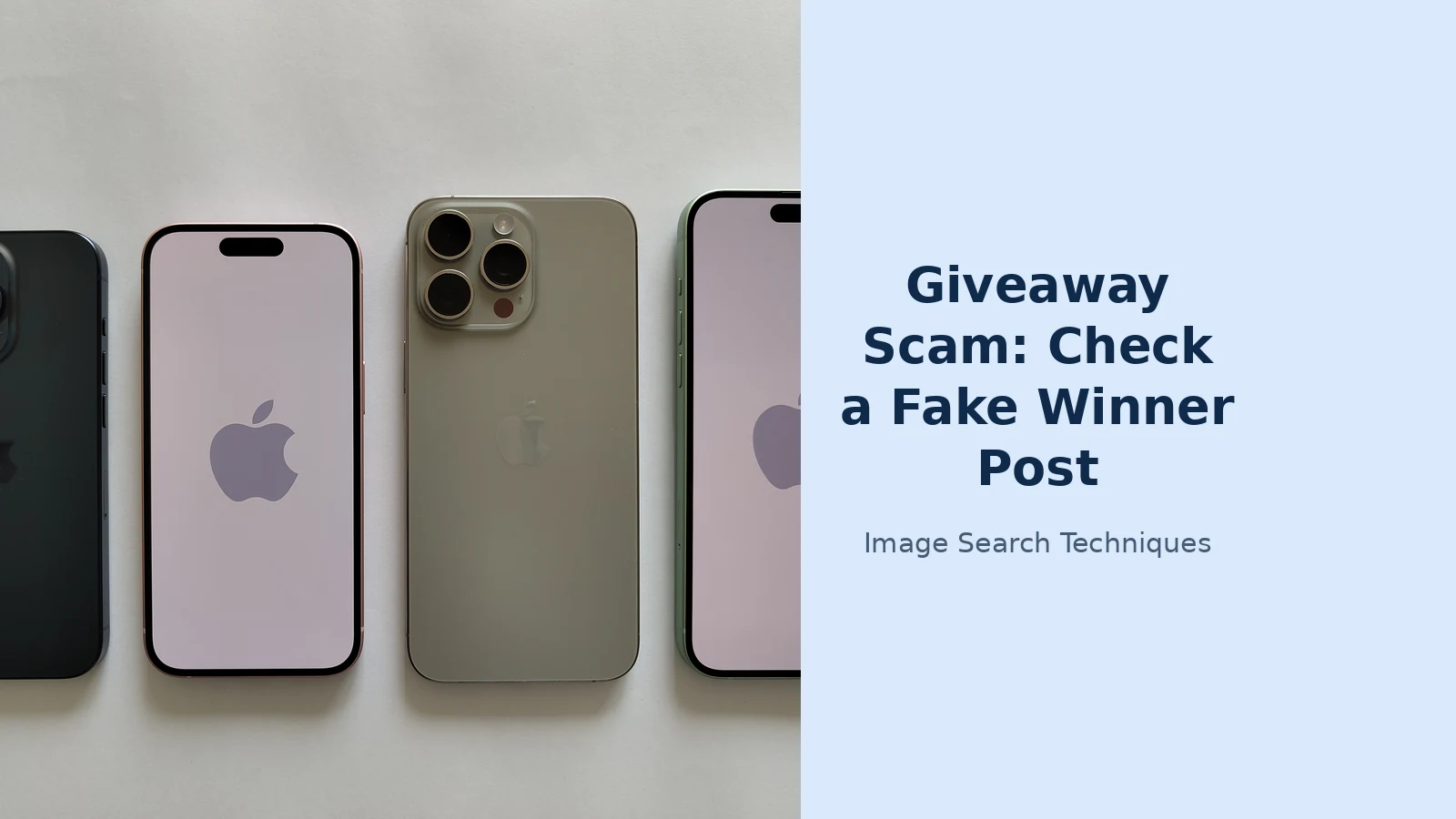
Here is the check worked through on a real photo. The scenario is a cloned page posting an iPhone 15 Pro as the prize, with the caption “Winner announced, check the comments.” The prize photo is a genuine product photo of an iPhone 15 Pro, the kind of clean studio shot brands and shops publish.
I ran this exact photo through TinEye and Google Lens on 14 November 2026, to show what the check actually returns. TinEye searched 86.7 billion images and found one result. It first indexed the photo on 29 August 2024, and the only match was a Russian news site, newsinfo.ru, which had used it as a small thumbnail on three news pages that month. It found no Apple page, no Wikimedia page and no giveaway page. That single fact already breaks the story. If a giveaway page posts this photo in November 2026 claiming it is their prize, the photo is more than two years old and belongs to someone else entirely.
Google Lens told a different but equally useful story. It identified the third phone from the left as an iPhone 15 Pro Max in Natural Titanium, and its visual matches were almost all shopping listings: Amazon, Walmart, eBay and Apple’s own refurbished store, with prices from $614 for a restored handset to $2,460 on a barcode catalogue site. Its exact matches list ran to hundreds of entries, but the top ones were single-phone photos from review and auction sites, not this four-phone shot, and no giveaway page appeared anywhere near the top. Lens is strong at naming the product. TinEye is stronger at finding where the exact file has lived before. Use both, because each one catches what the other misses.
Read the results like this. If the same photo shows up on a shop, a review site or a news article dated before the giveaway post, the photo was taken from there. The giveaway did not produce it, and the account posting it does not own the prize. If the photo appears on several other giveaway pages with different brand names attached, it is a recycled prize photo doing the rounds. If no engine finds it at all, that proves nothing on its own. A scammer can crop, flip or filter a photo to dodge a match, so a clean result never clears a post. It only means this one check found nothing.
Run the search on the exact photo from the post, not a similar one. A screenshot of the whole post works too, but crop it tight to the prize photo first. A busy screenshot full of text gives the engines too much to chew on and returns weaker matches. If you are on a phone and the app will not let you save the image, screenshot it and crop it in your gallery app. The site’s own free tool on the homepage runs the same kind of search across several engines at once, and the step-by-step method is covered in our how to reverse image search guide.
Answer capsule: save the prize photo, reverse search it, and treat any earlier appearance as proof the photo was stolen.
How can you tell a cloned handle from the real brand?
Open the profile that messaged you and read the handle character by character, next to the real brand’s handle. Clones survive on differences your eye skips: an extra letter, a missing letter, an underscore where a dot should be, a zero instead of an O, or the words “official” or “winners” added to the end. One well-known example from the comping community is a fake Bargain Booze profile called BargainBooze, with the space removed, replying to entrants on the genuine giveaway.
Then check three more things. First, the follower count. A real brand page usually has thousands of followers built up over years. A clone often has a few hundred, mostly people it has just messaged. Second, the follow list. A clone follows hundreds of accounts and is followed by far fewer. Third, the post history. Scroll back. A real brand has months or years of posts about its actual products. A clone has a handful of giveaway posts and nothing else, or a feed that suddenly changes subject, which is a sign the page was bought or renamed.
On Facebook, tap the page name, then About, then Page transparency. That panel shows when the page was created and whether it has changed its name. A page created last week running a Christmas giveaway for a brand founded decades ago is not the brand. On Instagram, tap the three dots on a profile, then About this account, and check the date joined and whether the username has changed. A real brand account is usually years old.
One more test costs nothing. Go to the brand’s real page yourself, from its own website or a search, and look for the giveaway there. If the real page has no winner announcement, or the closing date has not passed yet, the message you received is fake. If you were told you won before the closing date, that fact alone settles it. No genuine draw announces a winner before entries close.
Answer capsule: compare the handle letter by letter, check the follower count and post history, and confirm the win on the brand’s real page.
What does the page creation date tell you?
The creation date is the hardest thing for a scammer to fake, which is why it is worth more than a blue tick. A verified badge can be bought or faked in a profile photo. A creation date cannot be backdated. On Facebook, Page transparency shows the date the page was created and a list of its old names. On Instagram, About this account shows the date the account joined. On TikTok, there is no public creation date, so use the oldest video instead and check whether the account’s early videos match the brand at all.
What counts as suspicious depends on the brand. A page created six days ago for a supermarket chain is a fake. A page created three years ago that changed its name last month and now runs giveaways is also a fake, or a page that was sold and repurposed. Check the name history, not just the date. A genuine brand page keeps one name for years.
There is one honest exception. A small business may genuinely be new, and its first promotion may be a giveaway. That is why the creation date is one check among several, not a verdict on its own. A new page plus a stolen prize photo plus a claim fee is a scam. A new page on its own is just a new page.
Answer capsule: a page created days ago, or one that recently changed its name, fails the test no matter how good the prize photo looks.
What does a real winner announcement look like?
Real winner announcements are boring, and that is the point. A genuine brand names the winner in a post on its own page, often by first name only, and asks the winner to message the page directly. It never asks for card details, never asks for a delivery fee, and never sends a link to a payment form. If the prize is cash, the brand or its prize agency may ask for a sort code and account number so it can pay money in. Those two numbers can only receive money, not take it out, but you should still give them only through a channel you reached yourself, never through a link in a message.
The table below puts the two side by side. Keep it open next to any winner message you are unsure about.
| Check | Fake winner post | Genuine winner announcement |
|---|---|---|
| Prize photo | Stolen or recycled, found elsewhere by reverse search | The brand’s own photo, or a photo from its own past posts |
| Account | Clone handle, few followers, page created recently | The brand’s established page, years old, linked from its website |
| Timing | Winner announced before the closing date | Winner announced after entries close, on the brand’s own page |
| What they ask for | Card details, a claim or delivery fee, a screenshot of a code | Your name and address, or bank details only for a cash prize |
| Where it happens | A link to a lookalike site or a payment form | A message to the brand’s real page, reached by you |
One pattern deserves its own warning. Some fake claim sites look exactly like a shop checkout. They offer a discount code that takes the price to zero, then still ask for card details to register. A free prize never needs your card. Another pattern asks you to send a screenshot of a password reset code or a bank security code. That code lets the scammer into your account, and the moment you send it, the account is theirs. No genuine prize claim ever needs a code sent to your phone.
Answer capsule: a real win is announced on the brand’s own page after entries close, and it never costs you money or card details to claim.
What are the red flags in a giveaway scam fake winner message?
Read any winner message against this list before you reply. A single flag is a warning. Two or more is enough to walk away.
- You were told you won before the giveaway closing date.
- The message asks for a shipping fee, a claim fee or a tax payment to release the prize.
- It asks for card details, a PIN, a password or a security code sent to your phone.
- The account is not following you back in the way the real brand would, or you are not following the account that messaged you.
- The handle has an extra letter, an underscore, a zero for an O, or “official” added to it.
- The page was created recently, has few posts, or recently changed its name.
- The prize photo appears elsewhere online, found by a reverse image search.
- The message uses American words for a UK giveaway, such as contest, sweepstakes or shipping, or dollar signs instead of pounds.
- The claim link goes to a lookalike domain, a shortened link, or a site with no link to the brand’s real website.
- The message pressures you to claim in the next hour or lose the prize.
The same photo checks work beyond giveaways. If a message shows you a payment screenshot or a gift card balance as proof of anything, the same reverse search habit applies. Our fake screenshot checker guide covers fabricated screenshots in general, and the gift card photo scam check covers the version where the photo is a gift card balance.
Answer capsule: a fee, card details, a code, or a win announced before entries close are each enough to stop and check.
What should you do if you already replied or paid?
Act fast and do not feel embarrassed about it. These scams are built to fool careful people, and the comping community has plenty of experienced entrants who have been caught out. First, call your bank and ask it to cancel the card and block any payment. Tell the bank exactly what happened, including the website address if you entered card details on a form. Second, change the password on the social media account and turn on two-factor authentication, especially if you sent a screenshot of a code. Third, report the fake account on the platform where it found you, using the report option for impersonation or fraud.
Then report the crime. In the UK, report to Report Fraud online. You will get a crime reference number. In the US, report to the Federal Trade Commission at ReportFraud.ftc.gov. Keep screenshots of the post, the message and the claim page before the account disappears, because scammers delete their pages quickly once they have enough victims.
If you only replied and gave nothing away, you are probably fine. Do not click the claim link, do not send any code, and block the account. If you entered card details, treat the card as compromised even if no money has left yet. Scammers sometimes wait days before using a card, or add it to a phone wallet and use it later.
Answer capsule: cancel the card, change your passwords, report the account, then report to Report Fraud or the FTC with your screenshots kept.
How do you enter giveaways safely next time?
You do not have to stop entering giveaways. You only have to change how you check a win. Enter through the brand’s own page, reached from its website. When a win arrives, go back to that page yourself and look for the announcement there. Never follow a link in a winner message to claim a prize. If the brand wants your address, give it through a form on its own site or in a message you start yourself on its verified page.
Keep the photo habit. Any time a stranger’s message rests on a photo, a screenshot or a prize image, run a reverse search before you believe it. It takes under a minute on a phone, and it is the one check a scammer cannot talk their way around. Facebook has its own photo search habits worth knowing too, covered in our Facebook reverse image search guide. For the wider picture, the photo scams complete guide gathers every photo-led scam check on this site in one place.
Answer capsule: enter on the brand’s own page, verify every win there yourself, and reverse search any photo a stranger’s message depends on.
FAQs
Can a giveaway ask me to pay a delivery fee to claim a prize?
No. A genuine prize never costs money to claim. If a winner message asks for a delivery fee, a claim fee, a tax payment or card details, it is a scam, even when the page and the prize photo look real. Close the message, block the account and report it. Real brands cover delivery on prizes they give away.
How do I check a prize photo with reverse image search?
Save the prize photo from the post, or screenshot it and crop to the photo, then upload it to Google Lens, TinEye or Yandex Images. If the same photo appears on a shop or a review site, it was stolen. A clean result proves nothing on its own, because a cropped or flipped photo can dodge a match.
What if the winner message arrived before the closing date?
Then it is fake. No genuine draw announces a winner before entries close, because the winner cannot be known yet. This one fact settles it on its own, whatever the account looks like. Check the closing date on the brand’s real page and compare it with the date on the message you received.
How do I tell if a Facebook page is a clone of a real brand?
Read the handle letter by letter and look for an extra letter, an underscore or a zero instead of an O. Then open About and Page transparency to see when the page was created and whether it changed its name. A page made last week, with few posts and few followers, is not the brand.
I entered card details on a claim site. What do I do now?
Call your bank at once and ask it to cancel the card and block payments, even if no money has left yet. Then change the password on the social media account and turn on two-factor authentication. Report the fake account on the platform, and report the fraud to Report Fraud in the UK or the FTC in the US.
Can a real giveaway ever ask for my bank details?
Only for a cash prize, and only a sort code and account number, which can receive money but cannot take it out. Give them solely through a channel you reached yourself, never through a link in a message. A card number, PIN, password or security code is never needed to claim a prize.