


🔎 Reverse Image Search
Image search techniques made simple: upload a photo or paste a URL and search 6 engines at once. 100% free, nothing stored.
🔒 Your image is never stored on our servers longer than 24 hours and is never shared.
Grok is the provenance outlier among the big image generators. Google stamps an invisible SynthID mark into every Gemini image, Adobe Firefly and OpenAI attach signed Content Credentials, and Midjourney at least behaves consistently, but a picture made with Grok carries one faint logo in a corner and, as far as anyone outside xAI can verify, almost nothing else. OpenAI’s pictures are the opposite: ChatGPT images carry a signed C2PA record and a SynthID watermark, and our guide to telling whether an image was made with ChatGPT shows how to check both. That single fact shapes everything in this guide to how to tell if an image is Grok: you cannot “detect Grok” with one click, so you stack signals instead.
What Grok is: Grok is xAI’s chatbot, and its image and video feature, Grok Imagine, generates pictures with xAI’s in-house Aurora model, the same model behind the “Edit image” and “Imagine” tools in the Grok app, on grok.com and inside X.
The short answer: You cannot prove an image came from Grok with one check. Look first for the faint GROK wordmark in the bottom-right corner, then read the file for the camera metadata and a C2PA record, run it through a detector, and reverse-search it. A mark proves little on its own, and no mark proves nothing, because the mark crops off easily.
That is the honest position, and it is also the useful one. Most Grok pictures people worry about arrive as screenshots, re-saves and reposts, long after the original file, and its one visible mark, has been trimmed away. The routine below works on the file you actually have, not the file you wish you had, and it tells you what each signal can and cannot prove. We tested every step of it on a real Grok Aurora image, and the worked example near the end shows exactly what each check returned.
What does the Grok watermark look like, and where is it?
Images generated through Grok usually come out of the app with a small logo baked into a bottom corner: the word GROK next to a small square logo with a diagonal slash through it, both semi-transparent. In our own test of a genuine Aurora image (more on that below), the mark sat in the bottom-right corner, faint grey-white against the picture, roughly the width of a thumbnail, and easy to miss unless you open the image at full size and look deliberately at the corner. On some outputs it appears alongside a date.
Three properties of the mark matter more than its appearance:
- It lives in the pixels, not in the file’s metadata. It is painted into the picture itself, so it survives re-saving in a new format but disappears the moment someone crops, blurs or paints over that corner.
- Its exact placement shifts. Independent guides that track Grok’s output report the mark usually in a bottom corner, but the precise spot varies between app versions, aspect ratios and whether the picture was downloaded or re-shared.
- It is the only mark xAI documents for images. xAI’s Grok Help & FAQ states that generated images and videos include a Grok watermark, and that there is no setting to remove it. That wording was still current when independent guides re-checked xAI’s own pages on 8 November 2026.
Do not confuse Grok’s mark with Google’s. A four-pointed sparkle in the corner is the mark Gemini adds to its images, not Grok’s. If you see a sparkle, you are looking at a Google-made picture, our guide to how to tell if an image is AI-generated explains the difference between the generators’ marks.
A practical tip: zoom the corner, do not squint at the thumbnail. Open the picture at 100%, look at each corner in turn, and if the corner is dark, raise the brightness, the mark is semi-transparent and vanishes against busy or dark backgrounds. A blurred, cloned or oddly cropped corner is itself a signal: it is often where a mark used to be.
Does every Grok image carry the watermark, free and paid?
Yes, as far as xAI’s own published wording goes, on every tier, with no exception documented. This is the part of the lock we verified at write time, and it matters because several third-party guides say otherwise, so here is the position as it stands on 12 November 2026:
- The watermark applies paid or not. xAI’s FAQ says generated images and videos include a Grok watermark and that there is no setting to remove it. A guide that re-checked xAI’s, X’s and Higgsfield’s own pages on 8 November 2026 states flatly that every Grok Imagine image and video carries a Grok watermark, paid or not.
- Some guides claim paid video exports drop the mark. That claim is not in xAI’s published FAQ, and we could not verify it from any xAI page. Treat it as unverified: do not assume a clean-looking paid export is unmarked, or a marked one must be free.
- Removing the mark breaks the rules. xAI’s Acceptable Use Policy, effective 14 August 2026, prohibits “stripping, altering or circumventing embedded provenance metadata or watermarks”, and says violations can lead to action against the account, up to suspension or termination. The policy is the reason no legitimate Grok workflow offers a “remove watermark” toggle.
- Image generation is paid-first in 2026. After a wave of abusive deepfakes, xAI restricted Grok’s image features to paid subscribers in January 2026. Free accounts now get, at most, a thin image-only allowance inside Grok chat, while video, high-definition output and Spicy Mode sit behind a paid plan. The watermark rule does not change with the plan, the free allowance is smaller, not unmarked.
Two consequences follow. First, a visible GROK mark is a genuine hint, not proof: anyone can paste the mark onto a real photo, and the mark alone cannot tell you which account made the picture. Second, a missing mark tells you nothing at all, it may have been cropped, the picture may be a screenshot of part of the image, or the file may have been re-saved so many times that the corner is gone. Never reason “no watermark, therefore a real photo” with Grok. That is the single most common mistake in this whole area, and it is exactly the mistake the provenance gap makes possible.
Does Grok add C2PA or an invisible watermark?
Short answer: xAI has not documented one, and the independent sources disagree with each other, which is itself the finding. This is the provenance gap the title of this article refers to, so it is worth stating precisely rather than smoothing over.
C2PA (Content Credentials). C2PA is a signed provenance record attached to a file: it says, in machine-readable form, that an image was AI-generated, by which tool, and when. Adobe Firefly and Google’s Imagen embed it; OpenAI’s newer images carry it. For Grok, xAI does not document whether its files carry Content Credentials. One comparison of the major generators, updated 7 November 2026, lists Grok’s C2PA status as “not confirmed” and its invisible watermark as “not confirmed”. Two detection guides reach the same conclusion: no C2PA Content Credentials, no documented invisible watermark. But at least one watermark-removal site claims the opposite, that Aurora exports ship with signed C2PA manifests. Those claims cannot both be right for every file, and we could not settle the question from xAI’s own pages.
Our own test points the same way as the sceptics. The genuine Aurora file we ran through the routine below, a 1,024 × 768 WebP generated in Grok with Aurora on 10 December 2024, contained no JUMBF or C2PA markers at all in a byte-level scan, no EXIF data, and no text string naming Grok or Aurora anywhere in the file. That is one file, from December 2024, and xAI may have changed its pipeline since; but it matches what the November 2026 guides still report, so the safe working position is: do not expect a C2PA record on a Grok image, and do not treat a clean Content Credentials result as proof the image is real. If you run the file through the Content Authenticity Initiative’s checker at contentcredentials.org/verify and it reports no credentials, all you have learned is that no signed record survived in that copy, which is the normal state for a Grok picture, not evidence in its favour.
SynthID. SynthID is Google DeepMind’s invisible pixel watermark: it is woven into the pixels of Gemini and Imagen output, and it has also been used on OpenAI’s images since May 2026. It is Google’s technology, and xAI has made no public confirmation of using it. Do not expect a SynthID signal on a Grok image, and do not use Google’s SynthID detector, which is not publicly available for arbitrary uploads anyway, as a Grok check.
Text watermarking is a different thing. From 7 November 2026, xAI’s API documentation says responses from seven Grok models carry a watermark by default, covering plain text, structured outputs and tool-call arguments. That is a watermark on Grok’s words, introduced to meet the transparency duties in Article 50 of the EU AI Act, which have applied since 2 August 2026. It does not mark Grok’s pictures, and it tells you nothing about an image file. If a guide tells you Grok images are watermarked “since November 2026”, check whether it is talking about text, most of the November 2026 coverage is.
The practical upshot is simple: with Grok, the visible corner mark is the whole provenance story. Everything else in the routine below is a fallback for when that mark is gone, which, for a reshared image, is most of the time. Samsung’s Galaxy AI is the closest parallel, a visible mark plus a signed credential, and our guide to telling whether a photo was edited with Galaxy AI runs the same three-step check on Samsung photos.
The stacked-signals routine: how to tell if an image is Grok in four steps
This is the ranking asset for this guide: a routine you can run on any suspect image in about five minutes, in this order, stopping as soon as the evidence is strong enough. The order matters, start with the cheapest, most decisive signal and only spend effort on the weaker ones when the earlier steps come back empty.
Step 1: Look for the corner mark. Open the image at full size and inspect all four corners, bottom-right first. Look for the faint word GROK beside a small square logo with a diagonal slash. Zoom in, and brighten dark corners. If the mark is there, the image very likely came out of Grok, but remember it can be faked by pasting, so a mark plus a big claim still deserves step 4.
Step 2: Read the file. Save the original file if you can (not a screenshot of it) and open it in a metadata viewer, the free ExifTool, or a browser tool such as Metadata2go. Note three things: whether any camera make, model, lens or ISO is present; whether any C2PA manifest is present; and whether the file carries any software tag at all. A real camera photo normally carries make, model, lens and ISO. A Grok image carries none of that. Then run the same file through the Content Authenticity Initiative’s Verify tool linked above, in case a signed record survived. Record what you found, including the absence: “no EXIF, no C2PA” is a finding, not a failure.
Step 3: Run it past a detector. Upload the highest-resolution copy you have to a free AI-image detector, Hive, Sightengine or Illuminarty are the commonly used ones, and read the result as a probability, not a ruling. Cross-check with a second detector. Detectors look for the statistical fingerprints diffusion models leave on pixels, and they produce both false positives (flagging real photos) and false negatives (missing polished fakes). A heavily compressed, reshared image degrades their accuracy further, so a detector verdict on a screenshot is worth less than one on the original file.
Step 4: Reverse-search the image and check the claim. Search the image itself with Google Lens and Yandex Images (TinEye is worth trying, though it frequently blocks automated checks). You are looking for the earliest version of the picture, the stock photo it may have been built from, and whether the same image appears with a different story attached. Then check the story, not just the pixels: has any credible outlet reported the image, the event it supposedly shows, and have fact-checkers already weighed in? If the picture is the only evidence for a dramatic claim, and no outlet has it, that is a result in itself. Our guide to Google reverse image search walks through the Lens steps, and how to reverse image search covers the other engines and what to do when one of them blocks you.
| Signal | What it can prove | What it cannot prove |
|---|---|---|
| Corner GROK mark present | The image very likely came out of Grok, in the form it left the app | Nothing about who made it, the mark can be pasted onto a real photo |
| Corner mark absent | Nothing at all | That the image is real, the mark crops, blurs and screenshots away |
| No camera EXIF data | The file was not saved straight from a camera | That it is AI, screenshots, scans and social-media re-saves also strip EXIF |
| No C2PA record | No signed provenance survived in this copy | That the image is real, Grok does not document C2PA, so absence is the normal state |
| C2PA record naming Grok | Strong evidence of Grok origin, if the signature verifies | That the visible content is unedited, credentials describe the file, not the scene |
| Detector says “likely AI” | The pixels resemble diffusion-model output | Which tool made it, or that it is fake, false positives and negatives are common |
| Reverse search finds an earlier copy | Where the image first appeared, and what story it originally carried | How the image was made, an early copy can still be AI-generated |
| No outlet or fact-checker has the image | The claim riding on the image is unverified | That the image is fake, real events can also go unreported |
Read the table as a whole, not row by row. Two weak signals pointing the same way, say, no camera data plus a detector leaning AI, are worth more than either alone. One strong signal against, an earlier copy of the same picture with a different caption, outweighs all of them. And if every step comes back empty, say so plainly: “I could not confirm where this image came from” is a complete and honest answer, and it is far better than a confident guess.
We ran the routine on a real Grok image, here is what happened
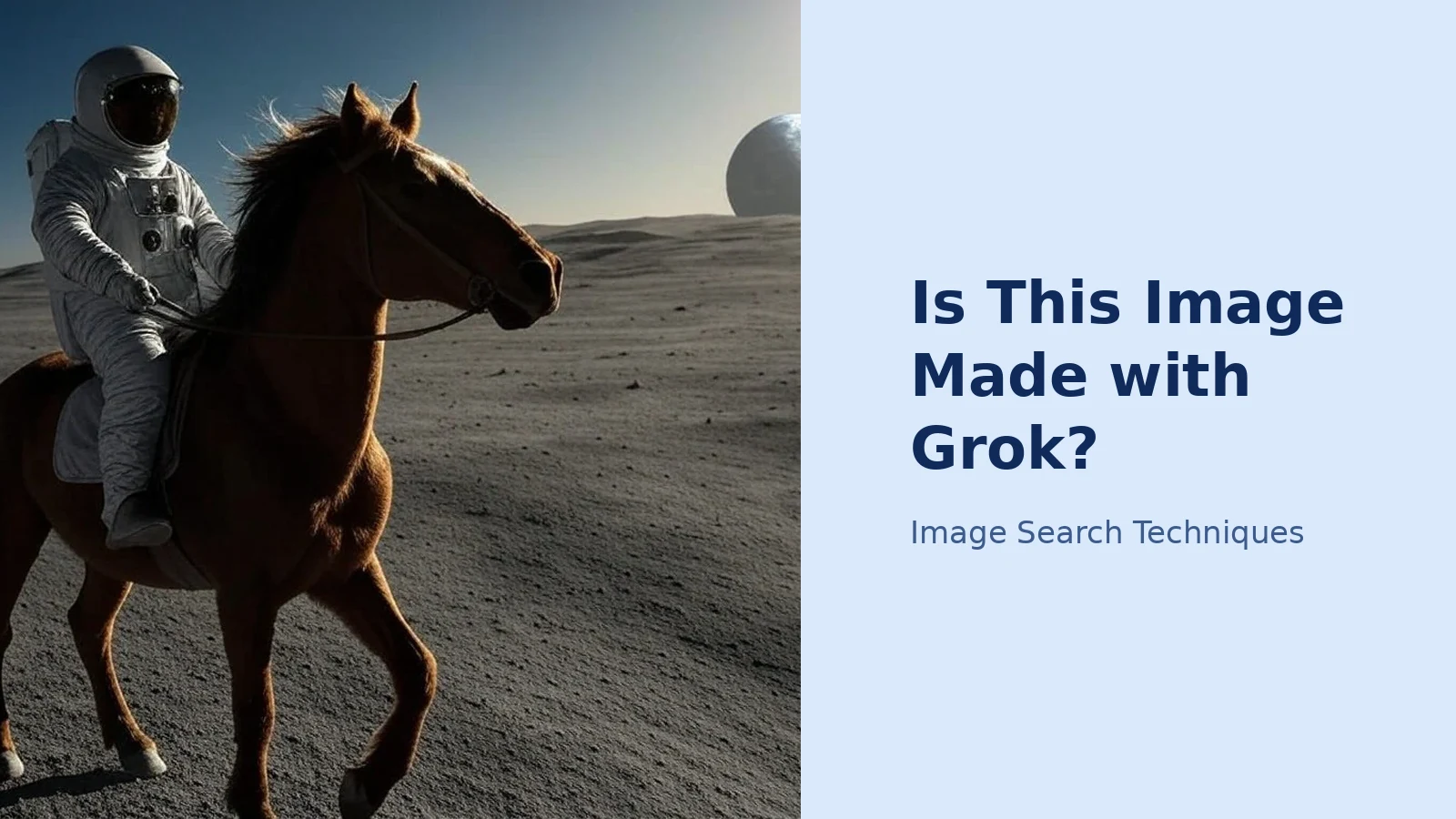
Every step in this article was performed on a real file, not described from memory. The test image is “Astronaut Riding a Horse (Grok Aurora)”, a 1,024 × 768 WebP uploaded to Wikimedia Commons as a public-domain (CC0) file. Its own description page records that it was generated in Grok with Aurora on 10 December 2024, from the prompt “a photograph of an astronaut riding a horse on moon”, by the Commons user VulcanSphere. It is therefore a known Grok image with a documented origin, the right kind of file to test a detection routine against, because we already know the answer it should give.

The test image: an astronaut riding a horse on the Moon, generated in Grok with Aurora in December 2024. The faint GROK wordmark and slashed-square logo are visible in the bottom-right corner. Image: Wikimedia Commons, CC0, by VulcanSphere.
Step 1: corner mark: found. At full size the bottom-right corner carries the faint word GROK beside the small slashed-square logo, in semi-transparent grey-white. It is clearly visible once you look for it, and easy to miss if you do not, which is the point. The other three corners are clean.
Step 2: file metadata: nothing at all. The downloaded file is 130,788 bytes. It carries zero EXIF tags, no camera make or model, no lens, no ISO, no GPS, no date in the file itself. A byte-level scan of the file found no JUMBF or C2PA markers, no “Content Credentials” text, and no string naming Grok or Aurora anywhere in the data. The one apparent hit, the letters “xmp” inside the compressed image data, turned out to be random bytes, not an XMP metadata packet. In other words, this genuine Grok file carries no provenance beyond its pixels, exactly the gap this guide warns about. Note the date: this file is from December 2024, so it shows the position then; the November 2026 guides cited above report the same position now.
Step 3: detector: not the deciding step. We did not need a detector to identify this file, the corner mark and the documented Commons description already settle it, and that is itself the lesson. A detector is the step you use when the mark is gone. On a file like this one, where the mark survived, a detector adds little; on a cropped repost, where the mark is gone, it is the only pixel-level signal left. Use it in that order.
Step 4: reverse search: Yandex worked, the others were blocked. Searching by the image URL: Google Lens returned a redirect with no readable result from a signed-out fetch; TinEye returned a 403 bot-block with no result; Yandex Images returned a 200 and matched the file, returning the original Commons copy and similar astronaut-on-horseback images. That pattern, Lens and TinEye blocking automated checks while Yandex answers, is the same pattern we have seen across this site’s test runs through 2026, and it is why the routine names more than one engine. If your first engine blocks you, switch engines rather than concluding the image has no history.
What the picture itself says. Step back from the file checks and look at the scene: an astronaut riding a horse across the lunar surface, Earth hanging in the sky. No horse has ever been on the Moon. The image is photoreal, the lighting, the dust, the horse’s coat are all convincing at a glance, but the scene is impossible, and impossibility is a check no watermark can replace. When an image shows something that cannot have happened, the file checks are confirming what the content already tells you.
What do the AI tells look like on a Grok image?
When the mark is gone and the file is silent, fall back on what the picture shows. Aurora is photoreal, and it still trips on the fiddly bits. None of these tells settles anything alone, real photos can look strange, but a cluster of them on an image making a big claim is your signal to slow down:
- Hands, teeth and jewellery that melt together or come out wrong, an extra or fused finger, teeth that blur into one another, an earring that does not match its pair.
- Text on signs, labels and clothing that turns to gibberish when you zoom in, or lettering that almost spells a real word.
- Backgrounds that bend: railings that curve, fences that change direction, crowds that blur into paste, architecture that does not quite join up.
- An oddly smooth, plastic sheen across skin and fabric, with no sensor grain and no pores, the “too perfect” look that is Aurora’s most consistent fingerprint.
- Lighting that falls from impossible directions: faces lit from a side the scene cannot explain, or shadows that point two different ways.
- An impossible scene: a horse on the Moon, a celebrity in a place they have never been, an event no one else photographed. Check the content against what is possible before you check the file.
Ask ChatGPT or Gemini what they see in the image as a cross-check, a second model’s description of the same tells is useful corroboration, and it costs nothing. Our guide to identifying a photo with ChatGPT and Gemini shows how to ask so you get a description of what is actually in the picture rather than a confident guess. But do not outsource the verdict: an AI chat answer is a lead, not a conclusion, in exactly the same way a Grok verdict is, our guide to asking Grok about a photo explains why these tools flip their answers and how to test them.
Can you trust a detector to spot a Grok image?
Only up to a point, and you should know exactly where that point is. Free classifiers such as Hive, Sightengine and Illuminarty look for the statistical fingerprints diffusion models leave behind in pixels, and they return a probability, “likely AI”, “likely real”, or something in between. They do not return a verdict, and they do not name the generator: no detector can reliably tell you “this is Grok” rather than “this is AI-generated”.
Three limits matter in practice. First, detectors produce both false positives and false negatives: real photos get flagged, and polished fakes get missed. Second, compression degrades them, a screenshot of a screenshot, re-saved by a social platform, carries far less of the signal the detector reads than the original file does. Third, the models improve: a detector trained on 2024 output may read 2026 output differently, in either direction. So use detectors the way the routine uses them, as one stacked signal, cross-checked with a second detector and with the file and reverse-search steps around it. One detector’s “likely AI” is a reason to keep checking, not a conclusion; two detectors agreeing, plus no camera data, plus an impossible scene, is a conclusion you can stand behind.
Never pay for a “Grok detector” that promises a yes-or-no answer for one image. There is no such product with a documented method, and the honest tools all present their results as probabilities. If a tool claims certainty about Grok specifically, that claim is itself a reason to distrust it.
How do you check the claim behind the image, not just the pixels?
Whether or not you can pin a file to Grok, the damage usually rides on the story attached to it, a supposed event, a person shown doing something, a “leaked” scene. That part you can check directly, and it is often the fastest route to an answer.
Reverse-search the image to find its earliest version: the first place it appeared, and the caption it carried then. If the same picture has circulated before with a different story, the current story is false whatever the file is. If the earliest copy is a stock photo, the “real event” may be a stock scene with a new caption. If the earliest copy is the Grok image itself on a creator’s feed, the picture was never a photograph of an event at all. Then check the event: has any credible outlet reported the image, the event it supposedly shows, and have fact-checkers already weighed in? A dramatic image that no news organisation has published, and that exists only as this one file, deserves the most suspicion, not the least.
If the image shows a real person, especially in an embarrassing, intimate or compromising situation, do not share it while you check. Save the evidence first: the file, the page it appeared on, the account that posted it, the date. Then report it through the right door: inside Grok, tap the three dots on the output and choose “Report Issue”, or email xAI directly at support@x.ai, both routes are stated in xAI’s own Acceptable Use Policy, which also prohibits removing or obscuring the watermark. For images already posted elsewhere, report them on the platform hosting them, and for intimate images use the StopNCII hash route rather than re-uploading the picture anywhere. A generator complaint does not remove copies already posted elsewhere, so report the copies too, our guide to reporting an AI-generated image of yourself walks through each door in turn.
What to remember. Grok’s provenance story is the thinnest of any major generator: one faint corner mark, no documented C2PA record, no confirmed invisible watermark, and no camera data in the file. That is not a reason to give up on checking, it is a reason to check in the right order. Look for the mark, read the file, run a detector, reverse-search the image, and check the claim. Any one of those steps can fail; the stack rarely does. And when the stack comes back empty, say so: “I could not confirm where this image came from” is the correct answer, and it is the answer that stops a fake travelling any further on your say-so.
Does every Grok image have a watermark?
Yes, according to xAI’s own FAQ: generated images and videos include a Grok watermark, and there is no setting to remove it. The rule applies on free and paid plans alike. But the mark is faint, sits in a corner and crops off easily, so a missing mark proves nothing about the image.
Can I tell if an image is Grok from its metadata?
Not reliably. A genuine Grok file we tested carried no EXIF data at all and no C2PA provenance record, and xAI does not document Content Credentials for Grok images. Missing camera data is a nudge, not a verdict, because screenshots and social-media re-saves strip metadata too. Always combine the metadata check with the corner mark and a reverse search.
Will an AI detector reliably spot a Grok image?
No. Detectors such as Hive and Sightengine return a probability, not a ruling, and they cannot name Grok as the generator. They produce false positives and false negatives, and compression from re-sharing degrades their accuracy. Cross-check with a second detector and with the file and reverse-search steps before drawing any conclusion.
What should I do if a Grok image shows me or someone I know?
Do not share it. Save the evidence first: the file, the page, the posting account and the date. Report the Grok output via the three dots and Report Issue, or email xAI at support@x.ai. Report copies on the platform hosting them, and use the StopNCII hash route for intimate images instead of re-uploading the picture anywhere.






