


🔎 Reverse Image Search
Image search techniques made simple: upload a photo or paste a URL and search 6 engines at once. 100% free, nothing stored.
🔒 Your image is never stored on our servers longer than 24 hours and is never shared.
To identify a vegetable from a photo, start with the plant, not the name. A photo of a leafy plant in a garden bed, a strange root at a market stall, or a purple bulb you have never grown before all raise the same question, and the answer comes from the details in the picture, not from a guess. This guide shows the method that works: how to take a photo that can be read, how to run it through reverse image search, and how to check the result against the traits that actually separate one vegetable from another.
Short answer: Yes, you can identify a vegetable from a photo. Upload a clear photo of the whole plant, or the whole harvested vegetable with its leaves still attached, to Google Lens, TinEye or Yandex, then check the match against leaf shape, stem, flower and fruit. If the plant is a seedling, wait for its true leaves before you trust any answer.
If you are new to the method itself, start with our how to reverse image search guide, then come back here for the vegetable part. A live Google search for this exact question on 21 November 2026 returns an AI Overview that covers four points: upload the photo, use Google Lens, try an online AI vegetable identifier, or describe the colour, shape and texture. The rest of this article covers every one of those points in our own words, and then goes further than the Overview does, with the full steps, a worked test on three engines, a traits table, and the seedling warning that decides whether an answer can be trusted at all.
What does it take to identify a vegetable from a photo?
Three things, and the photo is the first of them. A good identification needs a clear photo, a search that can find the same image or the same plant elsewhere, and a check of the plant’s traits against the match. Skip any one of the three and the answer gets shaky. A blurry leaf on its own can match a dozen plants. A perfect photo searched on the wrong tool can return nothing. And a confident tool result accepted without a traits check can name the wrong vegetable, because look-alikes share most of their features.
Reverse image search: a search that starts from a picture instead of words. You give the search engine an image, and it returns the pages where that image, or a visually similar image, already appears. It is the same method our find an item by image guide uses for objects, applied here to plants. The engine does not know what a vegetable is. It matches shapes, colours and patterns, and the name comes from the pages it finds.
The second thing is the search itself, and that means more than one engine. Google Lens is the best known, TinEye is the strictest about exact copies, and Yandex is often the strongest on plants, because its image index is deep on gardening and Russian language pages, where a lot of vegetable photos live. This article tests all three on the same real photo, so you can see what each one actually returns instead of taking a tool’s word for it.
The third thing is the traits check. A name from a search engine is a suggestion, not a verdict. You confirm it by looking at the plant in front of you: leaf shape, stem, flower, fruit or pod, and growth stage. The table later in this article lists those traits for the four vegetable groups, and the worked example shows the check being done on a real plant.
Answer capsule: a clear photo plus a reverse image search plus a traits check is what identifies a vegetable from a photo, and any one of the three on its own is not enough.
How do you take a photo that can actually be identified?
Most failed identifications start with the photo, not the tool. A photo taken from too far away, in shade, or cropped to one leaf gives the search engine almost nothing to match. The best vegetable identifiers, including the Snappit vegetable identifier page, agree on the same basics: photograph the whole plant in daylight, keep the leaves visible, and for a harvested vegetable show one intact piece with its leaves still attached. That advice is sound, and this section adds the reverse search angle that Snappit leaves out entirely.
Take the photo in daylight, with the sun behind you, and fill the frame with the plant. Include the whole plant if it is still growing: leaves, stem, and the bulb, root or fruit if any part of it shows above the soil. For a leafy vegetable, photograph one full leaf next to the whole plant, so the search can see both the shape and the size. For a root vegetable, include the cut base and the leaves, because the base shows the shape and the leaves show the plant it came from.
Take two more photos while you are there. One close up of a single leaf, flat and in focus, because leaf shape is the trait that separates most look-alikes. And one of the flower or fruit if the plant has one, because flowers and pods narrow the answer far faster than leaves alone. A courgette flower, a pea pod or a kohlrabi bulb each cut the list of candidates to a handful.
Keep the background simple. Soil, a hand, or a plain surface is fine. A busy market stall behind the vegetable confuses the match, because the engine tries to match the whole scene. If the photo has other plants at the edge, crop them out before you search, and say so in your notes, so a stray tomato at the edge of the frame does not become part of the identification.
Do not rely on a single photo of a cut or peeled vegetable. Once the skin, leaves and stem are gone, most vegetables lose the traits that identify them, and a peeled root or a sliced bulb can look like several different things. If that is all you have, photograph the cut surface and the piece as a whole, and treat the result as a guess, not an answer.
Answer capsule: photograph the whole plant in daylight, add a close up of one leaf and one of any flower or fruit, and crop out everything that is not the plant.
How do you identify a vegetable from a photo with reverse image search?
Work through the engines in order, and keep notes as you go. Start with Google Lens, because it is the fastest and it is built into Google Search and Google Photos. Open Lens, upload the photo, and read the result in two parts: the name Lens suggests, and the pages it lists as visual matches. If Lens names the vegetable and the top matches agree, you have a lead worth checking. If Lens fails, and it does fail sometimes, move on instead of trying the same upload again and again. The worked example below shows Lens failing three times on a perfectly good photo, for no reason the screen explains.
Next, try TinEye. TinEye works differently from Lens: it searches for the exact same image, or a cropped or resized copy of it, across the web. It does not guess what the picture shows, and it does not give you a list of similar images. What it does give you is proof of where your exact photo has already appeared, with the date it was first indexed. That is useful in two ways. If the photo is your own, TinEye should find nothing, which tells you the photo is not already published somewhere. If the photo came from the web, TinEye shows you the original page, which often carries the plant name, the photographer and the date.
Then try Yandex Images. Upload the photo by URL or by file, and read the tags Yandex puts at the top of the results. Those tags are Yandex reading the picture: it will often name the vegetable, sometimes in Russian, with the Latin name alongside it. Below the tags, the Sites tab lists the pages where the image appears, and the Similar images tab shows other photos of the same kind of plant. Yandex is the engine most likely to name a vegetable outright, and in the worked example below it is the only engine that did.
Compare the three results before you settle on a name. The table below is the order to use, and what each engine is good for.
| Engine | What it does best | What it will not do | When to use it |
|---|---|---|---|
| Google Lens | Names the plant and finds visual matches fast | Can fail on some image URLs with no clear reason | First, for a quick name and matching pages |
| TinEye | Finds the exact same image and where it was first published | Never names the plant, and gives no similar images list | To trace a photo to its original page |
| Yandex | Tags the image, often naming the vegetable and its Latin name | Tags can be in Russian, and similar images have no total count | When Lens gives nothing, or to confirm a name |
| Plant ID apps | Give a named match with a field guide entry | Do not search the web, and a match is still only a suggestion | As a second opinion, never as the only check |
A plant identification app, such as the Snappit vegetable identifier or a similar tool, is a useful second opinion, and it has one advantage the search engines do not: it gives you a field guide entry for the match, with facts and look-alikes. But it is not a reverse image search. It does not check whether your photo already exists on the web, and it does not show you the pages behind its answer. Use it after the search engines, not instead of them, and cross-check its match against the traits table in the next section.
If all three engines return nothing, the photo is probably the problem, not the plant. Retake it in better light, include the whole plant, and try again. A vegetable that nobody has photographed and published will not be found by any engine, and in that case the traits table is your only route: work through the groups, match the leaf and the fruit, and narrow it down by hand.
Answer capsule: run the same photo through Lens, then TinEye, then Yandex, compare what each one says, and confirm the name against the plant in front of you.
What do leaf shape, stem and fruit tell you?
This is the Ranking Asset for this article: the traits checklist that turns a search result into a real identification. Vegetables fall into four groups, and each group is read a different way. Leafy vegetables are read by the leaf. Root vegetables are read by the root and the leaves together. Fruiting vegetables are read by the fruit and the flower. Pod vegetables are read by the pod and the flower. The growth stage matters in every group, because a young plant looks different from a mature one, and the seedling section below explains why that is the hardest case of all.
| Group | Read first | Read second | Common look-alikes | What settles it |
|---|---|---|---|---|
| Leafy (lettuce, kale, spinach, chard) | Leaf shape and edge: smooth, wavy, frilled or toothed | Leaf texture and how the leaves grow: loose head, tight head or open rosette | Cabbage vs lettuce, kale vs chard | The head or rosette shape, plus the leaf edge |
| Root (carrot, parsnip, beetroot, turnip) | Root shape and skin colour | Leaves still attached: feathery, broad or heart shaped | Parsnip vs white carrot, turnip vs swede | The leaves with the root, never the root alone |
| Fruiting (courgette, tomato, pepper, aubergine, kohlrabi) | Fruit or swollen stem: shape, size, skin colour | Flower shape and colour, and the leaf shape | Courgette vs marrow, pepper vs chilli | The fruit with the flower, and the plant it grows on |
| Pod (pea, bean, broad bean) | Pod shape: flat, round, long or short | Flower colour, and whether the plant climbs or stands up | Pea vs broad bean, runner bean vs French bean | The pod opened, plus the flower colour |
Work through the table in order. First, decide the group: is the part you eat a leaf, a root, a fruit, or a pod? That single choice removes three quarters of the candidates. Then read the first trait, then the second, and only then look at the name the search engine gave you. If the traits and the name agree, you have a likely identification. If they disagree, trust the traits and search again with a better photo.
Two pairs deserve a special note, because they catch people out. Onion and leek look alike once the leaves are trimmed, but a leek has a long white stem with flat leaves, while an onion has a round bulb with hollow leaves. Cabbage and lettuce look alike as heads, but a cabbage head is dense and heavy with thick waxy leaves, while a lettuce head is looser, with softer leaves and no waxy coat. In both cases the leaf is the clue, and a photo that crops the leaves out cannot settle the question.
Variety is a different question from species, and a photo rarely answers it. A search can tell you that a plant is a kohlrabi, but it cannot tell you which variety, because named varieties of the same vegetable often look identical in a photo. The Royal Horticultural Society lists purple kohlrabi varieties such as Kolibri and Korist, and green ones such as Kossak, and notes that purple varieties are hardier and slower to mature, which suits late summer sowings. That is useful gardening knowledge, but it is not something a photo can prove. If the exact variety matters, for seed saving or for a show entry, you need the seed packet or the label, not a picture.
Answer capsule: decide the group first, read leaf shape and fruit or pod shape second, and treat the variety as a question a photo cannot answer.
Worked example: a purple kohlrabi in a garden bed
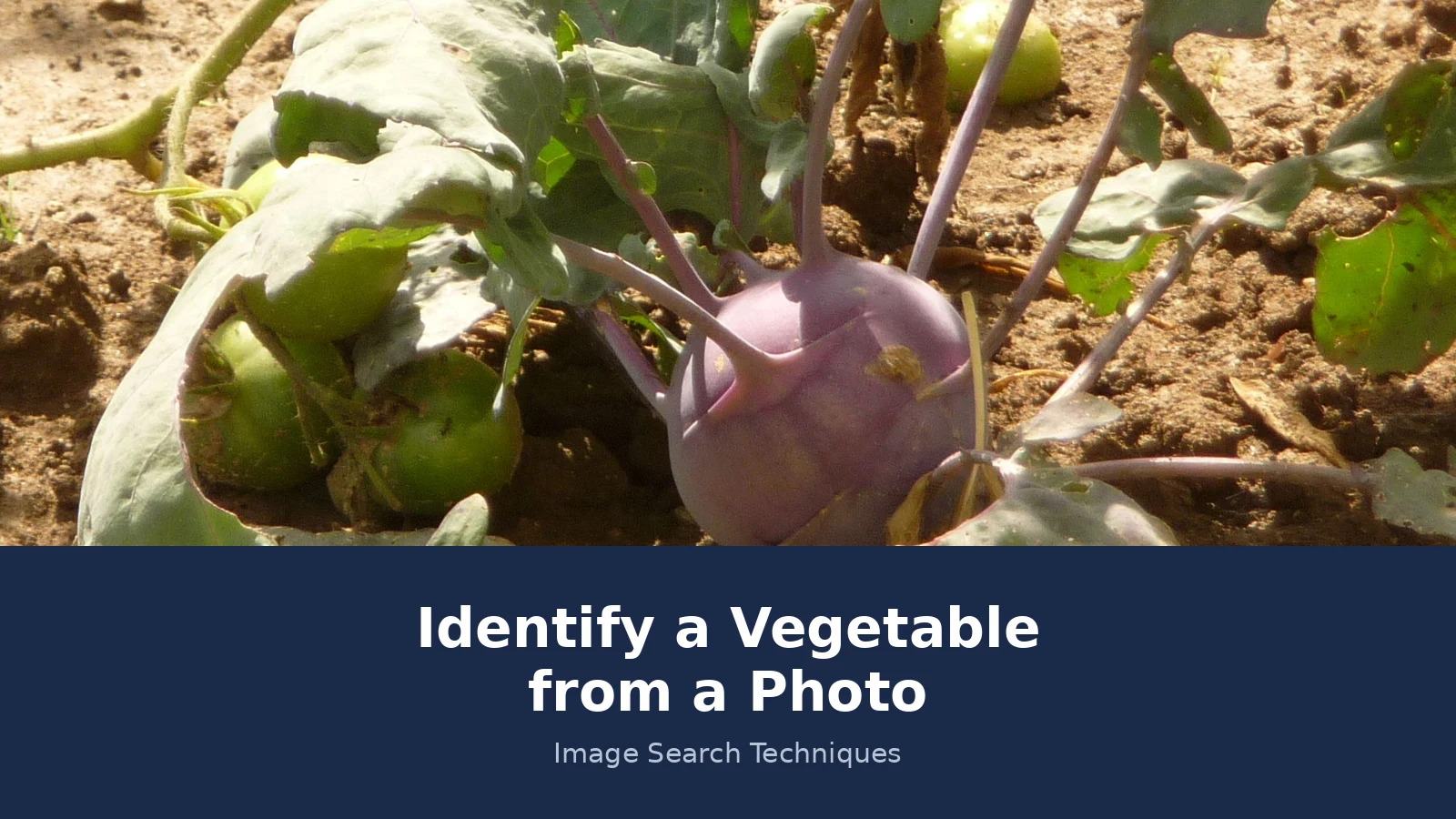
This is the worked example for this article, and every result below comes from a real test run on 21 November 2026. The photo is a Wikimedia Commons file, “Brassica oleracea var. gongylodes, Fryšták.jpg”, taken by Pavel Ševela on 16 August 2011 in Fryšták, Czech Republic, and shared under a CC BY-SA 4.0 licence. It shows a whole purple kohlrabi plant growing in soil: a round purple bulb in the centre, long leaf stalks, and green leaves. A few small green tomatoes from a neighbouring plant appear at the left edge, which is worth noting, because a search engine could read them as part of the plant. The photo is the one used as the base of this article’s banner, and the full file page is linked below.
First, the traits check, done before any search. The swollen stem base is the giveaway. Kohlrabi is a brassica that forms a swollen stem, often called a bulb, which can be green, white or purple on the outside, with pale green or white flesh inside. The Royal Horticultural Society describes the flavour as sweet, like broccoli or a mild turnip, and advises harvesting young, when the bulb is between golf-ball and tennis-ball size, because a bulb left to grow large turns woody. Baby veg can be ready in as little as six weeks, and a full size bulb in about twelve weeks. Our photo shows a purple bulb with the long stalks and broad leaves of the cabbage family, which puts it in the fruiting group of the traits table, and the purple skin narrows it to a purple kohlrabi variety. The full growing advice is on the RHS kohlrabi growing guide, which is the source for the figures in this paragraph.
Then the searches. Google Lens was tried three times, using the direct image URL twice and the Commons redirect once, and it failed all three times. Each attempt sat on “Thinking” for 20 to 25 seconds, then showed “Something went wrong, No image at the URL”. The URL itself loads fine in a browser, so this is Lens failing to fetch this particular file, most likely because of the comma and the diacritic in the file name. That is a failure, not a zero: Lens gave no identification, no exact matches and no similar image count for this photo. If you hit the same wall, our Google reverse image search guide explains the desktop route in full, and uploading the file by hand instead of by URL is the step to try next.
TinEye ran, and its answer was narrow but honest. It searched 86.8 billion images and returned exactly 1 result: the same file on commons.wikimedia.org, first indexed on 6 March 2013, with a second crawl date of 30 November 2018. No other site uses this image. TinEye does not give a similar images count, and it names no plant: it only lists where the image appears, and the file name itself carries the Latin name Brassica oleracea var. gongylodes. That result is still useful, because it proves the photo is an original Commons file and not a copy passed around the web, and the file page carries the photographer, the date and the licence.
Yandex was the engine that named the vegetable. Its tags read, in Russian, kohlrabi cabbage, Brassica oleracea, and purple kohlrabi, which is a direct identification of the plant in the photo. The Sites tab listed 14 site entries, topped by the Russian Wikipedia file page dated 13 February 2012, followed by the Commons file page and gardening pages in several languages. The same image appeared in 14 sizes, from 1962 by 1335 down to 120 by 82, and the Similar images tab loaded 78 thumbnails, mostly purple kohlrabi plants, seed packets and growing guides. Yandex gives no total similar image count, so 78 is the number loaded, not a total.
| Engine | Result on the kohlrabi photo | Named the vegetable? |
|---|---|---|
| Google Lens | Failed 3 times: “No image at the URL”, no matches shown | No, it gave no answer at all |
| TinEye | 1 exact match, Commons only, first indexed 6 March 2013, 86.8 billion images searched | No, it only lists where the image appears |
| Yandex | 14 sites, 14 sizes, 78 similar thumbnails loaded | Yes, purple kohlrabi, in Russian and Latin |
Put together, the three engines tell a consistent story. The traits check says purple kohlrabi. Yandex agrees and names it. TinEye confirms the photo is a genuine Commons original. Lens adds nothing this time, which is a reminder that a failed search is not a failed identification: it is a tool that could not fetch the file, and the other two engines plus the traits table carry the answer. The original photo, with its full credit and licence, is on the Wikimedia Commons file page for this kohlrabi photo.
Answer capsule: on a real purple kohlrabi photo, Yandex named the vegetable, TinEye proved the photo was an original, and Lens failed to fetch the file at all, which is why you run more than one engine.
Why are seedlings the hardest photos to identify?
A seedling is a young plant, and young plants of different vegetables look alike. The first leaves a seedling grows are the seed leaves, called cotyledons, and they look similar across many plants: small, smooth, and often rounded, with no sign of the shape the mature leaf will have. Until the true leaves appear, the leaves that carry the shape of the adult plant, there is often nothing in the photo that separates one vegetable from another. The Snappit vegetable identifier page puts this plainly: a young plant may look nothing like the vegetable it will become, and the first seed leaves look alike across many plants. That warning is the strongest part of its guide, and it is the reason this article repeats it here.
The honest answer for a seedling photo is usually to wait. If the seedling is in your own garden, mark the row, note the sowing date, and photograph it again in two or three weeks, when the true leaves are out. If it is a seedling you found elsewhere, photograph it, note where it was growing, and run the reverse search anyway, but treat the result as a shortlist, not an answer. A search engine that names a seedling is guessing from a shape that many plants share.
Three things help even before the true leaves appear. First, the seed itself, if any part of it is still visible, because seed size and shape differ between families. Second, the stem: colour, thickness, and whether it is hairy or smooth. Third, the place it is growing: a seedling in a vegetable bed is far more likely to be a sown vegetable than a wild plant, while a seedling at the edge of a field or a wood could be either. Note all three in your own words before you search, because the search cannot see them for you.
For the general method of searching plant photos, including how to handle a photo that returns nothing, our reverse image search for plants guide covers the steps in full. The vegetable specific part is what this article adds: the traits table above, and the warning that a seedling photo without true leaves is not ready to be identified yet.
Answer capsule: seedlings are hard to identify because their first leaves look alike across many vegetables, so wait for the true leaves before you trust an answer.
When can a photo not prove what a vegetable is?
A photo can suggest a vegetable, and it can narrow the answer to a small group, but it cannot prove edibility, and it cannot prove a wild plant is safe to eat. That is the lock on this article, and it is not a small print warning. Some wild plants look like vegetables and are poisonous. Poison hemlock looks like wild carrot, and death camas looks like wild onion, and both are named in the Snappit guide as the reason never to eat a wild plant because it looks like a vegetable. If you found the plant growing wild, do not eat it on the strength of a photo match, however confident the tool sounds. Ask a local expert, or a botanical society, and keep the plant where it is until you have an answer from a person, not a screen.
The same limit applies to a vegetable you bought or grew. A photo match can tell you that a bulb is probably a kohlrabi, but it cannot tell you that a particular bulb is safe to eat if it has been sprayed, stored badly, or grown in contaminated soil. Edibility is a question about the plant’s history, not its shape, and a photo carries no history.
There are two more honest limits. A photo cannot prove the variety, as the traits section explains, because named varieties of one vegetable often look identical. And a photo cannot prove that a plant is not something else: a zero from a search engine means the engine found no match, not that the plant does not exist, and a match to one site means the photo appears there, not that the site is right. Report a zero as a zero, and a match as a match, and let the traits decide.
The boundary with fruit is worth one note, because the two overlap in the kitchen. A tomato is a fruit by botany and a vegetable by cooking, and a courgette is a fruit that everyone treats as a vegetable. If your photo shows a fruit, our identify a fruit from a photo guide uses the same method with a fruit traits table, and the two guides share the same rule: the photo suggests, the traits confirm, and edibility is never decided by a picture alone.
Answer capsule: a photo can suggest a vegetable and narrow the field, but it can never prove a plant is safe to eat, and a wild look-alike should always be left alone.
FAQs
Can Google Lens identify a vegetable from a photo?
Yes, often. Upload a clear photo of the whole plant to Google Lens and it will suggest a name and show visual matches. It works best on a mature plant in daylight with the leaves visible. If it gives no answer, try Yandex or TinEye on the same photo and check the name against leaf shape and fruit.
What is the best app to identify a vegetable from a photo?
There is no single best app, because a plant ID app and a reverse image search do different jobs. An app like Snappit gives a named match with a field guide entry, while Lens, TinEye and Yandex search the web for the same image. Use an app as a second opinion and confirm the match against the traits table.
Can you identify a vegetable from a seedling photo?
Usually not with confidence. The first seed leaves, called cotyledons, look alike across many vegetables, and the true leaves that carry the adult shape have not grown yet. Mark the row and photograph the plant again in two or three weeks, when the true leaves are out, then run the search again.
How do I identify a vegetable from a photo at a market?
Photograph one whole item with its leaves still attached, plus a close up of one leaf and the cut base if you can see it. Search the photo on Lens or Yandex, then check the match against the leaf and fruit traits. Market clues help too: the stall label, the season, and the shape of the whole item.
Can a photo prove a wild plant is safe to eat?
No, never. A photo can only suggest what a plant might be, and some poisonous wild plants look like vegetables. Poison hemlock resembles wild carrot, and death camas resembles wild onion. Do not eat any wild plant on the strength of a photo match. Ask a local expert first and leave the plant where it is.
Why does reverse image search give different answers on each engine?
Each engine searches a different index and reads the photo a different way. Lens names the plant from visual matches, TinEye only finds the exact same image, and Yandex tags the image and lists the pages where it appears. That is why this guide runs all three on one photo and compares the results before settling on a name.






