


🔎 Reverse Image Search
Image search techniques made simple: upload a photo or paste a URL and search 6 engines at once. 100% free, nothing stored.
🔒 Your image is never stored on our servers longer than 24 hours and is never shared.
You found the perfect photo on Wikipedia. It fits your post, it looks free, and the question in your head is the same one a Quora reader asked word for word: “Can I use a picture from wikipedia on my blog, giving credit to wikipedia?” The short answer is yes, in most cases. The credit part is where most bloggers go wrong, and that mistake is the whole subject of this guide.
The direct answer: You can use Wikipedia images on your blog when the file’s own licence allows it. Most files sit on Wikimedia Commons under a Creative Commons licence or in the public domain, and each file page states its terms. Credit the photographer by name, link the licence, and never reuse a fair use image. Crediting “Wikipedia” alone meets no licence.
The same trap catches video creators. Credit is not permission on YouTube either, as our guide on book images in a YouTube video explains, with the fair use limits and the licence routes that actually work.
This guide gives general information about how image licences work. It is not legal advice. If a photo matters to your business, or a licence looks unclear, ask a lawyer in your own country before you publish. What follows is the practical process: how to find the licence, how to read it, how to write the credit, and which images to leave alone.
What counts as a Wikipedia image? A Wikipedia image is any photo, map, diagram or illustration that appears in a Wikipedia article. Most of these files are not stored on Wikipedia at all. They live on Wikimedia Commons, a separate free media library, and Wikipedia articles simply display them. A smaller group of images is stored on Wikipedia itself under a “fair use” claim, and those play by different rules entirely.
Can you use Wikipedia images on your blog?
Yes, in most cases, and the reason is simple. Wikipedia only accepts images that other people are allowed to reuse. The Wikimedia Commons library, where most Wikipedia images live, only takes files that are freely licensed or in the public domain. That is its written policy, and it is enforced by the volunteers who review uploads. So the photo you want is probably usable. Probably is not certainly, though. Each file carries its own licence, and your job is to read that one file’s terms before you use it.
Think of it this way. Wikipedia is a shop window, not the owner of the goods. The Wikimedia Foundation says plainly that it owns almost none of the content on its sites. The photos belong to the individual photographers, illustrators and archives who made them. They have simply agreed, through a licence, to let anyone use the work on stated terms. Your blog is covered by that agreement only if you keep the terms.
That is also why “giving credit to Wikipedia” fails. Wikipedia did not take the photo, and Wikipedia does not own the copyright. A credit line that says “Image: Wikipedia” names a website that has no rights in the picture. The top answer on the Quora question says it straight: attributing Wikipedia is not enough. The licence wants the creator’s name, and usually a link to the licence itself.
Where do Wikipedia images actually live?
Two places, and the difference decides whether you can use the image at all. Most images live on Wikimedia Commons. These are free to reuse under their licences, including on a commercial blog, as long as you follow the licence terms. A smaller set lives only on Wikipedia under a fair use claim. Those are not free, and you should treat them as unusable for your blog unless you have your own legal basis for using them.
How do you tell which is which? Click the image in the Wikipedia article. A viewer opens with the photo large. Click the “More details” button, or the file name, and you land on the file description page. That page tells you where the file is stored. If the address starts with commons.wikimedia.org, the file is on Commons. If it starts with en.wikipedia.org and the page carries a “Non-free use rationale” or “Fair use” label, the file is a Wikipedia-only image. That label is your stop sign.
Commons also has a rule worth knowing. It does not accept fair use justifications at all, and it does not accept licences that ban commercial use or ban changes, such as CC BY-NC or CC BY-ND on their own. If a file is on Commons, it has already passed that filter. It may still carry a ShareAlike condition, which affects what you can do with edited versions, but the file itself is free to use. Learning the difference between Commons files and Wikipedia-only files is the single most useful habit in this guide, and it takes about ten seconds per image once you know where to look.
How do you check an image’s licence in 30 seconds?
Open the file page and read four fields. They are always in the same places, on every Commons file page, so the check becomes routine fast.
- Licensing. Scroll to the Licensing section. It names the licence in plain words, for example “Creative Commons Attribution-Share Alike 4.0 International” or “Public domain”. If you see more than one licence listed, you may pick any one of them. The file page also links to the full licence text, and you should open that link at least once so you know what you are agreeing to.
- Author. The Author field names the person who made the work. This is the name your credit line must carry. Note the warning on the reuse page: the person who uploaded the file is not always the person who made it. If the uploader and the author differ, credit the author.
- Source. The Source field says where the file came from, often “Own work” or a link to a Flickr page or an archive. A vague source is a reason to pause. If the source does not let you confirm the licence claim, pick a different image.
- Date and description. The date tells you when the work was made, which matters for public domain checks, and the description tells you what the picture actually shows. Both help you spot a mislabelled file before it becomes your problem.
That is the whole check. If the licence is a free Creative Commons licence or the file is in the public domain, and the author and source look genuine, you can use it. If anything on the page looks wrong, contradictory or missing, do not use the file. There are more than 100 million files on Commons. You will never run out of alternatives.
Wikimedia’s own reuse guide, Reusing content outside Wikimedia, says the same thing in plainer terms: you do not need to contact the creator for permission when a free licence already covers your use, but you do need to verify the copyright status of each image yourself, because the Foundation gives no warranty that the licence information on a file page is correct.
What does each licence actually allow?
Most Wikipedia images fall into one of six buckets. The table below is the ranking asset for this article. Read the row that matches your file before you publish.
| Licence on the file page | Can you use it on your blog? | Credit needed? | Watch out for |
|---|---|---|---|
| CC BY (any version, 1.0 to 4.0) | Yes, including commercial blogs | Yes, name the author and link the licence | If you edit the image, say that you changed it |
| CC BY-SA (any version) | Yes, including commercial blogs | Yes, name the author and link the licence | Edited versions must carry the same licence; you cannot lock your version down |
| CC0 (public domain dedication) | Yes, any use | No, but a courtesy credit is good practice | The person in the photo may still have rights; see the section below |
| Public domain (copyright expired, or a US government work) | Yes, any use | No, but a courtesy credit is good practice | Public domain in the US is not always public domain in your country; check before you rely on it |
| GFDL (GNU Free Documentation Licence) | Yes, but awkward for blogs | Yes, and you must include the full licence text | Mostly found on older files; if the file is dual licensed with a CC licence, use the CC one instead |
| Fair use / non-free (Wikipedia only, not Commons) | No, do not reuse it on your blog | Not applicable | Fair use on Wikipedia covers Wikipedia’s use only; your blog is a different use |
A few points in that table deserve a closer look. CC BY is the friendliest licence for bloggers. It lets you use, crop and edit the image, even on a blog that earns money, as long as you credit the author, link the licence, and note any changes you made. The CC BY 4.0 licence deed sets out those three duties in short sentences, and they are easy to meet with one credit line under the photo.
CC BY-SA adds one condition: share alike. If you change the image, your changed version must be shared under the same licence. For a blog that simply displays the photo unchanged, this changes nothing. It only bites if you edit the photo and then try to claim full copyright over your edit. Our own public domain guide explains the other side of the same question, how to work out whether an old photo is out of copyright in the first place: Public Domain Photos: How to Tell If an Image Is Free to Use.
CC0 and public domain files need no credit by law, but credit them anyway. It costs one line, it shows your readers where the image came from, and it protects you if someone later questions the file’s status. A courtesy credit is also the decent thing to do for a photographer who gave their work away.
For the full method, our guide to how to credit a photo properly builds the credit line step by step with the TASL method, including worked examples for a Creative Commons photo, a stock photo and a public domain photo.
Why crediting “Wikipedia” is the wrong credit
This is the lock on this article, and it is worth stating plainly. “Image: Wikipedia” is not a credit. It names no author, it names no licence, and it gives the reader no way to check the terms. No Creative Commons licence accepts it, and the Commons credit line guide says the attribution must name the original author, plus the licence, plus a link or address where the licence can be read.
The mistake is understandable. Bloggers copy what they see other bloggers do, and “Source: Wikipedia” is everywhere. It also feels safe, because Wikipedia is famous and the image came from its pages. But the licence is a deal between you and the photographer, and Wikipedia is not a party to that deal. If the photographer ever asks how their photo is being used, the answer they need is their name on your page, not the name of the encyclopedia.
There is a second, quieter reason to get the credit right. A correct credit line proves you checked the licence. If a reader, a client or the photographer themselves asks where the image came from, your credit line answers in one line: who made it, under what licence, and where the file page lives. A vague credit invites the follow-up questions a correct credit prevents. If you have ever been on the other side of this, a photo of yours used without a proper credit, you will know how it feels: Creative Commons Photo Used Without Credit.
How do I write a credit line that works?
A credit line has three parts: the author, the licence, and a link. Put it directly under the image, or in a caption, where a reader can see it without hunting. The format is up to you, as long as all three parts are present. The examples below are the correct credit lines for the real files checked in the worked example later in this article, plus one from the top competitor guide, so you can copy the pattern.
| Licence | Author | Correct credit line |
|---|---|---|
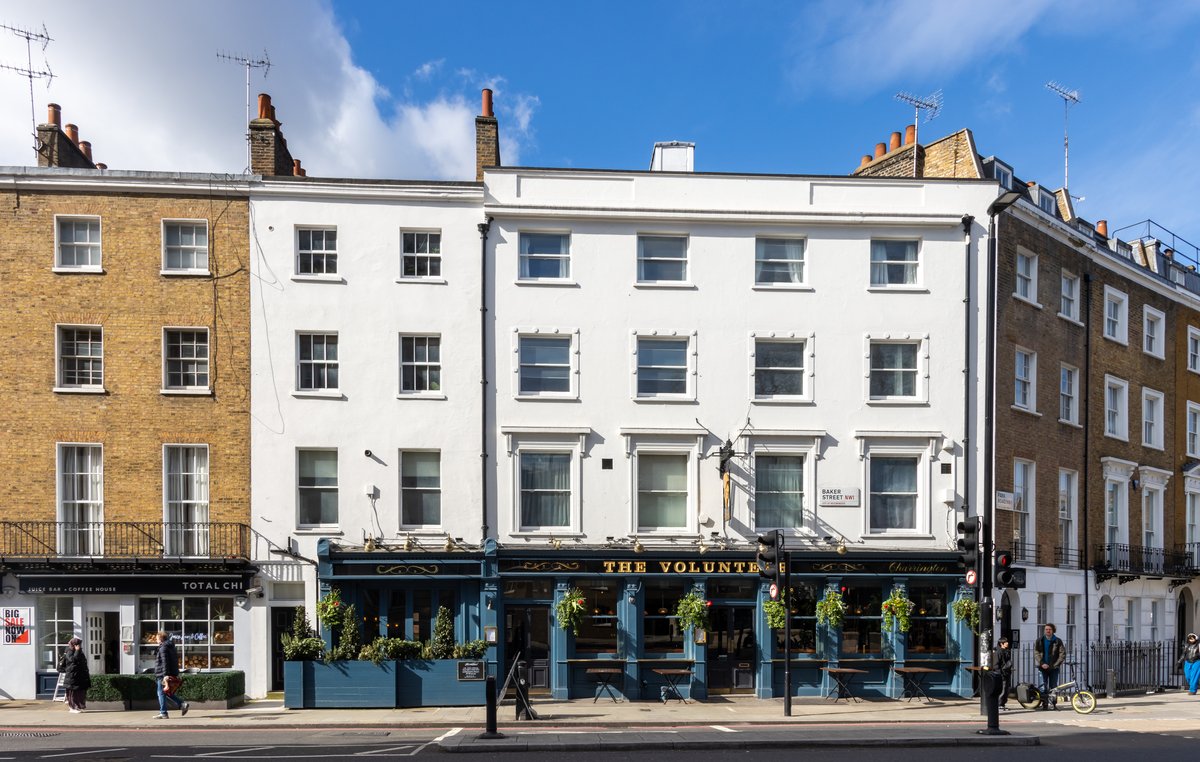
| CC BY-SA 4.0 | Mike Peel | “The Volunteer, Baker Street” by Mike Peel, CC BY-SA 4.0 (link to the licence) |
| CC BY 2.5 | Dschwen | “Gull portrait” by Dschwen, CC BY 2.5 (link to the licence) |
| CC BY-SA 3.0 | Gage Skidmore | Photo by Gage Skidmore, CC BY-SA 3.0 (link to the licence) |
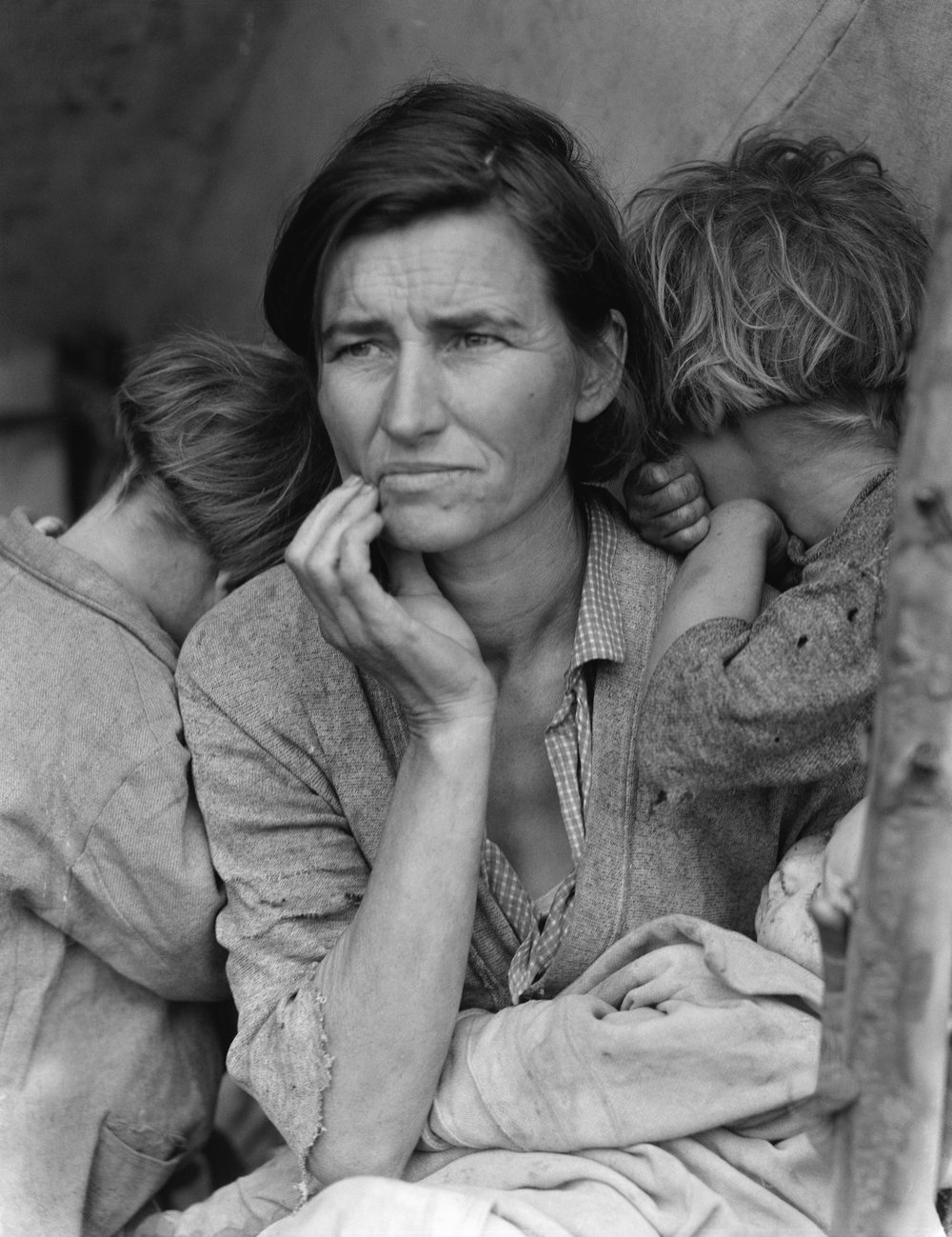
| Public domain | Dorothea Lange | Dorothea Lange, public domain, via Wikimedia Commons (courtesy credit) |
Notice what each line contains. The title of the work, where the file page gives one. The author’s name, exactly as the file page spells it. The licence, named in full, with a link to the licence text. And the source, Wikimedia Commons, so a reader can find the file page. Wikimedia’s credit line guide gives the same pattern in its shortest form: author, a slash, licence, as in “John Doe / CC-BY-SA-3.0”. That is the minimum. The fuller version above is better for a blog, because it also tells the reader what the picture is.
Three habits make credit lines painless. First, write the credit at the moment you download the file, while the file page is still open. Second, keep the file page URL in your notes for that post, so you can prove the licence later if anyone asks. Third, if the author asked for a specific form of words on the file page, use their words. The licence says their reasonable requests must be honoured.
If you edit the image, say so in the credit. A cropped or recoloured version is a change, and CC licences ask you to note changes. One short phrase does it: “Cropped from the original by Mike Peel, CC BY-SA 4.0”. If you use the image as the basis for a new illustration, the same rule applies, and a ShareAlike licence means your new version carries the same licence.
Which Wikipedia images must you never reuse?
Fair use images. These are the files that live on Wikipedia itself, not on Commons, and they carry a “Non-free use rationale” on their file page. They are usually low resolution portraits of people who have died, old film posters, album covers, book covers and logos. Wikipedia may use them because its use fits a narrow legal exception for an encyclopedia. Your blog is a different use, in a different context, and that exception does not travel with the file.
Take a real example I checked while writing this guide. The poster for The Godfather, file name Godfather ver1.jpg, sits on the English Wikipedia with its licence listed simply as “Fair use”. It is a copyrighted film poster, and Wikipedia’s rationale covers its use inside the film’s article. Nothing on that page gives a blogger permission to use the poster as a header image, a thumbnail or an illustration. The safe move is to leave it where it is and find a free alternative, or buy a licensed image.
The same caution applies to screenshots of software, TV stills and video game art. Commons refuses all of these as uploads, which tells you how the community views them. If you find such an image inside a Wikipedia article, it is almost certainly a non-free file, and the file page will say so. The rule is short: if the licence field says fair use, do not reuse the file.
There is one more category to handle with care, and it is not about copyright at all. A free licence covers the copyright in the photo. It does not cover the rights of the person in the photo, a trademark visible in the frame, or a private place that was photographed without permission. A Creative Commons photo of a recognisable person used in an advert can still raise a likeness or privacy claim, even though the copyright side is clean. Commons says this directly on its reuse page: other restrictions may apply, including trademarks, personality rights, moral rights and privacy rights. For a normal blog illustration, this rarely matters. For advertising, endorsements or anything that suggests a person supports your product, it matters a lot, and that is a question for a lawyer, not a licence table.
Four real photos, checked live
Advice is cheap, so here is the check done for real. On 15 November 2026 I opened four files through the Wikimedia Commons and Wikipedia systems and read their licence fields exactly as a blogger would. Nothing below is assumed. Each row shows what the file page actually says.
| Photo | What the file page says | Licence | Credit needed? | Safe for a blog? |
|---|---|---|---|---|
| Migrant Mother, Dorothea Lange, 1936 | Public domain, US federal work | Public domain | No, courtesy credit recommended | Yes |
| Charlie Chaplin as the Tramp, 1915 | Public domain | Public domain | No, courtesy credit recommended | Yes |
| The Volunteer pub, Baker Street, Mike Peel, 2024 | Creative Commons Attribution-Share Alike 4.0 | CC BY-SA 4.0 | Yes, author and licence | Yes, with the credit line |
| Gull portrait, Dschwen | Creative Commons Attribution 2.5 | CC BY 2.5 | Yes, author and licence | Yes, with the credit line |
| The Godfather film poster | Fair use, Wikipedia only | Not a free licence | Not applicable | No, do not reuse |
Two of these photos appear below, exactly as a blog would publish them, with the credit lines this guide recommends. The first is the Volunteer pub photograph. Its file page lists the author as Mike Peel and the licence as CC BY-SA 4.0, and the system confirms attribution is required. The credit under it is the full version from the table above, and it links to the licence.
The second is Migrant Mother, the 1936 Dorothea Lange photograph. Its file page lists it as public domain, a work of the US federal government, and the system confirms no attribution is required. The credit under it is a courtesy credit, which is good practice even when the law does not demand it.
Notice the pattern across all five rows. The check took seconds per file, the licence field gave a plain answer every time, and the credit line wrote itself once the author and licence were known. The only file that failed the check was the film poster, and it failed loudly, with “Fair use” printed on its page. That is the system working as designed.
Should you download the image or hotlink it?
Download it. Wikimedia Commons says directly linking to a file on its servers, hotlinking, is possible but not recommended. Downloading the file to your own media library is the normal route, and it has three practical advantages. First, your page keeps working if the file is renamed, moved or deleted on Commons. Second, you can resize and compress the file for your own site, which keeps your pages fast. Third, your credit line sits next to the image on your own page, where the licence expects it to be.
Hotlinking also puts your page at the mercy of someone else’s server. If Commons is slow or the file is removed, your image breaks without warning. There is also a quieter risk. A file you hotlink can be replaced on Commons with a different version, and your page would then show a picture you never checked. Downloading freezes the exact version you licensed.
When you download, take the full resolution version from the file page and resize it yourself. The full resolution file is the one the licence covers, and resizing it for the web is a normal, permitted change under a CC licence, as long as you note the change if the licence asks for it. Keep the original filename or the file page URL in your notes, so the licence trail stays intact.
What if the licence looks wrong or the photo is taken down?
Licences on Commons are usually right, but not always. The reuse page warns that the Foundation gives no warranty about the copyright status of any file, and a 2023 report on Medium flagged exactly this problem: some Commons files carry a free licence they should not have, because the uploader was not the rights holder. That is why the check matters, and why a vague source field should make you walk away.
Verify the original source before you rely on a file. If the source is a Flickr page, open it and check the licence there matches the Commons page. If the source is an archive, check the archive’s own terms. If the file page says the image is a US government work, the description should say which agency made it. A mismatch between the source and the licence claim is a reason to pick another image. A reverse image search can also help here: run the picture through the search and see where else it appears, and whether another site claims it. Our guide to that check is How to Reverse Image Search.
If you have already published an image and the licence turns out to be wrong, act fast. Take the image down, replace it with a properly licensed one, and keep a note of what happened. If the photographer contacts you, answer politely and promptly, and do not argue about the licence. Most disputes end when the image comes down and the credit is fixed. If you receive a formal takedown or a demand for payment, do not ignore it, and get legal advice before you reply. Our guide to the removal side of this, when a photo needs to come off Wikimedia Commons itself, is Remove a Photo from Wikimedia Commons.
Files do disappear from Commons. Volunteers delete images that turn out to infringe copyright, and the Foundation removes files after complaints. That is another reason to download rather than hotlink, and to keep the licence details in your post notes. If a file you used is later deleted, your downloaded copy and your credit line show you acted in good faith on the information available at the time. It does not make an infringing use legal, but it is the difference between a careless mistake and an honest one.
Finally, remember why this matters beyond compliance. The photographers who put their work on Commons did so on trust. They trusted that reusers would follow the licence, credit them by name, and share alike where the licence asks for it. Students meet the same rules in class, so it is worth reading whether you can use photos in a school presentation before the deck is built. Keeping that trust is what keeps the library free. A blog that credits properly is a small part of that, and it costs nothing.
Protecting your own photos uses the same ideas in reverse. If you publish your own work and want to control how it appears in search results, our hub guide walks through the options: Protect Your Photos Online: The Complete Guide.
FAQs
Can I use Wikipedia images on my blog for free?
Yes, in most cases. Most Wikipedia images live on Wikimedia Commons under a Creative Commons licence or in the public domain, and those licences cover free reuse, including on blogs. Check the file page first, because each image has its own licence. Images marked fair use are the exception, and you should not reuse those on a blog.
Do I have to credit Wikipedia when I use its images?
No. Crediting Wikipedia does not meet any image licence, because Wikipedia does not own the photo. Credit the photographer or creator by name, name the licence, and link to the licence text. That is what Creative Commons licences ask for. A short line under the image, such as the author, a slash and the licence, is enough.
What happens if I use a fair use image from Wikipedia on my blog?
You would be using a copyrighted work without a licence, and the fair use claim that covers Wikipedia does not cover your blog. The rights holder could ask you to take it down, and could ask for payment. Remove the image at once, replace it with a freely licensed photo, and do not reuse fair use files.
Can I crop or edit a Wikipedia image before I publish it?
Yes, if the licence allows changes. CC BY and CC BY-SA both allow edits, and so does a public domain file. Say that you changed the image in your credit line, for example by writing cropped from the original. A ShareAlike licence means your edited version must carry the same licence. Never edit a fair use image for reuse.
Can I use Wikipedia images on a commercial blog that earns money?
Yes, if the licence allows commercial use. CC BY, CC BY-SA, CC0 and public domain files all allow it, and those cover most Wikipedia images. Check the licence first, and credit the author as the licence asks. Never use a CC BY-NC file, or a fair use image, on a blog that earns money.
What should I do if a Wikipedia image licence looks wrong?
Do not use the image. Pick a different photo with a clear licence and a named author. Check the file’s source, and run a reverse image search to see where else the picture appears and who claims it. If you already published it, take it down at once, replace it, and answer politely if the rights holder contacts you.






