


🔎 Reverse Image Search
Image search techniques made simple: upload a photo or paste a URL and search 6 engines at once. 100% free, nothing stored.
🔒 Your image is never stored on our servers longer than 24 hours and is never shared.
You found a frog in the garden, by the pond, or on a path, and you took a photo before it hopped away. Now you want a name for it. If you want to identify a frog from a photo, the photo has to show the right things, and you need to know what to check first.
Short answer: Photograph the frog side-on, whole, with something for scale, and note where you found it. Then read the pattern before the colour, check skin, legs and the dark patch behind the eye, and run the photo through Google Lens, TinEye and Yandex. In our live test, Lens and Yandex both named a common frog correctly from one garden photo.
This guide walks through the whole method, step by step, using a real photo of a common frog we searched live on 20 November 2026. You will see the exact engine results, including the one engine that named nothing, and you will learn where a photo stops being enough. It is the same reverse-search method we use in our guide to find an item by photo, applied here to a living animal. By the end you will know how to identify a frog from a photo, and when the honest answer is only “frog, not toad”.
What Do You Need Before You Start?
The short version: a clear side-on photo, the location, and a rough size. Without those three, even the best search engine is guessing.
Start with the photo itself. It needs to show the whole animal, in focus, in natural light, from the side. A frog photographed from directly above hides the legs and the eye mask, which are the two marks that matter most. A photo taken from ten feet away, in the dark, with the flash on, will not do the job. Light and flash shift colours, so a brown frog can look green and a green frog can look grey. That is why the pattern matters more than the colour, and why a sharp photo matters more than a pretty one.
Then note three things while you still can. First, where you found it: the country, the county or region, and the habitat, such as a garden pond, a damp lawn, or a woodland path. Location is the single most useful fact after the photo itself, because many frogs look alike and only live in some places. Second, the size: roughly how long was the body, nose to tail, and was it sitting, climbing, or in the water? A coin or a set of keys placed near the frog gives scale without you touching it. Third, the markings you can see: toe pads, eye colour, belly colour, or stripes and spots on the back and legs. Write them down before the frog hops off and your memory fills in the gaps.
One rule runs through all of this. Photograph only. Never pick the frog up, never move it to a better spot, and never handle it to get a closer shot. Handling stresses amphibians, and toads secrete a toxin from the glands behind their eyes. The photo is the whole method, and it works fine from a respectful distance.
Is It a Frog or a Toad?
The short version: check the skin, the legs, the eye mask and the glands behind the eye, in that order. Those four marks settle the question in most British gardens.
Frog or toad, what do the words mean? They are everyday names, not a clean split in biology. Some toads are smooth, some frogs live away from water, and the line between the two is fuzzy. In Britain the question is usually simpler, because you are almost always choosing between the common frog and the common toad, and those two do look different. So this section answers the practical question, not the textbook one.
Work through the table below against your photo, one row at a time. Do not judge on colour alone. A common frog can be green, brown, red, yellow, or almost black, and the same frog can look different in sun and shade.
| What to look at | Frog | Toad |
|---|---|---|
| Whole outline, side-on | Slim, sleek body with long hind legs folded tight against it | Plump, squat body with shorter legs; it walks or crawls more than it leaps |
| Skin | Smooth and moist, looks wet even out of the water | Dry and warty, covered in lumps and bumps |
| Hind legs | Long and powerful, built for leaping, often with dark bands across them | Shorter, built for hopping or crawling |
| Dark eye mask | A dark patch behind the eye, covering the eardrum (the common frog’s best mark) | No dark mask; coppery gold eyes with horizontal pupils |
| Glands behind the eye | None | Raised parotoid glands, one behind each eye, which secrete a toxin |
| Location | Damp places, near ponds, in the garden after rain | Drier ground, often further from water |
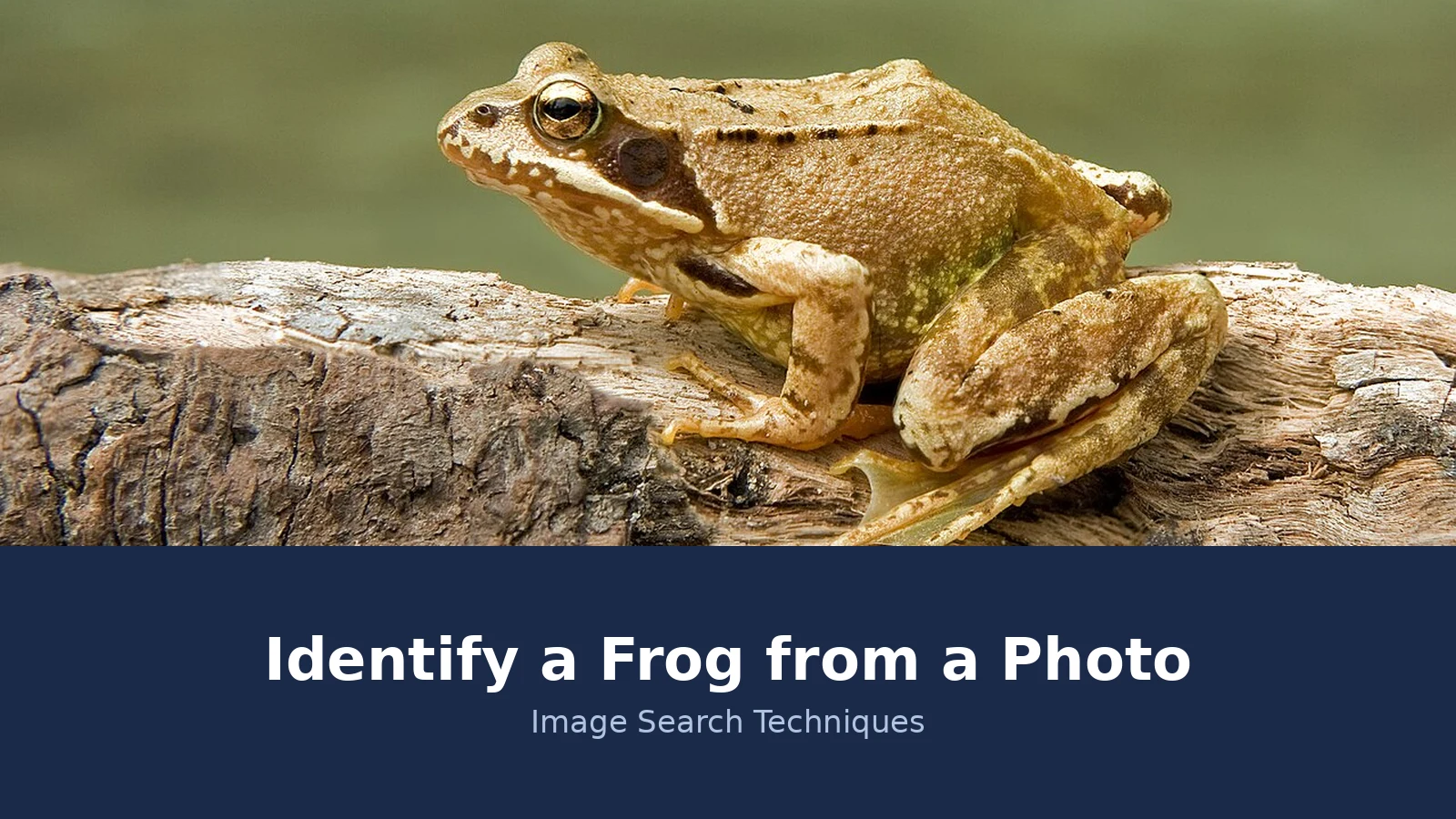
Now try it on our worked-example photo, the common frog on a log in the banner above. The outline is slim, the skin is smooth and moist, the hind legs are long with dark bands, and the dark mask behind the eye is plain to see. There are no raised glands behind the eyes. Every row of the table points the same way, so this animal is a frog, and the mask, the banded legs and the smooth skin point at the common frog in particular. That is the routine: run the table first, and only then ask a search engine to confirm it.
The glands row deserves a warning of its own. A toad’s parotoid glands secrete bufotoxin, a foul-tasting substance that can poison a dog that mouths a toad, and it can irritate human skin. Never pick a toad up, keep dogs away from it, and wash your hands if you touch anything it sat on. The toxin is a defence, not a reason to harm the animal. Leave it alone and it will move on by itself. Froglife’s frogs and toads identification guide gives the same marks in its own words, and it is the best short reference to check your photo against.
How Do You Photograph a Frog for Identification?
The short version: get low, get side-on, get the whole animal in frame, and take a second shot of the back. Five minutes of care here saves an hour of guessing later.
- Get down to the frog’s level. A photo taken looking down from standing height flattens the legs and hides the eye mask. Crouch or kneel so the lens is level with the animal, and take the shot from the side.
- Keep the whole animal in frame. Do not crop in camera. The search engines need the outline, the legs and the head together, and a tight crop throws away the very marks you need.
- Add scale without touching the frog. Lay a coin or your keys on the ground near it, not on it. A frog with no scale in the photo could be two centimetres long or ten, and size rules whole groups of species in or out.
- Take a second shot from above. The back pattern, the spots, the stripes, and any pale line down the spine all show best from above. Two photos beat one every time.
- Photograph the head close up. The eye mask, the eye colour, and the shape of the snout are the marks that separate close cousins. If you can only take one close-up, make it the head.
- Note the place and the date. County, habitat, and whether it was in water, on land, or climbing. A frog found in a British garden pond in November is a different shortlist from one found on a wall in Spain in July.
Two things to avoid. First, flash at close range. It bleaches the colour out of the photo and can make a brown frog look grey, which is exactly the mistake the pattern-first rule exists to prevent. Natural light is better, even if it is dull. Second, do not move the frog to a nicer background. A frog photographed where you found it keeps its habitat in the picture, and the habitat is evidence. A frog posed on a white sheet has lost it.
How Do You Identify a Frog from a Photo with Reverse Image Search?
The short version: upload the original file to Google Lens, TinEye and Yandex, and read what each one returns. Two of the three named our frog correctly, and the third pointed at the right page without naming it.
The test photo is a real one. It is “European Common Frog Rana temporaria.jpg” by Richard Bartz, a common frog photographed in Saulgrub, Germany, on 7 July 2008, published on Wikimedia Commons under a CC BY-SA 2.5 licence. It is a featured picture on Commons, and it shows the animal side-on on a log, with the dark eye mask, the banded hind legs and the smooth skin all visible. That is the kind of photo this guide asks for, so it is a fair test of the method.
We searched it live on 20 November 2026, on all three engines, using the file itself rather than a link. The first attempt on Google Lens, by image address, failed with “No image at the URL”, so we uploaded the file instead and it worked. The first attempt on TinEye, also by file upload, was stopped by a Cloudflare check that would not clear, so we ran the same image by its address on a fresh tab and the results loaded. Yandex took the file upload first time with no trouble. Those hiccups are part of the honest result, and they are worth knowing about before you try it yourself.
Google Lens named it outright. Its AI Overview called the frog a common frog, Rana temporaria, also known as the European common frog or grass frog. It picked out the brownish tan and olive tones with mottled markings, the distinct dark patch behind the eye covering the eardrum, and the semi-aquatic life near ponds and wetlands across much of Europe and parts of Asia. It even offered to tell it apart from a moor frog or an agile frog, which are the two species most likely to be confused with it. Google shows no numeric total, but the exact matches tab rendered about 399 entries, led by the Wikipedia common frog page and the file page itself, and 60 visual matches loaded on the all tab.
TinEye does not name species, and it did not name this one either. What it does is find where the exact file is used, and it found 211 results after searching 86.8 billion images, with the first indexed on 10 November 2009. The top result was the Wikipedia common frog page carrying the file under its own name, “European_Common_Frog_Rana_temporaria.jpg”, followed by other pages using the same file. The file name itself points at the identification, even though TinEye never says the word frog.
Yandex named it too, in Russian. Its top tag was the grass frog, Rana temporaria, with common frog and frog as further tags, and moor frog listed as an alternative. It showed 18 similar images, 18 other sizes from 1920 by 1200 down to 600 by 475, and 20 site entries. One of those entries was a false positive, a blog post about the Rana Plaza incident in Bangladesh, matched on the word Rana rather than the animal. That is a useful reminder: a tag list is a lead, not a verdict, and the odd wrong entry does not spoil the right ones.
Put the three together and the verdict is solid. Two engines named Rana temporaria independently, the third pointed at the Wikipedia page for that exact species, and the field marks in the photo, the mask, the banded legs, the smooth skin, all agree. That is how a reverse image search should be used: not as one answer to believe, but as three answers to compare. The step-by-step method for all three engines is in our guide to how to reverse image search.
What Does Each Search Engine Actually Tell You?
The short version: Lens names the animal, TinEye finds where the photo has been used, and Yandex gives a second opinion in tags. Use all three, because each one fails in a different way.
| Engine | Best at | What it named in our test | Counts in our test |
|---|---|---|---|
| Google Lens | Naming the species and finding near-duplicates and cropped copies | Common frog, Rana temporaria, with an AI Overview | About 399 exact matches rendered, 60 visual matches shown, no numeric total |
| TinEye | Finding where the exact file has been used online | No species name; the top result was the Wikipedia common frog page | 211 results, 86.8 billion images searched, first indexed 10 November 2009 |
| Yandex | Tags and similar images, a useful second opinion | Grass frog, Rana temporaria, in Russian tags | 18 similar images, 18 sizes, 20 site entries |
Use Lens first when you want a name. It is the only one of the three that tries to identify the animal in the picture, and its exact-match list is usually the longest because it counts near-duplicates and cropped versions, not just identical files. Use TinEye when you want to know where a photo has already been used, which matters if the photo might be a stock image, a press photo, or someone else’s picture rather than your own. Its count is smaller because it counts distinct indexed copies of the file, and that difference is normal, not a contradiction. Use Yandex as the second opinion, especially when Lens draws a blank, and read its tags with care, because a tag in another language can still be right, and a false positive like the Rana Plaza post can still slip in.
A zero needs reading too. A zero on TinEye means TinEye has not crawled a page carrying the image yet, especially if the photo is new. It does not mean the image exists nowhere else. A zero on all three usually means the photo is too new, too cropped, or too unusual to have been indexed, and the answer then is to try the full, uncropped file, or to accept that the engines cannot help with this one and fall back on the field marks and a human.
Can an App Identify a Frog from a Photo?
The short version: yes, as a suggestion, but no app we checked does a reverse image search, and none of them shows its working. Treat the name as a lead and check it against the field marks.
Snappit is a photo-upload identifier with a frog and toad section. You upload a clear photo, in JPG, PNG or WebP up to 10 MB, and it compares markings, build, legs and eyes, then gives a likely match as a card you can collect in the app. It also carries a long guide on telling frogs from toads, with the same field marks this article uses, plus look-alikes such as common frog against common toad in Britain, and froglet against toadlet. It is family oriented, aimed at ages four and up, with no ads. What it does not do is a reverse image search. The word reverse does not appear on the page, there are no search-engine result counts, and its only worked example is an illustration of its own matcher. It is fine for a quick frog-or-toad answer, not for finding the source of a photo.
IdentifyThis.app is an AI photo-upload tool that claims more than 7,000 frog species, with identification in seconds plus habitat, behaviour, diet and conservation status. The first identification is free, then it costs $6.99 a year, and a badge on the page also says “From $3/Week”. It covers tree frogs, true frogs, poison dart frogs, toads and ground frogs, aquatic species, exotic and rare species, and juveniles and tadpoles, and it carries a comparison table against Google Lens and other tools. But again, the word reverse does not appear on the page, there is no performed worked example with a real photo, and there are no engine counts. Google Lens appears only as a row in its comparison table. A paid tool that will not show its working is a weaker source than a free search that does.
iNaturalist is the slower, better second opinion. You upload the photo with the location, and other people suggest an identification, which the community then agrees or corrects. It takes longer than an app, but a human has checked it, and the location is built into the answer. Use it when the engines disagree, or when the animal is a juvenile and the apps are guessing.
The same method works for other animals too. We have used it to identify a fish from a photo, to identify a bird from a photo, and to identify animal tracks from a photo. The routine never changes: a clear photo, the location, the field marks first, then the engines.
What If the Search Names Nothing?
The short version: try the full, uncropped file first, then add the location to your search, then ask a human. A blank result is information, not a failure.
Start with the file. Search engines need detail, and a photo that has been cropped to a postage stamp, or shrunk to a thumbnail, often returns nothing. Upload the original file at its full size, and if you searched by a link, try the file upload instead, because a link can fail where a file works. That happened to us on Lens in this very test, where the image address failed and the upload worked.
Then add the location. A frog in a British garden is most likely a common frog, and saying “common frog, Derbyshire, garden pond” in your search narrows the field at once. The same photo in Australia would be a different shortlist entirely, and the engines cannot know which country you mean unless you tell them.
Young animals are the hardest case. Froglets leaving the pond in summer, and toadlets the same size, confuse everyone, including the apps, because the marks are not fully formed yet. If your animal is tiny and recently left the water, note the size and the season in your search, and accept that the answer may only be froglet or toadlet, not a species.
If the engines still name nothing, take the photo and the location to a human. iNaturalist, a local wildlife group, or a county recorder will often settle in a day what an app cannot settle at all. A photo that no engine recognises is usually a new photo, a rare animal, or a bad photo, and a person can tell those three apart where a search box cannot.
When Can a Photo Only Prove Frog Versus Toad?
The short version: when the photo is blurry, distant or partial, or when two species look alike, the honest answer stops at frog or toad. Claiming more than the photo supports is how wrong identifications spread.
Colour alone proves nothing. The Wildlife Trusts notes that the common frog varies in colour enormously, from green to brown and even red or yellow, and our own test photo is a brownish tan animal that could look olive in different light. The Wildlife Trusts common frog page lists the same marks this guide uses: smooth skin, a dark mask behind the eye, and long back legs covered in dark bands. If your photo shows none of those marks clearly, you do not have a species identification, you have a frog.
Similar species are the other limit. The moor frog and the agile frog look close to the common frog, and Lens itself offered to tell them apart in our test. In Britain the moor frog is rare and local and the pool frog rarer still, so location does most of the work, but without a clear mask, a clear leg shot and the county, do not claim the species. A single blurry garden shot can only ever prove frog versus toad, and saying so is not a failure. It is the correct answer.
Two safety rules close the subject. Never handle the animal to get a better photo, and never give a safe-to-touch or safe-to-eat verdict from a photo. Some frogs are poisonous, and no photo identification, by an app or by a person, can clear an animal as safe to pick up. If you think you have found something unusual, photograph it, note the place, and report it to a local wildlife group instead of touching it. In Britain the common frog and its spawn are protected by law from trade and sale, which is another reason to leave the animal where it is and let the photo do the work.
Reptiles need the same treatment. Our guide to identify a lizard from a photo runs the same field-mark routine on a basking wall lizard, with the same rule: photograph only, never handle. Turtles need the same treatment too: our guide to identifying a turtle species from a photo runs the same shell, head and feet routine on a basking red eared slider.
FAQs
Can you identify a frog from a single photo?
Often, yes, if the photo is clear, side-on and whole, and you know where it was taken. Run it through Google Lens, TinEye and Yandex, then check the name against the field marks: skin, legs, eye mask and glands. A blurry or distant shot may only prove frog versus toad, and that is still a useful answer.
How can I tell a frog from a toad in a photo?
Check four marks in order. Frogs have smooth, moist skin and long, powerful hind legs built for leaping, plus a dark mask behind the eye in the common frog. Toads have dry, warty skin, shorter legs, and raised parotoid glands behind the eyes. Colour alone will not settle it.
Why does TinEye find nothing for my frog photo?
A zero on TinEye means TinEye has not crawled a page carrying the image yet, especially if the photo is new. It does not mean the image exists nowhere else. In our test TinEye found 211 uses of a well-known frog photo first indexed in 2009. Try the full, uncropped file, then try Google Lens.
Is there a free frog identifier app?
Snappit offers a free photo upload for frog and toad identification, and iNaturalist is free, with the community checking your photo and location. IdentifyThis.app gives a first identification free, then charges $6.99 a year. None of them does a reverse image search, so check any name they give against the field marks.
What details should I include with a frog photo?
Include the location, meaning the country, region and habitat, such as a garden pond or woodland path. Add the approximate body length and whether it was sitting, climbing or in water. Note distinct markings: toe pads, eye colour, belly colour, and stripes or spots on the back and legs.
Is it safe to pick up a frog to photograph it?
No. Photograph only, and never handle the animal. Handling stresses amphibians, and toads secrete a toxin from the glands behind their eyes that can poison a dog and irritate skin. In Britain the common frog and its spawn are protected by law from trade and sale. Leave it where it is.






