


🔎 Reverse Image Search
Image search techniques made simple: upload a photo or paste a URL and search 6 engines at once. 100% free, nothing stored.
🔒 Your image is never stored on our servers longer than 24 hours and is never shared.
You spot a lizard basking on a garden wall, take a quick photo, and then wonder what it is. A photo can often answer that question, but only if you work it properly. A reverse image search will name the animal in some cases and stay silent in others, and the photo itself carries clues the search engines never read. This guide shows you both halves of the job, and it finishes with a real test on a real photo, so you can see what each tool actually returns.
Yes, you can often identify a lizard from a photo. Upload the clearest side-on shot to Google Lens, then cross-check the name on Yandex and TinEye. Add the location, body pattern, tail colour and size, and treat the result as a likely match, not proof. Never handle the animal to get a better photo.
A photo can only suggest a species, never prove it. That is the first thing to accept, and it shapes everything that follows. Lookalike species share the same pattern, juveniles look nothing like adults, and colour shifts with light, temperature and age. A single photo that names a species with total certainty is overselling what the method can do. What a good photo plus a careful search does give you is a short list of likely names, and a way to check each one. That is usually enough to know whether the animal in your garden is a common native lizard or something that needs an expert.
What does a photo need to show before you can identify a lizard?
Start with the photo, not the search engine. A search tool can only work with what the picture shows, and a distant blur of a tail disappearing under a stone will not identify anything. The best identification photo shows the whole animal, side-on, in focus, in natural light, with the head and the full tail in the frame. Take two or three shots from different angles if the lizard stays put, and include something for scale, such as a coin placed near it or the width of the wall it sits on. Google’s own advice for this question says the same thing: take photos from different angles and include something to indicate scale, and describe the location, the body and tail, the colour and pattern, any unusual features, and what the animal was doing.
Location is the single most useful fact you can add, and it is the one people most often leave out. Many lizards look alike across regions, so a photo without a country can mislead badly. Note the country, the region, and the habitat, meaning a garden wall, a heath, a forest path, a beach, or a desert rock. A common wall lizard in France and a Madeiran wall lizard on an Atlantic island can look almost identical in a photo, and only the location separates them at first glance. The same applies to the time of year and the weather. A lizard basking in morning sun in October is behaving normally for southern Europe, while the same animal in a British garden in February would be a surprise worth noting.
Then look at the animal itself before you search. Work through five things in order, and write them down, because the search results will ask you to judge them anyway. First, the body pattern: stripes, spots, mottling, or plain colour, and whether the pattern runs along the back, the sides, or both. Second, the head shape: pointed or blunt, and whether the snout is long and narrow. Third, the tail: long or short, thick or thin, and whether it is the same colour as the body or a different one. A bright blue tail on a young skink is a strong clue, and Google’s answer for this question names it as an example. Fourth, the legs and feet: long hind legs built for running, or short legs, and whether the toes have pads for climbing. Fifth, the behaviour: basking in the open, climbing a tree, hiding under a log, or spending time near water. Behaviour will not name a species on its own, but it narrows the list fast.
Exact match versus visual match. An exact match means the search engine found the very same image file used somewhere else on the web. A visual match means it found pictures that look similar, even if they are different photos of the same species or of a lookalike. Google Lens gives you both, and it is the visual matches that usually do the identifying. TinEye only finds exact copies of your file, so it never names a species. It tells you where the photo has been used before, which is useful for checking whether a photo is old or borrowed, but it is not an identification tool.
Some lizards cannot be identified from a photo alone, and an honest guide says so. New Zealand’s Department of Conservation, which publishes one of the best identification pages for lizards anywhere, says exactly that about its own skinks and geckos, and it asks for close-ups of scale patterns and counts that most phone photos never capture. The same limit applies everywhere. If your photo is blurry, cropped to the tail, or taken from ten metres away, the honest answer may be the family, not the species, and that is still a useful result. If you only have a partial photo, our what is this picture guide shows how to work with the part you do have.
Answer capsule: a clear, whole, side-on photo plus the location gives a search engine something real to work with, and five field marks give you a way to check whatever name it returns.
How do you identify a lizard from a photo with reverse image search?
Use three engines, not one, because each of them fails in a different way. The method below takes about ten minutes, and it works on a phone or a computer. Do it in this order.
Step 1: pick the best photo. Choose the sharpest shot where the whole animal is visible. Crop it tight around the lizard if the animal is small in the frame, but keep the full body, head and tail inside the crop. Save it at a normal phone-photo size. Very large files can fail to upload, and a heavily compressed thumbnail loses the pattern detail that matters.
Step 2: search Google Lens. Open lens.google.com, upload the photo or paste its web address, and wait for the result. Lens will usually name the animal in an answer at the top, then show exact matches and visual matches below. Read the name it gives, then look at the visual matches yourself. Check whether the top results agree with the name, and whether they are mostly the same species or a mix of lookalikes. If Lens shows no exact matches, do not worry. That only means the photo has not been widely shared, and it is normal for a recent photo. In our worked example below, Lens found zero exact matches for a photo that has been on Wikimedia Commons since 2024.
Step 3: search TinEye. Open tineye.com and upload the same photo. TinEye searches its index of more than 86 billion images and tells you where the exact file has appeared. It will not name the species, so read it differently: the number of results, the oldest date, and the pages that carry the photo. A photo with dozens of results and an old first-indexed date has been around a while, which helps you judge whether a claimed source is real. A zero on TinEye means TinEye has not crawled a page carrying the image yet. It does not mean the image exists nowhere else, and it says nothing about the species.
Step 4: search Yandex Images. Open yandex.com/images, upload the photo or paste its address, and read the tags it returns. Yandex often names the animal, though its tags are usually in Russian, so translate them. Check the similar-images tab for the range of species it returns, and check the Sites tab for the pages behind them. Yandex is often stronger than Lens on European wildlife, because its index holds a large number of Russian and European nature pages. In our test it named the species correctly where Lens also named it, and its similar images were overwhelmingly the right species.
Step 5: compare the three names. If Lens and Yandex agree, you have a likely match. Then check it against the field marks from the previous section: pattern, head, tail, legs, location. If the engines disagree, trust the field marks and the location over any single engine. If one engine finds nothing, that is a result too, and you should say so rather than hide it. A zero is honest evidence that the photo is new or rarely shared.
For the full method, including how to search by image on every major platform, see our find an item by image guide, which is the hub for all identification by photo on this site.
Answer capsule: Lens names the animal, TinEye finds copies of the file, Yandex adds a second opinion, and the field marks decide whether any of them is right.
What should you check in the photo yourself?
A search engine gives you a name. The photo itself gives you the check. Work through the table below against your own picture, and write down what you see before you look at the search results, so the name does not bias what you notice.
| What to look at | What it tells you | Watch out for |
|---|---|---|
| Body pattern | Stripes, spots or mottling along the back and sides point to a group, and often to a species | Pattern before colour. Colour changes with light and temperature, pattern changes far less |
| Head shape | A long, pointed snout with a narrow head suggests a wall lizard. A blunt head suggests a different group | The head looks wider from above than from the side, so use the side-on shot |
| Tail colour and length | A long tail, often longer than the body, is normal for wall lizards. A bright blue tail marks a young skink | A regrown tail is shorter and plainer than the original, so a short tail may mean an old injury |
| Legs and feet | Long hind legs mean a runner. Toe pads mean a climber, and are a strong clue for geckos and anoles | Legs hide under the body in a basking pose, so take a second angle if you can |
| Location and habitat | Country, region and habitat rule out most lookalikes at once. A wall lizard in France is not a Madeiran wall lizard | Escaped pets and introduced species break the location rule, so treat it as strong evidence, not proof |
| Glass lizard check | No visible legs, a shiny body and eyelids that blink mean a legless lizard, not a snake | Do not turn this into snake identification. If you cannot tell, leave it alone and ask an expert |
Pattern matters more than colour, and that is the single most useful rule in this table. A common wall lizard can be brown, grey, olive or green, and the same animal looks different in morning sun and in shade. The dark mottled pattern along its sides stays recognisable through all of that. The same is true of most lizards. If you try to match by colour alone, you will match the light, not the animal.
Age matters too. Juveniles often look nothing like the adults of the same species, and the bright blue tail of a young skink is the classic example. If the animal in your photo is small, brightly coloured and short-tailed, consider that it may be a juvenile, and check juvenile photos of the species you suspect, not only adult ones. A tail that looks too short for the body may also be a regrown tail. Lizards can drop the tail to escape a predator and grow a new one, and the replacement is usually shorter and plainer than the original. That is normal, and it is not a defect in your photo.
The same field-mark routine works for other animals too. Our guide to identifying a frog from a photo uses the same approach: whole animal, side-on, pattern before colour, location first.
Answer capsule: pattern, head, tail, legs and location, checked in that order, tell you whether the name the search gave you is worth trusting.
What did the worked example actually find?
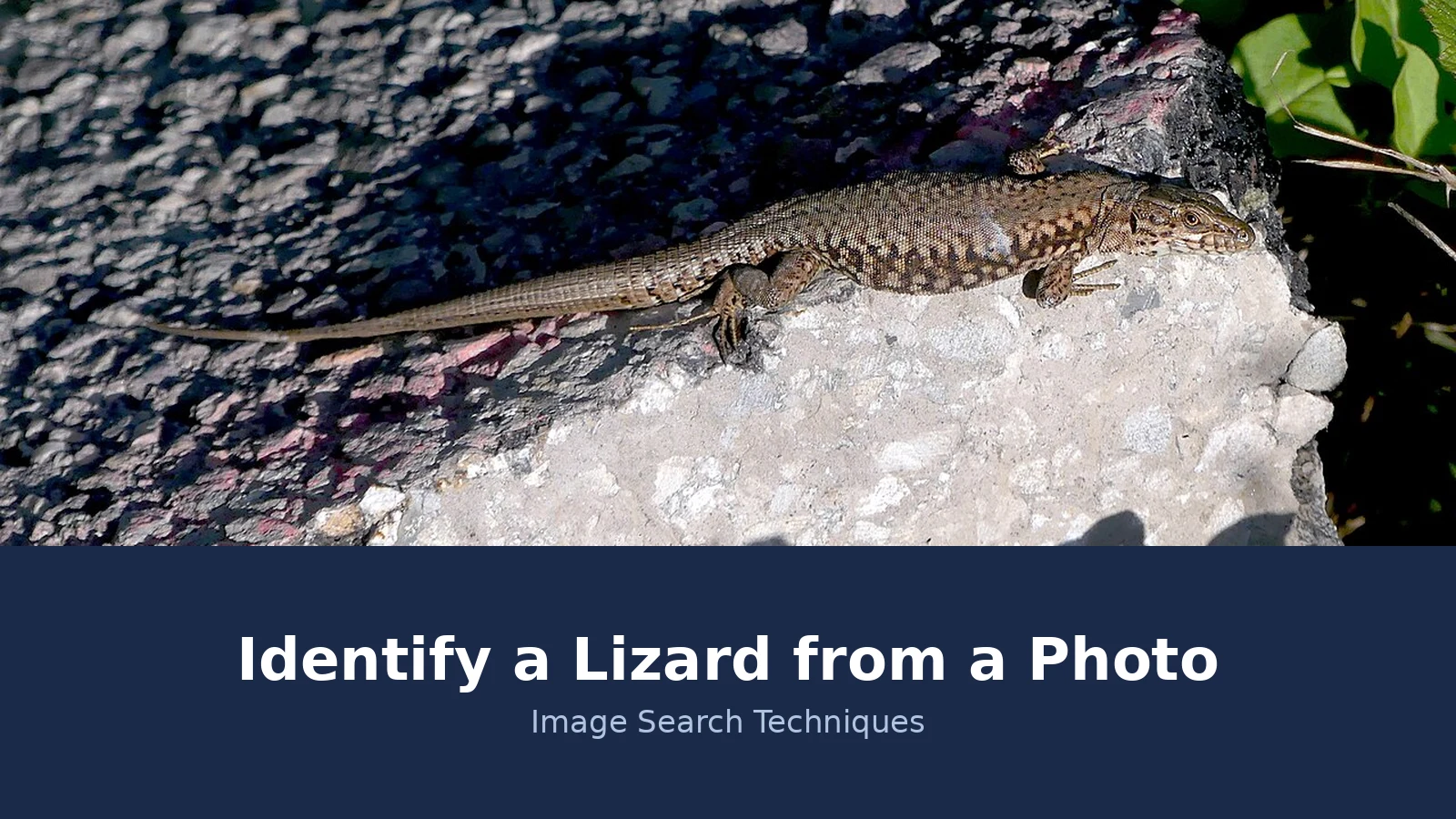
Here is the test, done live on 20 November 2026, with a real photo and honest results. The photo shows a common wall lizard basking on a stone near La Chavanne in Savoie, France. It was taken on 29 October 2024 by Florian Pépellin and is published on Wikimedia Commons under a CC BY-SA 4.0 licence. The animal is side-on, the whole body is in the frame, the long tail is fully visible, and the mottled brown pattern along the sides is clear. It is a good identification photo, which makes the results below a fair test of the method rather than a test of a bad picture.
| Engine | Named the species? | Exact matches | Visual or similar matches | What it actually showed |
|---|---|---|---|---|
| Google Lens | Yes, common wall lizard (Podarcis muralis) | 0 | 60 shown, plus a See more button | Named it correctly, citing Wikipedia. Top visual matches included the Wikipedia Podarcis muralis page, California Herps and an Indiana wildlife page, mixed with lookalikes such as the northern alligator lizard and the Madeiran wall lizard |
| TinEye | No, TinEye never names a species | 0 | 0 | Searched more than 86.8 billion images and found nothing. No first-indexed date, because there were no matches. The only thumbnails on the page were sponsored stock photos, which are adverts, not matches |
| Yandex Images | Yes, in Russian, common wall lizard | No exact count given | 18 on first load, 221 loaded on the similar-images tab | Tags named the common wall lizard, Podarcis muralis, and the common lizard, with one lookalike tag for the Caucasian lizard. The Sites tab listed 20 entries, topped by the Catalonian wall lizard, a close relative |
Two engines named the species correctly, and one found nothing at all. That split is the lesson. Google Lens named the animal in its answer and described it as a slender reptile with a long tail, a pointed snout, and mottled brownish-grey scales with dark patterning along its sides and back, which matches the photo exactly. It also asked for the location and for bright belly or throat colours to narrow the exact species, which is the right caution, because several wall lizards look alike. Its visual matches were mostly the right species, with a few lookalikes mixed in, and that mix is itself useful: it shows you what else your photo could be.
TinEye’s zero is the result most people misread, so it is worth spelling out. The photo has been on Wikimedia Commons since 2024, and TinEye still found no copy of it. That does not mean the photo is fake, and it does not mean the identification is wrong. It means TinEye has not crawled a page carrying this file yet. A zero on TinEye is a statement about TinEye’s index, not about your photo. The same applies to Lens exact matches. Lens showed zero exact matches for this photo, and then named the species correctly from the visual matches. Exact matches are a bonus, not the method. If you wait for an exact match before trusting an identification, you will wait a long time for any photo taken in the last year or two.
Yandex was the strongest of the three on volume. Its tags named the common wall lizard directly, and its similar images were overwhelmingly Podarcis muralis, with a few other lizards mixed in, including the Madeiran wall lizard and some Darevskia species. Its Sites tab put the Catalonian wall lizard at the top, which is a close relative rather than the right species, so the Sites list alone would have misled you. The tags were the reliable part. If you use Yandex, read the tags first and treat the Sites list as a set of leads to check, not as an answer.
The same method, with the same three engines, is how we worked through the fish identification guide, and the pattern there was the same: Lens names, Yandex confirms, TinEye finds copies or nothing.
Answer capsule: Lens and Yandex both named the wall lizard correctly, TinEye found nothing, and the honest conclusion is a likely match backed by two engines and the field marks, not a proven identification.
Is it a lizard or a snake? The glass lizard check
The most common confusion in a garden photo is not between two lizards. It is between a legless lizard and a snake. Glass lizards, including the slow worm found in British gardens, have no visible legs, a long body, and a smooth, shiny look, so a quick photo of one is routinely read as a snake. Getting this wrong matters, because it changes what you do next, and it changes how worried you should be.
Check three things in the photo. First, the eyes. A slow worm has eyelids and can blink. A snake has no eyelids and cannot blink, so its eye looks fixed and glassy. Second, the ears. Lizards have a visible ear opening on the side of the head. Snakes do not. Third, the tail. A slow worm can drop its tail to escape a predator and grow a new one, and the tail is often a third or more of the total length. A snake cannot drop its tail that way. The slow worm also has a flat, forked tongue, which is different from a snake’s thin, deeply forked tongue, though that detail is hard to see in a photo.
The slow worm itself is worth knowing by name. Its scientific name is Anguis fragilis, it is a lizard, and it is common in British gardens, where it hides under logs and in compost heaps and eats slow-moving prey such as slugs. Males are greyish brown, females are brown with dark sides, and juveniles are thin, around four centimetres long, with black bellies and gold or silver backs. It is protected by law in Great Britain against being deliberately killed, injured or sold, according to the Amphibian and Reptile Conservation Trust. It does not occur naturally in Ireland at all.
Do not turn this section into a snake identification guide, because that is a different job with different risks. If you cannot tell from the photo whether the animal is a legless lizard or a snake, leave it alone and ask an expert. Upload the photo to iNaturalist with the location, and let the community check it. A photo of a snake is not a reason to pick it up, and a photo of a slow worm is not a reason to handle it either.
Answer capsule: eyelids that blink, a visible ear opening and a tail that can drop mean a legless lizard, and if you cannot see those marks clearly, do not guess.
What if the photo only gives you a family, not a species?
This happens often, and it is not a failure. A blurry photo, a distant animal, a juvenile, or a species with several near-identical relatives can all leave you with a family rather than a name. Wall lizards are a good example. The common wall lizard, the Catalonian wall lizard and the Madeiran wall lizard share the same shape, the same basking habit and much of the same pattern, and a single photo of one basking on a rock may not separate them. Location helps, but introduced populations break the location rule: common wall lizards now live in parts of Britain and North America where they were introduced, far from their native range in southern and central Europe.
When the search gives you a family, do three things. First, narrow it with the field marks from the table above, and be honest about which marks your photo actually shows. Second, ask for a second opinion on iNaturalist, where you can upload the photo with the location and the community checks the identification. That is the route New Zealand’s Department of Conservation itself recommends for its own lizards, and it works anywhere. Third, check the candidate species against a reliable species page, such as the Amphibian and Reptile Conservation Trust for British species, and read the distribution and habitat notes. If the species you suspect does not live where the photo was taken, it is probably wrong, unless there is a known introduced population.
Be wary of identifier apps that give you a name with a percentage. Several apps now offer instant lizard identification from a photo, and one, Reptile Identifier, lists eighteen free guides and claims more than five hundred species. A percentage from an app is not a verification. It is a guess with a number attached. Use the app as a starting point, then check the name against the field marks and the location, exactly as you would check a search engine result. If the app and the field marks disagree, trust the field marks.
If you only have tracks, droppings or a shed skin rather than a photo of the animal, that is a different kind of evidence. Our animal tracks guide covers what those signs can and cannot prove.
Answer capsule: a family is a valid result, and a second opinion from iNaturalist plus a check against the species range will usually take you the rest of the way.
How do you stay safe around a lizard you cannot identify?
Never handle a wild lizard. Photograph it from where you are, and leave it where it is. Handling stresses the animal, and it can drop its tail, bite, or carry bacteria on its skin. It also puts you at risk, because a photo cannot tell you whether an animal is safe to touch. No identification from a photo, by a search engine or by an app, is a verdict that an animal is harmless. Very few lizard species are venomous, and the best known are the Gila monster and the beaded lizard of the American southwest and Mexico, but that fact does not clear any other lizard. A photo cannot clear an animal as safe, so do not let a name on a screen talk you into picking it up.
If you are bitten, or if you are unsure whether you have been exposed to something harmful, seek medical advice promptly and do not wait for an identification. Take the photo with you, and note where and when it happened, because that helps a clinician more than a species name guessed from a screen. The same rule applies to pets. Keep dogs away from lizards and toads, and if a dog picks one up, watch it and call a vet if it shows any sign of distress.
British readers should also know the law. The three native lizards, the common lizard, the sand lizard and the slow worm, are protected under the Wildlife and Countryside Act 1981. It is illegal to deliberately kill, injure or sell them, and the sand lizard has stronger protection still. That is another reason to leave the animal alone and let the photo do the work. The same safety-first routine runs through our other identification guides, including the frog guide, where handling is also off limits. It runs through the turtle guide too: our guide to identifying a turtle species from a photo uses the same photograph only rule on a basking red eared slider.
Answer capsule: photograph only, never handle, never take a photo identification as a safety verdict, and get medical advice promptly if you are bitten or unsure.
FAQs
Can you identify a lizard from a single photo?
Often, yes, if the photo is clear, side-on and whole, and you know where it was taken. Run it through Google Lens, TinEye and Yandex, then check the name against the field marks: pattern, head, tail, legs and location. A blurry or distant shot may only prove the family, and that is still a useful answer.
Why does Google Lens name the lizard but TinEye finds nothing?
Lens identifies by visual similarity, so it can name an animal it has never seen in that exact file. TinEye only finds copies of the exact file, and a recent photo may not have been crawled yet. In our test TinEye found nothing for a 2024 photo, while Lens named it correctly from visual matches.
What is the difference between a slow worm and a snake?
A slow worm is a legless lizard, not a snake. It has eyelids and can blink, a visible ear opening, and a tail it can drop to escape a predator. A snake has no eyelids, cannot blink, and has no ear opening. If you cannot see those marks clearly in the photo, do not guess.
Can a photo prove which lizard species it is?
No. A photo can only suggest a likely species, never prove it. Lookalike species, juveniles, colour change and introduced populations all limit what one picture can settle. Treat the search result as a likely match, check it against the field marks and the location, and ask iNaturalist for a second opinion.
Is it safe to pick up a lizard to photograph it?
No. Photograph only, and never handle a wild lizard. Handling stresses the animal, risks a bite, and can spread bacteria. A photo identification is never a verdict that an animal is safe. If you are bitten, or unsure, seek medical advice promptly and do not wait for an identification.
What details should I include with a lizard photo?
Include the location, meaning the country, region and habitat, such as a garden wall or a heath. Add the approximate body length, the body pattern, the tail colour and length, and what the animal was doing. Take two or three shots from different angles, and include something for scale.






