


🔎 Reverse Image Search
Image search techniques made simple: upload a photo or paste a URL and search 6 engines at once. 100% free, nothing stored.
🔒 Your image is never stored on our servers longer than 24 hours and is never shared.
What can a photo actually tell you about a dog’s breed?
A photo can tell you what a dog looks like, and a breed is, in large part, a set of visible traits: coat, ears, muzzle shape, body proportions, tail carriage and size. A tool that compares those traits against a database of breeds can make a good guess, and that is all it is. A scan is a well-informed guess, not a definitive answer, because a camera cannot see a dog’s family history. That is the honest frame for everything in this guide, and it is also the conclusion of Reviewed’s analysis of Dog Scanner, which warns that a plausible label is a starting point for learning, not proof of ancestry.That matters most in three situations. First, mixed-breed dogs, where traits from several breeds blend in one animal and no single label fits. Second, puppies, whose proportions change as they grow. Third, lookalike breeds: a Labrador and a Golden Retriever puppy, or a Staffordshire Bull Terrier and an American Pit Bull Terrier, can be hard to separate even for experienced owners from one photo. A photo-based answer is therefore a shortlist, not a verdict. If the breed matters for adoption paperwork, a training plan or a medical discussion, ask the people who know the dog or a qualified professional instead of relying on a visual scan, and if you ever need certainty, only a DNA test settles it, as explained near the end of this guide.One more boundary before we start: never use a breed guess to predict temperament or health. Dogs vary widely within the same breed, and a photo tells you very little about an individual animal’s past or personality. Reviewed makes the same point about Dog Scanner results: do not use them to make decisions about a dog’s health, behaviour or care. A veterinarian or a knowledgeable rescue professional is a much better source for those questions.How do you take a photo that gives every tool a fair chance?
Every method below reads the same thing, pixels, so the photo is the whole game. A full-body shot in decent light beats a face close-up, because breed is mostly in the body: the length of the legs, the shape of the chest, the set of the ears, the coat. Reviewed’s advice is the same: take a clear picture in decent light and include the dog’s whole body rather than a close-up of its face.- Photograph the whole dog, side-on. Stand at the dog’s level, not above it, and frame the animal from nose to tail with a little space around it. A side profile shows proportions that a front-on portrait hides.
- Use daylight, and avoid flash. Flash flattens coats and blows out pale fur; a shaded spot outdoors on a bright day is ideal. If the dog is moving, wait for a still moment rather than firing off a blurry burst.
- Keep the background plain and the dog unobstructed. Grass, a fence or a plain wall all work. Avoid other dogs, people, leads and bowls in the frame, the tool should have one subject to judge.
- Take two or three shots, not one. One side view, one three-quarter view, and one clear head shot. If two photos give different answers, that disagreement is information, not a fault, compare like with like, and treat a change as a clue rather than proof.
- Use an existing photo only if it is good enough. A gallery photo works if the dog is sharp, fully visible and well lit. A cropped screenshot of a dog mid-run will not.
- Ask first. If the dog is not yours, ask the owner before taking a close photo, and do not crowd or distract an unfamiliar animal just to get a better image.
Method 1: Dog Scanner, the dedicated breed scanner app
Dog Scanner, by Siwalu Software GmbH, is the best-known dedicated dog breed identifier app, and it is the closest thing to a purpose-built answer to this question. You point your camera at a dog, or upload a photo from your gallery, and it returns a breed suggestion with facts about the breed within seconds. It is free to download on Android and iPhone, with optional in-app purchases.The app’s own listing states that it identifies more than 370 different dog breeds, including all breeds officially recognised by the Fédération Cynologique Internationale (FCI), the world canine organisation, and some more besides. Its database of breed information and pictures can also be browsed without scanning anything, which makes it a small breed encyclopaedia as well as a scanner. On Google Play it holds a rating of 4.3 from around 62,000 ratings and has been installed more than five million times, according to the listing and Reviewed’s analysis of it. On the App Store it is listed as free with in-app purchases, requires iOS 15.0 or later, and is sold by the same developer, Siwalu Software GmbH.To use it:- Install Dog Scanner from Google Play (Android) or from the App Store (iPhone).
- Open the app and either point your camera at the dog or choose a photo from your gallery.
- Wait a few seconds for the result. For a mixed breed, the app reports the breeds it detects rather than forcing one label.
- Read the breed description the app shows, then check it against the dog in front of you: does the coat, ear set and build actually match?
- If the answer looks wrong, try a different photo, a side view instead of a head shot, and compare the two results before believing either.
Method 2: Google Lens, the free general-purpose cross-check
Google Lens is not a breed specialist, but it is free, needs no account and no install, and it answers a slightly different question: “where else does this dog, or a dog that looks like this, appear on the web?” That makes it an excellent cross-check for a scanner app’s answer, because Lens shows you its working, the breed pages and visually similar images it matched.- Open Google Lens in your browser, or open the Google app on your phone and tap the Lens icon.
- Upload your photo, or drag the crop box so it frames the whole dog and nothing else.
- Read the results. Lens usually shows a short identification at the top, followed by visually similar images and links to breed pages.
- Open two or three of the breed pages Lens suggests and compare their photos with your dog, feature by feature, instead of accepting the first label.
- If Lens returns no exact matches, that is still useful: it usually means your photo is not already published online, so Lens is judging the image itself rather than finding its source. Our step-by-step guide to how to reverse image search explains the same workflow in detail, and our Google reverse image search guide covers the phone and desktop routes.
Method 3: ChatGPT or Gemini, ask a chatbot to reason it out
The third method is to upload the photo to a multimodal chatbot, ChatGPT or Google’s Gemini, and ask what breed the dog resembles and why. This is the only method that explains itself in sentences: it can point to the drop ears, the double coat or the deep chest and say which breeds those features suggest, and it can answer follow-up questions such as “what else could it be?” or “what would a DNA test add?”- Open ChatGPT or Gemini and sign in.
- Upload your best full-body photo of the dog.
- Ask a specific question, not a vague one: “What breed or mix does this dog most resemble, and which visible features point to that?”
- Ask for the runner-up: “What is the second most likely breed, and what would distinguish the two?” A chatbot that only ever gives one confident answer is less useful than one that shows its uncertainty.
- Cross-check the answer against a breed database or against Dog Scanner. A chatbot’s breed guess is an opinion built from its training data, not a measurement.
Worked example: the same dog through Google Lens, twice
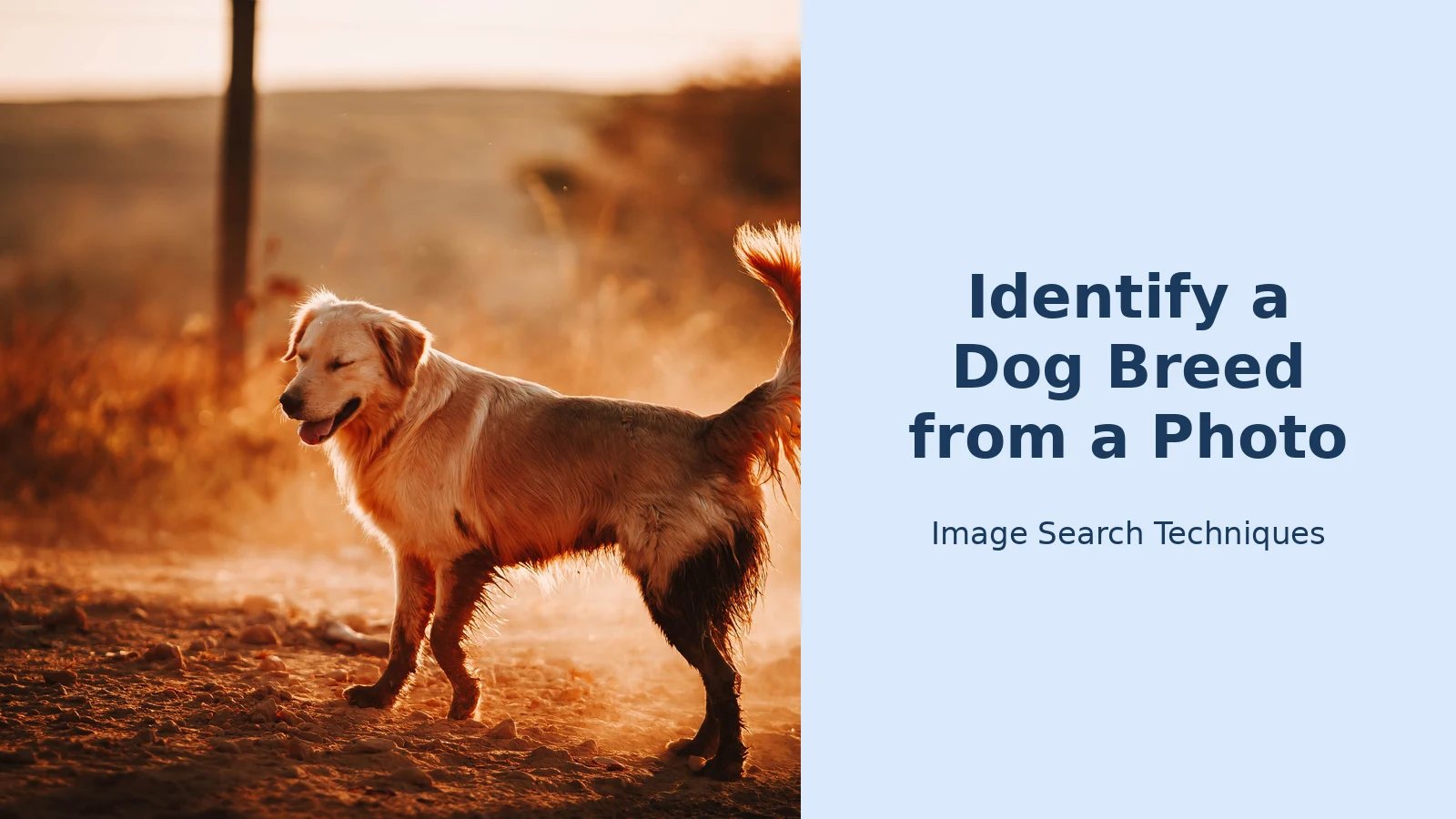
To see how the methods above behave on a real photo, we ran a test on 9 November 2026. The photo is a Pexels image by Helena Lopes, “Adorable Golden Retriever standing on ground”, one adult Golden Retriever in full left-facing side profile, standing on a dirt road in warm sunset light, taken on 25 June 2020. It is exactly the kind of photo this guide recommends: whole dog, side view, one subject, good light. We ran it through Google Lens twice, without signing in to any account: once as the full photo, and once cropped tight to the face using Lens’s own crop tool.Test 1, the full-body photo. Lens identified the breed definitively. Its AI Overview stated: “The image shows a golden retriever standing in the warm, dusty sunlight at sunset.” It even identified the photographer, noting the photo was taken by Helena Lopes and is available as a free stock image on Pexels and Unsplash. The related searches it offered were Golden Retriever, Labrador Retriever and Hovawart, the right family of lookalike breeds. The “Exact matches” tab returned many copies of the same image across the web, including the Unsplash copy dated 25 June 2020 and the Pexels page itself, and the first visual match was the photo itself. This is Lens at its best: a clear, well-photographed pure breed, identified confidently and traced to its source.Test 2, the face-only crop. We then cropped the same photo tight to the head, nose, closed eye, ears, mouth and chin, with a little neck, and ran Lens again. The breed stayed the same, but the confidence dropped. The AI Overview now read: “The image shows a golden dog, likely a Golden Retriever, standing in a field or dirt path during a warm sunset or sunrise.” Note the hedge: “golden dog, likely a Golden Retriever”, where the full photo got a flat “shows a golden retriever”. The related searches shifted too, Labrador Retriever dropped out and Nova Scotia Duck Tolling Retriever appeared, another golden-coated lookalike. And the “Exact matches” tab found nothing at all: “No exact matches found, this could mean the image is unique or has not been widely shared yet.” The visual matches were other golden dogs, not the source photo.That is the whole lesson in one test. The same dog, the same tool, two different crops: the full-body photo was identified definitively and matched exactly across the web, while the face crop kept the breed but lost the certainty and the exact match entirely. Cropping away the body removes the proportions, the deep chest, the leg length, the tail carriage, that separate a Golden Retriever from its lookalikes. If you take one thing from this guide, take this: photograph the whole dog. A face close-up is a fine second photo, but it should never be the only one.One honest caveat: this photo is a published stock image, so Lens had seen it before, which is why the exact matches appeared. Your own dog’s photo will not have that advantage, Lens will have to judge the image itself rather than find its source. That is exactly why the breed suggestion matters more than the exact matches for a private photo, and why running a second method, such as Dog Scanner, is worth the extra minute.Why do mixed-breed dogs confuse every photo tool?
A mixed-breed dog is the hardest case for photo identification, and also the most common one. Most dogs in shelters and many family pets are mixes, and a photo tool has to do something its design resists: assign one label to an animal that inherited traits from two or more breeds. Dog Scanner handles this by reporting the breeds it detects rather than forcing a single answer, which is the honest approach, but its percentages are still estimates from appearance, not measurements of ancestry.The practical advice for a mix is simple. Run the photo through two methods, Dog Scanner and Lens, for example, and look at the overlap, not at either top answer alone. Try a second photo from a different angle and see whether the answer changes; if it does, the dog’s breed is genuinely ambiguous from photos, and the change is a clue rather than a fault. Compare like with like: a full-body shot against a full-body shot, not a head shot against a body shot. And read the breed descriptions rather than the labels: if the app says “Labrador mix” but the description talks about a short coat and your dog has a long double coat, the label is wrong whatever the confidence looks like.There is also a limit that no tool can cross. Appearance alone cannot confirm a dog’s lineage, because two dogs can look alike for different genetic reasons and because some traits skip a generation. If the breed matters, for a rescue’s records, for a breeder’s paperwork, or because a landlord or insurer has asked, a photo result is not evidence. Only the dog’s documented history, or a DNA test, is.A related warning applies if you are buying rather than identifying. A seller who advertises a pedigree puppy should have paperwork to match the photo, and a photo that looks too polished for the price deserves a check: our guide to checking puppy and pet sale photos for scams shows how to reverse-search a seller’s pictures before you pay anything.Dog Scanner vs Google Lens vs ChatGPT: which method should you use?
The three methods answer different questions, so the right choice depends on what you want. This table is the comparison to keep: it is built from the facts verified for this article, Dog Scanner’s listing, Reviewed’s analysis, and the Lens test above, not from marketing claims.| Method | Cost | Mixed-breed handling | What it gets wrong | Best for |
|---|---|---|---|---|
| Dog Scanner app | Free; optional in-app purchases | Reports the breeds it detects instead of forcing one label | Confuses lookalike breeds; a confident label can still be a guess | A quick first answer, and learning breed facts |
| Google Lens | Free, no account | Shows visually similar dogs and breed pages, so you judge the mix yourself | May return the photo’s web source instead of a breed; weak on unusual mixes | A free second opinion and a cross-check |
| ChatGPT / Gemini | Free tier with an account; paid plans exist | Can discuss several possible mixes and explain the reasoning | Fluent even when guessing; can describe features not in the photo | Understanding why a dog looks like a breed |
| DNA test | Paid kit, price varies by provider | The only method that measures ancestry rather than appearance | Costs money and takes days; breed databases differ between providers | Settling the question for records or decisions |
What can a photo result never tell you?
Four things, and they are the four things people most often want to know. First, temperament: a breed label says nothing reliable about an individual dog, and dogs vary widely within the same breed. Watch the dog and listen to its owner instead. Second, health: no photo can diagnose anything, and a breed guess is not a basis for care decisions, a veterinarian is. Third, pedigree: a photo result is not proof of ancestry, and it will not satisfy a breeder, a rescue or an insurer. Fourth, age: puppies of large breeds can look like adults of small ones, and an old dog’s grey muzzle says nothing about its breed.There is also a privacy point. If the dog is not yours, the photo is yours to take only with the owner’s permission, and you should not post someone else’s dog online to ask strangers what breed it is without asking. Keep the identification private unless the owner is happy to share it.When does only a DNA test settle it?
When the breed is not a curiosity but a fact you need, for adoption or breeder paperwork, for a landlord or insurer who has asked, or because you are choosing care or training based on the answer, stop guessing from photos and test. A DNA kit works from a cheek swab you post to a lab, and the lab compares the dog’s DNA against its reference database and reports the breeds it finds, usually with estimated percentages. That is a measurement of ancestry, which is exactly what a photo cannot provide.Two cautions still apply. First, different providers use different reference databases, so two tests on the same dog can return slightly different mixes; read the percentages as estimates, not as exact fractions. Second, a DNA result still says nothing reliable about temperament or health on its own, it is ancestry, not a personality test. But for the question this article asks, what breed is this dog?, it is the only answer that is evidence rather than opinion. Until you test, the honest answer to keep is the one the photo tools give you: a shortlist, with the most likely breed first.The breed-from-a-photo method works for pocket pets too: see identify a hamster breed from a photo, which separates the five pet species by size, colour and dorsal stripe.FAQs
Can Google Lens identify a dog breed from a photo?
Yes, as a cross-check. Upload the photo to Google Lens and it will suggest visually similar dogs and breed pages, which you can compare with your dog feature by feature. It is free and needs no account. It is not a breed specialist, so use it alongside a dedicated app such as Dog Scanner rather than as the only answer.What is the best app to identify a dog breed from a photo?
Dog Scanner, by Siwalu Software, is the best-known dedicated option: it recognises more than 370 breeds, including all FCI-recognised breeds, is free to download on Android and iPhone, and reports mixed breeds instead of forcing one label. Its rating is 4.3 from around 62,000 ratings on Google Play, with more than five million installs.How accurate is dog breed identification from a photo?
It is a well-informed guess, not a definitive answer. Accuracy is best for a clear full-body photo of a well-known pure breed in daylight, and worst for mixed breeds, puppies and lookalike breeds. Two methods that agree are more trustworthy than one, and only a DNA test or documented history settles a dog’s ancestry for certain.Can you identify a mixed-breed dog from a photo?
Only approximately. A scanner such as Dog Scanner will report the breeds it detects, and Lens will show similar-looking dogs, but appearance alone cannot confirm lineage. Run two methods, try a second photo from a different angle, and read the breed descriptions against the dog you see. For a reliable answer, use a DNA test.For cats, the same photo-first approach applies, see our guide to identifying a cat breed from a photo, which covers Cat Scanner, Google Lens and the same mixed-breed cautions, and our guide to identifying a rabbit breed from a photo runs the same three-engine test on a Holland Lop.
For phones, the same photo-first approach applies. Our guide to identify a phone model from a photo works through a real iPhone 14 Pro photo on Lens and Yandex, and explains why a photo names the model family but not the exact variant.
For birds, the same photo-first approach applies, see our guide to identifying a bird from a photo with Merlin Photo ID and Google Lens. The same photo-first approach works for flags, too: see our guide to identifying a flag from a photo.
The same photo-first routine works for goats too. Our guide to identifying a goat breed from a photo starts with the ears, then the face, horns and coat, and finishes with a live reverse-search test on a real Anglo-Nubian photo.
Related: Reverse Image Search APIs Compared






